

How to Find the Email Address of Any Company Employee
You've got 200 target accounts, zero contacts, and your manager wants emails by Friday. Most guides list 12 methods and bury the useful ones under filler. You need two or three that work at scale. Here's how to find email addresses of company employees using methods that actually deliver, plus the compliance guardrails that keep your domain alive.
What You Need (Quick Version)
- Use an email finder with built-in verification. Stop cycling through nine free methods - the time costs more than a $49/month tool. If you’re building lists regularly, start with free lead generation tools to cover the basics.
- If you prefer manual methods, guess the email pattern using company-size data, then verify before sending. This is essentially a name to email workflow.
- Always verify. One bad campaign can tank your domain reputation for weeks - especially if you ignore email bounce rate benchmarks.
Use an Email Finder Tool
Database size is a vanity metric. A tool with 700M contacts and 83% accuracy wastes more of your time than one with 300M and 98%. You're not collecting baseball cards - you need emails that don't bounce. If you’re comparing vendors, use a shortlist like email search tools to avoid analysis paralysis.
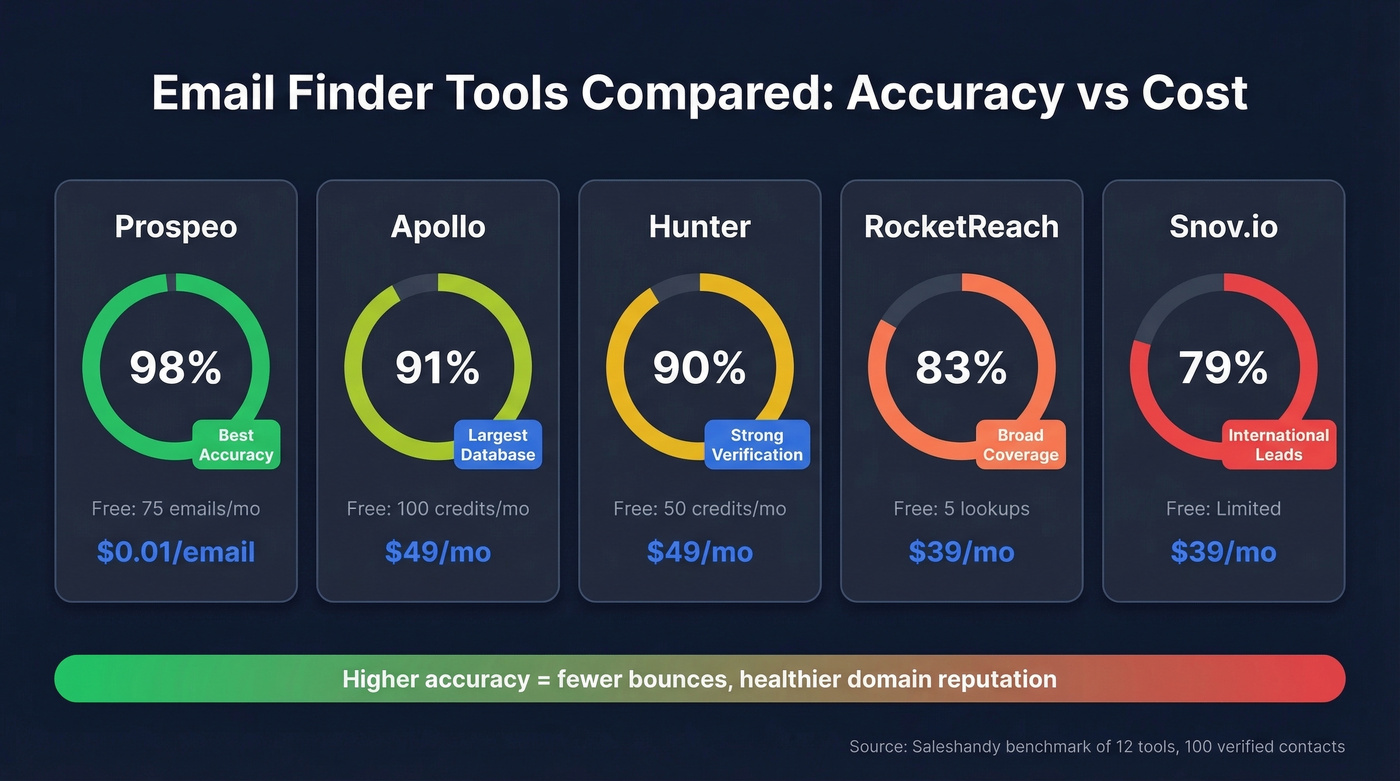
A Saleshandy bake-off tested 15 tools across 95,000 cold emails, then benchmarked 12 email finder tools against the same list of 100 verified business contacts. The accuracy spread ran from 79% to 98%, which is the gap between a clean campaign and a domain reputation crisis.
| Tool | Free Tier | Paid From | Accuracy | Best For |
|---|---|---|---|---|
| Prospeo | 75 emails/mo + 100 extension credits | ~$0.01/email | 98% | Accuracy + verified free start |
| Hunter | 50 credits/mo | $49/mo | 90% | Verification layer |
| Apollo | 100 credits/mo | $49/mo | 91% | Massive database |
| Snov.io | Limited | $39/mo | 79% | International leads |
| RocketReach | 5 lookups | $39/mo | 83% | Broad coverage |
We've tested most of these tools, and accuracy is the only metric that matters long-term. Prospeo's 300M+ profile database covers most B2B targets, and its 5-step verification pipeline runs during the lookup itself: syntax check, MX validation, SMTP handshake, catch-all handling, and spam-trap removal. You're not paying twice to find and then verify. The Chrome extension pulls verified emails from any company website or professional profile in one click, with a 7-day data refresh cycle so you're never working stale records. For that 200-account list due Friday, you can move through the entire batch without living in spreadsheets.

Hunter is solid for verification, but the database is smaller. Reddit practitioners consistently call it "VERY popular" with good accuracy - just don't expect it to be your primary source for net-new contacts. If you’re evaluating alternatives, see Hunter alternatives.
Apollo's 275M-contact database is massive, but the r/agency consensus is blunt: "data feels bad sometimes" and "lots of bounces on older contacts." At $49/mo per seat, those misses add up. Snov.io works well for international leads at affordable credit rates. RocketReach landed at 83% accuracy in testing, which usually means more bounces and wasted credits than the top performers.
Here's the thing: if you're paying enterprise pricing for ZoomInfo just to find employee emails, you're overpaying by about 10x. Most teams don't need a $15k-$40k/year platform when a self-serve tool at $0.01/lead delivers higher accuracy. If you’re building a stack, start with a vetted list of sales prospecting databases.
Guess the Email Pattern
If you can verify one email at a company, you've cracked the pattern for everyone there. An Interseller/Greenhouse analysis of 5M+ companies shows that email formats shift predictably by company size:
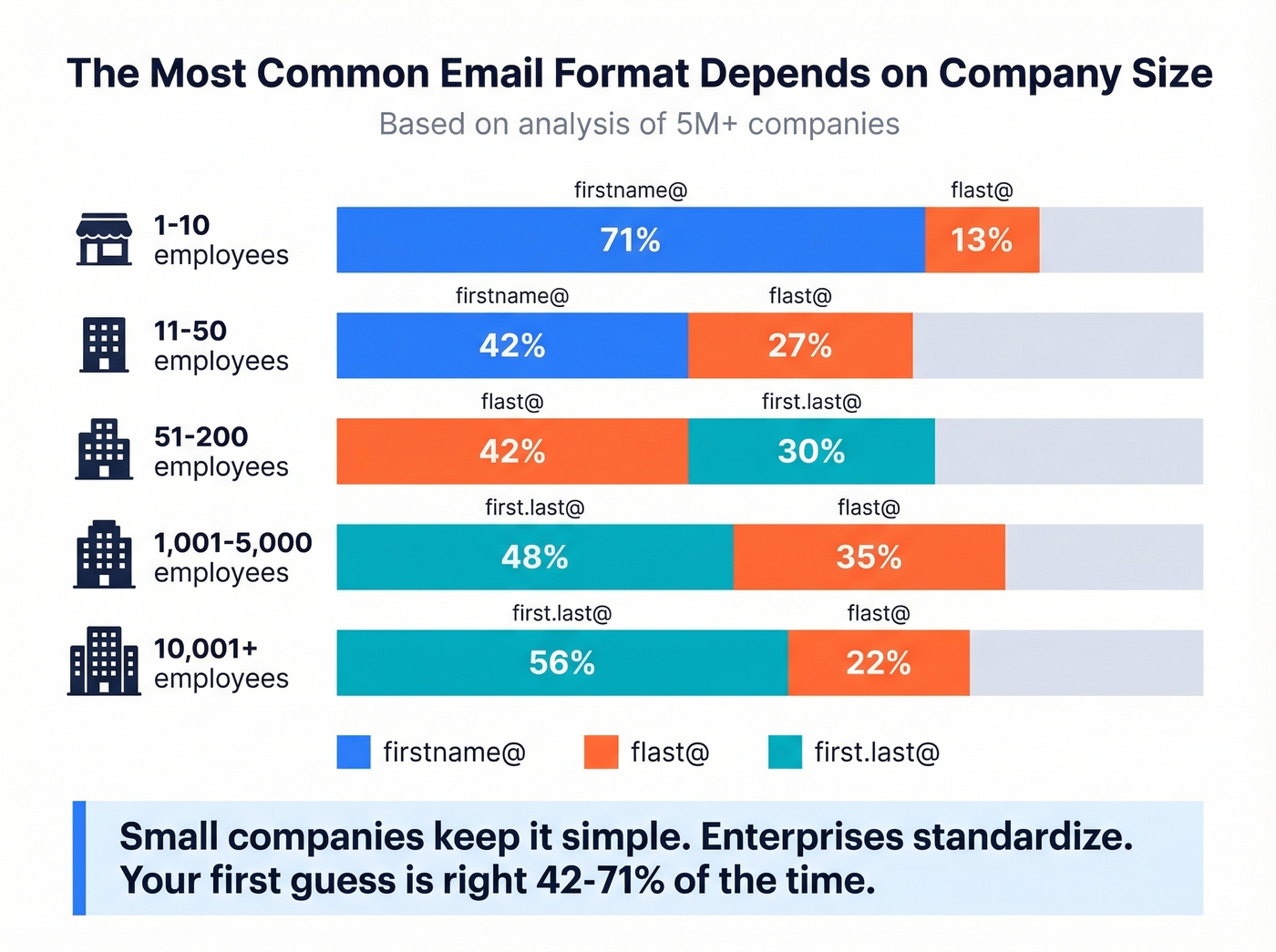
| Company Size | Top Format | Share | Runner-Up | Share |
|---|---|---|---|---|
| 1-10 employees | firstname@ | 71% | flast@ | 13% |
| 11-50 | firstname@ | 42% | flast@ | 27% |
| 51-200 | flast@ | 42% | first.last@ | 30% |
| 1,001-5,000 | first.last@ | 48% | flast@ | 35% |
| 10,001+ | first.last@ | 56% | flast@ | 22% |
The pattern is clear: small companies keep it simple with firstname@, while enterprises standardize on first.last@. Once you know the company size, your first guess is right 42-71% of the time depending on the segment. Generate your best guess, verify it with any email verification tool, and you've unlocked the format for every employee at that company. If you get stuck, use a troubleshooting flow like email not found.
This pattern-based approach is one of the fastest ways to locate employee contact details when you already know the org's naming convention, and it costs nothing beyond the verification step.

You need 200 accounts by Friday, not 200 bounces. Prospeo's 300M+ profiles come pre-verified through a 5-step pipeline - syntax, MX, SMTP, catch-all, and spam-trap removal - so you never pay to find an email and then pay again to verify it. At $0.01 per email and 98% accuracy, that entire target list costs less than a coffee.
Stop guessing email patterns. Start pulling verified contacts in one click.
Use Google Search Operators
Google dorking still works for surfacing business emails buried in PDFs, team pages, and press releases. It works, but it doesn't scale - treat this as a supplement, not a primary method.
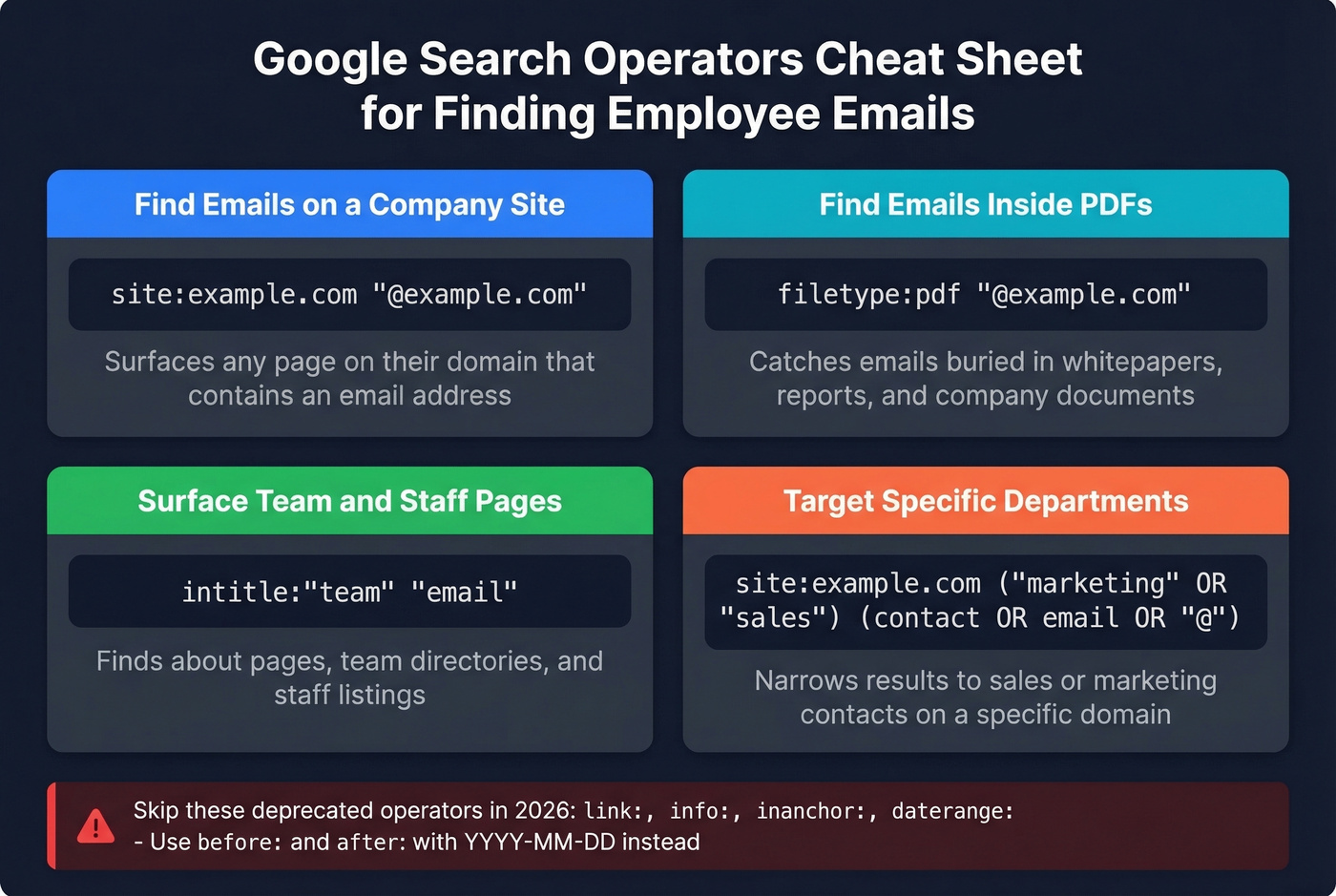
Four templates you can copy and paste:
Find emails on a company's site:
site:example.com "@example.com"
Find emails inside PDFs:
filetype:pdf "@example.com"
Surface team and staff pages:
intitle:"team" "email"
Target specific departments:
site:example.com ("marketing" OR "sales") (contact OR email OR "@")
Several operators are deprecated or unreliable in 2026. Skip link:, info:, inanchor:, and daterange:. Use before: and after: with YYYY-MM-DD format for freshness filtering instead.
Check Company Websites and Profiles
Before you reach for a tool, check the obvious places. Company websites often list emails on pages most people skip:
- About / Team pages - founders and executives frequently list direct emails
- Privacy Policy - almost always includes a data-controller email
- Press / Media pages - PR contacts are published for journalist outreach
- Professional profiles and social bios - some people list their work email publicly
I once pulled a VP of Sales' direct email from a company's privacy policy footer. Took 30 seconds. The cache: operator can also reveal emails on older page versions that have since been removed.
Skip this method if you're working more than 20-30 accounts - it doesn't scale, and you'll burn hours that a finder tool would save.
Always Verify Before Sending
Finding an email is only half the job. Sending to an unverified list is how you destroy your sender reputation, and we've seen teams spend weeks recovering from a single bad batch. The industry rule of thumb is to keep total bounces below 2%, with hard bounces under 1%. If you’re trying to fix deliverability after a bad send, start with how to improve sender reputation.
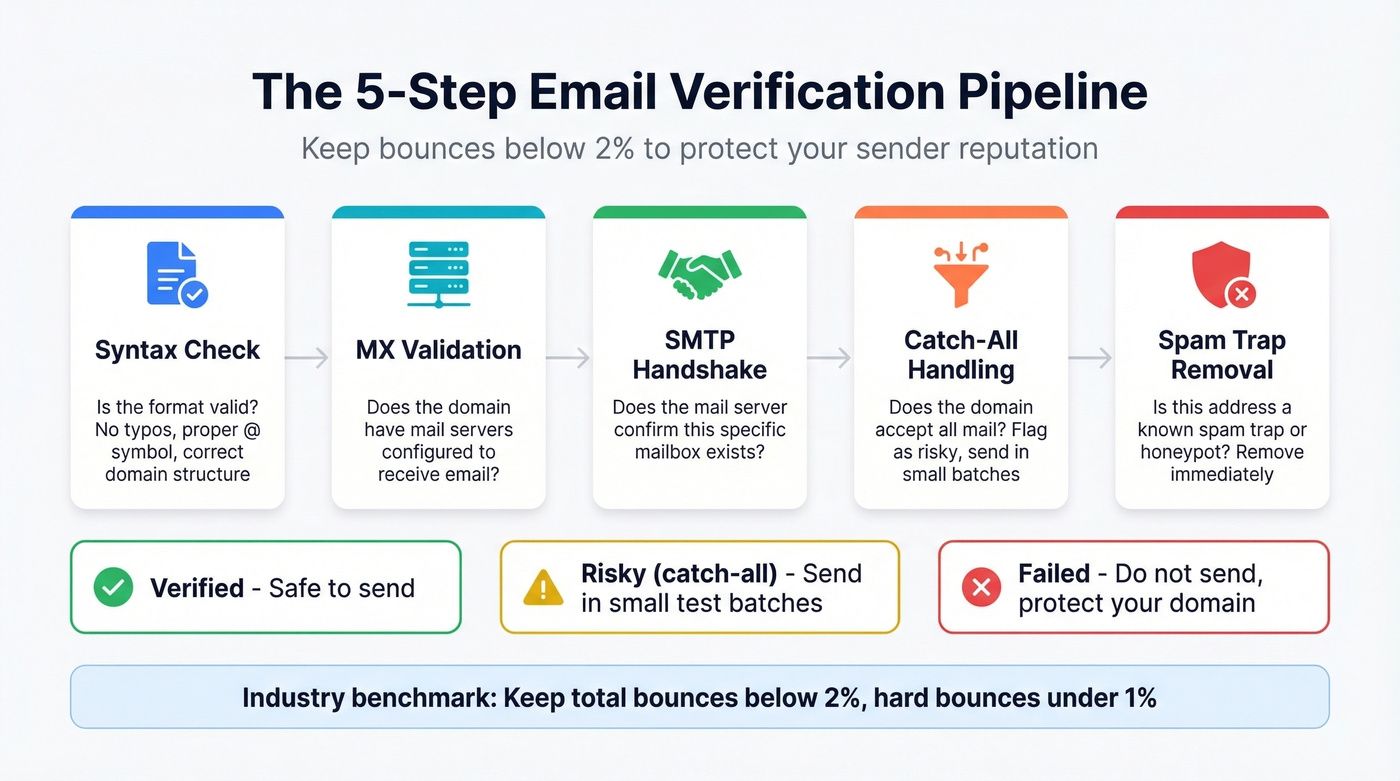
Verification works in stages: syntax check, then MX/domain validation, then SMTP handshake. Catch-all domains are the tricky part - they accept all mail regardless of whether the specific mailbox exists, so verifiers can't confirm the address. Flag these as risky and send in small batches.
Stay Legal (60-Second Check)
CAN-SPAM explicitly covers B2B email. No exception for business-to-business messages. Penalties run up to $53,088 per email. GDPR requires legitimate interest for cold outreach, with fines up to EUR 20M or 4% of global turnover. CASL in Canada carries $10M penalties and requires unsubscribe links to work for 60 days.
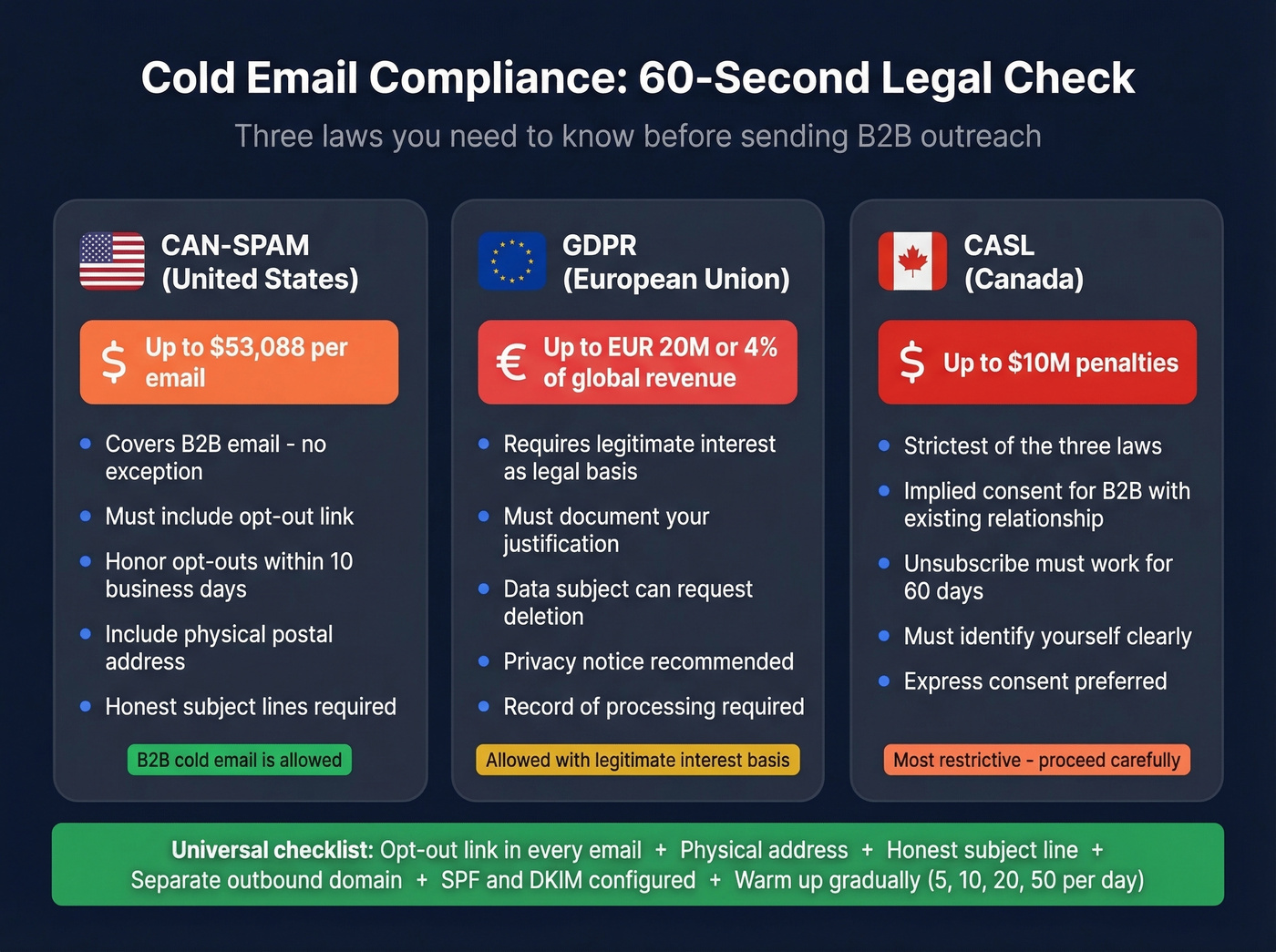
Include an opt-out link in every email and honor it within 10 business days. Add a physical postal address. Keep subject lines honest.
For deliverability, use a separate domain for outbound, warm it up gradually - 5 emails, then 10, then 20, then 50 per day - and set up SPF and DKIM before you send a single message. Skipping warm-up is the fastest way to land in spam folders, and no amount of good data will save you from that mistake. For sending limits and pacing, follow an email velocity framework.
The article shows accuracy ranges from 79% to 98% across tools. That gap is the difference between a clean campaign and a domain reputation crisis. Prospeo refreshes every record on a 7-day cycle - not the 6-week industry average - so you're never emailing someone who left the company last month.
Get the freshest employee emails in B2B data. 75 free every month.
FAQ
What's the most common corporate email format?
first.last@ dominates at companies with 50+ employees, accounting for 48-56% of formats. Smaller companies under 10 employees overwhelmingly use firstname@ at 71%. The pattern shifts predictably by company size - check the table above to nail your first guess.
Are email finder tools legal for B2B outreach?
Yes, in most jurisdictions. CAN-SPAM allows unsolicited B2B email as long as you include an opt-out link, physical address, and honest subject line. GDPR requires legitimate interest as your legal basis. CASL in Canada is stricter - always include a working unsubscribe mechanism.
How accurate are email finder tools?
Accuracy ranges from 79% to 98% in independent testing across 12 tools. The top of that range means clean campaigns and healthy sender reputation. The bottom means more bounces, wasted credits, and domain damage that takes weeks to recover from.
What's the best free option for finding employee emails at scale?
Prospeo's free tier gives you 75 email lookups plus 100 Chrome extension credits per month - enough to work a small target list with full verification included. Hunter offers 50 free credits monthly with strong verification but a smaller database. Apollo provides 100 credits but accuracy sits lower at 91%.