

How to Find Out If an Email Address Is Active
You just cleaned a list of 5,000 contacts, hit send on your outbound sequence, and watched 400 emails bounce. Your domain reputation tanks before lunch. A two-minute verification step would've caught most of those dead addresses before they did any damage.
"Active" vs. "Valid" vs. "Deliverable"
These three terms get tossed around like they're the same thing. They're not.
Valid means the mail server accepts mail for that address. The domain has working MX records, and the server returns a 250 OK when you probe it. This is what verification tools check.
Deliverable means your email actually lands in the inbox - not spam, not blocked. That depends on the recipient's server and your sender reputation, authentication setup, and content.
Active means someone monitors the inbox and reads messages. No tool can confirm this before you send. You only learn whether someone's "active" through engagement signals like opens, clicks, and replies after your email lands.
Here's the thing: when people ask whether an email address is active, what they usually need is validation. Does this mailbox exist and accept mail? That's solvable. Let's focus there.
What You Need (Quick Version)
No tool can confirm someone reads their inbox. What tools check is whether the mailbox exists and accepts mail.
- Single-email spot check: Use a free verifier like ZeroBounce (100 free/month) or Email Hippo (100/day, resets at midnight UTC).
- Bulk list cleaning on a budget: MillionVerifier at ~$3.70 per 1,000 emails is hard to beat on price.
Always treat "accept-all" and "unknown" results as risky, not green lights.
Why Verification Matters
Bounces aren't just annoying - they're expensive. The average hard bounce rate across industries is 0.21%, with soft bounces at 0.70%. Exceed 2% and you risk ISP throttling that takes weeks to repair.

Global inbox placement averages around 84% - roughly one in six emails never reaches the inbox. Gmail sits at 87.2% inbox placement, but Microsoft lags at 75.6%. And Gmail's complaint threshold is brutal: exceed 0.3% complaint rate and your placement drops fast. Verifying addresses before you send is as fundamental as authentication setup - skip it and you're burning domain reputation on every campaign. (If you want the full playbook, see our email deliverability guide.)
Don't Send a Test Email
The most intuitive approach - just send something and see if it bounces - is the worst one.
A hard bounce gets recorded against your sender domain. Stack up a few and ISPs start treating all your mail as suspicious. We've seen teams lose weeks of sending reputation over a single unverified batch. Worse, if your reputation is already damaged, valid addresses may reject your test email anyway - a false negative that compounds the original problem.
Verification tools check independently of your sender reputation. They query the recipient's mail server directly, so the result reflects the mailbox's status, not your domain's standing. If you're already seeing issues, here's how to improve sender reputation.

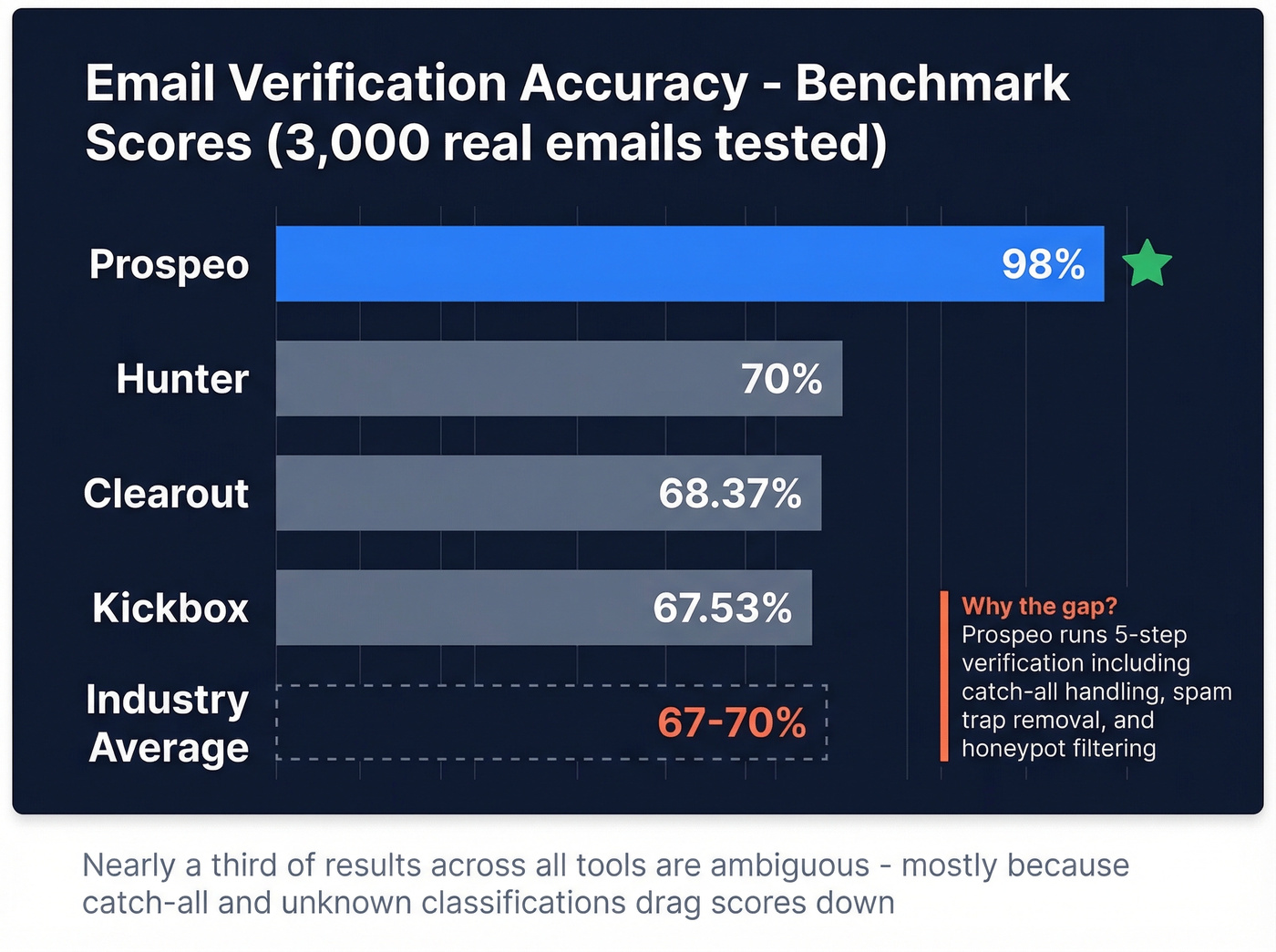
Prospeo's 5-step verification catches dead addresses, spam traps, and catch-all risks before they tank your sender reputation. Every email passes syntax, MX, SMTP, and honeypot checks - 98% accuracy, not the 67-70% benchmark scores you just read about.
Find and verify emails in one step - 75 free every month.
How Email Verification Works
Every verification tool - whether it's a $2/month budget option or an enterprise platform - runs the same basic four-step process. (If you're comparing options, start with these email reputation tools.)
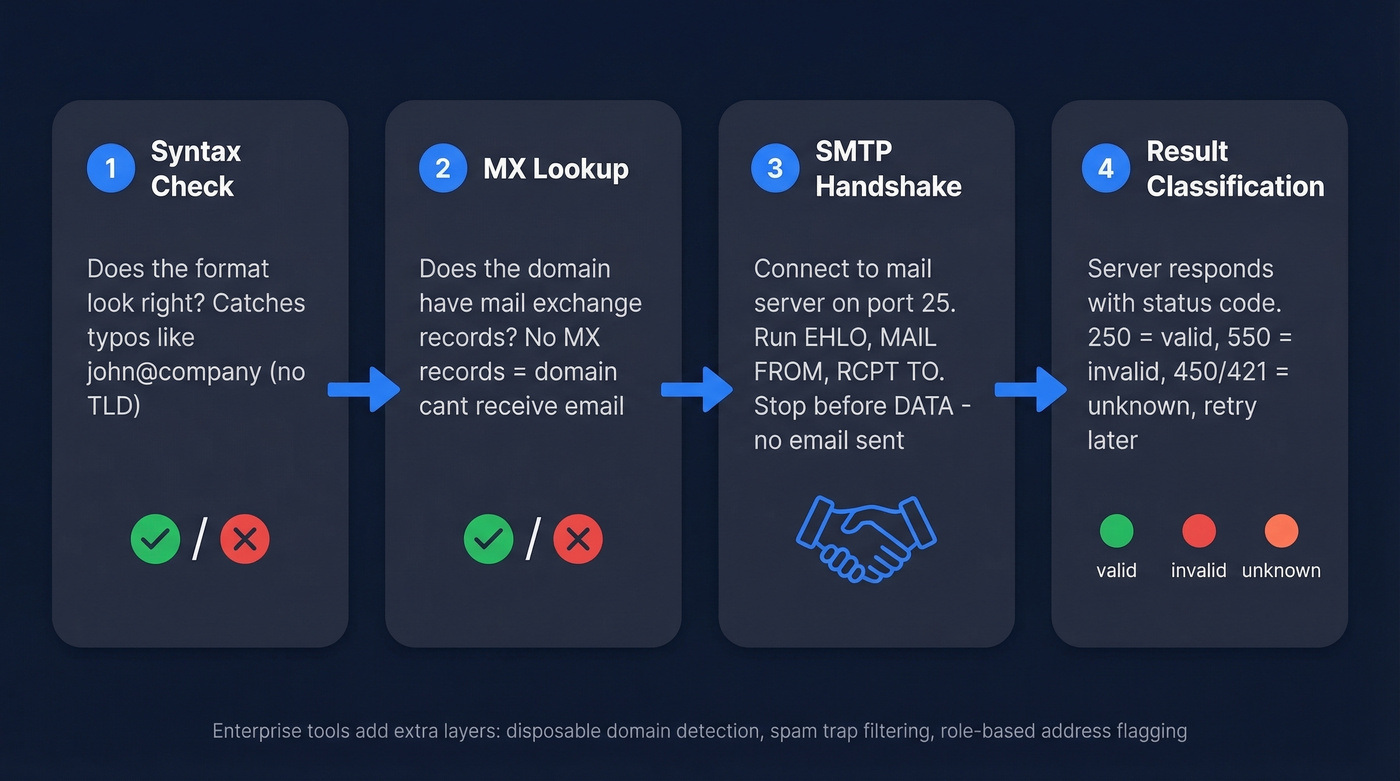
Step 1: Syntax check. Does the address follow valid formatting rules? john@company fails. john@company.com passes. This catches typos and garbage entries.
Step 2: MX lookup. The tool queries DNS for the domain's mail exchange records. If a domain has no MX records, it can't receive email - every address there is invalid.
Step 3: SMTP handshake. The tool connects to the mail server on port 25 and runs a partial SMTP conversation: EHLO -> MAIL FROM -> RCPT TO. It stops before DATA - no email is actually sent.
Step 4: Result classification. Based on the server's response, the tool categorizes the address:
| SMTP Code | Meaning | Classification |
|---|---|---|
250 |
OK, mailbox exists | Valid |
550 5.1.1 |
No such user | Invalid |
450 |
Temp failure / greylisting | Unknown (retry) |
421 |
Service unavailable | Unknown (retry) |
Enterprise tools add layers beyond these four steps - disposable domain detection, spam-trap filtering, role-based address flagging - but the core logic is always this sequence. For 100,000 emails, results can come back in under an hour.
The Catch-All Problem
Catch-all domains are the biggest blind spot in email verification. These servers accept mail for any address at the domain - ceo@company.com, asdfgh@company.com, literally-anything@company.com - all return 250 OK.
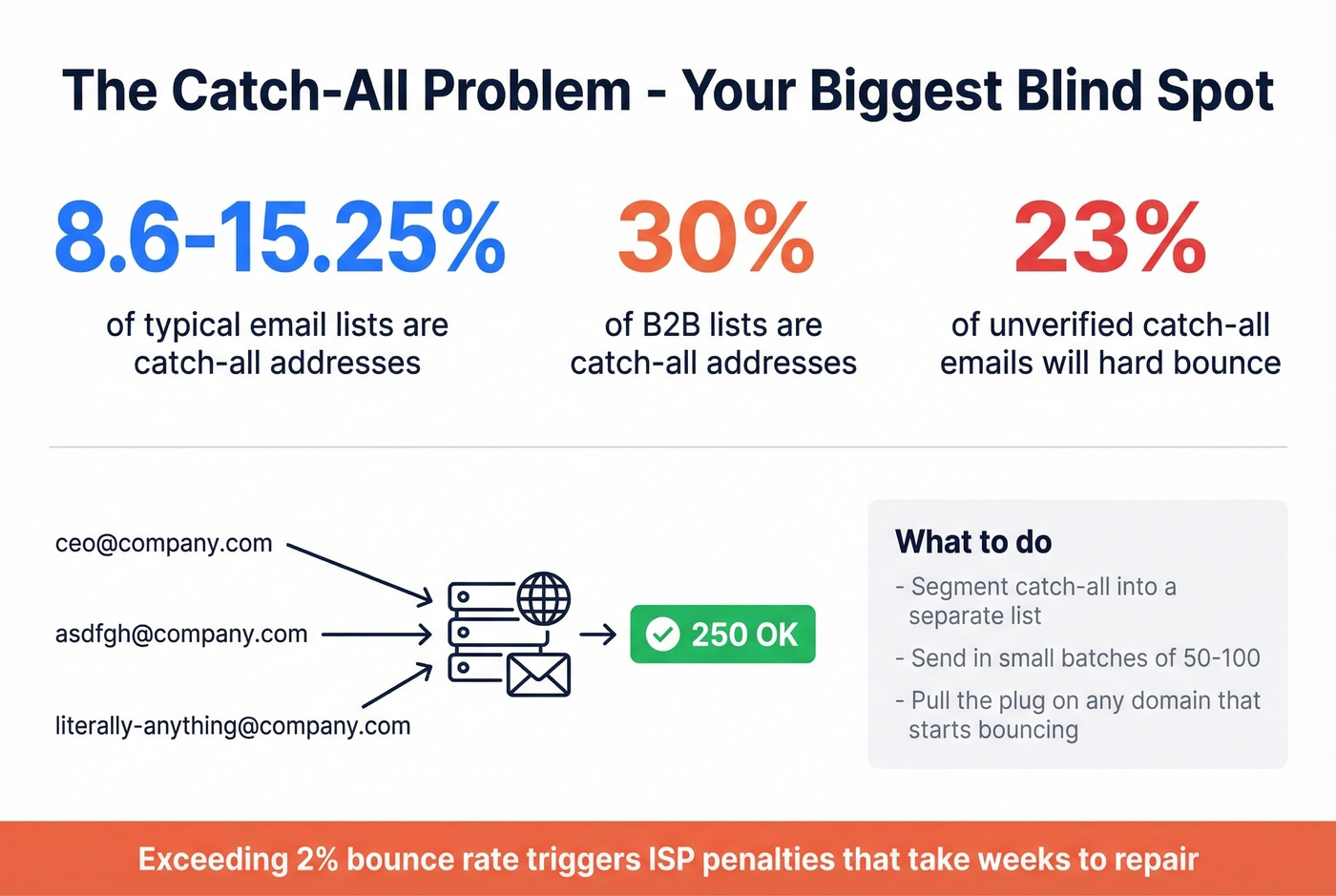
Verification tools detect catch-all domains by testing a random, obviously fake address. If xk7q9z@company.com gets accepted, individual mailbox verification becomes impossible. The prevalence is significant: 8.6-15.25% of typical email lists are catch-all addresses, and in B2B lists that number climbs to 30%. In our testing, catch-all domains are the single biggest source of false confidence in list quality. About 23% of unverified catch-all emails will hard bounce - enough to push you past the 2% threshold that triggers ISP penalties.
Segment catch-all addresses into a separate list. Send in small batches of 50-100, monitor bounce rates in real time, and pull the plug on any domain that starts bouncing. Addresses using a firstname.lastname format tend to be safer bets than generic ones.
Three Ways to Verify an Email Address
1. Use a Verification Tool (Fastest)
For most people, a dedicated verification tool is the right answer. Upload a list or paste a single address, get results in seconds. If you're building lists too, consider pairing verification with data enrichment services.
| Tool | Free Tier | Paid (per 1K) | Best For |
|---|---|---|---|
| Prospeo | 75 emails/mo | ~$10 | Find + verify in one step |
| ZeroBounce | 100/mo | $10 | Quick single checks |
| NeverBounce | 10 credits | $8 | Bulk list cleaning |
| MillionVerifier | - | ~$3.70 | Budget bulk verification |
| DeBounce | - | $1.50-$2 | Budget bulk at scale |
| Hunter | 50 credits/mo | ~$24.50 | Prospecting suite users |
| Kickbox | 100 one-time | ~$8-$10 | One-time list clean |
| Email Hippo | 100/day | ~$6-$8 | Free spot-checks |
| Mailmeteor | 50/mo | ~$5 | Google Sheets users |
A benchmark of 15 tools against 3,000 real emails found top accuracy scores of 70% (Hunter), 68.37% (Clearout), and 67.53% (Kickbox) - and accuracy dropped further on enterprise domains with stricter mail server configs. Those numbers surprised us. They mean nearly a third of results across all tools are ambiguous, mostly because catch-all and unknown classifications drag scores down.
If you're doing outbound at scale, also watch your email velocity so verification gains don't get erased by sending too fast.
2. Check MX Records Yourself
If you just need to confirm a domain can receive email at all - a domain-level check - an MX lookup takes 10 seconds.
nslookup -type=mx example.com
You'll get results like:
example.com   MX preference = 10, mail exchanger = mx1.example.com
example.com   MX preference = 20, mail exchanger = mx2.example.com
Lower preference number means higher priority server. If the query returns no MX records, that domain can't receive email - any address there is dead.
This confirms the domain accepts mail, not that a specific mailbox exists. Both ceo@example.com and nobody@example.com would look fine at this stage. To verify an individual address, you need the SMTP method below or a verification tool.
3. Manual SMTP Check via Telnet
You can run the same SMTP handshake that verification tools use - connect to the mail server and issue commands manually from a VPS or cloud server. Most residential ISPs block outbound port 25, so you'll need a server that doesn't.
telnet mx1.example.com 25
EHLO yourdomain.com
MAIL FROM:<test@yourdomain.com>
RCPT TO:<target@example.com>
A 250 response to RCPT TO means the mailbox likely exists. A 550 5.1.1 means it doesn't. Stop here - don't proceed to DATA or you'll actually send a message. Type QUIT to close the connection.
Skip this if you're not comfortable on the command line. Major providers like Gmail and Outlook have anti-enumeration protections that return ambiguous responses regardless, so you won't get clean answers from every domain. For anything beyond a handful of one-off checks, a verification tool is faster and more reliable.
What to Do With Your Results
| Result | What It Means | Action |
|---|---|---|
| Valid | Mailbox exists, accepts mail | Safe to send |
| Invalid | Mailbox doesn't exist | Remove immediately |
| Accept-all | Catch-all domain | Small batches, monitor bounces |
| Unknown | Verification failed | Retry in 24-48 hrs |
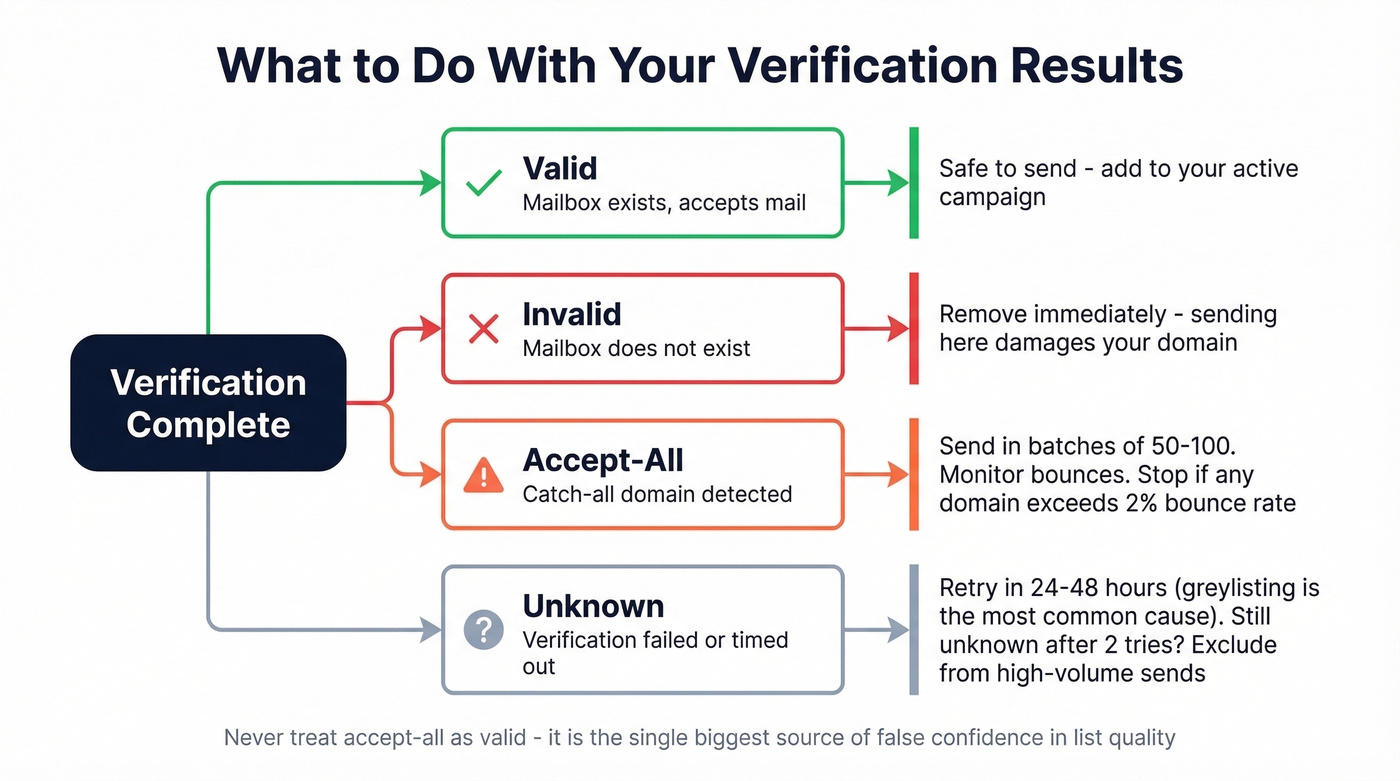
Don't treat accept-all as valid - send those in batches of 50-100 and stop sending to any domain that bounces above 2%. Unknown results deserve a retry after 24-48 hours since greylisting is the most common cause. Still unknown after two attempts? Exclude from high-volume sends. For more on bounce handling, see our email bounce rate guide.
Verification Isn't One-and-Done
Email lists decay faster than most teams realize. After four weeks, roughly 2% of a verified list will be invalid - people leave jobs, companies shut down mailboxes, domains change providers. We've watched a perfectly clean list go stale in under two months, which is frustrating when you spent hours building it.
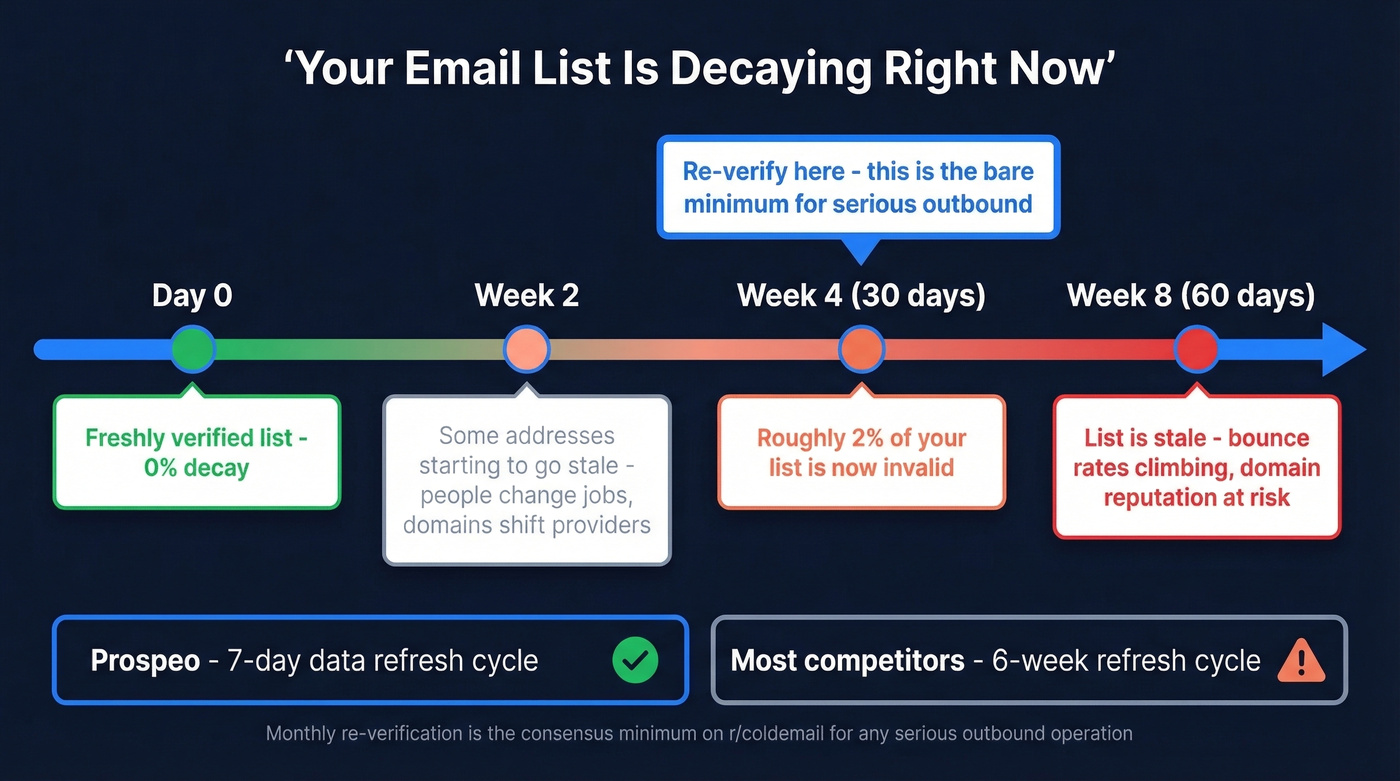
For active sending lists, re-verify every 30 days and keep your bounce rate under 1%. The consensus on r/coldemail is that monthly re-verification is the bare minimum for any serious outbound operation, and we agree. Tools with frequent data refreshes help - Prospeo's 7-day refresh cycle means the contacts you pull are already fresher than what most competitors offer on a 6-week cycle. If you're sourcing contacts, our guide on how to generate an email list pairs well with this.
Most verification tools top out at 70% accuracy because catch-all domains and unknown results drag them down. Prospeo's proprietary infrastructure handles catch-all verification, spam-trap removal, and honeypot filtering - delivering 98% email accuracy at roughly $0.01 per email.
Stop burning domain reputation on bad data. Verify before you send.
FAQ
How do I find out if an email address is active?
Use a verification tool that performs an SMTP handshake against the recipient's mail server - this confirms whether the mailbox exists and accepts mail without sending a message. For a quick manual check, run an MX lookup to confirm the domain receives email, then probe the specific address via telnet.
Can you tell if someone actually reads their email?
No. Verification confirms the mailbox exists and accepts mail, not that someone monitors it. Engagement signals - opens, clicks, replies - are the only way to gauge activity, and those only appear after you send.
How accurate are verification tools?
A benchmark of 15 tools against 3,000 real emails found top scores of 67-70% overall accuracy, with unknown and accept-all handling dragging every tool down. Prospeo's 5-step verification with catch-all handling and spam-trap removal delivers 98% email accuracy - well above the benchmark average.
How can I check if an email is active for free?
ZeroBounce provides 100 free verifications per month, Email Hippo offers 100 per day, and Prospeo includes 75 free verified emails monthly. For a completely free approach, run a manual MX lookup and SMTP check via telnet - though this requires technical comfort and won't work reliably against Gmail or Outlook.
Is email verification legal?
Yes. Verification queries public DNS records and SMTP infrastructure without accessing private data or sending unsolicited messages. It's the digital equivalent of checking whether a phone number is in service before dialing. No jurisdiction treats SMTP probing as unauthorized access.