

How to Fix Email Bounce Back (2026 Guide)
You sent 500 emails. 43 bounced. That's an 8.6% bounce rate - and your ESP just paused the campaign. Now you're staring at a bounce report full of cryptic SMTP codes, wondering how to get things moving again before your sender reputation craters. Let's sort it out.
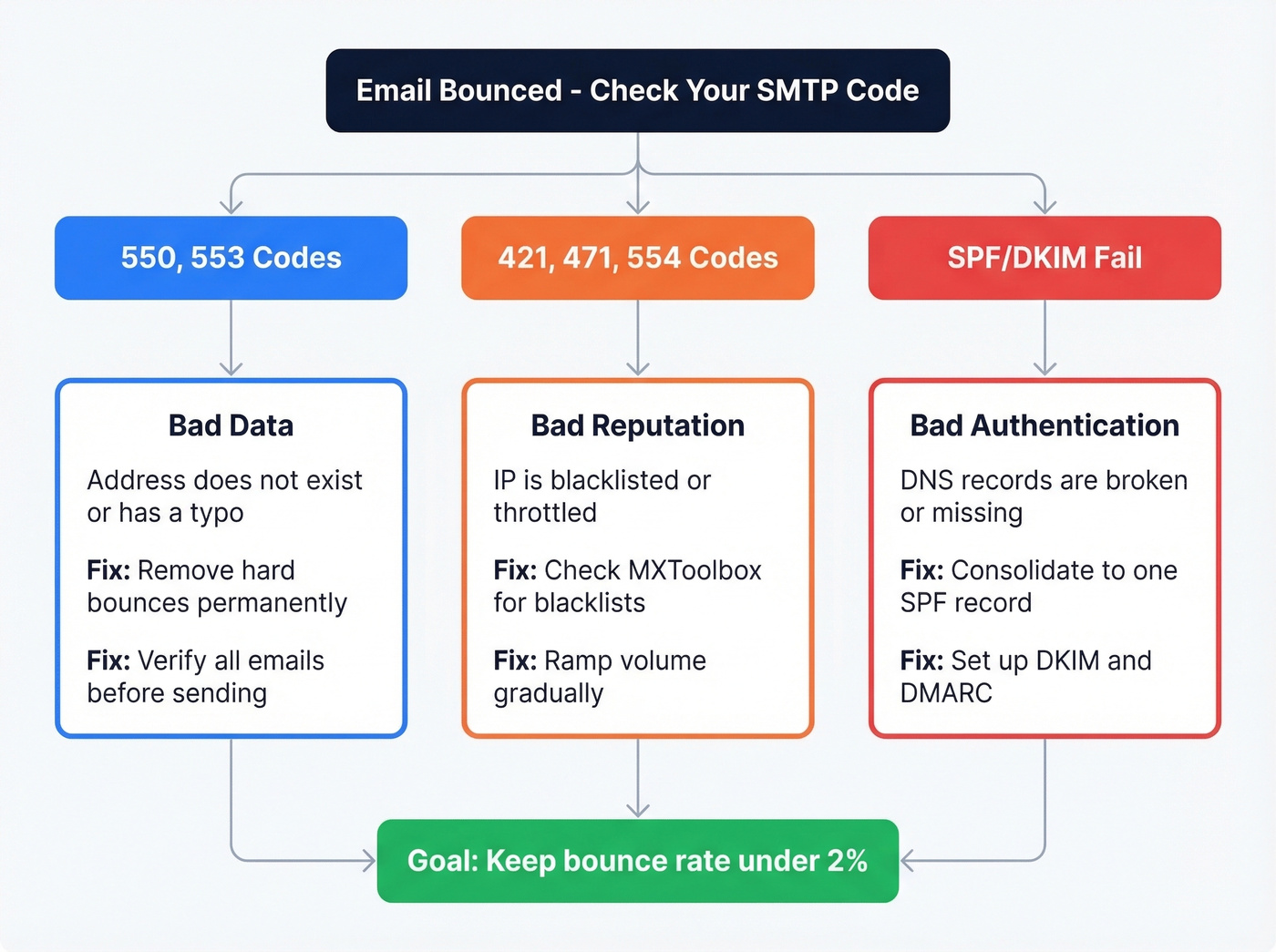
It's almost always one of three things: bad data where the address doesn't exist, bad authentication where your DNS records are broken, or bad reputation where you're blacklisted or throttled. Read the SMTP error code in your bounce message, match it to the right bucket below, and apply the fix.
What Is an Email Bounce-Back?
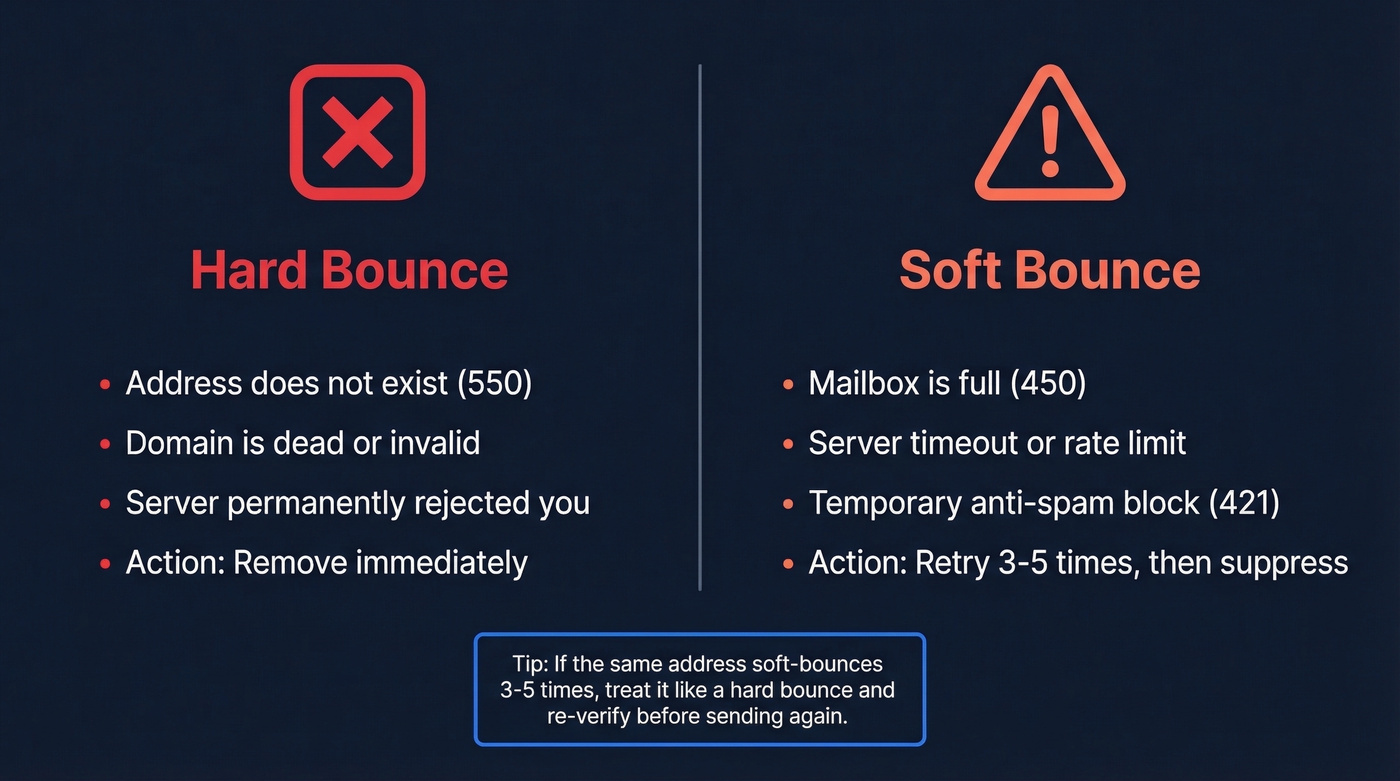
A bounce-back is a Non-Delivery Report (NDR) - that "Mailer-Daemon" message your server sends when an email can't be delivered. Hard bounces are permanent: the address doesn't exist, the domain is dead, or the server flat-out rejected you. Remove these immediately. Soft bounces are temporary: a full mailbox, a server timeout, a rate limit. If the same address soft-bounces 3-5 times, suppress it and re-verify before trying again.
Roughly 64% of senders are occasionally or regularly affected by poor deliverability. You're not alone - but you do need to fix bounced or rejected emails fast before they tank your sender reputation.
Reading SMTP Bounce Codes
Every bounce message includes an SMTP status code. The first digit tells you what happened: 2xx means success, 4xx means temporary failure so retry later, and 5xx means permanent failure - don't retry as-is. Enhanced codes add detail: X.1 is an addressing problem, X.2 is a mailbox issue, X.7 is security or policy.
Here's the thing: most people skip the error code and jump straight to "clean my list." That's like taking antibiotics before you know whether you have a bacterial infection. Read the code first.
| Code | What It Means | How to Fix It |
|---|---|---|
| 421 | Server temporarily busy | Wait 1-2 hours, retry |
| 450 | Mailbox full or inactive | Retry later; verify address |
| 471 | Blocked by anti-spam rule | Check IP reputation, content |
| 550 | Mailbox doesn't exist | Remove immediately (hard bounce) |
| 553 | Mailbox name not allowed | Check for typos in address |
| 554 | Transaction failed / IP blocked | Check blacklists; review content |
Mostly 550s? Your problem is bad data. Mostly 421s or 471s? Look at reputation and throttling. A mix of 554s with blacklist references? Jump straight to the reputation section below.

Most bounce problems start with bad data - and most verification tools can't handle catch-all domains. Prospeo's 5-step verification includes dedicated catch-all handling, spam-trap removal, and honeypot filtering. One customer dropped from 35% bounces to under 4%.
Get 98% email accuracy at $0.01 per verified address.
Three Root Causes and Fixes
Bad Data
Invalid addresses are the number-one cause of hard bounces. This sounds obvious, but here's where it gets frustrating: verification tools can mark an email "valid" and it still bounces. The culprit is usually catch-all domains. These servers accept everything during the SMTP check, so verification tools can't tell whether john@company.com is real or a black hole. One Reddit user reported that 60-70% of their list was flagged as catch-all, making standard verification nearly useless for those contacts.
Some desperate senders resort to "burner account probes" - sending a test email from a throwaway domain to see if the address bounces before mailing from their real domain. It works in theory, but it's a fast track to getting your IP flagged. Proper verification with dedicated catch-all handling is the safer path by a wide margin.
For hard bounces, remove the address permanently. For soft bounces, suppress after 3-5 repeated failures and re-verify before sending again. (If you need a quick pre-send check, see how to check if an email will bounce.)
Bad Authentication
SPF, DKIM, and DMARC aren't optional anymore. Gmail enforced authentication requirements on Feb 1, 2024, and Outlook.com followed with high-volume enforcement on May 5, 2025. Both providers have continued tightening enforcement through 2026, so misconfigured records now cause immediate bounces rather than gradual reputation decay.
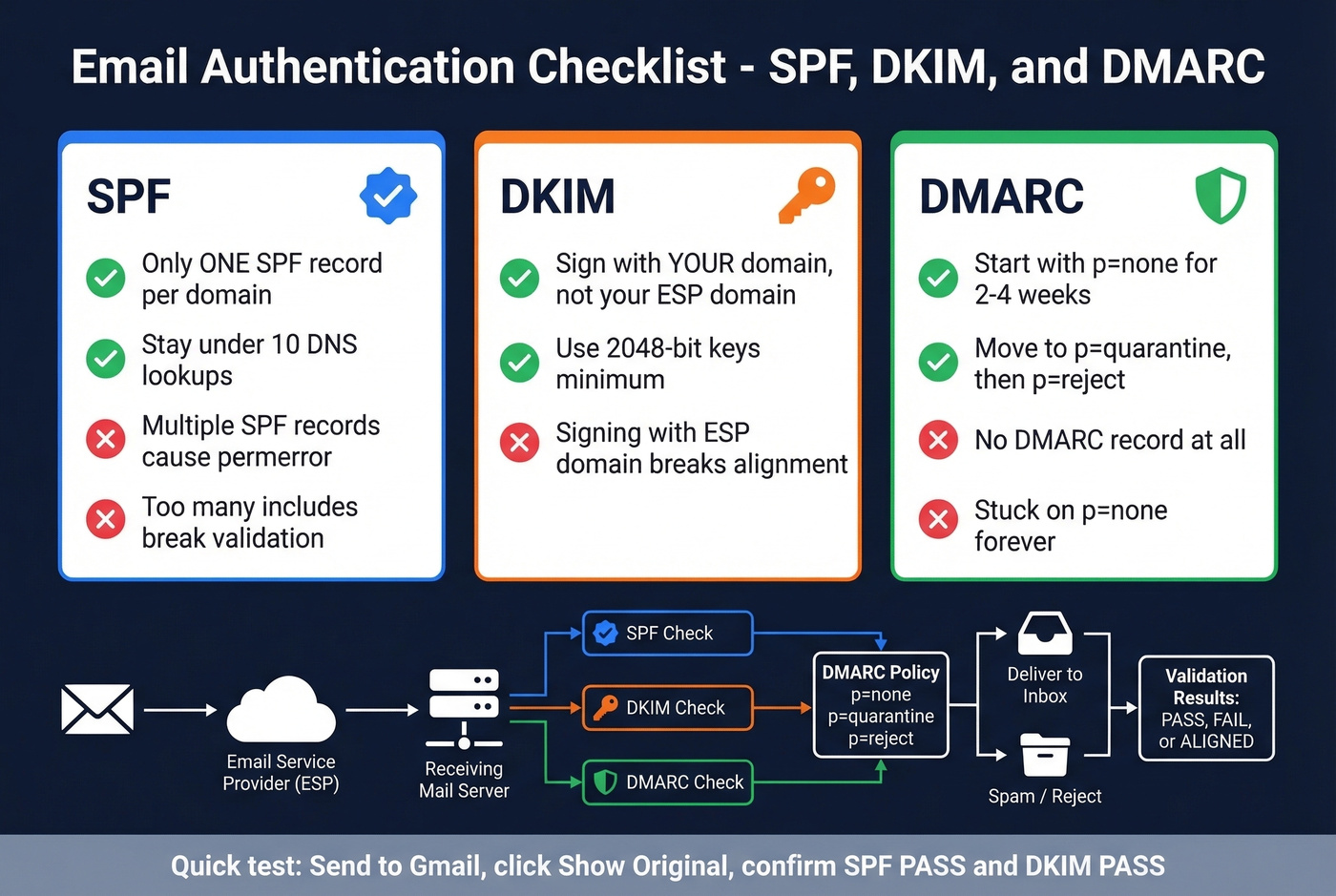
In our experience, the most common mistakes are:
- Multiple SPF records on the same domain - this causes a permerror and breaks SPF entirely
- Exceeding the 10-DNS-lookup limit in your SPF record, since every
include:counts - DKIM signing with your ESP's domain instead of your own, which breaks alignment
- No DMARC record at all, or one stuck on
p=noneindefinitely
To check quickly: send a test email to a Gmail account, click "Show original," and look for DKIM: PASS and SPF: PASS. If either fails, fix your DNS records before sending another campaign. (If you want a step-by-step, use how to verify DKIM is working.) Deploy DMARC progressively - start at p=none for 2-4 weeks, move to quarantine, then reject once you're confident everything's aligned. If you're unsure about alignment, read DMARC alignment. Google's Postmaster Tools will show you exactly where you stand.
Bad Reputation
If your bounce messages mention a specific blacklist, that's your diagnosis handed to you on a plate. Run your sending IP and domain through MXToolbox or MultiRBL to see where you're listed. Spamhaus and Barracuda are the blacklists that actually matter - if you're on UCEPROTECTL2 or L3, don't panic, those are generally low priority.
Common triggers for blacklisting: spam complaints, high bounce rates, sudden volume spikes, and compromised accounts. One sender on r/Emailmarketing reported that after sending 50-email blasts from three accounts on the same domain, two accounts suddenly saw ~85% bounces with "Message blocked" errors. That looks like spam to a mail server, even if every address is valid.
Don't forget provider sending limits. Exceed them and you'll get blocked for 1-24 hours even with a clean list. (More on safe pacing in email velocity.)
| Provider | Daily Limit | Per-Message Limit | Max Attachment |
|---|---|---|---|
| Gmail (free) | 500 emails | 500 recipients | 25 MB |
| Google Workspace | 2,000 emails | 2,000 recipients | 25 MB |
| Office 365 | 10,000 recipients | 500 recipients | 150 MB (Outlook) |
| Yahoo Mail | 500 emails | 100 recipients | 25 MB |
Let's be honest: if your average deal size is under five figures and you're sending fewer than 2,000 emails a month, your bounce problem is almost certainly bad data - not authentication, not reputation. Fix the list first, and you'll fix 80% of the problem.
How to Prevent Bounces Long-Term
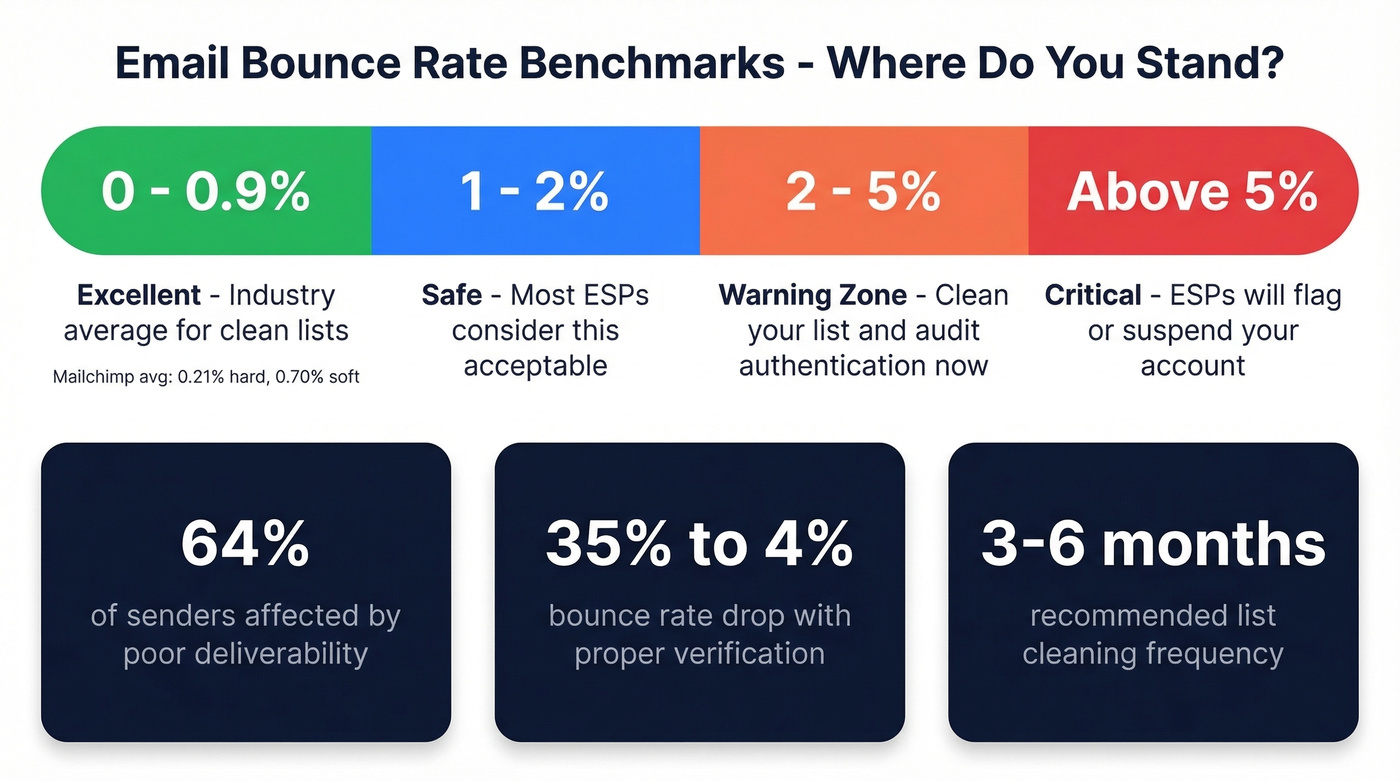
Fixing today's bounces is step one. Keeping your bounce rate under 2% permanently is the real goal. For context, Mailchimp's benchmarks show 0.21% hard bounces and 0.70% soft bounces across their platform - that's what clean, permission-based sending looks like. Above 5% is critical territory where most ESPs will flag or suspend your account. (If you want deeper benchmarks and code mapping, see email bounce rate.)
Here's the prevention checklist:
- Clean your list every 3-6 months. Remove hard bounces immediately. Suppress unengaged contacts after 6-12 months.
- Verify before you send. Every time. Not just when you buy a new list. (If you're building lists, pair this with how to generate an email list.)
- Monitor with Google Postmaster Tools. It's free and shows your domain reputation in real time.
- Ramp volume gradually. Don't go from 50 emails/day to 5,000 overnight.
For outbound teams dealing with catch-all-heavy lists, we've found that Prospeo's 5-step verification with dedicated catch-all handling, spam-trap removal, and honeypot filtering catches problems that other tools miss. Meritt, one of Prospeo's customers, dropped their bounce rate from 35% to under 4% after switching - and their pipeline tripled in the process.
| Tool | Price per 1,000 | Free Tier | Accuracy |
|---|---|---|---|
| Prospeo | ~$10 (~$0.01/email) | 75 emails/mo | 98% |
| Bouncer | $7 | 1,000 credits | 99.5% |
| NeverBounce | $8 | 1,000 credits | 99.9% |
| ZeroBounce | $7.50 (min $15/2K) | 100 credits | 96-98% |
All accuracy figures are vendor-reported.
Skip Bouncer or NeverBounce if your list is heavy on catch-all domains - they'll mark those addresses as "unknown" and leave you guessing. For permission-based marketing lists with minimal catch-all exposure, they're solid options at slightly lower per-email costs.
You just read 2,000 words on fixing bounces. The faster fix: stop sourcing bad emails. Prospeo refreshes 300M+ profiles every 7 days - not every 6 weeks like competitors - so you're never sending to stale addresses.
Clean data means zero SMTP codes to decode.
FAQ
What's an acceptable bounce rate?
Below 2% is safe for most ESPs. Between 2-5% is a warning zone - clean your list and audit authentication. Above 5% is critical, and most platforms will flag or suspend your account. Mailchimp's cross-industry average is 0.21% for hard bounces and 0.70% for soft bounces.
Can I resend to a bounced address?
Hard bounces (550 errors) mean the address doesn't exist - remove it permanently. Soft bounces (4xx errors) are temporary, so retry once or twice. If the same address soft-bounces 3-5 times, suppress it and re-verify before attempting again. Continuing to send to hard bounces damages your sender reputation fast.
How do I stop bounces before they happen?
Verify every email address before sending. Combine verification with proper SPF/DKIM/DMARC setup and list cleaning every 3-6 months, and you'll stay well under the 2% threshold. For outbound teams, a 7-day data refresh cycle - rather than the 6-week industry average - means you're not sending to addresses that decayed since your last campaign.
Why are my emails bouncing back from one specific domain?
The receiving domain likely has a strict security policy, a misconfigured mail server, or has blacklisted your sending IP. Check MXToolbox for the domain's MX records and run your IP against major blacklists. If only one domain rejects you, contact their postmaster - the address is usually postmaster@domain.com.