

How to Follow Up Without Saying "Follow Up" (2026)
You wrote the proposal Monday. It's Thursday. Your cursor's blinking in a reply window, and you're about to type the five worst words in professional email: "Just following up on this."
Don't. That phrase is the professional equivalent of "hey" on a dating app - it signals nothing, adds nothing, and the average office worker receiving 120+ emails a day will skip right past it. Here's how to follow up without saying follow up, using phrases that actually earn replies.
The Short Version
The single best swap: Replace any generic check-in with a specific question. "Does the Q3 timeline still work, or should we revisit scope?" beats "Just following up" every time.
The cadence: Space touches 3-4 days apart. The first follow-up boosts reply chances by 49%. The second adds 3.2%. The third actually hurts. The overall sweet spot is 4-7 touchpoints total.
The hot take: You don't have a follow-up problem. You have a first-email problem. Most replies come from your initial message - not the nudge after it.
Why "Just Following Up" Kills Replies
The word "just" is a minimizer. Linguistically, it signals that what you're saying isn't important - the opposite of what you want when you're competing with 120 other messages. You're literally telling the recipient to deprioritize you.
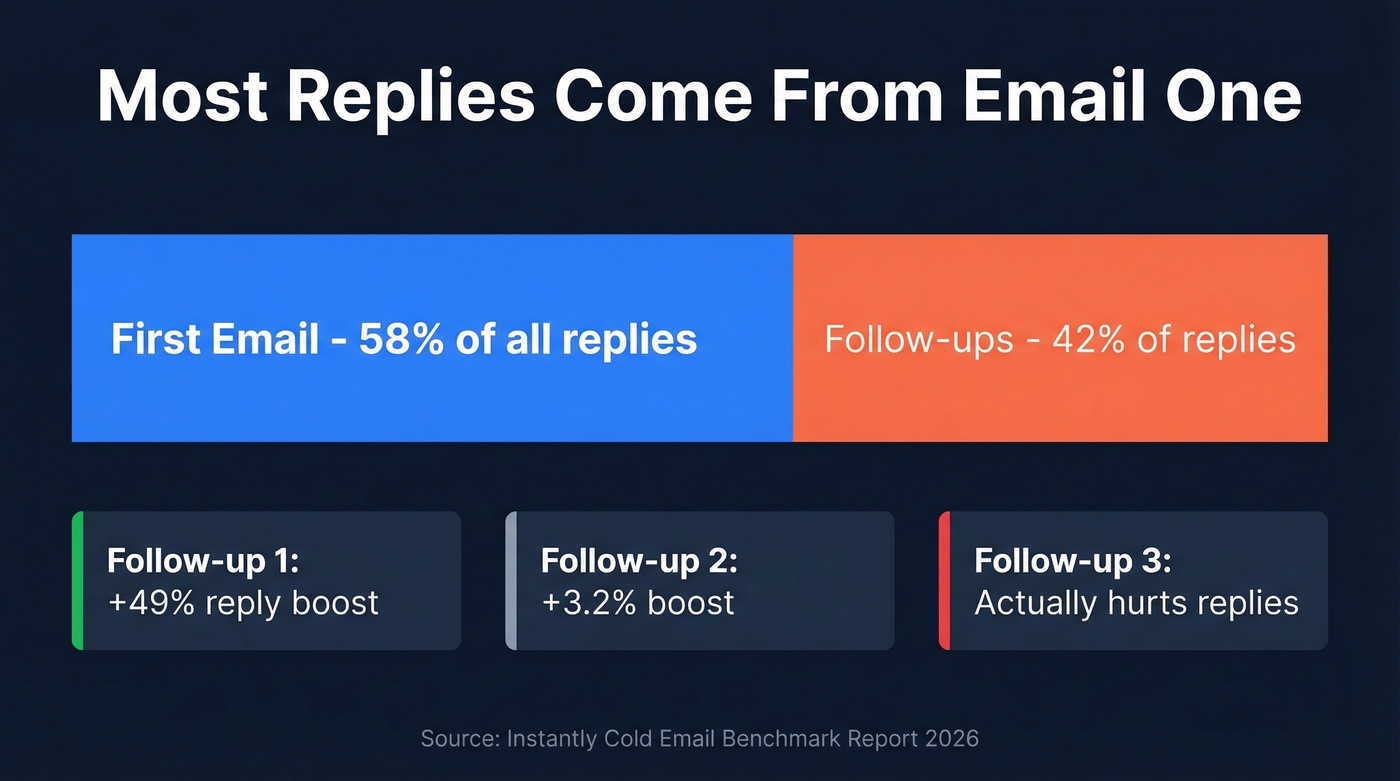
58% of all replies come from the initial email. Follow-ups contribute the remaining 42%, but only when they add something new. A message that just reminds someone you exist triggers zero psychological urgency. The Zeigarnik effect - our tendency to remember unfinished tasks - explains why open loops work better than reminders. "I had one more thought on the pricing model" creates an itch. "Just checking in" doesn't.
For the record, these are all equally dead: "checking in," "touching base," "circling back," "bumping this," "hope you're doing well," and "sorry to bother you." Delete them from your vocabulary.
10 Alternatives That Actually Get Replies
1. Ask a direct question. "Would next week work better, or has the priority shifted?" Forces a yes/no instead of letting them defer.
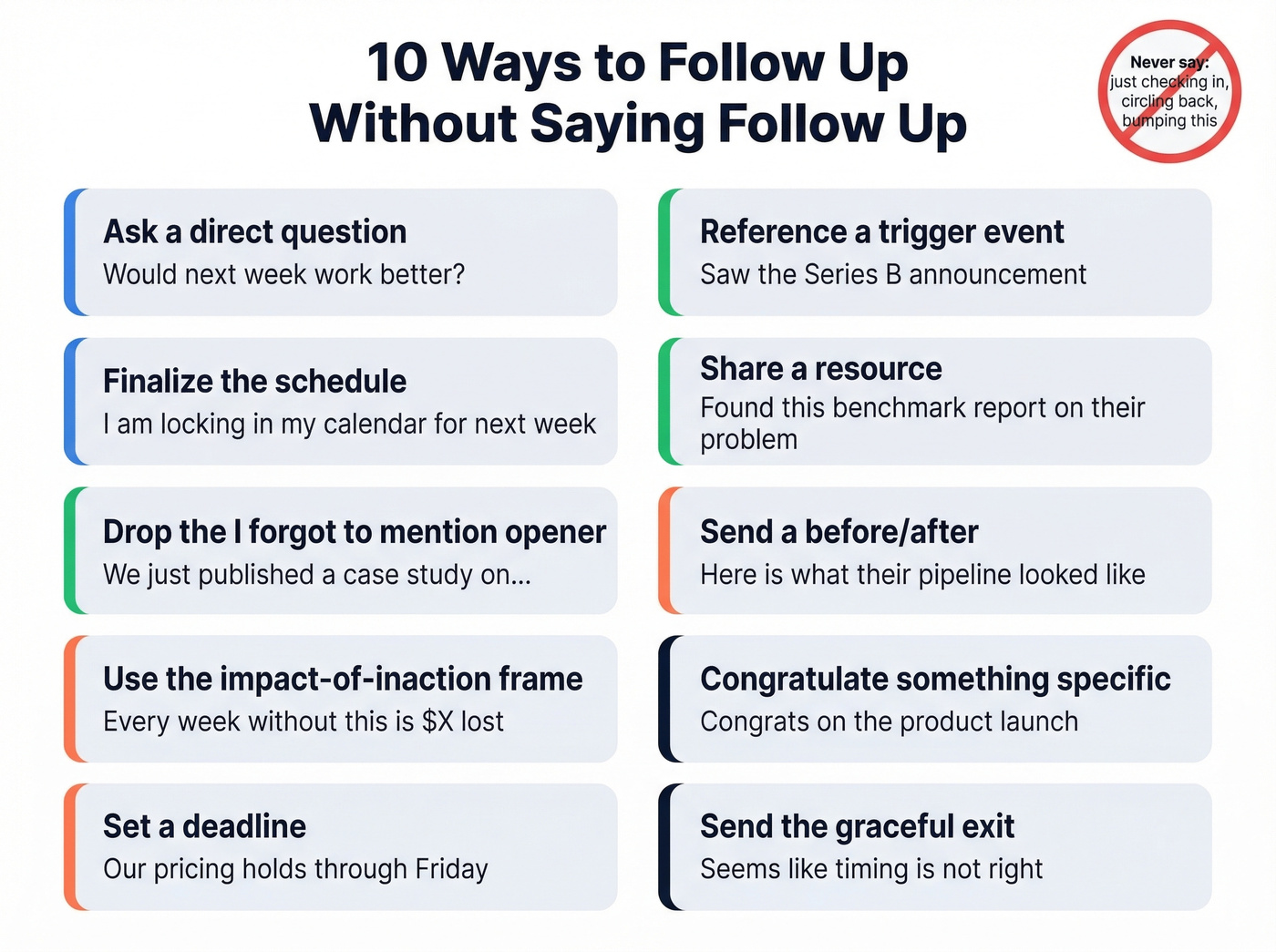
2. Finalize the schedule. "I'm locking in my calendar for next week - does Thursday at 2 still work?" This kind of schedule-finalization line works especially well for booking face-to-face meetings.
3. Drop the "I forgot to mention" opener. "I forgot to mention - we just published a case study on [their industry]." Feels like a natural addendum, not a nudge.
4. Reference a trigger event. "Saw the Series B announcement - congrats. Does that change the timeline?"
5. Share a resource. "Found this benchmark report on [their problem]. Thought it was relevant." Reciprocity drives replies.
6. Use the impact-of-inaction frame. "Every week without [solution] is roughly $X in lost revenue. Want to revisit?"
7. Send a before/after. Don't explain your value - show it. "Here's what [similar company]'s pipeline looked like before and after switching. Thought you'd want to see the numbers." Before/after snapshots consistently outperform generic case study links because they make the gap between inaction and action visceral, not abstract.
8. Congratulate something specific. "Congrats on the product launch. Curious if that changes priorities for Q3."
9. Set a deadline. "Our pricing holds through Friday - wanted to make sure you had the chance to review."
10. Send the graceful exit. "Seems like the timing isn't right. I'll check back in Q4 unless you say otherwise." Giving people an out is often what gets them to respond.
Bonus for invoices and ops: "Our records show invoice #1234 is still open. Can you confirm it's in the queue?" Direct, professional, zero ambiguity.

The best follow-up in the world won't land if you're emailing a dead address. Prospeo's 98% email accuracy and 7-day data refresh mean your carefully crafted messages actually reach real inboxes - not bounce logs.
Stop perfecting emails that never arrive. Fix the data first.
Three Templates You Can Steal
After Sending a Proposal (Sales)
Subject: Quick thought on the scope
Body: Hi [Name], I had one more idea after reviewing your team's workflow - [specific insight]. It might change how we'd structure the rollout. Worth a 10-minute call Thursday or Friday?
Timing: Send 3 days after the proposal. If you want more options, steal from these sales follow-up templates.
After a Job Interview
Subject: One thing I didn't mention
Body: Hi [Name], I've been thinking about the [specific challenge discussed]. I led a similar project at [Company] - here's what we did differently: [one sentence]. Happy to dig in if it's helpful.
Timing: Send within 24-48 hours of the interview.
After Meeting Someone at an Event
Subject: That idea re: [topic]
Body: Great meeting you at [event]. You mentioned [specific pain point] - I just came across [resource] that's directly relevant. Open to grabbing coffee next week?
Timing: Send within 24-48 hours while the conversation's fresh.
Subject Lines That Get Opened
Keep them under 33 characters - that's the mobile visibility cutoff. Cold email open rates have dropped from 36% to 27.7% over the past two years. A vague subject line accelerates that decline. If you need inspiration, pull from these email subject line examples.
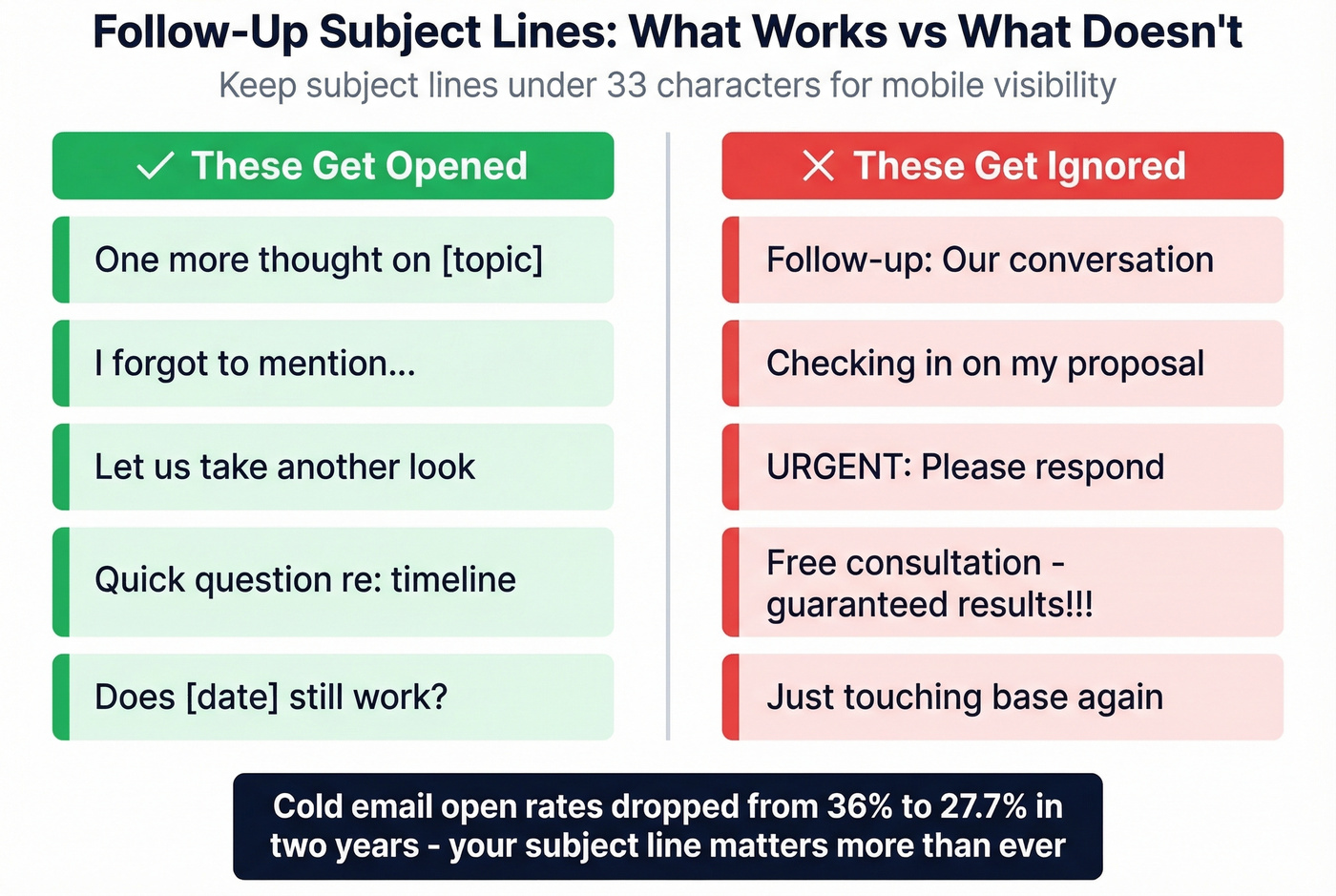
Five that work:
- "One more thought on [topic]"
- "I forgot to mention..."
- "Let's take another look"
- "Quick question re: timeline"
- "Does [date] still work?"
Five that don't: Anything starting with "Follow-up:" or "Checking in." Avoid ALL CAPS, "Free," "Guarantee," and excessive punctuation.
The Cadence That Works
The sweet spot is 4-7 touchpoints, spaced 3-4 days apart, with Tuesday and Wednesday as peak send days. Each touchpoint must add new value. Messages that feel like replies - not formal reminders - outperform by roughly 30%.
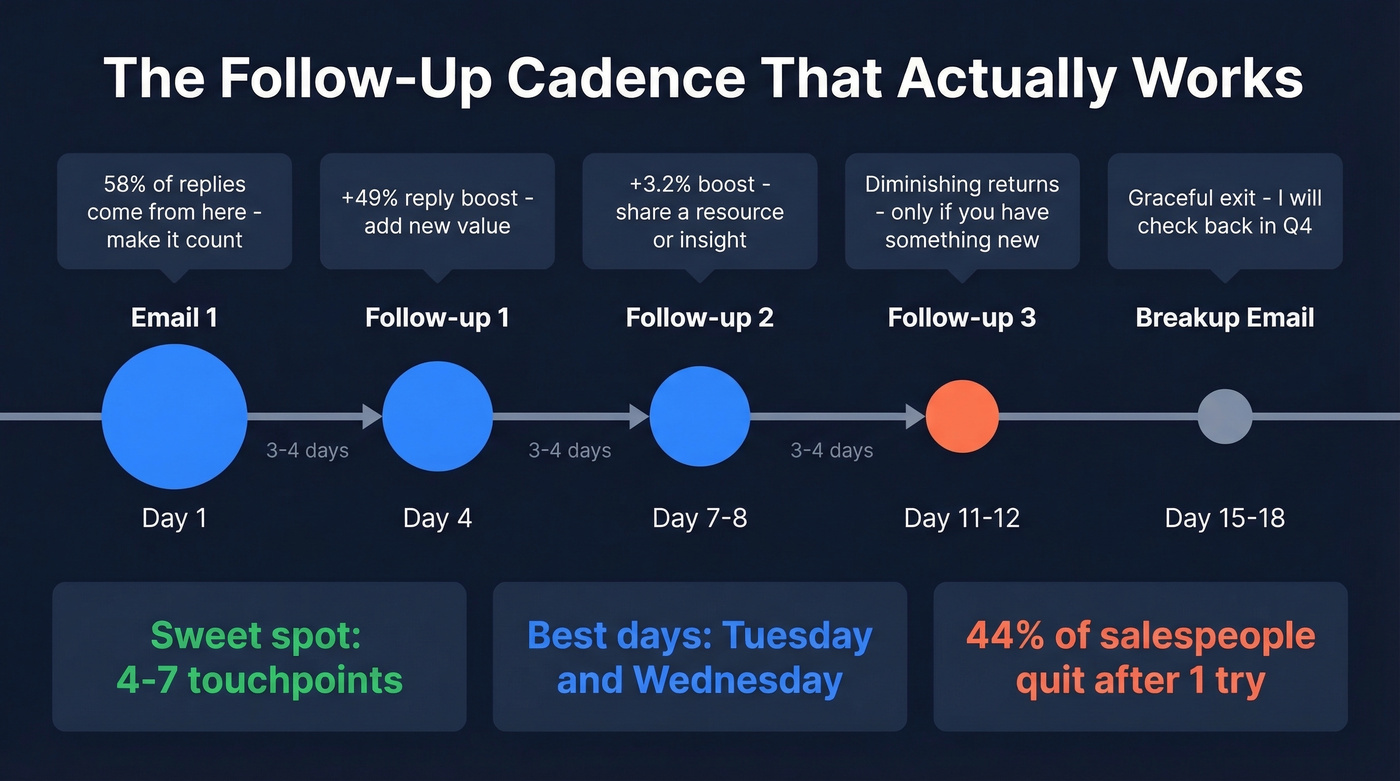
We've tested sequences with 3 vs. 5 touchpoints, and the sweet spot is almost always 4. A third email with nothing new can cut replies by 20%. That's not persistence - that's self-sabotage.
Here's the thing: 44% of salespeople give up after one attempt. Don't be that person. But don't be the person who sends seven identical "bumping this" emails either. After 5-7 unanswered touches, send the graceful breakup and move on. If someone hasn't replied after five value-added messages, the problem isn't your wording - and remember, 58% of replies come from step one. If your first email doesn't earn a response, no amount of clever phrasing will save it.
Better yet, schedule the next step before the current conversation ends. A calendar invite is harder to ignore than any email - especially if your email wording to schedule a meeting is tight.
Why You're Getting Ghosted
Sometimes it's not your copy. It's one of five objections you haven't addressed: they don't need it, don't see the value, don't feel urgency, don't want it, or don't trust you. Your message should match the likely objection - not just remind them you exist. (If you want a framework for this, start with sales communication.)
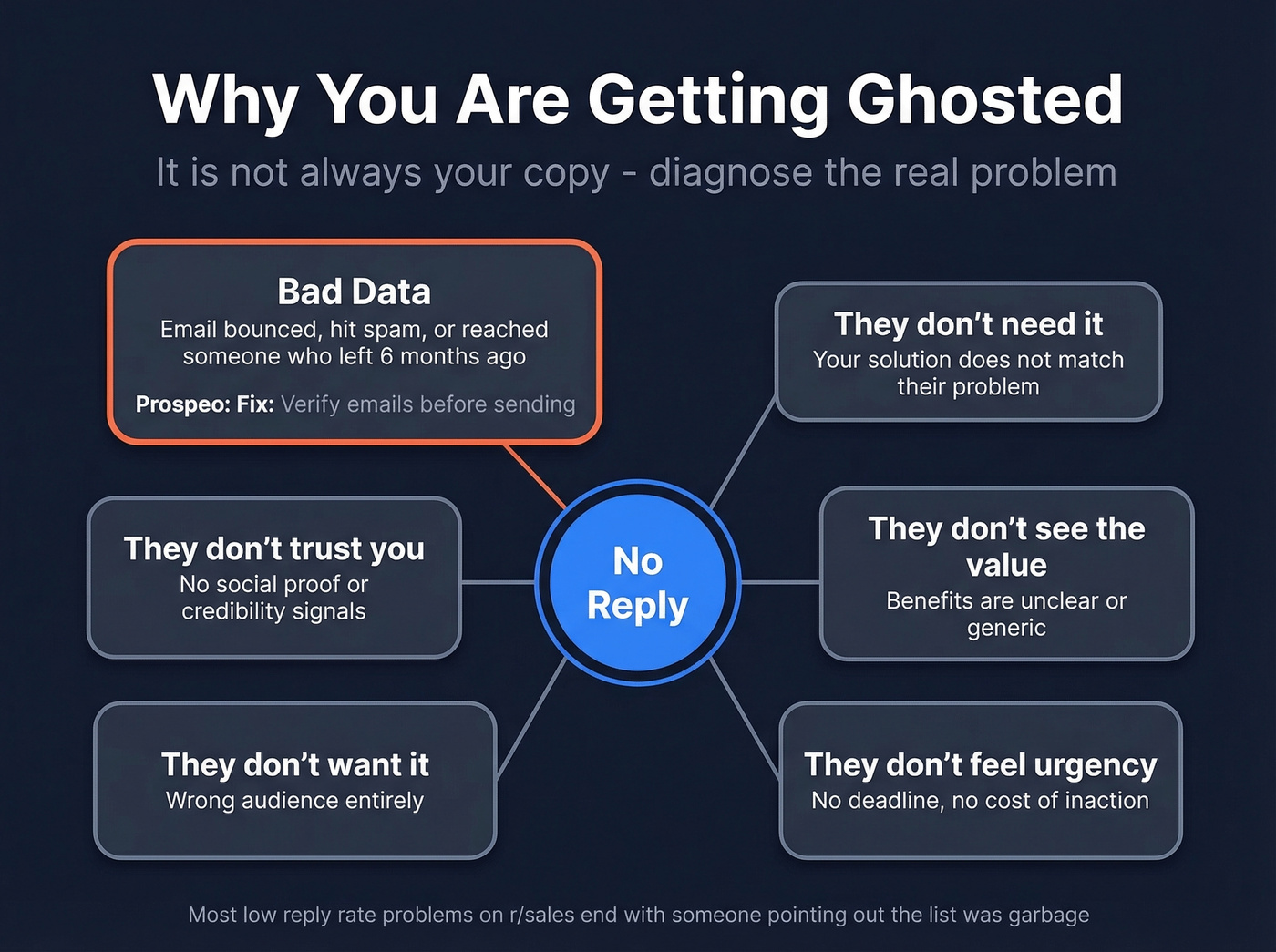
But there's an even simpler reason that tanks entire sequences: bad data. If your email bounces, lands in spam, or reaches someone who left the company six months ago, your carefully crafted message never arrives. We've seen teams rewrite their outreach three or four times before realizing the problem was never the words - it was the addresses. Prospeo verifies emails in real time with 98% accuracy on a 7-day refresh cycle, so your message actually lands where it's supposed to. (If you're troubleshooting bounces, use this email bounce rate guide.)
Let's be honest - the best follow-up in the world is worthless if it hits a dead inbox. The consensus on r/sales backs this up: most "low reply rate" threads end with someone pointing out the sender's list was garbage. Fix the data first, then worry about the copy. If you’re building lists, start with lead enrichment and a solid email deliverability guide.
You just learned that 58% of replies come from email one - which means your first touch needs to hit the right person at the right address. Prospeo gives you 300M+ verified contacts with 30+ filters so every outreach starts strong.
Nail the first email. Prospeo finds who to send it to.
FAQ
What can I say instead of "just checking in"?
Lead with new information, a specific question, or a trigger event. "Saw [company news] - does that change the timeline?" gives them a concrete reason to reply instead of guilt-tripping them into a response.
How many follow-ups is too many?
Four to seven touchpoints is the data-backed sweet spot, but each one must add new value - a resource, insight, or question. After 5-7 unanswered touches, send a graceful breakup email and move on.
How do I follow up without being annoying?
Add value with every message: a resource, a data point, a direct question. Space emails 3-4 days apart. If your emails are bouncing, the wording doesn't matter - verify addresses before you send. Skip this step if you enjoy shouting into the void.