

How to Make an Unsubscribe Link That Actually Works
Marketing wants you to "just add an unsubscribe link." Every tutorial you find is a Mailchimp walkthrough. You don't use Mailchimp. You're building on SES, or Resend, or raw SMTP - and none of those tutorials explain what's actually happening under the hood.
Here's the platform-agnostic guide on how to make an unsubscribe link, from legal requirements to working code. Non-compliance carries fines of up to $53,088 per email, and Gmail will route to spam or outright reject bulk mail that doesn't meet one-click unsubscribe requirements.
Quick orientation:
- Using a major ESP (Mailchimp, Brevo, HubSpot)? Your unsubscribe button is probably already handled. Confirm it's active, then skip to the Gmail/Yahoo header requirements below.
- Building a custom email system (SES, Resend, Postmark API)? You need RFC 8058 headers plus a POST endpoint. Jump to the technical implementation section.
- Sending cold email? You need an opt-out link AND clean data. Read the cold email section.
What the Law Requires
CAN-SPAM applies to all commercial email. Including B2B. There's no exception, and the penalties aren't theoretical.
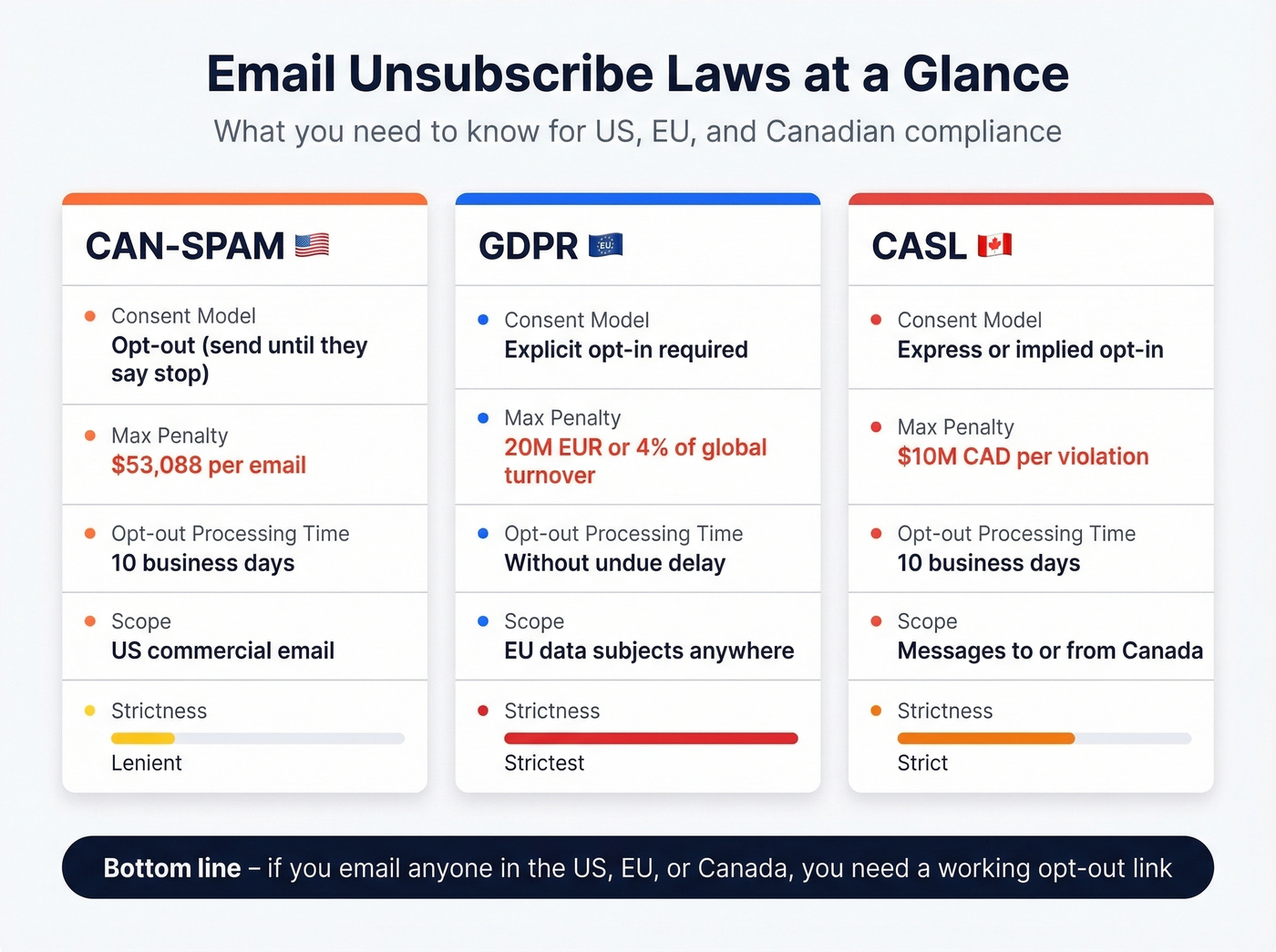
The law requires a clear, conspicuous opt-out mechanism in every commercial message. That mechanism must remain functional for at least 30 days after sending. Once someone opts out, you've got 10 business days to process it. You can't charge a fee, require a login, or ask for personal information beyond an email address. Every message also needs a valid physical postal address.
But CAN-SPAM is the lenient one. GDPR and CASL are stricter on consent, and the penalties scale differently.
| CAN-SPAM | GDPR | CASL | |
|---|---|---|---|
| Consent model | Opt-out | Explicit opt-in | Express/implied opt-in |
| Max penalty | $53,088/email | EUR 20M or 4% turnover | $10M CAD/violation |
| Opt-out processing | 10 business days | Without undue delay | 10 business days |
| Scope | US commercial email | EU data subjects | Messages to/from Canada |
The practical takeaway: if you're emailing anyone in the US, EU, or Canada, you need an opt-out link. The specifics vary by jurisdiction, but the baseline is universal - make it easy, make it work, process it fast.
Gmail and Yahoo Bulk Sender Rules
Google and Yahoo tightened bulk-sender requirements starting in February 2024, with enforcement escalating through 2025. As of 2026, these rules are firmly established and actively enforced. If you send 5,000+ messages per day to Gmail or Yahoo addresses, you're a bulk sender and these apply:
- One-click unsubscribe is mandatory for promotional messages - header-based, not just a footer link
- Spam complaint rate must stay below 0.3%, with 0.1% as the recommended target
- Unsubscribe requests must be processed within 2 business days (stricter than CAN-SPAM's 10)
- Google Postmaster Tools has a compliance status dashboard - use it
One-click unsubscribe isn't optional for bulk senders anymore. If you're still using a two-click confirmation page, you're out of compliance. Google's guidance distinguishes true one-click unsubscribe (RFC 8058) from mailto/URL-based List-Unsubscribe methods that don't complete the one-click flow. You need the full RFC 8058 implementation.
How One-Click Unsubscribe Actually Works (RFC 8058)
Here's the thing: every guide on this topic is just an ESP help doc in disguise. They show you where to click in their UI, but they don't explain what's happening at the protocol level. Let's fix that.
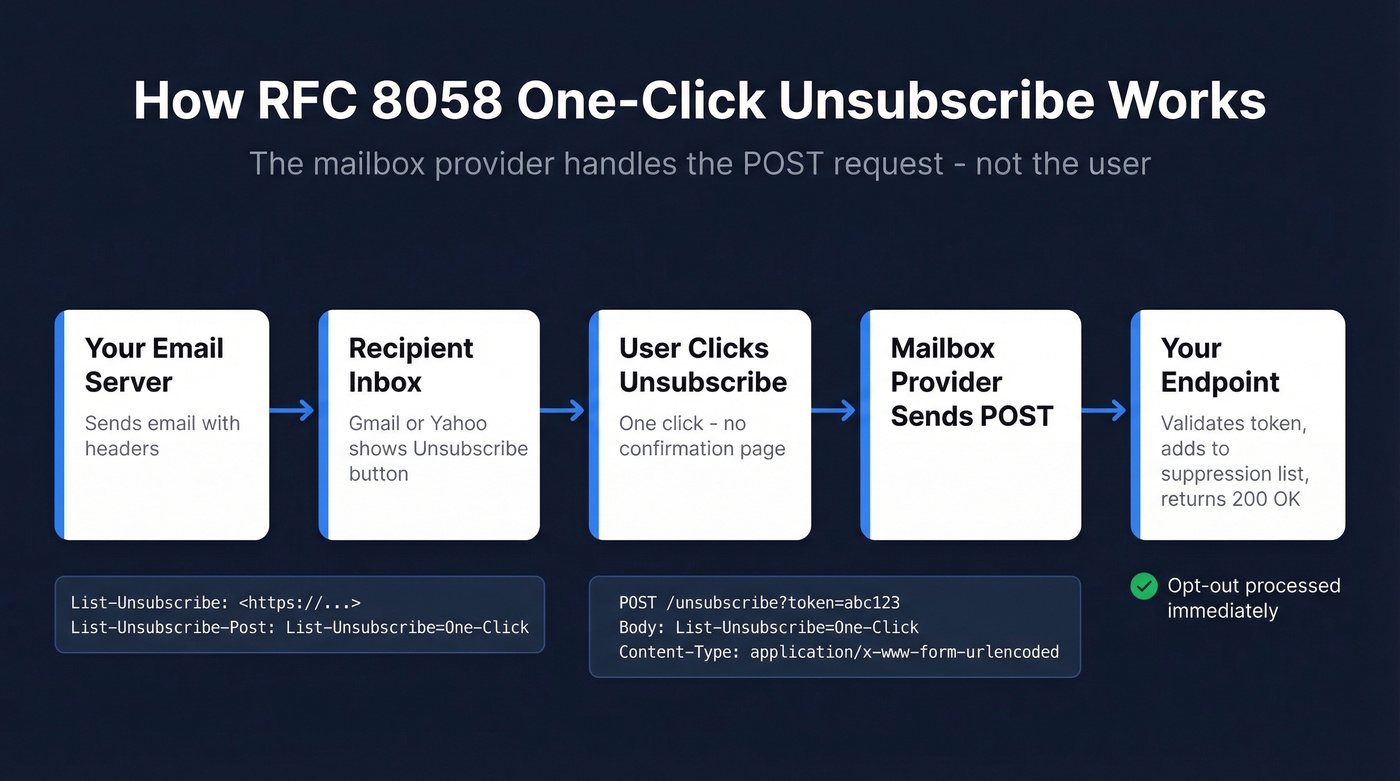
RFC 8058 defines one-click unsubscribe through a pair of email headers:
List-Unsubscribe: <https://example.com/unsubscribe?token=abc123>

List-Unsubscribe-Post: List-Unsubscribe=One-Click
The List-Unsubscribe header must contain at least one HTTPS URI. It can also include a mailto: URI, but the HTTPS one is what matters for one-click. The List-Unsubscribe-Post header must contain exactly one key/value pair: List-Unsubscribe=One-Click.
When a user clicks "Unsubscribe" in Gmail or Yahoo's interface, the mailbox provider sends a POST request to your HTTPS endpoint with Content-Type: application/x-www-form-urlencoded and the payload List-Unsubscribe=One-Click. Your endpoint validates the token, records the opt-out idempotently, and returns 200 OK. No redirects. No confirmation steps. No landing page.
GET requests show a landing page - useful for users who click the link in the email body. POST triggers the actual unsubscribe - this is what the mailbox provider sends. Your endpoint needs to handle both.
The message must have a valid DKIM signature that covers both the List-Unsubscribe and List-Unsubscribe-Post headers. This is where most implementations break. If your headers get rewritten after signing by a relay, a forwarding service, or a misconfigured mail server, the DKIM signature invalidates and the one-click signal disappears.
Three Ways to Add an Unsubscribe Link
ESP Merge Tags (The Easy Way)
If you use a major ESP, your opt-out link is probably already compliant. Most handle RFC 8058 headers automatically. Here's where to confirm:
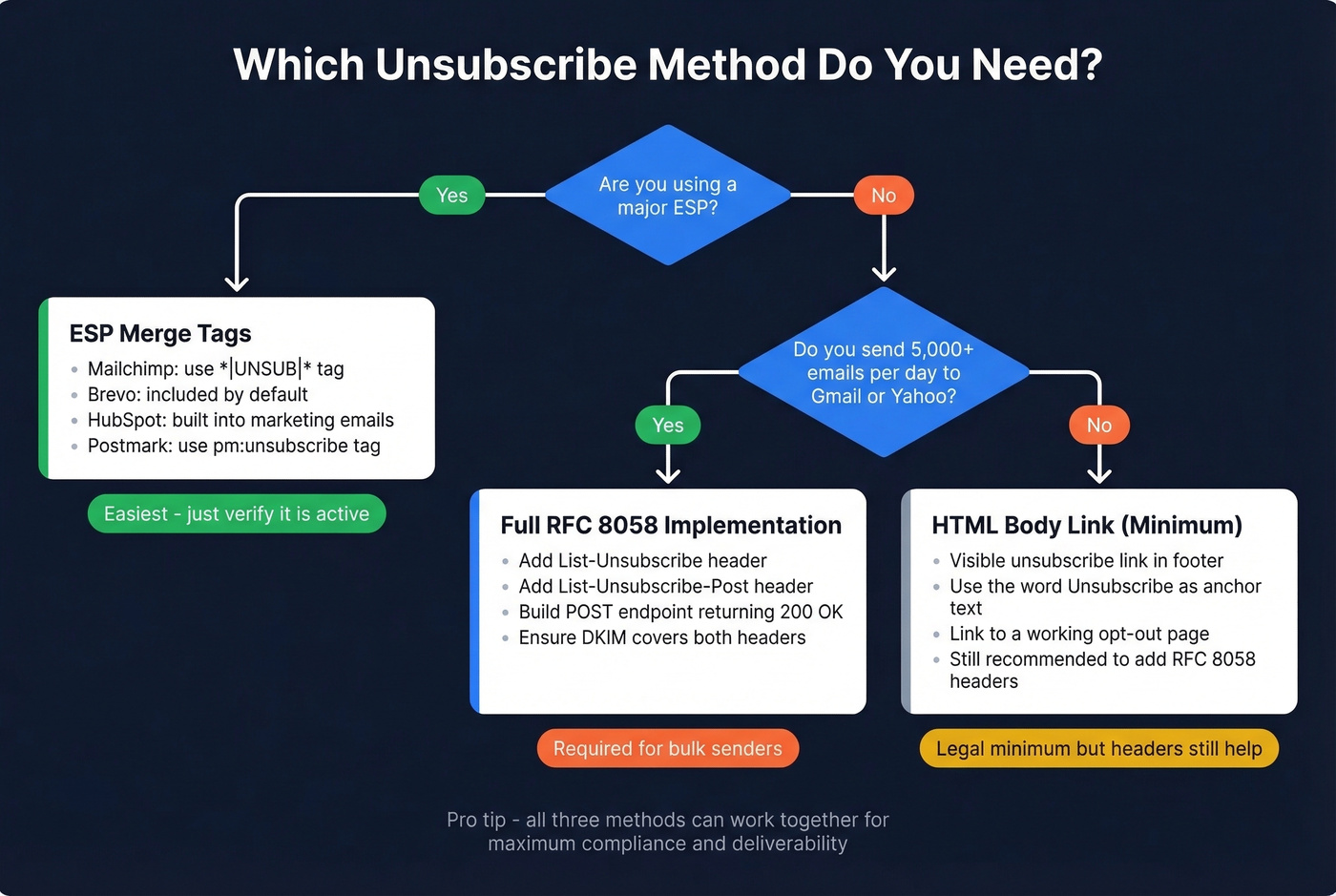
- Mailchimp: Use the
*|UNSUB|*merge tag in your template footer. If it's missing, Mailchimp adds an extra footer automatically. - Brevo: Includes unsubscribe functionality by default, and its free plan covers 300 emails/day.
- HubSpot: Includes unsubscribe links in marketing emails. Admins can manage default unsubscribe settings.
- Postmark: Use the
{{{ pm:unsubscribe }}}tag. Postmark's documentation on List-Unsubscribe headers is one of the best technical references available. - Campaign Monitor: Insert
[unsubscribe]in your template. - Kit (formerly ConvertKit): Custom link triggers handle opt-outs automatically.
Don't turn this into a project. If your ESP handles it, verify it's active and move on.
HTML Body Link (Universal)
This is the visible link in your email footer. CAN-SPAM requires a clear opt-out mechanism in the message itself, so most senders include a visible footer link even when they also support header-based one-click unsubscribe.
<p style="font-size:12px; color:#666;">
  Don't want these emails?
  [Unsubscribe](https://example.com/unsubscribe?token=abc123).
</p>
Use the word "unsubscribe" as your anchor text - not "manage preferences" as the sole option, not "click here," not some euphemism buried in gray-on-gray text. "Manage preferences" is fine as an additional option, but there must be a clear path to full opt-out.
Build Your Own Endpoint (DIY)
This is the section we wish existed when we first set up custom sending infrastructure. If you're building on SES, Resend, or raw SMTP and need to create an unsubscribe link from scratch, here's what your endpoint needs to do. The pseudocode below is language-agnostic - the logic is the same whether you're writing Node, Python, or PHP:
// Token generation (at send time)
const token = hmacSign(secret, `${recipientEmail}:${campaignId}`);
const unsubUrl = `https://yourapp.com/unsubscribe?token=${token}`;

// Endpoint handler
app.all('/unsubscribe', (req, res) => {
  const { token } = req.query;
  const email = validateAndDecodeToken(token);

  if (!email) return res.status(400).send('Invalid token');

  // Idempotent - safe to call multiple times
  addToSuppressionList(email);

  if (req.method === 'POST') {
    // One-click: mailbox provider POST - return 200 immediately
    return res.status(200).send('OK');
  }

  // GET: user clicked the link - show confirmation page
  return res.render('unsubscribed', { email });
});
Use HMAC or JWT for token generation - never pass raw email addresses in query strings. The POST handler must return 200 OK quickly, with no redirects or confirmation steps. Write to your suppression list immediately, not in a batch job.
One specific warning if you're using PHP: PHPMailer's built-in DKIM signing has been known to inconsistently include List-Unsubscribe-Post in the signature. If you're using PHPMailer with DKIM_extraHeaders, send a test email, inspect the raw headers, and verify that both List-Unsubscribe and List-Unsubscribe-Post appear in the DKIM h= tag before going live. We've debugged this exact issue for two different teams, and it's always the same root cause.

Unsubscribe links keep you compliant - but bouncing off bad emails destroys your sender reputation before anyone even sees that link. Prospeo's 98% email accuracy and 5-step verification (with spam-trap and honeypot removal) means fewer bounces, fewer complaints, and a domain that stays out of the spam folder.
Fix your data before you fix your footer. Start with 75 free verified emails.
Mistakes That Kill Deliverability
The "unsubscribe links trigger spam filters" myth needs to die. Gmail and Yahoo require easy unsubscription for bulk senders. Including one improves deliverability. Omitting one is far riskier.
If you're trying to diagnose why you're landing in spam, start with the basics of email deliverability and then work outward.
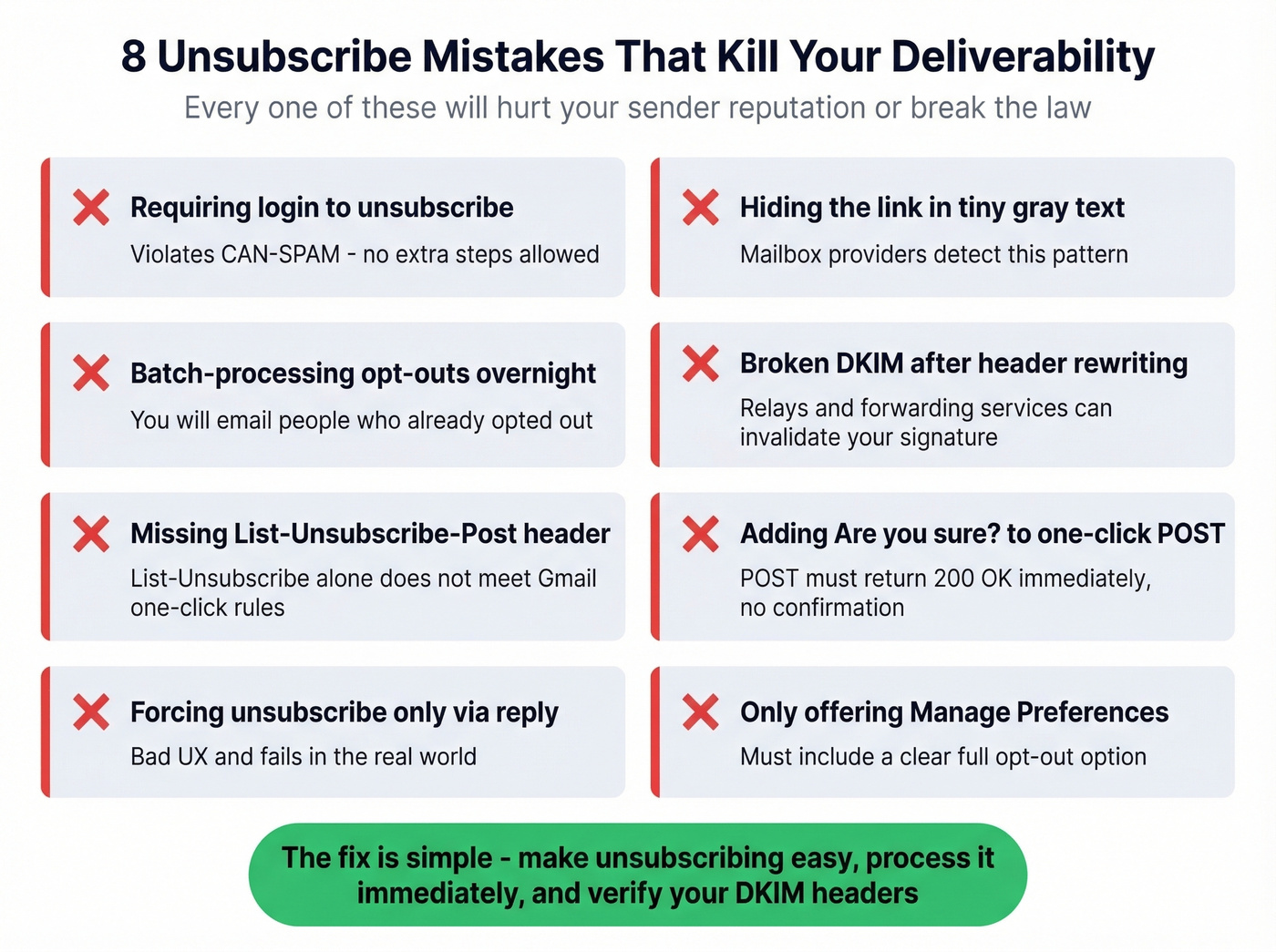
Here are the actual mistakes that hurt you:
- Requiring login to unsubscribe. CAN-SPAM prohibits requiring steps beyond replying or visiting a single webpage to opt out. A login wall violates the law.
- Hiding the link. Gray text on a gray background, 6px font, buried after three paragraphs of legal boilerplate. Mailbox providers notice this pattern.
- Batch-processing opt-outs. We've seen teams lose entire sending domains because their system processed unsubscribes in a nightly cron job, sending emails to people who already opted out. Process immediately.
- Broken DKIM after signing. Headers rewritten by a relay or forwarding service invalidate your signature. Your one-click headers become invisible to Gmail. (If you need a quick check, see how to verify DKIM is working.)
- Missing
List-Unsubscribe-Post. HavingList-Unsubscribewithout the POST header doesn't meet Gmail's one-click requirement. Close only counts in horseshoes. - Adding a confirmation step to one-click. The POST endpoint must process the opt-out and return
200 OK. No "Are you sure?" page. - Forcing unsubscribe only via reply. Bad UX and it fails in the real world. Give people a working link.
- Using "manage preferences" as the only path. You can offer preferences, but there must be a clear option to stop all messages.

Unsubscribe Links in Cold Email
Two common concerns in cold outreach: does an unsubscribe link make outreach "look automated," and does it trigger spam filters?
Both fears are backwards.
Without an opt-out mechanism, frustrated recipients hit the spam button instead - and spam complaints destroy sender reputation far faster than unsubscribes do. CAN-SPAM requires an opt-out mechanism in all commercial email, including cold outreach. Include it.
Now here's the hot take most cold email guides won't give you: the unsubscribe link isn't your deliverability problem. Emailing addresses that don't exist is. Bounces and spam traps destroy sender reputation faster than anything else. A compliant opt-out link paired with a verified email list is the baseline - skip either one and you're building on sand. Prospeo catches invalid addresses and spam traps before they hit your sequences, with 98% email accuracy so you're sending to real inboxes instead of dead endpoints.
If you're building outbound at scale, pair this with a real cold email marketing playbook and keep an eye on email bounce rate benchmarks.
The consensus on r/coldemail lines up: clean lists and compliant opt-outs are table stakes, not competitive advantages.
Preference Centers
Not every subscriber who clicks "unsubscribe" actually wants to disappear. Many just want fewer emails, or different emails. A well-designed preference center can reduce full unsubscribes by up to 30% by offering an "opt-down" instead of a full opt-out.
Opt-down means letting subscribers choose between daily, weekly, or monthly frequency, pick content categories, or pause emails for 30 days. The key is offering these choices without hiding the full unsubscribe option. CAN-SPAM requires that a complete opt-out path exists - you can't force someone through a preference center with no way to stop all messages.
For teams sending more than one type of email, a preference center is worth building. Skip it if you only send one newsletter or one campaign type - it'll just add friction for no benefit.
If you want to reduce unsubscribes without hurting performance, it also helps to tighten targeted email campaigns and improve email copywriting.
Compliance Checklist
Pin this. Run through it before every campaign launch.
- Visible unsubscribe link in email footer using the word "unsubscribe"
List-Unsubscribeheader with HTTPS URIList-Unsubscribe-Post: List-Unsubscribe=One-Clickheader present- DKIM signature covers both headers
- POST endpoint returns
200 OK- no redirects, no confirmation - Opt-outs processed within 2 business days for bulk senders, 10 for CAN-SPAM
- Unsubscribe mechanism functional for at least 30 days after sending
- No login, fee, or extra info required to opt out
- Valid physical postal address in message
- Spam complaint rate below 0.1%
- Email list verified and bounce rate under 2%
Your headers are set and your opt-out flow is compliant. Now make sure your list is clean - bounces undo all the compliance work you just did. If you're scaling volume, monitor email velocity so you don't spike complaints.
You're building unsubscribe infrastructure to stay under Gmail's 0.3% spam complaint threshold. But if 20-35% of your emails bounce because your data provider refreshes every 6 weeks, you'll hit spam filters anyway. Prospeo refreshes every 7 days and delivers sub-4% bounce rates - ask the teams that tripled their pipeline on it.
Stop engineering around bad data. Start with emails that actually land.
FAQ
Do unsubscribe links hurt deliverability?
No - they improve it. Gmail and Yahoo require easy unsubscription for bulk senders, and a compliant opt-out link reduces spam complaints. Omitting one forces frustrated recipients to hit the spam button, which damages sender reputation far more than an unsubscribe ever will.
One-click vs. two-click unsubscribe?
One-click uses the List-Unsubscribe-Post header to process the opt-out via a single POST request - no confirmation page. Two-click shows a landing page first. Gmail's 2026 bulk-sender requirements treat RFC 8058 one-click as the compliance standard; two-click doesn't qualify.
Do cold emails need an unsubscribe link?
Yes. CAN-SPAM requires an opt-out mechanism in all commercial email, including cold outreach. Including one also improves deliverability by giving recipients an alternative to the spam button. Pair it with verified contact data to keep bounce rates under 2%.
How fast must I process unsubscribes?
Gmail's bulk sender rules require processing within 2 business days; CAN-SPAM allows up to 10. Best practice is immediate - your POST endpoint can write to a suppression list in milliseconds, and delays risk sending to people who already opted out.