

How to Reverse Email Lookup: The Complete 2026 Guide
Finding someone's work email used to mean guessing formats and praying. Now the harder problem is the reverse: you've got an email address, and you need to know who's behind it - and whether it's worth trusting. Knowing how to reverse email lookup the right way saves hours of dead-end searching and keeps you out of the bait-and-switch traps that dominate this space.
What a Reverse Email Lookup Actually Returns
Reverse email lookup isn't one thing. It's three different outputs that people constantly mix together:
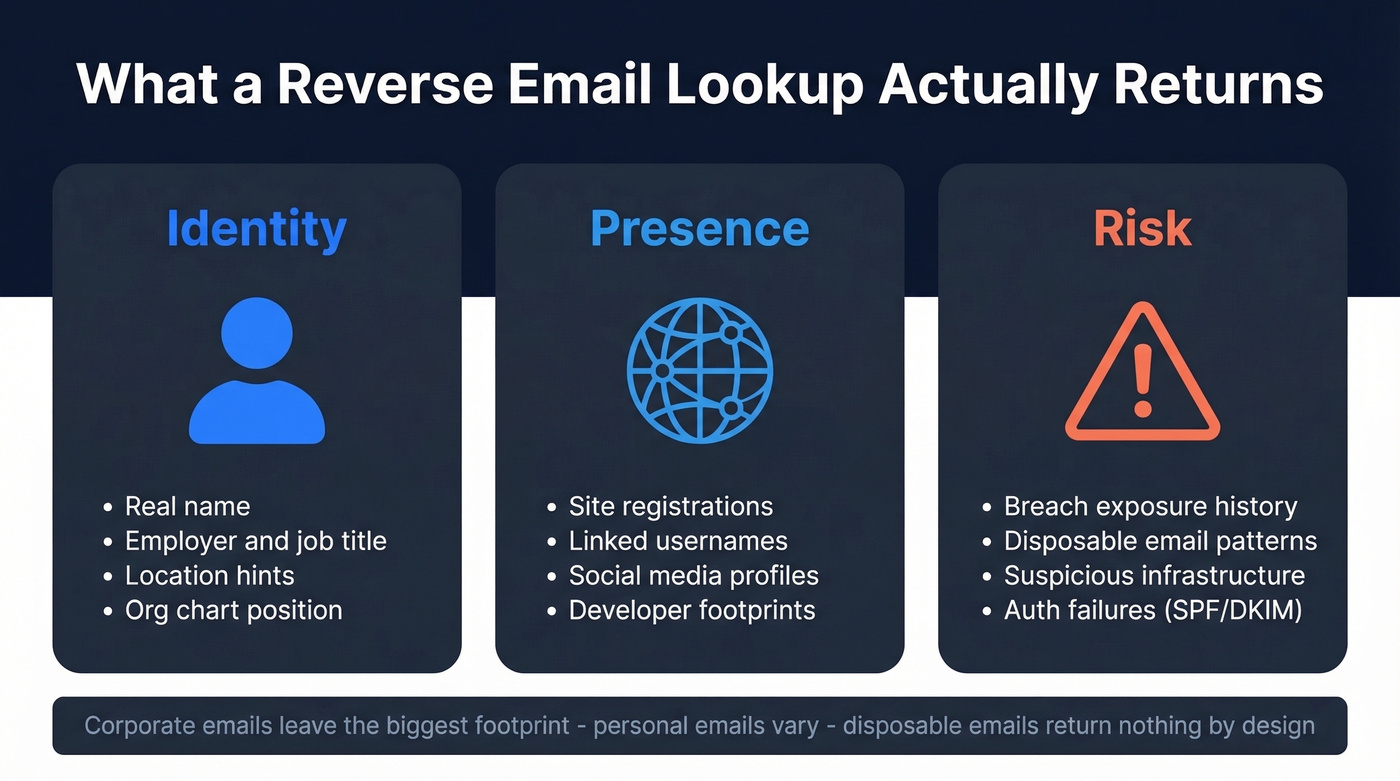
- Identity: a real name, employer, role, location hints.
- Presence: where that email is registered online, plus usernames tied to it.
- Risk: breach exposure, disposable email patterns, suspicious infrastructure.
There are 4B+ email addresses in use globally, so results vary wildly by email type. Corporate emails leave a bigger professional footprint because they're tied to domains, org charts, and public-facing content. Personal inboxes can be locked down tight. Disposable emails return nothing by design.
What You Need (Quick Version)
Use the path that matches your goal:
- Investigating one suspicious email: Google dork it (free) + run Holehe (free). Fastest "who/where" signal available.
- Quick identity check without installing anything: Epieos' free tier is the easiest browser-based starting point when you need to research an email address fast.
- Sales team enriching prospect emails at scale: Prospeo gives 75 free verified emails/month (no credit card) and turns an email into a usable contact profile.
The "Free" Lookup Trap
Here's the thing: "free reverse email lookup" is one of the scammiest phrases on the internet.
A Reddit post in the OSINT community calls out the bait-and-switch pattern directly - the site looks free until the moment you click "view report," then you hit a paywall for the only part you actually wanted. We've watched teams waste an hour hopping between these sites, only to end up with a PDF full of fluff. Watch out for "Top 5 free tools" posts on Reddit and Medium that read like ads. They rarely include real workflow details or accuracy notes.
The cleanest example is Spokeo's pricing funnel: $0.95 trial that auto-renews at $29.95/mo. That's not inherently evil, but it's frustrating when you thought you were doing a quick lookup and suddenly you're managing subscriptions.

Free lookup tools waste your time with paywalls and fluff PDFs. Prospeo turns a bare email into a verified contact profile - name, title, company, direct dial - with 98% email accuracy and 50+ data points returned. 75 free lookups/month, no credit card.
Skip the bait-and-switch. Get real data from real emails.
Manual OSINT Methods That Work
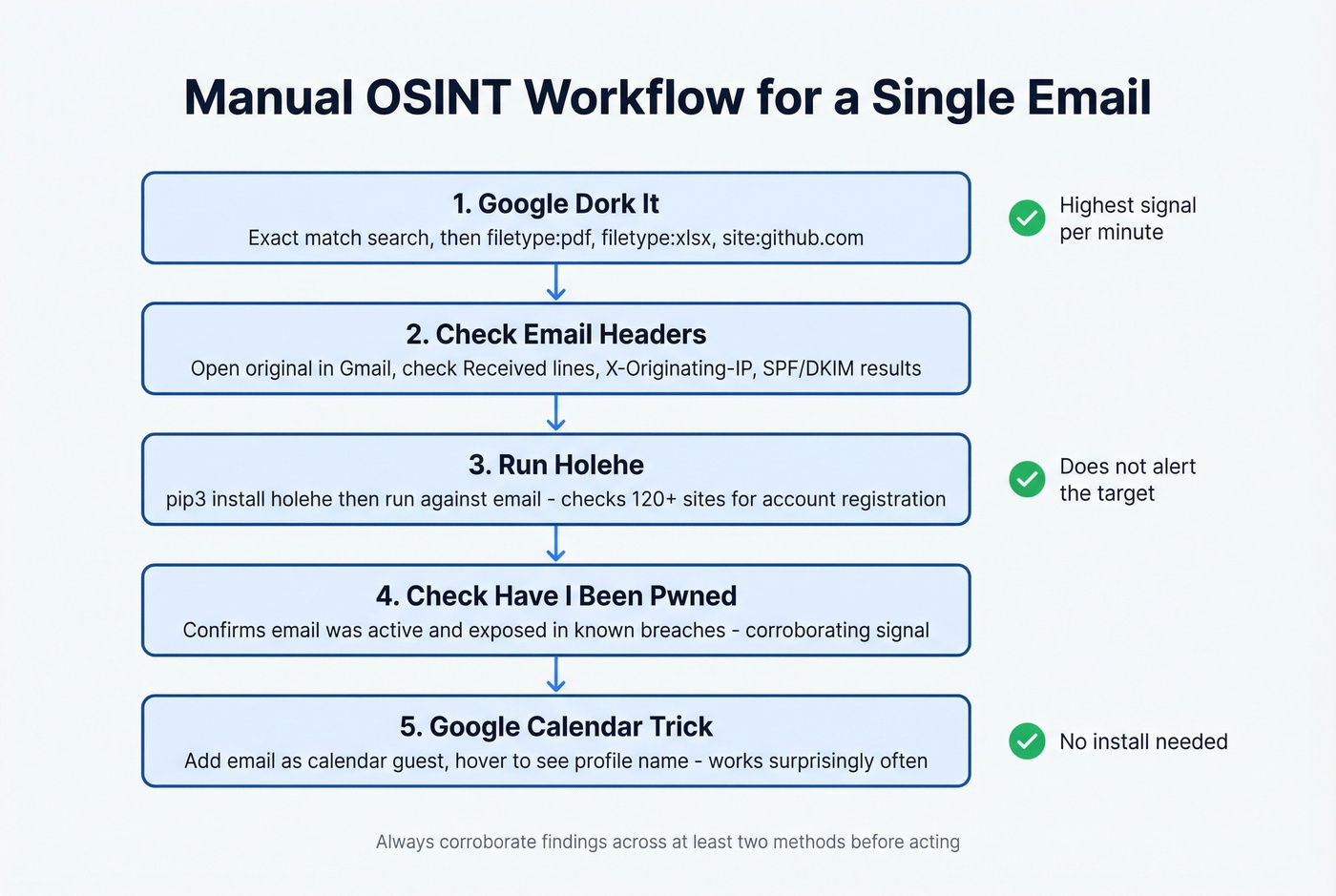
Manual OSINT is still the highest signal-per-minute approach for single-email investigations. It's also the best way to validate tool output, because lookup tools can be wrong, stale, or overly confident.
Google Dorking
Start with an exact match search, then pivot into file types and platforms. You're looking for leaks, public docs, commits, conference PDFs, and random paste sites that expose identity.
"email@example.com"
Now pivot into documents - this is where real names and signatures show up:
"email@example.com" filetype:pdf
"email@example.com" filetype:xlsx
"email@example.com" filetype:txt
Then check developer footprints:
site:github.com "email@example.com"
If you get a hit on a repo commit, you often get a username, a display name, and sometimes an org. That's usually enough to jump to a company site and confirm the person exists. One more practical trick: search the domain plus the email's local part (before the @). People reuse handles constantly.
Twitter/X obfuscated email search: People often spell out email addresses on social media to avoid scrapers. Search for patterns like [name] dot [domain] at to catch emails written as "john dot smith at acme dot com." It works more often than you'd expect.
Email Header Analysis
If the email came to you - phishing, vendor outreach, weird inbound - the header gives you "sanity check" signals. It won't magically reveal a home address, but it exposes infrastructure inconsistencies.
In Gmail: open the message, click More (⋮), then Show original.
Look for:
Received:lines (mail hops and sending servers)X-Originating-IP:(sometimes present, sometimes stripped)
Take the IP and run a GeoIP lookup via MaxMind's database. If the sender says "I'm in Austin" but the originating infrastructure geolocates to a totally different region, that's a flag worth investigating through other methods. Check authentication results too (SPF/DKIM/DMARC). A legit company can still misconfigure these, but consistent failures plus a weird domain is a bad combo.
Account Enumeration with Holehe
Holehe is the most useful free OSINT tool for email-based investigations because it answers a very specific question: is this email registered on common services? It probes forgot-password and similar account-recovery flows across 120+ sites and interprets the responses.
Install it:
pip3 install holehe
Run it:
holehe email@domain.com
You'll see a list of services with exists: True/False, plus occasional extras like rate-limit flags or partially masked recovery hints. The key operational detail: it doesn't alert the target email during checks, which is why investigators prefer it.
Two caveats from the real world. First, Holehe modules drift - when sites change their flows, you'll see false positives or dead checks. Reddit threads in r/OSINT call out maintenance issues, and one alternative people mention is user-scanner. Second, treat Holehe as a presence signal, not identity proof. If it says "exists on X," validate with at least one other pivot.
Breach Check with Have I Been Pwned
After running Holehe, check Have I Been Pwned to see if the email appears in known data breaches. This won't reveal identity on its own, but it confirms the email has been active and exposed - useful context for risk assessment and a strong corroborating signal alongside your other findings.
Google Calendar Trick
This one's weird, but it works often enough to keep in your toolkit. Create a Google Calendar event, add the target email as a guest, then hover the guest entry. Depending on privacy settings, you'll see a profile name attached to that email. When it hits, it's a fast way to see who owns an email address without installing anything. Corroborate the name elsewhere before acting on it.
Best Reverse Email Lookup Tools
Manual methods are great for one-offs. Tools are what you use when you need speed, repeatability, or enrichment beyond "this email exists on a few sites."
Epieos
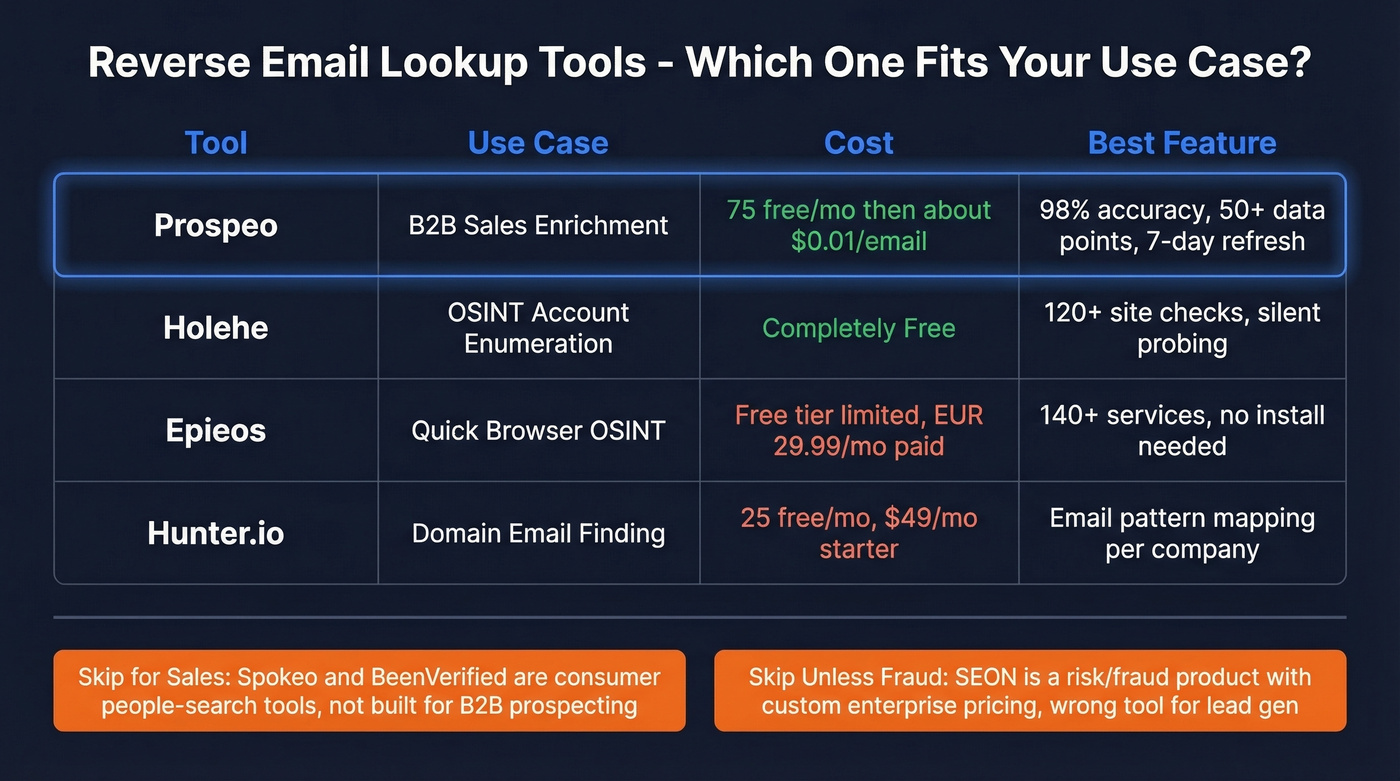
Epieos is the best "no install" OSINT-style option for quick footprint discovery in a browser. It runs checks across 140+ services and its free tier covers a small subset like Google and Skype account data.
The paid Osinter plan at EUR 29.99/mo unlocks 30 full-access requests/month. The tradeoff is coverage depth: if the target has a small online footprint, Epieos can return minimal data, and Reddit threads call that out directly.
Prospeo
OSINT tools tell you where an email shows up. Prospeo is what you use when you need to turn a bare email into a complete B2B contact profile: name, title, company, and direct contact data you can actually work with.
The database covers 300M+ professional profiles with 98% email accuracy, and enrichment returns 50+ data points per contact. You can enrich thousands of emails in a single CSV upload, and the data refresh cycle is 7 days - most providers refresh closer to 4-6 weeks, which means you're often working with stale records without realizing it. Free tier includes 75 verified emails/month, and paid plans work out to roughly $0.01/email.

Hunter.io
Hunter is the "classic" B2B email tool. It's not an OSINT footprint mapper - it's a domain-based email finder and verifier that excels at mapping a company's email patterns and finding additional contacts once you've got the domain nailed. You get 25 free searches/month, and paid starts at $49/mo for Starter. Where it shines is domain search: if you need to find someone's email at a specific company, Hunter maps the pattern and surfaces verified addresses fast. If you're comparing options, see our breakdown of Hunter alternatives.
Skip SEON Unless You're in Fraud Prevention
SEON is a fraud/risk product that happens to include reverse email lookup as part of a broader risk graph. If you're assessing suspicious signups, chargeback risk, or marketplace abuse, it's excellent. If you're building a prospect list, it's the wrong tool entirely. Their demo experience is limited to 5 lookups/day, and paid plans run custom enterprise pricing.
Spokeo & BeenVerified: Consumer-Grade Only
These are consumer people-search tools, full stop. They're best when the email is personal and you're trying to connect it to public records, addresses, or household-level data. Spokeo runs the classic $0.95 trial that auto-renews at $29.95/mo, and BeenVerified is $29.99/month. Don't use them for "who's the VP of RevOps at this company?" They weren't built for that question.
Tool Comparison
| Tool | Best For | Free Tier | Paid Starting Price | Key Strength |
|---|---|---|---|---|
| Holehe | Account enumeration | Yes | $0 | 120+ site checks |
| Prospeo | B2B enrichment | 75 emails/mo | ~$0.01/email | 98% email accuracy |
| Epieos | Browser OSINT checks | Limited | EUR 29.99/mo | 140+ services |
| Hunter.io | Domain email finding | 25/mo | $49/mo | Domain search |
| SEON | Fraud/risk checks | 5/day demo | Custom enterprise | Risk signals |
| Spokeo | Consumer lookup | Trial | $29.95/mo | Public records |
| BeenVerified | Consumer lookup | No | $29.99/mo | People search |
Using Reverse Lookup for Sales Enrichment
Sales is where reverse email lookup gets misunderstood. OSINT tools answer "where does this email exist online?" SDRs need "who is this, what do they do, and how do I reach them this week?" If you're building a repeatable motion, start with proven sales prospecting techniques and a clear lead generation workflow.
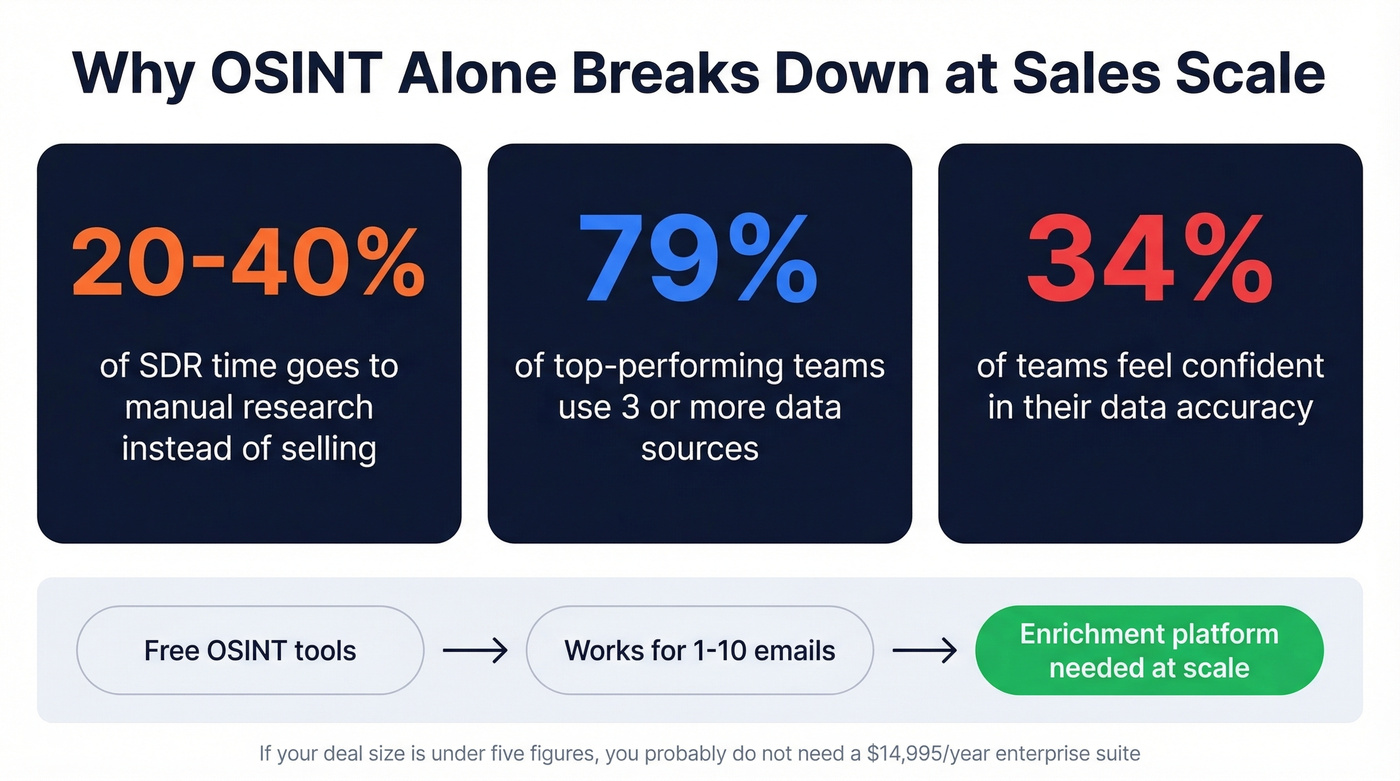
Let's be honest: if your average deal size is under five figures, you almost certainly don't need ZoomInfo-level data at $14,995/year. A leaner enrichment tool with high accuracy will outperform an enterprise suite you're only using at 15% capacity. For context, Apollo starts at $49/mo, RocketReach at $99/mo, and Lusha at $49/mo - so the market has options at every price point.
That gap between OSINT and sales enrichment is why prospecting gets slow. Benchmarks show 20-40% of SDR time goes to manual research instead of selling, and 79% of top-performing teams use 3+ data sources while only 34% feel confident in data accuracy. We've watched teams try to brute-force this with spreadsheets and free OSINT, and it always collapses under volume.
Here's the workflow that actually holds up:
- Start with the emails you already have - inbound leads, event lists, scraped signups, old CRM exports.
- Bulk enrich to get verified name/title/company plus phones where possible. The goal is to attach a real person to every email address in your pipeline. (More on choosing providers: data enrichment services and lead enrichment.)
- Push clean records into your sequencer and CRM, then run sequences with confidence your deliverability won't get torched. If you need the deliverability side, use an email deliverability guide and keep an eye on email bounce rate.
AI-powered enrichment and tighter privacy regulations are reshaping this space fast. Tools that can't prove data freshness and compliance are going to lose trust quickly - weekly refresh cycles and transparent sourcing aren't nice-to-haves anymore.
Manual OSINT works for one-off investigations. But when your sales team needs to enrich hundreds of prospect emails into actionable contacts, you need infrastructure - not Google dorks. Prospeo's enrichment API returns verified names, titles, companies, and direct dials at a 92% match rate for roughly $0.01 per email.
Turn every email in your pipeline into a complete contact profile.
When Reverse Lookup Fails
Reverse lookup fails for predictable reasons. Don't overthink it - just switch tactics.
Disposable emails like Guerrilla Mail and Temp Mail have no stable identity to find. If you control the system, look for the signup source IP or device signals instead.
Catch-all domains are the most common false-positive trigger. The email technically "exists" but there's no guarantee a real inbox sits behind it. Enrich at the company level, then find confirmed individuals via domain search.
Role-based addresses like info@, support@, and sales@ are shared inboxes with no single owner. You can't tie them to a specific person. Map the org chart from the company site and route to a real human.
Aliases and forwarders mean the visible email isn't the "root" identity. Pivot on the domain, WHOIS, and any names you can extract from signatures or docs.
When you do get a name, your next best move is usually boring: check the company website, press releases, and professional profiles to confirm the person's role and timeline. If you're operationalizing this for outbound, pair it with solid contact management software so the data doesn't rot in spreadsheets.
FAQ
Is reverse email lookup legal?
Reverse email lookup is generally legal when using publicly available data and legitimate tools, but GDPR/CCPA require a lawful basis to process personal data. Don't use results for harassment or stalking. B2B enrichment platforms designed for sales workflows are typically GDPR-compliant by design, which matters for outreach at scale.
Can you reverse lookup a Gmail or Yahoo address?
Results are usually thinner than corporate emails because personal accounts expose less public metadata. Holehe checks registrations across 120+ services, and Epieos surfaces limited Google account signals. For personal inboxes, combining Google dorking with Holehe gives you the best shot at useful results.
What's the difference between reverse email lookup and email verification?
Reverse email lookup identifies who's behind an address and where it appears online. Email verification checks deliverability and filters risky addresses like spam traps. The best workflow combines both: verify the address is deliverable, then enrich it into a usable contact profile with name, title, and company data.
How do I find out who owns a specific email address?
For corporate emails, a B2B enrichment tool returns the owner's name, title, and company in seconds. For personal emails, start with a Google dork search, run Holehe for account enumeration, and try the Google Calendar trick. Combining two or three methods gives you the highest-confidence result.