

How to Rush Someone Politely in an Email Without Burning the Relationship
It's Thursday afternoon. The cursor's blinking. You need an answer by tomorrow, and the person who has it hasn't replied in four days. You type "Just checking in..." and immediately delete it. Because you know that email won't work - and a Babbel survey of 2,000 U.S. office workers found that 88% of people have regretted an email's tone right after hitting send. Even worse, 28% say an email has actually hurt their career.
Knowing how to rush someone politely in an email is a genuine skill. It comes down to a system, not a single magic phrase.
The Five Rules (Quick Version)
Before you write another follow-up, internalize these:
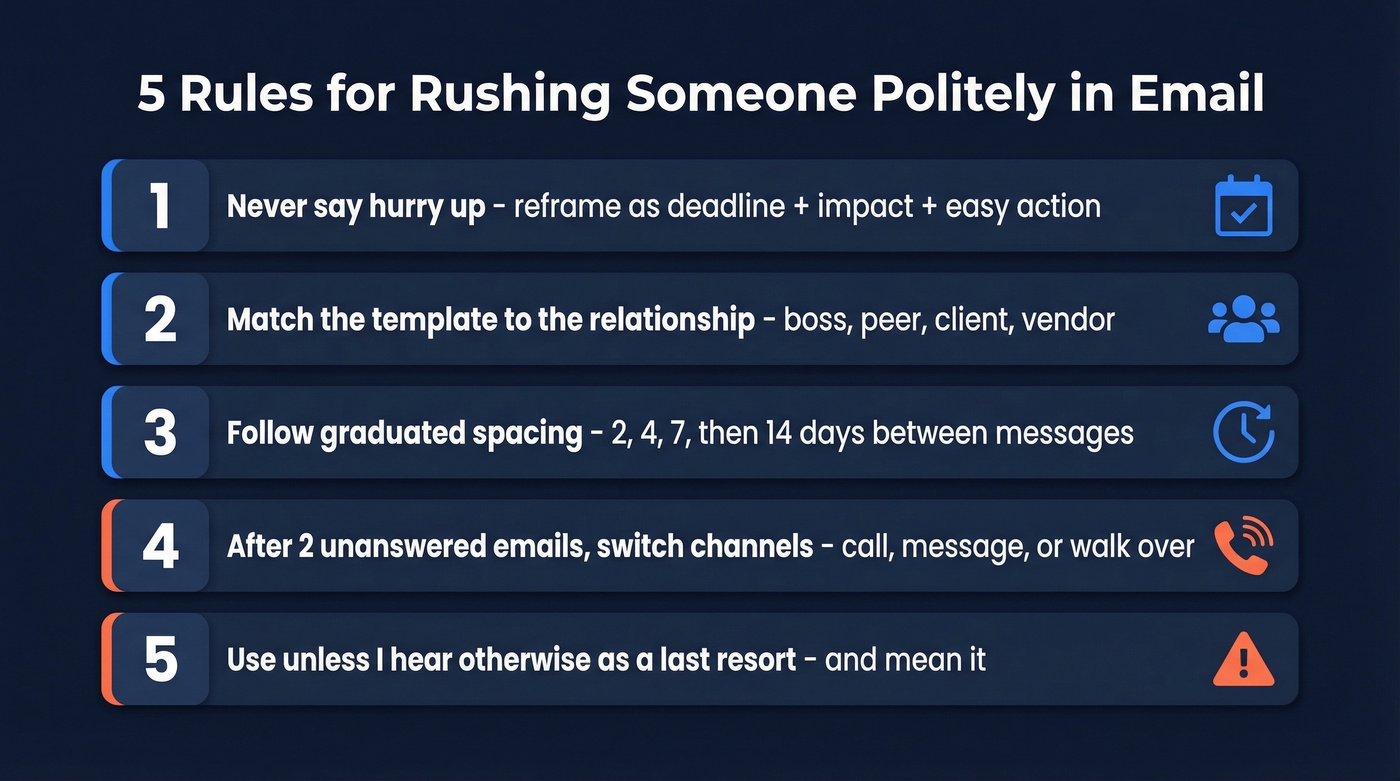
- Never say "hurry up." Reframe every request as deadline + impact + easy response.
- Match the template to the relationship. Boss, peer, client, and vendor emails need different tones.
- Follow graduated spacing. 2, 4, 7, then 14 days between messages is a strong default for cold follow-ups.
- After two unanswered emails, switch channels. Call, message, or walk over.
- Use "unless I hear otherwise" as a last resort - and mean it.
Why "Hurry Up" Never Works
Telling someone to hurry up doesn't make them move faster. It makes them resent you. The principle is straightforward - don't tell people to prioritize your request; give them the information they need to prioritize it themselves.
That means every urgent email needs three elements: a specific deadline, the business impact of missing it, and an easy action the recipient can take right now.
The phrase "at your earliest convenience" is the worst offender. It sounds polite, but it communicates zero urgency. Replace it with a date. "Could you review this by Thursday at 3 PM?" is both more respectful and more effective because it tells the recipient exactly how to plan their day.
Another tactic that works surprisingly well: state how long the task will take. "This needs a 2-minute review" removes the mental friction of an unknown time commitment. People procrastinate on tasks they can't size. Give them the size.
Here's the thing - there's a critical distinction between urgency and importance. A server outage at 2 AM is urgent AND important. Your request for updated headshots is neither. Before you write, ask yourself: is this urgent because of external constraints, or because I didn't plan ahead? That answer should shape your entire tone.
Polite Rush Email Templates
You don't need 19 templates. You need the right one for your situation. Use this table to calibrate before writing:
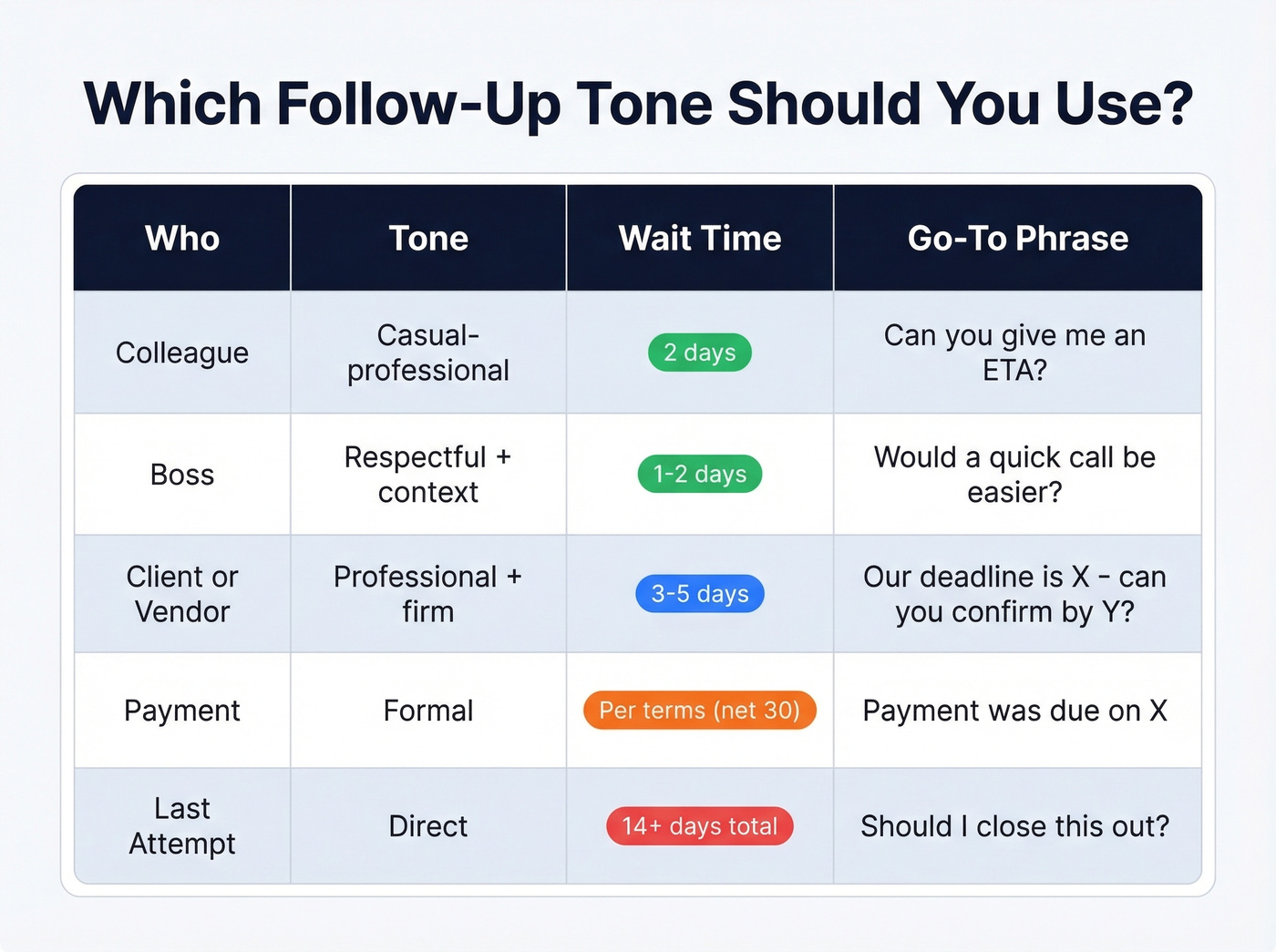
| Scenario | Tone | Wait Before Sending | Key Phrase |
|---|---|---|---|
| Colleague | Casual-professional | 2 days | "Can you give me an ETA?" |
| Boss | Respectful + context | 1-2 days | "Would a quick call be easier?" |
| Client/Vendor | Professional + firm | 3-5 days | "Our deadline is [date] - can you confirm by [date]?" |
| Payment | Formal | Per terms (net 30) | "Payment was due [date]" |
| Last attempt | Direct | 14+ days total | "Should I close this out?" |
Each template below stays under 120 words - long enough to provide context, short enough to actually get read.
Following Up With a Colleague
Subject: Quick check - [Project] status?
Hi [Name],
I know you've got a lot going on. Just wanted to check in on the [deliverable] - do you have an ETA? If something's blocking you, happy to jump on a quick call and help sort it out.
The client-facing deadline is [date], so I'd ideally need your piece by [date minus buffer].
Thanks!
Why this works: It acknowledges their workload, offers help instead of pressure, and anchors the request to an external deadline - so the urgency isn't coming from you, it's coming from the situation.
Following Up With Your Boss
Subject: [Reply needed] Input on [Topic] - 2-min review
Hi [Name],
Wanted to surface this before [deadline/meeting]. Here's the quick version:
- Option A: [one sentence]
- Option B: [one sentence]
A yes/no on which direction works, or I can grab 5 minutes on your calendar if it's easier to talk through. Happy to go with Option A if I don't hear back by [date].
Why this works: Bosses are drowning in email. Giving them two options and a default action means they can respond in five seconds - or not respond at all and still move things forward.
Following Up With a Client or Vendor
Subject: [Project] - confirmation needed by [date]
Hi [Name],
Following up on my [date] email about [topic]. Our internal deadline for [next step] is [date], and I'll need your confirmation by [date minus 2 days] to keep things on track.
If anything's changed on your end, let me know and we'll adjust. Otherwise, I'll plan on the original scope.
Payment or Invoice Reminder
Subject: Invoice #[number] - payment due [date]
Hi [Name],
Quick note that Invoice #[number] for [amount] was due on [date]. I've reattached it here for convenience.
Could you confirm when payment will be processed? If there's an issue with the invoice, I'm happy to sort it out. Per our agreement, a [late fee / next step] applies after [grace period date].
Proposal Awaiting Signature
Subject: [Company] agreement - ready for signature
Hi [Name],
Reattaching the [proposal/contract] we discussed on [date]. Once signed, we can [specific next step - kick off onboarding, schedule implementation, etc.].
Is there anything holding this up? Happy to hop on a call if you'd like to walk through any details. I'll plan to follow up [date] if I haven't heard back.
Meeting Confirmation
Subject: Confirming our [date] meeting?
Hi [Name],
Just confirming we're still on for [day, date, time, timezone]. Let me know if the time still works or if we need to shift.
Time-Sensitive Deadline
Subject: [Project] deadline: [date] - action needed
Hi [Name],
Quick flag: the [deliverable/decision] deadline is [date]. If we miss it, [specific consequence - delayed launch, lost slot, penalty, etc.].
I need [specific action] from you by [date minus buffer]. This should take about [time estimate]. Let me know if there's a blocker.
The "Breakup" Email
Subject: Should I close this out?
Hi [Name],
I've followed up a few times on [topic] and haven't heard back. Totally understand if priorities have shifted.
Should I close this out on my end? If you'd like to revisit later, just let me know - happy to pick it back up whenever timing works.
The implied finality creates urgency without any pressure. Nobody wants to be the person who let something slip through the cracks.
Before and After: A Quick Reality Check
Most people instinctively write something like this:
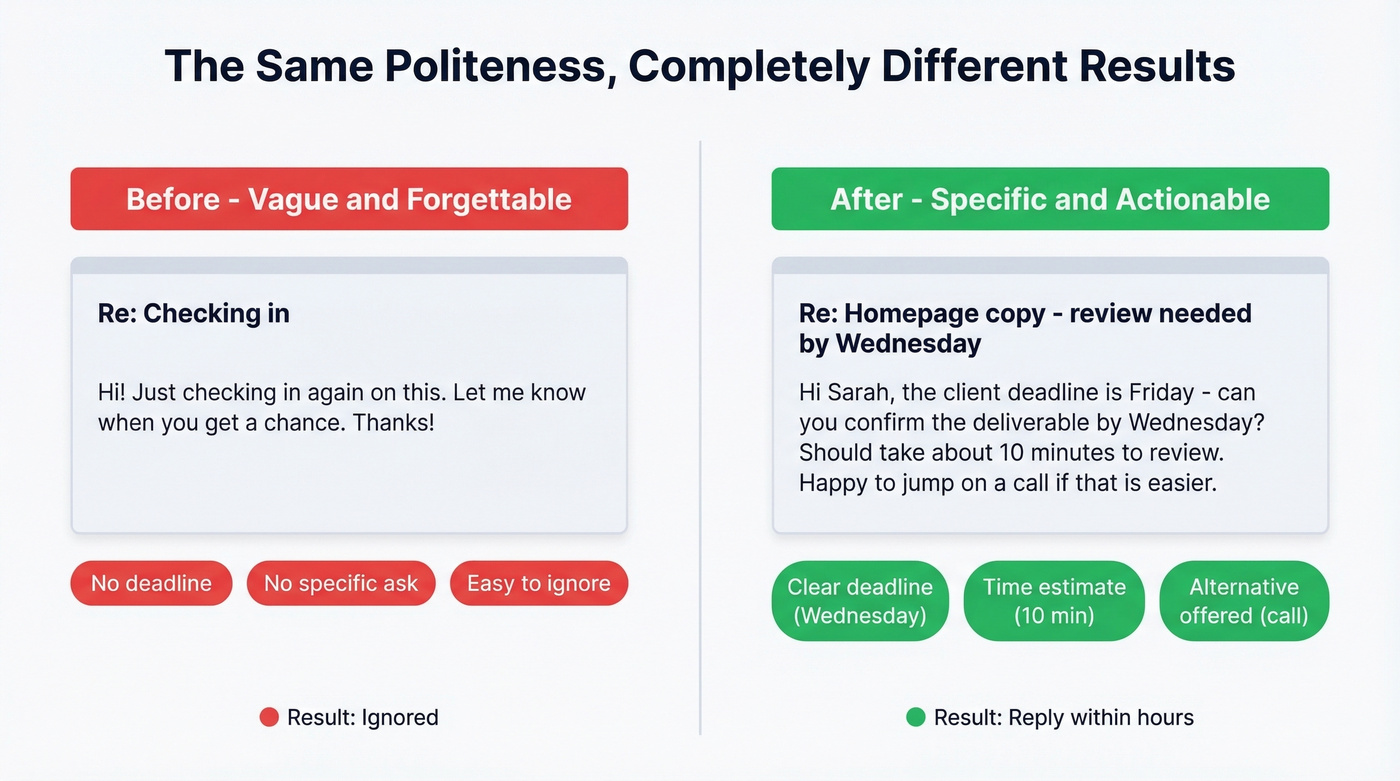
"Hi! Just checking in again on this. Let me know when you get a chance. Thanks!"
That email is polite, forgettable, and easy to ignore. Now compare:
"Hi [Name], the client deadline is Friday - can you confirm the deliverable by Wednesday? Should take about 10 minutes to review. Happy to jump on a call if that's easier."
Same politeness. Far more effective. The difference is specificity.
Timing Your Follow-Ups
Timing matters as much as wording. A Belkins study of 16.5M emails found that the sweet spot is one initial email plus one follow-up, producing roughly 8% reply rates. Each additional follow-up has diminishing returns, and sending four or more emails triples spam complaint rates.
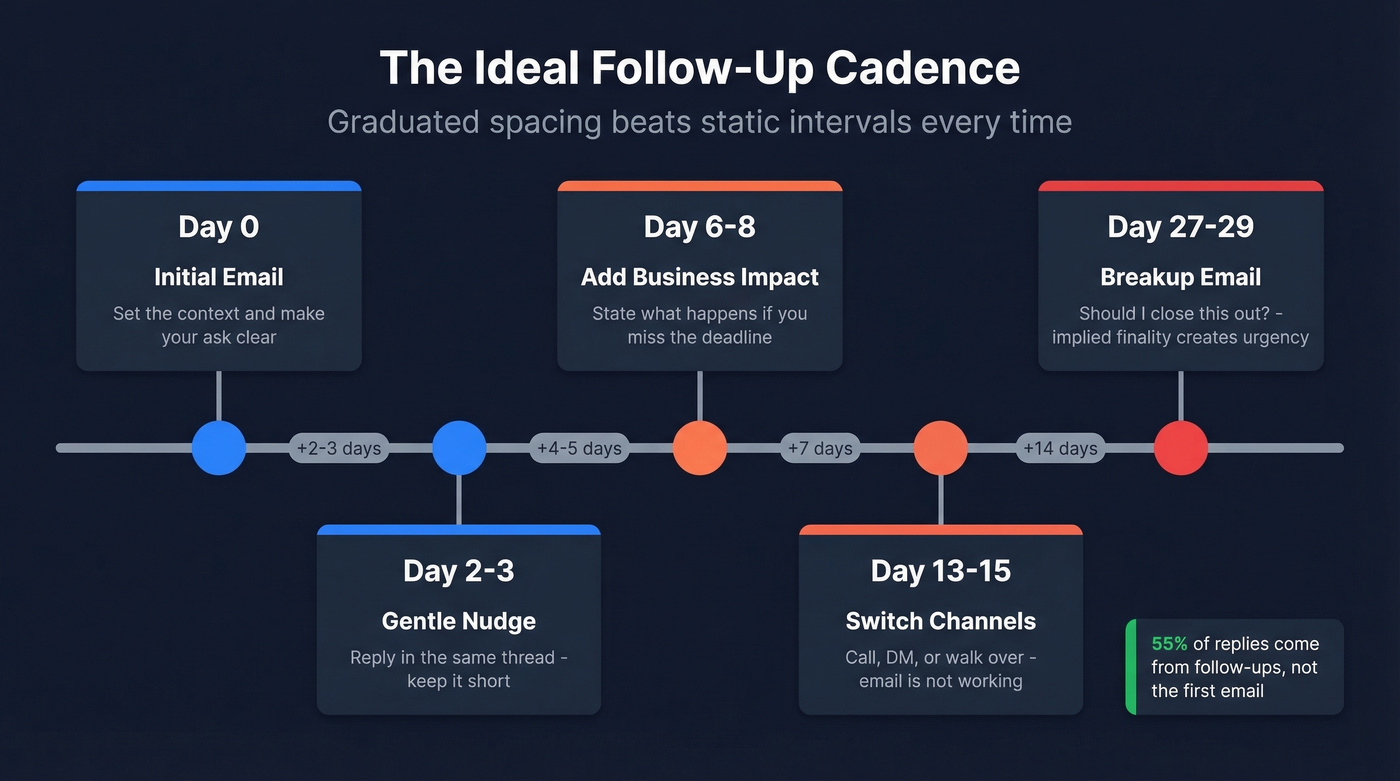
The best send window for B2B emails is Tuesday through Thursday, 9-11 AM in the recipient's local time zone. And here's a stat that should change how you think about follow-ups: 55% of cold email replies come from follow-ups, not the initial message.
Use graduated spacing rather than static intervals. Sending every two days looks automated and can hurt deliverability. We've found this cadence works well:
- Day 0: Initial email
- Day 2-3: First follow-up (gentle nudge)
- Day 6-8: Second follow-up (add business impact)
- Day 13-15: Third follow-up (consider switching channels)
- Day 27-29: Final attempt or breakup email
For internal emails, compress the timeline. A colleague or boss should hear from you within 1-2 business days. External contacts - clients, vendors, partners - get 3-5 business days before the first nudge.
If you want more plug-and-play options, borrow a few proven follow-up templates and adapt the tone to your relationship.

The best way to avoid chasing people? Reach the right person with the right email the first time. Prospeo's 98% verified emails mean fewer bounces, fewer awkward follow-ups, and faster responses.
You won't need a breakup email if your first one actually lands.
How to Ask for an Update Politely
Sometimes you're not rushing a deadline - you just need to know where things stand. This is a slightly different skill than pushing for a deliverable, because the goal is information rather than action.
Lead with context, not with the ask. Instead of "Any updates?" try "Hi [Name], wanted to check on the [project] status so I can plan next steps on my end - do you have a quick update?" This frames the request around your planning needs rather than their responsiveness, which removes any implied criticism.
If you've already sent one update request, your second message should add new information - a shifted timeline, a stakeholder question, or a decision that depends on their input. Repeating the same ask with different words signals impatience, not professionalism.
If you're doing this in a sales context, it helps to treat follow-ups as part of your sales communication system, not a one-off message.
When Follow-Ups Fail: Escalation
Let's be honest: when two emails go unanswered, more emails aren't the answer. The consensus across workplace forums like r/sales and r/jobs is consistent - after two emails, switch channels. Here's a four-step framework.
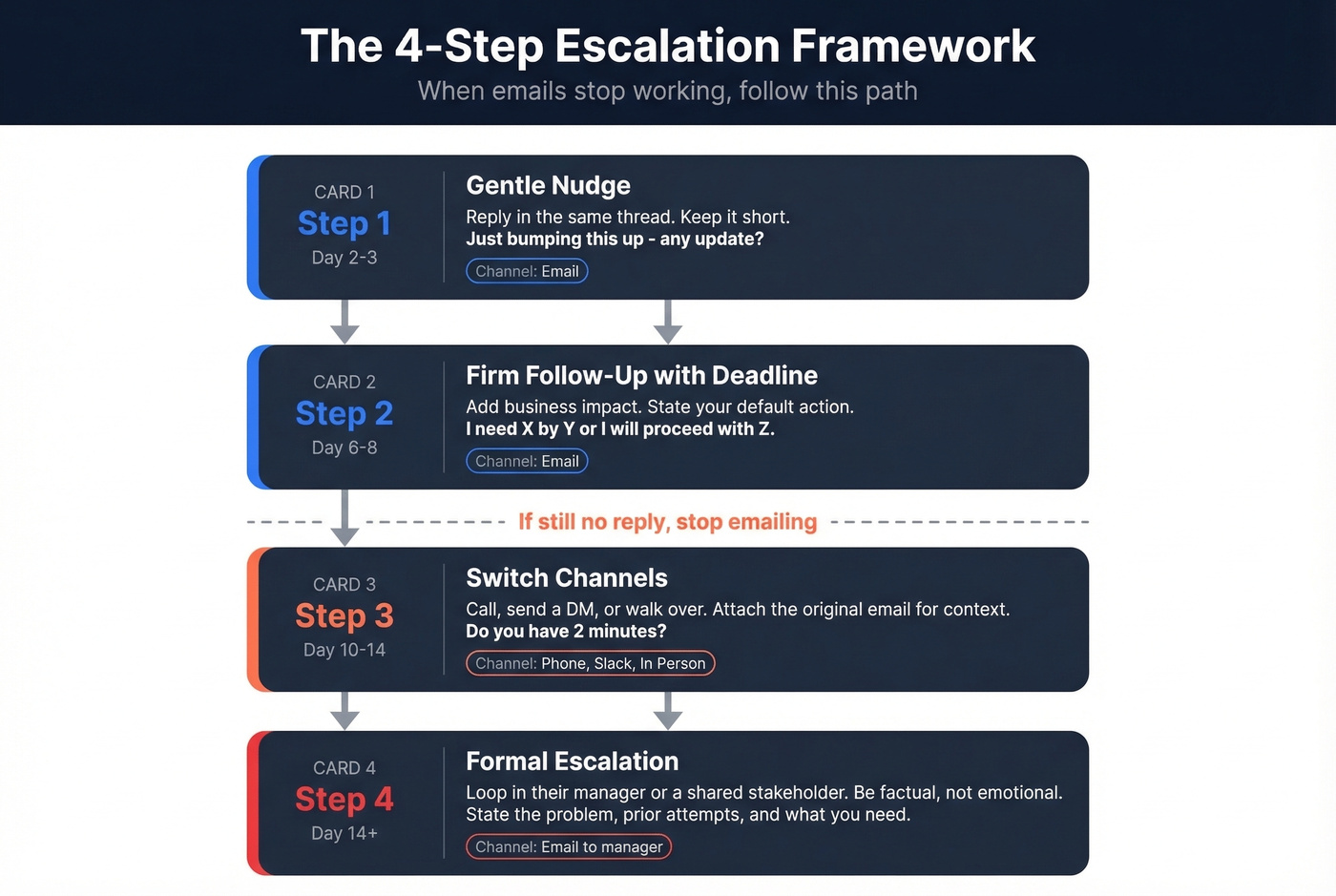
Step 1 - Gentle nudge (Day 2-3). Reply in the same thread. Keep it short: "Hi [Name], just bumping this up - any update on [topic]?" Don't pretend it's a new conversation.
Step 2 - Firm follow-up with deadline (Day 6-8). Add the business impact: "I need to [next step] by [date]. Could you get back to me by [date minus buffer]? If I don't hear back, I'll proceed with [default action]."
Step 3 - Switch channels (Day 10-14). Call, send a direct message, or walk over. Attach the original email so they have context. "Hey, I sent an email about [topic] last week - wanted to make sure it didn't get buried. Do you have 2 minutes?"
Step 4 - Formal escalation (Day 14+). If the person's input is genuinely blocking progress, loop in their manager or a shared stakeholder. Structure the email with a clear problem statement, a summary of prior attempts, and the specific action you need. Keep it factual, not emotional.
The "unless I hear otherwise, I'll proceed with [X]" technique belongs in Step 2. But use it only if you're genuinely prepared to follow through. It's a commitment, not a bluff - and people remember when you use it and don't act on it.
One strong opinion from our team: If your average deal value is under $10K, you probably don't need a four-step escalation process. You need faster disqualification. The breakup email at Step 2 saves you more time than three more weeks of chasing.
If you're chasing prospects specifically, a dedicated follow-up email sequence usually beats improvising.
Adjusting Tone for Global Teams
If you're working across cultures, your "polite" might be someone else's "pushy."
German business emails stay formal longer than you'd expect. Family names and formal greetings persist even with long-term contacts. A direct deadline request is fine, but skipping the formal greeting isn't.
Japanese business emails tend to avoid direct deadline pressure. Framing urgency as a shared problem ("the project timeline requires...") works better than personal directives ("I need you to...").
American and English-speaking emails shift to first names quickly and tolerate directness. "Can you get this to me by Friday?" is perfectly acceptable after one or two exchanges.
Subject line norms vary too. Some cultures use vague subjects ("Regarding the latest matter") while others expect problem-forward directness ("Request: budget approval needed by Friday"). One common trap: "Re:" in a subject line means "Regarding," not "Reply." Using it on a first-contact email confuses recipients who think they missed an earlier thread.
Mistakes That Make People Ignore You
The fastest way to get your follow-up buried is a vague subject line. "Following up" tells the recipient nothing. "[Reply needed]: [Project] deadline Friday" tells them everything - the action, the context, and the timeline in six words.
Equally damaging is the absence of a specific deadline. "Soon" and "ASAP" aren't dates. I've watched teams send seven follow-ups to the same person, each one saying "when you get a chance." It never works. Pick a date. Write it down. Send it.
Then there's the CC problem. Every extra person on the thread creates diffusion of responsibility. If everyone's responsible, no one is. Copy only the people who need to act - not the people you want to witness the asking.
Urgency inflation kills credibility faster than almost anything else. Marking everything "URGENT" is the email equivalent of crying wolf. Save it for genuine emergencies, and your genuine emergencies will actually get treated like ones. The same Babbel survey found that 60% of workers say email volume adds stress to their day, and 48% judge typos in email more harshly than in chat. So proofread - especially when the email carries urgency.
Two more mistakes worth flagging: sending a wall of text (if your email requires scrolling, it requires editing - keep follow-ups under 120 words) and using the wrong channel entirely. Some people live in Slack. Others check email twice a day. Match the channel to the person, not your preference.
Skip all of this advice if the problem isn't your tone but your data. If you're following up on outreach emails and getting zero response, the address might be invalid. Prospeo verifies emails in real time with 98% accuracy, so you know your message actually landed before you stress about the wording. If you want the deeper mechanics, start with an email deliverability audit.
Pre-Send Checklist
Run through these five checks before you hit send:
- Specific deadline stated? A date and time, not "soon" or "when you get a chance."
- Clear one-line ask? The recipient should know what you need within the first two sentences.
- Subject line signals urgency without screaming? Use the project name and deadline. "[Reply needed]" beats all-caps "URGENT." If you need inspiration, use these email subject line examples.
- Document reattached? Don't make them search. Reattach it every time.
- Right channel for this person? If they haven't replied to two emails, try calling or messaging instead.
If you're still tempted to write "Just checking in," use these alternatives for just checking in that keep the tone firm but friendly.
FAQ
How long should I wait before following up?
Wait 2-3 business days for colleagues and 3-5 for external contacts. For cold outreach, use graduated spacing: 2, 4, 7, then 14 days between messages. Compressing the timeline tighter than that risks spam complaints.
Is it rude to follow up more than once?
No - 55% of replies come from follow-ups, not the initial email. Cap it at 2-3 emails before switching to a call or direct message. Four or more follow-ups in the same thread triples spam complaint rates.
What subject line works for a polite reminder?
Use a specific, action-oriented format like "[Reply needed]: [Project] deadline Friday." This beats vague lines like "Following up" or "Checking in." Reserve all-caps "URGENT" for genuine emergencies only - overuse trains people to ignore it.
How do I rush my boss without overstepping?
Give them yes/no options or a short list of choices with full context, plus a default action if they don't reply. Suggest a 5-minute call for complex topics. Reducing their cognitive load is the fastest path to a decision.
How do I know if my follow-up was even delivered?
For internal emails, most corporate systems confirm delivery. For outreach and sales emails, bad data is the most common culprit - Prospeo verifies B2B email addresses with 98% accuracy before you send, so you're not following up into a void. Their free tier includes 75 verifications per month.
Following up four times because your contact data was wrong isn't polite persistence - it's wasted effort. Prospeo delivers 143M+ verified emails refreshed every 7 days, so you reach real inboxes on the first send.
Skip the follow-up spiral. Start with data that connects.