

How to See If an Email Address Exists
Every email verification tool wants you to paste an address into a box and trust the green checkmark. Most tools claim ~95-99% accuracy, but real-world edge cases - catch-all domains, greylisting, anti-enumeration defenses - still create false positives and "unknown" results that can tank your sender reputation. This guide explains how to see if an email address exists and what's actually happening behind that checkmark.
B2B email addresses used to decay at 1.5-2% per month. That number has spiked to 3.6%. A list you built in January can lose around 10% of its deliverable addresses by April, and once your bounce rate crosses 5%, you're in reputation-damage territory - throttled or blocked by ESPs entirely. Verification isn't optional. It's infrastructure. (If you want the benchmarks and fixes, see bounce rate.)
Quick Version
- Checking one email? Use the password reset trick or a free online checker like Email Hippo.
- Checking a list of 50+? Use a verification tool. Manual methods don't scale, and hammering SMTP servers can get your IP blocklisted.
- Best accuracy for the price? Prospeo - 98% accuracy, ~$0.01/email, 75 free verifications per month, with catch-all handling baked in.
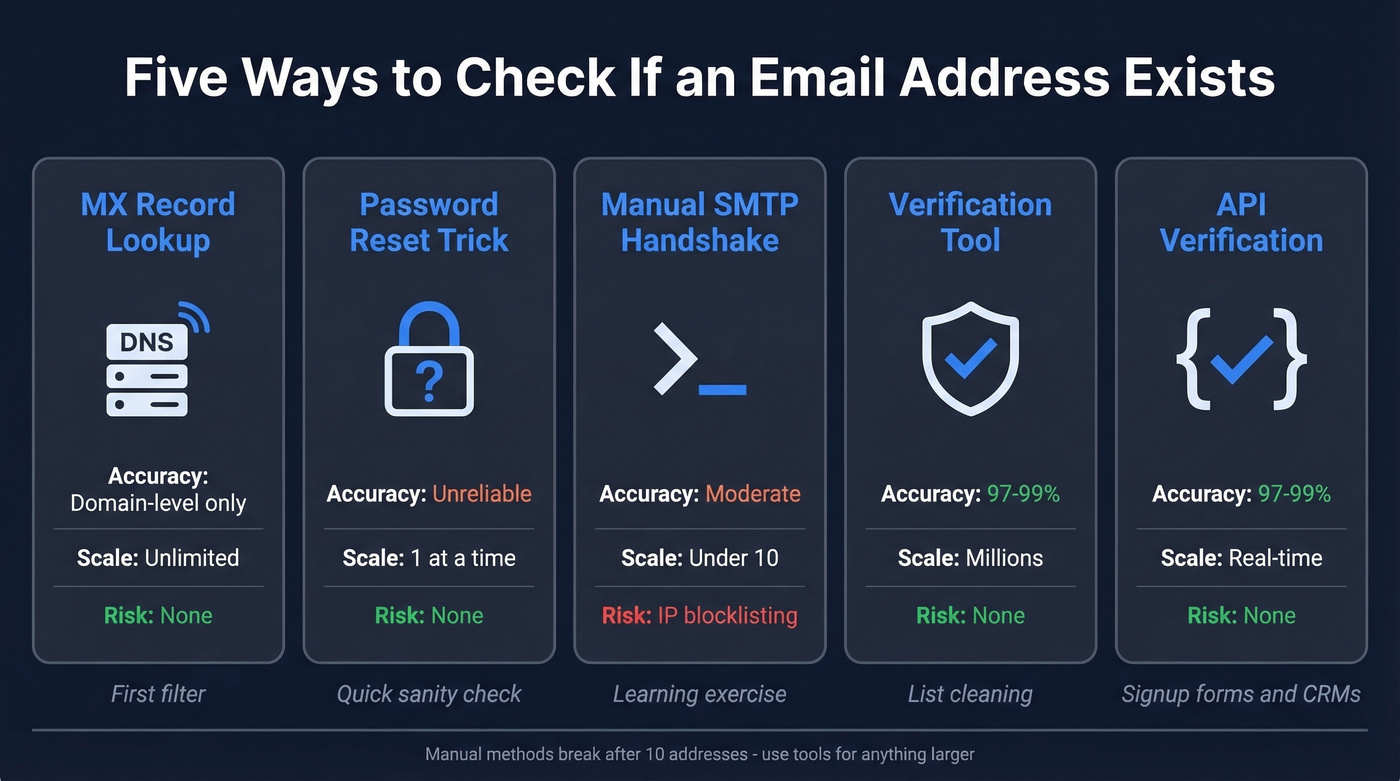
Five Ways to Verify an Email Address
1. MX Record Lookup
Before you check a specific mailbox, check whether the domain can receive email at all. An MX (Mail Exchange) record tells the internet which server handles mail for a domain. No MX records means the domain can't receive email - every address at that domain is dead.
On Linux or macOS, open a terminal:
[dig example.com MX +short](https://support.dnsimple.com/articles/dig-reference-guide/)
You'll get something like:
10 mail.example.com.
20 mail2.example.com.
The numbers are priority values - lower means preferred. If you get nothing back, the domain has no mail server configured. On Windows, use [nslookup -type=MX example.com](https://learn.microsoft.com/en-us/windows-server/administration/windows-commands/nslookup) instead.
This is a fast, zero-risk first filter. It won't tell you whether john@example.com exists, only that example.com can receive mail. But it eliminates typo domains, parked domains, and defunct companies in seconds - and if you're cleaning a list, running MX checks first saves you from wasting verification credits on domains that were never going to work. For scripting, dig +noall +answer gives cleaner output, and [dig @8.8.8.8 example.com MX](https://developers.google.com/speed/public-dns) queries Google's resolver directly if your local DNS is flaky.
2. The Password Reset Trick
Use this if you need to spot-check a single address at a major provider and don't mind a manual process. Skip this if you're checking more than a handful of addresses or need reliable results.
The idea: use a provider's password recovery flow and observe whether it acknowledges the account exists. Go to Gmail's, Outlook's, or Yahoo's password reset page, enter the email address, and read the response carefully. Gmail's recovery flow sometimes shows "No account found with that email address" for non-existent accounts. Outlook returns "The Microsoft account is incorrect." Yahoo shows "We couldn't match the Yahoo ID you entered."
Here's the catch: providers have been patching enumeration leaks for years. Many now return generic "we'll send a code if the account exists" responses that tell you nothing. It works inconsistently, and it's useless for custom domains or corporate email. Treat this as a quick sanity check, not a verification method.
3. Manual SMTP Handshake
This is the method that actually probes the mail server directly. You're simulating the first steps of sending an email, then stopping before any message is delivered. Here's the thing: it's educational, but it's not production-grade.
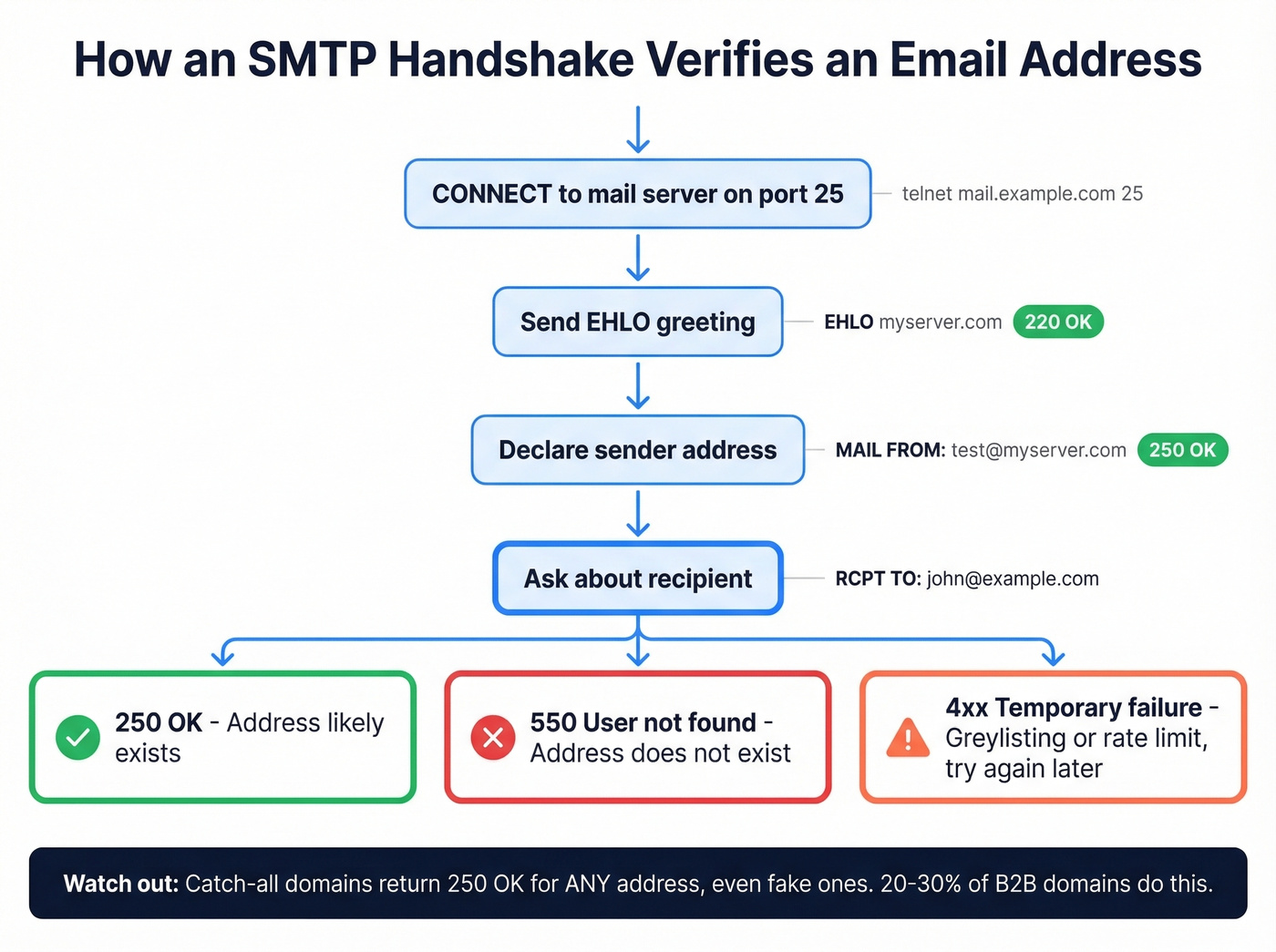
Open a terminal and connect to the domain's mail server on port 25:
telnet mail.example.com 25
You'll see a greeting like 220 mail.example.com ESMTP. Now walk through the handshake:
EHLO myserver.com
250-mail.example.com Hello
MAIL FROM:<test@myserver.com>
250 OK
RCPT TO:<john@example.com>
The server's response to RCPT TO is where verification happens:
250 2.1.5 OK- the server accepted the recipient. The address likely exists.550 5.1.1 The email account that you tried to reach does not exist- definitively rejected. The mailbox doesn't exist.
Type QUIT to close the connection cleanly.
Sounds straightforward. Here's why it isn't.
Catch-all domains accept mail for any address, even fabricated ones. You'll get a 250 response for totallynotreal@example.com. Between 20-30% of B2B domains use catch-all configurations, so this is a massive blind spot. Greylisting returns temporary 4xx failures on first contact, expecting your server to retry later - a one-shot telnet check interprets this as a failure when it's actually a spam-prevention technique. Anti-enumeration defenses mean some servers accept at RCPT TO but reject or bounce later, making mailbox-level certainty impossible at scale. Gmail doesn't support the VRFY command at all, and RFC 2505 recommends disabling VRFY to prevent directory harvest attacks.
Blocklisting risk is real. Repeated SMTP probing from a single IP can get you flagged, and your IP range can end up on blocklists that are painful to get removed from (see Spamhaus blacklist removal).
SMTP handshakes are useful for understanding how email verification works. They're terrible for doing it at scale.
4. Use a Verification Tool
Once you're past about 10 addresses, manual methods stop making sense. Verification tools automate the entire chain: syntax validation, DNS/MX lookup, SMTP handshake, database cross-referencing, catch-all detection, and spam-trap detection. That last part matters more than most people realize - spam traps can seriously damage your domain reputation, and you won't know you've hit one until the damage is done.
Typical verification speed for modern tools is 1-2.5 seconds per address in real-time mode, or under an hour for 100K emails in batch mode.
Let's be honest about the "unknown result" frustration - where you check an email and get back a shrug. It's almost always a catch-all domain problem. When a catch-all domain returns 250 for every address, the only way to reduce risk is cross-referencing against a large database of verified emails and applying probabilistic scoring. This is the single biggest gap in manual SMTP probing, and the main reason teams switch to tool-based verification after their first campaign bounces above 5%. We've seen teams waste weeks debugging their sending infrastructure when the real problem was unverified catch-all addresses sitting in their lists.
5. API-Based Verification
If you're building verification into signup forms, CRM enrichment workflows, or automated prospecting sequences, you need an API - not a CSV upload.
The pattern is simple: your system sends an email address to the verification API, gets back a status (valid, invalid, risky, unknown), and routes accordingly. Signup forms reject disposable or invalid emails in real time. CRM workflows enrich and verify new leads before they hit a sales rep's queue. Automated prospecting tools filter bad addresses before they enter a sequence.
The key decision is whether to verify synchronously or asynchronously. Real-time form validation needs synchronous - blocking the user until verification completes. Batch CRM enrichment works fine async. For teams running Clay or n8n workflows, most verification APIs slot in as a step without custom code. (Related: data enrichment services.)

You just learned five ways to check if an email exists. MX lookups, SMTP handshakes, password resets - they all break at scale. Prospeo runs the entire verification chain automatically: syntax, DNS, SMTP, catch-all detection, and spam-trap removal. 98% accuracy, ~$0.01/email, 75 free verifications/month.
Skip the telnet commands. Verify your entire list in minutes.
Why Results Say "Unknown"
Verification isn't binary. Every tool returns results on a confidence spectrum, and understanding what each status means is the difference between smart list management and guessing.
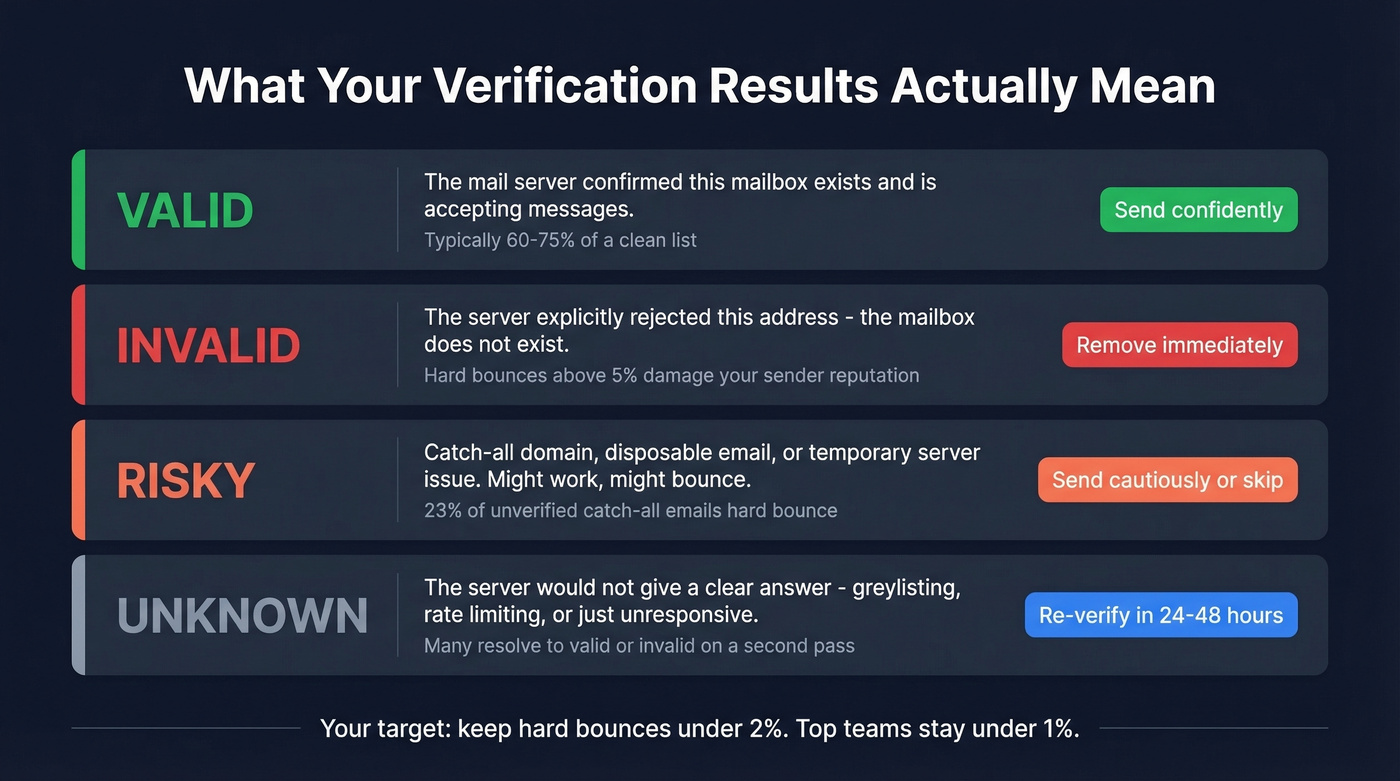
| Status | What It Means | What to Do |
|---|---|---|
| Valid | Server confirmed the mailbox exists | Send confidently |
| Invalid | Server rejected the address | Remove immediately |
| Risky | Catch-all domain or temporary issue | Send cautiously or skip |
| Unknown | Server didn't give a clear answer | Re-verify later; don't send |
The "risky" and "unknown" categories are where money gets wasted. 23% of unverified catch-all emails hard bounce when you actually send to them. That's not a rounding error - it's a domain reputation problem. If you're sending cold outreach, pair verification with a safe email velocity so you don't compound the damage.
"Unknown" doesn't mean "invalid." It means the server was uncooperative - greylisting, rate limiting, or simply not responding. Re-verify these addresses after 24-48 hours. Many resolve to valid or invalid on a second pass.
Verification Tools Compared
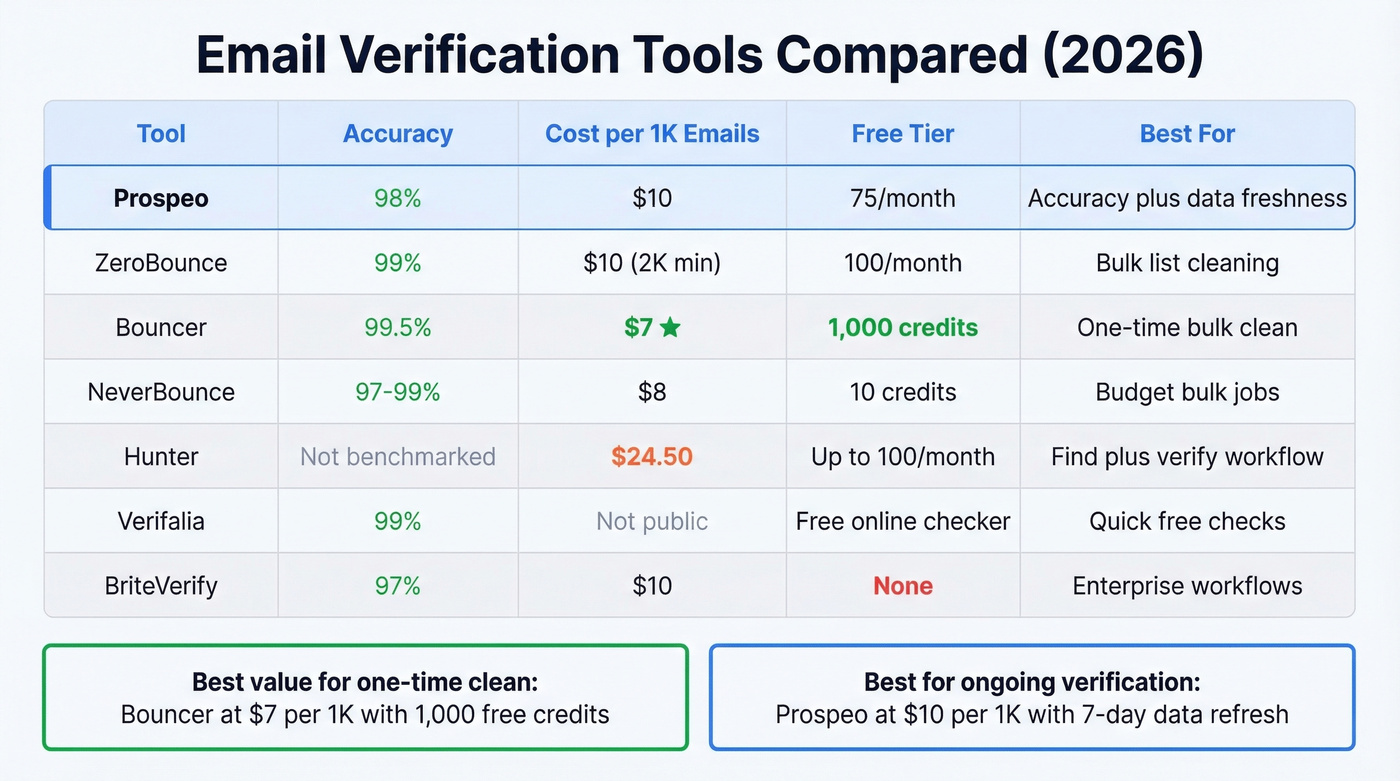
Look, most teams don't need the most expensive verification tool. They need one that handles catch-all domains well and refreshes data frequently. A tool with 99% accuracy on standard domains but no catch-all handling will still wreck your bounce rate on the 20-30% of B2B domains that use catch-all configs.
| Tool | Accuracy | Cost per 1K | Free Tier | Best For |
|---|---|---|---|---|
| Prospeo | 98% | ~$10 | 75/month | Accuracy + data freshness |
| ZeroBounce | 99% | $10 (2K min) | 100/month | Bulk list cleaning |
| Bouncer | 99.5% | $7 | 1,000 credits | One-time bulk clean |
| NeverBounce | 97-99% | $8 | 10 credits | Budget bulk jobs |
| Hunter | Not benchmarked | ~$24.50 | up to 100/month | Find + verify workflow |
| Verifalia | 99% | Not public | Free online checker | Quick free checks |
| BriteVerify | 97% | $10 | None | Enterprise workflows |
Bouncer deserves a callout for value: 1,000 free credits and $7 per 1K makes it the cheapest option for a one-time list clean. Hunter's ~$24.50 per 1K is hard to justify if you're only using it for verification - it makes more sense as part of Hunter's broader email-finding workflow (see Hunter alternatives).
Catch-all domains fool manual SMTP checks 20-30% of the time. Prospeo's 5-step verification with proprietary catch-all handling and spam-trap removal eliminates the "unknown" results that tank your sender reputation. Data refreshed every 7 days - not the 6-week industry average.
Stop losing deliverability to unverified catch-all addresses.
How Often to Re-Verify
A verified list doesn't stay verified. At the B2B decay rate of 3.6% per month, at least 25% of your database goes stale annually. That's a quarter of your contacts disappearing every year.
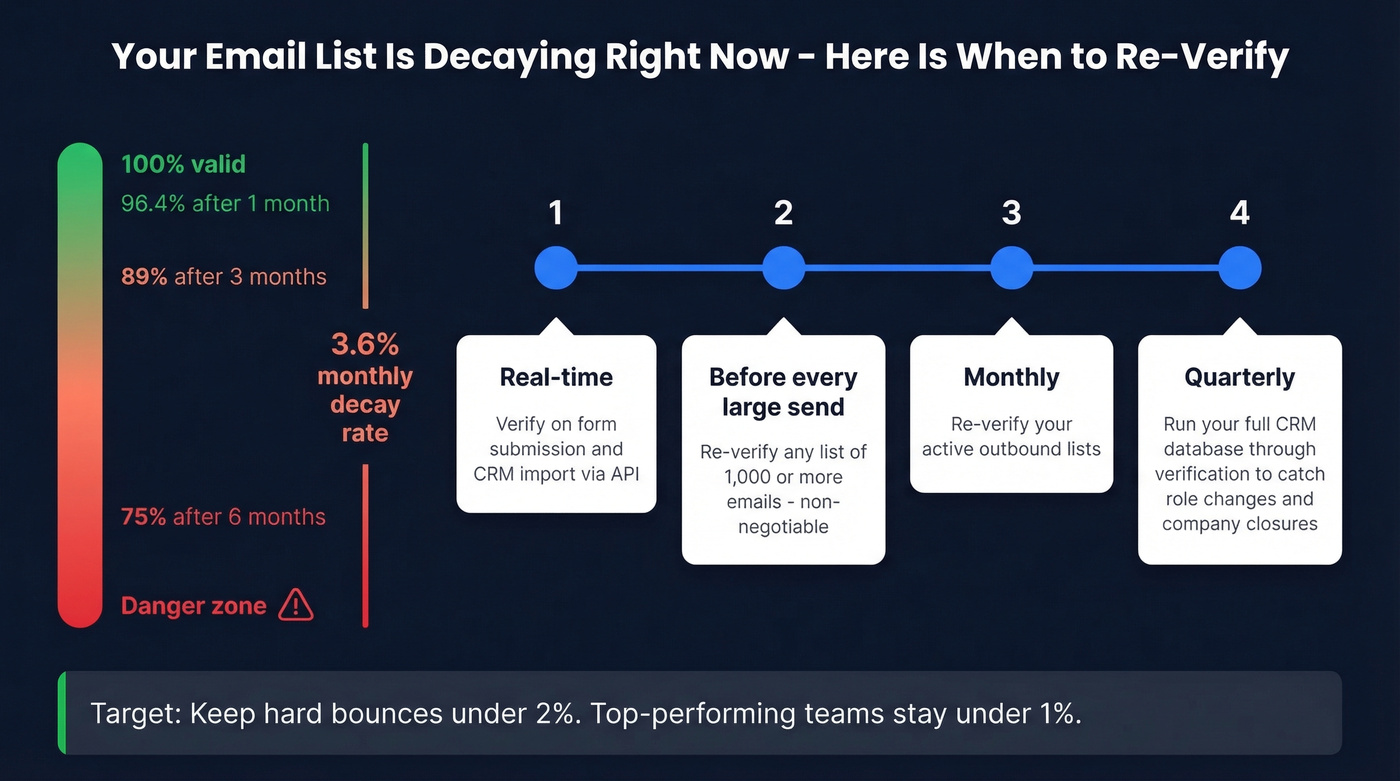
Here's the cadence that actually works:
- Before every large send of 1,000+ emails - always re-verify. Non-negotiable.
- Monthly - re-verify your active outbound lists.
- Quarterly - run your full CRM database through verification to catch role changes and company closures.
- Real-time - verify on form submission and CRM import via API.
Your target is a bounce rate below 2%. Top-performing teams keep hard bounces under 1%. In our experience, when a team comes to us saying "our deliverability tanked," the problem is almost never the ESP or the sending schedule. It's the data. One agency we work with, Stack Optimize, went from chronic deliverability issues to 94%+ deliverability and under 3% bounce across all their clients - just by verifying before every send. (More on the bigger picture: email deliverability.)
FAQ
Can you check if an email exists without sending a message?
Yes. MX lookups, SMTP handshakes stopped before DATA, and dedicated verification tools all confirm existence without delivering a message. MX lookups only confirm the domain receives mail. SMTP handshakes probe the specific mailbox but fail against catch-all domains. Multi-step verification tools give the most reliable results at scale.
What is a catch-all domain?
A catch-all domain accepts mail for any address - even asdfgh@company.com. SMTP checks always return "valid," even when the mailbox doesn't exist. Between 20-30% of B2B domains use catch-all configs, and 23% of unverified catch-all emails hard bounce. Only tools with database cross-referencing can flag this risk.
What's the best free way to verify emails?
MX record lookups and manual SMTP handshakes are completely free but require a terminal. For tool-based verification, Bouncer offers 1,000 free credits, Prospeo gives 75 free verifications per month with full catch-all detection, and Email Hippo allows 100 checks per day. Beyond a few dozen addresses, a tool with catch-all handling is worth the upgrade.
What bounce rate is too high?
Below 2% is healthy. Below 1% is excellent. Above 5% triggers real reputation damage - ESPs can throttle or block your sending domain entirely. If you're consistently above 2%, your contact data needs verification, not a new sending strategy.