

How to Send 1,000 Cold Emails Per Day Without Landing in Spam
You bought 5 domains, blasted 200 emails on day two, and by Friday every inbox was in spam. Infrastructure burned before you booked a single meeting. Here's the thing most guides get wrong: they'll obsess over domains and DNS records while treating the actual email addresses as an afterthought. That's backwards. Bad data kills domains faster than bad infrastructure ever will.
What You Actually Need
- ~14 domains, 3 inboxes each, 25 emails per inbox per day
- 4-week warm-up with no shortcuts
- SPF/DKIM/DMARC on every domain
- Verified email data at 98%+ accuracy - or your domains die
- Budget: $200-600/month for inboxes + sending tools (data costs depend on volume)
- Expected results: ~34 replies/day, 5-7 positive, ~1 meeting every 3-4 days
Why One Inbox Can't Do This
Free Gmail caps at 500 emails per day via web and just 100 via SMTP. Google Workspace allows 2,000 per day per user, which sounds like plenty until you realize the practical cold email safe limit is 25-50 emails per inbox per day before spam filters start paying attention.
These limits operate on a rolling 24-hour window. Send your last batch at 3 PM, and your limit resets at 3 PM the next day - not midnight. Marketing ESPs like Mailchimp, Brevo, or Mailjet aren't built for cold outreach and often enforce strict acceptable-use policies against unsolicited messages. You need a different architecture entirely.
The gap between "technically allowed" and "deliverability-safe" is where most teams get burned. Google won't stop you at 200 emails from one inbox, but Gmail's filters will quietly route you to spam, and you won't know until your reply rate craters. That's exactly why reaching 1,000 cold emails daily requires multi-domain infrastructure, not a single overloaded account.
Infrastructure for Sending 1,000 Emails Daily
Here's the formula: Daily volume / (emails per inbox x inboxes per domain) = domains needed.
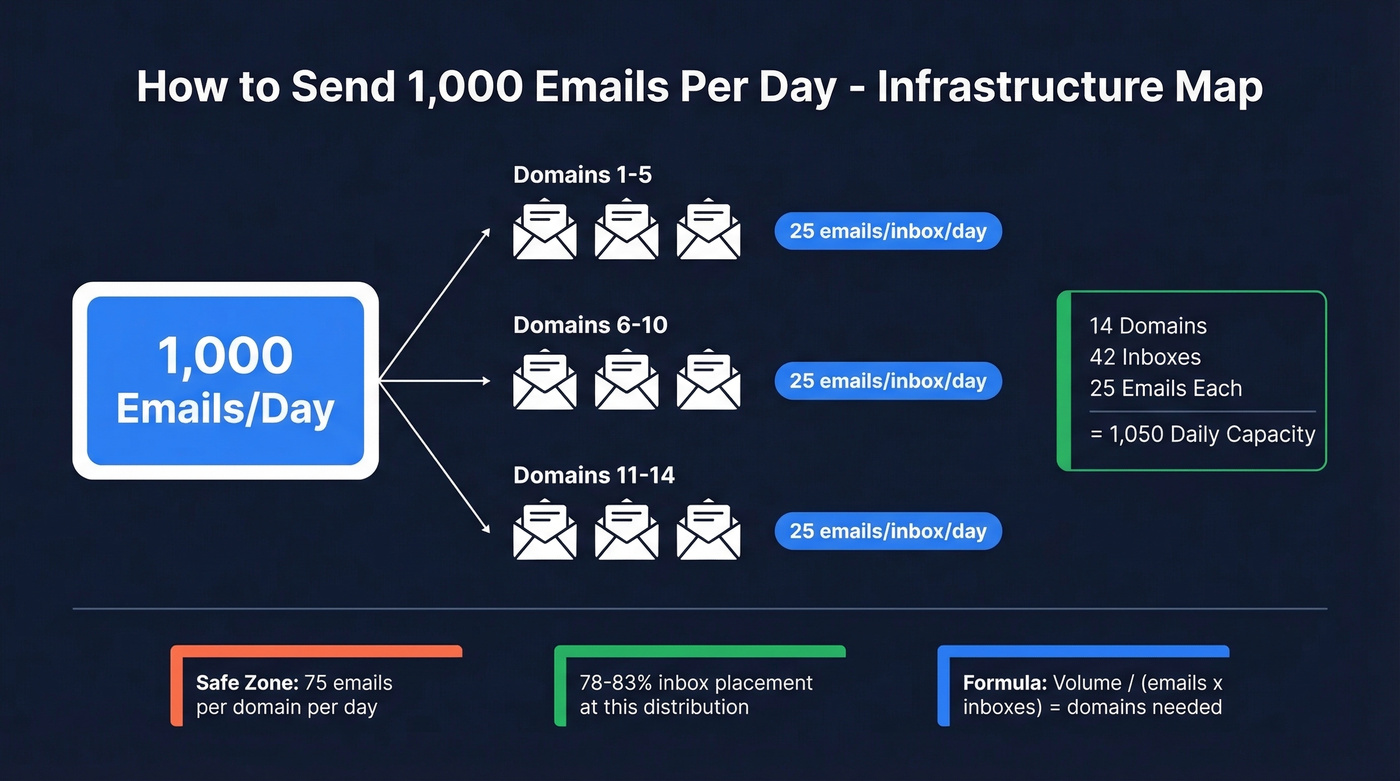
For 1,000 emails per day: 1,000 / (25 x 3) = ~14 domains. Each domain gets 3 inboxes, each inbox sends 25 emails per day - 75 emails per domain, well within the safe zone. A more conservative setup uses 20 domains at 15 emails per account. In practitioner benchmarks, that kind of distribution lands around 78-83% inbox placement.
| Component | Monthly Cost |
|---|---|
| 14-20 domains | ~$1-$17/mo (amortized annually; varies by TLD/registrar) |
| Google Workspace, 40-60 seats | ~$240-$420/mo |
| Sending platform | $37-$174/mo |
| Data & verification | $0-$99/mo |
| Total | $200-$600/mo (plus data if you need higher daily sourcing volume) |
Domain TLDs range from $1-$10/year depending on extension. A .xyz runs about $1/year; .com or .co closer to $10. Always use secondary or lookalike domains - never your primary business domain. If your company is acme.com, register acme-team.com or getacme.co.
DNS Authentication Checklist
Every domain needs three records configured before you send a single email:
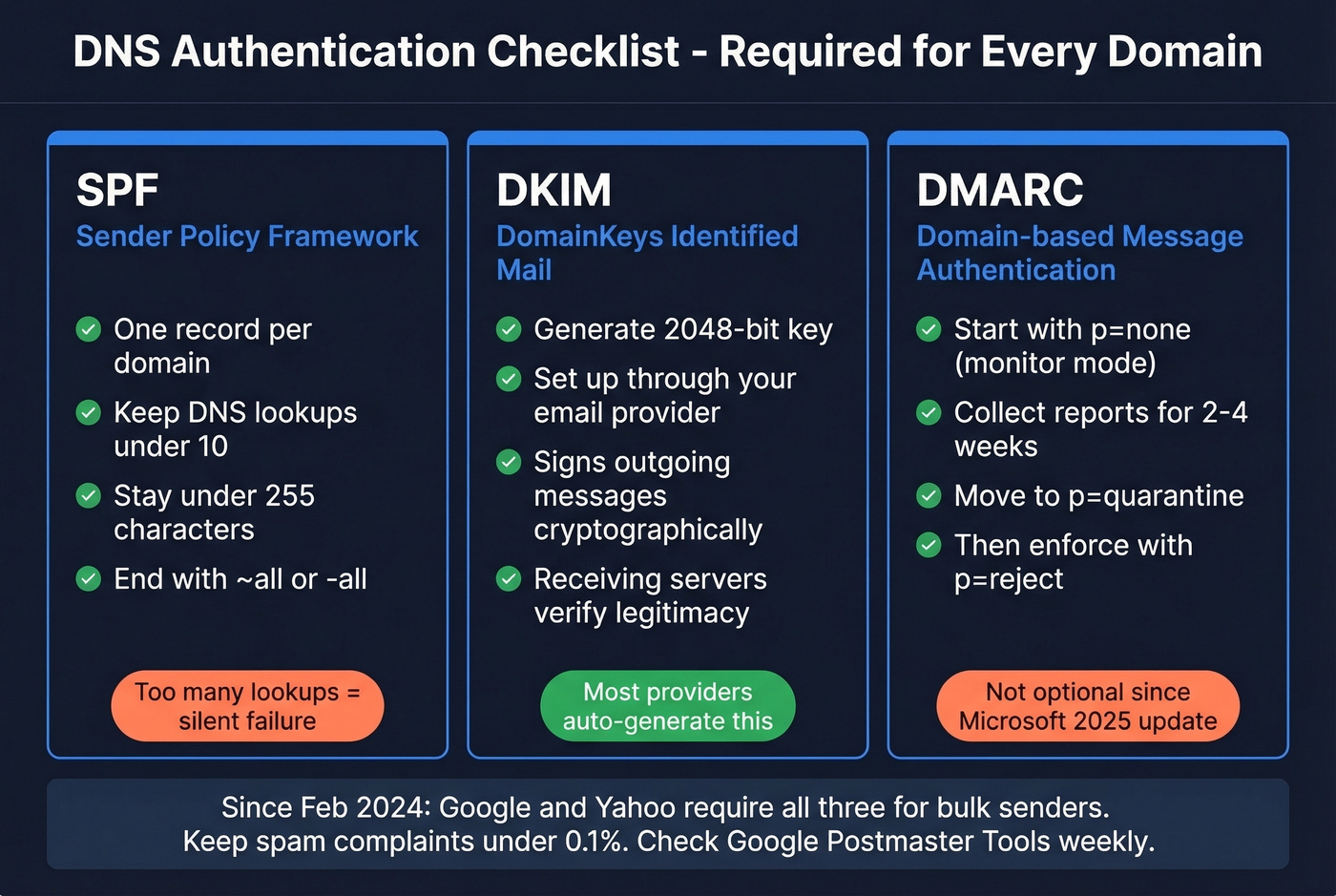
SPF: One record per domain. Keep DNS lookups under 10 and stay under the 255-character limit. End with ~all or -all.
DKIM: Generate a 2048-bit key through your email provider. This cryptographically signs outgoing messages so receiving servers can verify legitimacy.
DMARC: Start in monitor mode with p=none to collect reports. Move to p=quarantine or p=reject once you're confident in your setup. (If you want to go deeper, see DMARC alignment.)
Since February 2024, Google and Yahoo require SPF, DKIM, and DMARC for bulk senders. One-click unsubscribe became mandatory by June 2024. Spam complaint rates must stay below 0.3% - Google recommends under 0.1%. Microsoft's 2025 deliverability push is even stricter, making authentication non-optional across every major provider. Check Google Postmaster Tools weekly and run your sending domains through MXToolbox to catch issues early.
Don't forget compliance. Every email needs a working unsubscribe mechanism, and if you're targeting EU prospects, GDPR applies.
The 4-Week Warm-Up Plan
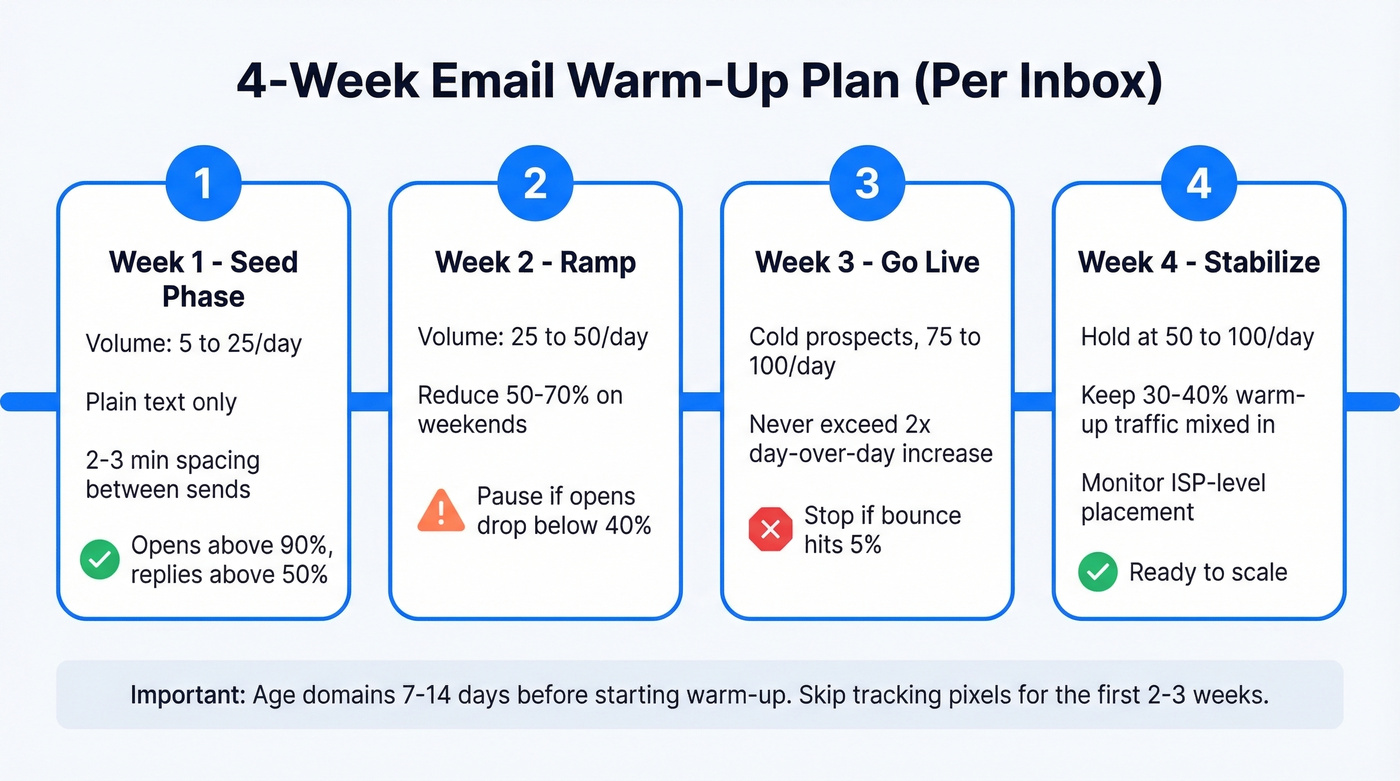
Age your domains 7-14 days before starting warm-up. A 2-week warm-up is the minimum you'll see in practitioner playbooks, but 4 weeks is significantly safer at high daily volume. We've seen teams try to shortcut this and regret it within days. Follow this schedule per inbox:
| Week | Volume/Inbox/Day | Gating Metrics | Notes |
|---|---|---|---|
| 1 | 5 to 25 | Opens >90%, replies >50%, 0 complaints | Plain text, 2-3 min spacing |
| 2 | 25 to 50 | Pause if opens <40% or any complaint | Reduce 50-70% on weekends |
| 3 | Cold prospects, 75-100 | Bounce <3% warning, <5% stop | Keep some boxes at <50/day; never exceed 2x day-over-day |
| 4 | Stabilize 50-100 | Keep 30-40% warm-up traffic | Monitor ISP-level placement |
Warmup-to-real-send ratios matter as you scale. At 0-50 real sends per day, keep a 1:1 ratio. At 50-200, shift to 1 warmup for every 2 real sends. At 200-400, drop to 1:3 or 1:4. Skip tracking pixels for the first 2-3 weeks - they're a spam signal on fresh domains. (More on that in email tracking pixels.)
Don't use free warmup services. Free warmup tools create detectable bot patterns that train filters to flag the domain. Use the warmup built into your sending platform instead. If you're comparing options, see unlimited email warmup tools.

At 1,000 emails per day, you need 1,000 verified contacts every single day. Prospeo's 143M+ verified emails refresh every 7 days - not 6 weeks - so your lists never go stale mid-campaign. 98% accuracy means fewer than 20 bounces per 1,000 sends, keeping every domain healthy.
Source 1,000 verified emails daily at ~$0.01 each. No contracts.
Why Bounce Rate Matters More Than Domain Count
At 1,000 emails per day, a 5% bounce rate means 50 bounces daily. Within a week, your domains are flagged. Within two weeks, you're rebuilding from scratch. The bounce-to-reputation-to-spam spiral destroys cold email operations faster than any infrastructure mistake. (Benchmarks and fixes: email bounce rate.)

This is where data quality becomes the real bottleneck. Sourcing 1,000 verified, relevant contacts every single day is harder than setting up domains. If your data provider can't keep pace at 98%+ accuracy, your domains will pay the price. Prospeo's 5-step verification - catch-all handling, spam-trap removal, honeypot filtering - delivers 98% email accuracy across 143M+ verified addresses on a 7-day refresh cycle. Stack Optimize built from $0 to $1M ARR using that data, maintaining 94%+ deliverability, bounce rates under 3%, and zero domain flags across all client accounts. (If you need remediation, see spam trap removal.)
Stack Optimize scaled to $1M ARR sending high volume with Prospeo data - bounce rates under 3%, zero domain flags across every client. That's what 5-step verification with catch-all handling, spam-trap removal, and honeypot filtering does at scale.
Your domains are too expensive to feed with unverified data.
Expected Results at This Volume
Per Instantly's 2026 benchmark report, the average cold email reply rate is 3.43%. Top quartile hits 5.5%+, and the top 10% reaches 10.7%. In our experience, 1-2% reply rates are also common when list quality or offer-market fit is weak. (For broader context, see cold email marketing.)
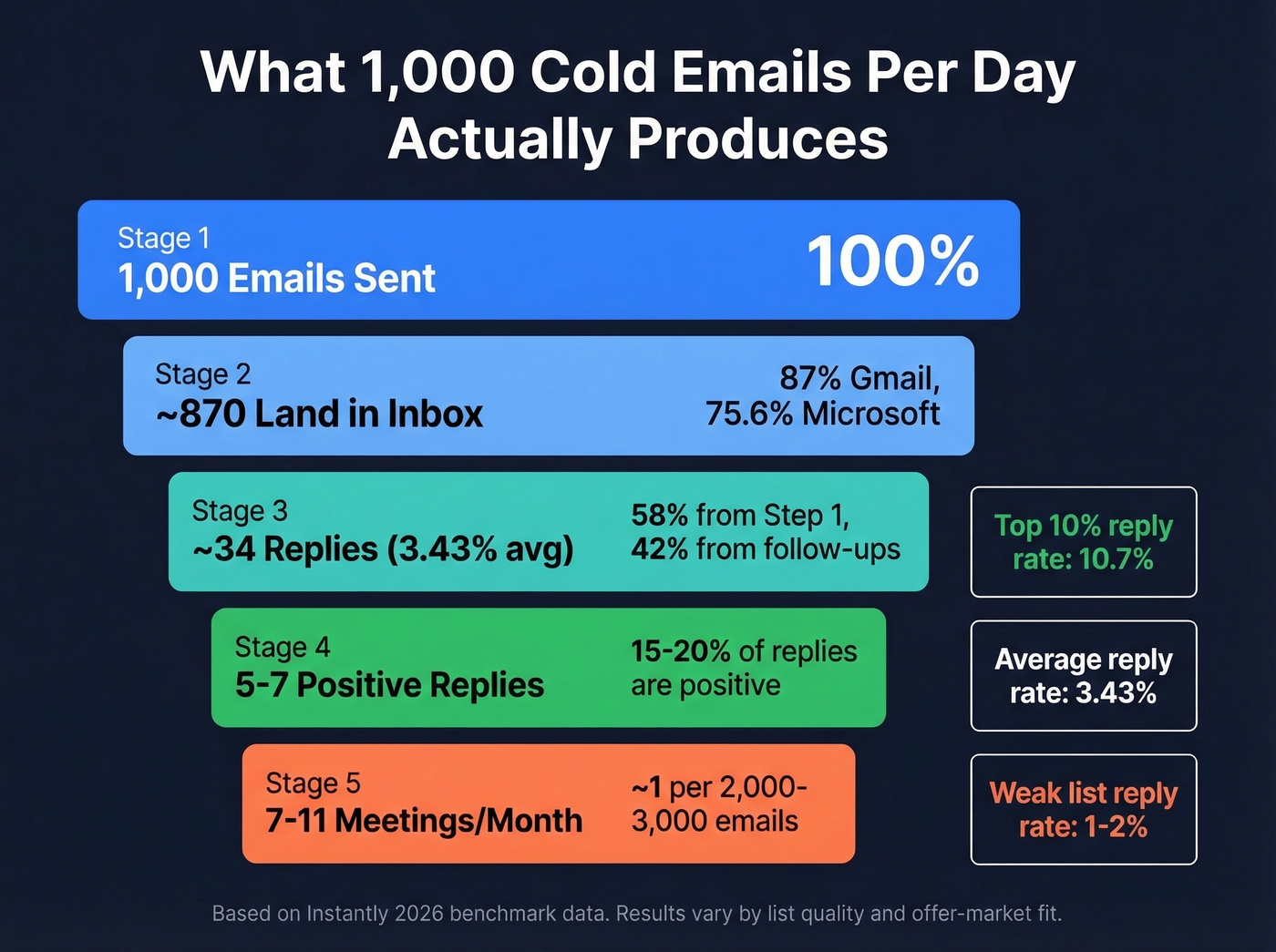
At 1,000 emails per day with a 3.43% reply rate, you're looking at ~34 replies daily. Of those, 15-20% will be positive - that's 5-7 positive replies per day. For meetings, a solid rule of thumb at this volume is ~1 qualified meeting per 2,000-3,000 emails. At ~20-22k emails/month, that's roughly 7-11 qualified meetings per month.
58% of replies come from step 1. The remaining 42% come from follow-ups, which means your sequence design matters. Best-performing campaigns use fewer than 80 words per email, run 4-7 touchpoints, and peak on Tuesday and Wednesday. If you want proven structures, use these cold email follow-up templates.
ISP placement varies dramatically. Gmail delivers 87.2% to inbox, Yahoo hits 86.0%, but Microsoft only manages 75.6%. If your prospect list skews Outlook-heavy, expect tougher placement and plan your volume accordingly. (More on monitoring and fixes: email deliverability guide.)
Let's be honest: if your average deal size is under $10k, you probably don't need 1,000 emails per day. Tighter lists of 200-300 highly targeted prospects with better copy will outperform spray-and-pray every time. Scale volume only after you've proven your messaging converts.
Scaling Beyond 1,000
Once your infrastructure is stable at 1,000/day, the same principles apply at higher volumes. The math scales linearly - more domains, more inboxes, more verified data. To reach 40k cold emails per month, you'd need roughly 55-60 domains following the same 25-per-inbox, 3-inboxes-per-domain model.
At 5,000 cold emails daily, you're looking at ~70 domains and 200+ inboxes. Inbox rotation and data freshness become the primary operational challenges at that level, not DNS setup. Teams running at this scale typically dedicate a full-time ops person to monitoring deliverability across all accounts. If that sounds like overkill, it isn't - one flagged domain at that volume cascades fast.
5 Mistakes That Get You Flagged
We've audited dozens of cold email setups, and the same five failures show up repeatedly. The consensus on r/coldemail mirrors this list almost exactly:
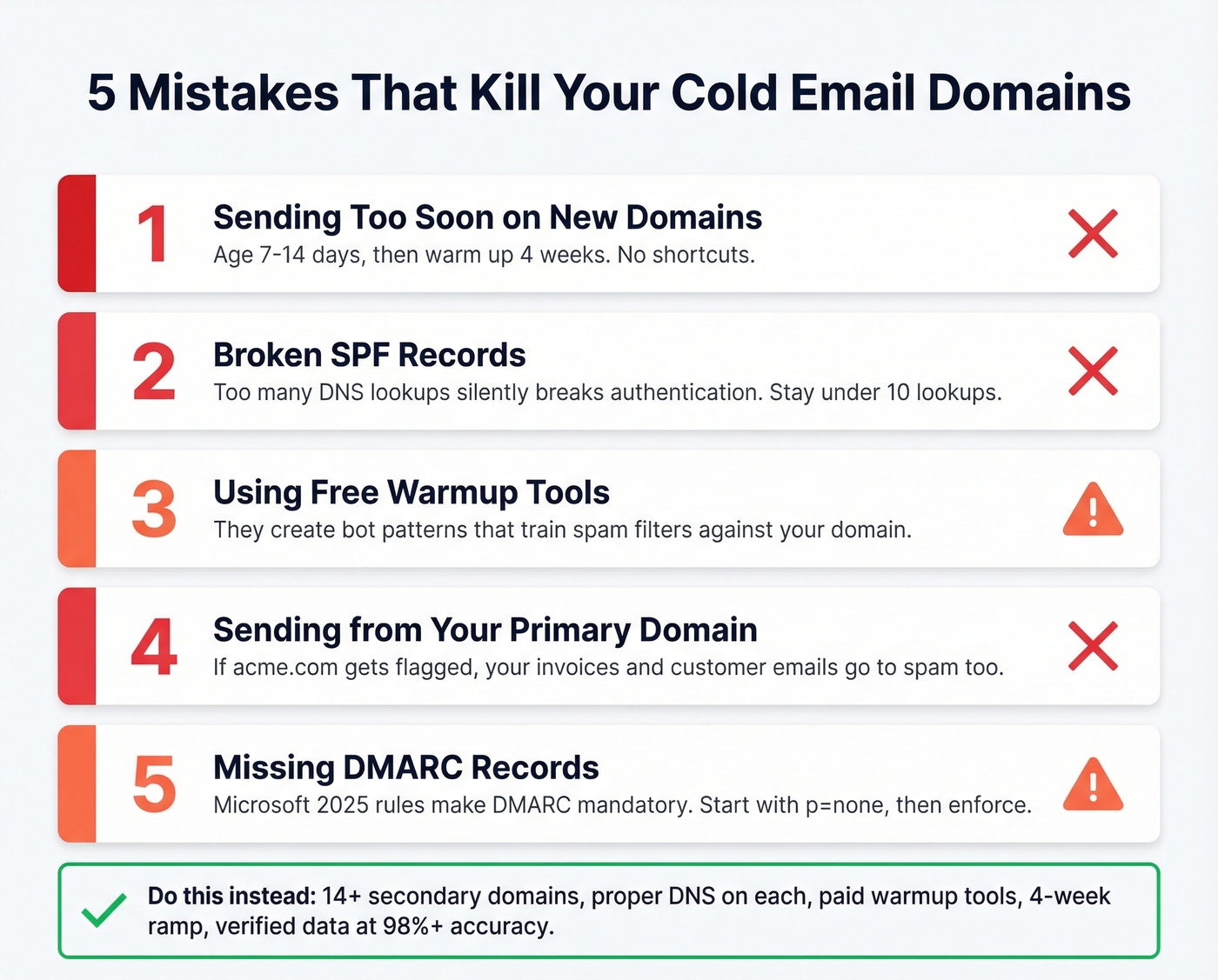
- New domain + volume too soon. Age domains 7-14 days, then warm up for 4 weeks. No exceptions.
- Broken SPF records. Too many DNS lookups silently breaks authentication. Keep it under 10. (Examples: SPF record examples.)
- Free warmup services. They create detectable bot patterns that train filters against you. Pay for a real platform.
- Using your primary business domain. If acme.com gets flagged, your invoices and customer emails go to spam too.
- Missing DMARC. With Microsoft's stricter 2025 posture, DMARC isn't optional. Start in monitor mode, then enforce.
Skip this section if you've already run cold email at scale before - you know these. But if you're setting up infrastructure for the first time, print this list and tape it to your monitor.
Your Tool Stack
Sending: Instantly at $37/mo includes unlimited warmup, or Smartlead at $39-$174/mo. Either handles inbox rotation and sequencing well. Pick based on UI preference - both get the job done. (If you're evaluating more options, see AI bulk email senders.)
Data & verification: Prospeo delivers 98% email accuracy with real-time verification and native integrations with Instantly, Smartlead, and Lemlist. The free tier gives you 75 emails/month to test before committing.
Inboxes: Google Workspace runs about $6-$7/user/month. For warmup, use what's built into your sending platform - don't pay separately unless you have a specific deliverability problem that needs diagnosis.
FAQ
Can I send 1,000 emails from one Gmail account?
No. Free Gmail caps at 500/day via web and 100 via SMTP, and the practical cold email limit is 25-50 per inbox before filters trigger. You need 14+ domains with 3 inboxes each - roughly 40+ mailboxes - to safely reach 1,000/day without reputation damage.
What's the biggest reason cold email at scale fails?
Unverified email data. Bounces above 3% destroy domain reputation within days, forcing a full infrastructure rebuild. A 5-step verification process with catch-all handling keeps bounce rates under 3% - that's the baseline you should demand from any data provider.
How long does it take to ramp to 1,000 emails per day?
Plan 4-6 weeks total. Week 1 starts at 5 emails per inbox per day, ramping to 25. By week 4, each inbox stabilizes at 50-100/day. With 40+ inboxes warming simultaneously, you'll hit full 1,000/day volume by week 5-6.
Should I start at 1,000 per day or per week?
Start at 1,000 per week - roughly 200 emails per business day, achievable with 3-4 domains. Once reply rates exceed 3% and bounce stays under 3%, scale to daily volume using the full 14-domain infrastructure outlined above.