

How to Send a Reminder Email Politely and Actually Get a Reply
You sent a proposal four days ago. The prospect opened it - you saw the notification - and then nothing. Now you're staring at a blank compose window, trying to figure out how to nudge without sounding desperate, passive-aggressive, or like an automated sequence.
Knowing how to send a reminder email politely is the difference between getting a reply and getting ignored. With 392.5 billion emails projected daily in 2026, your message didn't get ignored because it was bad. It got buried. A well-crafted reminder isn't annoying - it's expected.
The Short Version
Every reminder needs three things: context from the original message, something new (a fresh angle, piece of info, or deadline), and a specific ask. Drop "just following up" forever.
Send your first reminder 3-5 business days after the original email, as a reply in the same thread. Keep it under 80 words. If 2-3 well-crafted follow-ups get no response, the answer is no. Stop chasing and move on.
Do Polite Reminders Actually Work?
The data is unambiguous. According to Instantly's cold email benchmark report, 42% of all replies come from follow-up messages - not the first email. If you're sending one email and waiting, you're leaving nearly half your potential responses on the table.
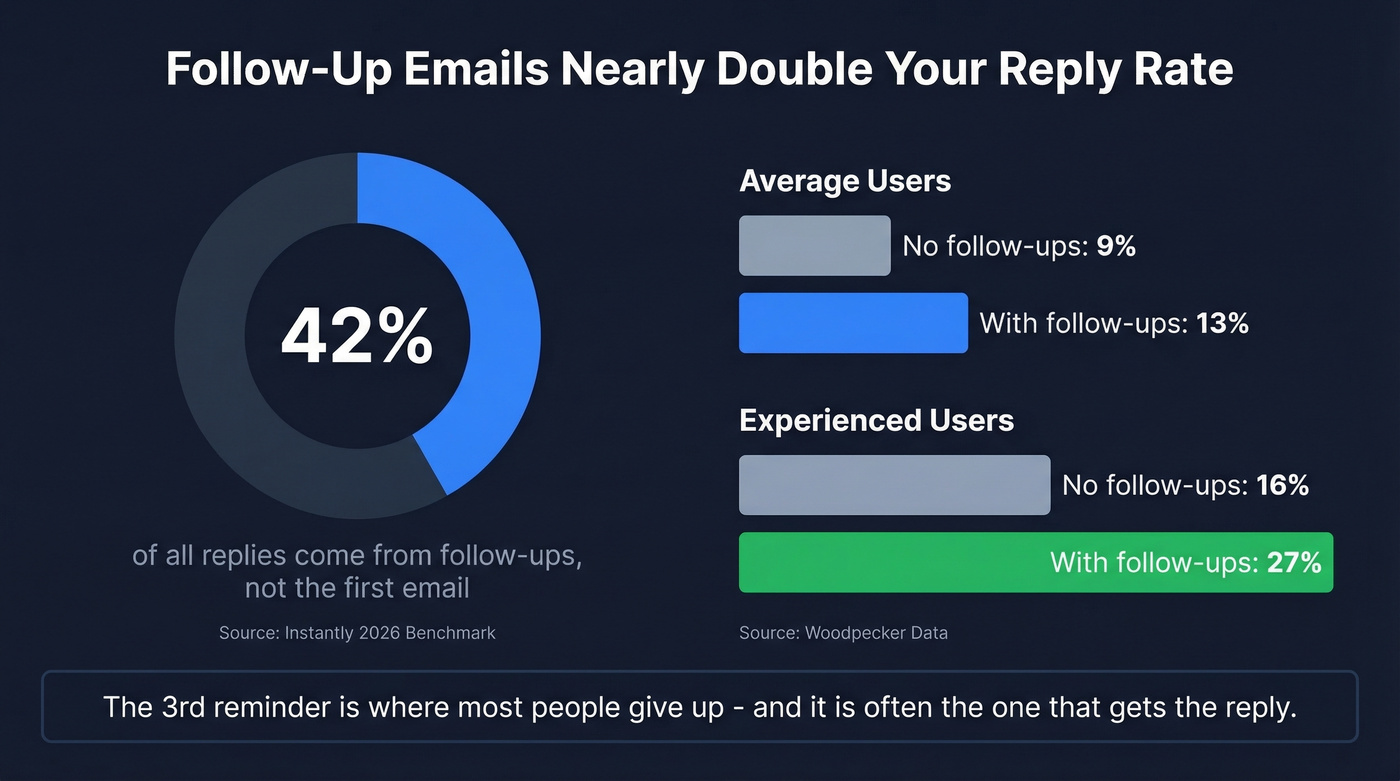
Woodpecker's data tells a similar story. Campaigns without follow-ups average roughly 9% reply rates. Add at least one follow-up and that jumps to 13%. For experienced users who've dialed in their messaging, the gap widens further: 16% without follow-ups versus 27% with them.
These aren't marginal improvements. They're the difference between a pipeline that works and one that doesn't. The anxiety you feel about "bothering" someone? Misplaced. People expect follow-ups. In our experience, the third reminder is where most people give up - and it's often the one that gets the reply.
Why "Just Following Up" Gets Ignored
The phrase "just following up" is the professional equivalent of clearing your throat before saying nothing. As CNBC's expert analysis explains, the word "just" is a minimizer - it signals that your message isn't important enough to warrant a real reason for writing. You're telling the recipient they can safely ignore you.
"Sorry to bother you" is even worse. You're apologizing for existing in their inbox, which frames the entire exchange as an imposition rather than a professional interaction. NetHunt's research on follow-up mistakes adds another landmine: putting "follow-up" in your subject line. It's the email equivalent of labeling a gift "obligation present."
And "I hope this email finds you well"? Nobody reads that. It's filler that trains your recipient's eye to skip to the second paragraph.
Here's what to say instead:
| Weak Phrase | Strong Alternative |
|---|---|
| "Just following up" | "Wanted to share one more thing on [topic]" |
| "Circling back" | "Quick question about [specific item]" |
| "Touching base" | "Any thoughts on [specific decision]?" |
| "Sorry to bother you" | "I know your week is packed - one quick item" |
| "I hope this finds you well" | "Adding context that might help with [decision]" |
The pattern is clear: specificity beats vagueness. Every strong alternative references something concrete. Every weak phrase could apply to literally any email ever sent.
Polite Reminder Email Structure
Every effective reminder follows a four-part structure. Memorize this and you won't need 50 templates.
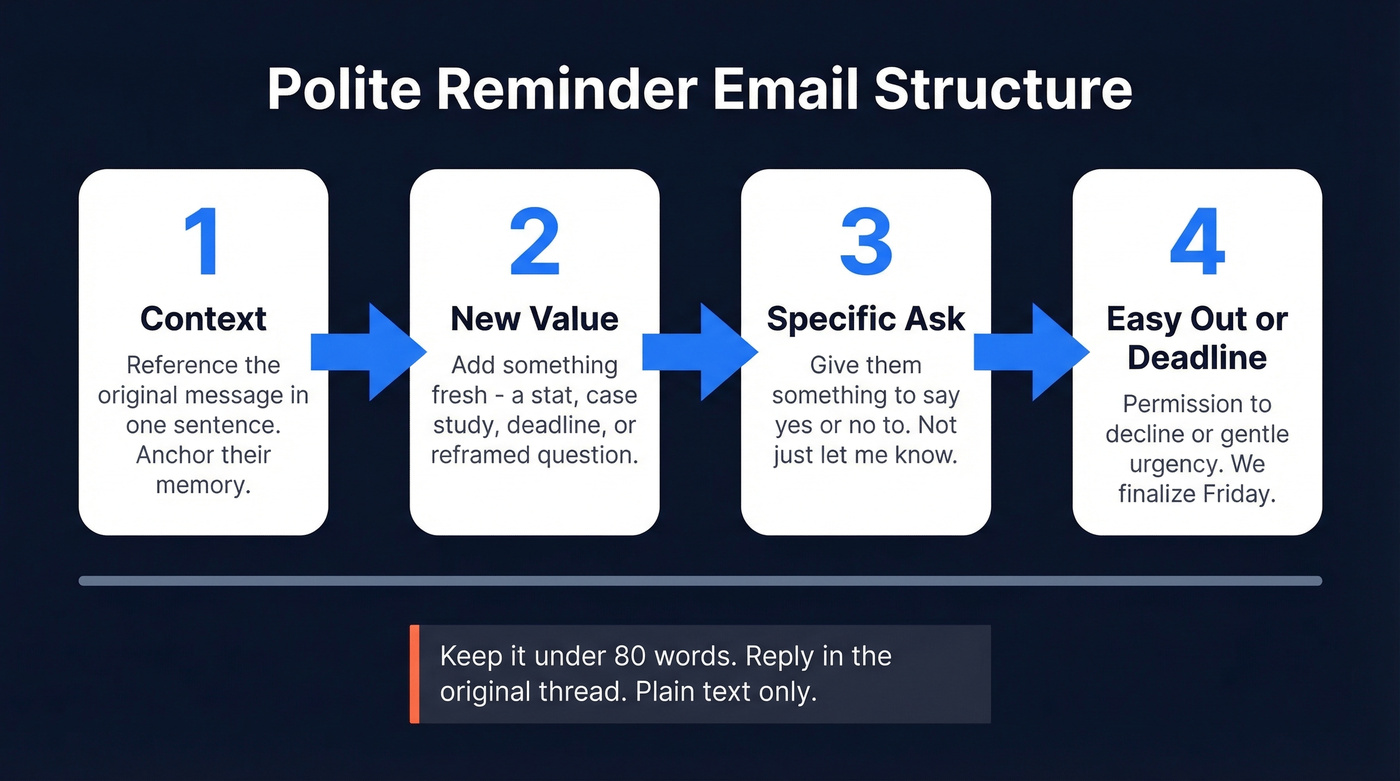
- Context. Reference the original message in one sentence. "I sent over the Q3 proposal last Tuesday" - that's it. You're anchoring their memory.
- New value. Add something that wasn't in the first email - a relevant stat, a case study, a deadline that's approaching, a question that reframes the decision. As GMass's follow-up guide puts it, each follow-up must earn its existence by adding new information.
- Specific ask. "Would Tuesday or Wednesday work for a 15-minute call?" beats "Let me know your thoughts" every time. Give them something to say yes or no to. If you need help tightening your ask, use these email wording patterns.
- Easy out or deadline. Either give them permission to decline or create gentle urgency: "We're finalizing the project scope Friday."
Keep the whole thing under 80 words. Send it as a reply in the original thread, not a new message. Plain text, no fancy formatting.
Here's the thing: if your original email didn't have a clear ask and a reason to respond, no reminder framework will save it. The problem often isn't the reminder - it's the first email.
Subject Lines That Get Opened
We've tested dozens of subject line formulas, and specificity wins every time. Instantly's subject line research shows reminder emails can drive 49% higher reply rates than single-touch campaigns.
| Weak Subject Line | Optimized Version |
|---|---|
| "Following up" | "Quick question about [project name]" |
| "Just checking in" | "One thought on your [specific challenge]" |
| "Reminder" | "Meeting confirmation - Thursday 2pm" |
| "Urgent!!!" | "Invoice #1234 due Friday" |
| "Touching base" | "Update on [deliverable] + next step" |
| "Re: our conversation" | "[Name], one more thought on [topic from call]" |
Your subject line should tell the recipient exactly what the email is about and why it matters right now. If you can swap your subject line onto any other email and it still works, it's too generic. For more options, borrow from these subject line examples.

42% of replies come from follow-ups - but only if your emails actually reach the inbox. Prospeo's 98% email accuracy and 5-step verification mean your carefully crafted reminders land where they should, not in a bounce-back folder.
Stop perfecting emails that never arrive. Fix the data first.
12 Polite Reminder Templates
Each template below follows the four-part framework: context, new value, specific ask, and easy out or deadline. Adapt the tone to your relationship - whether you need to gently remind a client, nudge a colleague, or follow up on a job application. If you want more variations, start with these sales follow-up templates.
No Response to Initial Email
Casual:
Hi [Name],
I sent over [specific item] on [day] - wanted to add one thing. [New detail or question.] Would [specific time] work for a quick chat? If the timing's off, no worries at all.
Formal:
Dear [Name],
Following up on my [date] email regarding [topic]. Since then, [new development or relevant insight]. Could you let me know by [date] whether this aligns with your priorities?
Payment or Invoice Overdue
Your first reminder should assume good faith. Your second should be direct.
First reminder: "Quick note - invoice #[number] for [amount] was due on [date]. I know these things slip through the cracks. Here's the payment link: [link]. Let me know if anything's holding it up."
Second reminder: "This is a kind reminder regarding invoice #[number], originally due [date]. Our records show it's still outstanding. Could you confirm payment status or a timeline by [date]? Happy to hop on a call if there's an issue to sort out."
Meeting Confirmation
Hi [Name],
Confirming our meeting on [day] at [time] - [topic]. I've attached the agenda so we can hit the ground running. Let me know if the time still works or if we need to shift.
Approaching Deadline
Hi [Name],
Friendly heads-up that [deliverable/decision] is due [date]. I've pulled together a summary to make this easier on your end. What do you need from me to finalize?
Post-Proposal Follow-Up
Watch how adding new value transforms a dead follow-up:
❌ "Just wanted to check if you had a chance to review the proposal."
✅ "One thing I didn't mention in the proposal - [Company X] saw a 30% reduction in onboarding time using the same approach. I've updated the doc to reflect this. Worth a look before your team meets on [date]?"
The first version gives them nothing. The second gives them a reason to re-engage.
Nudging a Colleague
Fill in the blanks:
Hey [Name], just a heads-up - I need _______ by _______ to keep [project] on track. If you're blocked on anything, let me know and I'll help clear it. What's your ETA?
Upward (to a manager):
Hi [Name],
Wanted to flag that [decision/approval] is the last step before we can ship. I've attached everything you need to review. Could you take a look by [date]?
When you're reminding your boss, frame it around the project timeline rather than their delay. That's the difference between helpful and presumptuous.
Job Application Follow-Up
Hi [Name],
I applied for the [role] position on [date] and wanted to reiterate my interest. Since applying, I [completed relevant project/earned certification]. Is there any additional information I can provide?
Event RSVP Reminder
Hi [Name],
Quick reminder that [event name] is on [date]. We've just confirmed [speaker/agenda item] - thought you'd want to know. Can you confirm attendance by [date]?
When to Send Your Reminder
Honest truth: timing matters less than you think, but cadence matters a lot. If you want a deeper timing breakdown, see when you should follow up.
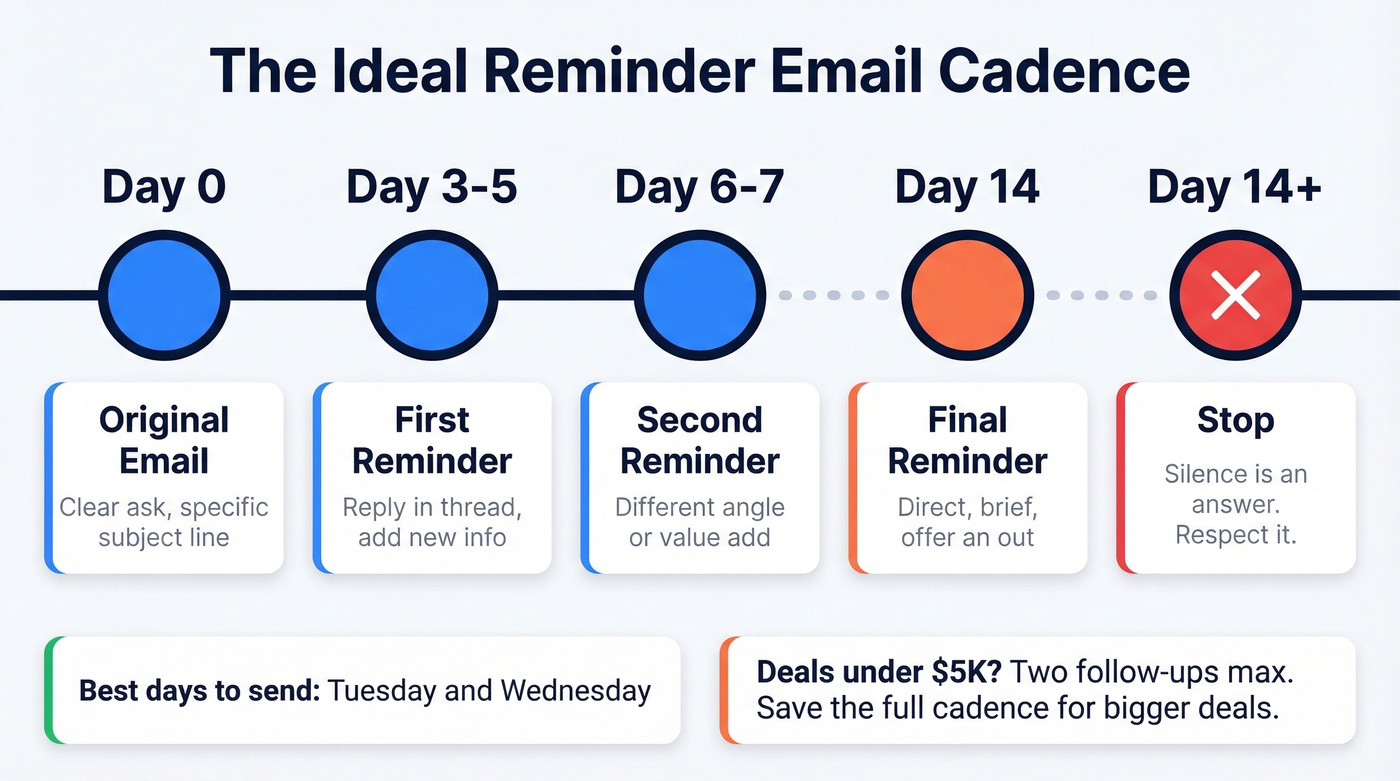
| Day | Action | Notes |
|---|---|---|
| Day 0 | Send original email | Clear ask, specific subject |
| Day 3-5 | First reminder | Reply in thread, add new info |
| Day 6-7 | Second reminder | Different angle or value add |
| Day 14 | Final reminder | Direct, brief, offer an out |
| Day 14+ | Stop | Silence is an answer |
A strong default is spacing touches 3-4 days apart. Instantly's benchmark data shows Tuesday and Wednesday as peak reply days, with Wednesday highest. Woodpecker's data confirms that 2-3 follow-ups is the sweet spot, with diminishing returns kicking in hard after the 5th-7th touch.
After 2-3 well-crafted follow-ups with no reply, the answer is no. Respect the silence. Continuing to push past this point doesn't show persistence - it shows you can't read a room.
One more thing: if your average deal value is under $5,000, you probably don't need more than two follow-ups total. The math doesn't justify the time. Save the three-touch cadence for deals that actually move the needle.
Five Mistakes That Kill Your Reminder
Bumping with no new info. "Just making sure you saw this" adds nothing. Every reminder needs fresh context or a new angle. One new detail, stat, or question. (If you’re building a repeatable system, use a simple sequence management checklist.)
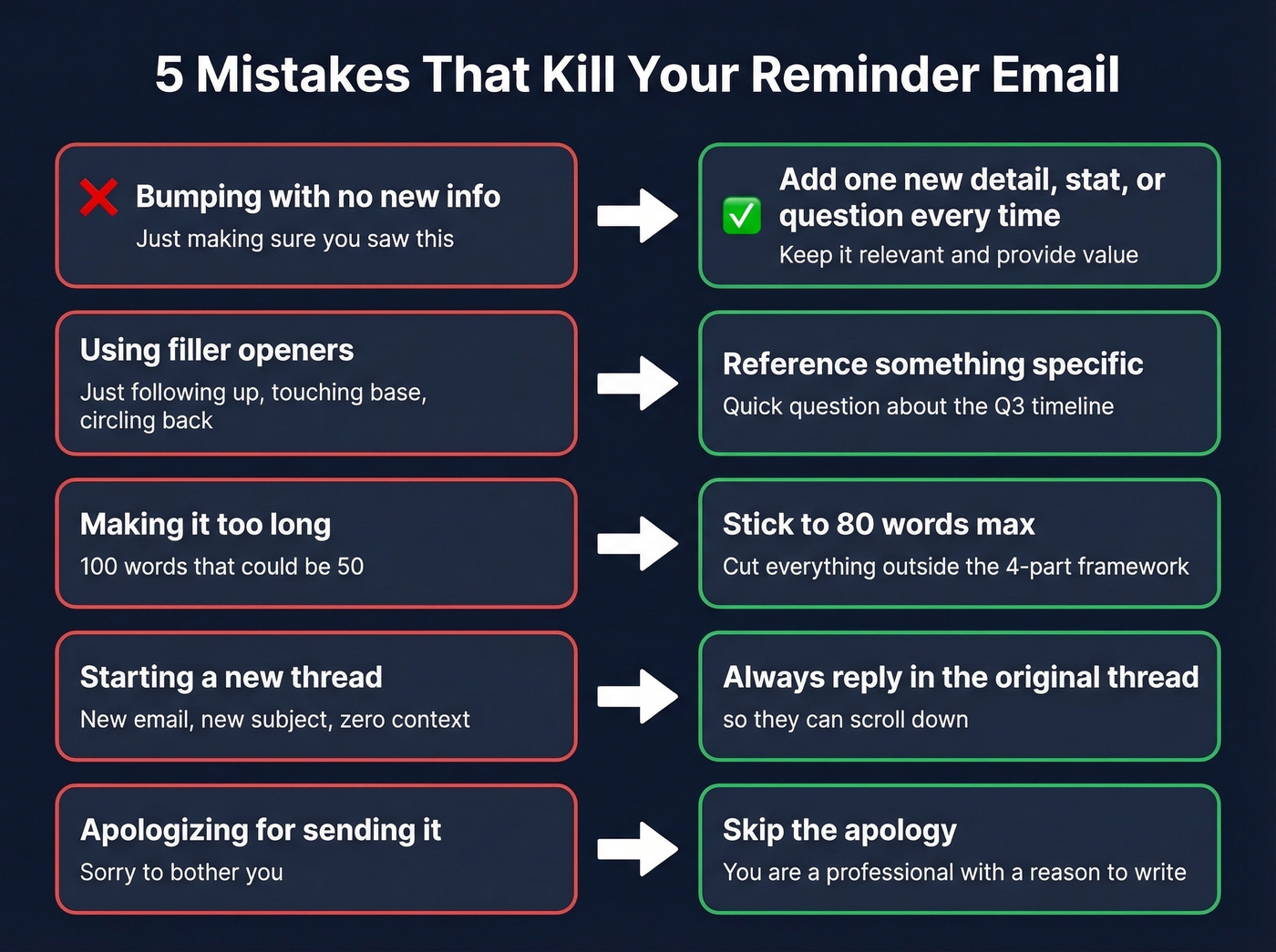
Using filler openers. "Just following up," "touching base," and "circling back" are invisible to busy people. Replace them with a specific reference to what you're following up about. If you need alternatives, here’s how to say just checking in professionally.
Making it too long. If your reminder is 100 words that could be 50, you've already lost them. Cut everything that doesn't serve the four-part framework. (This is a core skill in email copywriting.)
Starting a new thread. A new email with a new subject line means the recipient has zero context. Always reply to the original thread so they can scroll down and see the history.
Apologizing for sending it. "Sorry to bother you" undermines your credibility before you've even made your point. Skip the apology entirely. You're a professional communicating about professional matters - a non-confrontational reminder doesn't require self-deprecation. It requires clarity and respect for the reader's time.
Before You Remind - Check the Address
Sometimes the problem isn't your wording. It's the address.
Before rewriting your reminder for the fifth time, consider whether the email was delivered at all. Bounced emails, outdated addresses, and typos in contact records are more common than most people realize - especially if you're working from a list that's more than a few weeks old. We've seen teams agonize over copy when the real issue was a 15% bounce rate from stale data. If you’re troubleshooting this, start with email bounce rate basics.
Run the address through Prospeo's email finder before you follow up. It verifies emails with 98% accuracy, and the free tier gives you 75 credits per month - plenty for checking your most important contacts.
Reminder Emails Across Cultures
If you're emailing across borders, your biggest risk isn't grammar - it's tone. According to research cited by HBR, 60% of email misunderstandings in global teams come from tone interpretation, not language barriers.
The differences come down to high-context vs. low-context communication. In high-context cultures like Japan and China, meaning lives between the lines - relationships, hierarchy, and indirect cues matter more than explicit statements. In low-context cultures like Germany and the US, directness is valued and ambiguity creates confusion. Understanding which side your recipient falls on determines whether your "friendly nudge" lands as helpful or rude.
Safe defaults: clarity over cleverness, neutrality over personality, explicitness over assumption, respect over efficiency. Skip the idioms, drop the sarcasm, and spell out deadlines with time zones.
| Country | Greeting Norm | Key Note |
|---|---|---|
| Japan | Last name + "-san" | Formality is respect |
| Germany | Herr/Frau + surname | Titles matter |
| India | Sir/Madam common | Honorifics expected |
| Brazil | First name OK | Patience is normal |
| China | Formal greeting | Speed signals respect |
| Nigeria | Formal first contact | Persistence is fine |
The universal rule: when in doubt, err on the side of formality. You can always loosen up once the relationship is established. Going the other direction - casual to formal - is much harder to pull off.
You just learned the perfect reminder framework. Now make sure you're sending it to the right person. Prospeo gives you verified emails for 300M+ professionals - refreshed every 7 days - so your polite nudge reaches a real, active inbox.
Find any prospect's verified email for $0.01. No bounces, no wasted follow-ups.
FAQ
How long should I wait before sending a reminder?
Wait 3-5 business days for external emails and 1-2 days for internal messages. Space subsequent follow-ups 3-4 days apart. Instantly's benchmark data shows Tuesday and Wednesday deliver the highest reply rates.
How many follow-ups is too many?
Two to three follow-ups is the proven sweet spot. Woodpecker's data shows diminishing returns after the 5th-7th touch. If three well-crafted reminders get silence, move on - continuing signals poor judgment, not persistence.
Is it rude to send a reminder email?
No. 42% of all email replies come from follow-ups, not the original send. The key is adding fresh value each time rather than just bumping the thread. People appreciate reminders that respect their time and give them a concrete reason to respond.
How do I remind someone without sounding pushy?
Use the four-part structure: context, new value, specific ask, and an easy out. A gentle reminder anchored in something concrete - a deadline, a new data point, a specific question - never reads as pushy. Vague persistence with no new information is what feels aggressive.
What if I'm not sure the email address is correct?
Verify it before following up. Prospeo checks email validity in seconds with 98% accuracy, and the free tier includes 75 credits per month - enough to confirm your highest-priority contacts are reachable.