

How to Send Automatic Emails: 5 Methods From Free to Advanced
You exported 500 webinar leads, opened Gmail, clicked "Schedule Send," and realized it only works for one email at a time. No recurring sends, no sequences, no personalization at scale. Now you're staring at a spreadsheet wondering how to send automatic emails without manually copying and pasting for the next three hours.
There's a way. And the method you pick matters more than most people think. Automated emails account for just 2% of total sends but generate 30% of email-attributed revenue - $2.87 per automated send versus $0.18 for scheduled campaigns. That's a 16x difference. The gap between "sending emails" and "automating them" is where the money lives.
What You Need (Quick Version)
- Fewer than 50 emails? Gmail Schedule Send or Google Sheets + Apps Script. Both free.
- Opted-in list? MailerLite or Brevo's free plan. Automation included.
- Cold B2B outreach? Prospeo for verified contacts, then Instantly or Smartlead for the sending engine.
Pick your lane, then read the section that matches.
Types of Automated Emails
| Type | What It Does | Example |
|---|---|---|
| Scheduled send | One-time email, future delivery | "Send this Tuesday at 9 AM" |
| Drip campaign | Fixed sequence over time | 5-email onboarding series |
| Autoresponder | Single triggered email | Welcome email after signup |
| Behavior-triggered | Fires on user action | Cart abandonment email (35.75% avg open rate) |
| Cold outreach | Automated prospecting sequence | Multi-step cold email cadence |
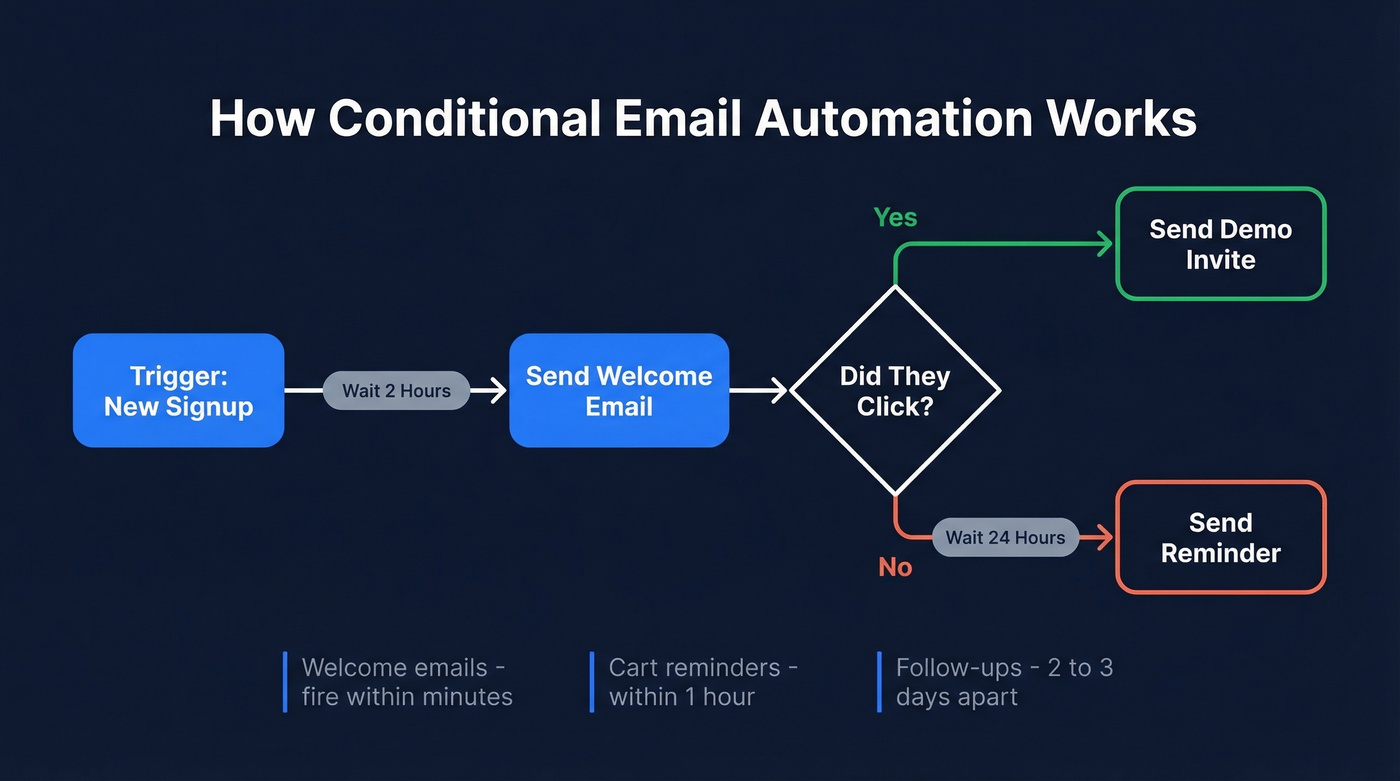
The real power kicks in with conditional logic. A basic flow works like this: trigger (someone signs up) → delay (2 hours) → send welcome email → condition (did they click?) → if yes, send demo invite → if no, send reminder 24 hours later. Welcome emails should fire within minutes, abandoned cart reminders within an hour, and follow-ups 2-3 days apart. That branching logic is what separates "scheduling an email" from real automation.
Five Methods to Send Automated Emails
1. Gmail and Outlook Built-Ins
Use this if you need to schedule a handful of one-time emails. Free, built in, two clicks.
Skip this if you need recurring sends, sequences, or personalization at scale. Gmail's Schedule Send is strictly one-time - it won't handle "every Thursday at 6 PM." For recurring emails in the Microsoft ecosystem, use Power Automate: Create → Scheduled cloud flow → Send an email (V2). For Gmail, you'll need Apps Script or an ESP.
2. Google Sheets + Apps Script
This is the scrappy approach, and it works surprisingly well for small batches.
Build your sheet with columns for first name, email, and any personalization variables - company, title, custom line. Write a simple Apps Script that replaces placeholders like {{FirstName}} with values from each row, then sends via Gmail. Hit execute, and your emails go out personalized, one per row.
In our experience, this works great for around 30 contacts and starts breaking down past 50. The consensus on r/automation is that it's "super lightweight" and "no need to mess with Mailchimp" at that scale. The ceiling is Gmail sending limits: expect hundreds per day on consumer Gmail and up to a couple thousand on Google Workspace, depending on your account reputation. Beyond that, you need a real platform.
3. Email Marketing Platforms
For opted-in lists between 50 and 10,000 contacts, a free ESP plan is the sweet spot. We've tested most of these free tiers, and the differences are stark:
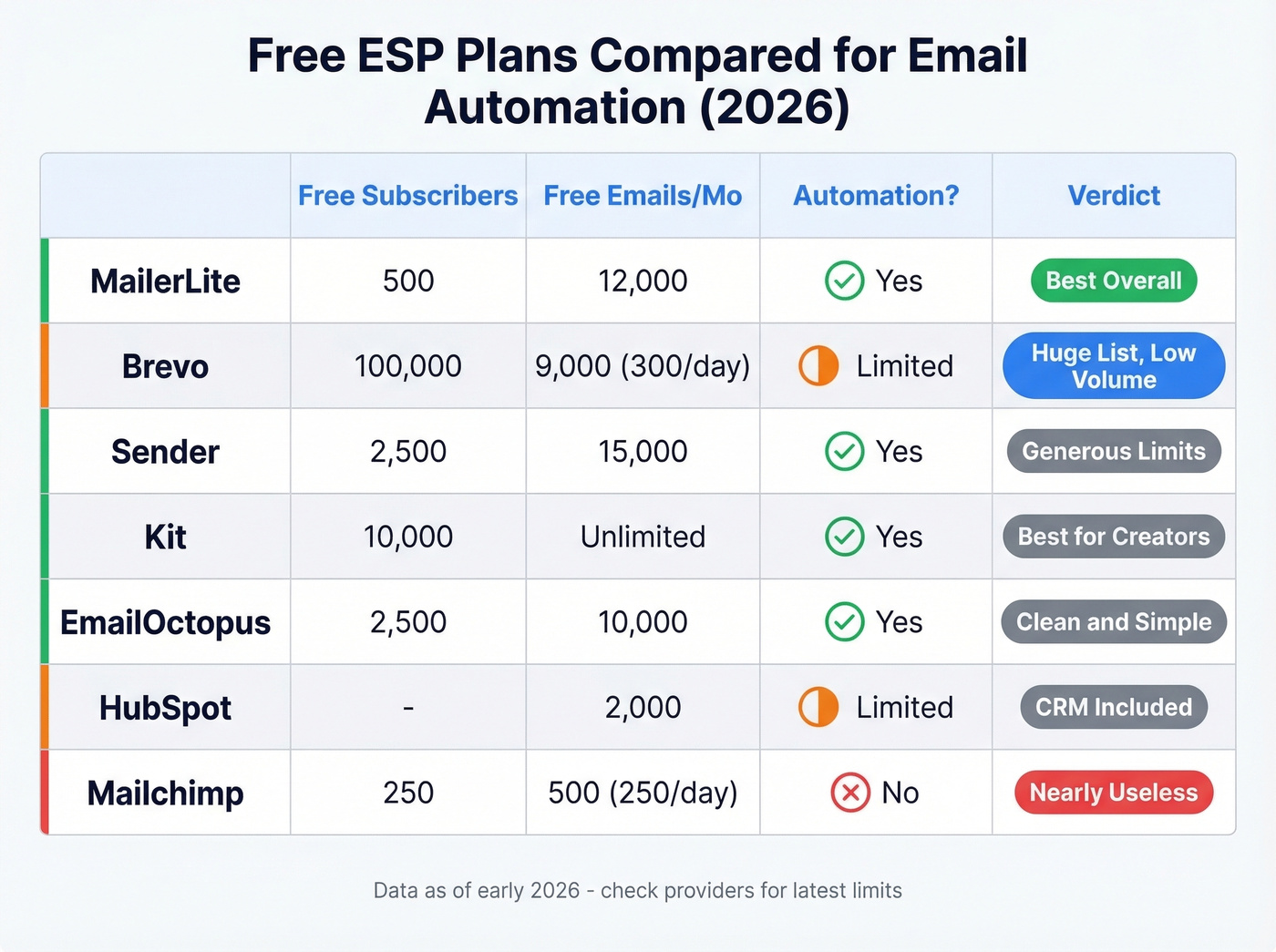
| Tool | Free Subscribers | Free Emails/Mo | Automation? | Notes |
|---|---|---|---|---|
| MailerLite | 500 | 12,000 | Yes | Best all-around free plan |
| Brevo | 100,000 contacts | ~9,000 (300/day) | Limited | Huge contact limit; automation capped at 2,000 subscribers |
| Sender | 2,500 | 15,000 | Yes | Generous limits |
| Kit | 10,000 | Unlimited | Yes | Best for creators |
| EmailOctopus | 2,500 | 10,000 | Yes | Clean, simple |
| HubSpot | - | 2,000 | Limited | CRM included |
| Mailchimp | 250 | 500 (250/day) | No | Nearly useless |
Here's the thing: Mailchimp's free plan is nearly useless for automation. 250 subscribers, 500 emails/month, no automations, no scheduling, no time-zone delivery. MailerLite gives you automation workflows, landing pages, and reporting at no cost. If you've got a massive list but low send volume, Brevo's 100,000-contact free tier is remarkable - though automation is capped at 2,000 subscribers on the free plan.
Some practitioners worry about shared ESP IPs hurting deliverability. In practice, reputable ESPs actively manage IP reputation, making this a non-issue for most senders.
4. Workflow Automation Tools
Sometimes you don't need an ESP - you need a connector. Zapier and Microsoft Power Automate sit between your apps and trigger emails based on events elsewhere.
Zapier's free plan handles 100 tasks/month, with paid plans starting around $20/mo. Power Automate is included with many Microsoft 365 plans. Someone books a demo on Calendly? Zapier fires a confirmation email through Gmail. A deal moves to "Closed Won" in your CRM? Power Automate triggers the onboarding sequence. These tools shine when the email isn't the product - it's a reaction to something happening in another system.
AI-powered email workflows are emerging fast in this space. Zapier's AI actions can now draft, summarize, and route emails based on content. It's early, but within a year most workflow automation will have an AI layer. Worth watching, not worth betting your stack on yet.
5. Cold Email Automation
If you're sending cold emails through Mailchimp, stop. Right now.
Marketing ESPs are built for opted-in subscribers, and cold outreach through them often leads to account restrictions or outright bans. Cold outreach needs dedicated infrastructure: separate sending domains, warm-up protocols, and tools designed for prospecting sequences.
The go-to platforms are Instantly (~$30-97/mo) and Smartlead (similar range). Both handle multi-step sequences, A/B testing, and domain rotation. A well-built cold email campaign generates 10-20% reply rates once you've dialed in messaging and targeting.
But none of that matters if your contact data is garbage. We've seen teams spend weeks perfecting their copy and sequences only to watch bounce rates blow past 10% on the first send - torching their domain reputation before the campaign even gets going. Before you automate a single cold email, you need verified addresses. Prospeo gives you 300M+ professional profiles with 98% email accuracy, and the Chrome extension pulls verified emails from any website in one click. It integrates natively with Instantly, Smartlead, and Lemlist, so verified contacts flow straight into your sending tool without CSV gymnastics.
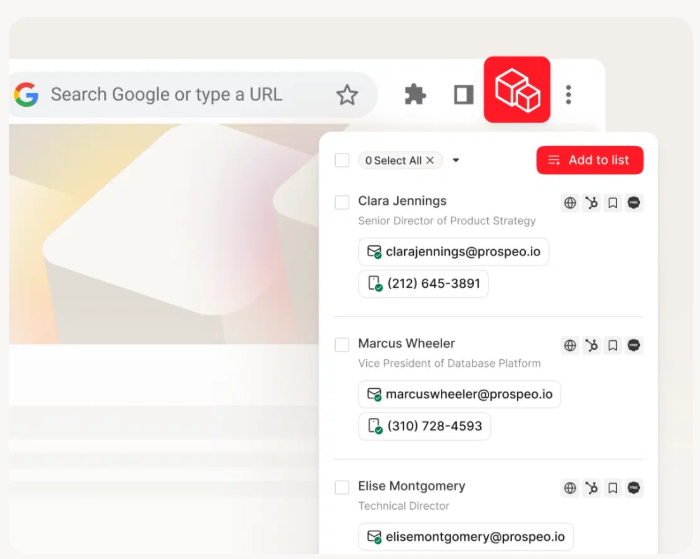
The workflow: find contacts → verify → push to your cold email platform → launch sequence. Verify first, automate second.

Automating cold emails with bad data is like building a rocket with a leaky fuel tank - you'll crash before liftoff. Prospeo delivers 300M+ professional profiles at 98% email accuracy, and integrates natively with Instantly, Smartlead, and Lemlist so verified contacts flow straight into your sequences.
Verify first, automate second. Start free with 75 emails.
Choosing the Right Method
Fewer than 50 contacts, no budget: Google Sheets + Apps Script. Free, flexible, done in an hour.
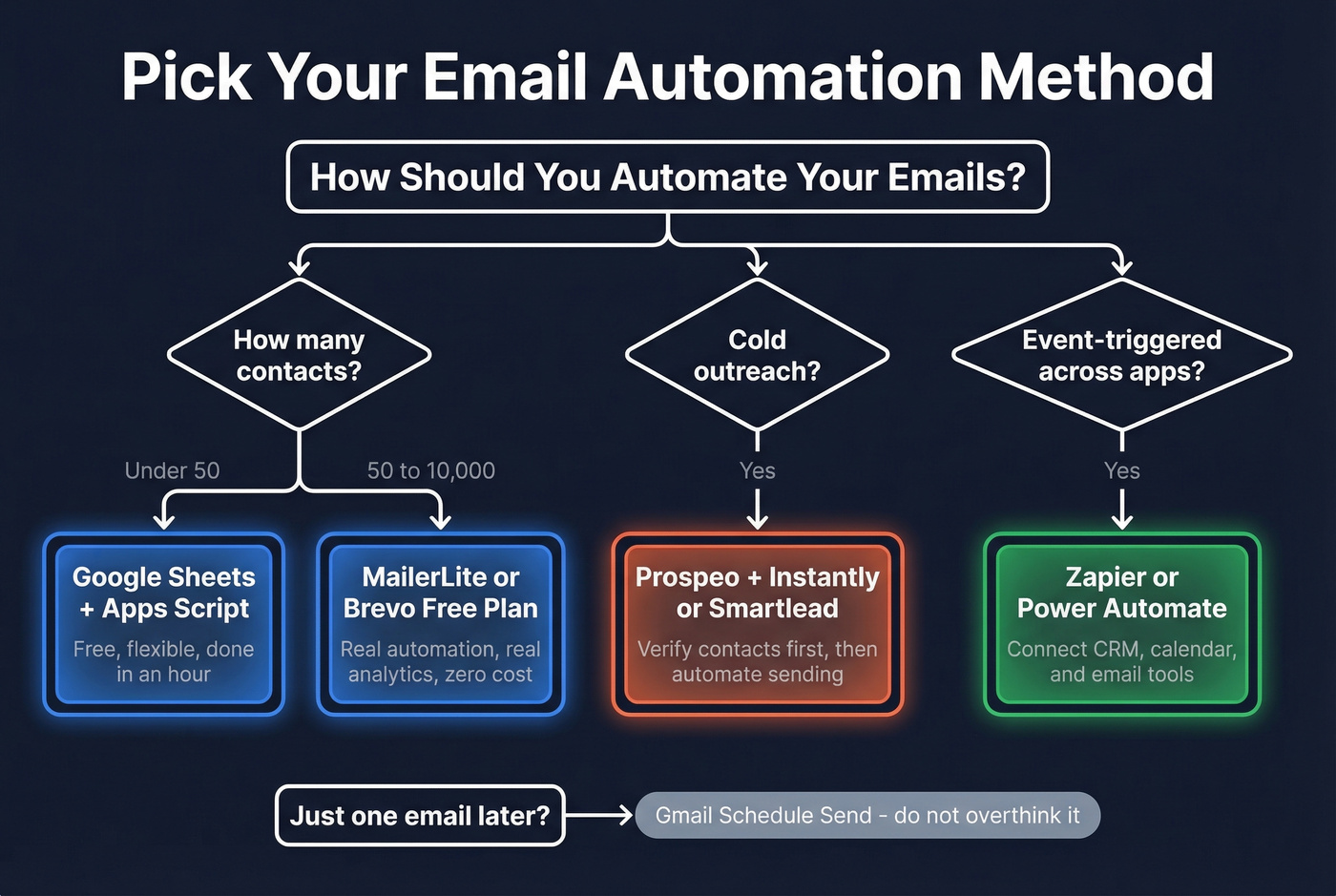
50-10,000 opted-in contacts: MailerLite or Brevo free plan. Real automation, real analytics, zero cost.
B2B outbound prospecting: Prospeo for verified data, Instantly or Smartlead for sending. This is the stack a lot of outbound teams are running in 2026.
Event-triggered emails across apps: Zapier or Power Automate to connect your CRM, calendar, and email tools.
One-off scheduled sends: Gmail Schedule Send. Don't overthink it.
Let's be honest: if your deal sizes are under five figures, you probably don't need a $500/mo cold email stack. Start with Apps Script or a free ESP, prove the channel works, then invest in dedicated tools.
Deliverability Essentials
Knowing how to send automatic emails is only half the battle - getting those messages into inboxes is the other half. Delivery means the server accepted your email. Deliverability means it landed in the inbox, not spam. 70% of emails show at least one spam-related issue, and if your inbox placement drops below 90%, something's broken.
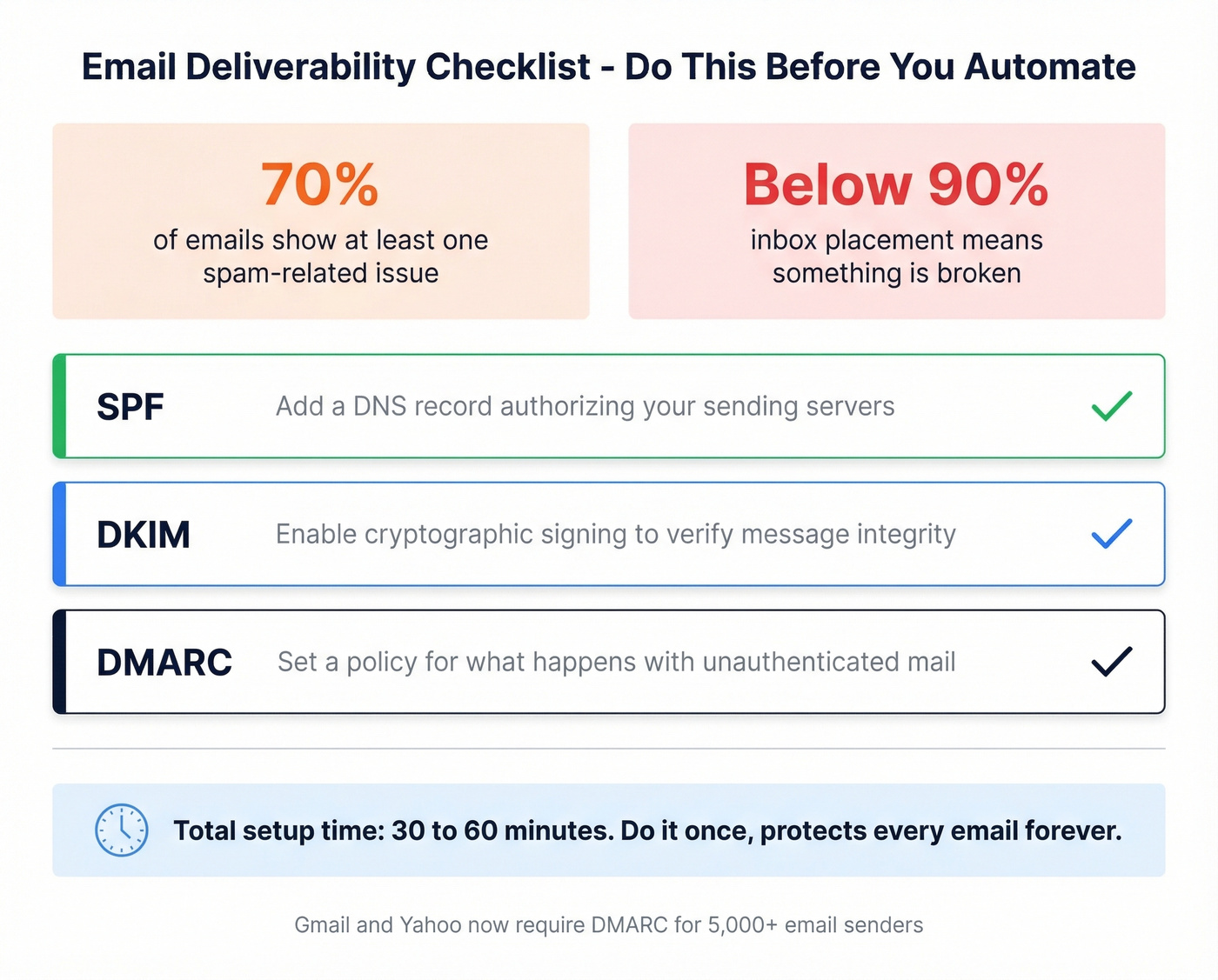
Email authentication isn't optional anymore. Gmail and Yahoo require DMARC for anyone sending 5,000+ emails, and nearly half of senders still lack it. The non-negotiable checklist:
- SPF: Add a DNS record authorizing your sending servers, such as
v=spf1 include:_spf.google.com ~all. (If you want examples by provider, see our SPF guide.) - DKIM: Enable cryptographic signing so recipients can verify message integrity. (Quick check: how to verify DKIM is working.)
- DMARC: Set a policy telling receiving servers what to do with unauthenticated mail. (Deep dive: DMARC alignment.)
Total setup time: 30-60 minutes. Do it once, and it protects every email you send going forward. Before automating any campaign, verify your list - high bounce rates on your first send will tank your sender reputation for months. (More on bounce thresholds: email bounce rate.)

Common Mistakes
No list verification before sending. High bounce rates trigger spam filters. Verify every list, every time. This is the single most preventable cause of deliverability problems we see. (If you're scaling volume, also watch your email velocity.)
Skipping SPF/DKIM/DMARC. Authentication takes 30 minutes and prevents silent email drops. There's no excuse for skipping it.
Mixing cold outreach with marketing ESPs. Mailchimp, MailerLite, and Brevo are built for opted-in lists, not unsolicited sends. Use the wrong tool and you'll get your account banned. (If you're building outbound sequences, use a dedicated B2B cold email sequence framework.)
No unsubscribe link. CAN-SPAM and GDPR require it. Recipients who can't unsubscribe hit "Report Spam" instead - and that's far worse. (Run a quick preflight with an email spam checker.)
DIY scripting at scale without bounce handling. Apps Script is great for 30 contacts. At 3,000, you'll burn your domain without proper bounce management. (If you're trying to scale safely, see the best way to send bulk email without getting blacklisted.)
Teams using Prospeo's verified data before automating outreach see bounce rates drop below 4% and book 35% more meetings than Apollo users. At $0.01 per email with a 7-day data refresh cycle, you're not just automating - you're automating on data that's actually current.
Stop torching your domain reputation with stale data.
FAQ
Can Gmail send recurring emails automatically?
No. Gmail's Schedule Send only handles one-time future delivery. For recurring emails, use Google Apps Script with a time-based trigger, a Zapier workflow connected to Gmail, or an ESP like MailerLite that supports scheduled automations natively.
What's the best free tool for automated email campaigns?
MailerLite is the strongest free option: 500 subscribers, 12,000 emails/month, and full automation workflows at no cost. For large lists, Kit offers 10,000 subscribers with unlimited sends. For cold outreach, Prospeo's free tier includes 75 verified email credits per month - enough to test a prospecting sequence before committing.
How do I stop automated emails from going to spam?
Set up SPF, DKIM, and DMARC on your domain - about 30-60 minutes of work. Verify your email list before sending to keep bounce rates under 3%. Include an unsubscribe link in every message, and warm up your sending domain over 2-3 weeks before scaling volume.