

How to Send Mass Emails Without Destroying Your Domain
You've got a thousand contacts, a solid offer, and a send button. You hit it. Half your emails land in spam, your bounce rate spikes to 15%, and Gmail quietly throttles your domain for the next 72 hours.
A common complaint on r/b2bmarketing is exactly this: "every time I try mass emails, half end up in spam folders or I get flagged." Figuring out how to send mass emails is trivially easy. Landing in inboxes is the hard part - and that's what this entire guide is about.
What You Need (Quick Version)
Your approach depends on your list size. Here's the short answer before we get into details.
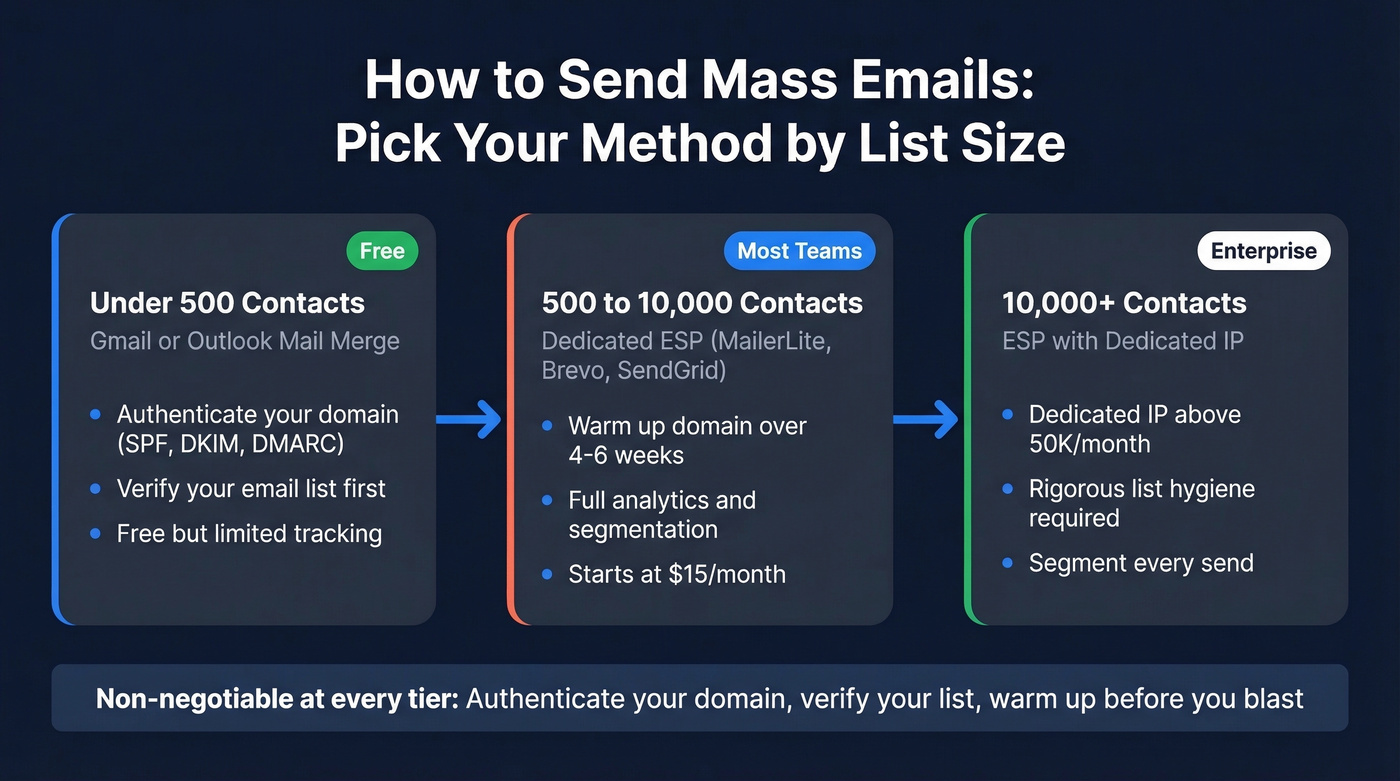
Under 500 contacts: Gmail or Outlook mail merge works. Authenticate your domain (SPF, DKIM, DMARC) and verify your list before you send. Don't skip verification just because the list is small - a 10% bounce rate on 500 emails still hurts a fresh domain.
500-10,000 contacts: Use a real ESP like MailerLite, Brevo, or SendGrid. Warm up your sending domain over 4-6 weeks, authenticate everything, and verify your list before you send. This is where most teams live, and where most teams get sloppy.
10,000+ contacts: Dedicated ESP with a dedicated IP (if you're above 50K/month), segmented sends, and rigorous list hygiene. At this volume, every percentage point of bounce rate compounds into deliverability damage. No shortcuts.
The non-negotiable at every tier: authenticate your domain, verify your list, and warm up before you blast.
What Changed in 2024-2026
If you haven't sent bulk email since 2023, the rules have changed under your feet. Three shifts matter most.
Gmail updated its algorithm in November 2024. Newsletters that reliably landed in Primary started routing to Promotions - even for senders with strong engagement histories. One r/Emailmarketing poster running ~50K emails/week reported the shift happened overnight. Primary placement at high volume is now the exception, not the expectation.
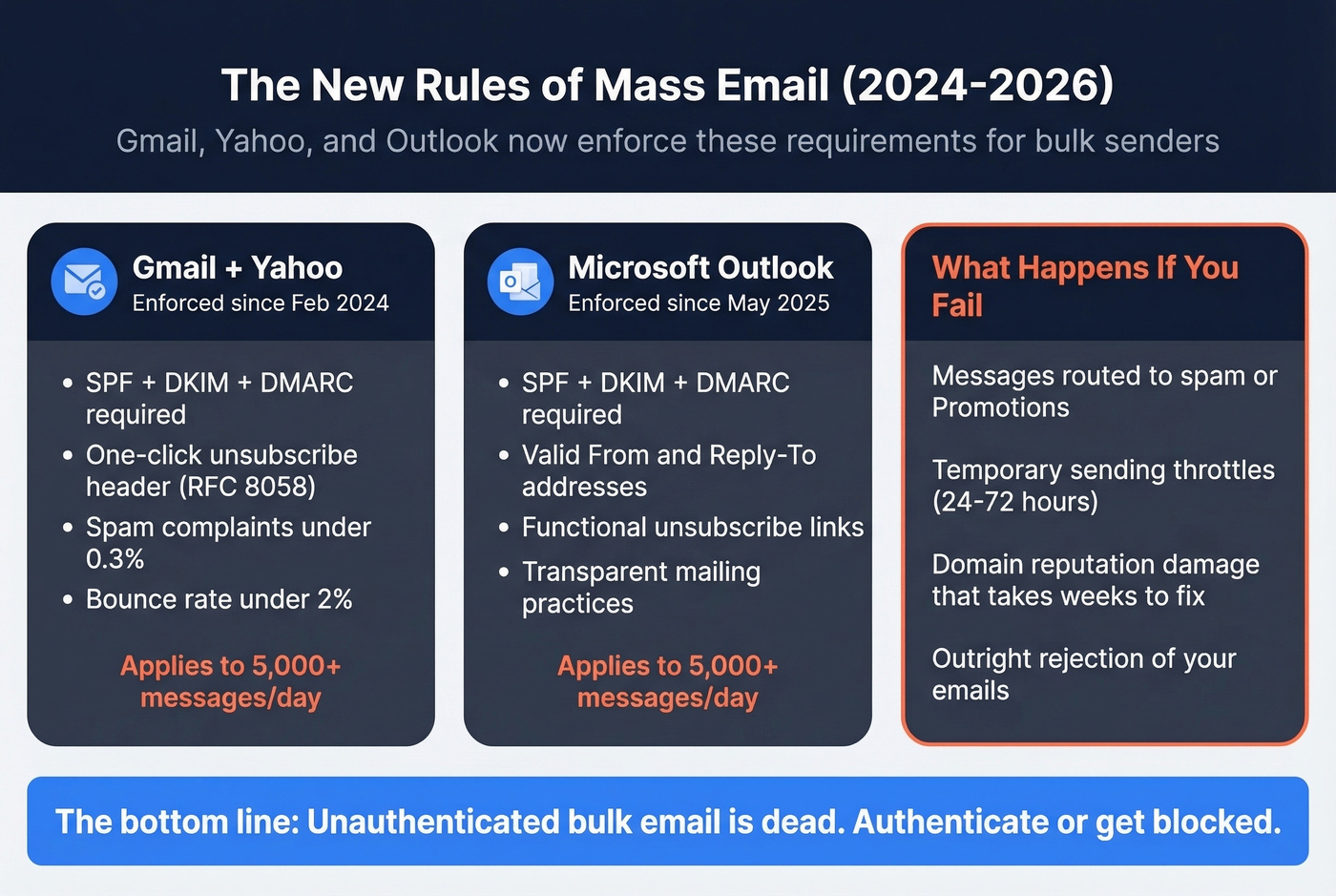
Gmail and Yahoo's bulk sender rules, enforced since early 2024, set hard requirements for anyone sending 5,000+ messages per day. SPF, DKIM, and DMARC authentication are mandatory. One-click unsubscribe headers (RFC 8058) are required. Spam complaint rates must stay under 0.3%. Bounces must stay under 2%. These aren't suggestions - fail them and your mail gets throttled or rejected.
Microsoft followed suit. Starting May 5, 2025, Outlook.com enforces SPF, DKIM, and DMARC for senders hitting 5,000+ messages per day. The three major inbox providers now agree: unauthenticated bulk email is dead.
Authentication, list hygiene, and complaint management aren't "nice to haves" anymore. They're table stakes enforced at the infrastructure level. Build your sending practice around them or watch your deliverability collapse.
Sending Limits You Need to Know
Before you pick a method, know the ceiling. Every email provider enforces daily sending limits, and exceeding them triggers temporary blocks - typically a ~24-hour cooldown before you can send again.
| Provider | Plan | Daily Limit |
|---|---|---|
| Gmail | Personal | 500 |
| Google Workspace | Business | 2,000 |
| [Outlook.com | Personal | 300](https://support.microsoft.com/en-us/office/sending-limits-in-outlook-com-279ee200-594c-40f0-9ec8-bb6af7735c2e) |
| [Microsoft 365 | Business | 10,000](https://learn.microsoft.com/en-us/office365/servicedescriptions/exchange-online-service-description/exchange-online-limits) |
| Yahoo Mail | Personal | ~500 |
| Zoho Mail | Free | 250 |
| Zoho Mail | Business | 5,000 |
These limits apply to messages sent through the provider's native interface or SMTP. Third-party tools that route through your Gmail or Outlook account are still bound by these caps. If you're sending more than 2,000 emails in a day, you need an ESP with its own sending infrastructure.
Five Methods Compared
Here are the options from simplest to most capable. Only one is the right answer for most people, but you should know why the others fall short.
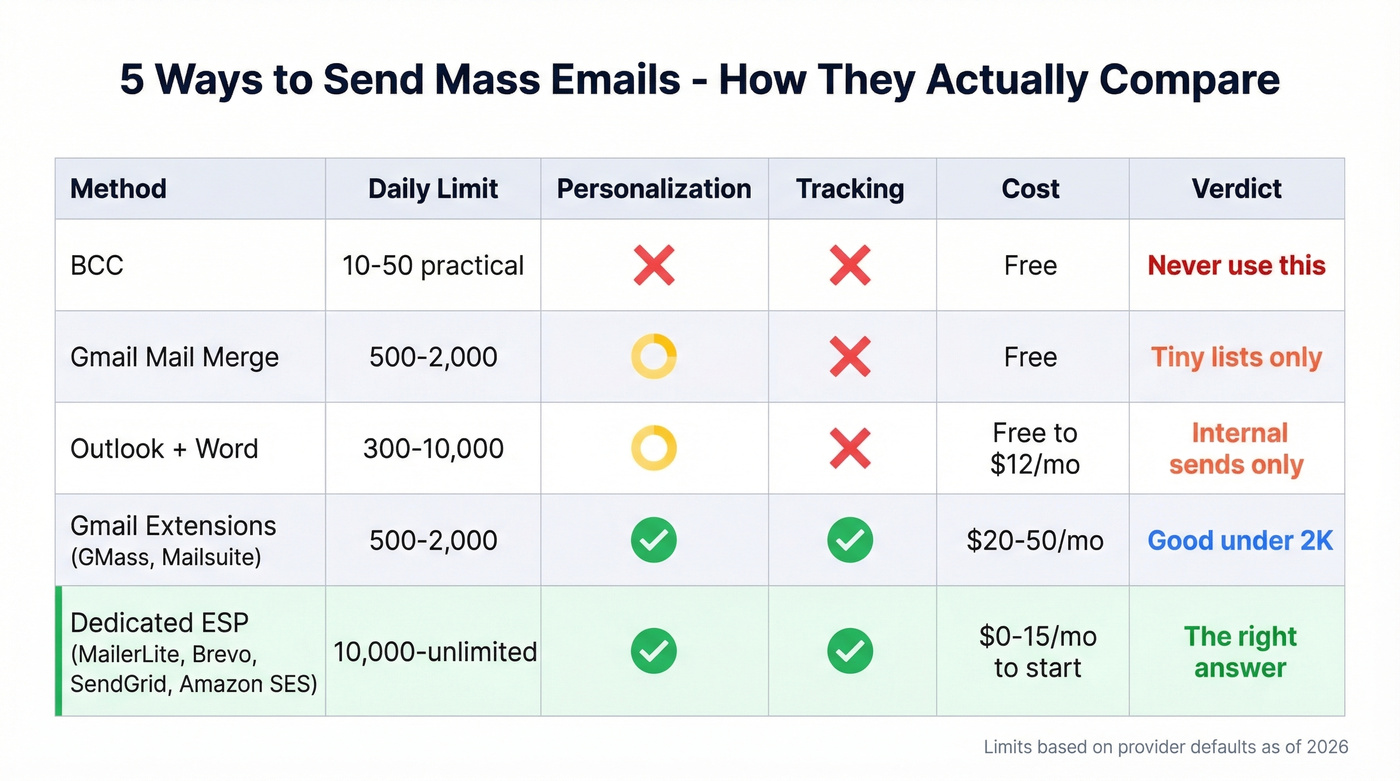
BCC (Don't)
Use this if: You're emailing 10 people about a dinner party.
Skip this if: You're doing anything that resembles marketing or sales outreach. BCC offers zero personalization, zero tracking, and ISPs flag identical messages sent to large recipient lists. It's the fastest way to look like a spammer to Gmail's filters.
Gmail Mail Merge
Google Sheets has a built-in mail merge feature that lets you send personalized emails through Gmail. It's free, it works, and it's limited in ways that'll frustrate you quickly. You can't track opens. Gmail mail merge doesn't let you insert merge tags in subject lines. And you're capped at 500 sends on a personal account or 2,000 on Workspace - per day, with no rollover.
The fact that Google built mail merge into Sheets but didn't include open tracking or scheduling is genuinely baffling. It's a half-finished tool that works for a one-time send to a small list and nothing else.
Outlook + Word Mail Merge
Microsoft's mail merge connects Word, Excel, and Outlook into a workflow that's been essentially unchanged since 2005. You build your template in Word, pull data from Excel, and send through Outlook. The 300-email daily cap on Outlook.com makes this impractical for anything beyond internal communications. Microsoft 365 bumps that to 10,000, which is more reasonable - but you still get no analytics, no A/B testing, and a setup process that feels like filing taxes.
Best for one-off internal announcements or small transactional sends where you don't need tracking.
Gmail Extensions (GMass, Mailsuite)
Extensions like GMass and Mailsuite bolt tracking, scheduling, and auto follow-ups onto Gmail's interface. They're genuinely useful for small-scale outbound - you get open and click tracking, mail merge with personalized subjects, and campaign analytics without leaving your inbox.
The tradeoff is you're still sending through Gmail's infrastructure, which means you're still bound by Gmail's daily limits. GMass has a workaround that routes some sends through its own systems, but that introduces deliverability risk - you're now dependent on GMass's IP reputation alongside your own. For lists under 2,000, these tools work well. Beyond that, you're fighting the platform.
Dedicated ESP (The Right Answer)
Every method above is a workaround. Dedicated email service providers exist specifically to solve the mass email problem - they have sending infrastructure built for volume, deliverability monitoring, compliance tools, analytics, and list management baked in. ESPs send individualized messages to each recipient, so you can send personalized bulk emails without resorting to hacks.
MailerLite, Brevo, SendGrid, and Amazon SES are the names you'll see most often, and for good reason. They handle authentication automatically, manage bounce processing, provide engagement analytics, and give you the tools to segment and personalize at scale. The rest of this guide assumes you're using an ESP, because that's the only approach that scales without destroying your domain reputation.
The cost is minimal. Brevo starts at $15/month for 10,000 emails. Amazon SES charges $0.10 per 1,000 emails. MailerLite's free plan covers 500 subscribers. There's no financial reason to route bulk campaigns through Gmail when ESPs exist at these price points.
Here's the thing: if your average deal size is under $5K and your list is under 2,000 contacts, you don't need a $200/mo marketing automation platform. A $15/mo ESP plus verified data will outperform a bloated tech stack every time. We've watched teams spend months configuring HubSpot workflows when a clean list and a simple Brevo campaign would have gotten them results in a week.

This guide says keep bounces under 2%. That's impossible with unverified lists. Prospeo's 5-step email verification delivers 98% accuracy - teams using it cut bounce rates from 35% to under 4%.
Stop guessing which emails are real. Verify before you send.
The Deliverability Stack
Picking an ESP gets you the infrastructure. But infrastructure alone doesn't guarantee inbox placement. You need three things working together: authentication, warmup, and list verification. Skip any one of them and the other two can't save you.
Set Up Email Authentication
Authentication tells inbox providers that you're authorized to send email from your domain. Without it, your messages look suspicious - and in 2026, they'll be outright rejected by Gmail, Yahoo, and Outlook at scale.
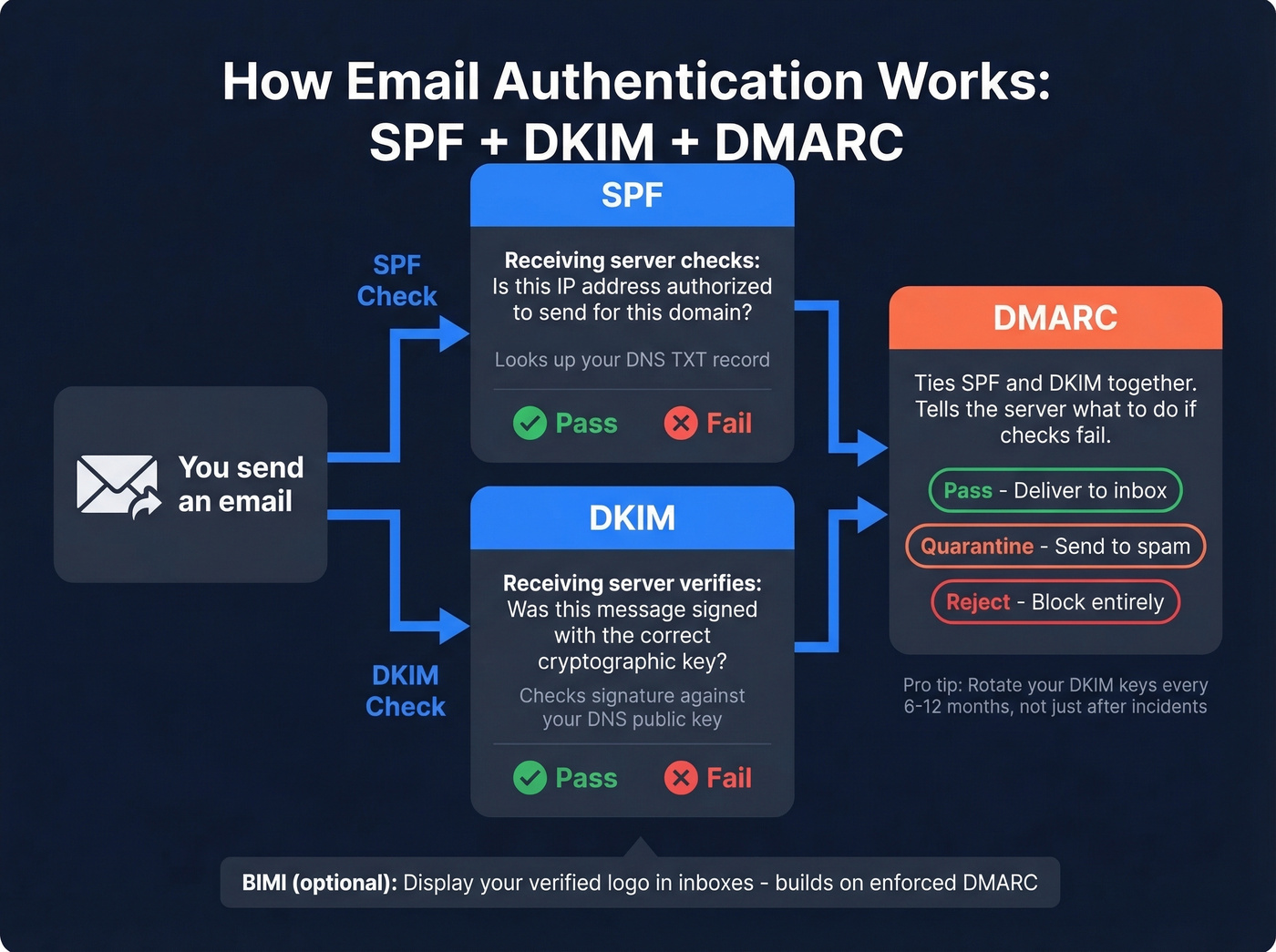
SPF (Sender Policy Framework) publishes a DNS record listing which IP addresses can send email for your domain. When a receiving server gets your message, it checks the sending IP against your SPF record. Mismatch means suspicion. (If you need examples, see SPF record syntax and common provider setups.)
DKIM (DomainKeys Identified Mail) adds a cryptographic signature to every outgoing message. The receiving server verifies the signature against a public key in your DNS, proving the message wasn't tampered with in transit and actually came from your domain. If you're unsure it's set up correctly, use this checklist to verify DKIM is working.
DMARC (Domain-based Message Authentication, Reporting & Conformance) ties SPF and DKIM together. It tells receiving servers what to do when authentication fails - nothing (monitor), quarantine, or reject - and sends you reports so you can see who's sending email as your domain. If you're troubleshooting deliverability, DMARC alignment is the detail that trips up a lot of teams.
The adoption numbers tell an interesting story. 66% of senders use both SPF and DKIM, which sounds decent until you realize that only 37% of DMARC users enforce with Reject or Quarantine. The rest are running DMARC in monitor-only mode, which provides visibility but no protection. Among senders doing 100K+ emails per month, 71% use DMARC - but 20% aren't even sure. If you're in that 20%, fix it today.
One detail most guides skip: rotate your DKIM keys every 6-12 months. Nearly half of senders only rotate after a security incident. Don't be reactive - set a calendar reminder and rotate proactively.
If you want the cherry on top, BIMI (Brand Indicators for Message Identification) builds on enforced DMARC to display your verified logo next to your messages in supported inboxes. It's not required, but it increases trust and open rates.
Warm Up Your Domain and IP
A brand-new domain or IP address has no sending reputation. ISPs don't know if you're legitimate or a spammer, so they default to suspicion. Warmup is the process of building that reputation gradually - and it's especially critical if you plan to run bulk cold outreach at any meaningful scale.
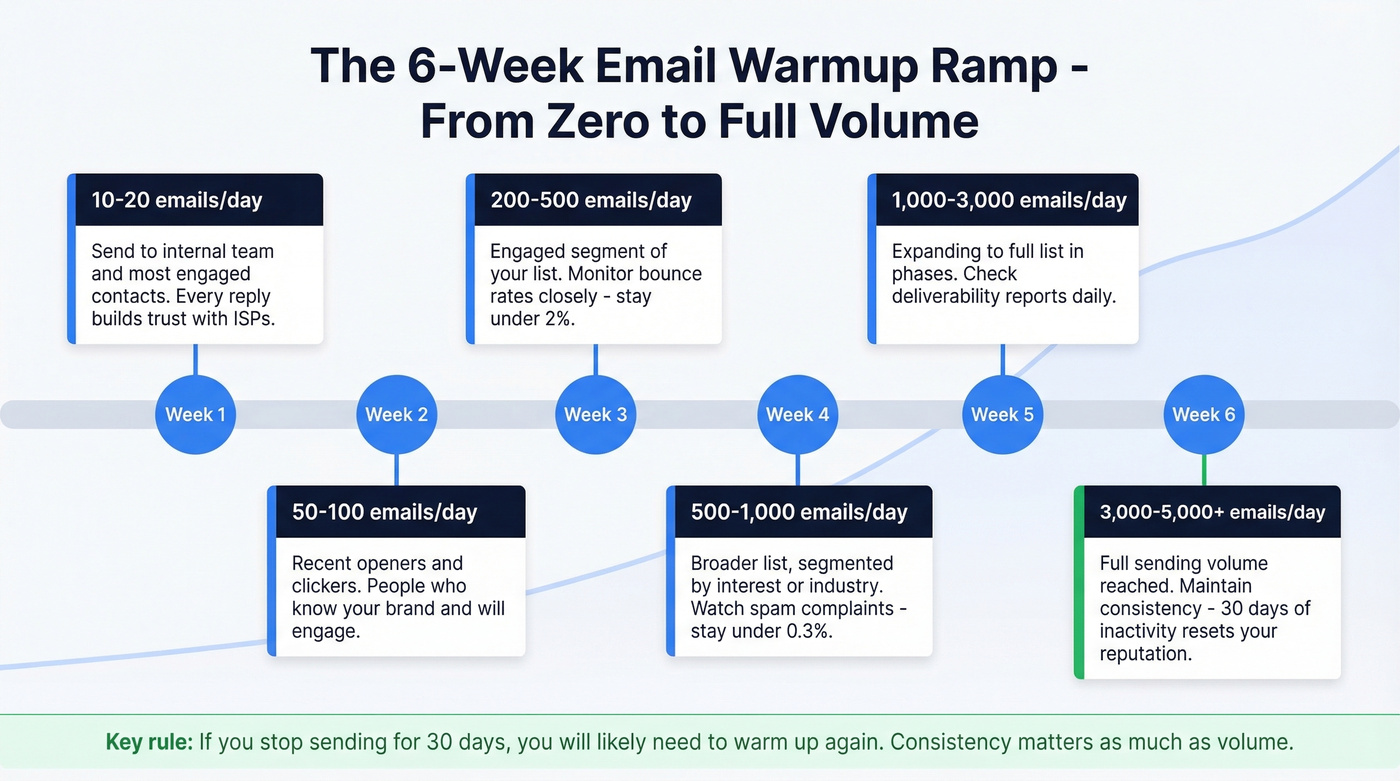
Start at 5-10 emails per day and scale over 4-6 weeks. We've tested warmup ramps from 2 weeks to 8 weeks, and 4-6 weeks is the sweet spot for most domains. Send to your most engaged contacts first - people who'll open, click, and reply. Every positive engagement signal teaches ISPs that your mail is wanted. (If you're planning volume, it helps to understand email velocity and safe ramp rates.)
| Week | Daily Volume | Target Audience |
|---|---|---|
| 1 | 10-20 | Internal + most engaged |
| 2 | 50-100 | Recent openers/clickers |
| 3 | 200-500 | Engaged segment |
| 4 | 500-1,000 | Broader list, segmented |
| 5-6 | 1,000-5,000+ | Full list, phased sends |
Most reputation systems only store data for 30 days. If you go a month without sending on a given IP, you'll likely need to warm up again. Consistency matters as much as volume.
For domain alignment, make sure your From address, DKIM signing domain, and Return-Path all match. Misalignment raises flags. If you're migrating to a new domain, start by routing ~5% of your traffic through it and gradually increase to 100%.
One question that comes up constantly on Reddit and in Slack communities: shared IP vs. dedicated IP? A Brevo user sending 100K/month on a shared IP reported open rates under 10% and suspected other tenants were tanking the IP's reputation. That's a real risk. But dedicated IPs only make sense if you're sending 50K+ emails per month - below that, you won't generate enough volume to build a strong IP reputation on your own. For most senders, a shared IP from a reputable ESP is the right call.
Monitor Your Sending Reputation
Authentication and warmup get you started, but you need ongoing visibility into how inbox providers view your domain. Google Postmaster Tools shows how Gmail classifies your domain - spam rate, authentication results, and IP reputation - all free. Microsoft SNDS does the same for Outlook. Check both weekly. They'll surface deliverability problems before your campaign metrics do, giving you time to fix issues before they compound. For a broader toolkit, see these email reputation tools.
Verify Your List Before Every Send
This is the single most controllable factor in your deliverability, and it's the one teams skip most often. Bad email addresses cause bounces. Bounces signal to ISPs that you're sending to unverified lists. ISPs respond by routing your mail to spam. Spam placement tanks your engagement metrics. Lower engagement means worse reputation. It's a death spiral, and it starts with one thing: unverified data.
Prospeo's 5-step verification process catches invalid addresses, spam traps, and honeypots before they ever hit your ESP. Stack Optimize built their agency to $1M ARR using Prospeo for client list verification - they maintain 94%+ deliverability, bounce rates under 3%, and zero domain flags across all clients.

At ~$0.01 per email verified, list verification is the cheapest insurance policy in your entire email stack. Run every list through verification before every send. Not just new lists - existing lists decay at roughly 2-3% per month as people change jobs, companies shut down, and mailboxes get deactivated. If you want to go deeper on bounce mechanics and thresholds, see email bounce rate.
Legal Compliance (Don't Skip This)
Mass email is legal. Mass email without compliance isn't. The penalties are real and enforcement is active - whether you're sending a newsletter or running cold email campaigns to prospects.
CAN-SPAM (US)
CAN-SPAM is an opt-out framework - you can email people without prior consent, but you must follow seven requirements:
- No false or misleading header information
- No deceptive subject lines
- Identify the message as an advertisement
- Include your physical postal address
- Provide a clear opt-out/unsubscribe mechanism
- Honor opt-out requests within 10 business days
- You're responsible for third parties sending on your behalf
The penalty: up to $53,088 per separate email in violation. Send 1,000 non-compliant emails and the math gets ugly fast.
GDPR (EU/UK)
GDPR flips the model entirely. Instead of opt-out, you need opt-in consent before sending marketing email to EU/UK residents. This applies regardless of where your company is based - if you're emailing someone in Berlin from an office in Austin, GDPR applies. The maximum penalty is EUR 20M or 4% of global annual turnover, whichever is higher. By early 2025, cumulative GDPR fines had reached ~EUR 5.88B across 2,245 enforcement actions. This isn't theoretical.
The UK's PECR (Privacy and Electronic Communications Regulations) adds a separate layer with penalties up to GBP 500,000. If you're emailing into the UK, you're dealing with both GDPR and PECR.
The One Rule That Covers Everything
Only email people who expect to hear from you. Everything else is details. If you build your list through genuine opt-ins, provide clear unsubscribe options, and don't try to trick anyone, you'll stay compliant with every major regulation. The companies that get fined are the ones buying lists, hiding unsubscribe links, and pretending marketing emails are transactional. Don't be that company.
Mistakes That Tank Your Sends
We've seen teams make every one of these mistakes. Most are fixable in an afternoon - but they'll wreck your deliverability for weeks if you don't catch them.
Buying email lists. This is the fastest way to destroy a domain. Purchased lists are full of spam traps, dead addresses, and people who never consented to hear from you. Your bounce rate spikes, complaints flood in, and ISPs blacklist your domain. One agency we spoke with burned through three domains in two months before they stopped buying lists and started building them. (If you're debating it, read is it illegal to buy email lists first.)
Emailing stale lists. A list you haven't emailed in six months has decayed significantly. Re-verify before you send.
Sending from new domains without warmup. A brand-new domain blasting 5,000 emails on day one is a spam signal. Always warm up.
Using no-reply addresses. Replies are a positive engagement signal. No-reply addresses kill that signal and frustrate recipients who want to respond.
Blasting your entire list without segmentation. Sending the same message to your entire database guarantees low engagement. Segment by interest, behavior, or recency. (If you want a practical framework, use targeted email campaigns principles.)
Mixing transactional and marketing streams. Keep your transactional and marketing email on separate sending streams. A bad marketing campaign shouldn't tank your password reset deliverability.
Email Benchmarks for 2026
You need benchmarks to know if your campaigns are performing. Here's what the data says across two major sources.
Mailchimp's all-user averages (last updated December 2023, based on billions of emails from campaigns with 1,000+ subscribers):
| Metric | All Industries | Business/Finance | Nonprofit | E-commerce |
|---|---|---|---|---|
| Open rate | 35.63% | 31.35% | 40.04% | 29.81% |
| Click rate | 2.62% | 2.78% | 3.27% | 1.74% |
| Unsub rate | 0.22% | 0.15% | 0.18% | 0.19% |
A caveat on open rates: Apple Mail Privacy Protection inflates them by pre-loading tracking pixels. Your real open rate is lower than what your ESP reports. Click rate is the more reliable engagement metric in 2026. (If you want to standardize reporting, use the click rate formula in email marketing.)
Klaviyo's 2026 benchmarks across 183,000+ brands tell a more nuanced story by separating average from top-performer:
| Metric | Average | Top 10% |
|---|---|---|
| Campaign open rate | 31% | 45.1% |
| Campaign click rate | 1.69% | 3.38% |
| Flow click rate | 5.58% | 10.48% |
| Flow order rate | 2.11% | 4.3% |
The gap between average and top 10% is massive. If your campaign click rate is under 1.69%, you're below the median. If it's above 3.38%, you're in the top decile. Automated flows consistently outperform one-off campaigns - 5.58% average click rate for flows vs. 1.69% for campaigns. That's 3x the engagement, which is why every serious email program invests in automation.
Best Tools for Sending Mass Emails
Three categories here: free plans for getting started, paid platforms for scaling, and the verification layer that makes everything else work.
Best Free Plans
| Tool | Subscriber Cap | Send Limit | Best For |
|---|---|---|---|
| Kit | 10,000 | Unlimited | Creators, newsletters |
| Sender | 2,500 | 15,000/mo | Small business |
| MailerLite | 500 | 12,000/mo | Clean UI, landing pages |
| Brevo | 100,000 contacts | 300/day | Large lists, low frequency |
| EmailOctopus | 2,500 | 10,000/mo | Simple campaigns |
Kit's free plan is absurdly generous - 10,000 subscribers with unlimited sends. The catch is it's designed for creators and newsletters, not B2B outbound. For B2B teams, Sender and MailerLite offer the best balance of features and limits. Brevo's free plan is interesting if you have a large contact list but send infrequently - 100K contacts but only 300 emails per day means you're drip-feeding, not blasting.
Paid Platforms Worth Paying For
Amazon SES at $0.10 per 1,000 emails is unbeatable on unit economics if you have a developer who can set it up. It's raw infrastructure - no drag-and-drop editor, no built-in analytics dashboard - but for high-volume senders who want maximum control, nothing else comes close on price.
For teams that want something turnkey, Sender at $7/mo and Brevo at $15/mo are the sweet spots. Moosend at $9/mo sits between them with unlimited emails to 500 contacts. Mailjet at $17/mo is worth a look if you want a straightforward platform at that volume tier.
SendGrid scales with volume; many teams pay around $60-$100/month at ~50K emails, with custom pricing above that.
| Tool | Starting Price | Volume | Best For |
|---|---|---|---|
| Amazon SES | $0.10/1K emails | Pay-as-you-go | Developers, high volume |
| Sender | $7/mo | 12,000 emails | Budget-conscious SMBs |
| Moosend | $9/mo | Unlimited (500 contacts) | Simple automation |
| Brevo | $15/mo | 10,000 emails | General-purpose ESP |
| Mailjet | $17/mo | 15,000 emails | Straightforward mid-volume |
| SendGrid | ~$60-$100/mo (50K) | Scale pricing | API-first teams |
Don't Forget List Verification
Your ESP handles sending. But it can't fix bad data. Prospeo's free tier gives you 75 email verifications per month - enough to test the workflow. Paid verification runs ~$0.01 per email with no contracts and no minimums. Think of it as the complement to any ESP: the ESP sends the mail, verification makes sure the addresses are real before you hit send. If you're comparing options, start with these Bouncer alternatives for email verification.
Your ESP handles the sending. Prospeo handles the data. With 143M+ verified emails refreshed every 7 days, your mass email campaigns start with contacts that actually exist - at $0.01 per email.
Clean data in, inbox placement out. That's the formula.
FAQ
Is mass email legal?
Yes. In the US, CAN-SPAM allows it as long as you include an unsubscribe link, your physical address, and honest headers. In the EU/UK, GDPR requires opt-in consent before sending marketing messages. Follow the regulations for your recipients' jurisdictions - the penalties for non-compliance reach $53,088 per email (CAN-SPAM) or EUR 20M (GDPR).
How many emails can I send from Gmail per day?
500 on a personal Gmail account, 2,000 on Google Workspace. Exceeding either limit triggers a temporary block - typically ~24 hours before you can send again. These limits apply whether you're sending manually, through mail merge, or via a third-party extension like GMass.
What's the difference between mass email and spam?
Permission. Mass email goes to people who opted in or have a legitimate business relationship with you. Spam goes to people who didn't ask for it. The technical infrastructure is identical - the difference is entirely about consent and compliance.
Do I need a dedicated IP?
Only if you're sending 50,000+ emails per month. Below that threshold, you won't generate enough volume to build a strong IP reputation on your own, and a shared IP from a reputable ESP will actually perform better. Dedicated IPs require their own warmup process and ongoing volume to maintain reputation.
How is bulk outreach different from newsletter marketing?
Bulk outreach targets prospects who haven't opted in to your mailing list - it's typically one-to-one in tone and sent through tools designed for cold email rather than broadcast ESPs. Newsletter marketing goes to subscribers who explicitly signed up. The deliverability principles are the same (authentication, warmup, list hygiene), but outreach requires even more attention to personalization and sending volume because recipients haven't pre-approved your messages. Let's be honest - if you're doing cold outreach at scale, your margin for error on data quality is basically zero.