

How to Send Personalized Emails in Bulk Without Nuking Your Domain
You've got 1,500 contacts in a spreadsheet, a draft that needs to feel personal, and a nagging fear that one wrong move tanks your domain reputation for months. That fear is justified - global inbox placement sits at 83.5%, meaning roughly 1 in 6 legitimate emails never reaches anyone's inbox.
Here's the thing: learning how to send personalized emails in bulk isn't hard. Doing it without wrecking your sender reputation requires picking the right method, verifying your data, and following a few non-negotiable deliverability rules (including email deliverability fundamentals).
Pick Your Method
Match your situation to the right approach:
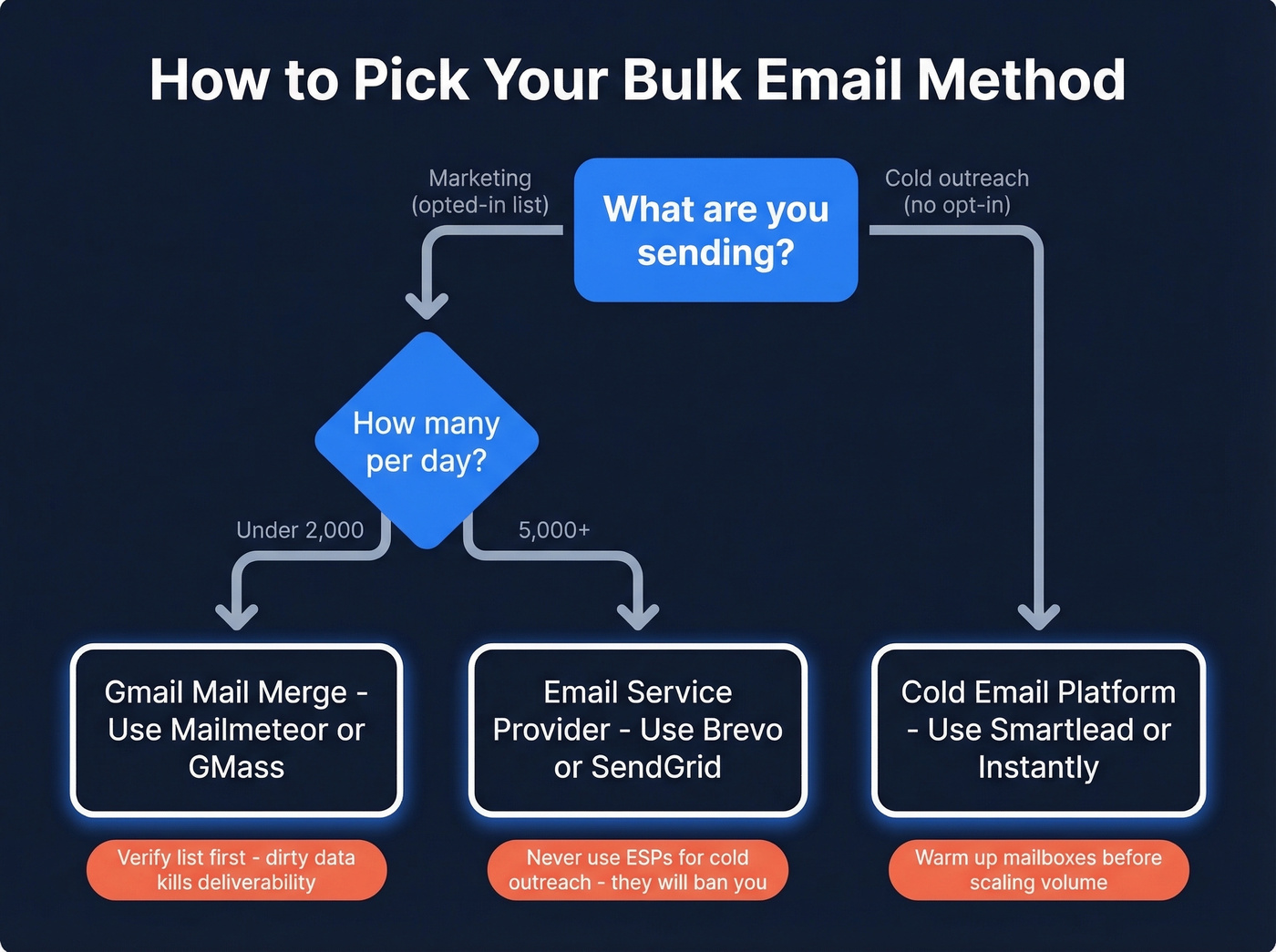
| Your Situation | Best Method | Tool to Start With |
|---|---|---|
| <500 emails/day, marketing | Gmail mail merge | Mailmeteor or GMass |
| Cold outreach, any scale | Cold email platform | Smartlead or Instantly |
| 5,000+/day marketing | Email service provider | Brevo or SendGrid |
Every method above fails if your list is dirty. Verify before you send - we'll get to that (and if you’re unsure what “safe speed” looks like, see email velocity).
Gmail Mail Merge
Gmail's Built-In Merge
Use this if you're on Google Workspace, sending under 1,500-2,000 emails/day, and only need basic personalization like name and company.
Skip this if you're on free Gmail - it doesn't support native mail merge. You need Google Workspace. You also won't get follow-up sequences or open tracking. And Google's stated limits of 500/day for free Gmail and 2,000/day for Workspace are ceilings, not guarantees. Brand-new accounts can get throttled to as few as 10 emails per day.
Gmail Mail Merge Extensions
Extensions unlock tracking, scheduling, conditional logic, and automated follow-ups - making them the simplest path to bulk email personalization for teams already living in Google Sheets.
| Extension | Price | Free Tier | Standout Feature |
|---|---|---|---|
| Mailmeteor | $9.99/mo | 150/day | Simplest UI, 6M+ users |
| GMass | $29.95/mo | Limited trial | Deepest Gmail integration |
| Merge.email | $2.99/mo | 50/day | Cheapest monthly option |
| YAMM | $48/yr | Limited | Budget-friendly annual |
| Quicklution | $30/yr or $80 lifetime | - | Cheapest long-term |

Mailmeteor is the easiest starting point - it lives inside Google Sheets, so there's almost no learning curve. GMass is more powerful if you need conditional content and auto follow-ups, but it costs three times as much (if you run into issues, this breakdown of GMass email deliverability helps). For teams that just need basic personalization without a monthly bill, Quicklution's $80 lifetime license is hard to beat.
Outlook/Word Mail Merge
Skip this. Outlook's mail merge through Word is a legacy workflow with no tracking, no analytics, and no follow-up automation. You can't even CC or BCC someone.
If you're stuck in the Microsoft ecosystem, use a dedicated cold email tool that connects to your Outlook account instead. You'll get sequences, sending controls, and actual deliverability management (especially around sender reputation). Outlook mail merge exists because it's been around forever, not because it's good.
Cold Outreach Platforms
If you're sending cold emails - messages to people who haven't opted in - a Gmail extension isn't the right tool. You need multi-step sequences, inbox management, and deliverability controls to avoid getting flagged (this is where a solid B2B cold email sequence matters).
| Platform | Starting Price | Key Strength |
|---|---|---|
| Smartlead | ~$39/mo | Inbox rotation at scale |
| Instantly | ~$30/mo | Simplest warm-up setup |
| Lemlist | ~$59/mo | Creative personalization |
| Mailshake | $39-99/mo | Sales team workflows |
We've tested all four extensively. Smartlead handles the most mailboxes without deliverability drops, Instantly wins on ease of use, and Lemlist offers the richest personalization with custom images and videos. All four integrate natively with Prospeo for verified contact data, which saves a lot of the manual list-building grind.
If your average deal size is under $5k, you probably don't need anything beyond Instantly at $30/mo. The extra features in pricier tools only pay off when each closed deal justifies the overhead.

Every cold email platform above integrates natively with Prospeo. Build verified lists with 30+ filters - buyer intent, job changes, technographics - then push contacts directly to Smartlead, Instantly, or Lemlist. 98% email accuracy means your sequences actually land.
Stop building campaigns on data that bounces. Start with verified contacts.
Email Service Providers (5,000+/Day)
For high-volume marketing sends to opted-in subscribers, you need an ESP.
| ESP | Free Tier | Paid From |
|---|---|---|
| Brevo | 300 emails/day | ~$25/mo |
| Mailchimp | 500 contacts | ~$13/mo |
| SendGrid | 100 emails/day | ~$20/mo |
These are purpose-built for bulk email best practices: list management, segmentation, compliance, and deliverability infrastructure. Don't use them for cold outreach - they'll shut your account down. Different jobs, different tools.
Verify Your List Before You Send
This is the step everyone skips. It's also the one that determines whether everything else works.
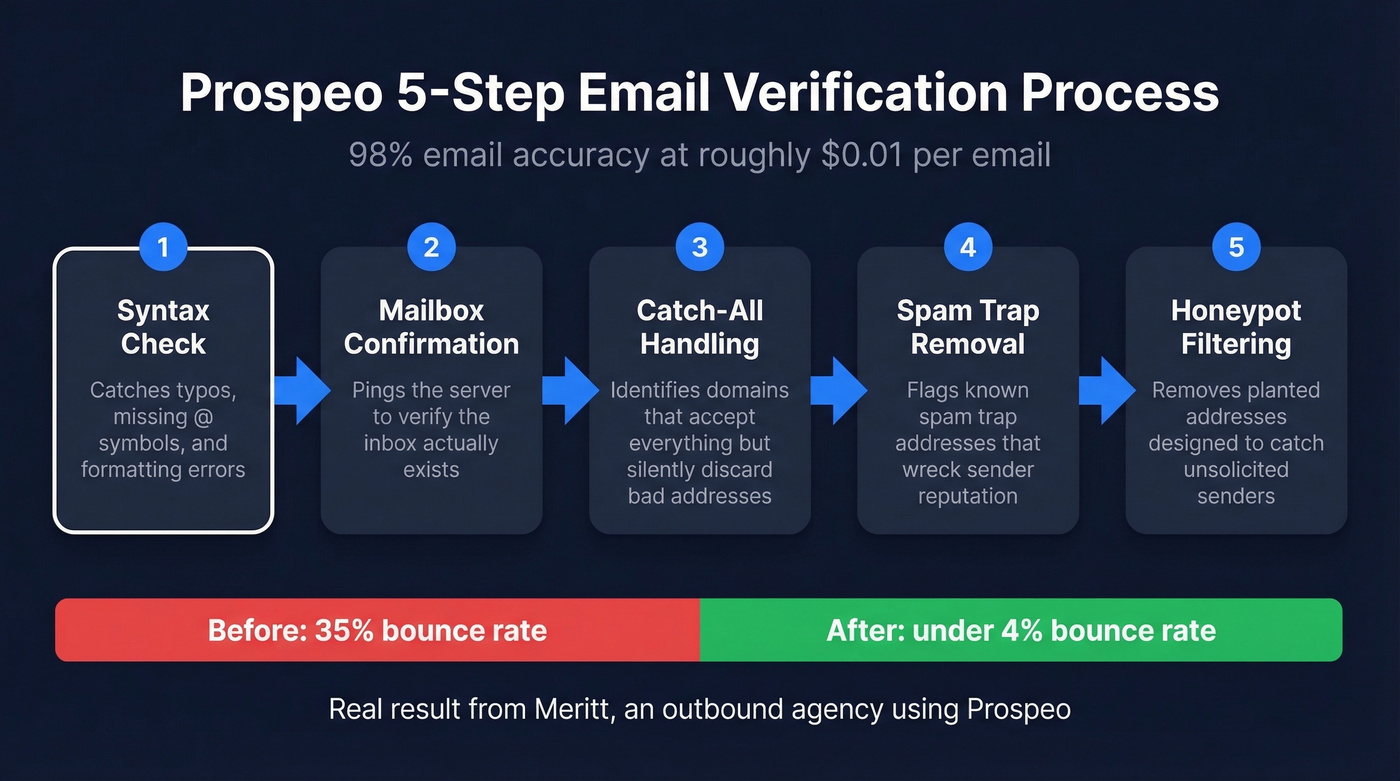
The chain reaction is predictable: 10% invalid emails lead to bounce rate spikes, which tank your domain reputation, which means your next campaign lands in spam. We've watched teams spend weeks perfecting their copy and sequences, only to torch their sender reputation on day one because they didn't clean their list. No amount of clever personalization saves a campaign built on bad data (see email bounce rate benchmarks and fixes).
Prospeo runs every address through a 5-step verification process - catch-all handling, spam-trap removal, honeypot filtering, syntax checks, and mailbox confirmation - delivering 98% email accuracy. Meritt, an outbound agency, dropped their bounce rate from 35% to under 4% after switching. At roughly $0.01 per email verified, a few dollars in verification saves weeks of domain recovery.
Personalization Beyond First Name
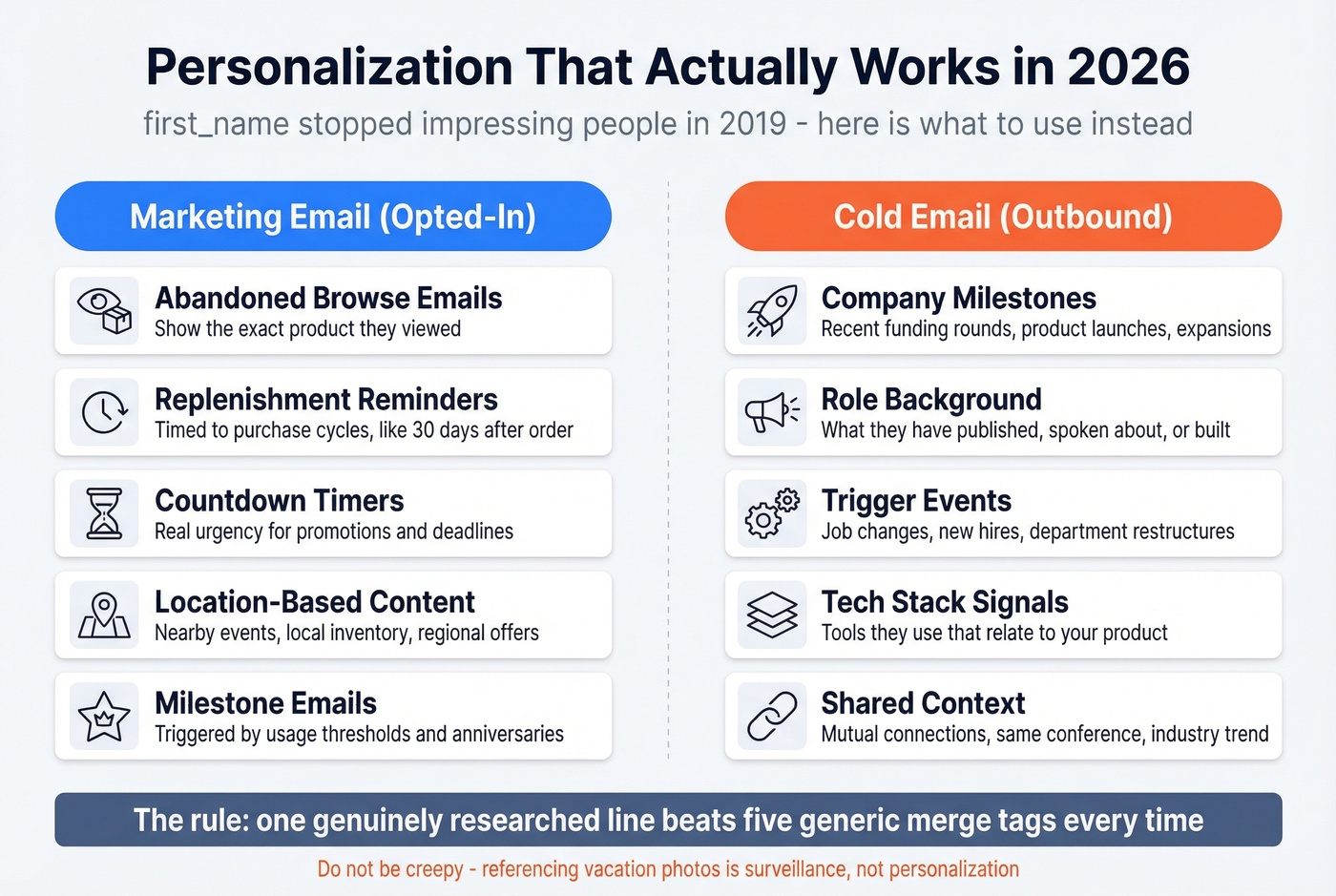
{{first_name}} hasn't impressed anyone since 2019. If you want replies or clicks, you need relevance: behavioral data for marketing, real research for cold outreach (more on personalized outreach).
Dynamic Content for Marketing
Dynamic content blocks are the workhorse of scaled personalization. Instead of sending one email to everyone, you swap sections based on subscriber data.
Abandoned browse emails showing the exact product someone viewed consistently outperform generic re-engagement messages. Replenishment reminders timed to purchase cycles - say, 30 days after a consumable order - convert like crazy when the timing is right. Layer in countdown timers for promotions, location-based content for nearby events, and milestone emails triggered by usage thresholds, and you've built a personalization engine that crushes "one-size-fits-all" blasts without requiring a data science team.
Research-Driven Cold Emails
Cold email personalization is a different game entirely. You're working with research, not behavioral data.
The best signals: company milestones like recent funding or product launches, role background including what the prospect has published or spoken about, and trigger events such as job changes or new department hires. The consensus on r/sales is that one genuinely researched line beats five generic merge tags every time - and our experience backs that up.
A word of caution: don't be creepy. Referencing someone's vacation photos isn't personalization - it's surveillance. And fake personalization like "I loved your recent post!" when you clearly didn't read it is worse than none at all. Prospects can smell it instantly.
Deliverability Rules That Matter
Authentication isn't optional anymore. Google and Yahoo started enforcing SPF/DKIM/DMARC alignment in February 2024 with temporary deferrals. Microsoft followed in May 2025, rejecting non-compliant messages for Outlook.com, Hotmail, and Live. By November 2025, Gmail escalated to permanent 550 rejections. As of 2026, all three providers are in full enforcement mode.
The non-negotiable checklist:
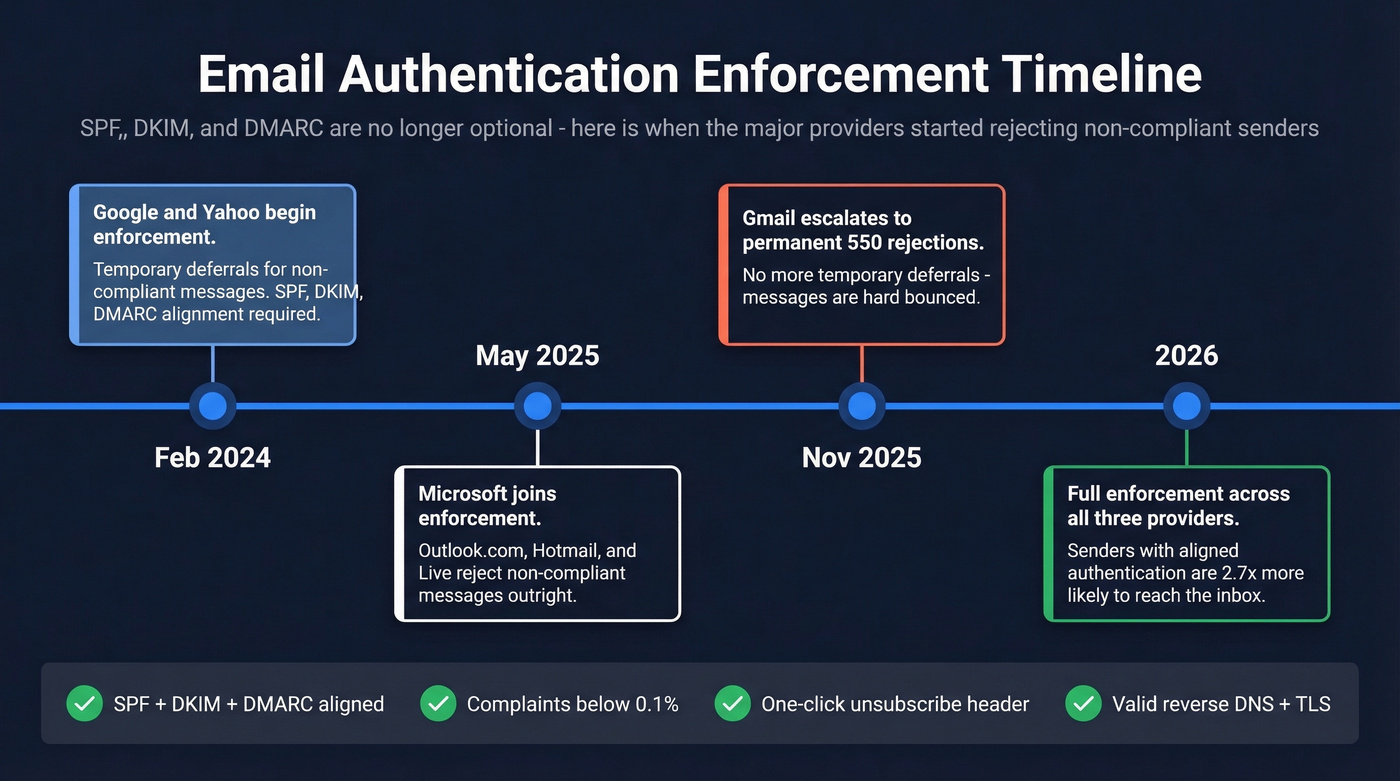
- SPF + DKIM + DMARC configured and aligned. Start DMARC at
p=none, move top=quarantine, thenp=reject. Keep SPF under the 10 DNS lookup limit. Use 2048-bit DKIM keys (use this DMARC alignment explainer if you’re troubleshooting). - Spam complaint rate below 0.3% - but operate below 0.1% to stay safe.
- One-click unsubscribe header per RFC 8058 - process within 2 days.
- Valid reverse DNS and TLS encryption on all sending infrastructure.
Senders with fully aligned authentication are 2.7x more likely to reach the inbox. That's not a marginal improvement. That's the difference between a campaign that works and one that doesn't.
Legal Compliance
Look, CAN-SPAM applies to all commercial email, including B2B. The penalty is up to $53,088 per email in violation. Every send must include:
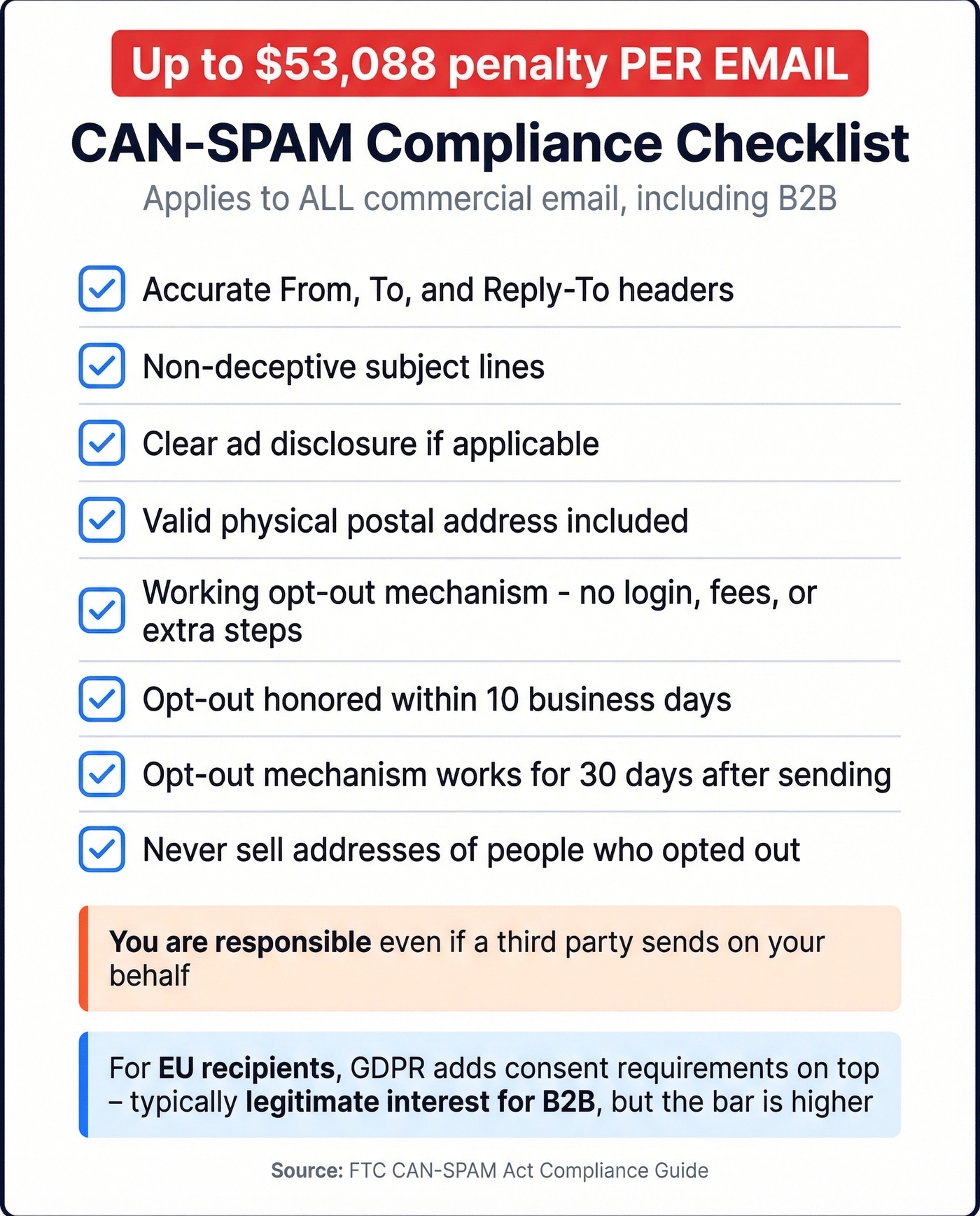
- Accurate "From," "To," and "Reply-To" headers
- Non-deceptive subject lines
- Clear ad disclosure if applicable
- A valid physical postal address
- A working opt-out mechanism - no login, fees, or extra steps
- Opt-out honored within 10 business days
- Opt-out mechanism functional for 30 days after sending
- No selling addresses of people who opted out
You're responsible even if a third party sends on your behalf. For EU recipients, GDPR adds consent requirements on top - typically legitimate interest for B2B cold outreach, but the bar is higher.
Meritt dropped their bounce rate from 35% to under 4% and tripled pipeline to $300K/week. Stack Optimize built a $1M agency with sub-3% bounce rates and zero domain flags. The difference wasn't their copy - it was verified data at $0.01/email.
Clean your list before you hit send. Your domain reputation depends on it.
FAQ
How many emails can I send per day in Gmail?
Free Gmail caps you at 500 emails per day; Google Workspace allows up to 2,000. New accounts are often throttled to roughly 10/day until Google trusts your sending history, so ramp volume gradually over 2-4 weeks.
Is BCC the same as mail merge?
No. BCC sends one identical message to every recipient, while mail merge generates individual, personalized emails. That distinction matters because BCC offers zero customization and often triggers spam filters at higher volumes.
Can I send bulk emails without landing in spam?
Yes. Authenticate your domain with SPF, DKIM, and DMARC, verify your list before sending, keep complaint rates below 0.1%, and include a one-click unsubscribe header. Verified lists are the single biggest factor - catching invalid addresses, spam traps, and honeypots before they damage your reputation.
What's the difference between cold email and marketing email?
Marketing email goes to opted-in subscribers via ESPs like Brevo or Mailchimp. Cold email targets prospects who haven't subscribed, using dedicated platforms like Smartlead or Instantly with built-in warm-up and inbox rotation. Different tools, different compliance rules, different deliverability strategies.