

How to Tell If Someone Read Your Email (2026)
You sent a proposal three days ago. No reply. Your tracking extension says it was "opened 4 times," but you've got a sinking feeling that was Apple Mail preloading images before your contact even glanced at their inbox. You refresh the dashboard again - four opens, zero clicks, zero replies.
The uncertainty is the real problem. Not the technology, not the tools, but the gap between what your dashboard shows and what actually happened. We've watched teams chase open-rate ghosts for months before realizing the metric was lying to them. If you're wondering how to tell if someone read your email, the honest answer is more nuanced than any Chrome extension will admit.
The 30-Second Answer
No method reliably tells you whether someone read your email in 2026. Read receipts require the recipient to cooperate - most people decline. Tracking pixels are broken by Apple Mail Privacy Protection and Gmail's image proxy. The best signal isn't whether they opened; it's whether they clicked or replied.
Start upstream: make sure you're emailing real addresses first. Then shift your attention to clicks, replies, and meetings booked. Those are the signals that actually correlate with revenue.
3 Ways to Know If Someone Read Your Email
Three approaches survive in 2026. None are perfect.
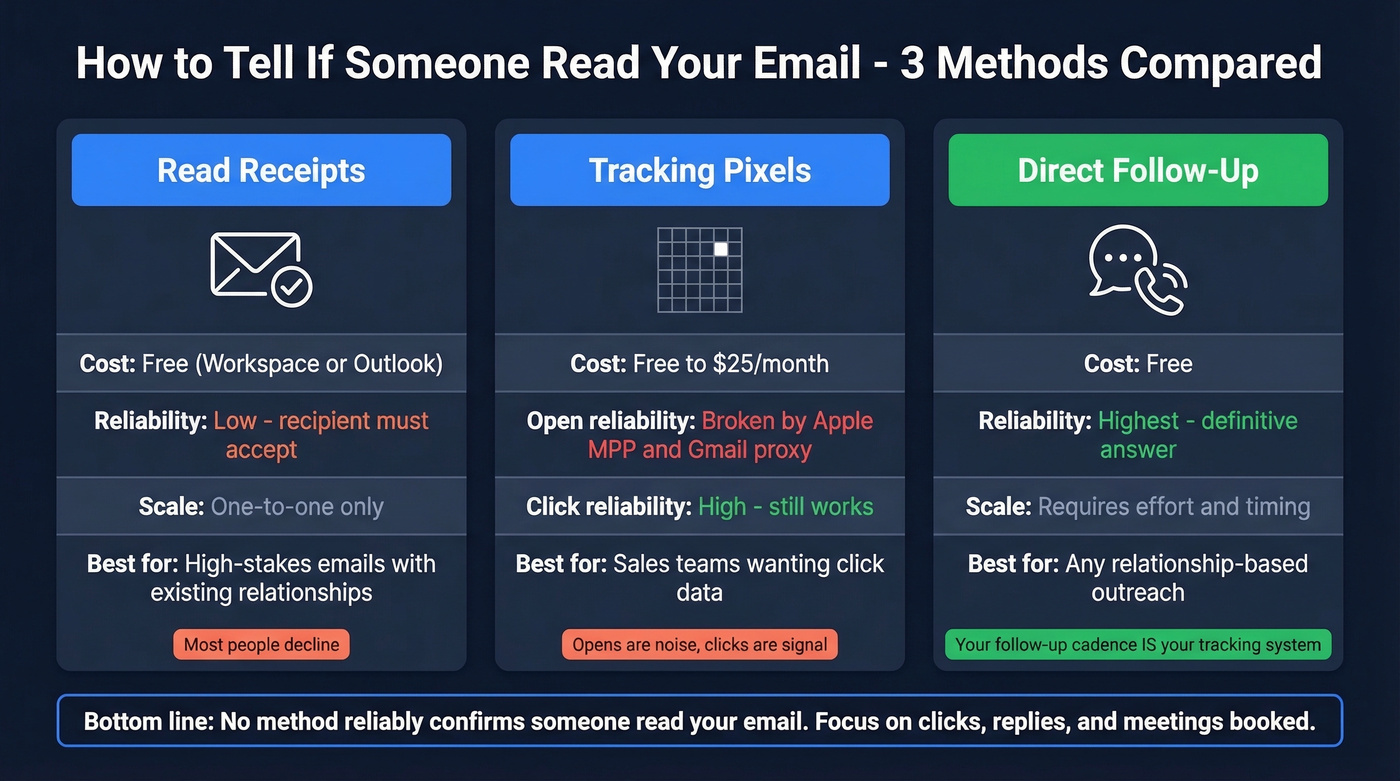
Read Receipts (Gmail Workspace + Outlook)
Read receipts are the most honest tracking method because they require the recipient to actively confirm. That's also why they're the least useful at scale.
Gmail: Read receipts aren't available on free Gmail accounts. You need Google Workspace, and your admin has to enable the feature. Even then, the recipient chooses whether to send a confirmation.
Outlook (classic desktop): Go to Options, then Tracking, then check "Request a Read Receipt." You can also request a delivery receipt, which only confirms the server accepted the message. New Outlook and Outlook on the web: Click the three dots, then Options, then More options, then check "Request a read receipt." One catch - in new Outlook, tracking options currently only work for Microsoft email accounts, not third-party addresses like Gmail or Yahoo. Recipients can also pre-configure their response under Settings, which means they can auto-decline without ever seeing the prompt.
Verdict: Use this for high-stakes one-to-one emails where you have a relationship. Skip it for cold outreach - it signals neediness.
Tracking Pixels and Extensions
Every email tracking tool - Mailtrack, Streak, Boomerang, Saleshandy - works the same way. They embed a tiny 1x1 transparent image in your email. When the recipient's client renders HTML and loads that image, the server logs a timestamp, IP address, and user-agent string.
That's the theory. In practice, Gmail has routed images through proxy servers since 2013, and Apple Mail Privacy Protection preloads images before the recipient even sees the email. The pixel fires, but the data it returns is either wrong or meaningless.
Click tracking, however, is unaffected by image proxying - a crucial distinction we'll come back to. Apple's Link Tracking Protection can strip UTMs and identifiers from links, and security scanners can sometimes trigger "clicks," so attribution and intent still need context. But the click itself registers.
Verdict: Still useful for click tracking. Treat open signals as directional noise, not actionable data.
The Direct Approach
Here's the contrarian take: the most reliable way to confirm someone engaged with your email is to ask them. A well-timed follow-up, a phone call, or a reply-based workflow gives you a definitive answer. No pixels, no proxies, no guessing. If you're in sales, your follow-up cadence is your tracking system.
| Method | Cost | Reliability | Best For | Key Limitation |
|---|---|---|---|---|
| Read Receipts | Free (Workspace/Outlook) | Low - recipient must accept | High-stakes 1:1 emails | Most people decline |
| Tracking Pixels | Free-$25/mo | Low for opens, high for clicks | Sales teams wanting click data | MPP and Gmail proxy break opens |
| Direct Follow-Up | Free | Highest | Any relationship-based outreach | Requires effort and timing |
Why Open Tracking Is Broken in 2026
Two forces have gutted open tracking. Here's exactly what each one does.
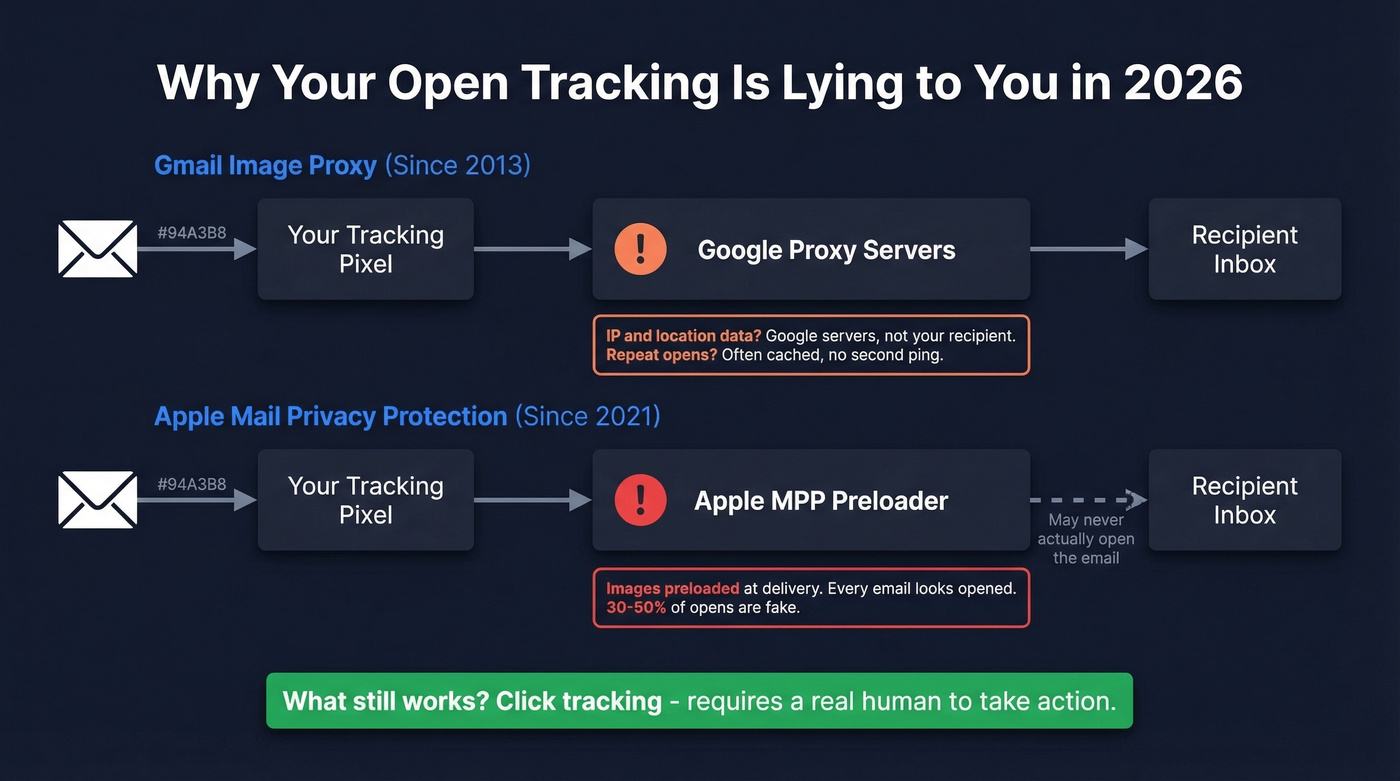
Gmail's image proxy has been active since 2013. Every image request routes through Google's servers, meaning your tracking tool logs Google's IP - not your recipient's. After the first load, Gmail can cache the image, so repeat opens often don't trigger additional pings. You get one signal (maybe), with the wrong location data.
Apple Mail Privacy Protection (MPP) launched in September 2021 and is far more aggressive. It preloads all images at delivery time, regardless of whether the recipient opens the email. This creates a false-positive "opened" signal for every message delivered to an Apple Mail user. The critical nuance: MPP only applies to the Apple Mail app, not to the Gmail app running on an iPhone. Apple has also introduced Link Tracking Protection, which strips UTM parameters and tracking identifiers from URLs - meaning click tracking can lose attribution data for Apple Mail users, though the click itself still registers.
The result? MailerLite's 2025 benchmark across 3.6 million campaigns reported an average open rate of 43.46% - with an explicit warning that Apple MPP inflates these numbers. On consumer-heavy lists, 30-50% of opens can be machine-generated artifacts.
| Signal | Gmail (Proxy) | Apple Mail (MPP) | Outlook |
|---|---|---|---|
| First open detected? | Yes (IP/location wrong) | False positive (preloaded) | Yes (reliable if images enabled) |
| Repeat opens? | Often no (cached) | No (single preload) | Yes |
| IP / Location? | Google servers | Apple proxy | Recipient's (usually) |
| Click tracking? | Works | Works (UTMs may be stripped) | Works |
| Read receipt option? | Workspace only | N/A | Yes (can be declined) |
Practitioners on r/Emailmarketing consistently report the same experience: Gmail proxying kills repeat-open tracking and distorts location data, while MPP makes open rates functionally meaningless for Apple Mail users. The consensus is blunt - "open rates are a vanity metric now."

Open tracking is broken, but you know what isn't? Sending to verified emails that actually reach real inboxes. Prospeo's 5-step verification delivers 98% email accuracy - so when someone doesn't reply, at least you know the message landed. Bounce rates under 4%, not 35%.
Fix the data before you fix the tracking.
Is Email Tracking Legal?
This is where things get uncomfortable for anyone running tracking pixels at scale.
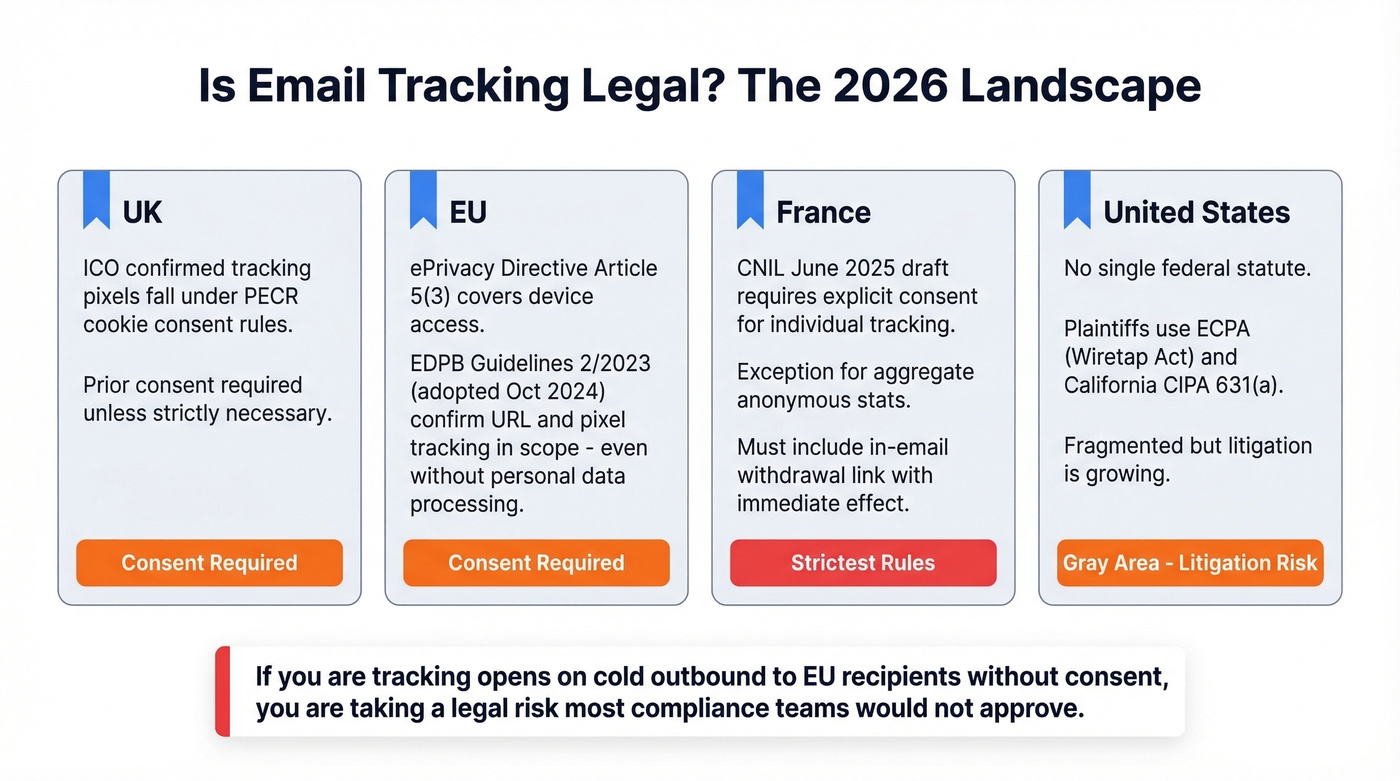
UK: The ICO has confirmed that email tracking pixels fall under PECR - the same cookie-consent framework. Prior consent is required unless the tracking is "strictly necessary."
EU: The ePrivacy Directive Article 5(3) governs device access and storage. EDPB Guidelines 2/2023, adopted in October 2024, clarify that URL and pixel tracking fall within scope - even if personal data isn't ultimately processed.
France: The CNIL's June 2025 draft recommendations go further, requiring explicit consent for individual-level tracking while carving out exceptions for aggregate anonymous stats. They also propose requiring an in-email withdrawal link with immediate effect.
US: No single federal statute covers email tracking. Plaintiffs typically use ECPA (Wiretap Act) and California's CIPA 631(a) theories. The landscape is fragmented, but litigation is growing.
If you're tracking opens on cold outbound to EU recipients without consent, you're taking a legal risk that most compliance teams wouldn't approve. For a deeper breakdown, see our guide on Email Tracking & GDPR.
What to Track Instead of Opens
"Did they read it?" is the wrong question. "Did they engage?" is the right one.
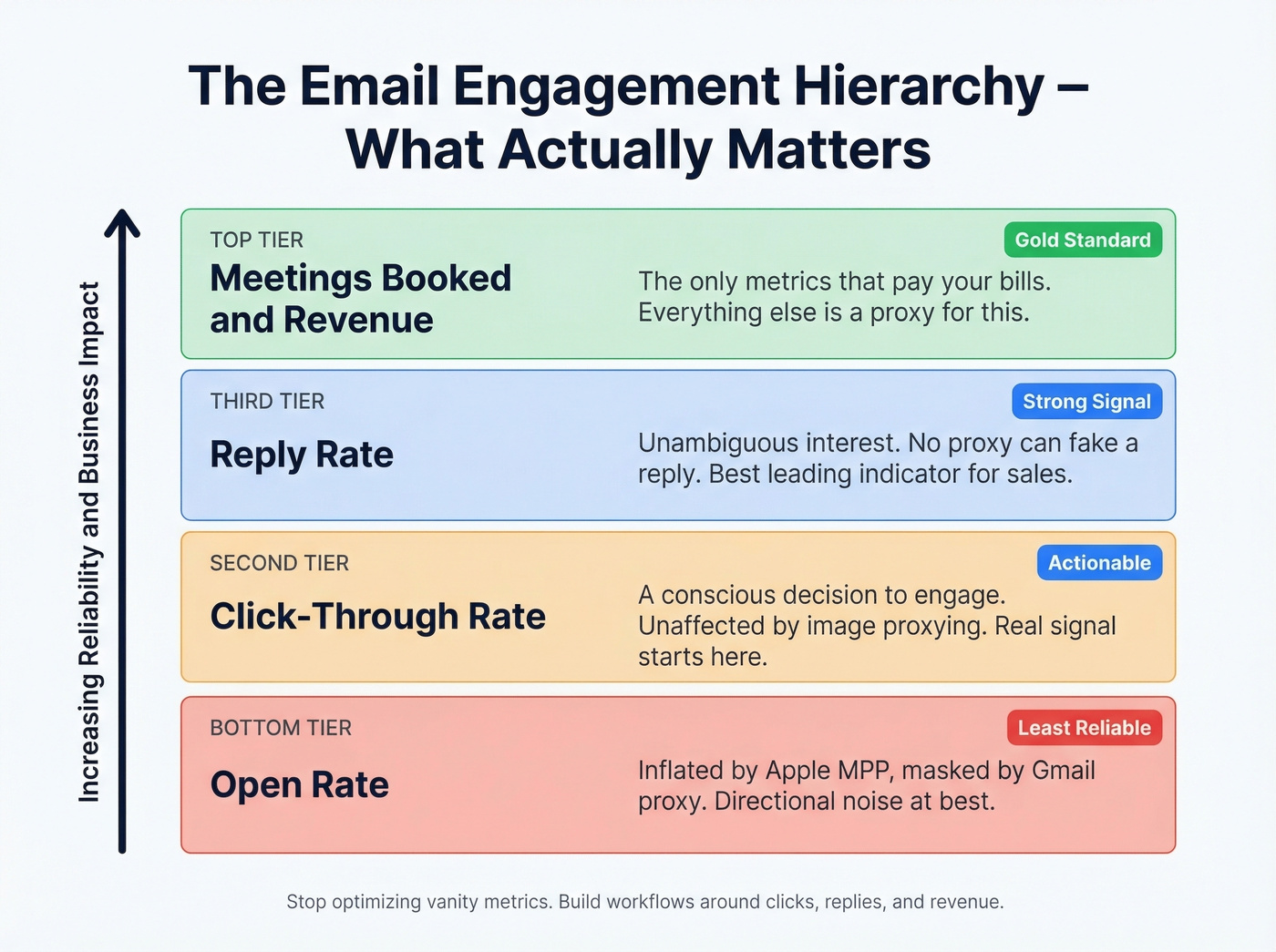
In our experience, the teams that stop obsessing over open rates and rebuild around click-based triggers see cleaner data within a week. The hierarchy is simple: open rate sits at the bottom - inflated by MPP, masked by Gmail's proxy, useful only as a rough directional indicator when segmented by email client. Click-through rate is where real signal begins, because clicks represent a conscious decision to engage. Reply rate is stronger still - an unambiguous signal of interest. And at the top, meetings booked and revenue generated are the only metrics that pay your bills.
Twilio's guidance is blunt: prioritize clicks over opens for workflows, A/B testing, engagement scoring, and benchmarks. If you want to operationalize that, build your reporting around email tracking metrics and a simple email analytics dashboard.

But none of these metrics matter if your emails are bouncing. If 15% of your list is invalid, every metric downstream is garbage before privacy features even enter the picture. Prospeo's Email Finder pulls from 143M+ verified emails with 98% accuracy and refreshes data every 7 days - so you're measuring real engagement from real people. The free tier covers 75 emails/month with no contract.
Best Email Tracking Tools
If you still want open and click notifications - and there are legitimate use cases for one-to-one sales emails - here are the tools worth considering. Every one of them is subject to the accuracy limitations above, and some tracking extensions use shared tracking domains that can hurt deliverability at volume. If you're comparing options, our breakdown of the best email tracking tools and best email tracking chrome extensions goes deeper.
| Tool | Free Tier | Paid From | Click Tracking | Best For |
|---|---|---|---|---|
| Mailtrack | Yes | ~$5-10/mo | Yes | Simple notifications |
| Boomerang | Yes | ~$5-20/mo | Yes | Scheduling + tracking |
| Streak | Yes | ~$15-60/mo | Yes | CRM + tracking in Gmail |
| Saleshandy | 7-day trial | ~$25-50/mo | Yes | Outbound campaigns |
Mailtrack is the simplest option - it does one thing: tells you when an email was opened (or when Gmail's proxy loaded the image). Best for freelancers who want basic notifications without complexity.
Boomerang bundles scheduling, follow-up reminders, and tracking into one extension. The free tier is genuinely useful, and it works across Gmail and Outlook, which is more than most trackers offer. Paid plans run ~$5-20/month.
Streak is a lightweight CRM that lives inside Gmail with tracking baked in. Free tier for basic tracking, with paid plans typically landing in the ~$15-60/month range depending on features. Saleshandy leans outbound - better for teams running campaigns at scale, with pricing around ~$25-50/month per user after a 7-day trial.
Let's be honest: if your average deal size is under five figures, you probably don't need any of these tools. A disciplined follow-up cadence with click-tracked links will tell you more than a pixel dashboard ever will. We've seen teams waste entire quarters optimizing open rates that were 30-50% machine-generated.
Mistakes That Ruin Your Tracking Data
Treating opens as your primary metric. Opens fire from preview panes, MPP preloads, and security scanners. Use clicks and replies instead.
Following up based on a single open signal. One "open" could be a proxy, a preload, or an accidental swipe. Wait for a pattern - multiple opens plus a click - before changing your approach.
Ignoring click tracking entirely. Click tracking is unaffected by image proxying and represents genuine engagement. Add at least one trackable link to every outbound email. (If you're implementing this in Gmail, see Gmail click tracking.)
Misinterpreting MPP-inflated opens. If your audience skews Apple Mail, your open rates are fiction. Segment by email client and discount Apple Mail opens entirely.
Sending to unverified lists. Every bounced email drags down sender reputation and pollutes every metric. Run your list through verification before you send - 98% accuracy means you're starting with clean data instead of guessing. If you want a framework, start with an AI Email Verification workflow.
The article says it clearly: clicks, replies, and meetings booked are the only signals that matter. But none of those happen if you're emailing dead addresses. Prospeo refreshes 300M+ profiles every 7 days - so your follow-up cadence hits real people, not phantom opens.
Replace open-rate guessing with replies from verified contacts.
FAQ
How do you see if someone read your email on iPhone?
Not reliably. Apple Mail's MPP preloads tracking images at delivery, generating false "opened" signals whether the recipient reads the message or not. The Gmail app on iPhone triggers Gmail's proxy instead - one open signal with Google's IP. Neither gives a trustworthy answer for mobile read confirmation.
Do read receipts work on personal Gmail?
No. Read receipts require Google Workspace (paid), and the admin must enable them. Free Gmail accounts - the kind most people use - don't have a read receipt feature. There's no workaround or hidden setting.
Is there a guaranteed way to confirm someone read your email?
The only guaranteed method is a reply. Tracking pixels and read receipts both depend on conditions outside your control. Design your message to prompt a response - ask a direct question or include a link requiring action. Clicks and replies are the only unambiguous engagement signals in 2026.
Is email tracking legal?
In the UK and EU, regulators increasingly treat tracking pixels like cookies requiring prior consent under PECR and the ePrivacy Directive. In the US, there's no single federal law, but litigation under ECPA and California's CIPA is growing. If you're tracking cold outbound to EU recipients, get legal advice before deploying pixels.
What's more reliable than open tracking?
Click-through rate, reply rate, and meetings booked. Clicks aren't affected by image proxying and represent genuine engagement. For outbound teams, verified contact data ensures your metrics aren't polluted by bounces - starting with accurate emails on a weekly refresh cycle means you're measuring real engagement from real inboxes.