

How to Track an Email Address: What Actually Works in 2026
Over 376 billion emails cross the internet every day. Most guides on tracking an email address still assume you can pull a sender's real IP from the headers and pinpoint their location. That hasn't worked reliably in years - Gmail, Outlook, and Yahoo all route outbound mail through their own infrastructure, so headers point to the provider, not the person.
We've spent enough time digging through raw headers and testing reverse lookup tools to know what's worth your time and what isn't. Let's separate the methods that still deliver from the ones that just waste your afternoon.
What You Need (Quick Version)
Your next step depends entirely on what you're trying to do:
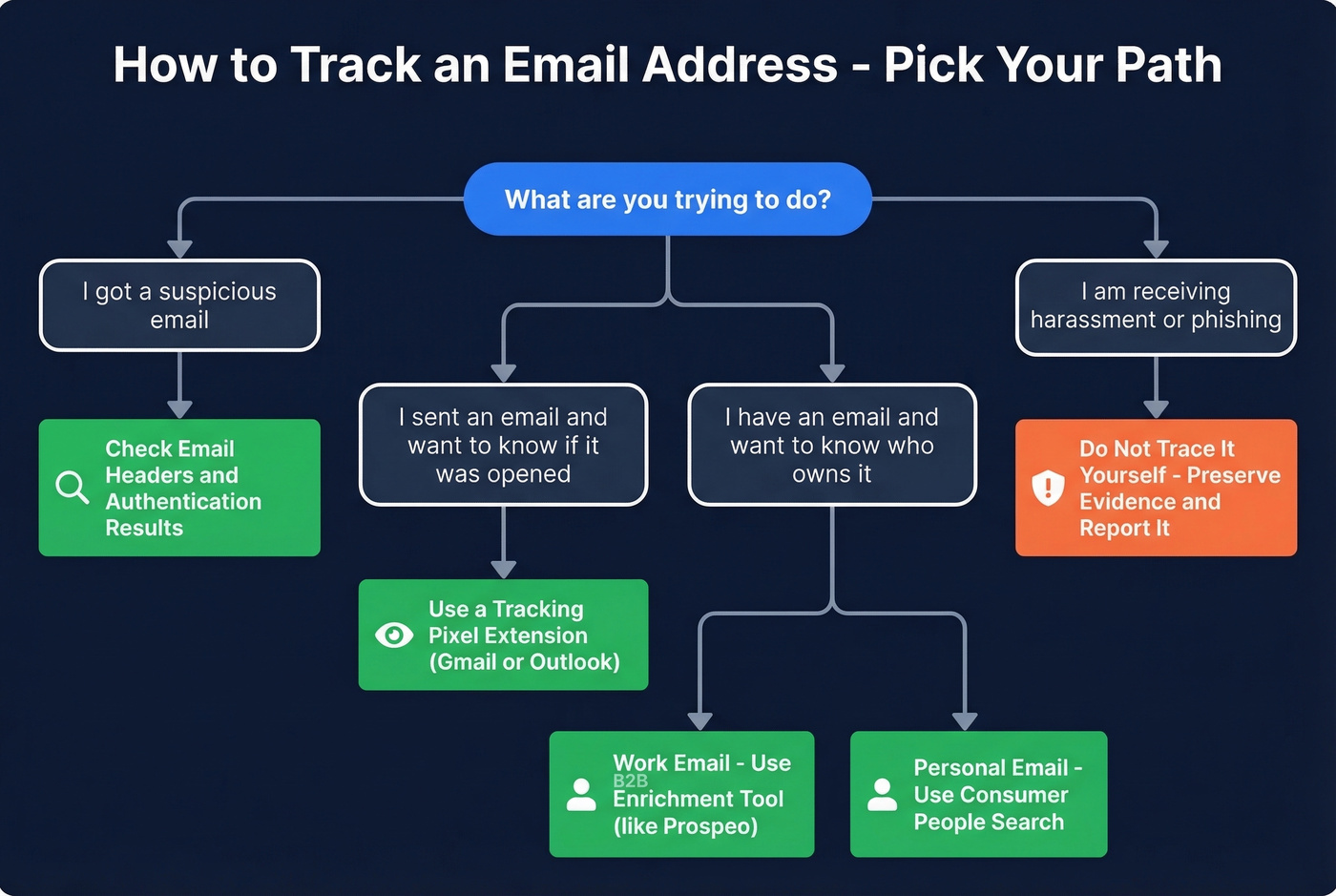
- "I got a suspicious email and want to know where it came from." Check the email headers and authentication results.
- "I sent an email and want to know if it was opened." Use a tracking pixel extension for Gmail or Outlook.
- "I have an email address and want to know who owns it." Run a reverse email lookup. For work emails, a B2B enrichment tool returns verified contact details. For personal emails, try a consumer people-search tool.
- "I'm receiving harassment or phishing attempts." Don't trace it yourself. Preserve the evidence and report it.
Tracing an Email Through Headers
Email headers are the audit trail every message carries. They record which servers handled it, when, and whether the sender's identity checks out. The trick is knowing where to look and what the results actually mean.
How to View Full Headers
Gmail: Open the email, click the three-dot menu, select Show Original. A new tab opens with raw headers and a quick summary of SPF, DKIM, and DMARC results.
Outlook (web): Open the message, click the three dots, then View message source. In the desktop app, open the message, go to File, then Properties, and look in the "Internet headers" box.
Apple Mail: Open the message, then View > Message > All Headers or Raw Source.
In all three cases, you're looking for two things: the Received chain and the [Authentication-Results](https://www.rfc-editor.org/info/rfc8601) header.
Reading the Received Chain
The Received headers tell you the path a message took from origin to your inbox. Read them bottom-to-top - the earliest entry is usually the first server that accepted the message. Here's an annotated example:
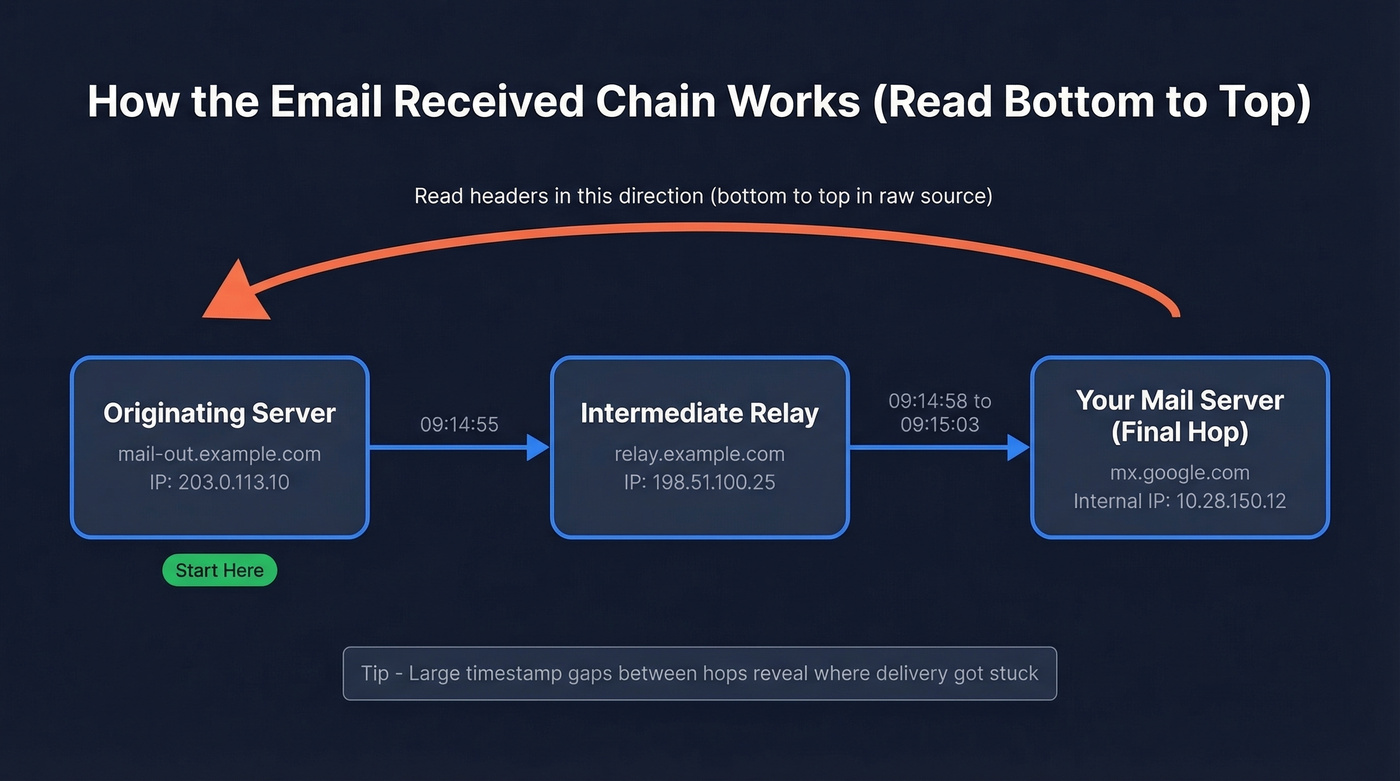
Received: by 10.28.150.12 with SMTP id a12;          ← 3. Your mail server (final hop)
        Tue, 14 Jan 2026 09:15:03 -0800

Received: from relay.example.com (198.51.100.25)      ← 2. Intermediate relay
        by mx.google.com with ESMTPS id b7;
        Tue, 14 Jan 2026 09:14:58 -0800

Received: from mail-out.example.com (203.0.113.10)     ← 1. Originating server (start here)
        by relay.example.com with ESMTP;
        Tue, 14 Jan 2026 09:14:55 -0800
Start at the bottom. The originating server mail-out.example.com at IP 203.0.113.10 is where the message entered the mail system. Each hop above it is a relay. Large timestamp gaps between hops often reveal where delivery got stuck.
Reading Authentication Results
The Authentication-Results header is where the real information lives:
Authentication-Results: mx.google.com;
       dkim=pass header.i=@example.com header.s=selector1;
       spf=pass (google.com: domain of sender@example.com designates 198.51.100.1 as permitted sender) smtp.mailfrom=sender@example.com;
       dmarc=pass (p=REJECT sp=REJECT dis=NONE) header.from=example.com
Here's what each line tells you:
- SPF=pass means the sending server's IP is authorized by the sender's domain to send on its behalf.
- DKIM=pass means the message's cryptographic signature matches the domain's published key. The
header.iandheader.sfields tell you which domain and selector were used. (If you need to validate your setup, see how to verify DKIM.) - DMARC=pass means the authenticated domain aligns with the visible
Fromaddress. This is the one that matters most - DMARC alignment is what prevents spoofing. (More detail: DMARC alignment.)
Microsoft formats things slightly differently. You'll see header.d instead of header.i, and sometimes a [compauth](https://learn.microsoft.com/en-us/defender-office-365/email-auth-sec-ops-guide) field, but the core verdicts (pass, fail, none) work the same across providers.
Common Authentication Patterns
| Pattern | What It Likely Means |
|---|---|
| SPF pass + DKIM fail | Signing issue - wrong selector, or message modified after signing |
| DKIM pass + DMARC fail | Alignment failure - signing domain doesn't match the visible From address |
| All three pass | Legitimate sender (or a well-configured spoofing setup, which is rare) |
| Large timestamp gaps in Received chain | Delivery delay - the gap shows where the message got stuck |
| SPF none + DKIM none | No authentication configured - treat with suspicion |
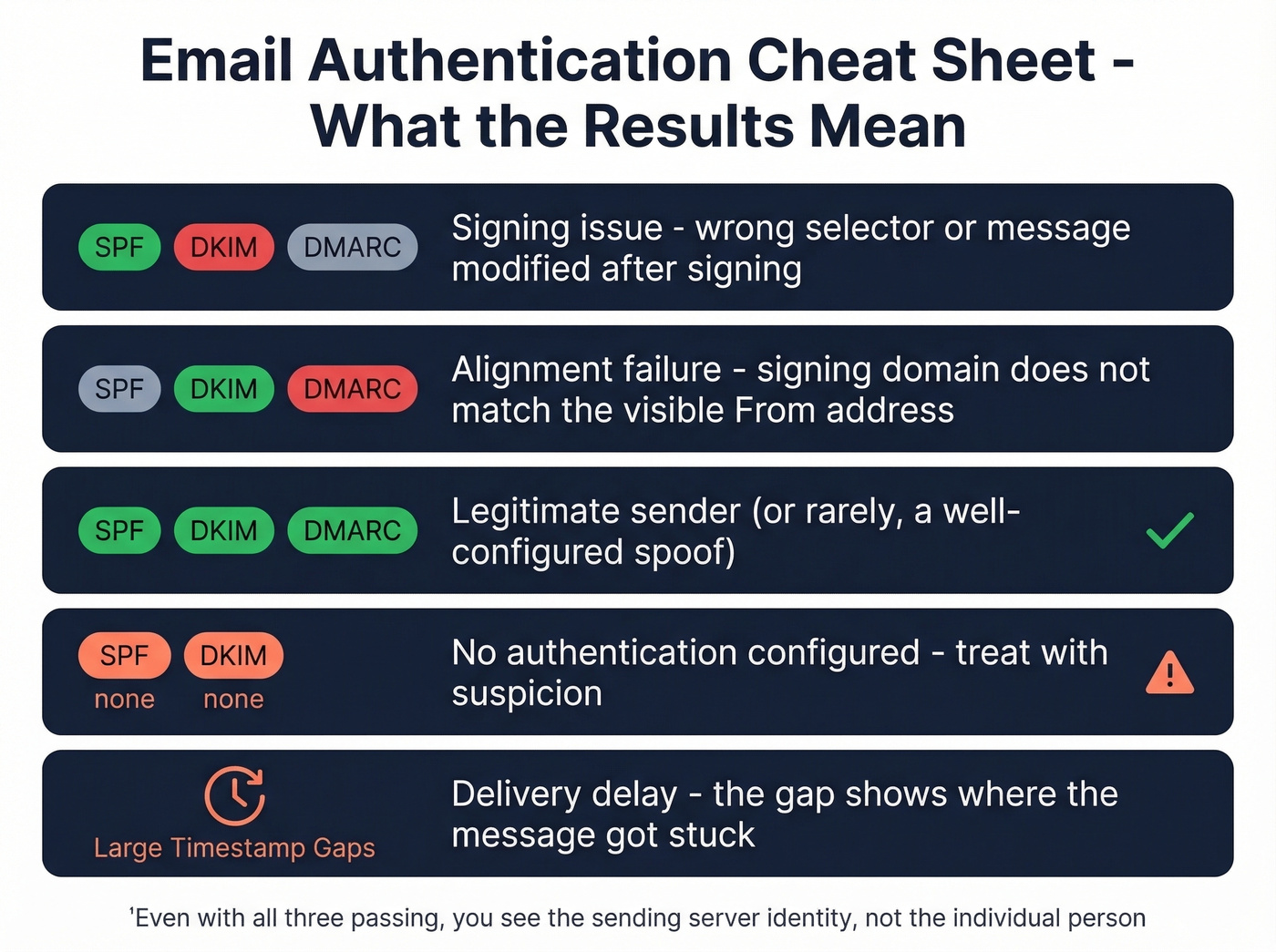
Even with all three passing, you're seeing the sending server's identity, not the individual person's. That distinction matters.
When the Sender's IP Is Hidden
Most mainstream providers hide the sender's actual IP and show the provider's server IP instead. Gmail, Outlook, and Yahoo all route outbound mail through their own infrastructure, so headers point to the provider - not the sender's home network.
This is where most "trace an email" guides fall apart. They promise you'll find a location, but you'll find a data center.
Look, if you're trying to identify a real person and the sender uses any major webmail provider, header tracing alone won't get you there. Skip straight to a reverse lookup or OSINT.
When the IP is masked, here's the fallback workflow:
- Pattern analysis: Look for anomalies in the Received chain - unexpected hops, unusual relay servers, or timestamp inconsistencies.
- Reverse email lookup: Search the address itself using enrichment tools (covered below).
- OSINT: Search the email address across the web, social platforms, and public directories.
- Abuse report: If the email is malicious, report it to the sending provider and check the IP against AbuseIPDB or WhatIsMyIPAddress, both free.
For IP lookups when you do have an address, IPinfo offers a free tier and paid plans for higher usage. But IP geolocation gives you an approximate region and ISP, not a person's name or street address.

Reverse email lookups only scratch the surface. Prospeo's enrichment engine takes any work email and returns 50+ data points - name, title, company, phone, technographics - with a 92% match rate and 98% email accuracy. No header digging required.
Turn an unknown email address into a full contact profile in seconds.
Track Emails You Send
This is the other half of "email tracking" - knowing whether someone opened your message or clicked a link. It's a completely different problem from tracing received emails, and it comes with its own limitations.
How Pixels and Links Work
A tracking pixel is a tiny 1x1 transparent image embedded in your email. When the recipient's email client loads images, it pings the tracking server, which logs the open along with a timestamp and sometimes IP-based location data. Modern email clients block JavaScript execution, so pixels remain the most reliable method for detecting opens. (If you want the technical deep dive, see email tracking pixels.)
Link tracking works similarly. Your tracking tool wraps each URL in a redirect that passes through its server before sending the recipient to the actual destination, logging the click, the time, and basic browser metadata.
Read receipts are the third option, but they require the recipient to explicitly approve the notification. Almost nobody clicks "yes" on those.
Why Open Tracking Is Unreliable
Apple Mail Privacy Protection broke open tracking. Launched on September 20, 2021, MPP hides the recipient's IP address and pre-fetches tracking pixels automatically, creating "machine opens" that look real but aren't. Your open rate for Apple Mail users is essentially fiction.
It gets worse. While 77% of marketers think MPP is automatically activated, it's actually opt-in during Mail setup - though the prompt is prominent enough that adoption is extremely high. Apple's Link Tracking Protection can also strip tracking parameters like UTMs in Mail and Safari, complicating click attribution.
Open rates are a vanity metric in 2026. Click tracking is more reliable, but even that has gaps. Don't make major decisions based on open data alone.
One thing that helps: verifying recipient addresses before you send. If you're tracking opens on emails that bounced, you're just adding noise to already noisy data. Prospeo verifies emails in real time and flags catch-all domains and spam traps, so your tracking data at least reflects real inboxes. (Related: email bounce rate and email deliverability.)

Best Lightweight Tracking Tools
The consensus on r/EmailProspecting is that lightweight Gmail extensions beat heavy CRM-based tracking for simple open and click notifications. The options that come up most often:
- MailSuite / Mailtracker - Lightweight tracking for Gmail. Free tiers available.
- Streak - Free Gmail CRM with built-in tracking. Paid plans start around $49/month for the full CRM.
- Yesware - Around $15-$25/month. Solid for sales teams who want tracking plus templates.
- Mixmax - Around $20-$40/month. Similar feature set, popular with SDR teams.
If you're doing bulk Gmail sending with tracking, GMass is also worth a look. It's built for high-volume sending and separates potentially false opens from Apple MPP activity. (If you're scaling, also watch email velocity.)
For a deeper dive on tracking mechanics, HubSpot's email tracking guide covers the fundamentals well.
Reverse Email Lookup Methods
Sometimes you don't need to trace headers or track opens. You just have an email address and want to know who's behind it. This is often the fastest way to track an email address to a real identity, and the tools differ sharply depending on whether it's a personal or professional address.
B2B Enrichment Tools
For work emails, B2B enrichment platforms are far more reliable than consumer people-search sites. They pull from professional databases, company directories, and verified records rather than scraped public records.
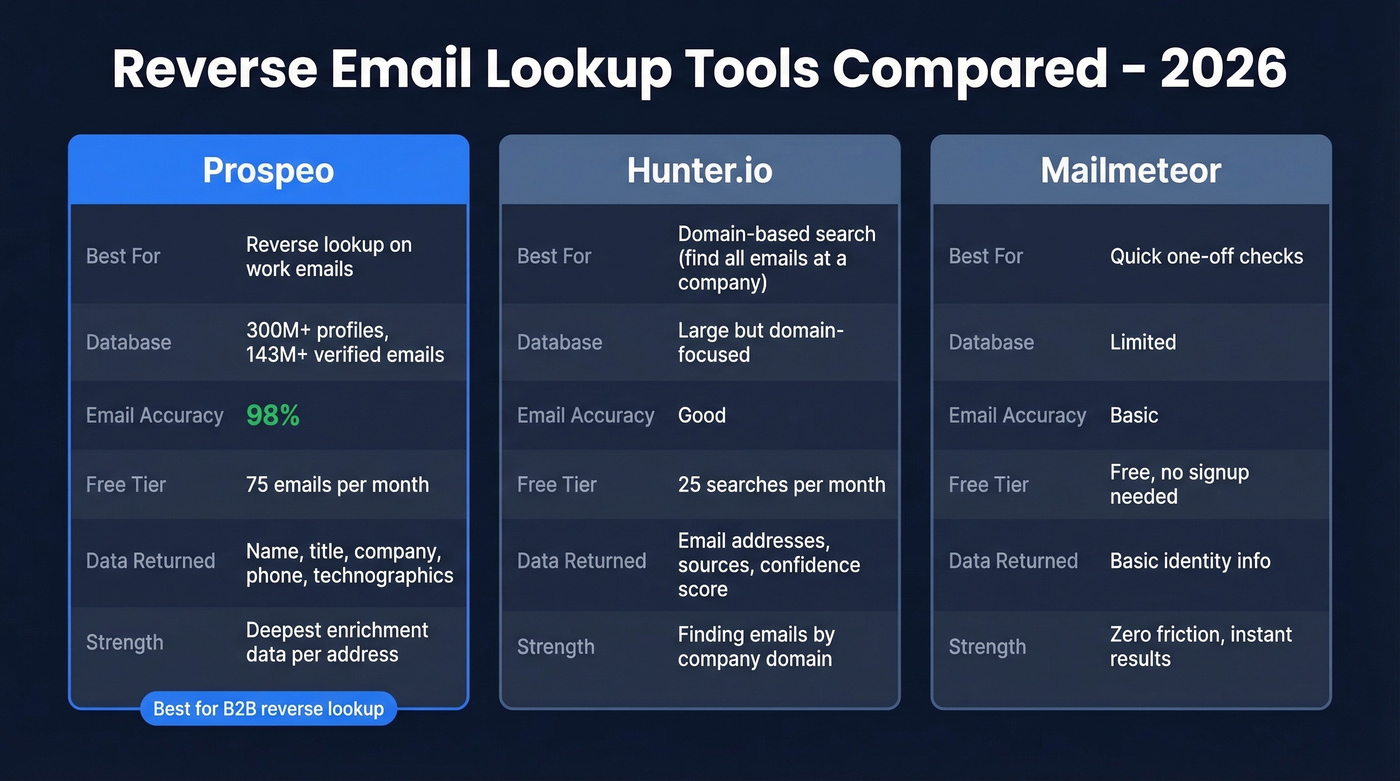
Prospeo is the strongest option for reverse lookups on professional addresses. Paste in a work email and it searches 300M+ profiles, returning the person's name, job title, company, and additional verified contact details. Email accuracy runs at 98% across 143M+ verified emails - meaningfully higher than most alternatives we've tested. The free tier gives you 75 emails per month, enough to see whether it fits your workflow before spending anything.

Hunter.io takes a different approach. It's strongest for domain-based searches - finding all emails at a company rather than reverse lookups on individual addresses. Free tier gives you 25 searches per month, paid plans start at $49/mo. (If you're comparing options, see Hunter alternatives.)
Mailmeteor offers a free reverse email lookup with no signup required. Useful for quick, one-off checks, though the depth of data returned is limited compared to dedicated enrichment platforms.
Consumer People-Search Tools
For personal email addresses like Gmail, Yahoo, or Hotmail, you're in murkier territory.
Spokeo (around $5-$15/month) and BeenVerified (around $20-$30/month) aggregate public records, social profiles, and data broker databases. They can sometimes surface a name and associated accounts, but results vary wildly. Personal webmail addresses are harder to match than corporate ones because there's less structured data to work with.
Use these if you're looking up a personal email and don't mind paying for inconsistent results. Skip these if the address is a work email - B2B tools give you better data at similar or lower cost.
Always verify what these tools return. Data goes stale fast, and cross-referencing multiple sources is the only way to build confidence in the result.
Putting It All Together
The workflow that actually works in our experience: start with headers to check authentication and identify the sending server, then if the IP is masked by a webmail provider, run a reverse email lookup, and finally verify the result with a second source. Most people skip straight to the lookup, which is fine - but headers can tell you whether the sender's domain is legitimate before you spend credits on enrichment.
| Tool | What It Does | Free Tier | Paid From | Best For |
|---|---|---|---|---|
| Prospeo | B2B email lookup + verify | 75 emails/mo | ~$0.01/email | Work email ID |
| Hunter.io | Domain email search | 25 searches/mo | $49/mo | Emails by company |
| Mailmeteor | Reverse email lookup | Yes, no signup | - | Quick free lookups |
| Spokeo | Consumer people search | No | ~$5-$15/mo | Personal email lookup |
| BeenVerified | Background/people search | No | ~$20-$30/mo | US consumer records |
| WhatIsMyIPAddress | IP/header trace | Yes | - | Tracing server IPs |
| Streak | Gmail CRM + tracking | Yes | ~$49/mo | CRM + tracking combo |
Tracking opens tells you who's interested. Prospeo tells you who they actually are. Enrich any email address against 300M+ verified professional profiles refreshed every 7 days - not the 6-week-old data other tools serve up.
Go from an email address to a qualified lead for $0.01 per lookup.
Harassment or Phishing Emails
If you're receiving threatening, harassing, or phishing emails, stop trying to trace the sender yourself. A determined bad actor uses VPNs, disposable accounts, and relay services that make header tracing pointless.
Instead, follow this checklist:
- Preserve everything. Don't delete the email. Screenshot it, save the raw headers, and note the date and time.
- Report to your email provider. Gmail, Outlook, and Yahoo all have "Report phishing" or "Report abuse" options built in.
- Check the sending IP against AbuseIPDB and report it there if it's flagged.
- Contact the sender's ISP abuse desk if you can identify the sending infrastructure from the headers.
- File a report with law enforcement if the emails contain threats, extortion, or illegal content. In the US, the FBI's IC3 handles internet crime complaints.
- Don't engage with the sender. Any response confirms your address is active and monitored.
Is Email Tracking Legal?
Email tracking - both header analysis and pixel/link tracking - is legal in most countries, but the rules vary by method and location.
In the US, the Electronic Communications Privacy Act governs interception of electronic communications. CAN-SPAM requires commercial emails to include an unsubscribe mechanism and honest header information but doesn't specifically prohibit tracking. Under GDPR in the EU, tracking pixels that collect IP addresses or behavioral data require disclosure or consent, depending on the legal basis you're relying on. The safest approach is to disclose tracking in your privacy policy and provide an opt-out. (If you're doing outbound, it's also worth reading is it illegal to buy email lists.)
This isn't legal advice. If you're running tracking at scale across jurisdictions, consult a data privacy attorney. For individual use cases like checking whether a prospect opened your email, you're on solid ground in most countries.
FAQ
Can you trace a Gmail address to a person?
Not through headers alone. Gmail hides sender IPs, so headers only reveal Google's servers. For professional Gmail-hosted addresses (Google Workspace), a B2B reverse lookup tool can return the owner's name, title, and company. For personal @gmail.com addresses, consumer people-search tools like Spokeo sometimes surface a match, but results are inconsistent.
Can someone track my email address?
They can see your email provider's server IP and check authentication headers, but not your personal IP or physical location if you use webmail like Gmail or Outlook. Tracking pixels in emails you open can log the time and your general location, unless you block image loading or your client masks it (like Apple MPP).
How accurate are reverse email lookups?
Consumer people-search tools are hit-or-miss for personal emails - expect roughly 40-60% match rates. B2B enrichment platforms perform much better for work addresses. Prospeo delivers 98% email accuracy across 143M+ verified records, and Hunter.io is strong for domain-level searches with 25 free lookups per month.
Can you trace an anonymous email?
Rarely to a specific person. Anonymous email services, VPNs, and disposable accounts make tracing nearly impossible through headers alone. Your best move is to preserve the email as evidence and report it to your provider or law enforcement if it's threatening.
Does email open tracking still work in 2026?
Partially. Apple Mail Privacy Protection creates fake opens and hides recipient IPs, making open rates unreliable for a significant chunk of recipients. Click tracking remains more accurate, but Apple's Link Tracking Protection can strip UTM parameters. Treat open data as directional, not definitive.