

How to Verify an Email Address in 2026 (3 Methods)
You sent 200 cold emails on Monday. By Tuesday, 47 had bounced, your ESP flagged your account, and your domain reputation took a hit that'll take weeks to repair. That's not a hypothetical - it's what happens when you skip verification.
Whether you need to check a single address or clean a list of 50,000, knowing how to verify an email before you hit send is the difference between a healthy domain and a blacklisted one.
Two Meanings of "Verify an Email"
"Verify an email" means two very different things depending on context.
The first meaning is about security - confirming that an email you received is actually from who it claims to be. If that's what you're after, here's the quick checklist:
- Hover over the sender's display name to reveal the real address
- Inspect for lookalike characters - the classic "rn" that mimics "m"
- Check the Return-Path in your email headers via File → Properties in Outlook
- When in doubt, call the sender using a number you already trust
Lookalike domains and spoofed display names catch people every day.
This guide focuses on the other meaning: verifying that an email address exists and can receive mail before you send to it. That's the deliverability problem, and it's the one that costs sales teams real money.
What You Need (Quick Version)
Your approach depends on what you're actually trying to do:
- Verify one email right now. Use a manual SMTP check (instructions below) or a free single-check tool like Verifalia or Mailmeteor. Results come back in seconds.
- Clean an existing list. Upload a CSV to a bulk verification tool - Bouncer, Emailable, or NeverBounce all handle this well at ~$0.002-$0.007 per email.
The 3-Layer Verification Pipeline
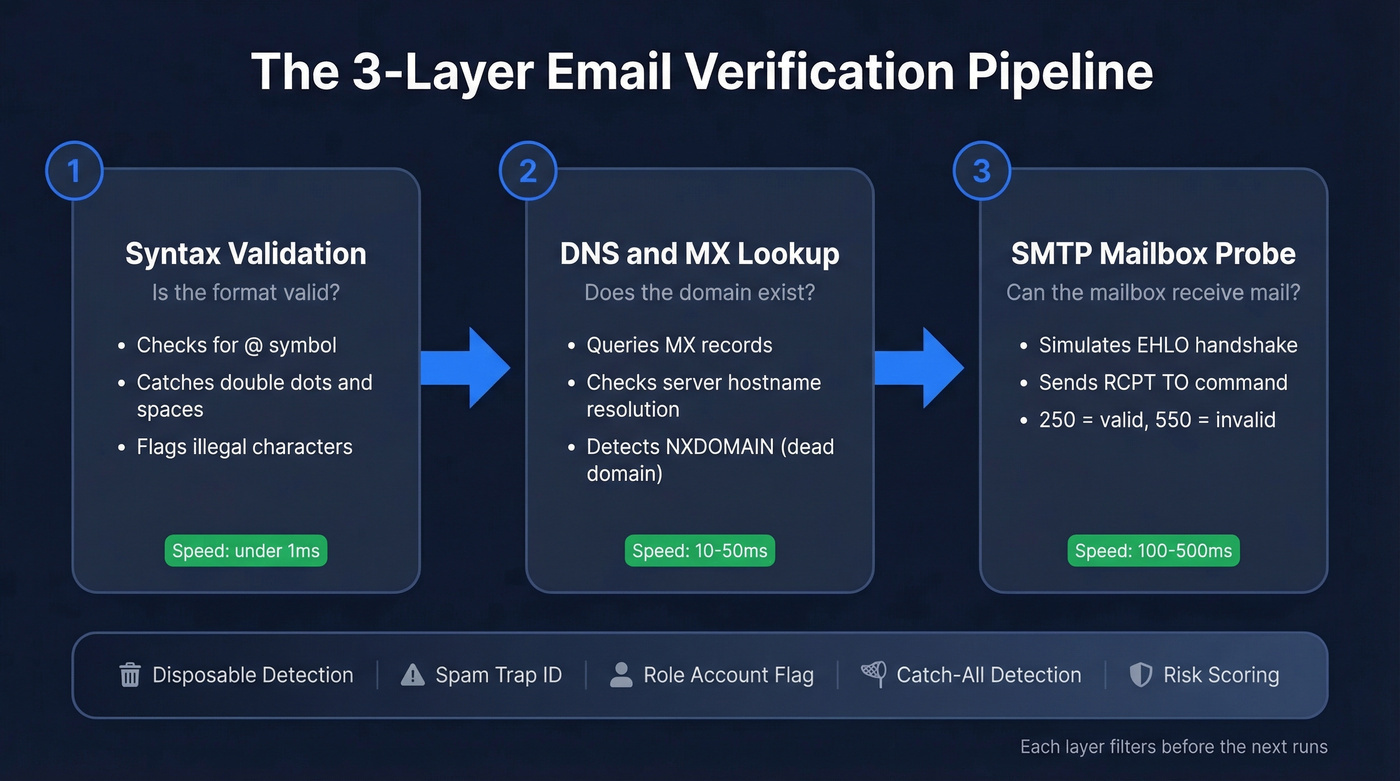
Every verification tool - whether it's a $24/10K budget option or a $149/10K premium service - runs the same fundamental pipeline. Three layers, each catching different problems. Some tools use progressive verification, running cheap syntax and DNS checks first and only performing the slower SMTP probe if earlier checks pass. Enterprise tools like Verifalia run 30+ individual checks per address, but the core pipeline is always these three layers.
Syntax Validation
The first check is instant and trivial. Does the address follow the local-part@domain.tld format? Missing @ symbol, double dots, illegal characters, spaces - all get caught here. This eliminates typos and obviously malformed entries. It's the cheapest check and runs in under a millisecond.
Domain and MX Record Lookup
Once syntax passes, the tool performs a DNS lookup to confirm the domain exists and has MX (Mail Exchange) records pointing to a mail server. Each MX record includes a priority number - lower means higher priority - and the tool can also validate whether the mail server hostnames resolve to IP addresses and whether the server is reachable over SMTP.
You can run this yourself in a terminal:
dig MX example.com
Or on Windows:
nslookup -type=mx example.com
No MX records, or hostnames that don't resolve? The address is dead. An NXDOMAIN response means the domain flat-out doesn't exist. A SERVFAIL response is temporary and worth retrying.
SMTP Mailbox Probe
This is where the real verification happens. The tool opens a connection to the mail server and simulates the beginning of an email delivery - without actually sending anything. The dialogue looks like this:
- Connect - server responds with
220(ready) - EHLO - server responds with
250(acknowledged) - MAIL FROM - server responds with
250(sender accepted) - RCPT TO - this is the critical step.
250means the server accepted the recipient.550means permanent failure - that address is invalid.
The connection closes before any message content is sent. The recipient never knows the check happened.
Temporary errors (450, 451, 452) mean the server can't confirm right now - greylisting, rate-limiting, or just being cagey. Permanent errors (550, 551, 552, 553) mean the mailbox is definitively rejected. Good verification tools distinguish between these rather than lumping them together. The whole handshake typically completes in 100-500ms, with one benchmark clocking the average at around 444ms - fast enough for real-time form validation.
Beyond these three layers, most tools also run disposable email detection, spam-trap identification, role-account flagging, catch-all detection, and risk scoring.
Understanding Verification Results
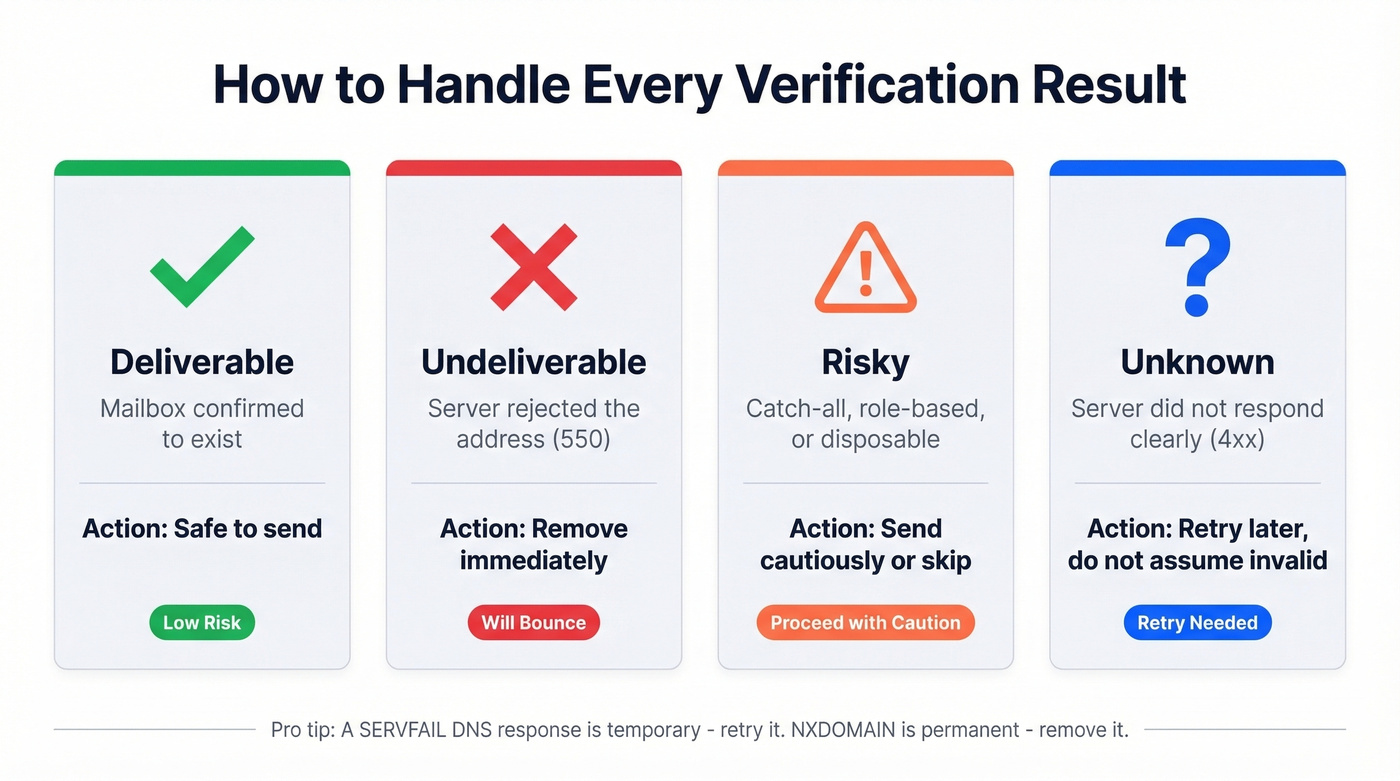
Verification doesn't return a simple yes/no. Modern tools classify addresses into four categories, and how you handle each one matters:
| Result | What It Means | What to Do |
|---|---|---|
| Deliverable | Mailbox confirmed | Safe to send |
| Undeliverable | Server rejected it | Remove immediately |
| Risky | Catch-all, role-based, or disposable | Send cautiously or skip |
| Unknown | Server didn't respond clearly | Retry later, don't assume invalid |
The nuances matter. A SERVFAIL DNS response isn't the same as NXDOMAIN - the first is temporary, the second is permanent. A 4xx SMTP response should be treated as unknown, not invalid. Role-based addresses like info@ or support@ technically work but tend to have lower engagement and higher complaint rates. ZeroBounce's documentation breaks down these categories well if you want the full taxonomy.

Running emails through syntax checks, DNS lookups, and SMTP probes yourself? Prospeo's 5-step verification handles all of that - plus catch-all detection, spam-trap removal, and honeypot filtering - before you ever see the address. 98% email accuracy, refreshed every 7 days.
Skip the pipeline. Every Prospeo email is already verified at 98% accuracy.
The Catch-All Problem
Let's be honest about the biggest blind spot in email verification: 30-40% of B2B email addresses sit on catch-all domains. These servers accept mail for any recipient at the domain, which means the SMTP handshake returns 250 OK for everything - real addresses, fake addresses, complete gibberish.
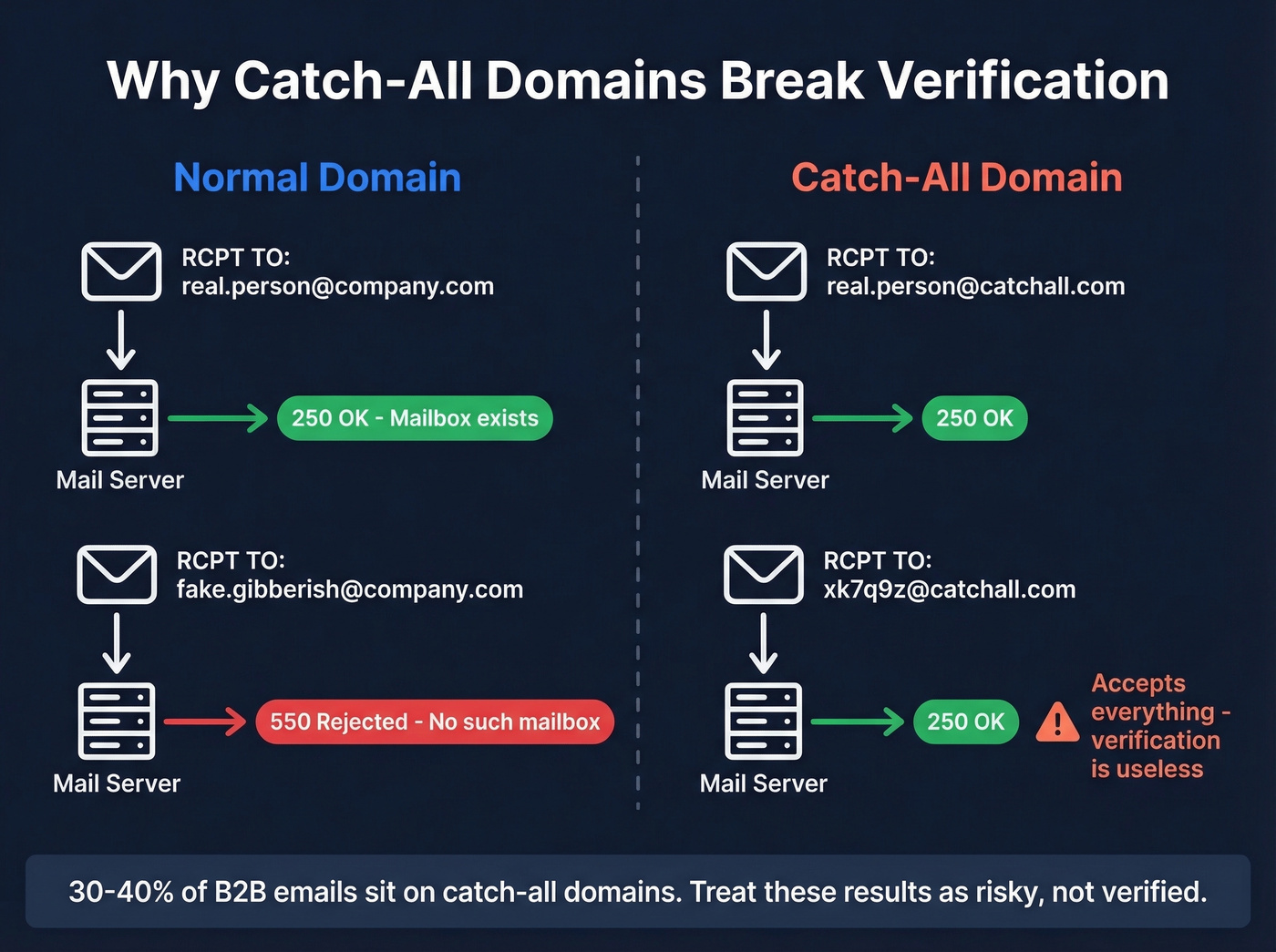
The standard detection method is straightforward. The tool sends a probe to a random, obviously fake address at the same domain - something like xk7q9z@theirdomain.com. If the server accepts it, the domain is catch-all, and individual mailbox verification becomes unreliable.
Enterprise security gateways make this worse. Proofpoint, Mimecast, Barracuda, and Microsoft Defender can block or degrade SMTP probes entirely via greylisting, rate limiting, or outright rejection, producing "unknown" results even when the mailbox is perfectly valid. In our testing, catch-all domains account for the majority of "unknown" results across every tool we've benchmarked.
Organizations use catch-all for legitimate reasons - catching typos, flexible routing during migrations, privacy through unique aliases. The right approach is to treat catch-all results as "risky" and apply engagement-based gating or double opt-in before committing to full-volume sends.
Manual Email Verification Steps
Sometimes you just need to check one address yourself - maybe you're debugging a bounce, or you're curious how the sausage gets made.
First, find the mail server:
dig MX example.com +short
You'll get something like 10 mail.example.com. The number is priority; the hostname is your target.
Next, connect to the mail server:
telnet mail.example.com 25
Or if telnet isn't available:
nc -vz mail.example.com 25
Once connected, run the SMTP dialogue:
EHLO verify.test
MAIL FROM:<test@yourdomain.com>
RCPT TO:<target@example.com>
QUIT
If RCPT TO returns 250, the server accepted the recipient. If it returns 550, it doesn't exist. Anything in the 4xx range means the server is being cagey - greylisting, rate limiting, or just not telling you.
Look, this is useful for learning and one-off checks. Don't do this at scale. You'll hit rate limits immediately, risk getting your IP blacklisted, and greylisting will make half your results unreliable. That's what tools are for.
Best Email Verification Tools Compared
Every tool self-reports 97-99% accuracy. Real-world accuracy varies most on catch-all domains, greylisted servers, and enterprise-protected domains. High-volume cold emailers on r/coldemail consistently treat verification as non-optional - one poster running 1M+ emails per month described it as "damage control, not optional." With that caveat, here's how the market breaks down.
| Tool | Free Credits | Price / 10K | Best For |
|---|---|---|---|
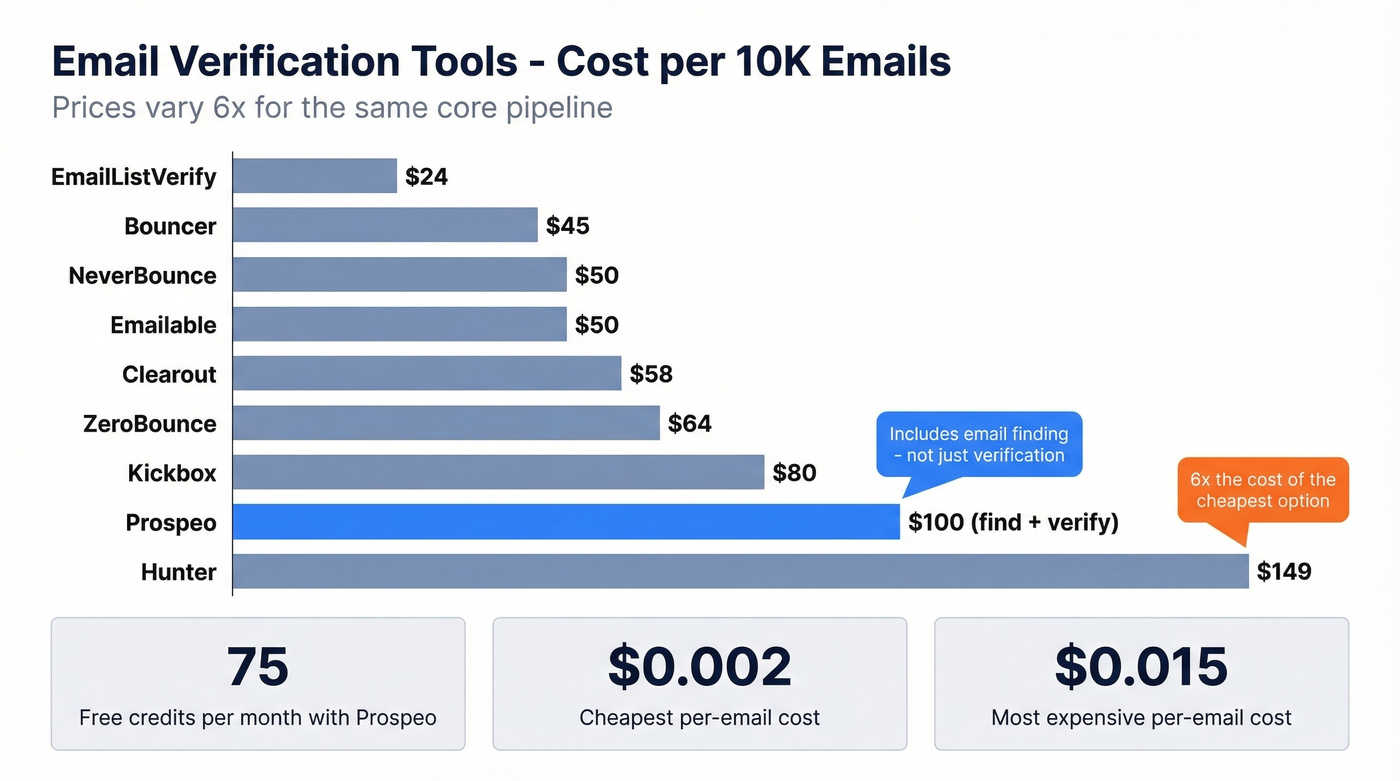
| Prospeo | 75/month | ~$100 (find + verify) | Verified prospect lists |
| Bouncer | 1,000 | $45 | Budget list cleaning |
| NeverBounce | 1,000 | $50 | High-volume cleaning |
| Emailable | 250 | $50 | Mid-range standalone |
| ZeroBounce | 100/month | $64 | Compliance-focused teams |
| Clearout | 100 | $58 | General verification |
| Kickbox | 100 | $80 | Enterprise SLAs |
| Hunter | 100/month | $149 | Existing Hunter users |
| EmailListVerify | 100 | $24 | Lowest cost per check |
Hunter charges $149 for 10K verifications. EmailListVerify charges $24. The spread is absurd for what's fundamentally the same core pipeline. Pay for accuracy and features, not brand tax.
Prospeo - Find and Verify in One Step
Most verification tools assume you already have a list. Prospeo skips that step entirely. Its database covers 300M+ professional profiles with 143M+ verified emails, and every address goes through a 5-step verification pipeline - syntax, domain, SMTP, catch-all handling, and spam-trap removal - before it ever reaches your export. The 7-day data refresh cycle means you're not verifying stale addresses that went dead three weeks ago. At ~$0.01 per email, it's positioned as a find-and-verify platform rather than a standalone verifier. If you're building prospect lists from scratch, this eliminates the two-tool workflow entirely. The Chrome extension - used by 40,000+ people - lets you verify contacts directly from any website or CRM. 75 free emails per month, no contracts, self-serve onboarding.
Bouncer - Budget List Cleaning
Who it's for: Teams that already have lists and just need them cleaned without spending a fortune. At $45 per 10K, Bouncer is among the cheapest options that still delivers reliable results. We've used it as a second-pass verifier behind primary data sources - belt and suspenders for high-stakes sends. The 1,000 free credits are generous enough to test properly before committing. Skip it if you need email finding - it's verification only.

NeverBounce - High-Volume Cleaning
Picture this: you're an agency cleaning lists of 100K+ contacts every week across a dozen client accounts. That's NeverBounce's sweet spot. Their volume pricing gets aggressive at scale, and the API is solid for automated workflows. At $50 per 10K at standard rates, it's competitive. Where NeverBounce shines is reliability at volume - it handles the throughput without choking.
ZeroBounce vs. Emailable
These two occupy similar mid-range territory, but they serve different buyers.
ZeroBounce is the pick for compliance-heavy teams in financial services or healthcare that need detailed reporting on why addresses failed and audit trails for every verification. Its result categories are more granular than most. At $64 per 10K with 100 free monthly credits, you're paying for that extra reporting layer.
Emailable is the opposite philosophy - reliable, no surprises, no complexity you don't need. $50 per 10K, 250 free credits, gets the job done. If you don't need audit trails, save the $14 per 10K.
Quick Mentions
Kickbox charges premium pricing at $80 per 10K for enterprise-grade infrastructure - worth it if you need SLAs and dedicated support, overkill for most teams. EmailListVerify is the cheapest at $24 per 10K and fine for basic list cleaning, though don't expect the same catch-all handling as pricier tools. Verifalia offers free single-email checks, perfect for one-off lookups. Hunter makes sense if you're already deep in their ecosystem, but $149 per 10K for verification alone is hard to justify when alternatives cost a third of that.
If you want a deeper breakdown, see our full roundup of email verification tools and the cheapest options in email list cleaning.
Bounce Rate Benchmarks
What does "good" actually look like? Mailchimp's analysis of billions of sends puts the average hard bounce rate at 0.21% and soft bounce at 0.70%. Industry variation is significant:
| Industry | Avg Hard Bounce Rate |
|---|---|
| Architecture & Construction | 1.04% |
| Software & Web App | 0.93% |
| Agriculture & Food Services | 0.42% |
| Ecommerce | 0.29% |
| All industries average | 0.21% |
Your target: keep hard bounces under 2%, ideally in the 0-1% range. The global inbox placement rate sits at roughly 83.5% based on recent benchmarks, meaning about one in six emails doesn't reach the inbox even when it doesn't bounce. Clean lists are table stakes - they're the minimum, not the goal.
Hot take: If your average deal size is under $5K, you probably don't need a $149-per-10K verification tool. EmailListVerify at $24 or Bouncer at $45 will catch 95%+ of the same bad addresses. Save the budget for better copy.
At minimum, verify quarterly - monthly if you're running high-volume outbound. Google's own guidance recommends reducing sending volume immediately when error rates spike, then ramping back up slowly. By the time you're reacting to bounces, the damage is already done.
For more on bounce thresholds and what they mean, use our bounce rate guide and bounce rate calculator.
Mistakes That Wreck Deliverability
1. Verify once and forget. Email lists decay. After four weeks, roughly 2% of a verified list becomes invalid - people change jobs, domains expire, mailboxes get deactivated. Verification is maintenance, not a one-time event. We've watched teams lose weeks of sending reputation over a single unverified list that sat untouched for two months.
2. Treating "accept-all" as "valid." A catch-all response means the server accepted the address. It doesn't mean a human reads that inbox. Sending full volume to accept-all addresses without engagement gating is how you tank deliverability. One thread on r/coldemail put it bluntly: treating catch-all as valid is "playing Russian roulette with your domain."
3. Verifying after sending. If you're waiting for bounces to identify bad addresses, the reputation damage already happened. ESPs track your bounce rate in real time. Verify before you send, always.
4. Not filtering inactive contacts first. Why burn verification credits on contacts who haven't opened an email in six months? Filter by engagement first, verify the active segment, and save your budget.
5. Using stale data sources. This is the one most teams miss entirely. You don't have a verification problem - you have a data source problem. If your contact database refreshes every six weeks, you're verifying addresses that went stale a month ago. Fresh data needs less verification, not more. Customers like Stack Optimize maintain under 3% bounce rates across all their clients by starting with data that's refreshed weekly rather than cleaning up month-old exports.
If you're building outbound lists, it helps to start with a workflow that includes B2B email verification and email list hygiene from day one.
Catch-all domains break every verification tool on this list. Prospeo's proprietary infrastructure handles catch-all verification natively - so you're not guessing which 30-40% of your list is risky. At $0.01 per email, cleaning bad data costs less than one bounced send.
Stop treating catch-all as a coin flip. Get emails you can actually send to.
FAQ
Does verifying an email send a message to the recipient?
No. Verification initiates an SMTP handshake - it connects to the mail server and asks "would you accept mail for this address?" but disconnects before sending any content. The recipient never knows the check happened. No email is delivered, no notification is triggered.
How accurate are email verification tools?
Most tools self-report 97-99%, but real-world accuracy drops on catch-all domains - which represent 30-40% of B2B addresses - as well as greylisted servers and enterprise security gateways. Expect 95-98% in practice for deliverable addresses. The gap shows up at scale.
How often should I re-verify my list?
At minimum, quarterly. Email lists decay at roughly 2% per month, so a 50K list loses ~1,000 valid addresses every four weeks. If you're running weekly campaigns, verify before each major send.
Are free email checkers reliable?
For single checks, free tools like Verifalia and Mailmeteor work fine. For bulk verification, free tiers are too small - typically 50-100 credits. Paid tools start at ~$0.002 per email, cheap enough that skipping verification is never worth the domain reputation risk.
What's the difference between email verification and email validation?
In practice, they're used interchangeably. Some vendors use "validation" for syntax and format checks, and "verification" for the full SMTP mailbox probe. What matters is that your tool runs all three layers: syntax, domain/MX, and SMTP. If it only does syntax, it isn't actually checking anything useful.