How to Verify an Email Address in Gmail (2026)
"Verify an email address in Gmail" means three completely different things depending on who's asking - and most guides only answer one of them. You might need to confirm your own account, check whether a sender is spoofing you, or figure out if a prospect's address actually exists before you hit send. The method that works for one will fail spectacularly for another.
We've spent enough time watching outbound teams torch their sender reputation on unverified Gmail addresses to know this matters. Let's break it down by scenario.
Verify Your Own Gmail Account
This is the simplest case. If Google's asking you to verify your account or you can't sign in, here's the path:
- Go to your Google Account (myaccount.google.com) and review your Personal info and Security settings. Make sure your recovery email and phone number are current.
- Check Spam and Promotions - verification emails love to hide there.
- If you're locked out entirely, head to Google's account recovery page and follow the prompts. Google will walk you through recovery using whatever options you've configured.
- If you keep retrying and nothing works, slow down. Google rate-limits recovery attempts and can trigger extra challenges when it detects rapid retries.
That's it. If your problem is account access, you don't need a tool - you need Google's recovery flow.
Check If a Sender Is Legitimate
This matters more than most people realize. Business email compromise has caused over $55 billion in losses since 2013, according to the FBI. Gmail's built-in tools can tell you whether an email is actually authenticated by the domain it claims to be from.
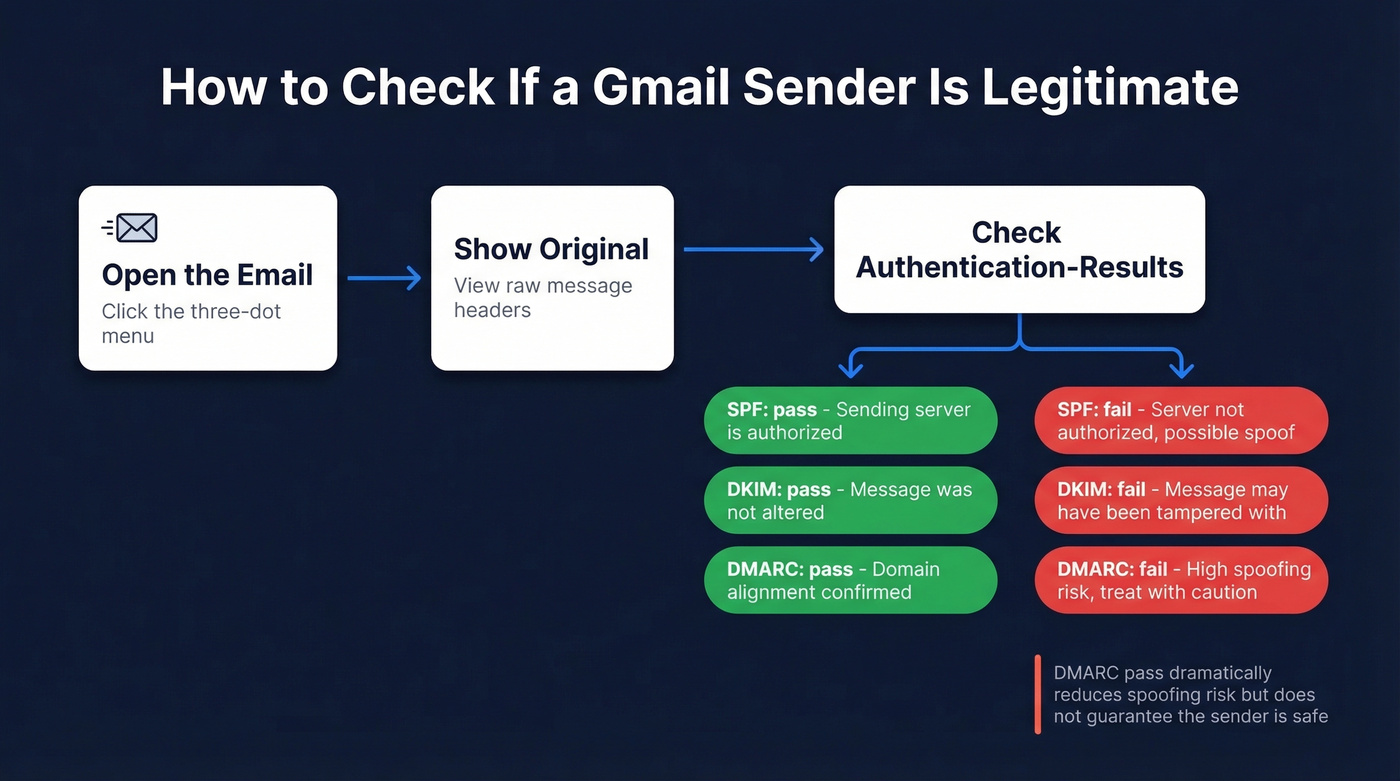
Open the suspicious email, click the three-dot menu in the top right, and select Show original. You're looking for the Authentication-Results header. It shows three key checks:
- SPF - checks whether the sending server is authorized to send for the envelope/Return-Path domain (not always the same as the visible "From"). A "pass" is good; a "fail" is a red flag.
- DKIM - confirms the message wasn't altered after it was signed. Think of it as a digital seal on the envelope.
- DMARC - ties SPF and DKIM together with alignment rules and tells receiving systems what to do when authentication fails.
DMARC is the one that actually drives enforcement:
| DMARC Policy | What Happens |
|---|---|
p=none |
Monitor-only - no action taken |
p=quarantine |
Treat as suspicious, often routed to spam |
p=reject |
Reject at SMTP level, never delivered |
If you see dmarc=pass in the headers, the message is properly authenticated for that domain. That dramatically reduces spoofing risk. It doesn't guarantee the sender is "safe," but it means the email is far less likely to be a simple forged From address. Google's email sender guidelines cover the full technical requirements if you want to go deeper.
If you want to go deeper on the mechanics, start with DMARC alignment and a clean SPF record example.

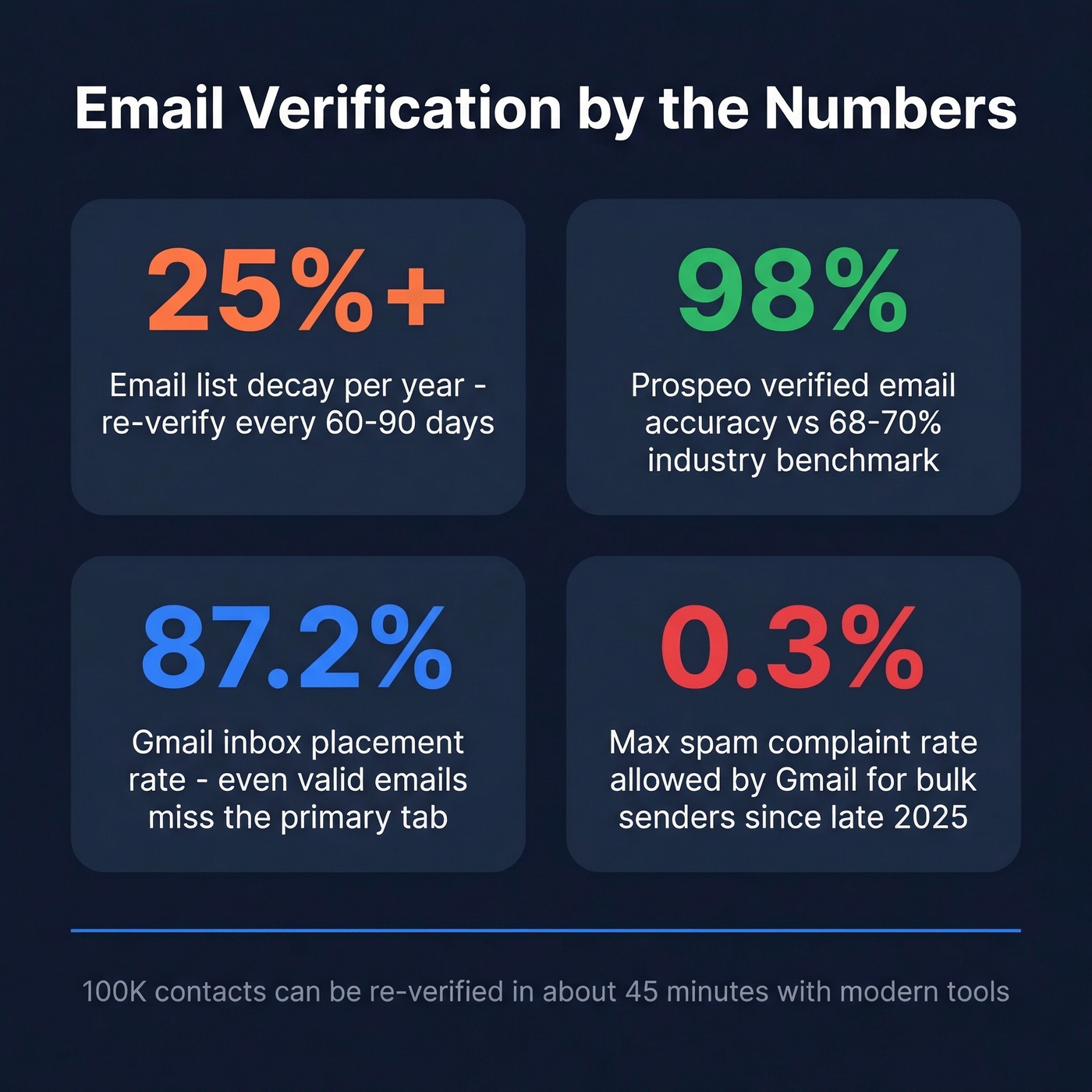
Gmail's accept-all SMTP behavior makes standard verification useless. Prospeo's proprietary 5-step process bypasses SMTP entirely - combining DNS checks, spam-trap removal, and honeypot filtering across 143M+ verified emails refreshed every 7 days. That's how teams hit 98% accuracy instead of the 68-70% industry benchmark.
Stop guessing which Gmail addresses are real. Verify 75 emails free this month.
Check If a Gmail Address Is Valid
This is what most people actually want when they search this topic. You've got a prospect's Gmail address and you need to know if it's real before you burn a send.
Quick Manual Checks
For one to three addresses, you can use Google's own flows. Go to accounts.google.com/signin/recovery and enter the email. If Google says "No account found with that email address," it doesn't exist. If it moves to a verification challenge, the account is real.
This works for spot checks but breaks down fast at scale. Google rate-limits aggressively, and you'll hit CAPTCHAs after a handful of attempts. Don't try to build a workflow around it.
If you need more options beyond Gmail's recovery flow, see our guide on how to check if a Gmail account exists.
Why Gmail Breaks Standard Verification
Here's the thing most verification guides won't tell you: Gmail's SMTP servers return 250 OK for RCPT TO commands even when the mailbox doesn't exist. The standard email verification method - connecting to the mail server and asking "does this address accept mail?" - produces false positives on every single Gmail address you test.
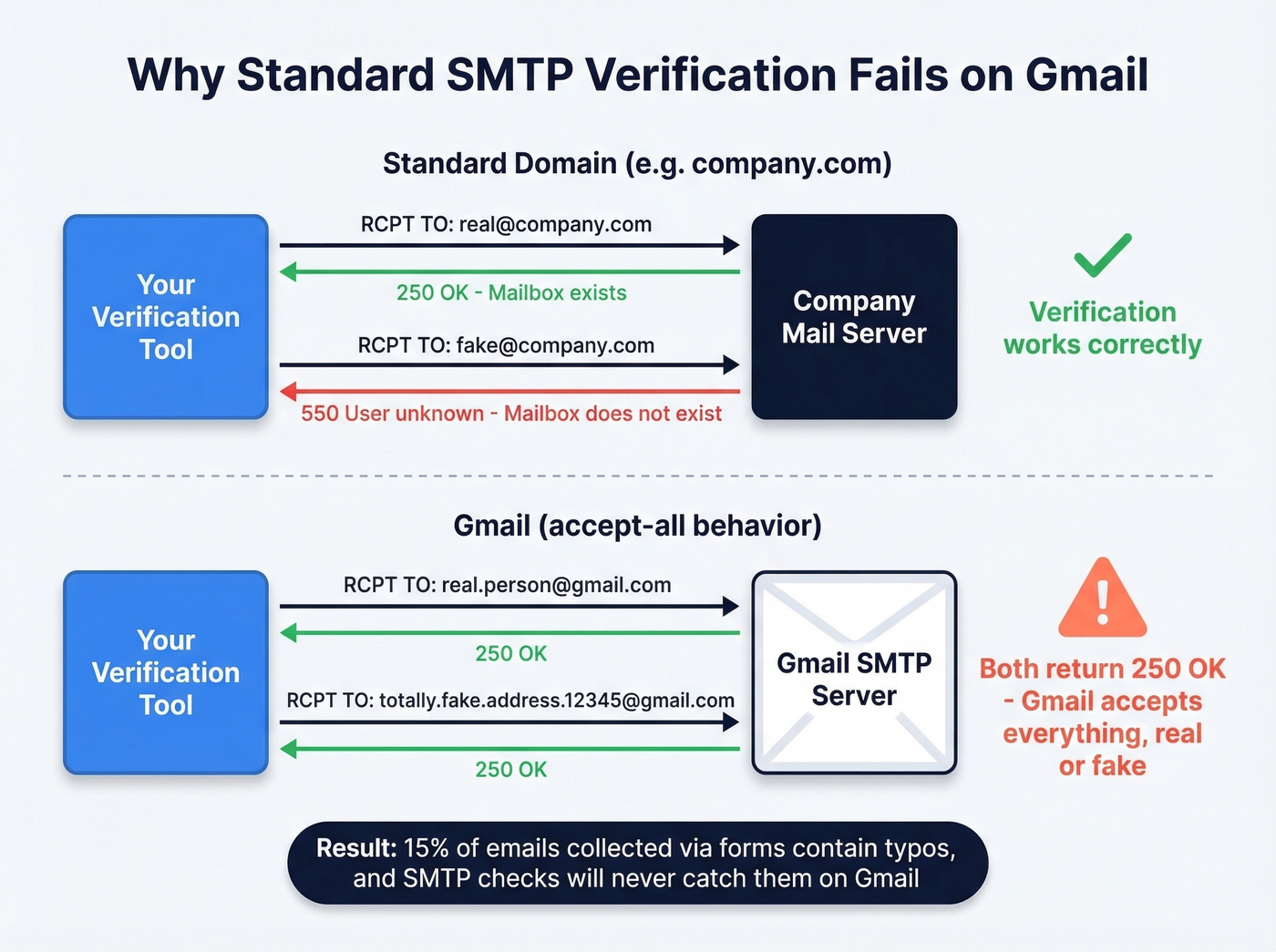
You can run MX lookups all day, and they'll confirm the domain is real. But domain-level confirmation tells you nothing about whether john.smith.fake.address.12345@gmail.com has an actual inbox behind it. Roughly 15% of emails collected via forms contain typos, and Gmail's accept-all behavior means SMTP checks won't catch them.
If you're trying to operationalize this, it's the same core problem as how to check if an email exists and how to check if email id exists - Gmail just makes it harder.
When to Use a Verification Tool
There's a thread on r/AskProgramming where developers argue Gmail verification is impossible - and they're right about SMTP. But they're wrong about the conclusion. Professional verification tools get better results on Gmail by combining non-SMTP signals like proprietary datasets, historical deliverability patterns, and risk scoring instead of trusting Gmail's misleading SMTP responses.
This matters operationally because email lists decay 25%+ per year. Gmail inbox placement sits at around 87.2%, meaning a meaningful chunk of mail still doesn't land in the primary inbox even when the address is valid. Sending to invalid addresses makes that worse.
If you're running outbound, pair verification with a real email deliverability workflow and monitor your email bounce rate.
Since late 2025, Gmail has been actively rejecting non-compliant email at the SMTP protocol level, and bulk sender requirements demand spam complaint rates below 0.3%. Verification isn't optional anymore. It's infrastructure.

Best Free Tools for Gmail Verification
In a benchmark of 15 tools across 3,000 emails, top performers landed around 68-70% overall accuracy. That's the baseline you're working against with standard SMTP-based approaches.
If you're comparing vendors, you may also want our roundup of Bouncer alternatives.
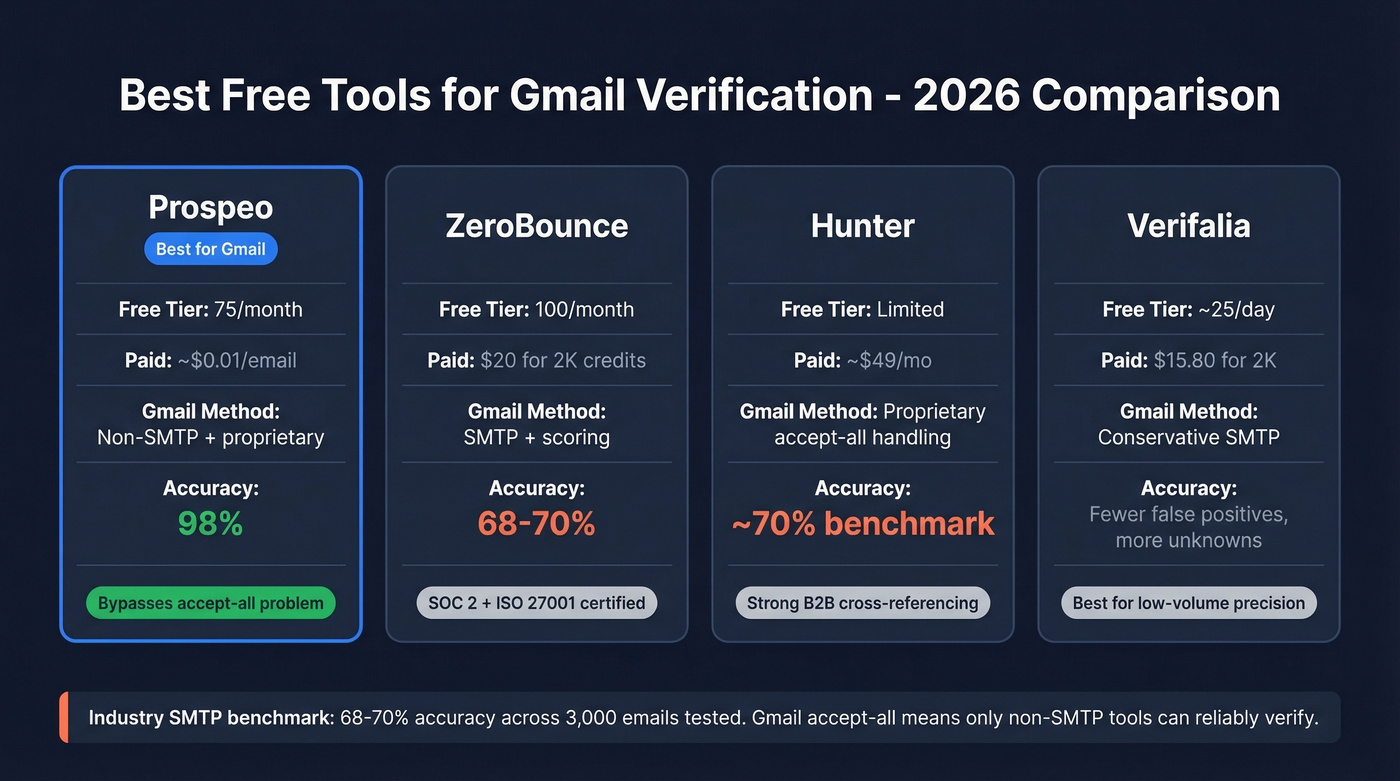
| Tool | Free Tier | Paid Pricing | Gmail Handling | Best For |
|---|---|---|---|---|
| Prospeo | 75/month | ~$0.01/email | Non-SMTP + proprietary verification | Gmail-heavy lists |
| ZeroBounce | 100/month | $20 for 2K credits | SMTP + scoring | Compliance teams |
| Hunter | Limited free | ~$49/mo | Proprietary accept-all handling | B2B cross-referencing |
| Verifalia | ~25/day | $15.80 for 2K | Conservative SMTP | Low-volume precision |
Prospeo
Prospeo is our pick for Gmail-heavy lists, and it's not close. Its 5-step verification - syntax validation, DNS/MX checks, proprietary non-SMTP mailbox confirmation, spam-trap removal, and honeypot filtering - is built on 143M+ verified emails and a 7-day refresh cycle. That translates to 98% verified email accuracy, which is a different planet from the 68-70% benchmark. The free tier gives you 75 verifications per month, paid plans run about $0.01 per email, and there are no contracts. One of our users, Stack Optimize, built to $1M ARR running client deliverability above 94% with bounce rates under 3% - zero domain flags across all their clients.
ZeroBounce
If compliance is your top priority, ZeroBounce is the move. SOC 2 Type 2 and ISO 27001 certifications make it a strong choice for regulated industries. The 100 free emails per month is generous, and pay-as-you-go at $20 for 2,000 credits keeps costs predictable. Skip this if you're running large Gmail-heavy lists though - their SMTP-based approach hits the same accept-all wall everyone else does.
Hunter
Hunter scores a 4.4 on G2 and 4.6 on Capterra, and its B2B database cross-referencing adds a layer most pure-play verifiers lack. But the 70% benchmark accuracy is hard to ignore. Worth testing on your specific domains before committing to a paid plan.
If you're evaluating options in the same category, compare against Hunter alternatives.
Verifalia
Fewer false positives, more "unknown" results - that's the Verifalia tradeoff. Its conservative approach means you'll spend more time manually following up on ambiguous addresses, but the ones it confirms are genuinely confirmed. Fine for trickle-volume checks at roughly 25 free verifications per day.
Look, here's the real talk: if your outbound list is more than 30% Gmail addresses, most verification tools are giving you garbage data and you don't even know it. The SMTP accept-all problem means the only tools worth paying for are the ones that have solved it with non-SMTP methods. Everything else is theater.
Email lists decay 25%+ per year, and Gmail now rejects non-compliant senders at the protocol level. Stack Optimize built to $1M ARR with bounce rates under 3% using Prospeo's verification - zero domain flags across every client. At $0.01 per email with no contracts, protecting your sender reputation costs less than a single bounced campaign.
Protect your domain reputation before Gmail does it for you.
FAQ
Can you tell if a Gmail address is real without sending an email?
Yes. For one to three addresses, use Google's account recovery page at accounts.google.com/signin/recovery - it'll confirm whether the account exists. For larger lists, use a verification tool with non-SMTP checks like Prospeo (75 free/month) or ZeroBounce (100 free/month), since Gmail's servers accept all addresses at the SMTP level regardless of whether the mailbox is real.
What do SPF, DKIM, and DMARC mean in Gmail headers?
SPF checks whether the sending server is authorized for the envelope domain. DKIM confirms the message wasn't altered after signing. DMARC ties them together and defines enforcement - none, quarantine, or reject. In properly authenticated mail you'll see "pass" for all three, though forwarding and misconfigurations can cause failures even for legitimate senders.
How often should you re-verify an email list?
Every 60-90 days. Email lists decay 25%+ per year, and Gmail's acceptance behavior can shift over time. Bulk re-verification is fast with modern tools - 100,000 contacts process in about 45 minutes - so there's no reason to let a list go stale.