

How to Verify an Email Address: 5 Methods From Manual Checks to Bulk Verification
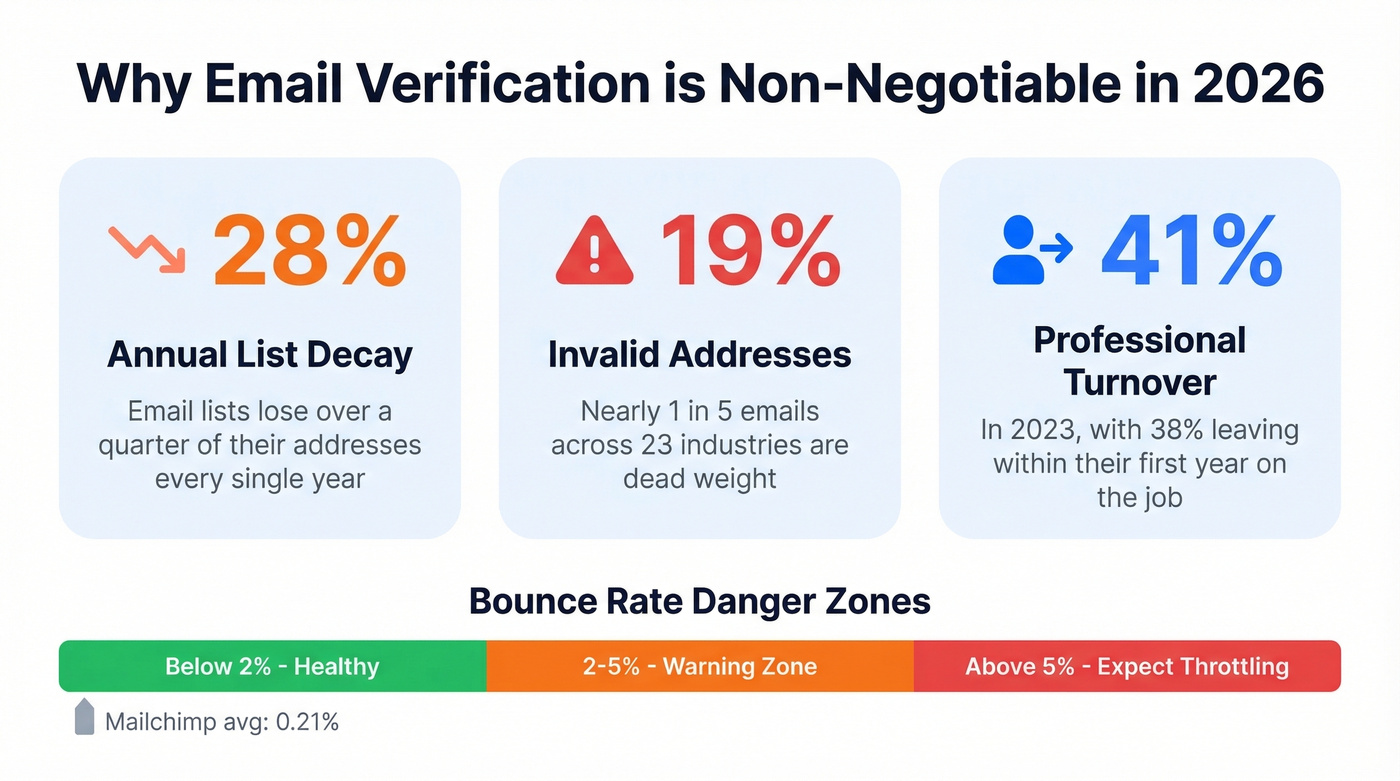
Nearly one in five email addresses is invalid. An analysis of close to a billion emails across 23 industries found only 80.94% were valid - meaning roughly 19% were dead weight. If you don't know how to verify email addresses before sending, that dead weight turns into real damage: bounced messages, throttled campaigns, and a sender reputation that takes weeks to rebuild.
Email verification is the fix. And in 2026, with Google and Yahoo enforcing stricter sender requirements than ever, it's no longer optional for anyone doing outbound at scale.
What "Verify Email" Actually Means
People search for ways to verify email for four different reasons. Here's the map so you can jump to what you actually need.
Deliverability verification is the most common B2B use case: confirming that a prospect's email address exists and will accept mail before you hit send. That's the core of this article.
Account verification is the signup flow - sending a confirmation link so users prove they own an address. The mechanics overlap with deliverability verification, but the implementation is different. Developers also look for API-based ways to block disposable or non-existent emails during registration.
Sender identity verification means figuring out whether an email you received is legitimate. We cover that in a dedicated section below.
Developer implementation means integrating verification via API into your app or workflow. The tool comparison section covers API availability for each tool.
One distinction matters everywhere: validation checks syntax and formatting. Verification goes deeper - it confirms the mailbox exists at the receiving server. Validation catches typos. Verification catches dead inboxes, spam traps, and role accounts. You need both, but verification is where the real value lives.
Why Verification Matters in 2026
Email lists decay by 28% annually. That stat comes from ZeroBounce's analysis of over 10 billion email addresses, and it tracks with what we've seen in practice. In 2023, average professional turnover hit 41%, with 38% of professionals leaving within their first year. Every departure means another dead email in your CRM.
The bulk sender rules Google and Yahoo rolled out in 2024 - now fully enforced - made the consequences of ignoring verification worse. For bulk senders, SPF, DKIM, and DMARC authentication are mandatory. Spam complaint rates must stay below 0.3%. Bounce rates feed directly into your sender reputation score.
Here's the thing: ISPs don't give you much runway.
| Bounce Rate | What It Means |
|---|---|
| Below 2% | Healthy - keep going |
| 2-5% | Warning zone - list needs cleaning |
| Above 5% | Red flag - expect throttling |
For context, Mailchimp's benchmarks show an average hard bounce rate of just 0.21% and soft bounce of 0.70% across their platform. If you're above 2%, you're already an outlier - and not in a good way. (If you want a deeper breakdown of bounce codes and thresholds, see our bounce rate guide.)
Industry matters too. Bounce rates vary significantly by sector:
| Industry | Avg Bounce Rate |
|---|---|
| IT / Software | 0.90% |
| Financial Services | 1.20% |
| Construction | 2.20% |
A 2.2% bounce rate might be "normal" for construction, but it's still above the threshold where ISPs start paying attention. Verification isn't optional for any of these verticals.
How Verification Works Under the Hood
Every serious verification tool runs a three-layer check. Understanding the layers helps you evaluate which tools are thorough and which are cutting corners.
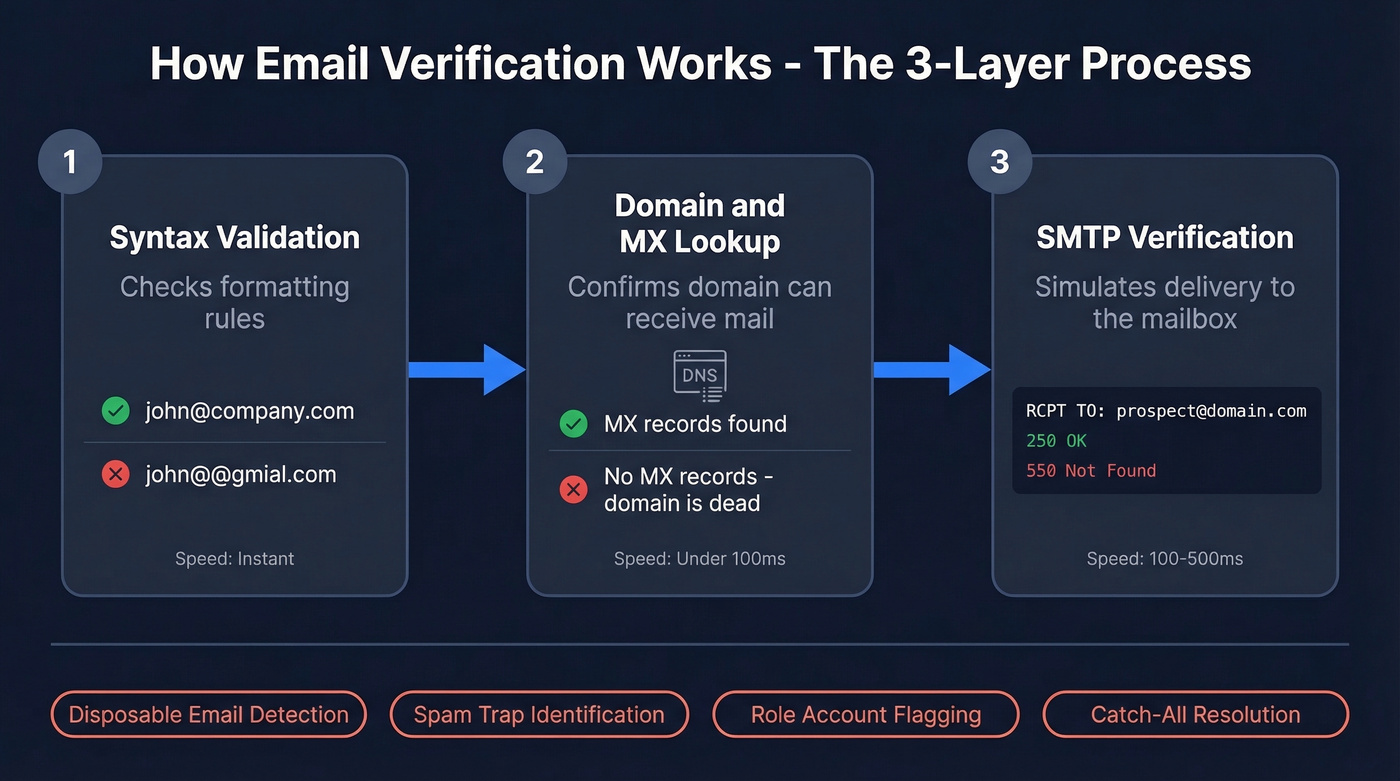
Layer 1: Syntax validation. The tool checks formatting - is there an @ symbol, is the domain structure valid, are there illegal characters? This catches typos like "gmial.com" or "john@@company.com." Fast, simple, and the bare minimum.
Layer 2: Domain and MX lookup. The tool queries DNS records to confirm the domain exists and has mail exchange (MX) records configured. No MX record means the domain can't receive email. Full stop.
Layer 3: SMTP verification. This is where the real work happens. The tool connects to the recipient's mail server and simulates a delivery attempt without actually sending a message. The SMTP conversation looks like this:
HELO verify.example.com
MAIL FROM:<check@verify.example.com>
RCPT TO:<prospect@theirdomain.com>
A 250 response means the mailbox exists. A 550 means it doesn't. The tool disconnects before sending any actual email.
This sequence typically completes in 100-500 milliseconds. But the three layers alone aren't enough. Better tools add disposable email detection to catch throwaway addresses from services like Guerrilla Mail, spam trap identification, role account flagging for addresses like info@ and support@, and - critically - catch-all domain handling. (If you’re actively cleaning a list, our spam trap removal guide is a useful companion.)
A catch-all domain accepts mail sent to any address, even ones that don't exist. The SMTP check returns 250 for everything, making it impossible to distinguish real inboxes from fake ones. Roughly 25-30% of B2B domains are configured as catch-all. Tools that can't resolve catch-alls leave a huge chunk of your list in limbo.

Prospeo handles all three verification layers - plus catch-all resolution, spam-trap removal, and honeypot filtering - through a proprietary 5-step process. The result: 98% email accuracy across 143M+ verified addresses, refreshed every 7 days.
Skip the manual SMTP checks and get verified emails at $0.01 each.
5 Ways to Verify an Email Address
1. Send a Test Email
Use this if you need to check one or two addresses and don't mind waiting. Send a brief, harmless message and see what comes back. A hard bounce notification confirms the address is dead.
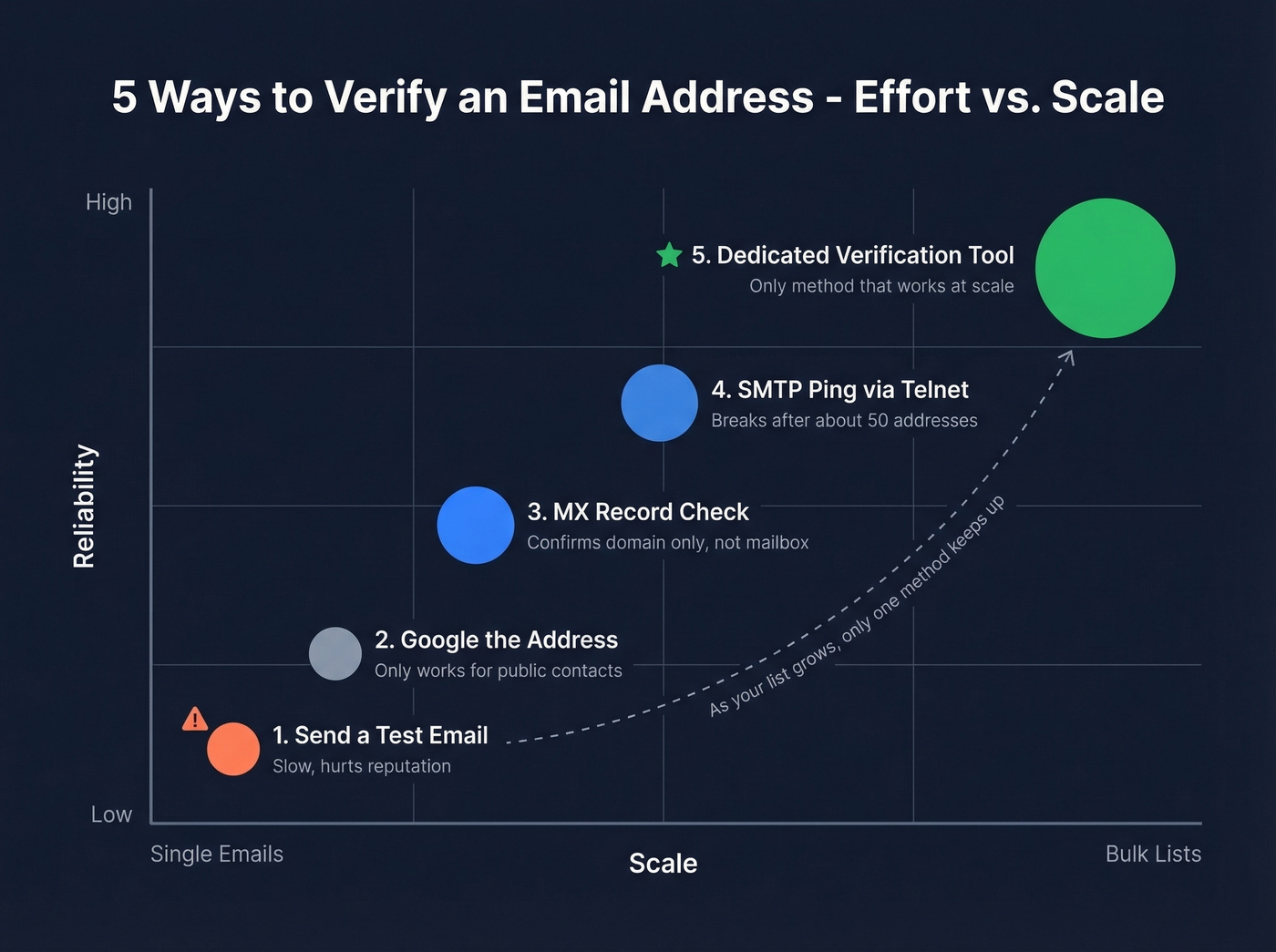
Skip this if you're checking more than a handful. It's slow, it doesn't catch soft bounces reliably since a full inbox might accept the message temporarily, and sending to bad addresses hurts your sender reputation - which is the problem you're trying to avoid. (If you’re sending at volume, it also helps to understand safe email velocity limits.)
2. Google the Address
Paste the email into Google with quotes. If it appears on a company website, conference page, or public directory, you've got a basic signal that it's real. You can also check the company's "About" or "Team" page to cross-reference.
This works for public-facing addresses - marketing directors who speak at events, founders with published contact info. For private B2B contacts? Useless. Most prospect emails don't appear anywhere public. If you’re still building your list, you’ll get more leverage from a proper email ID finder workflow.
3. Check MX Records Manually
You can confirm that a domain accepts email without any special tools. Open a terminal and run:
dig MX theirdomain.com
Or on Windows: nslookup -type=mx theirdomain.com. If MX records come back, the domain is configured to receive mail. If they don't, every address at that domain is dead. This confirms the domain is valid but tells you nothing about whether a specific mailbox exists - a useful first filter for cleaning obviously dead domains out of a list, but not full verification.
4. SMTP Ping via Telnet
This is the manual version of what verification tools do automatically. You connect directly to the mail server and simulate a delivery:
telnet mail.theirdomain.com 25
HELO mydomain.com
MAIL FROM:<test@mydomain.com>
RCPT TO:<prospect@theirdomain.com>
If the server responds with 250 OK after the RCPT TO command, the mailbox exists. A 550 or 553 means it doesn't.
Here's the reality though: this breaks past about 50 addresses. Mail servers rate-limit SMTP connections aggressively, and you'll start hitting timeouts and blocks mid-list. One developer on r/webscraping reported getting rate-limited partway through a batch, with many responses simply timing out. Verification services solve this with infrastructure rotation, distributed IPs, and pacing algorithms. You can't replicate that from a single terminal.
5. Use a Dedicated Verification Tool
This is the only method that works at scale. Dedicated tools handle SMTP rate limits by rotating across distributed infrastructure, resolve catch-all domains that manual checks can't crack, and flag spam traps and honeypots that would destroy your sender reputation. (If you’re also trying to protect inbox placement, pair verification with an email deliverability guide checklist.)
The workflow is straightforward: upload a CSV of addresses or check one at a time, and the tool returns each email tagged as valid, invalid, or risky. Most serious tools run syntax, domain/MX, SMTP, catch-all resolution, and spam-trap removal in a single pass. You can often verify 75-100 emails per month free, and bulk verification runs about $0.01 per email at scale.
For teams running outbound sequences, this is the step that separates campaigns that land in the inbox from campaigns that land in spam. If you’re doing outbound, it’s also worth tightening your cold email sequence so you don’t waste verified leads.
Best Verification Tools Compared
Let's be honest: if your average deal size is under $15K, you probably don't need the most expensive verification tool on this list. A 98% accuracy tool at $0.01/email will protect your domain just as well as a feature-loaded platform at 3x the cost. Save the budget for better copy.
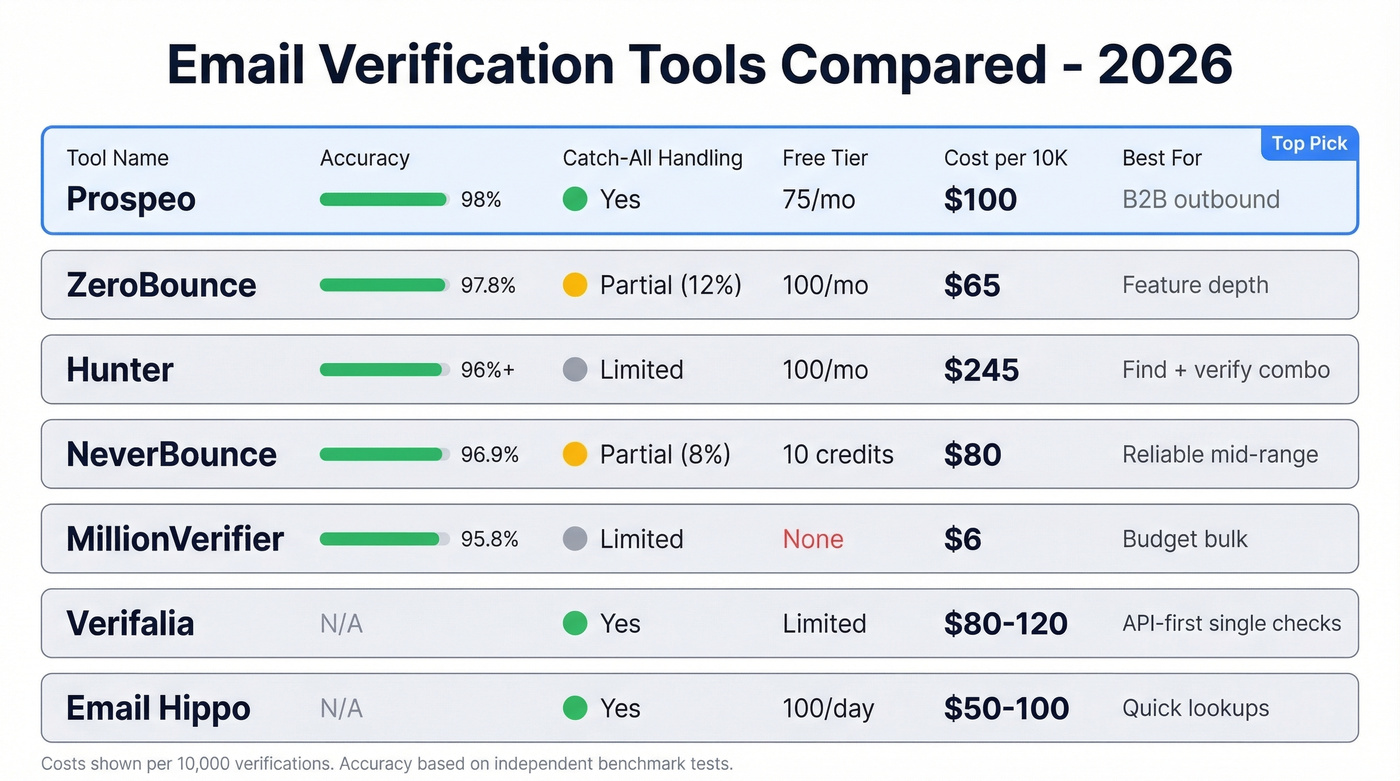
| Tool | Accuracy | Catch-All | Free Tier | Cost / 10K | API | Best For |
|---|---|---|---|---|---|---|
| Prospeo | 98% | Yes | 75/mo | ~$100 | Yes | B2B outbound |
| ZeroBounce | 97.8% | Partial (12%) | 100/mo | ~$65 | Yes | Feature depth |
| Hunter | 96%+ | Limited | 100/mo | ~$245 | Yes | Find + verify combo |
| NeverBounce | 96.9% | Partial (8%) | 10 credits | ~$80 | Yes | Reliable mid-range |
| MillionVerifier | 95.8% | Limited | None | ~$6 | Yes | Budget bulk |
| Verifalia | Not public | Yes | Limited free | ~$80-120 | Yes | API-first single checks |
| Email Hippo | Not public | Yes | 100/day | ~$50-100 | Yes | Quick lookups |
Prospeo
Prospeo runs a proprietary 5-step verification process - syntax, domain/MX, SMTP handshake, catch-all resolution, and spam-trap/honeypot removal - delivering 98% email accuracy. That catch-all handling is the differentiator we care about most. With 25-30% of B2B domains configured as catch-all, tools that punt on those addresses leave a massive gap in your list quality. Prospeo doesn't.
The free tier gives you 75 verifications per month, and bulk verification runs about $0.01 per email at scale. There's no contract and no sales call required to get started. Stack Optimize built from $0 to $1M ARR running client campaigns with 94%+ deliverability and bounce rates under 3% - with zero domain flags across all their clients - using Prospeo as their verification backbone.
ZeroBounce
ZeroBounce is the most feature-rich standalone verifier. In a 10,000-email benchmark test, it hit 97.8% accuracy and resolved 12% of catch-all addresses - better than most competitors on catch-all handling, though still leaving the majority unresolved. Processing 10K emails took about 22 minutes.
Pricing starts at $15/month for 2,000 verifications, with pay-as-you-go at $0.008/email. The free tier gives you 100 verifications per month. Where ZeroBounce earns its premium is the extras: email scoring, activity detection, and a risk signal that flags high-risk addresses. If you need more than just valid/invalid - if you want to score your list - ZeroBounce is worth the higher per-email cost. The tradeoff: verifying 100K emails at PAYG rates runs $800. At that scale, cheaper alternatives start looking attractive.

Hunter
Hunter's strength is combining email finding and verification in one platform. You can try the verifier for free without signing up, and the free plan includes up to 100 verifications per month. Paid plans start at $34/month. Their published benchmark methodology is unusually transparent - they tested 15 verifiers against 3,000 real business emails and disclosed their own bias risk.
The catch: verification-only cost per email is steep compared to dedicated verifiers. At ~$24.50 per 1,000 emails, Hunter makes more sense as a find-and-verify combo than as a standalone verification tool. If you're already using Hunter for email finding, the built-in verification is convenient. If you're only verifying, you're overpaying. (If you’re evaluating alternatives, see our Hunter alternatives roundup.)
NeverBounce
Solid mid-range option. 96.9% accuracy in the 10K benchmark, $0.008/email on pay-as-you-go, and reliable enough for most use cases. The free tier is stingy at just 10 credits, but the PAYG pricing is straightforward with no monthly commitment. NeverBounce handles the basics well without trying to be a platform. If you just need to clean a list before a campaign, it gets the job done without fuss.
MillionVerifier
The budget play. At $0.0003/email for bulk verification, MillionVerifier is roughly 25x cheaper than ZeroBounce and NeverBounce. You can verify 100K emails for about $30.
The tradeoff is real, though. At 95.8% accuracy in the same benchmark, you're letting more invalid emails through. On a 10,000-email list, that's roughly 200 additional bad addresses compared to a 98% tool. If those 200 bounces push you from 1.5% to 3.5% bounce rate, you've saved $60 and damaged your domain reputation. The consensus on r/sales is that this is a "false economy" - the cheapest verification isn't always the cheapest outcome.
Verifalia and Email Hippo
Verifalia offers a free single-email verification checker that's handy for one-off checks. It's a stealth validator - it doesn't send messages while testing - and it runs deep verification steps including DNS/MX checks and SMTP diagnostics. For higher volumes, expect mid-tier pricing.
Email Hippo gives you 100 free verifications per day, which is generous for light usage. Their platform also offers API products for verification and related checks. Both tools are fine for spot-checking and developer integrations. Neither is built for bulk outbound workflows - if you're running campaigns at scale, look at the options above.
Lists decay 28% per year. Prospeo's 7-day data refresh cycle means you're never working with stale contacts - while competitors refresh every 6 weeks. That's why teams using Prospeo keep bounce rates under 4%.
Stop cleaning dead emails and start with verified ones.
How to Verify Who Sent You an Email
This is the other "verify email" - figuring out whether an email you received is legitimate or a phishing attempt. Different problem, same search query.
Verify the sender address. Hover over the display name in your email client. "John from Chase Bank" might actually be sending from john8847@randomdomain.xyz. Compare the address to previous legitimate emails from the same organization. If something feels off, call the sender using a phone number you already have - not one from the suspicious email.
Inspect the headers. In Gmail, click the three dots and select "Show original." Look for the SPF, DKIM, and DMARC results at the top - all three should show "PASS" for legitimate senders. In Outlook, go to File > Properties and review the Internet headers. Look for mismatches between the From:, Return-Path:, and Reply-To: fields. Legitimate emails from a company should have all three pointing to the same domain.
For a deeper dive, paste the full headers into a free tool like MXToolbox's Header Analyzer.
Watch for subtle character swaps in domain names - "rn" rendered as "m" at small font sizes, ".co" instead of ".com," or extra characters like "paypa1.com." These lookalike domain tricks are the most common phishing technique.
Search the domain. Run a WHOIS lookup on the sending domain. A domain registered two weeks ago claiming to be from a Fortune 500 company is an obvious red flag. Check the domain age, registrant information, and whether it matches the organization it claims to represent.
Red flags that should trigger immediate suspicion: artificial urgency like "your account will be suspended in 24 hours," poor grammar from supposedly professional organizations, and any request to click a link or download an attachment you weren't expecting.
Mistakes That Kill Deliverability
Verifying once and forgetting. With 28% annual list decay and 41% workforce turnover, a list verified in January is significantly degraded by June. We watched a SaaS marketing team let an 80,000-contact list sit for 18 months without re-verification. Bounce rate crept from 1.2% to 4.7% - firmly in the warning zone - before anyone noticed. Re-verify outbound lists every 90 days. Marketing lists can stretch to every six months, but don't push it further. (If you do get into trouble, here’s how to improve sender reputation.)
Ignoring catch-all results. When a tool returns "catch-all" or "accept-all," that's not a green light. It means the tool couldn't confirm whether the specific mailbox exists. Sending blindly to catch-all results is gambling with your bounce rate. Either use a tool that resolves catch-alls or segment catch-all addresses into a separate, slower-sending campaign with careful monitoring.
Skipping role-based accounts. Addresses like info@, support@, and sales@ are managed by teams, not individuals. They have higher complaint rates, lower engagement, and many ESPs flag them automatically. Remove them from outbound sequences.
Not re-verifying before campaigns. Even if you verified a list two months ago, run it through verification again before a major send. People change jobs. Domains expire. A quick re-verification pass takes minutes and can prevent a deliverability disaster.
Trusting syntax-only validation. Format checks catch typos, but they won't tell you if a perfectly formatted address points to a dead mailbox, a spam trap, or a honeypot. If your "verification" tool only checks syntax and domain records without an SMTP handshake, you're not actually verifying anything meaningful. Email validity depends on confirming the mailbox at the server level - anything less is guesswork.
FAQ
How do I verify an email address for free?
Most verification tools offer free tiers: ZeroBounce gives 100/month, Prospeo provides 75 free verifications monthly with full 5-step checks, and Hunter offers 100. Manual SMTP pings via Telnet cost nothing but break past a few dozen addresses. For any real volume, a tool's free tier is the practical starting point.
How do you check email addresses in bulk?
Upload a CSV to a dedicated tool like Prospeo, ZeroBounce, or NeverBounce. The tool processes each address through syntax, domain, and SMTP checks, then returns results tagged as valid, invalid, or risky. Most tools handle tens of thousands of addresses in under an hour - manual methods can't match that throughput.
Is email verification legal?
Yes. Verification checks publicly accessible DNS and SMTP records - no private data is accessed or stored during the process. GDPR and CCPA govern how you obtained the address and store personal data, not the technical act of confirming whether a mailbox exists.
How often should I re-verify my list?
Every 90 days for active outbound lists, every six months for marketing databases. Lists decay by 28% annually due to job changes, domain shutdowns, and abandoned inboxes. Waiting longer compounds bounces and erodes sender reputation.
What's a catch-all domain and why does it matter?
A catch-all domain accepts mail sent to any address - real or fake - so standard SMTP checks return "valid" for everything. Roughly 25-30% of B2B domains are catch-all. Tools with catch-all resolution prevent you from sending blind to potentially nonexistent inboxes, which is why it's one of the first features we look for when evaluating a verifier.