

How to Verify an Email Domain: 3 Methods for 3 Different Jobs
"Verify email domain" means three completely different things depending on who's asking. Confusing them costs teams deliverability, bounced campaigns, and wasted hours in DNS panels. Let's sort it out.
What You Need (Quick Version)
- Proving domain ownership for ESP setup - add a TXT record to DNS. Takes 5 minutes.
- Authenticating for deliverability with SPF/DKIM/DMARC - the real work, and it's been mandatory since Google and Yahoo's 2024 enforcement rollout.
- Verifying email addresses on a domain for outreach and list hygiene - use a verification tool, because domain authentication alone doesn't validate individual contacts.
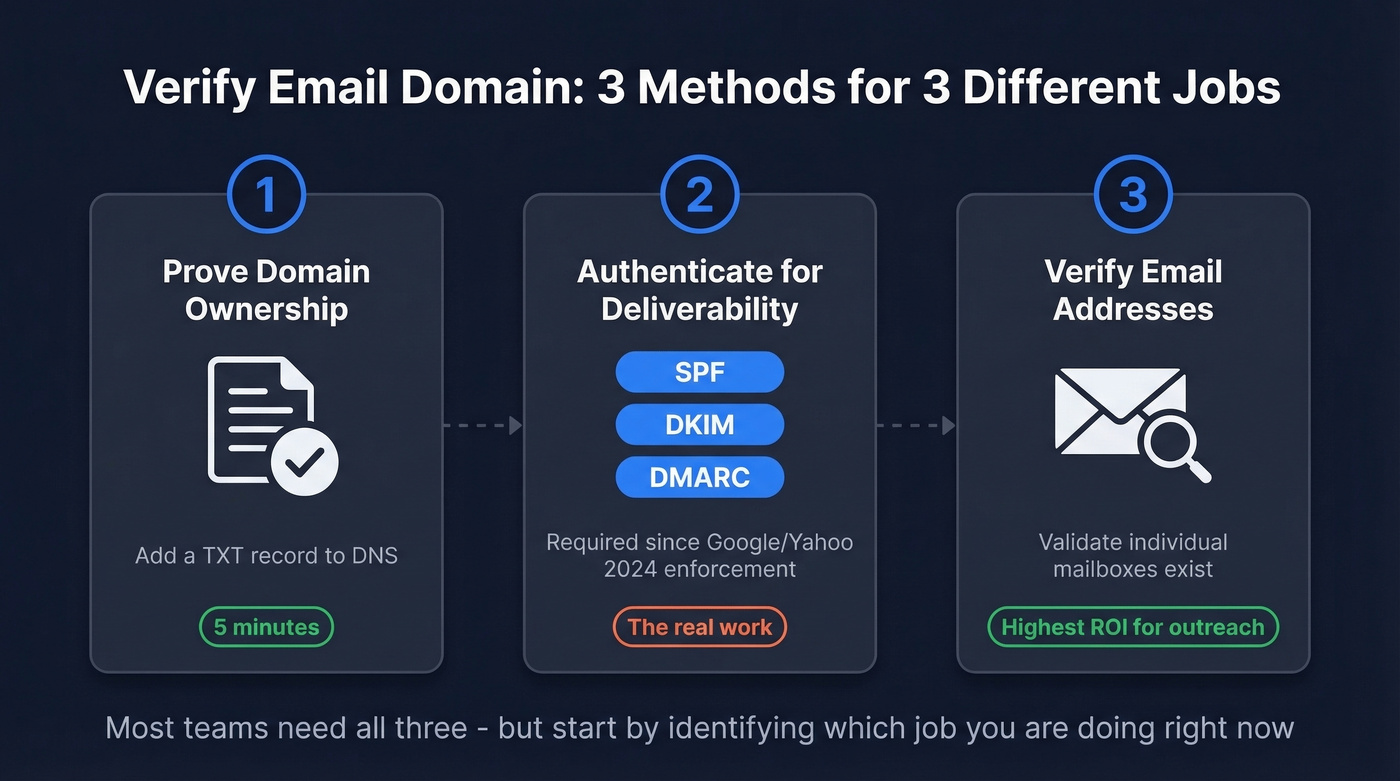
Figure out which job you're doing, then jump to the right section.
Why This Matters in 2026
Google and Yahoo now require SPF, DKIM, and at least a p=none DMARC record for anyone sending 5,000+ messages per day. SMTP-level rejection is common for non-compliant bulk mail. The spam complaint rate ceiling sits at 0.3% - ideally under 0.1%. Miss these thresholds and your mail gets routed straight to spam or rejected outright.
Meanwhile, email lists decay by roughly 28% every year. Authenticating your domain protects your sender reputation. Sending to bad addresses destroys it. You need both sides handled.
Verify Email Domain Ownership (Method 1)
This is the simplest version. A service gives you a unique string, you add it as a TXT record in your DNS, and the service queries DNS to confirm you control the domain. You've seen these tokens before:
google-site-verification=abc123...MS=ms12345678stripe-verification=xyz789...
The pattern is universal across ESPs, payment processors, and SaaS platforms. Some services offer a CNAME record as an alternative - same concept, different record type. Others support HTML file upload or meta tag verification, but TXT records are the most common method. Either way, you're proving ownership by placing a value only the domain admin could add.

Domain ownership is the easy part. The hard part is knowing which addresses on that domain are real mailboxes. Prospeo's 5-step verification handles catch-all domains, spam traps, and honeypots - delivering 98% email accuracy across 143M+ verified addresses.
Start with 75 free verifications - no credit card, no sales call.
Authenticate Your Domain for Deliverability (Method 2)
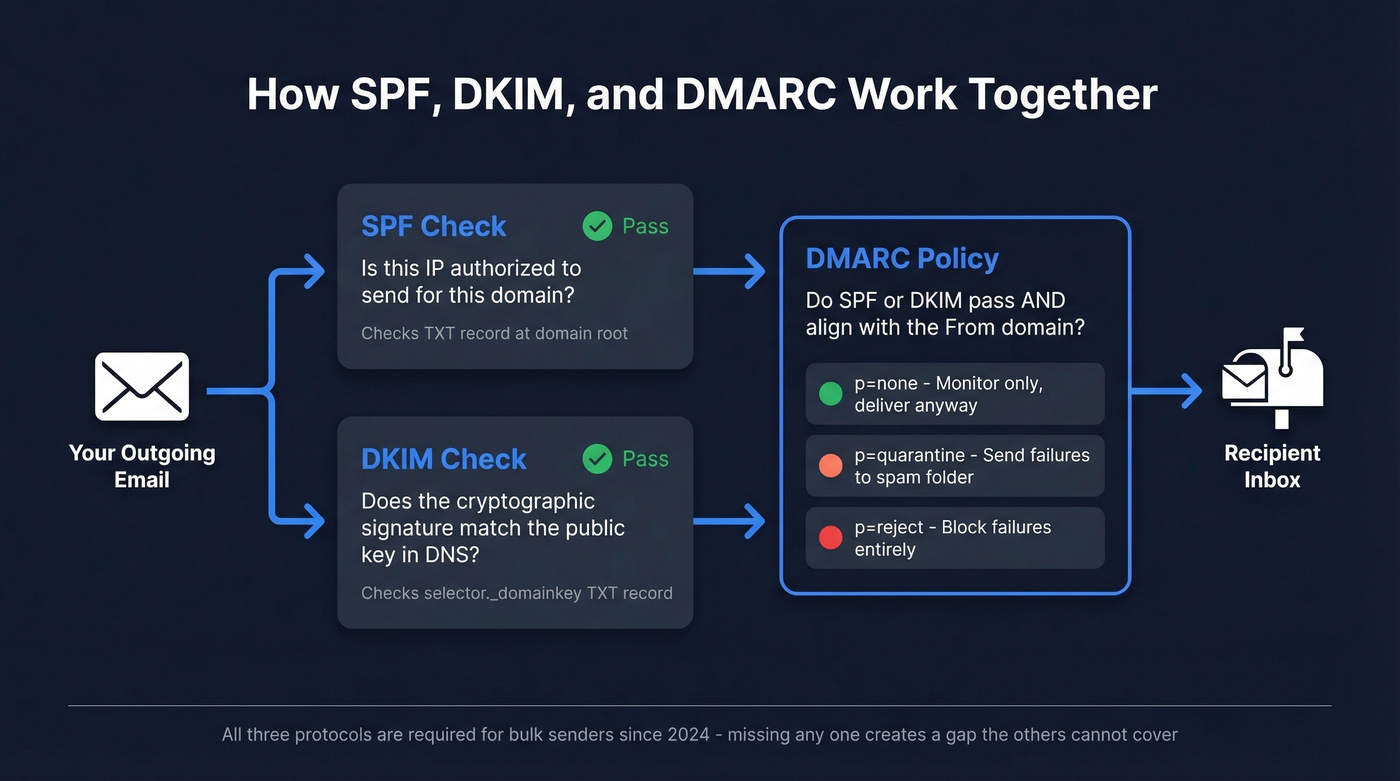
This is where the real work lives. SPF, DKIM, and DMARC work together to tell receiving mail servers that your emails are legitimate and haven't been spoofed. If you’re building a full deliverability baseline, pair this with an email deliverability guide so you don’t miss the non-DNS factors.
Set Up SPF
SPF tells receiving servers which IP addresses and services are authorized to send mail on your behalf. You publish a single TXT record at your domain's root:
v=spf1 include:_spf.google.com include:sendgrid.net -all
The -all at the end is a hard fail - anything not listed gets rejected. Use it. The softer ~all is fine during testing, but -all is what you want in production.
Two hard constraints to remember. First, SPF has a 10 DNS lookup limit. Exceed it and your SPF record effectively breaks - mail gets treated as unauthenticated. SPF flattening tools exist but can introduce their own issues; dedicated subdomains per sending service is the cleaner approach.
Second, you can only have one SPF record per domain. We've seen teams break their SPF by adding a second record without realizing it - the records invalidate each other silently, and nothing in your inbox tells you it happened. If you want more patterns you can copy/paste safely, use these SPF record examples.
Set Up DKIM
DKIM adds a cryptographic signature to your outgoing messages. The receiving server checks the signature against a public key stored in your DNS:
selector._domainkey.yourdomain.com TXT "v=DKIM1; k=rsa; p=MIGf..."
Use 2048-bit keys, rotate them annually, and create unique selectors per sending service. A common mistake: configuring DKIM for your primary email provider but forgetting to set it up for your cold email tool or marketing platform. Every service that sends on your behalf needs its own DKIM selector. If you’re unsure whether it’s actually passing, follow this guide on how to verify DKIM is working.
Set Up DMARC
DMARC is the policy layer. It tells receiving servers what to do when SPF or DKIM fails. Configure both first, then wait 48 hours before publishing your DMARC record. In our testing, that 48-hour wait makes a real difference - skip it and you'll get noisy reports full of false failures. Start with monitoring mode:
_dmarc.yourdomain.com TXT "v=DMARC1; p=none; rua=mailto:dmarc@yourdomain.com; pct=100"
Here's the tag reference:
| Tag | Value | Purpose |
|---|---|---|
v |
DMARC1 |
Protocol version (required, must be first) |
p |
none / quarantine / reject |
Policy for failures (required, must be second) |
sp |
none / quarantine / reject |
Subdomain policy |
rua |
mailto:you@domain.com |
Aggregate report destination |
pct |
1-100 |
% of messages policy applies to |
aspf |
s (strict) / r (relaxed) |
SPF alignment mode |
adkim |
s (strict) / r (relaxed) |
DKIM alignment mode |
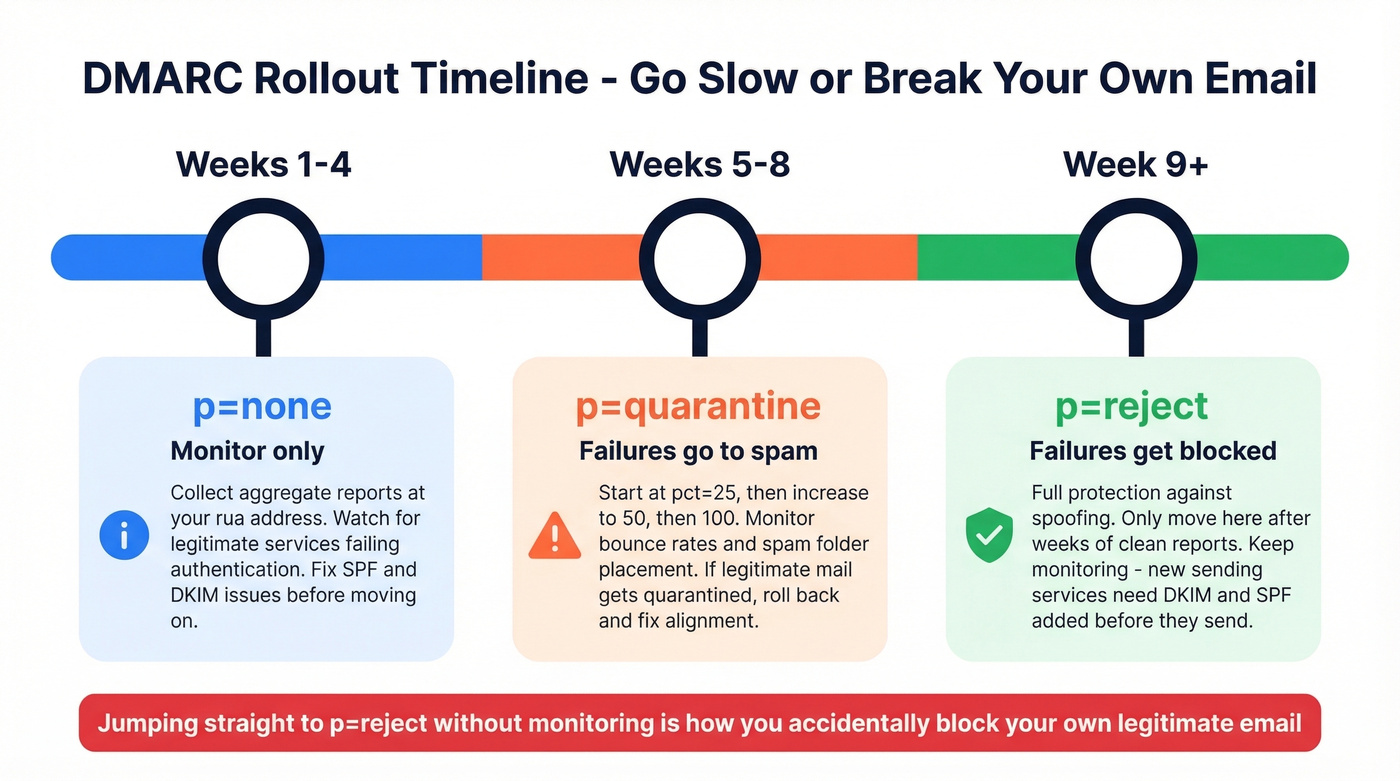
Roll out gradually: weeks 1-4 at p=none, weeks 5-8 at p=quarantine, then week 9+ at p=reject. Jumping straight to reject without monitoring is how you accidentally block your own legitimate mail. If you want the nuance on strict vs relaxed alignment, see DMARC alignment.
Check Your Records
Don't guess - verify. From your terminal:
dig +short TXT yourdomain.com | grep spf
dig yourdomain.com MX
For a GUI approach, MxToolbox and dmarcian offer free lookups. Google Postmaster Tools also has a compliance dashboard that shows your authentication status for Gmail-bound mail - it's the single best way to confirm everything is working for your highest-volume destination. Run these checks after every DNS change and again 48 hours later to confirm propagation.
Verify Email Addresses on a Domain (Method 3)
Here's the part most guides skip entirely: a perfectly authenticated domain doesn't mean the individual addresses on it are valid. A domain-level MX check returning "valid" misleads people into thinking addresses exist - the consensus on r/sales and r/coldemail is that this confusion causes more bounced campaigns than anything else. DNS checks confirm the domain has MX records. They don't tell you whether jane.smith@company.com is a real, active mailbox.
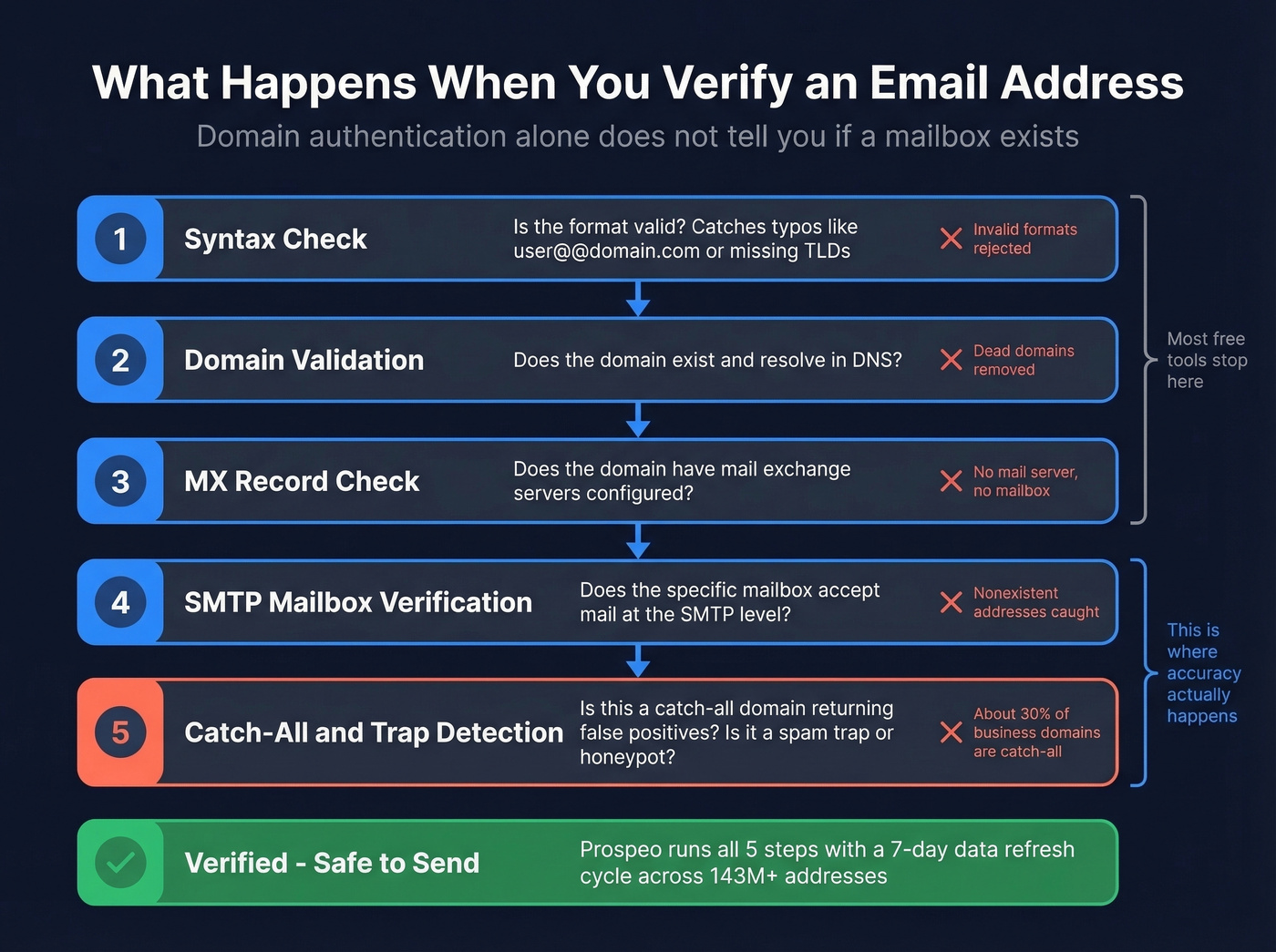
Proper email verification runs a multi-step pipeline: syntax check, domain and MX validation, then SMTP mailbox verification. The tricky part is catch-all domains - about 30% of business domains accept any address at the SMTP level. A basic check returns "valid" for addresses that don't actually exist. If you’re doing this at scale, it helps to understand email bounce rate benchmarks and what they do to deliverability.
Prospeo handles this with a 5-step verification process that includes catch-all detection, spam-trap removal, and honeypot filtering, all running on a 7-day data refresh cycle. The result is 98% email accuracy across 143M+ verified addresses, and the free tier gives you 75 verifications per month - enough to test the workflow before committing. For more on the “does this email exist?” side, see how to check if an email exists.
Hunter and Verifalia work for smaller verification volumes. If your deal sizes sit below five figures, you probably don't need ZoomInfo-level data infrastructure. But you absolutely need verified emails - one bad list can torch a domain you spent weeks warming up. Verification is the highest-ROI step in any outbound workflow. If you’re comparing tools, start with these Hunter alternatives or a broader list of Bouncer alternatives.
SPF, DKIM, and DMARC protect your sender reputation. Sending to invalid addresses destroys it. Prospeo refreshes 300M+ profiles every 7 days and catches the bad addresses other tools miss - including catch-all traps that return false positives.
Stop guessing which emails are real. Verify at $0.01 per address.
Check If a Sender's Domain Is Legit
When you're on the receiving end, a few quick checks separate legitimate senders from spoofed ones.
Don't trust the display name - check the actual email address. Attackers use legitimate email providers but manipulate the display name, so the domain passes authentication while the sender is still malicious. In Gmail, click "Show original" to inspect headers and look for SPF: Pass and DKIM: Pass.
Compare the From domain and the Return-Path domain. Mismatches are a red flag. Watch for typosquatting too: netf1ix.com instead of netflix.com, or paypa1.com instead of paypal.com. Run suspicious sender domains through Spamhaus - newly registered domains already sending volume are almost always trouble. If you’re setting up separate infrastructure for tracking and sending, a dedicated tracking domain can reduce risk.
Troubleshooting Common Issues
Multiple SPF records. Two SPF TXT records on the same domain invalidate both. Merge them into one.
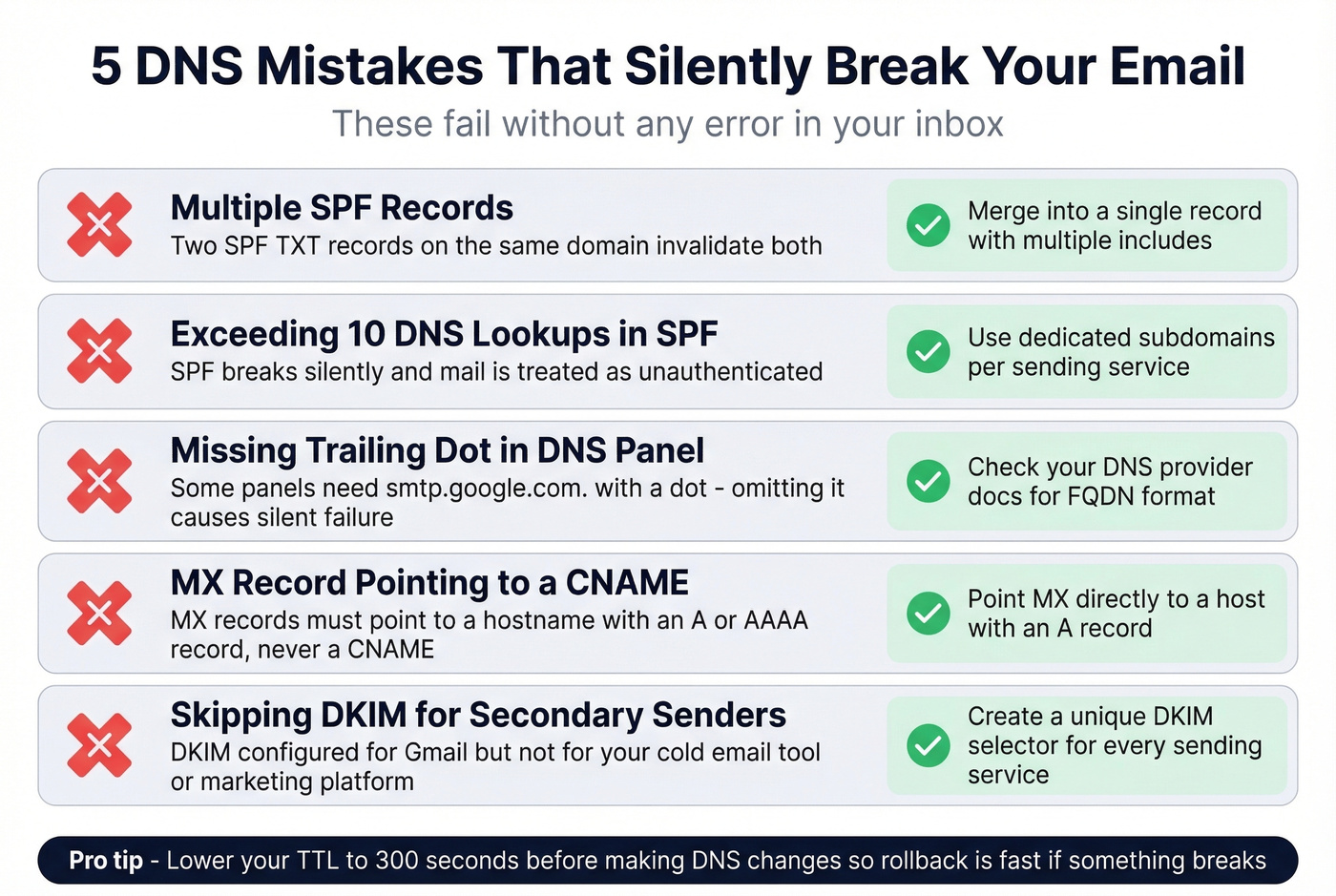
DNS propagation delays. Changes typically take 24-48 hours, sometimes up to 72. Lower your TTL to 300 seconds before making changes so the rollback is fast if something breaks.
Trailing dot in DNS panels. Some panels require a trailing dot on FQDNs (e.g., smtp.google.com.). Omitting it can cause silent failures - we've debugged this more times than we'd like to admit.
MX pointing to CNAME. MX records must point to a hostname with an A or AAAA record, never to a CNAME. This breaks mail delivery silently and is surprisingly common with newer DNS setups.
Catch-all false positives. A domain-level MX check returning "valid" doesn't mean individual addresses exist. Skip this if you're only doing domain ownership verification - but for outreach, you need SMTP-level verification to catch these. If you’ve already been hit, follow a proper spam trap removal process before sending again.
FAQ
How long does domain verification take?
DNS propagation typically takes 24-48 hours, sometimes up to 72 hours. Lower your TTL to 300 seconds before making changes. Most ESPs let you re-check after 48 hours - if it's still pending, double-check the record value and type in your DNS panel.
Do I need SPF, DKIM, and DMARC - or just one?
You need all three. Google and Yahoo require the full stack for anyone sending 5,000+ emails per day. Even below that threshold, the protocols work together - SPF authorizes senders, DKIM signs messages, and DMARC enforces policy. Skipping one leaves a gap the others can't cover.
Can I verify individual email addresses without sending to them?
Yes. Verification tools run syntax, domain, MX, SMTP mailbox, and catch-all checks without delivering a single message. Prospeo's free tier includes 75 verifications per month with catch-all detection - enough to validate a pilot list before scaling outreach.