

How to Verify If an Email Is Valid (2026 Guide)
Your last campaign bounced at 6%. Your ESP flagged your account. Now you're staring at a "sending privileges under review" notice, wondering how a "verified" list went sideways.
Knowing how to verify if an email is valid - actually valid, not just syntactically correct - is the difference between a healthy sender reputation and a suspended account. And most guides treat this like a simple checkbox exercise. It isn't.
64.6% of businesses say deliverability issues have directly impacted revenue or retention. Meanwhile, 23% of email addresses decay every year as people change jobs, companies fold, and domains migrate. If you aren't actively managing list quality, you're sending into a black hole that gets darker every quarter.
Here's the take most verification guides won't give you: you shouldn't be verifying emails. You should be sourcing better data. But let's start with the mechanics so you can see exactly why that's true.
What You Need (Quick Version)
Verify a single email right now? Use a free tool like Hunter (single checks are free with no signup) or ZeroBounce (100 free monthly verifications when you sign up with a business domain). Just understand that "valid" only means the server accepted the address - it doesn't guarantee delivery.
Clean an existing list? Run it through a bulk verifier like ZeroBounce, NeverBounce, or EmailListVerify. Remove invalids, suppress unknowns, and monitor catch-all addresses closely.
Skip verification entirely? Source pre-verified emails from a platform like Prospeo - 98% accuracy, catch-all handling built into the pipeline, 7-day data refresh. No cleanup step needed because the data arrives clean.
What "Valid" Actually Means
Most people think email validity is binary: it works or it doesn't. Reality is messier. There are four distinct levels, and most free tools only check the first two.
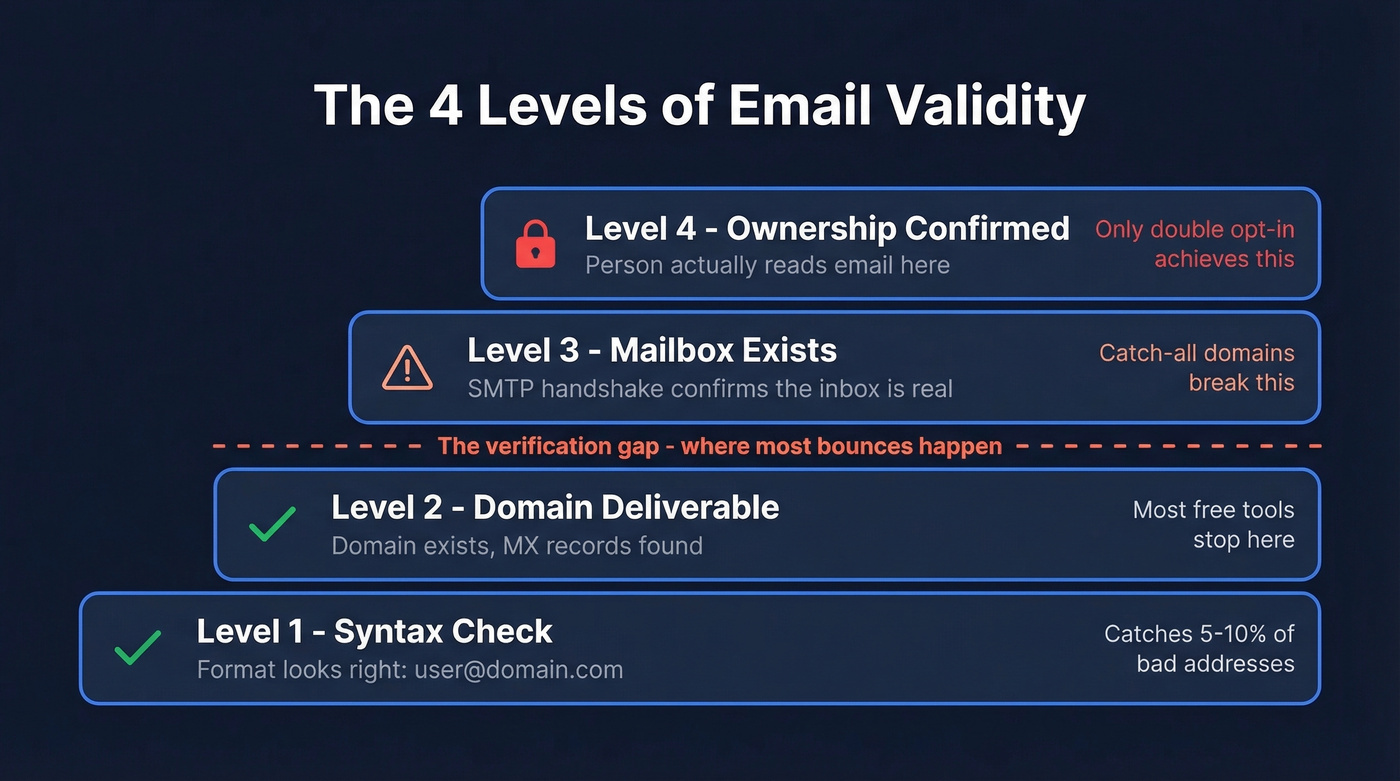
Level 1 - Syntactically correct. The address follows the right format: local part, @ symbol, domain. john.smith@company.com passes. john..smith@@company doesn't. This catches about 5-10% of bad addresses from typos and extraction errors.
Level 2 - Domain-deliverable. The domain exists, has valid DNS records, and has MX records pointing to a mail server that can receive messages.
Level 3 - Mailbox exists. The specific mailbox - the part before the @ - is recognized by the receiving server. This is where SMTP verification comes in, and where things get complicated fast.
Level 4 - Ownership confirmed. The person behind the address actually receives and reads mail there. Only double opt-in achieves this. No verification tool can reach level 4.
Here's the kicker: about 9% of emails entered on webforms are invalid, yet only 23.6% of businesses verify before every campaign. Most free email checkers are glorified syntax validators. They'll tell you the format looks right while the mailbox has been dead for six months.
How Email Verification Works Under the Hood
Professional verification tools run a 6-step pipeline. Understanding each step helps you interpret results, pick the right tool, and spot the ones cutting corners.
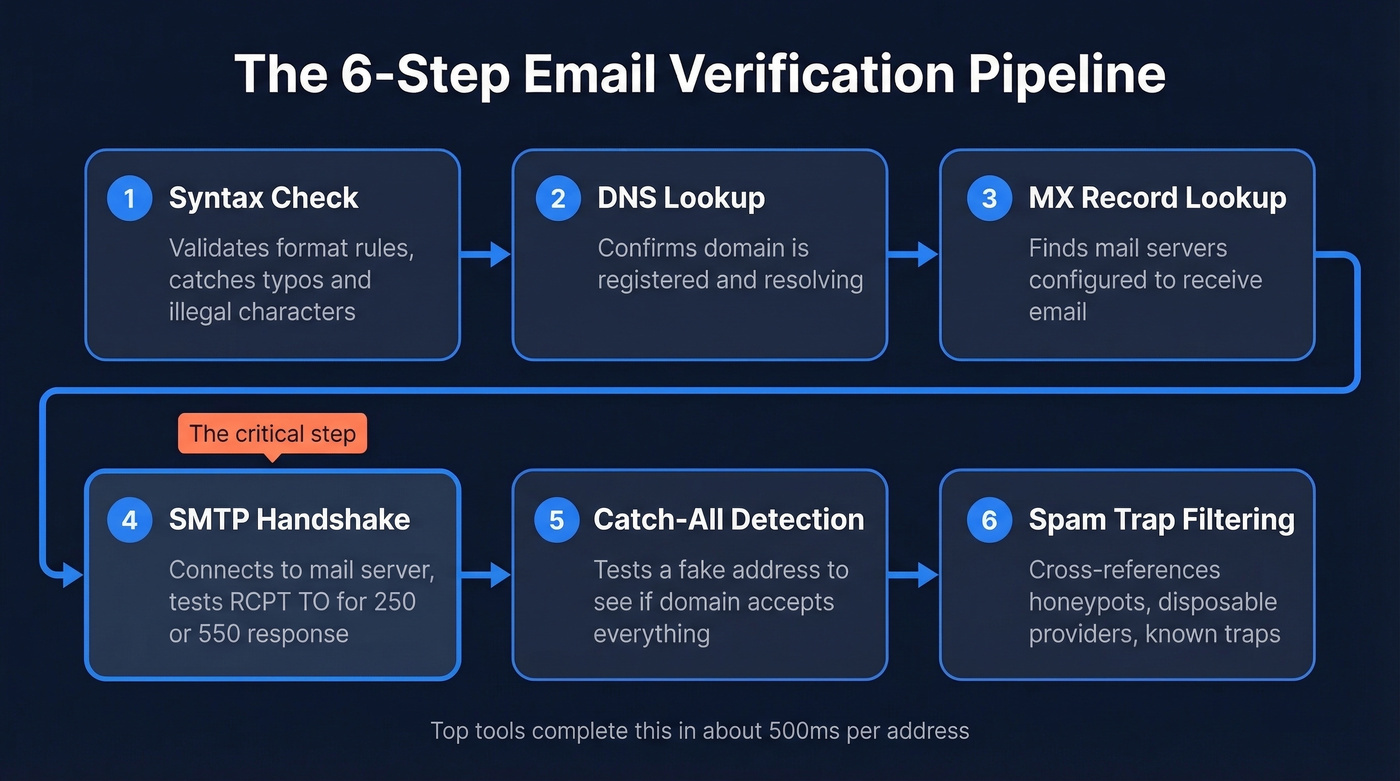
Step 1 - Syntax check. The tool validates format rules: proper use of @, no illegal characters, correct domain structure. Fast and deterministic.
Step 2 - DNS lookup. The tool queries the domain's DNS records to confirm it's registered and resolving. A domain that doesn't resolve can't receive mail. Period.
Step 3 - MX record lookup. Mail Exchange records tell the internet which servers handle email for a domain. No MX records and no fallback A record means the domain isn't configured to receive email.
Step 4 - SMTP handshake. This is the critical step. The tool opens a connection to the mail server on port 25 and initiates a conversation:
EHLO verify.example.com
MAIL FROM:<test@verify.example.com>
RCPT TO:<john@targetdomain.com>
The server's response to RCPT TO is the signal that matters. A 250 response means the server accepted the recipient. A 550 means the mailbox doesn't exist. The tool then disconnects - no actual email is sent.
Step 5 - Catch-all detection. The tool sends a second RCPT TO with a deliberately fabricated address like xk7q9z@targetdomain.com. If the server returns 250 OK for a clearly fake address, it's a catch-all domain - and the original "valid" result becomes unreliable.
Step 6 - Spam-trap and honeypot filtering. The tool cross-references the address against known spam-trap databases, disposable email providers, and honeypot addresses designed to catch senders with bad list hygiene. If you need a remediation playbook, see spam-trap removal.
SMTP Codes Decoded
| Code | Meaning | Action |
|---|---|---|
| 250 | Recipient accepted | Mark valid (unless catch-all) |
| 421 | Service unavailable - try later | Retry after delay |
| 450 | Mailbox temporarily unavailable | Retry - likely greylisting |
| 550 | Mailbox doesn't exist | Mark invalid - remove |
| 551 | User not local | Mark invalid |
| 553 | Mailbox name not allowed | Mark invalid |
Top tools run this in around 500ms per address. The difference between a $4/month tool and a $40/month tool usually comes down to how well they handle steps 5 and 6.
How to Verify an Email Manually
You won't do this in production. But understanding the manual process helps you evaluate tools and spot the ones that skip steps.
Find the mail server:
nslookup
> set type=mx
> targetdomain.com
Pick the MX record with the lowest preference value - that's the highest priority server.
Connect via Telnet on port 25:
telnet mail.targetdomain.com 25
Run the SMTP handshake:
EHLO yourdomain.com
MAIL FROM:<test@yourdomain.com>
RCPT TO:<john@targetdomain.com>
A 250 response to RCPT TO means the mailbox likely exists. A 550 means it doesn't. Disconnect cleanly with QUIT.
One caveat from Microsoft's own documentation: you can't backspace in a Telnet session. One typo means a 500 5.3.3 Unrecognized command error and starting over.
This doesn't scale. You can't manually test 10,000 addresses, detect catch-all domains without a second test, or identify spam traps. The exercise exists to show you what's happening behind the scenes - not to replace a tool.

You just read the 6-step pipeline every verification tool runs. Prospeo runs a 5-step version before you ever see the email - catch-all handling, spam-trap removal, and honeypot filtering included. 98% accuracy, refreshed every 7 days. No post-hoc cleanup needed.
Skip the verification step entirely. Source emails that arrive clean.
Why Verification Isn't Perfect
Even the best verification tools have blind spots. Knowing them keeps you from over-trusting results.
VRFY is dead. The SMTP VRFY command was designed to confirm whether a mailbox exists. Almost every modern mail server disables it to prevent address enumeration. Tools rely on RCPT TO instead, which is less reliable.
Accept-then-discard behavior. Some servers accept every RCPT TO with a 250 OK, then silently discard messages to non-existent mailboxes. The verification tool sees "valid." Your email goes into a void. There's no way to detect this from the outside, and it's more common than you'd expect with enterprise mail systems.
Greylisting creates false negatives. Greylisting servers return a 450 on first contact from an unknown sender. If a verification tool doesn't retry after 15-30 minutes, it marks the address as temporarily invalid. Good tools use exponential backoff and retry. Cheap tools don't. If you're troubleshooting broader issues, use an email deliverability guide to isolate root causes.
Catch-all domains break everything. A catch-all domain returns 250 OK for any address - real or fabricated. We've seen lists where catch-all addresses hit 30% of total records. The detection method works, but it only tells you the domain is catch-all. It can't tell you whether the specific mailbox is real.
No tool guarantees 100% accuracy. Verification is probabilistic, not deterministic. This is why your data source matters as much as your verification tool - starting with high-quality, recently verified data eliminates most of these edge cases before they become yours to manage.
What to Do with Each Result
| Status | What It Means | Action |
|---|---|---|
| Valid | Server confirmed mailbox | Send normally |
| Invalid | Server rejected mailbox | Remove immediately |
| Catch-all / Risky | Domain accepts everything | Send with monitoring; suppress if bounces |
| Unknown | Server didn't respond clearly | Suppress or re-verify in 48 hours |
| Disposable | Temporary email service | Remove - no long-term value |
| Role-based | info@, support@, sales@ | Remove from cold outreach; keep for inbound |
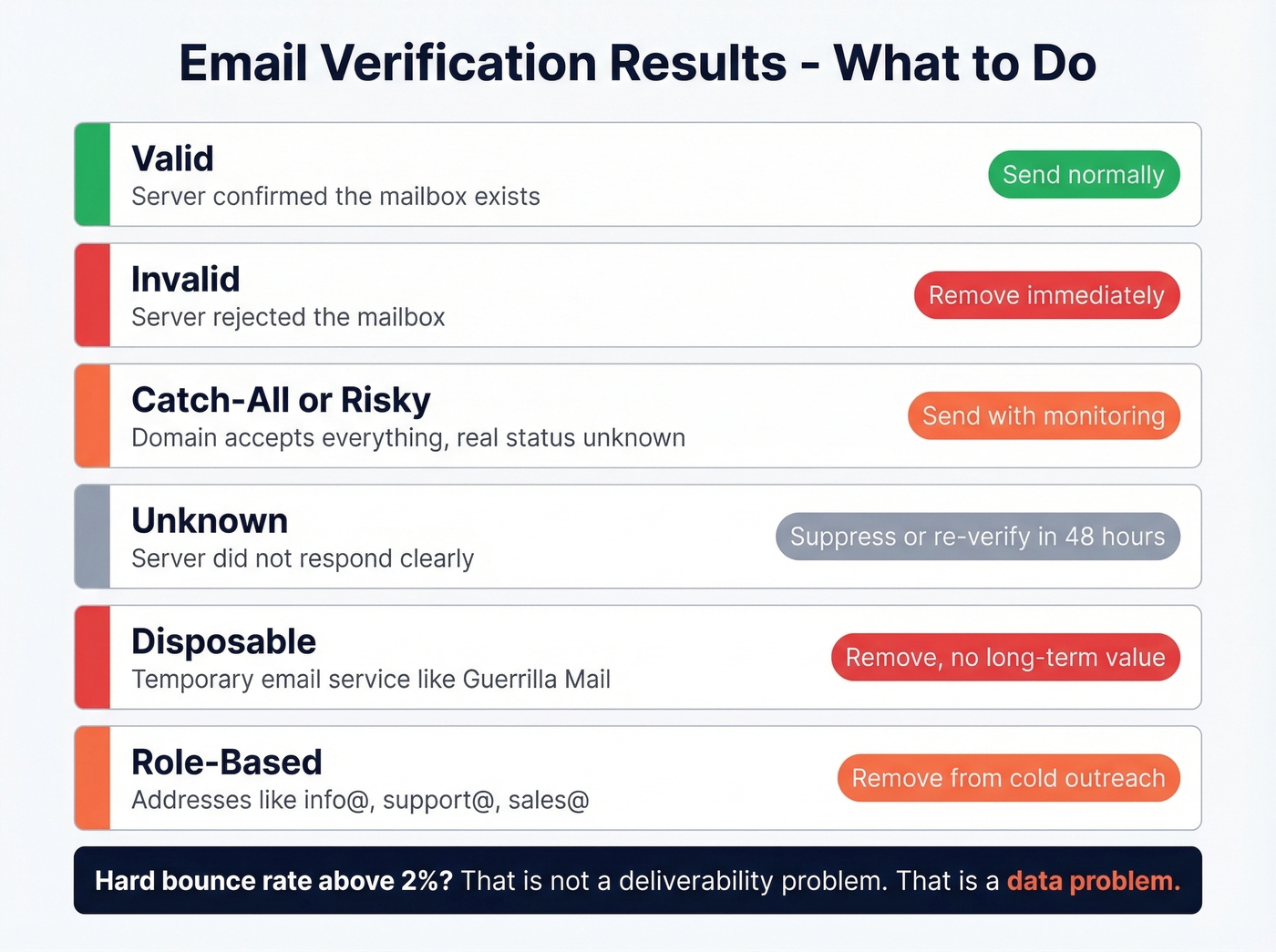
The threshold that matters: if your hard bounce rate exceeds 2%, you don't have a deliverability problem. You have a data problem. ESPs start throttling or suspending accounts well before that point. For deeper diagnostics, see email bounce rate.
Bounce Rate Benchmarks
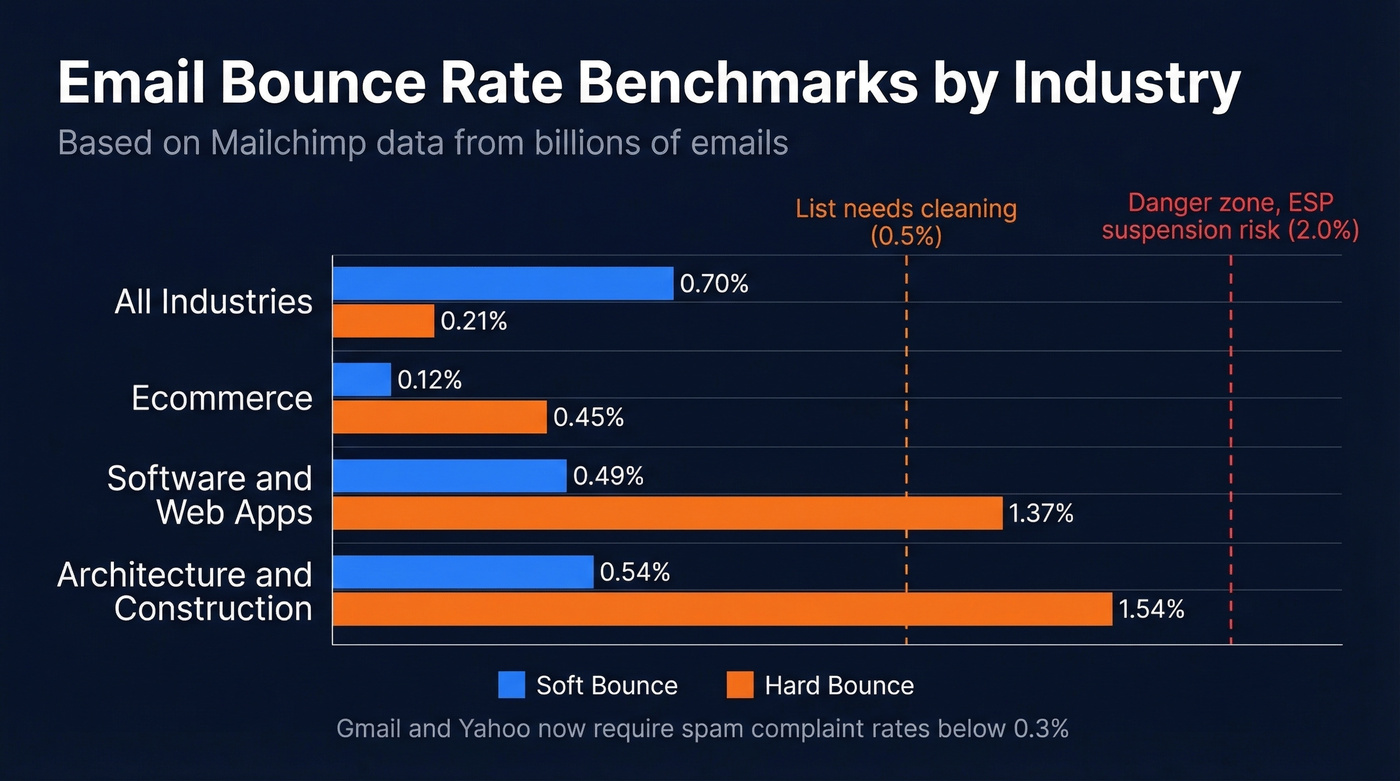
Based on Mailchimp data from billions of emails:
| Industry | Soft Bounce | Hard Bounce | Average |
|---|---|---|---|
| All industries | 0.70% | 0.21% | 0.46% |
| Ecommerce | 0.12% | 0.45% | 0.29% |
| Software / Web App | 0.49% | 1.37% | 0.93% |
| Architecture / Construction | 0.54% | 1.54% | 1.04% |
If your hard bounce rate exceeds 0.5%, your list needs cleaning. Above 2%, no amount of post-hoc verification will fix fundamentally bad data. Gmail and Yahoo now require spam complaint rates below 0.3%, and high bounces often correlate with high complaints. To stay within safe sending limits, review email velocity.
Best Email Verification Tools
We've tested most of these across client campaigns and internal prospecting. Accuracy varies by dataset, so the right move is to run a small batch test on your own list before committing.
Prospeo - The Upstream Fix
Prospeo isn't a verification tool - it's a B2B data platform that makes standalone verification unnecessary. Every email in its 143M+ database runs through a 5-step verification pipeline before you ever download it, and the 7-day refresh cycle means addresses don't go stale between campaigns. The accuracy rate is 98% across all verified emails, with catch-all handling and honeypot filtering built in.
Real-world proof: Snyk's 50-person sales team cut their bounce rate from 35-40% to under 5% after switching to Prospeo's pre-verified data, eliminating their standalone verification step entirely. At ~$0.01 per email with 75 free emails per month, it's a fraction of what you'd spend on a separate data source plus a verification tool. If you're comparing sources, start with best sales prospecting databases.

ZeroBounce - Accuracy Leader
In a 10,000-email benchmark test, ZeroBounce hit 97.8% accuracy - the highest among dedicated verification tools tested. It also resolved 12% of catch-all addresses, better than most competitors manage.
The tradeoff: at ~$65 per 10K emails, it's expensive insurance for a problem you can avoid by sourcing better data upstream. But for teams that need the highest possible accuracy on existing lists and are willing to pay a premium, it's the best standalone option. 100 free credits per month for testing.
NeverBounce
Use this if you need reliable bulk verification at a reasonable price and don't need best-in-class catch-all resolution. NeverBounce scored 96.9% accuracy in the same benchmark, with PAYG starting at $8 per 1,000 emails. It's the workhorse choice - not flashy, but consistent.
Skip this if catch-all domains make up a significant portion of your list. NeverBounce resolved only 8% of catch-all addresses in testing, which means more "risky" results you'll need to handle manually.
Hunter.io
Hunter offers single checks for free with no signup, and its free plan includes up to 100 verifications per month. Paid plans start at $34/month for shared credits across finding and verifying. Checks include format validation, gibberish detection, disposable domain flagging, and an accept-all verification system for several major email providers. With 6M+ users and strong G2/Capterra ratings (4.4 and 4.6), it's a solid option for one-off checks. Don't rely on it for bulk cleaning - the shared credit model gets expensive fast. If you're evaluating alternatives, see Hunter alternatives.

EmailListVerify
Budget bulk verification that gets the job done. The free checker allows a few single checks to test, and PAYG starts around $4 per 1,000 emails. You'll see more "unknown" results than premium tools, but if you're comfortable suppressing unknowns, the price-to-performance ratio is hard to beat for lists over 50K records.
MillionVerifier
Best for massive lists where budget is the primary constraint. At ~$6 per 10,000 emails, it's one of the cheapest per-email options and scored 95.8% accuracy in benchmark testing. Skip this if you need granular catch-all resolution or detailed diagnostic data per address - MillionVerifier trades depth for volume.
Verifalia
Verifalia offers a free email validator and API access with an unusually detailed verification process - over 30 steps per address. Worth evaluating for teams that need diagnostic data on why specific addresses fail. If you're building a broader workflow, pair verification with data enrichment services.
Tool Comparison
| Tool | Free Tier | PAYG Price | Accuracy | Best For |
|---|---|---|---|---|
| Prospeo | 75 emails/mo | ~$0.01/email | 98% | Pre-verified prospecting |
| ZeroBounce | 100/mo | ~$0.008/email | 97.8% | Max accuracy on lists |
| NeverBounce | - | $0.008/email | 96.9% | Reliable bulk cleaning |
| Hunter.io | 100/mo + free single checks | ~$34/mo shared | ~95% | Free single checks |
| EmailListVerify | Limited free single checks | $0.004/email | ~95% | Budget bulk |
| MillionVerifier | - | ~$0.0006/email | 95.8% | Cheapest per-email |
Most teams shortlist 3-5 tools and run a small batch test on their own data. That said, the pattern we see repeatedly is that teams who switch from verify-after-export to source-already-verified data see the biggest deliverability gains. If you're scaling outbound, consider outbound lead generation tools to keep sourcing and sending aligned.
Mistakes That Kill Deliverability
Treating verification as a one-time cleanup. Verification is maintenance, not a project. With 41% average workforce turnover in 2023 and 38% of employees leaving within their first year, your list decays faster than you think. Re-verify every 3-4 months at minimum.
Ignoring catch-all results. Marking catch-all addresses as "valid" and blasting them is how you spike your bounce rate overnight. We've seen teams lose sending privileges over this exact mistake. Send to catch-all addresses in small batches, monitor bounces, and suppress aggressively.
Using free tools for production lists. Free verifiers are fine for spot-checking a handful of addresses. They aren't built for cleaning a 50,000-record list. The accuracy gap between free and paid tools widens dramatically at scale, and learning how to interpret verification results properly matters more than the tool you choose.
Not verifying at point of capture. About 9% of webform entries are invalid. If you aren't running real-time verification on signup forms, you're importing bad data from day one.
Skipping deduplication. Duplicate records mean duplicate sends, which mean inflated complaint rates. Deduplicate before you verify - it saves credits and protects your sender reputation. If you're also tightening authentication, review DMARC alignment.
Every tool on this page tells you whether an email is valid right now. None of them stop it from decaying next month. Prospeo refreshes 300M+ profiles every 7 days - not the 6-week industry average - so the emails you pull today still work next quarter.
Stop chasing bounces. Start with data that stays fresh at $0.01 per email.
FAQ
Can you verify an email without sending one?
Yes. SMTP verification checks whether a mailbox exists by initiating but not completing a server connection. Tools like ZeroBounce and Hunter automate this. The limitation: catch-all domains and some servers accept any address, so "verified" doesn't guarantee delivery.
What's a catch-all email domain?
A domain configured to accept mail sent to any address, including fabricated ones. SMTP verification returns "valid" for every address regardless. Over 9% of verified B2B emails sit on catch-all domains, making them a major source of false positives.
How often should you re-verify your list?
Every 3-4 months minimum. About 23% of addresses go invalid each year from job changes and company closures. High-turnover industries like tech and staffing need monthly re-verification.
What bounce rate is too high?
Industry average hard bounce is 0.21%. Anything above 2% signals a serious data quality problem and risks ESP penalties including throttling or account suspension. Most ESPs start flagging accounts at 0.5% hard bounces.
Is there a way to skip verification entirely?
Yes - use a data source that verifies emails before you download them. Prospeo's 5-step verification pipeline and 7-day refresh cycle deliver pre-verified contacts at 98% accuracy, eliminating the standalone verification step. For teams that want clean data without managing a separate tool, it's the most efficient approach.