


Hunter vs SuperSend: Different Tools for Different Jobs
You built a list of 2,000 contacts, hit send, and 15% bounced. Is the problem your data or your sending setup? When you're weighing Hunter against SuperSend, the answer matters - one finds and verifies emails, the other scales outbound sending and deliverability.
Here's which one you actually need.
30-Second Verdict
Pick Hunter to find and verify professional emails with light sequencing - under 5K emails a month, small team, simple workflows.
Pick SuperSend when you already have a clean lead list and need to scale sending with warmup, inbox rotation, and multichannel sequences.
Skip both if your real problem is data accuracy. Bad emails torpedo deliverability regardless of your sending tool.
Feature Comparison
| Feature | Hunter | SuperSend | Edge |
|---|---|---|---|
| Primary function | Email finder + verifier + light sequences | Multichannel sender + deliverability infrastructure | Depends on need |
| Pricing | Free / $49 / $149 / $299/mo | Growth $99/mo / Scale $319/mo | Hunter (free tier) |
| Email accounts | 1-20 by plan (+$10/mo per extra) | $5/mo per inbox (Google, Outlook, or SuperSend mailboxes) | SuperSend (scales via add-ons) |
| Warmup | None | Built-in | SuperSend |
| Multichannel | Email only | Email + LinkedIn | SuperSend |
| Lead database | Built-in (smaller than large data vendors) | None | Hunter |
| G2 rating | - | 4.6/5 (18 reviews) | SuperSend |
Hunter - Find Emails, Send Light
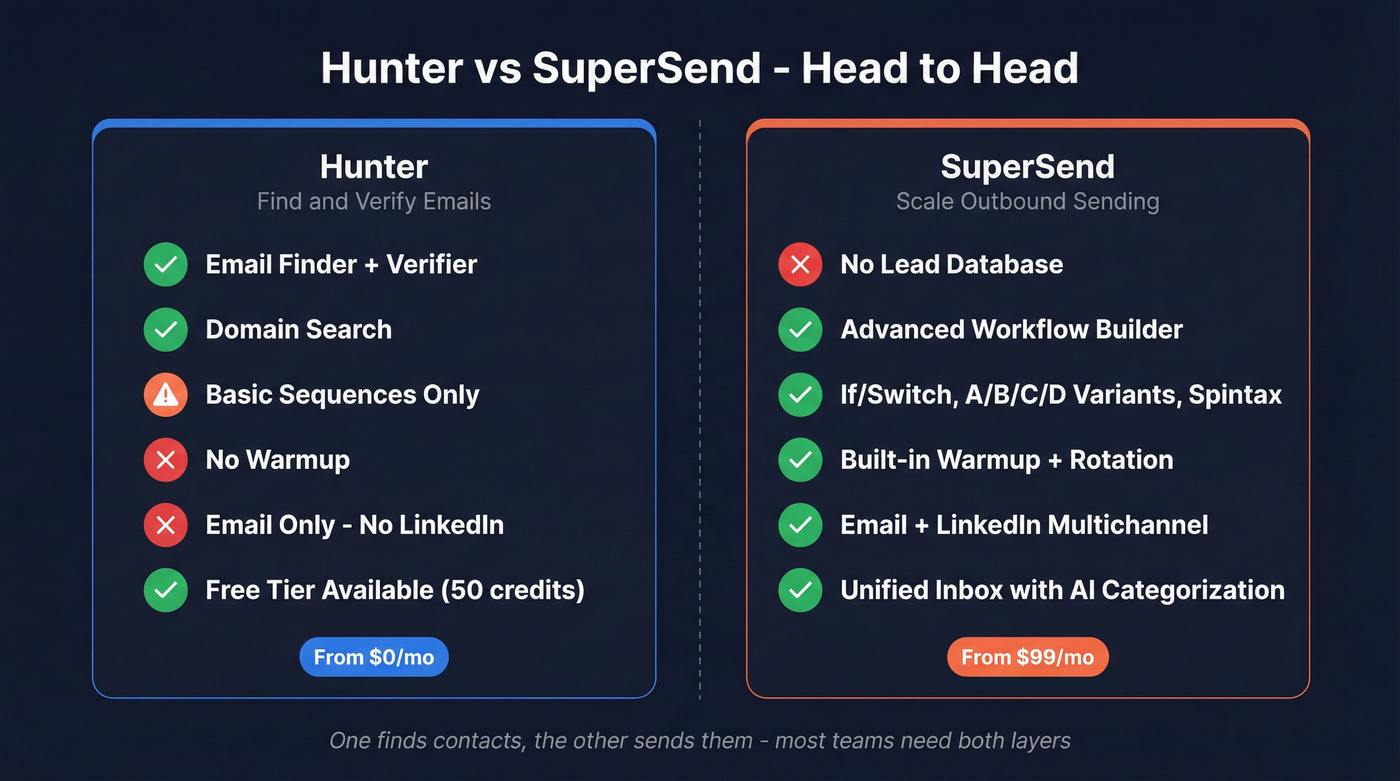
Hunter works best for solo founders or small teams who need to find professional emails by domain, verify them, and run simple cold email sequences without stitching together three tools. The free plan gives you 50 credits/month - that's 50 email finds or 100 verifications, enough to test before committing.

Domain Search and Email Finder handle one-off lookups well, and the verification engine is genuinely solid. The Reddit consensus nails it: "solid verification accuracy but database is pretty small." If you're comparing options, see our breakdown of Hunter alternatives.
The sequencing side is bare-bones. On paid plans you get email account rotation and tracking toggles, but Hunter explicitly says its progressive sending feature "is not an email warm-up and does not guarantee deliverability." No warmup network, no placement testing. Credits run out fast too - the $49/mo Starter plan gives you 2,000 credits, and every email found costs one. We've watched teams burn through a month's credits in a single afternoon of prospecting. If you're trying to scale safely, it helps to understand email velocity limits and ramping.

Hunter gives you 2,000 credits a month. Prospeo gives you 300M+ profiles with 98% email accuracy on a 7-day refresh cycle - so your contacts are fresh before they ever hit SuperSend or any other sender. At ~$0.01/email with no contract, you stop burning credits and start booking meetings.
Fix the data layer and your sending tools actually work.
SuperSend - Built for Sending at Scale
Forget the feature-by-feature comparison for a moment. Here's the real question: do you trust your sending infrastructure? Teams without proper infrastructure see deliverability drop from ~95% to under 50% within 3-6 months. SuperSend exists to prevent that. If deliverability is the bottleneck, this email deliverability guide is a useful baseline.
The workflow builder is where it pulls ahead. If/Switch conditions, A/B/C/D variants per step, AI rewrite, spintax, API webhooks, and coordinated email + LinkedIn timing - it's a lot of firepower. The unified inbox with AI categorization across 10 intent categories is genuinely useful for teams running volume. SuperSend also recommends disabling open-rate tracking for cold email because tracking pixels can trigger spam filters, a detail most tools conveniently ignore (more on email tracking pixels).
The Growth plan at $99/mo includes 50,000 emails and 2,000 global credits for email validation and placement testing. Most teams spend ~$357/mo once inboxes and domains are added. G2 reviewers praise the ease of use and integrated warming, though frequent UI changes can be disorienting and LinkedIn automation still needs polish.
Let's be honest: if your average deal size is under $10K and you're sending fewer than 5,000 emails a month, SuperSend is overkill. Hunter's free plan plus a good data source will get you further than a sophisticated sending engine pointed at bad contacts. If you're evaluating other senders, compare against our picks for the best AI bulk email senders.
The Data Problem Neither Tool Solves
Neither tool fixes the upstream issue. Hunter's database is small. SuperSend doesn't have one at all. If you're shopping for providers, start with these data enrichment services and sales prospecting databases.
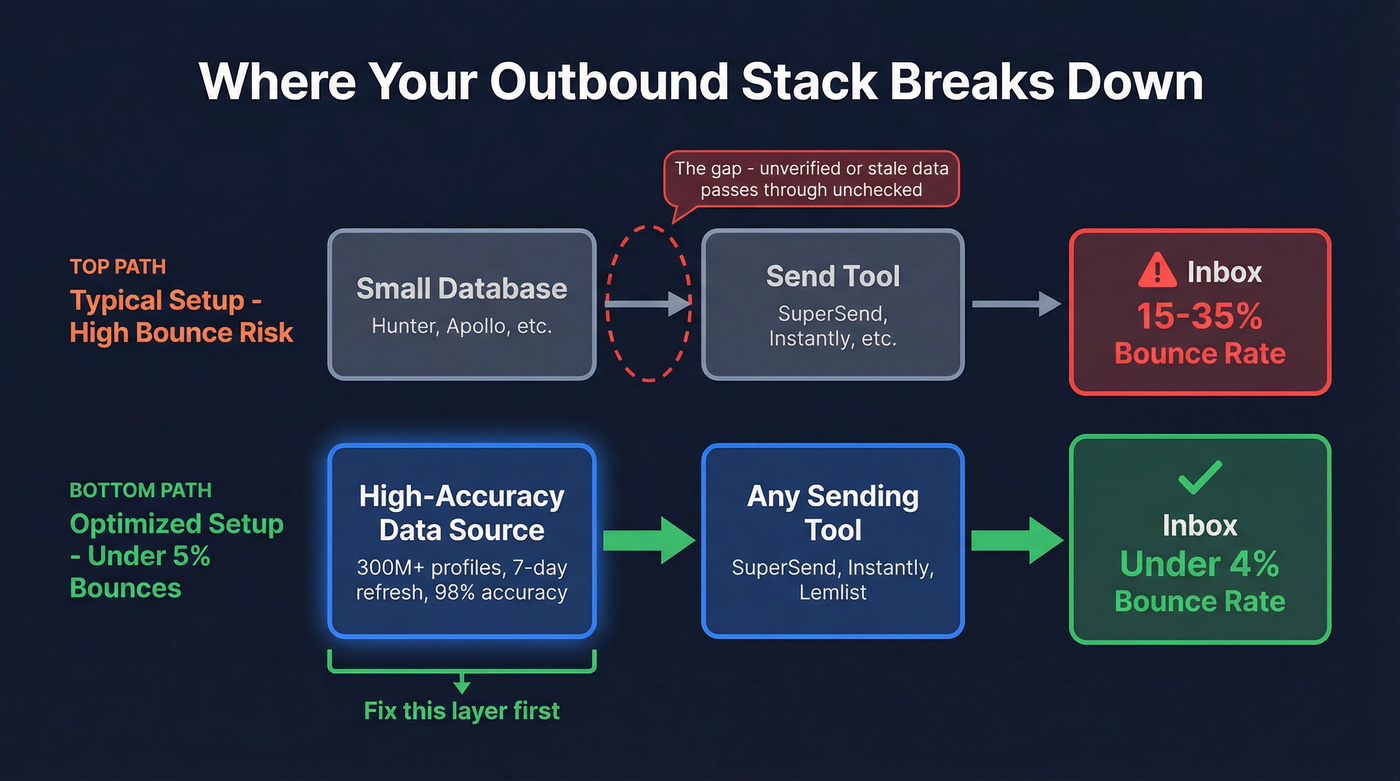
On r/coldemail and r/sales, users consistently report "verified" emails still bouncing at 20%+ with some tools. A February 2026 benchmark testing 15 email finders on 20,000 real contacts found wide variance in actual enrichment rates - reinforcing that your data source matters more than your sending tool. We've seen this firsthand with our own outbound: swapping data providers dropped our bounce rate from double digits to under 4% overnight, with zero changes to the sending side. If you want the benchmarks and fixes, see email bounce rate.
Prospeo covers 300M+ professional profiles with 98% email accuracy on a 7-day refresh cycle, while most competitors refresh every 4-6 weeks. Paid plans run about $0.01 per email with no contracts, and it integrates natively with Instantly, Smartlead, and Lemlist - so you can pair it with SuperSend or any other sender and know your contacts are clean before they hit an inbox.

Teams like Snyk cut bounce rates from 35% to under 5% by switching their data source - not their sender. Prospeo's 5-step verification with catch-all handling and spam-trap removal means fewer bounces, healthier domains, and more replies from the contacts SuperSend delivers.
Stop debugging bounces. Start with emails that land.
Which Should You Pick?
These tools do different jobs. Here's how to decide:
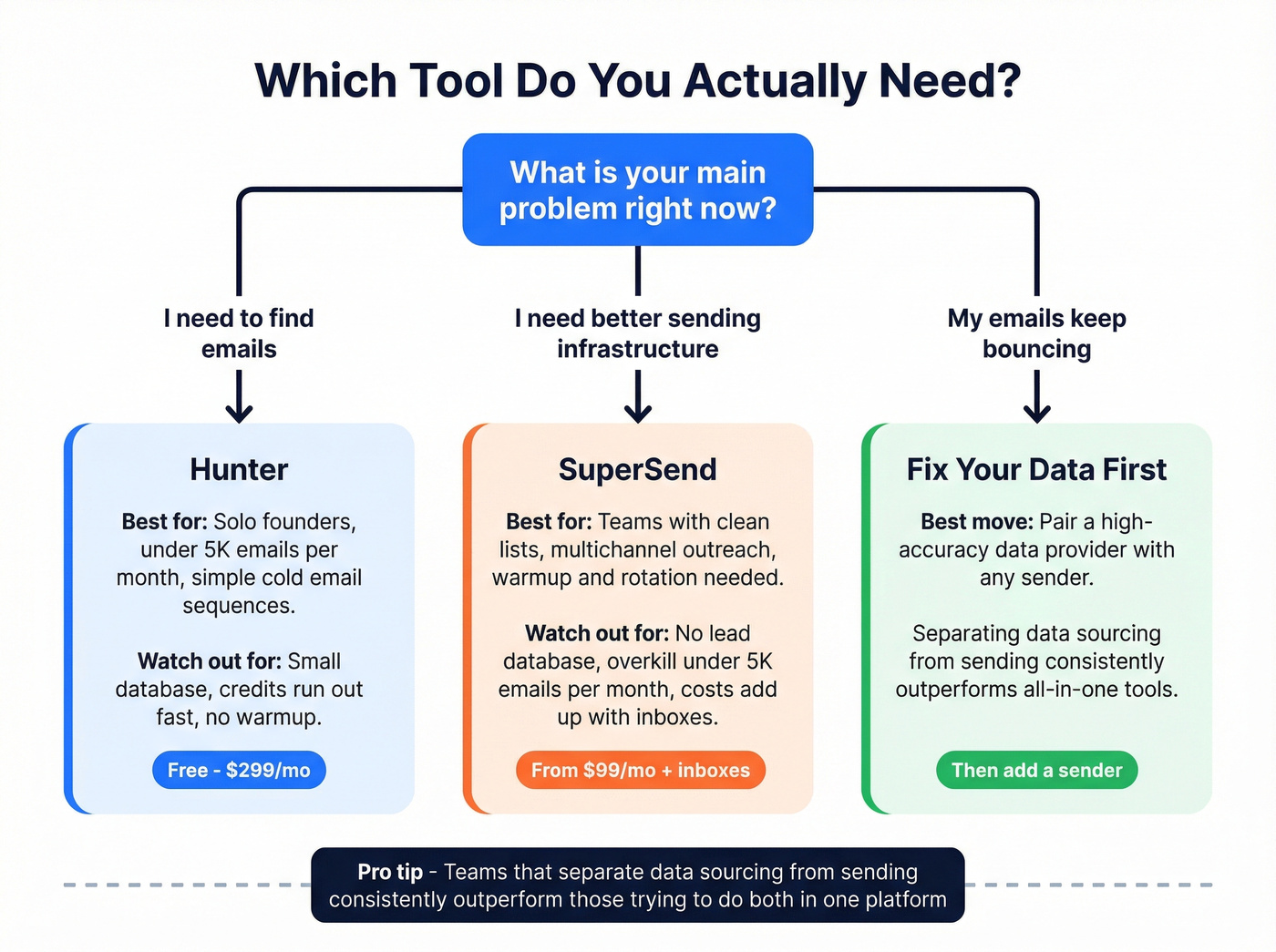
- Hunter alone works for finding and verifying emails with light outreach under 5K emails/month. Don't expect deliverability infrastructure.
- SuperSend alone works if you already have a clean, verified list and need multichannel sending with real warmup and rotation.
- The optimal stack pairs a high-accuracy data source with SuperSend's sending engine. In our experience, teams that separate data sourcing from sending consistently outperform those trying to do both in one platform - sometimes by a wide margin. If you're building the full motion, use these sales prospecting techniques to keep pipeline quality high.
If you're spending more time debugging bounces than writing copy, the problem isn't your sender. It's your data.
FAQ
Can I use Hunter and SuperSend together?
Yes - find emails in Hunter, then import verified contacts into SuperSend for sequencing. But Hunter's small database and credit limits bottleneck pipelines at scale. Most teams outgrow this pairing within a few months and switch to a dedicated data provider alongside SuperSend.
Does SuperSend include email warmup?
SuperSend includes built-in warmup, sender health monitoring, and placement testing on the $99/mo Growth plan. Hunter offers no warmup at all - its progressive sending feature explicitly disclaims deliverability guarantees.
What if my bounce rate stays high after switching tools?
The problem is almost certainly your data source, not your sender. Teams like Meritt and Snyk cut bounce rates from 35%+ to under 5% by switching data providers alone. If you're above 5% bounces, swap your data provider before changing anything else.