

What Actually Happens If an Email Address Doesn't Exist
You hit send on a cold email. Thirty seconds later, your inbox pings back with "550 5.1.1 - The email account you tried to reach does not exist." That prospect you spent ten minutes researching? Gone. And if an email address doesn't exist, you don't just lose the contact - you lose sender reputation points that took months to build.
Here's the thing: most people don't understand what's actually happening behind that bounce message, and that ignorance costs them deliverability they can't easily get back. Let's break down the full chain of events, the codes you'll see, and what to do about it.
The Short Version
- The recipient's mail server rejects the message and returns a bounce notification with an SMTP error code, usually 550 5.1.1.
- You can never prove with 100% certainty that an address can't receive mail. Catch-all domains, greylisting, and server quirks make it impossible.
- If you're sending at any scale, verify your list first instead of gambling with your sender reputation.
The SMTP Flow When Delivery Fails
Every email follows the same path. Your mail client hands the message to your outgoing server, which performs a DNS lookup on the recipient's domain. That lookup returns MX (Mail Exchange) records pointing to the recipient's mail server.
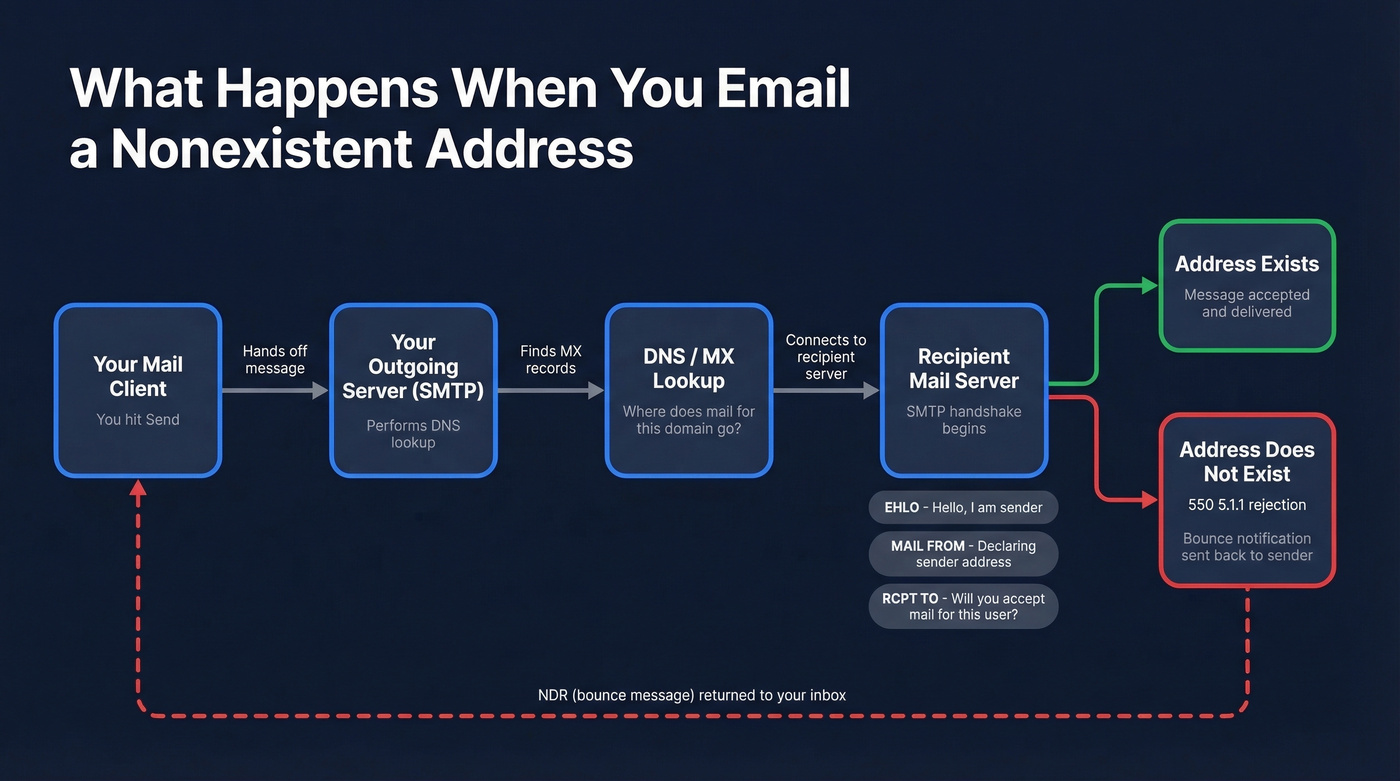
Your server opens an SMTP connection and starts a handshake: introduces itself (EHLO), declares the sender (MAIL FROM), then asks the critical question - "Will you accept mail for this address?" (RCPT TO).
If the mailbox doesn't exist, the server responds immediately with something like 550-5.1.1 The email account that you tried to reach does not exist. That rejection triggers a Non-Delivery Report (NDR) - the bounce message in your inbox. Your email never gets delivered. It's rejected at the door.
But "address doesn't exist" usually comes from a few distinct failure modes, and each one produces a different error code. The mailbox could be invalid at a valid domain (most common). The domain itself could be unregistered. The domain could be missing MX records entirely - and in some setups, delivery falls back to the domain's A record. Or the receiving server is unreachable: down, misconfigured, or blocking your connection. Knowing which failure you're dealing with changes your response.
SMTP Bounce Codes Decoded
550 5.1.1 means "this mailbox doesn't exist." It's one of the most common hard bounces, but it's not the only code you'll encounter.
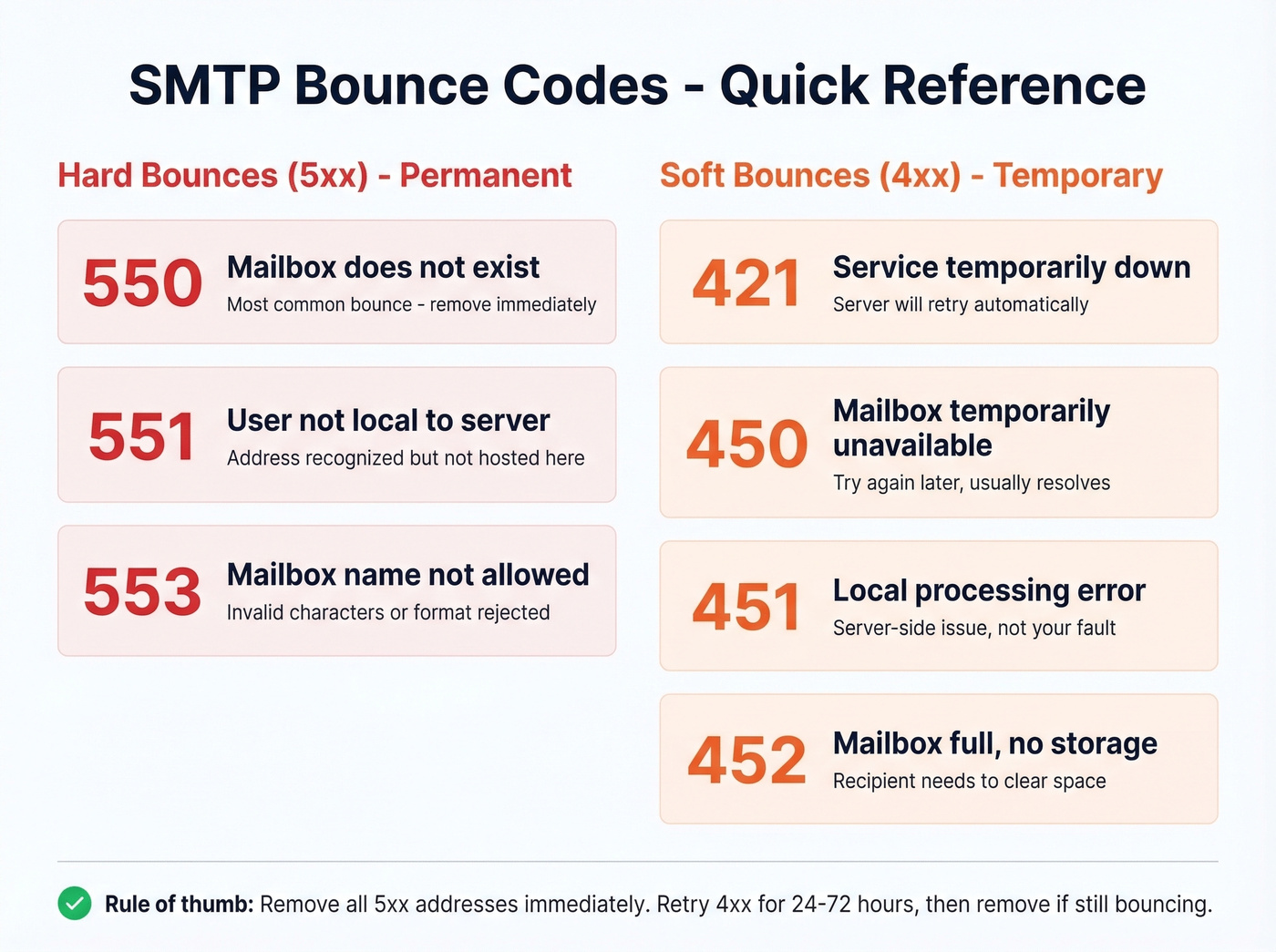
| Code | Type | What It Means |
|---|---|---|
| 550 | Hard | Mailbox doesn't exist |
| 551 | Hard | User not local to server |
| 553 | Hard | Mailbox name not allowed |
| 421 | Soft | Service temporarily down |
| 450 | Soft | Mailbox temporarily unavailable |
| 451 | Soft | Local processing error |
| 452 | Soft | Mailbox full / no storage |
The 5xx codes are permanent. The 4xx codes mean "try again later." Simple enough on paper, but the real world is messier.
Hard Bounce vs. Soft Bounce
Hard bounces are permanent failures - invalid address, nonexistent domain, deleted account. Remove these immediately. Every hard bounce chips away at your sender reputation, and the damage compounds fast. Keep hard bounces below 0.5%.
Soft bounces are temporary - full mailbox, server downtime, processing hiccup. Your mail server retries automatically, usually over 24-72 hours. But if a soft bounce persists across multiple attempts, treat it like a hard bounce and scrub it.
The general rule: keep your overall bounce rate under 2%. Above 5%, ISPs start throttling your domain. We've seen teams lose months of warm-up progress from a single dirty list import.

Every hard bounce from a nonexistent address chips away at the sender reputation you spent months building. Prospeo's 5-step verification - with catch-all handling, spam-trap removal, and honeypot filtering - delivers 98% email accuracy so you never send to an address that doesn't exist.
Stop bouncing. Start connecting with emails that actually exist.
Provider Quirks Worth Knowing
Not all mail servers behave the same way. These are the gotchas that trip people up most often.
Gmail's Username Paradox
This one drives people crazy. You email a Gmail address, get a 550 bounce. You try to register that exact username - Google says it's taken. What gives? Google doesn't release deleted or deactivated usernames for re-registration. The r/Gmail subreddit is full of confused users hitting this wall. There's no workaround; the namespace is locked permanently.
Outlook Alias Confusion
With Microsoft 365, the most common cause of 5.1.x bounces is a misspelled address. Outlook's Auto-Complete cache makes it worse by remembering old, invalid addresses and suggesting them months later. Clear the nickname cache in settings. If you receive an NDR for a message you never sent, that's backscatter from a forged sender address - ignore it.
Microsoft Account Inactivity Deletion
Microsoft automatically deletes accounts that have been inactive for more than 2 years. So an address that worked in the past can bounce later. This is why regular list hygiene beats one-time verification every time.
SendGrid: Check Before Sending
If you're routing outbound through SendGrid, pay attention to its Event Webhook. SendGrid surfaces bounce events in real time, and its suppression list automatically prevents re-sends to addresses that have already hard-bounced. But that only helps after the first failed delivery. For proactive protection, validate your list with a dedicated verification tool before importing contacts.
Why You Can Never Be 100% Sure
The VRFY command - originally designed to confirm whether a user exists - is disabled on virtually every modern mail server. The RCPT TO check is better, but servers can lie. Some accept every address at the SMTP stage and silently discard messages later. Greylisting temporarily rejects the first connection attempt, breaking naive validation scripts entirely.
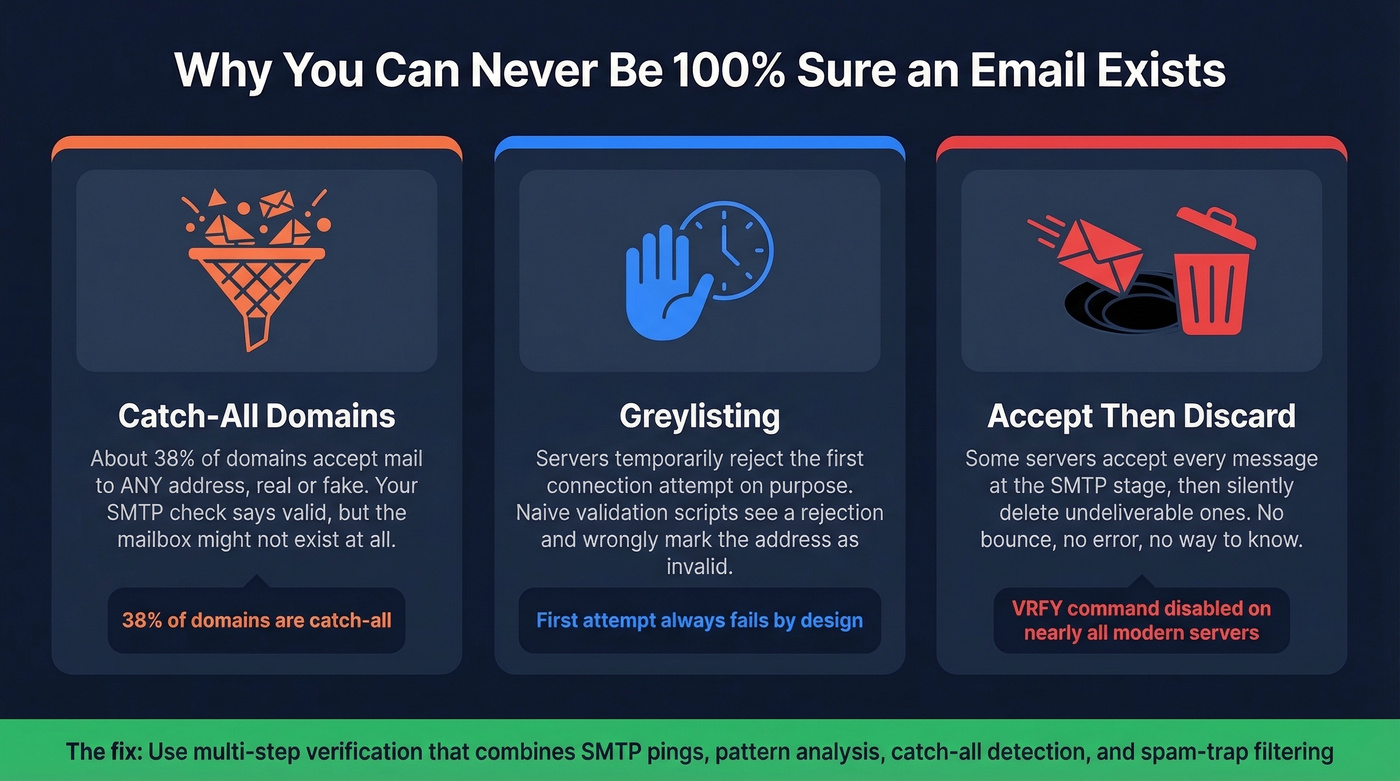
Then there's the catch-all problem. A Hunter.io study of 2,572 domains found roughly 38% were configured as catch-all - accepting mail to any address, real or not. Your SMTP check returns "valid," but the mailbox might not exist at all. That's a huge blind spot if you're relying on basic verification.
How to Verify Without Sending
Most guides tell you to "just send a test email." Terrible advice. It damages your sender reputation if the address doesn't exist and bounces, and it doesn't scale past a handful of contacts. Instead, escalate through levels of certainty:
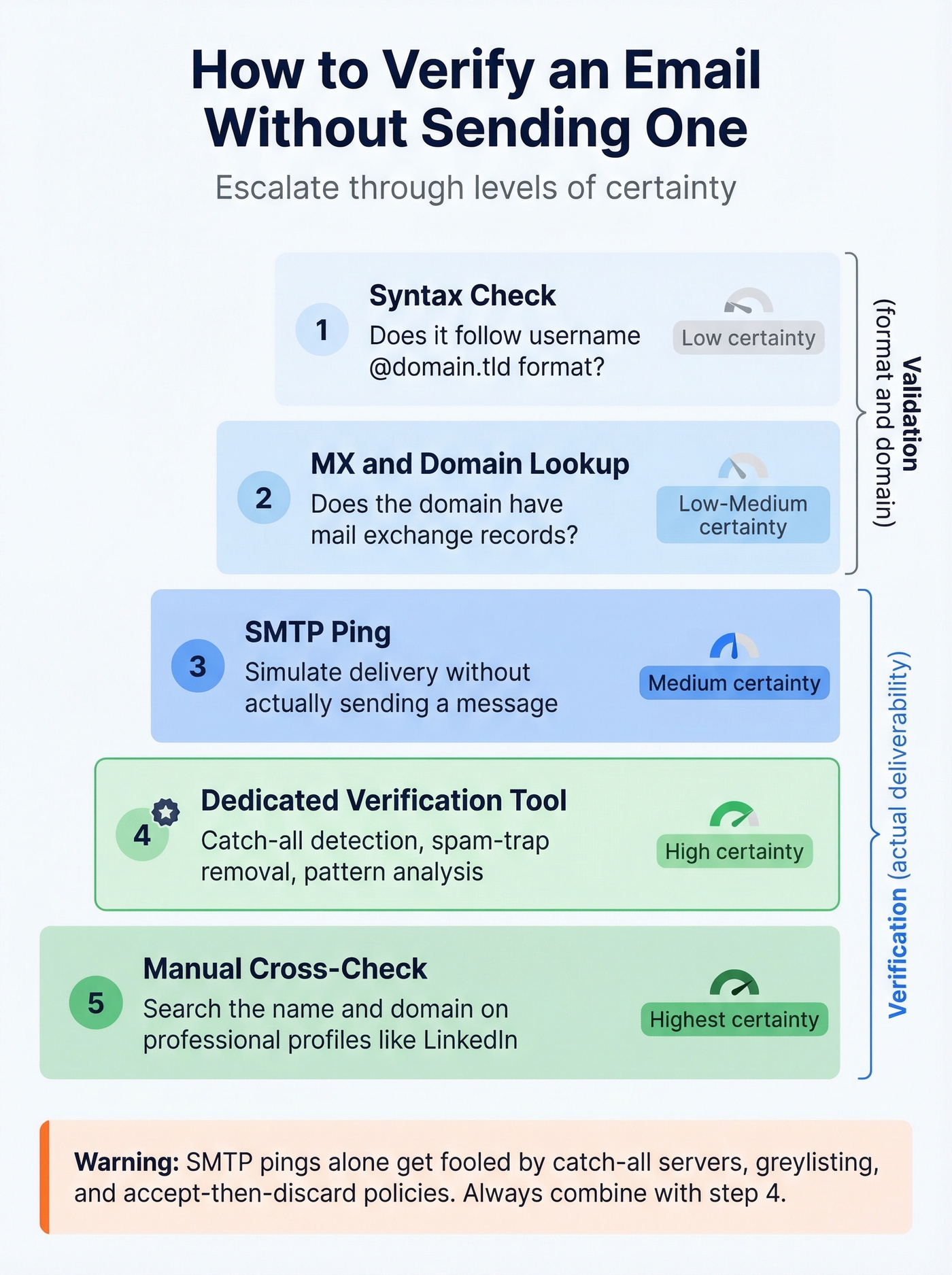
- Syntax check - does it follow username@domain.tld format?
- MX/domain lookup - does the domain have mail exchange records?
- SMTP ping - simulate delivery without actually sending
- Dedicated verification tool - catch-all detection, spam-trap removal, pattern analysis
- Manual cross-check - search the name and domain on professional profiles
Steps 1-2 are validation (format and domain). Steps 3-4 are verification (actual deliverability). That distinction matters because SMTP pings get fooled by catch-all servers, greylisting, and accept-then-discard policies.
If you want a deeper walkthrough of methods, see how to check if an email exists and how to check if email will bounce.
Programmatic Verification with Python
Developers often want to verify whether an email address exists using Python libraries like py3dns and smtplib. The typical approach opens an SMTP connection, issues EHLO and RCPT TO commands, then reads the response code. This works for basic checks, but it breaks against greylisting, rate-limiting, and catch-all domains. For production-grade verification at scale, API-based services are far more reliable than rolling your own SMTP validation script.
In Hunter's benchmark of 15 verifiers using 3,000 real emails, top tools landed around 67-70% overall accuracy. That's why we've moved all pre-send verification to tools with proprietary infrastructure rather than relying on basic SMTP checks.
Prospeo runs a 5-step verification process that handles catch-all domains, removes spam traps and honeypots, and delivers 98% email accuracy across 143M+ verified addresses. The free tier gives you 75 verifications per month - upload a CSV, get results in minutes, and export clean contacts to your outreach tool.
If you're comparing vendors, start with AI Email Checker or browse Bouncer alternatives before you commit.
Bounce Rate Benchmarks by Industry
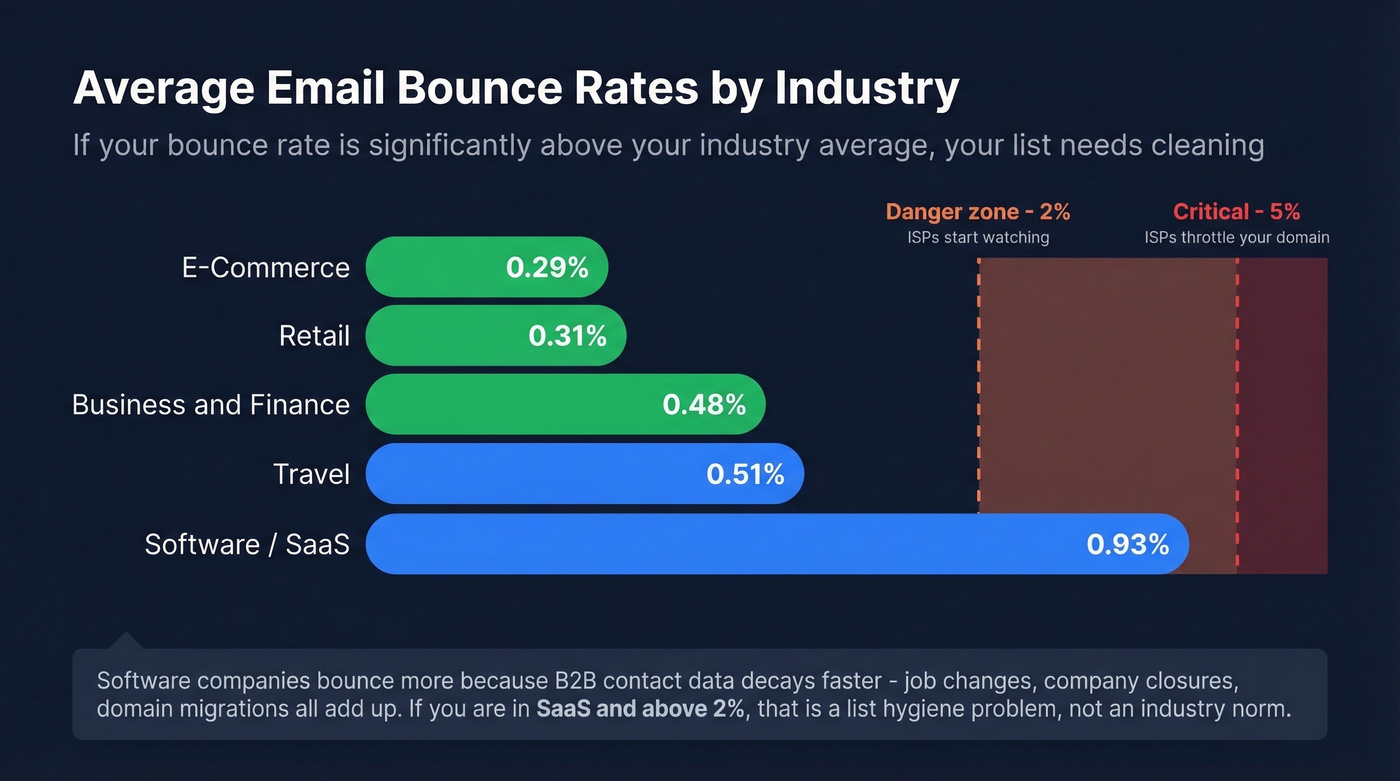
If your bounce rate runs significantly above your industry average, your list needs cleaning:
| Industry | Avg. Bounce Rate |
|---|---|
| E-Commerce | 0.29% |
| Retail | 0.31% |
| Business & Finance | 0.48% |
| Travel | 0.51% |
| Software | 0.93% |
Software companies run the highest averages because B2B contact data decays faster than consumer data. Job changes, company closures, domain migrations - it all adds up. If you're in SaaS and your bounce rate is above 2%, that's a list hygiene problem, not an industry norm.
For a more complete breakdown, see our email bounce rate benchmarks and fixes.
The Real Problem Isn't Deliverability
Look, most teams don't have a deliverability problem. They have a data quality problem. Fix the input and the output fixes itself. We watched one agency client - Stack Optimize - go from chronic domain flags to 94%+ deliverability and under 3% bounce rates across every client campaign, just by verifying before sending. No magic. No new ESP. Just clean data.
Skip the "send and pray" approach. Skip the DIY Python scripts unless you're building a hobby project. If you're running outbound at any real volume, use a verification tool that handles catch-all detection and spam-trap filtering natively. Your domain reputation will thank you.
If you're scaling cold outreach, pair verification with a solid email deliverability guide and safe email velocity limits.
You just read why SMTP pings, Python scripts, and manual checks can't reliably tell you if an email address exists. Catch-all domains fool them. Greylisting breaks them. Prospeo's proprietary verification infrastructure handles all of it - 143M+ verified emails, refreshed every 7 days, at roughly $0.01 per address.
Replace guesswork with 98% accuracy for a penny per email.