

How to Write the Perfect Introduction Email as a New Point of Contact
You just got assigned 15 accounts from a departing CSM. Half are mid-renewal, two have open escalations, and one hasn't heard from your company in six weeks. The introduction email you send as the new point of contact in the next 48 hours will set the tone for each relationship - or quietly end it.
The short version: Don't lead with your bio - lead with what you know about the client's account. For top accounts, call first and email second. For everyone else, use the templates below.
Ditch "New" in Your Subject Line
A top Microsoft account manager shared a tactic on a recent podcast that reframed how we approach transition emails: never use the words "new" or "introduction" in the subject line. Those words signal disruption. They tell the client someone they trusted is gone and a stranger is taking over.
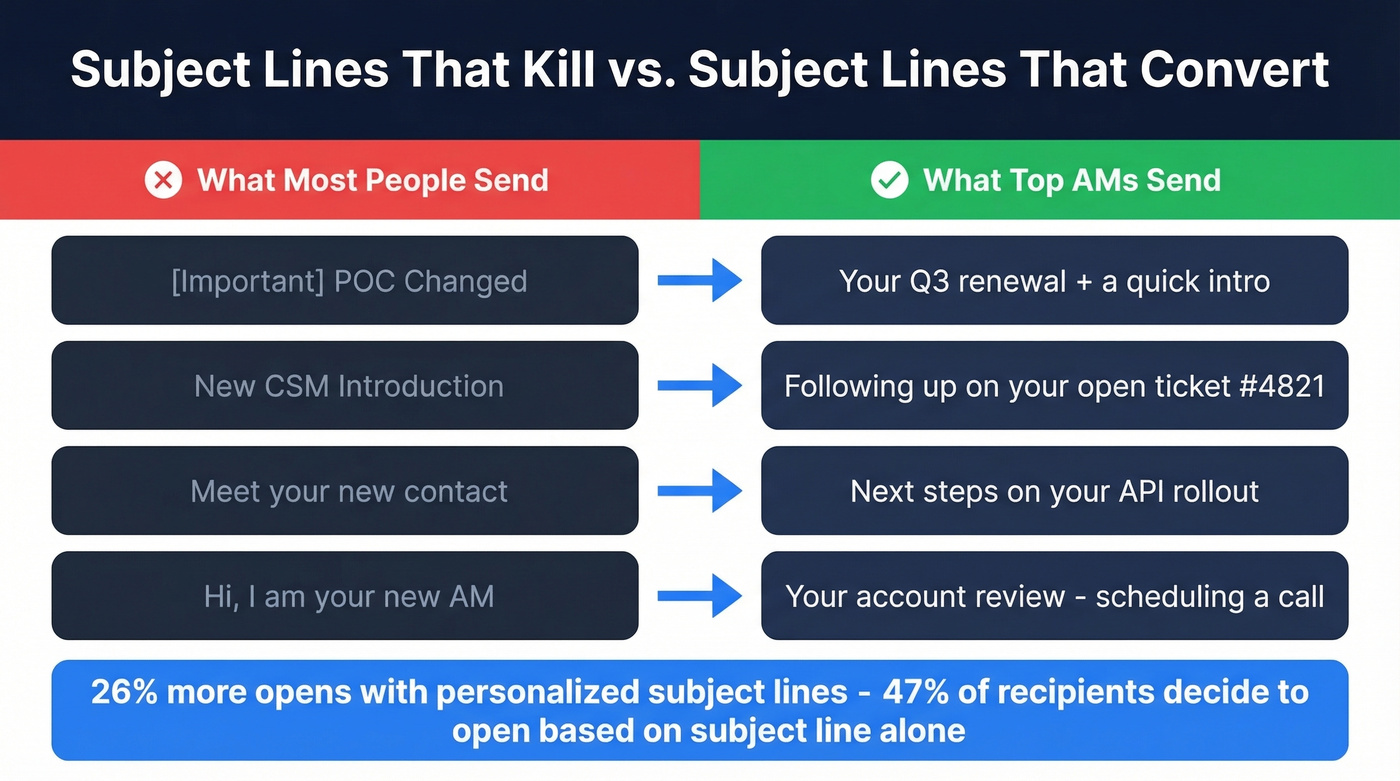
Instead, position yourself as their account manager - not the new one - and reference something specific to their account. A renewal date, a feature rollout, an open project. This immediately communicates "I already know your situation."
The data backs this up. 47% of recipients decide to open emails based solely on the subject line, and 69% mark emails as spam based on the subject line alone. Personalized subject lines get 26% more opens - and referencing a specific account detail is one of the strongest forms of personalization you can use.
If you need more ideas, pull from these subject line examples and adapt them to the account context.
| Instead of | Try this |
|---|---|
| [Important] POC Changed | Your Q3 renewal + a quick intro |
| New CSM Introduction | Following up on your open ticket #4821 |
| Meet your new contact | Next steps on your API rollout |
| Hi, I'm your new AM | Your account review - scheduling a call |
Lead with the thing the client cares about. Your name and role go in the body.
Before You Write: The Handoff Checklist
The biggest mistake in account transitions isn't bad email copy - it's making the client re-explain their situation. Before you write anything, pull together:
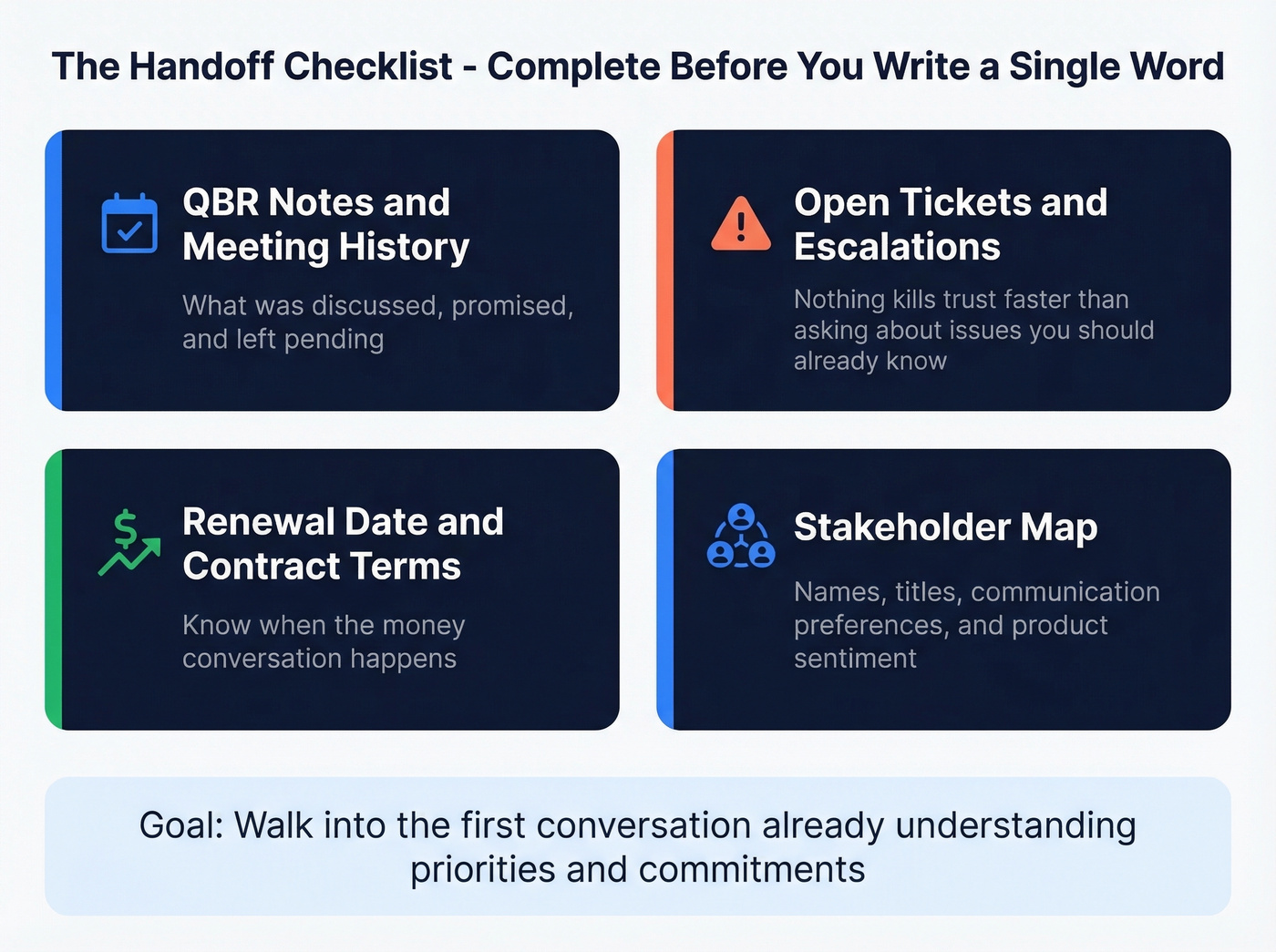
- QBR notes and meeting history - what was discussed, promised, and left pending (if you need a refresher, here’s a quick guide on QBR meaning)
- Open tickets and escalations - nothing kills trust faster than asking "so, any issues?" when there's an active P1
- Renewal date and contract terms - know when the money conversation happens (tie this back to your renewal rate targets)
- Stakeholder map - not just names and titles, but communication preferences and product sentiment
Your goal is to walk into the first conversation already understanding priorities and commitments. The client should feel like nothing was lost in the transition.
One thing that's easy to overlook: verify your contact data is current before hitting send. People change roles, emails go stale, and a bounced intro email is a terrible first impression. Prospeo's email finder checks emails in real time with 98% accuracy and flags bounces before they damage your sender reputation (more on email deliverability if you’re troubleshooting).

Who Sends the First Email?
| Scenario | Who sends first? |
|---|---|
| Standard transition | Outgoing contact sends warm handoff, then you follow up |
| Outgoing contact unavailable | Your manager sends a brief intro, you follow immediately |
| Client was unhappy with predecessor | You send directly - no reminder of the old relationship |
The outgoing person vouches for you, the client feels continuity, and you don't arrive cold. But if the previous contact was terminated or the client had a negative relationship with them, skip the warm handoff entirely. You don't want guilt by association.
If you need a few variations, start with a proven handoff email template and customize it to the account.

A bounced introduction email kills the relationship before it starts. Prospeo verifies emails in real time with 98% accuracy - catching stale addresses, catch-all domains, and spam traps before they torch your sender reputation.
Verify every contact on your inherited accounts before you hit send.
5 Account Transition Email Templates
These templates all follow the same principle: account context first, bio second. Welcome emails average an 83.63% open rate - a good reminder that first-touch emails perform extremely well when they're clear, relevant, and easy to act on.
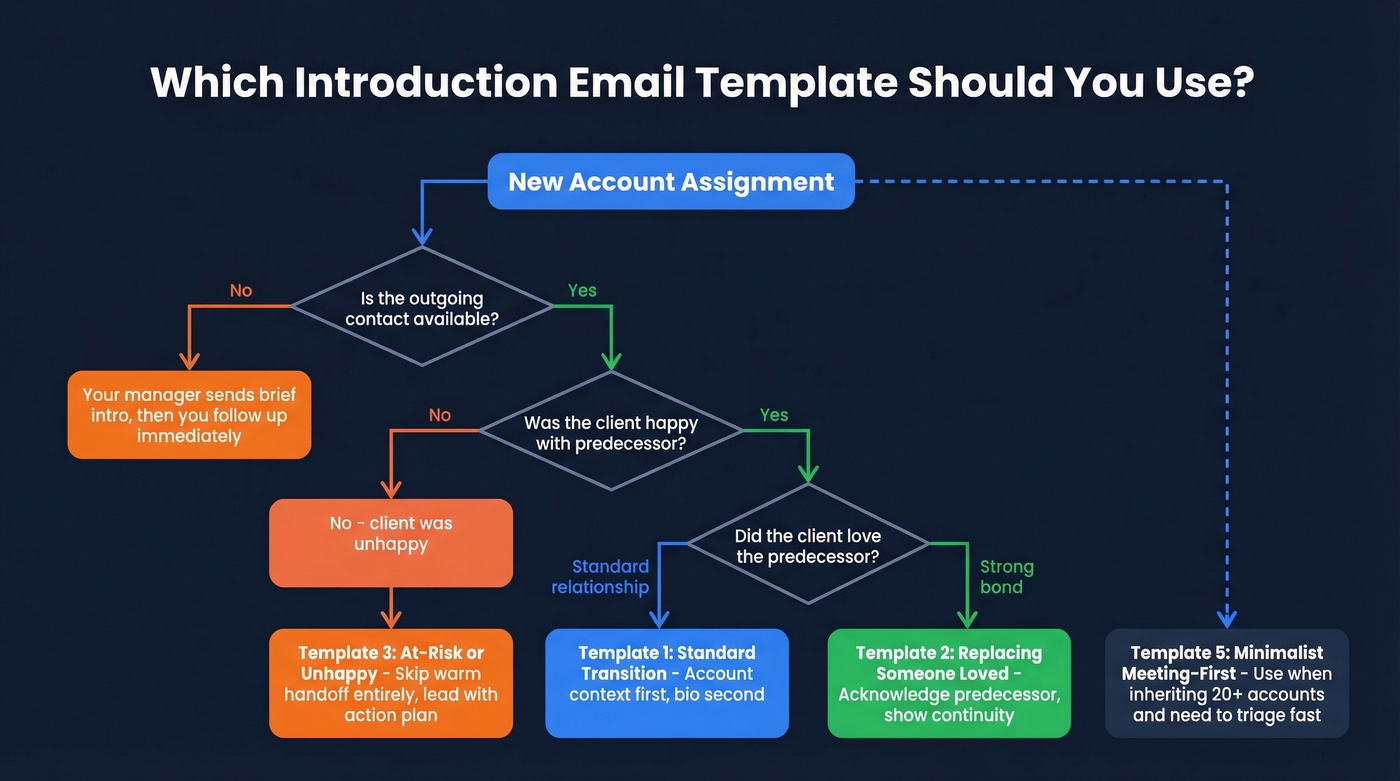
They default to professional-warm. For more casual client relationships, drop the "Best" sign-off and shorten sentences - the structure stays the same.
Let's be honest: Reddit's r/CustomerSuccess community is blunt about this - long personal backgrounds in intro emails come across as "tacky peacocking." Lead with the account, not your resume (same principle as strong email copywriting).
The Standard Transition
Subject: Your Q3 roadmap + a quick intro
Hi [Name],
I've been reviewing your account ahead of your [renewal / project milestone / upcoming QBR] and wanted to introduce myself. I'm [Your Name], and I'll be your primary point of contact going forward.
My job is making sure you're taken care of - advocating for your priorities internally, keeping your [specific initiative] on track, and making sure nothing falls through the cracks.
I'd love to set up 20 minutes to hear what's top of mind for you. [Calendar link]
Best, [Your Name]
Leading with their account context - not your LinkedIn summary - signals you've done the work. This is the go-to format for a standard handoff where you're introducing yourself as the new point of contact.
Replacing Someone the Client Loved
Subject: Continuing the momentum on [project/initiative]
Hi [Name],
[Predecessor] spoke highly of working with your team, and I can see why - the progress on [specific project] has been impressive. I'm [Your Name], and I'll be picking up where [they] left off.
I've already reviewed your account history, open items, and goals for this quarter. My priority is making sure nothing falls through the cracks during this transition.
Can we find 20 minutes this week? [Calendar link]
Acknowledge the predecessor's contributions without dwelling on the departure. That single line of praise for the outgoing person does more for trust than anything you could say about yourself.
The Client Is At-Risk or Unhappy
Subject: Addressing your [specific issue] - and a fresh start
Hi [Name],
I know your experience with [specific issue - e.g., delayed implementation, support gaps] hasn't met the standard you deserve. I'm [Your Name], your point of contact going forward, and resolving this is my first priority.
Here's what I'm doing immediately: [1-2 concrete actions]. I'd like to get on a call this week to align on a plan that works for you.
[Calendar link]
No sugarcoating. Acknowledge the issue, state what you're doing about it, and propose a plan. Clients at risk don't need warmth - they need action.
The Outgoing Contact's Handoff Email
Subject: Introducing [New Contact Name] - you're in great hands
Hi [Name],
I wanted to let you know that [New Contact Name] will be taking over as your primary point of contact starting [date]. I've briefed [them] thoroughly on your account, including [specific item].
[New Contact] has deep experience in [relevant area] and [they'll] be reaching out shortly. It's been a pleasure working with you.
A warm handoff email like this is one of the most effective ways to smooth the transition. The departing person's endorsement does more for trust than anything you can write about yourself.
The Minimalist Meeting-First Email
Skip this template to the front of the line if you're inheriting 20+ accounts and need to triage. This is a popular r/sales-style approach - short, specific, and human.
Subject: Quick call about your account?
Body: "I'm [Your Name], your contact at [Company]. I'd love to schedule 15 minutes to introduce myself and hear what's on your radar. [Calendar link]. PS - Congrats on [specific achievement you found]. Impressive stuff."
The PS personalization tactic takes 30 seconds of research and signals genuine attention. It works better than three paragraphs of biography.
Call First, Email Second
Here's the thing: for your highest-value accounts, pick up the phone before you send the email. The email becomes a recap, not a cold introduction. A five-minute call where the client hears your voice builds more trust than the most perfectly crafted email ever could. We've seen this play out repeatedly across our own account transitions, and it's a consistent recommendation from key account management frameworks like Kapta's KAM process.
If you’re building a repeatable motion, document it as sequence management so the whole team runs the same play.
For accounts under $25K ACV, you often don't need the phone-first approach. Batch your intros with the templates above, personalize the subject lines, and save the calls for accounts that actually move the needle.
Your Follow-Up Cadence
Don't send one email and wait. Sales cadence research from Gong shows meaningful engagement takes 8-12 touchpoints over 17-21 days. For existing customers, compress that - they already know your company.
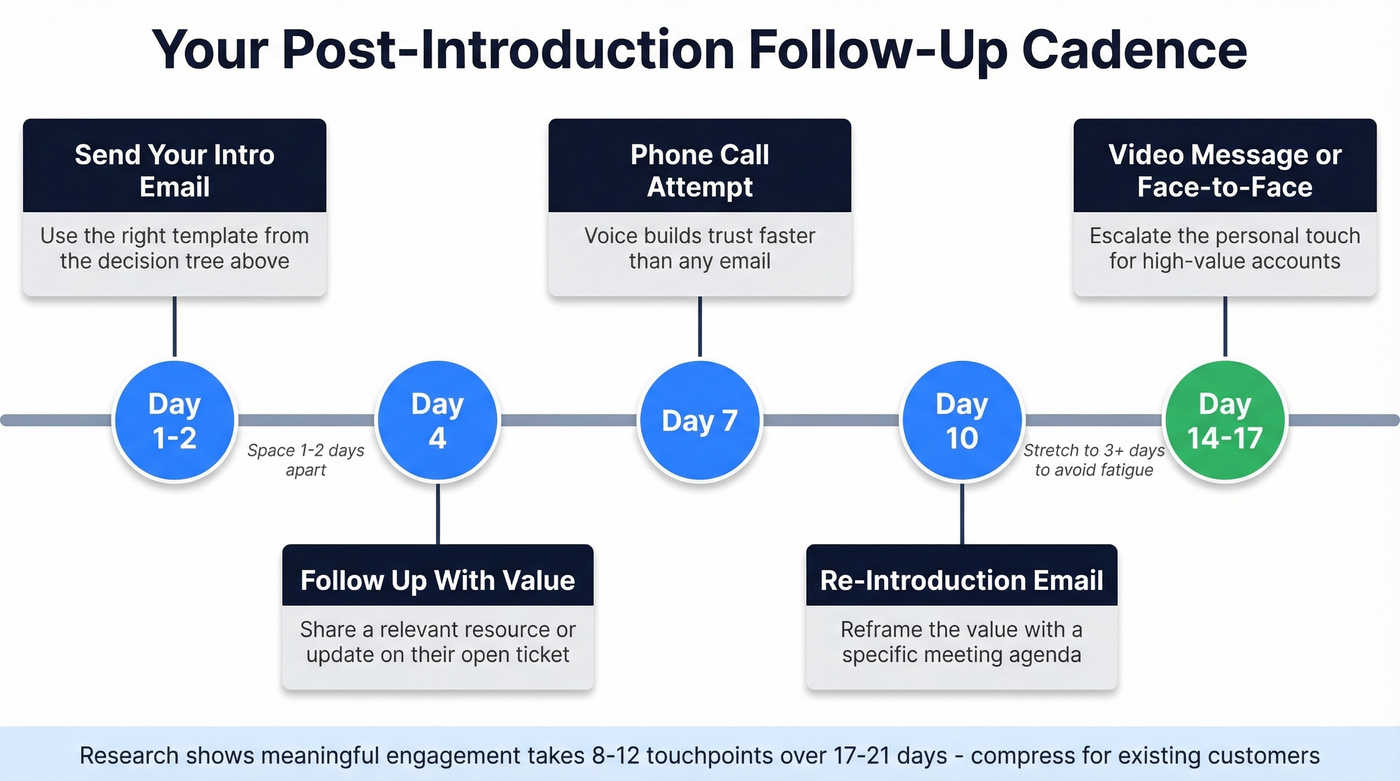
Send your intro on Day 1-2. Follow up on Day 4 with a new piece of value - a relevant resource, an update on their open ticket, something that proves you're already working on their behalf. Attempt a phone call on Day 7, and send a brief email with a specific meeting agenda on Day 10. By Day 14-17, try a video message or suggest a face-to-face if geography allows. Space early touches 1-2 days apart, then stretch to 3+ days to avoid fatigue.
If your first message went unanswered, consider a re-introduction email on Day 10 that reframes the value - sometimes a different angle is all it takes to get a reply. If you want plug-and-play options, use these sales follow-up templates.
Inheriting 15 accounts means inheriting outdated CRM data. Prospeo enriches your contact list with 50+ data points at a 92% match rate - current titles, verified emails, and direct dials so your intro lands with the right person.
Stop emailing people who left six months ago.
FAQ
Should I CC the outgoing contact on my intro email?
Yes, for standard transitions - it shows continuity and gives the client a familiar name in the thread. Skip the CC if the outgoing person was terminated or the client relationship was strained. Never BCC the departing contact; it can backfire and erode trust if discovered.
How soon should I send the introduction email?
Within 48 hours of assignment. Longer gaps signal the company doesn't prioritize the relationship. If you need more prep time, have the outgoing contact send their handoff email first - that buys you a day while keeping the client informed.
What if my CRM has the wrong email for the client?
CRM data goes stale fast - people change roles, companies get acquired, and email formats shift. Run your contact list through Prospeo's email verification before sending. A bounced intro email is worse than a late one.
How many follow-ups should I send if there's no reply?
Plan 3-4 follow-ups over two weeks, each adding new value - a relevant resource, a ticket update, or a specific meeting agenda. After four unanswered touches, loop in your manager or try a different channel like phone or video. Persistence matters, but every touchpoint needs a reason beyond "just checking in."