

IP Warming Strategy: A Practitioner's Playbook for 2026
You just provisioned a fresh dedicated IP, sent your first campaign to 10,000 contacts, and 40% landed in spam. Bounce rate spiked to 5%. Your IP reputation cratered before you even got started. This isn't a scheduling problem - it's a data quality problem, and your IP warming strategy needs to start there.
What You Need (Quick Version)
Authentication is non-negotiable - SPF, DKIM, and DMARC must be live before email #1. Verify your entire list to keep bounces under 2%. Use the conservative schedule below, segment by engagement, and monitor daily. That's the whole strategy. The rest of this article is the detail.
Why Old IP Warmup Guides Fail
IP warming is the practice of gradually increasing send volume from a new or dormant dedicated IP so mailbox providers learn to trust it. You're building a reputation from zero, and every send is a signal.
Every warmup guide written before February 2024 is incomplete. Gmail and Yahoo both enforced new authentication requirements that changed the game - DMARC, one-click unsubscribe, hard spam complaint thresholds. If your playbook doesn't start with authentication, it's outdated. One practitioner on r/SaaS reported burning a fresh domain and getting better results by sending fewer, personalized emails from a real inbox and avoiding sequences entirely. The volume game is dead.
Pre-Warmup Checklist
Don't send a single email until every item here is done.
Configure SPF and DKIM for your sending domain. Both are required for Gmail and Yahoo bulk sender compliance. (If you want a quick sanity check, use this guide on how to verify DKIM is working.)
Publish a DMARC record - minimum
p=nonewith alignment passing. Only 53.8% of senders use DMARC, and just 37% enforce with Reject or Quarantine. You need to be in that minority. If you're unsure what "alignment" means, start with DMARC alignment.Add one-click unsubscribe via the List-Unsubscribe header. Yahoo requires honoring unsubscribes within 2 days.
Set up deliverability monitoring. Google Postmaster Tools and Microsoft SNDS give you visibility into how major ISPs perceive your sending. For a broader stack, see these email reputation tools.
Keep spam complaint rate below 0.1%. Yahoo's official threshold is 0.3%, but operating under 0.1% during warmup keeps you out of trouble almost everywhere.
Verify your entire list before sending. Bounces from unverified lists are the fastest way to kill a new IP's reputation. Run your full list through Prospeo's 5-step verification - 98% accuracy, catch-all handling, spam-trap and honeypot removal. (If you're dealing with legacy issues, this spam trap removal guide helps.) The free tier includes 75 emails plus 100 Chrome extension credits per month, and paid plans run about $0.01/email with no contracts.

Day-by-Day Warmup Schedule
| Days | Daily Volume |
|---|---|
| 1-3 | 50 |
| 4-6 | 100 |
| 7-9 | 500 |
| 10-12 | 1,000 |
| 13-15 | 2,000 |
| 16-18 | 4,000 |
| 19-21 | 8,000 |
| 22+ | Double every 3 days |
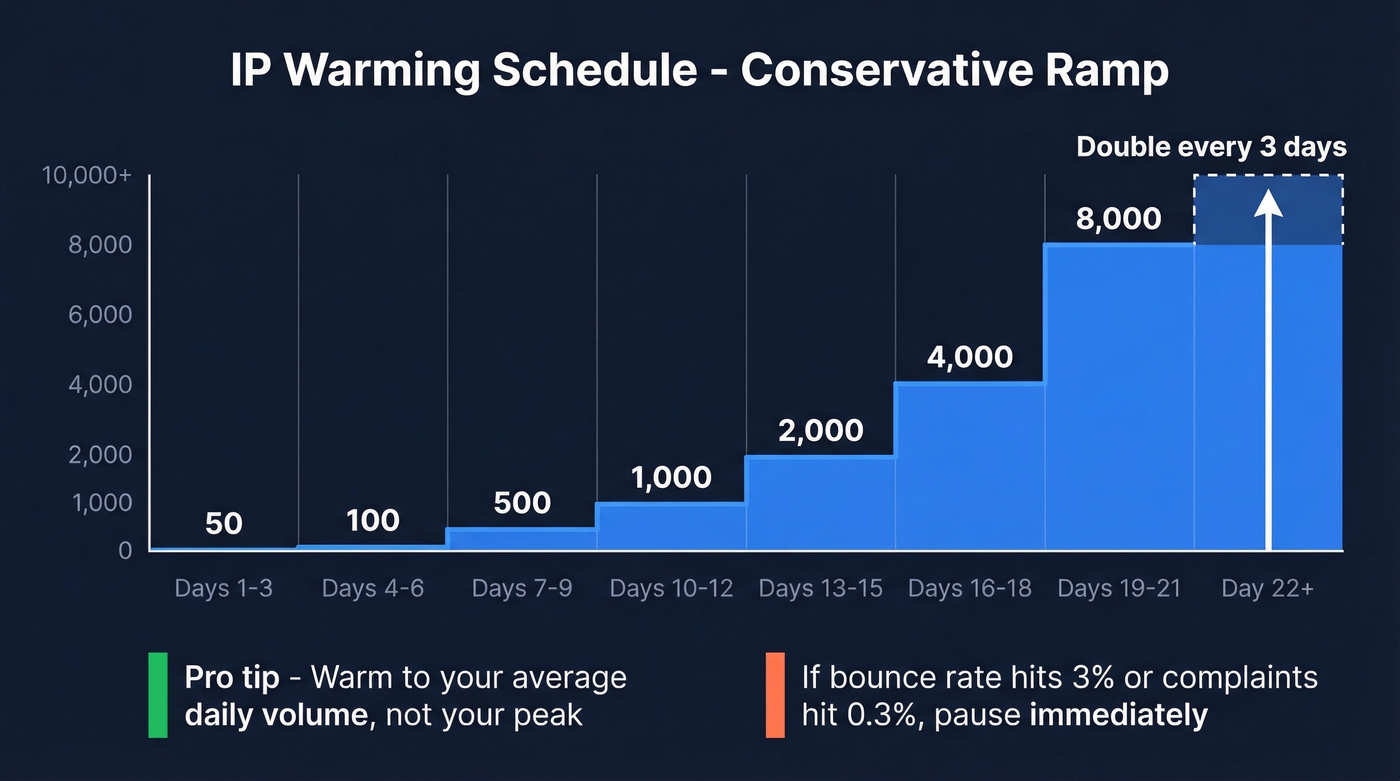
This schedule is adapted from Braze's documentation. Moderate and aggressive ramps exist for senders pushing 500k+ per day with verified, engaged lists - but for everyone else, conservative is the only sane default.
Here's a trick that works well: if you send transactional emails like receipts, password resets, or account confirmations, route them through your new IP first. These generate very high engagement and give ISPs positive signals before you introduce marketing volume.
Warm to your average daily volume, not your peak. If you blast 50,000 once a week but average 7,000 per day, warm to 7,000. Post-warmup, maintain consistent daily volume. Large weekly spikes can undo weeks of progress. (If you're unsure what "safe speed" looks like, use this email velocity guide.)

Every bounce during warmup is a permanent scar on your new IP's reputation. Prospeo's 5-step verification catches invalid addresses, spam traps, and honeypots before they tank your sender score - 98% accuracy at ~$0.01/email.
Clean your list once. Warm your IP without a single setback.
Segment by Engagement
Don't send to your full list during warmup. Segment by recency and engagement - this is what separates successful warmups from ones that stall by week two.
During weeks 1-2, send only to contacts who've opened or clicked in the past 30 days. Weeks 3-4, expand to 60-day actives. For the first six weeks, never send to contacts inactive for 90+ days. When you do add older segments, introduce them in 15% volume chunks so you can isolate any reputation damage before it compounds.
We've watched dozens of teams cut corners on engagement segmentation and blow up new IPs in the first two weeks. One caveat worth flagging: Apple Mail Privacy Protection makes opens unreliable. Use clicks as your primary engagement signal instead. (If you need a clean definition and benchmarks, see click rate formula in email marketing.)
Adjust by Mailbox Provider
You're not running one warmup - you're running three. Distribute each day's volume across Gmail, Microsoft, and Yahoo recipients rather than dumping everything into one provider.
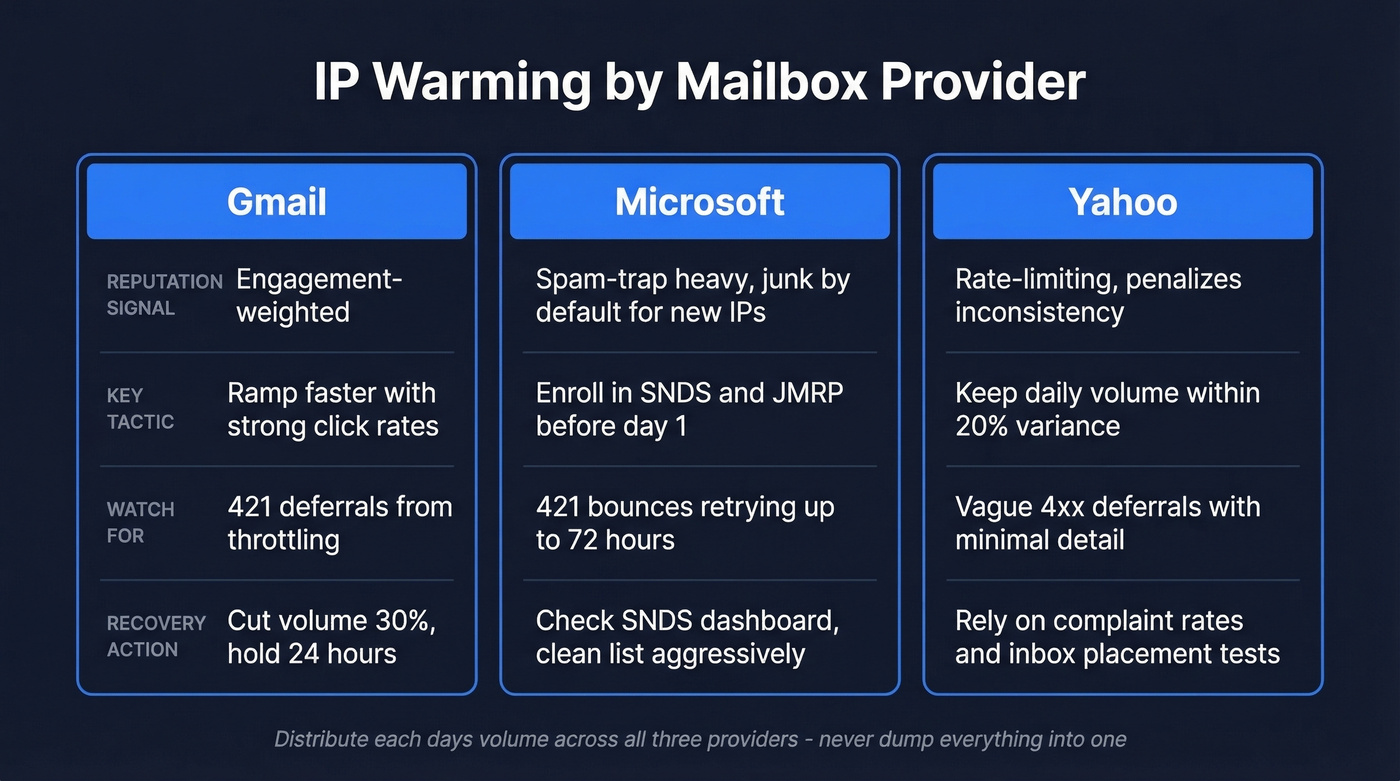
| Provider | Reputation Signal | Key Tactic | Watch For |
|---|---|---|---|
| Gmail | Engagement-weighted | Ramp faster with strong clicks | 421 deferrals - cut volume 30%, hold 24 hrs |
| Microsoft | Spam-trap heavy; junk by default for new IPs | Enroll in SNDS/JMRP before day 1 | 421 bounces retrying up to 72 hrs |
| Yahoo | Rate-limiting; penalizes inconsistency | Keep daily volume within 20% variance | Vague 4xx deferrals |
Yahoo's 4xx deferrals give you almost nothing to work with. Frustrating, but that's the reality - you're flying partially blind and need to rely on complaint rates and inbox placement tests to gauge progress.
Monitoring Thresholds
Check these metrics daily during warmup. No exceptions.
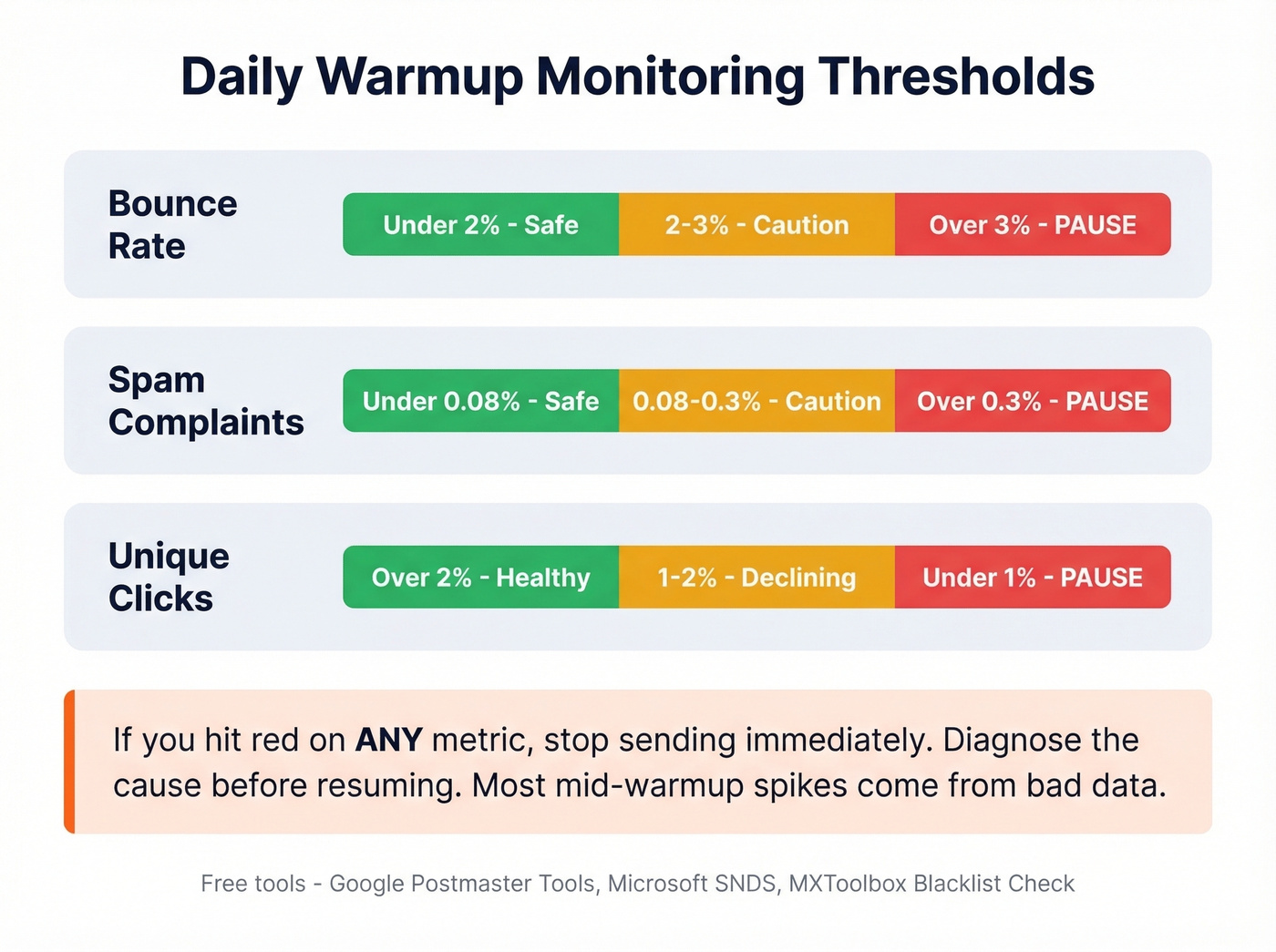
| Metric | Green | Yellow | Red (Pause) |
|---|---|---|---|
| Bounce rate | <2% | 2-3% | >3% |
| Spam complaints | <0.08% | 0.08-0.3% | >0.3% |
| Unique clicks | >2% | 1-2% | <1% |
If you hit red on any metric, stop sending immediately. Diagnose before resuming. The tools you need are free: Google Postmaster Tools for Gmail reputation and MXToolbox for blacklist monitoring. If you're troubleshooting hard failures, this email bounce rate breakdown helps.
Let's be honest about what usually causes mid-warmup bounce spikes: bad data. If your bounce rate suddenly jumps, re-verify the next batch before sending. Bad addresses compound fast on a new IP, and a single batch of stale contacts can set you back two weeks.
Engagement segmentation only works if the emails actually reach real inboxes. Prospeo removes catch-all traps, honeypots, and stale addresses across 143M+ verified emails - refreshed every 7 days, not every 6 weeks like competitors.
Stop diagnosing bounce spikes. Eliminate them at the source.
Domain vs. IP Reputation
Domain reputation matters more than IP reputation in 2026. Full stop.
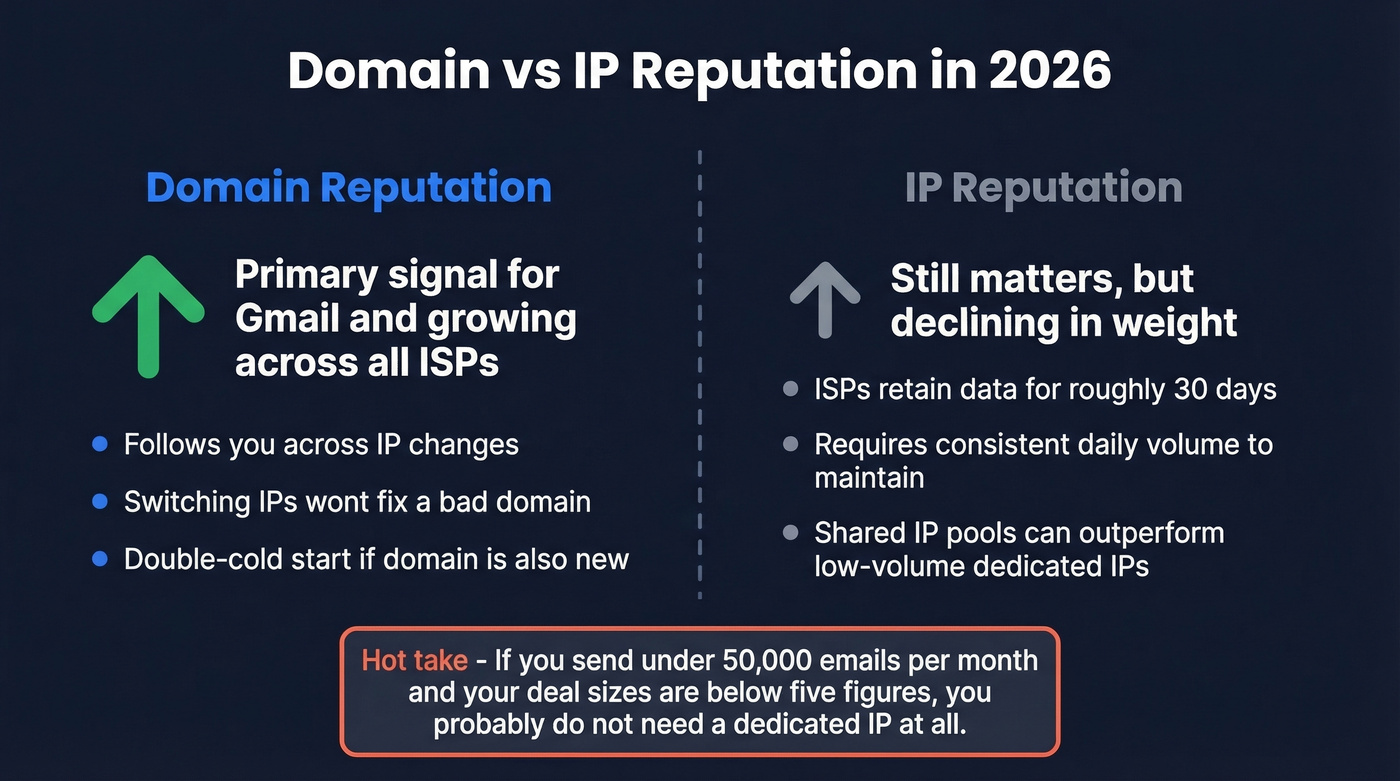
Gmail has been shifting toward domain-based filtering for years, and the other providers are following. Warming an IP on a brand-new domain is a double-cold start - you're building two reputations simultaneously with zero history. Switching IPs doesn't escape poor domain reputation either. We've seen teams burn through three IPs before realizing the domain was the problem all along. If you need a remediation checklist, use this guide on how to improve sender reputation.
Hot take: If your deal sizes sit below five figures and you're sending fewer than 50,000 emails per month, you probably don't need a dedicated IP at all. Shared IPs from reputable ESPs carry pooled reputation that a small sender can't build alone. Skip the dedicated IP unless your volume is high enough to sustain daily consistency - otherwise you're creating a problem you didn't need to have.
FAQ
How long does a full warmup take?
Plan for 4-8 weeks using a conservative schedule. Clean, engaged lists with proper authentication can stabilize in 4 weeks. Larger lists or mixed engagement typically push closer to 8 weeks before ISPs grant full trust.
Do I need to re-warm after a sending gap?
Yes, if the gap exceeds roughly 30 days. Most ISPs retain reputation data for about a month. After that, restart the ramp at a lower volume and treat it like a fresh warmup with the same conservative schedule outlined above.
How do I prevent bounces from destroying my warmup?
Verify your entire list before sending. During warmup, a 2% bounce ceiling is non-negotiable - anything above that and ISPs start throttling. If you're pulling contacts from a CRM that hasn't been cleaned in months, expect trouble unless you verify first.