

Is My Website Blacklisted? A Complete Diagnosis & Fix Guide
You're staring at a Chrome red screen that says "Deceptive site ahead," or your cold email campaign just cratered and someone mentioned Spamhaus. Either way, you need answers fast. If you're asking "is my website blacklisted," the answer depends entirely on which type of block you're dealing with - and there are five of them. Most scanners only check one type, which is why people run three tools, see clean results, and still can't figure out why they're blocked.
What You Need (Quick Version)
Before you spiral, run these three checks:
- Google Transparency Report - paste your domain to check for Safe Browsing flags, the ones that trigger browser warnings and kill your traffic.
- MxToolbox Blacklist Check - scans 100+ email DNSBLs to see if your domain or IP is listed for spam. Fastest way to check spam domain status across all major lists.
- VirusTotal - runs your URL through 70+ antivirus engines to catch malware and phishing flags.
If all three come back clean but you're still blocked somewhere, you're dealing with URL reputation filtering or a corporate/ISP web filter - not a traditional DNSBL-style listing. That distinction matters more than most guides will tell you.
Quick test: remove your website URL from your email signature and resend. If delivery improves, you've got a URL/domain reputation problem rather than classic SMTP/IP blacklisting.
Five Types of Website Blacklists
Most people run one scanner and either panic or get a false sense of security. Here's what's actually going on.
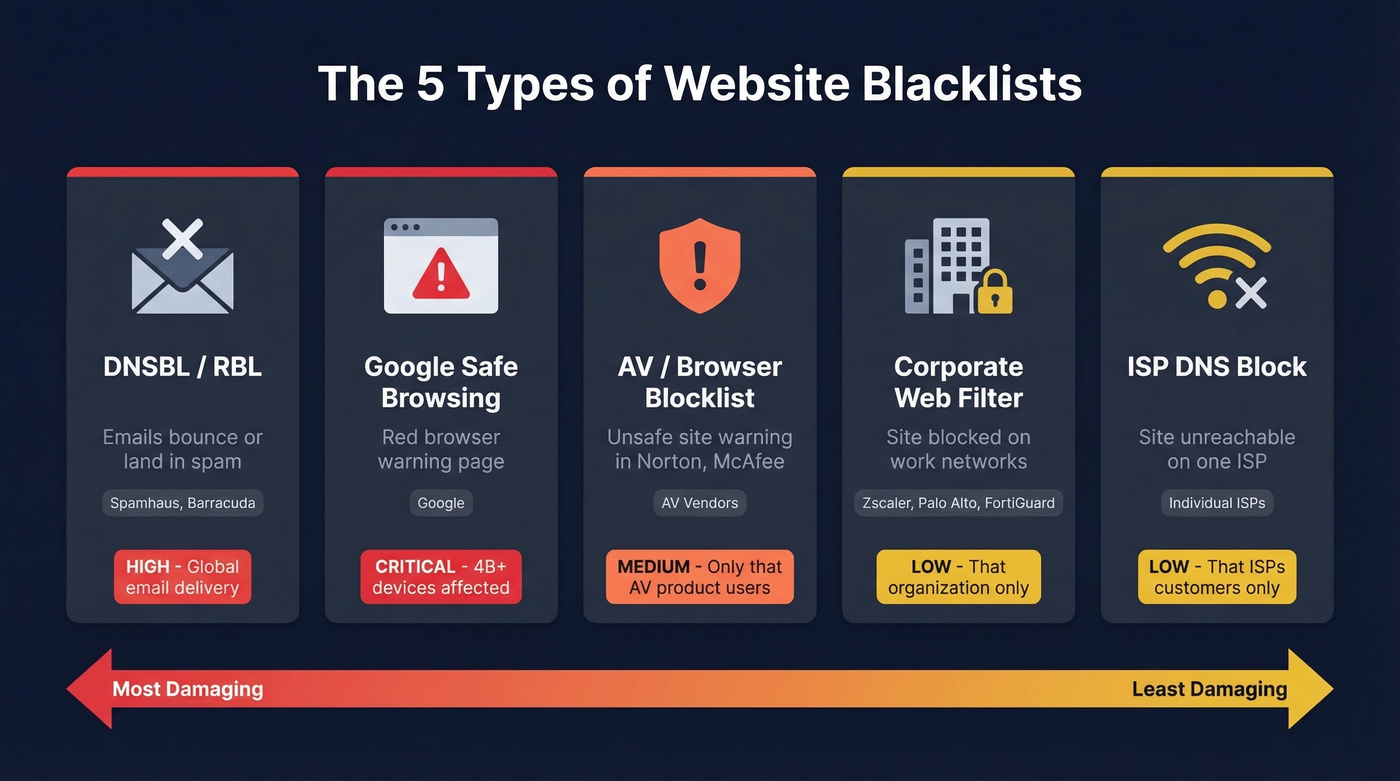
| Type | What It Looks Like | Who Controls It | Scope |
|---|---|---|---|
| DNSBL/RBL | Emails bounce or land in spam | Spamhaus, Barracuda, etc. | Global email delivery |
| Google Safe Browsing | Red browser warning page | Browser/device warnings + Google ecosystem | |
| AV/Browser Blocklist | "Unsafe site" warning in Norton, McAfee | AV vendors | Users of that AV product |
| Corporate Web Filter | Site blocked on work network | Zscaler, Palo Alto, FortiGuard | That organization only |
| ISP DNS Block | Site unreachable on one ISP | Individual ISPs | That ISP's customers only |
Google Safe Browsing is the big one - it protects 4 billion+ devices and drives warnings across Chrome and Android, impacting Google Search, Gmail, and Google Ads simultaneously. Spamhaus protects more than 3 billion inboxes through domain-based blocklisting that covers both IPs and domains. These two cause real, measurable damage.
But a corporate web filter blocking your site on one company's network doesn't touch your Google rankings. An ISP DNS block on Optimum doesn't propagate to Comcast. We've seen this confusion play out dozens of times: someone runs three DNSBL scanners, gets clean results, and still can't figure out why their site is blocked at a prospect's office. The scanner checks email blacklists while the actual problem is a Zscaler URL category flag. Totally different system, totally different fix.
For context on why these systems exist: 80-85% of all email is spam, with 300-400 billion spam messages observed on a given day. Blacklists are the internet's immune system. Sometimes they catch legitimate sites in the crossfire.
How to Check If Your Site Is Blacklisted
The right tool depends on which type of block you suspect.
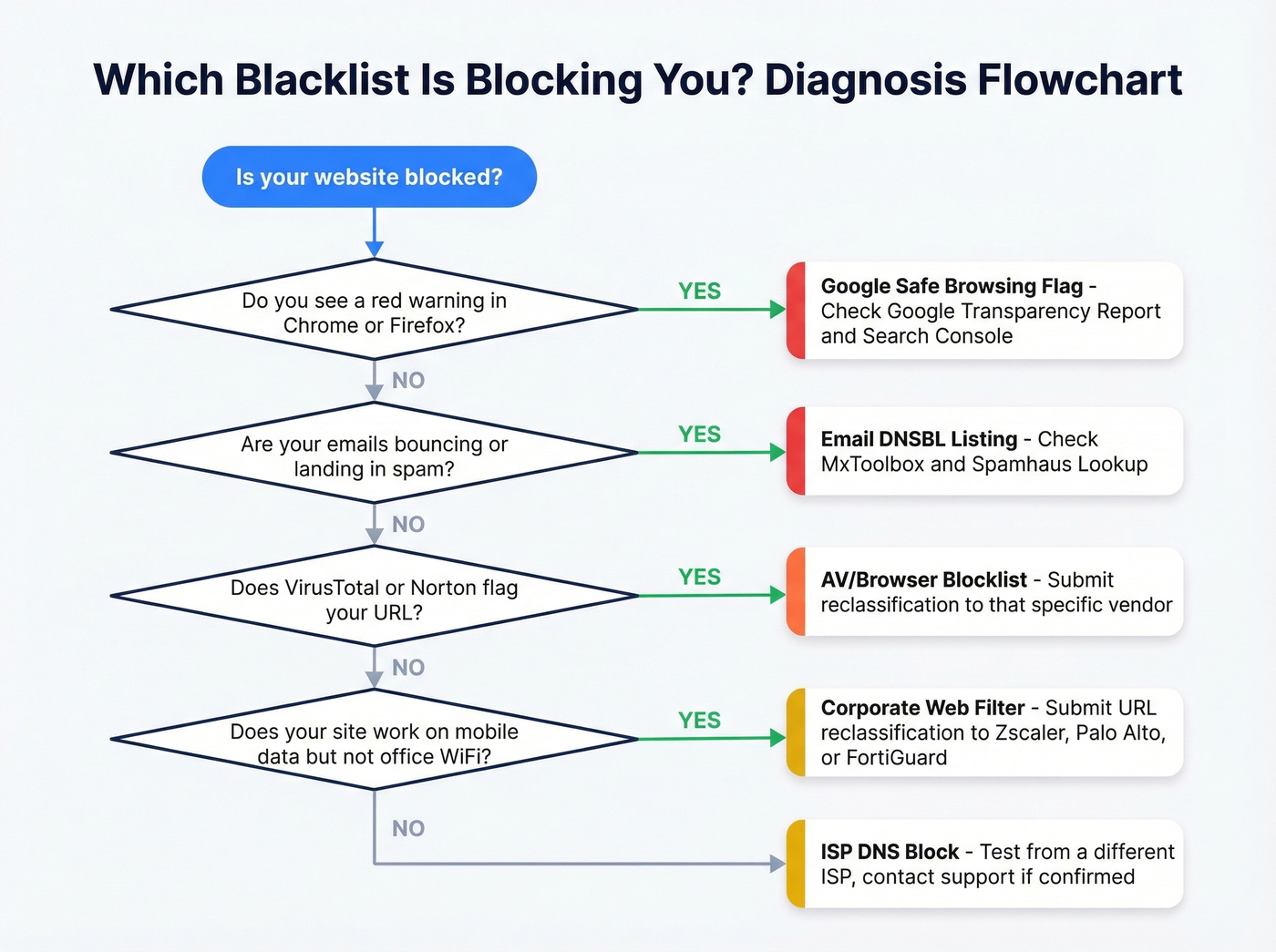
| Blacklist Type | Primary Check Tool | Backup Tool |
|---|---|---|
| Google Safe Browsing | Google Transparency Report | Search Console |
| Email DNSBL | MxToolbox | Spamhaus Lookup |
| AV/Browser | VirusTotal | Norton Safe Web, URLVoid |
| Corporate Filter | Test from mobile data | Vendor reclassification form |
| ISP Block | Test from different ISP | Contact ISP support |
Google Safe Browsing
Go to the Google Transparency Report and paste your domain. You're looking for status labels like "Dangerous" or "Deceptive site ahead." Then check Google Search Console under Security & Manual Actions, then Security Issues for specific categories: Malware, Phishing, Unwanted Software, or Harmful Downloads.
Email DNSBLs and Domain Blocklists
Use MxToolbox's blacklist checker to scan 100+ lists at once, and run a separate check at check.spamhaus.org. Check both your domain AND your sending IP independently - they're tracked separately, and either one can be listed while the other is clean. For domain-level reputation specifically, Spamhaus's DBL is the most authoritative source. If you're doing outbound, it also helps to monitor sender reputation alongside blacklist status.
AV and Browser Blocklists
Run your URL through VirusTotal, URLVoid, Norton Safe Web, and Sucuri SiteCheck. If one engine flags you but others don't, you've got a vendor-specific listing, not a global blacklist. Don't waste time on a full remediation - just submit a reclassification to that specific vendor.
Corporate Web Filters
This is the trickiest to diagnose. If your site works on your phone's mobile data but not on your office WiFi, you've got a corporate filter issue. Test from multiple networks. For Zscaler, Palo Alto, or FortiGuard blocks, each vendor provides a URL reclassification form - submit it and expect a response in 1-7 days.
ISP-Level Blocks
Same diagnostic approach: test on mobile data versus your home ISP. If it's ISP-specific, contact their support directly. Fair warning - Reddit threads about ISP blocks are full of people stuck in support loops with no resolution. The consensus on r/sysadmin is that persistence and escalation to a supervisor are your best tools here.

Spam traps and high bounce rates are the #1 reason domains land on email blacklists - and it's 100% a data quality problem. Prospeo's 5-step verification delivers 98% email accuracy with catch-all handling, spam-trap removal, and honeypot filtering built in. Teams switching from other providers cut bounce rates from 35%+ to under 4%.
Stop sending to bad data. Start sending to verified contacts at $0.01 each.
Why Websites Get Blacklisted
SEO spam accounts for roughly 60% of affected websites. Attackers inject hidden links to boost their own sites' rankings, and your domain takes the hit.
The attack patterns are predictable: drive-by downloads, malicious redirects, hidden iframes loading external content, and phishing pages buried in subdirectories. Attackers love hosting phishing on hacked sites because they don't have to buy domains with identifying info - they piggyback on your SSL certificate for legitimacy. A single hidden phishing page in /wp-content/uploads/ can get your entire domain flagged, and attackers sometimes create malicious subdomains like paypal.yoursite.com to exploit your certificate for phishing campaigns that look disturbingly legitimate.
The entry point is almost always outdated CMS software, plugins, or themes with known vulnerabilities.
On the email side, bad sending practices are the fastest path to a DNSBL listing. Sending to unverified lists with high bounce rates triggers spam traps - addresses specifically designed to catch senders who don't maintain clean lists. This is the most preventable cause of blacklisting, and it's entirely a data quality problem. If you're seeing issues, start by checking your email bounce rate and tightening your email deliverability fundamentals.
The Business Impact
A Google Safe Browsing flag is catastrophic. Only 9-23% of users click through malware or phishing warnings - meaning you lose up to 91% of visitors the moment that red screen appears. Blacklisted sites can lose up to 95% of traffic overnight.
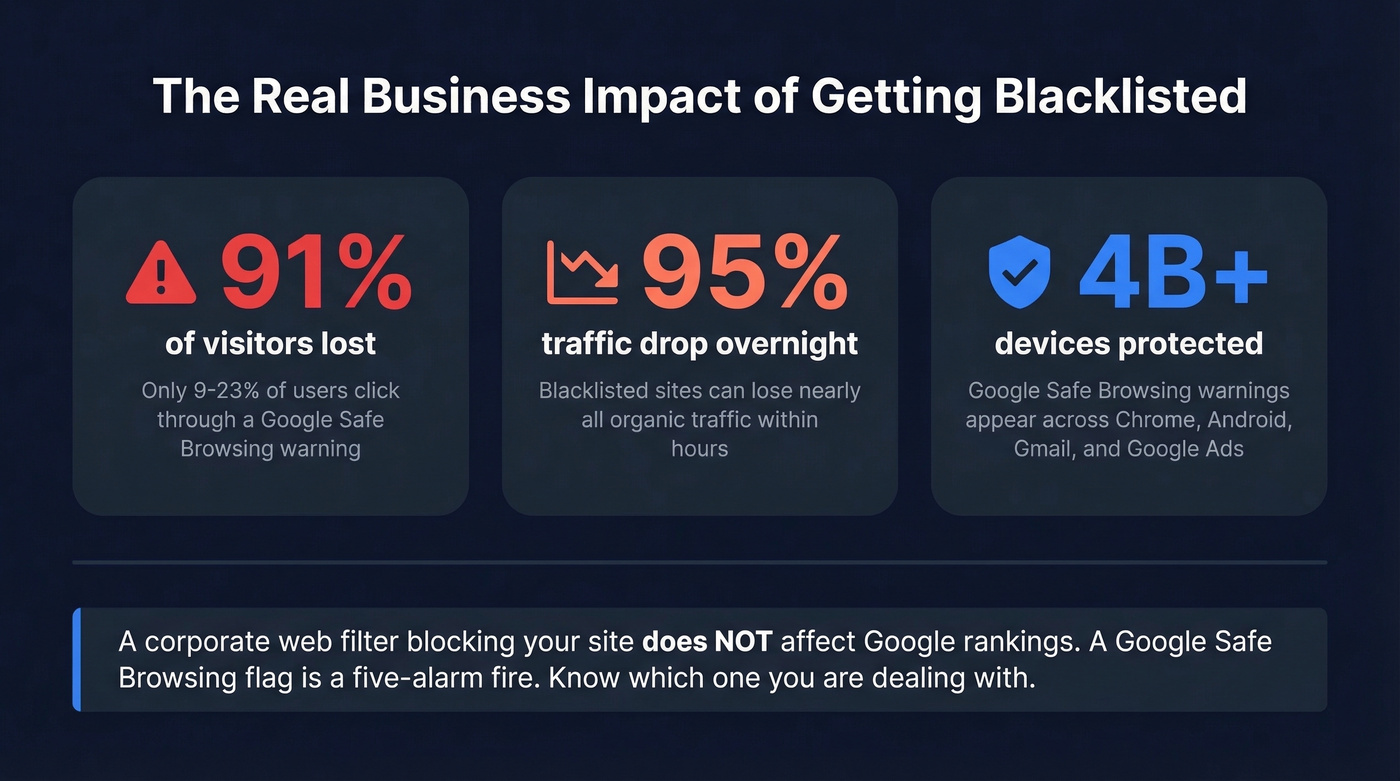
The blast radius extends beyond organic search. Google Ads can suspend campaigns pointing to flagged domains. Safe Browsing flags ripple through Chrome, Android, Gmail, and more. If your business runs on inbound traffic or paid acquisition, a Safe Browsing flag is an emergency - treat it like your site is down.
Here's the thing most guides won't tell you: if your site is blocked by a corporate web filter or a single ISP, stop panicking. It doesn't affect your Google rankings. It doesn't propagate to other networks. Fix it when you can, but don't burn a weekend on it. A Google Safe Browsing flag, on the other hand, is a five-alarm fire. Know which one you're dealing with before you do anything else.
How to Get Delisted
Google Safe Browsing Removal
Don't request a review until you're 100% clean. Repeated review requests without full cleanup can prolong the listing - Google takes note.
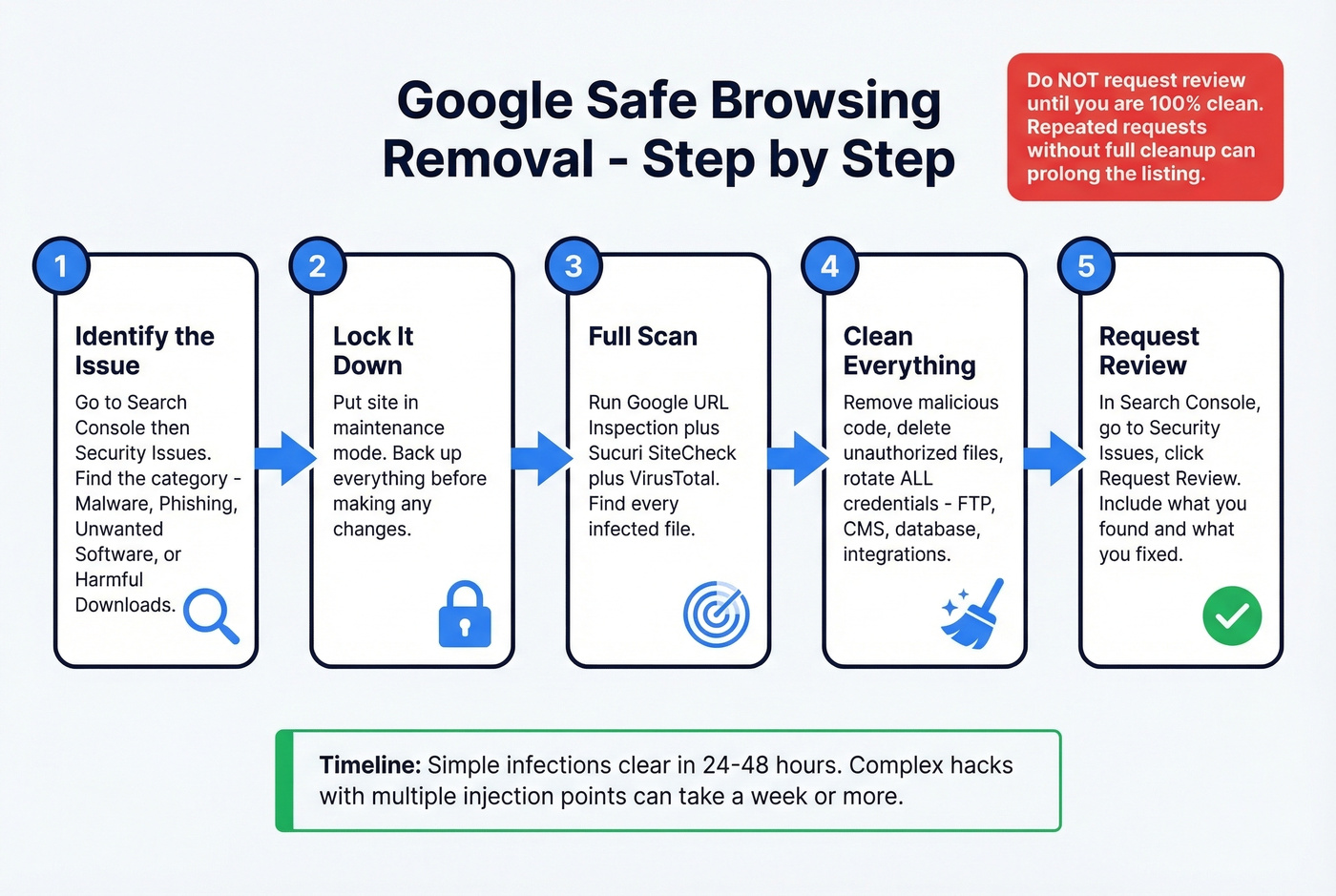
- Go to Search Console, then Security Issues, and identify the category: Malware, Phishing, Unwanted Software, or Harmful Downloads.
- Put your site in maintenance mode. Back up everything before making changes.
- Run a full scan using Google URL Inspection + Sucuri SiteCheck + VirusTotal. Find every infected file.
- Clean the infection. Remove malicious code, delete unauthorized files, and rotate every credential - FTP, CMS admin, database, third-party integrations. All of them.
- In Search Console, go to Security Issues and click Request Review. Include a concise summary of what you found and what you fixed.
Timeline: minor single-page infections often clear in 24-48 hours. Complex hacks with multiple injection points can take a week or more.
Spamhaus and DNSBL Removal
Use check.spamhaus.org to identify which specific list you're on - SBL, XBL, DBL, PBL, CBL, or CSS. This matters because the removal process differs by list.
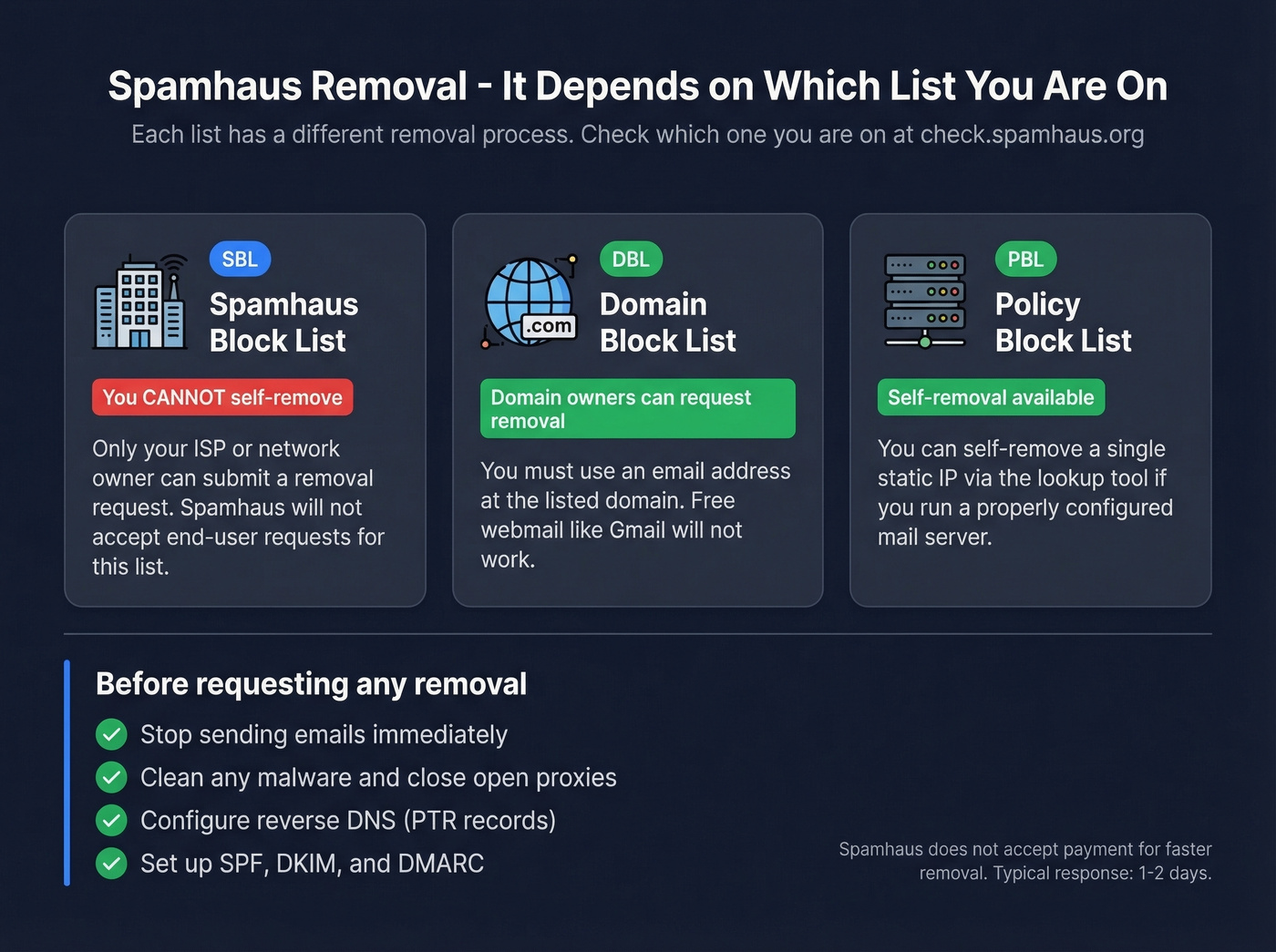
- SBL: Only your ISP or network owner can submit a removal request. Spamhaus won't accept end-user requests for this list.
- DBL: Domain owners can request removal, but you must use an email address at the listed domain. Free webmail like Gmail won't work.
- PBL: You can self-remove a single static IP via the lookup tool if you're running a properly configured mail server.
Before requesting removal: stop sending emails, clean any malware, close open proxies, configure reverse DNS (PTR records), and set up SPF/DKIM/DMARC. Spamhaus doesn't accept payment for faster removal. They typically reply within a day or two once your request is valid. If you need the full playbook, follow our Spamhaus blacklist removal guide.
AV Vendor Reclassification
Norton Safe Web: search your domain and click "Submit Site for Review." McAfee TrustedSource: register an account, then request re-evaluation. Reviews typically take hours to several days.
For enterprise web filters like Zscaler, Palo Alto, and FortiGuard, each vendor has a URL reclassification form on their site. Submit it with evidence that the issue is resolved. Expect 1-7 day turnaround.
How to Prevent Blacklisting
Prevention splits into two tracks: website security and email hygiene.
Website security is about closing the doors attackers walk through. Keep CMS, plugins, and themes updated - this is a major attack vector. Run regular malware scans with Sucuri SiteCheck. Set up Google Search Console alerts for security issues. Use strong unique passwords with 2FA on every admin account, and enable file integrity monitoring to catch unauthorized changes before they trigger a flag.
Email hygiene is about protecting your sender reputation. Set up SPF, DKIM, and DMARC for your sending domain. (If you’re troubleshooting policy issues, start with DMARC alignment and a clean SPF record.) Use double opt-in for marketing lists. Remove non-engaged addresses regularly and stay below 0.1% spam complaint rate. Never send from a flagged domain - fix it first. If you're sending at scale, keep an eye on email velocity and use dedicated email reputation tools.
Let's be honest about the root cause for most outbound teams: bad contact data. If your domain got blacklisted because you blasted a list full of dead addresses and spam traps, the fix isn't just delisting - it's switching to verified data. We've seen teams go from 35% bounce rates to under 3% just by running contacts through Prospeo's 5-step verification, which includes catch-all handling, spam-trap removal, and honeypot filtering. Stack Optimize built to $1M ARR using that same data with zero domain flags across all their clients.

Skip the prevention advice above if your site was hacked - that's a security problem, not a data problem. But if your blacklisting came from outbound email, data quality is where you start. For a safer sending workflow, see the best way to send bulk email without getting blacklisted.
Every unverified email you send is a coin flip between a reply and a Spamhaus listing. Prospeo refreshes 300M+ profiles every 7 days - not every 6 weeks like competitors - so you're never sending to stale addresses that have turned into spam traps. Stack Optimize built a $1M agency on Prospeo data with sub-3% bounce rates and zero domain flags.
Your domain reputation is too valuable to gamble on outdated data.
FAQ
How long does it take to get delisted?
Google Safe Browsing clears in 24-48 hours for minor infections, a week or more for complex hacks. Spamhaus typically replies within a day or two after a valid removal request. Norton and McAfee reviews take hours to several days. Enterprise web filters like Zscaler or FortiGuard usually process reclassification requests in 1-7 days.
Can a blacklist affect my SEO rankings?
A Google Safe Browsing flag can drop your SERP click-through rate by 90%+ and trigger "This site may be hacked" labels in search results. That's devastating for organic traffic. Corporate or ISP-level blocks, however, don't affect Google rankings at all - they're local to that network.
Why does my scan show clean when I'm still blocked?
Most free scanners only check email DNSBLs. If your problem is URL reputation filtering, a Safe Browsing flag, or a corporate web filter, those scanners won't detect it. Use the Google Transparency Report for browser-level flags and VirusTotal for AV engine detections instead.
Can I get blacklisted from sending cold emails?
Yes - sending to unverified lists with high bounce rates or spam-trap addresses is one of the fastest ways to land on Spamhaus or Barracuda lists. Running a domain reputation audit and verifying every address before you send is the simplest way to stay off those lists entirely.
Does a blacklist on my IP affect my domain?
They're tracked independently. Your IP can be clean while your domain is listed, or the reverse. Always check both using MxToolbox or the Spamhaus Lookup tool. If you're on shared hosting, someone else's behavior on the same IP can get you listed even if your domain is clean - one more reason to use a dedicated sending IP for outbound email.