

How to Find Someone's Email Address: 7 Methods That Work in 2026
You found the perfect prospect - name, title, company - but no email anywhere on the page. It's the most common dead end in outbound sales, and it's completely fixable.
Is there a way to find someone's email address without paying hundreds a month or resorting to guesswork? Yes. Here are seven methods that actually work, ranked from fastest to scrappiest.
The Short Answer
Is It Legal to Look Up Someone's Email?
Yes, in most B2B contexts. But the rules shift by country, and fines can exceed $50K per non-compliant message.
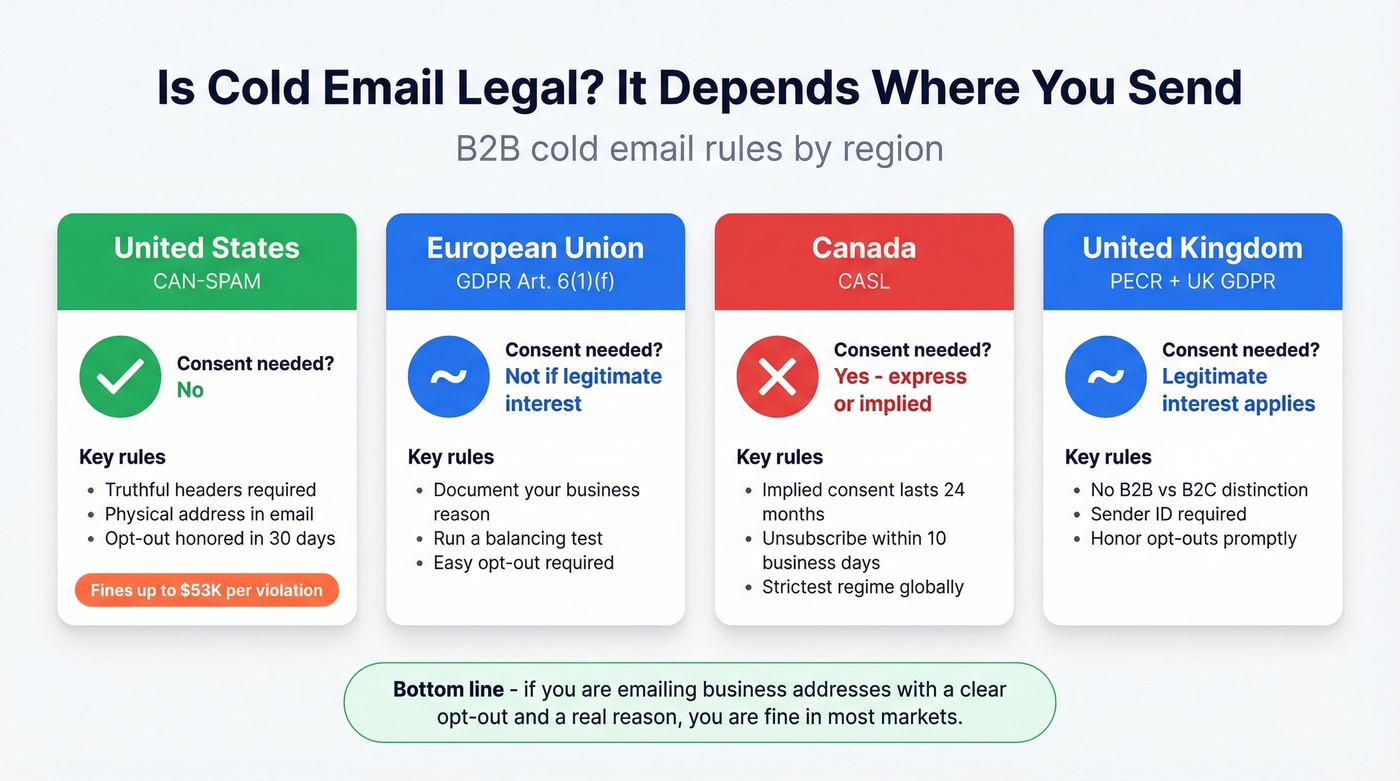
US (CAN-SPAM): Cold email is legal without prior consent. You need truthful headers, a physical address, and a working opt-out honored within 30 days. Penalties run $51,744-$53,088 per violation.
EU (GDPR): Article 6(1)(f) allows B2B cold email under "legitimate interest" if you can document purpose, necessity, and a balancing test. You need a real business reason and an easy opt-out.
Canada (CASL): The strictest regime. Consent-first, with a narrow implied-consent window - 24 months for an existing business relationship. Unsubscribe must be honored within 10 business days.
UK (PECR): Follows GDPR principles with no B2B/B2C distinction. Focus on sender identification and honoring opt-outs.
The practical takeaway: if you're emailing business addresses with a clear opt-out and a legitimate reason, you're fine in most markets.

You just read seven ways to find someone's email. One of them gives you 98% accuracy, catch-all verification, and 75 free emails per month with zero commitment. Prospeo's 5-step verification eliminates bounces so you never burn your domain on a guessed address.
Skip the guesswork - verify before you send.
Seven Ways to Find Someone's Email Address
1. Use an Email Finder Tool
Use this if: you need verified emails at scale, you're running outbound sequences, or you can't afford bounces above 2%.
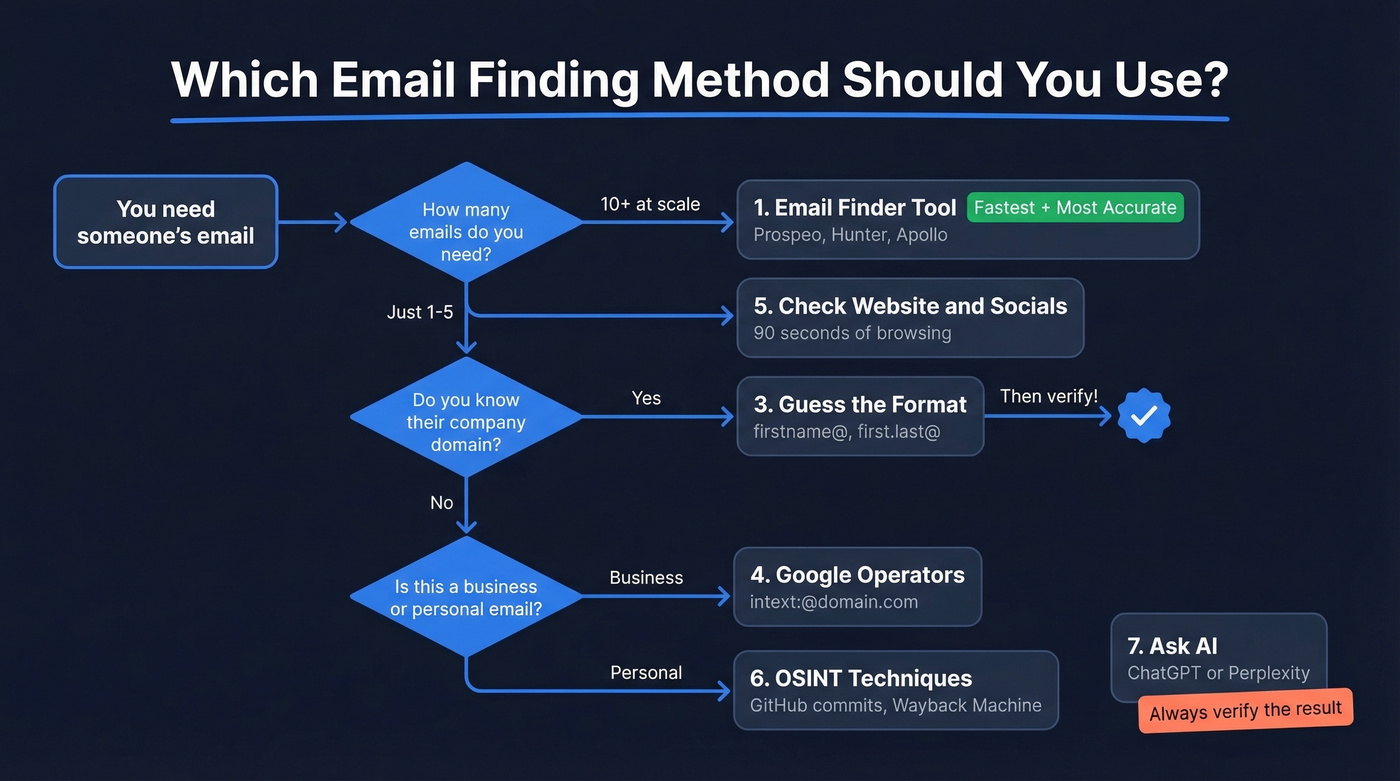
Skip this if: you're looking for a personal Gmail - these tools focus on professional domains.
We've tested dozens of email finders over the years. Prospeo is the best starting point: 300M+ professional profiles, 98% email accuracy, and a proprietary 5-step verification process that handles catch-all domains, spam traps, and honeypots. You get 75 free emails per month - enough to test properly - and paid plans work out to roughly $0.01 per email with no annual contract.

Hunter is the other name everyone knows. It offers 50 free searches per month and starts at $49/mo for paid plans, with solid verification. The tradeoff: its database is smaller than some all-in-one platforms, so it often works better as a verification layer than a primary source. If you're comparing options, see our breakdown of Hunter alternatives.
Apollo has a massive database (270M+ contacts) and 75 free credits, but the consensus on r/sales is that older contacts bounce frequently. At $59/user/month, per-seat pricing adds up fast for teams. Some tools like Instantly's Lead Finder use waterfall enrichment - checking multiple data sources sequentially - to improve hit rates, but verification quality still varies.
2. Use a Browser Extension
If you're doing quick lookups while prospecting, a Chrome extension can be faster than switching tabs.
3. Guess the Format (With Data)
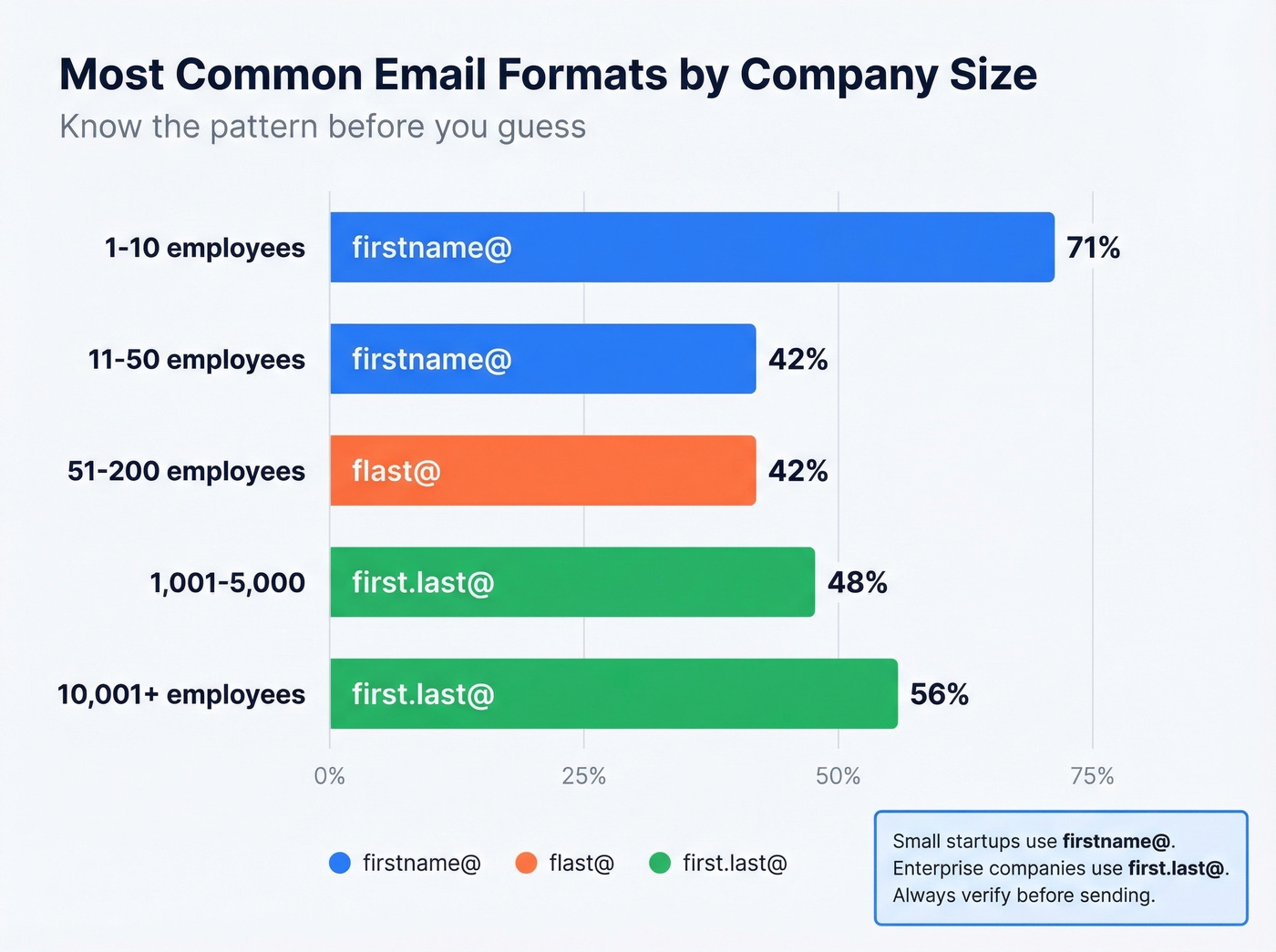
Most companies follow predictable email patterns. What matters is knowing which pattern to guess based on company size. An analysis of email format prevalence breaks it down clearly:
| Company Size | Most Common Format | % |
|---|---|---|
| 1-10 employees | firstname@ | 71% |
| 11-50 employees | firstname@ | 42% |
| 51-200 employees | flast@ | 42% |
| 1,001-5,000 | first.last@ | 48% |
| 10,001+ | first.last@ | 56% |
For a 15-person startup, try firstname@company.com first. For a Fortune 500, try first.last@company.com. Generate a few permutations, then always verify before sending - a guessed email that bounces is worse than no email at all. (If you're doing this workflow often, our name to email guide goes deeper.)
4. Google Search Operators
Free, surprisingly effective, and most people don't know the syntax. Here are copy-paste queries that work:
intext:"@example.com"- surfaces pages containing emails at that domainsite:example.com filetype:pdf (email OR "@")- finds emails buried inside PDFssite:example.com (press OR "media") ("contact" OR "email")- targets PR and media contact pagesintitle:"team" ("email" OR "contact") "fintech"- finds team pages across an industrycache:example.com/contact- pulls cached versions of contact pages that may have been updated
Per Ahrefs' operator list, site:, filetype:, intitle:, and intext: are all confirmed working. Skip deprecated operators like link: and info:. For anything over 50 prospects, switch to a tool - you'll burn hours otherwise.
If you hit a wall, this is a common email not found scenario.
5. Check Their Website and Socials
The obvious step people skip. Check the company's Contact page, About page, and team directory. YouTube About tabs list business emails more often than you'd expect, and X/Twitter bios include them too.
It's manual, but for a single high-value prospect, 90 seconds of browsing can save you a tool credit.
6. OSINT Techniques (Advanced)
When standard methods fail - especially for personal emails or hard-to-find contacts - OSINT fills the gap:
- GitHub commits - email addresses are embedded in commit metadata. Check a user's recent commits.
- idcrawl.com - search a username across platforms to find linked accounts.
- Wayback Machine - check archived pages that listed an email before being updated.
- Google the username in quotes -
"jsmith2847"surfaces profiles across forums, GitHub, and niche sites.
These work best when the person reuses usernames or has posted their email publicly. Success rates are lower than B2B tools, but the price is right.
7. Ask an AI Assistant
ChatGPT and Perplexity with web search enabled can surface publicly listed emails by searching company pages, press releases, and directories. Here's the thing: they're searching the same public sources you could search manually - they don't have access to proprietary databases. Always verify whatever they return. This is a faster version of Googling, not a replacement for a dedicated tool.
Our take: If your average deal size is under $5K, you probably don't need a $59/user/month platform. Start with a generous free tier, master Google operators, and only upgrade when volume demands it. The best email finder is the one that pays for itself within the first week. For more tactics, see our sales prospecting techniques.
Quick Tool Comparison
| Tool | Free Tier | Paid From | Database | Verification | Best For |
|---|---|---|---|---|---|
| Hunter | 50/mo | $49/mo | Not public | Built-in | Verification layer |
| Apollo | 75 credits | $59/user/mo | 270M+ contacts | Built-in | Large database |
| Snov.io | 50 credits | ~$39/mo | Not public | Built-in | International leads |
| GetProspect | 50 valid emails | $49/mo | Not public | Built-in | Simple UI |
| Anymail Finder | 100 test credits | $14/mo | Not public | Built-in | Pay-per-valid model |
If you're building lists (not just one-off lookups), consider data enrichment services or dedicated email list providers.
Always Verify Before Sending
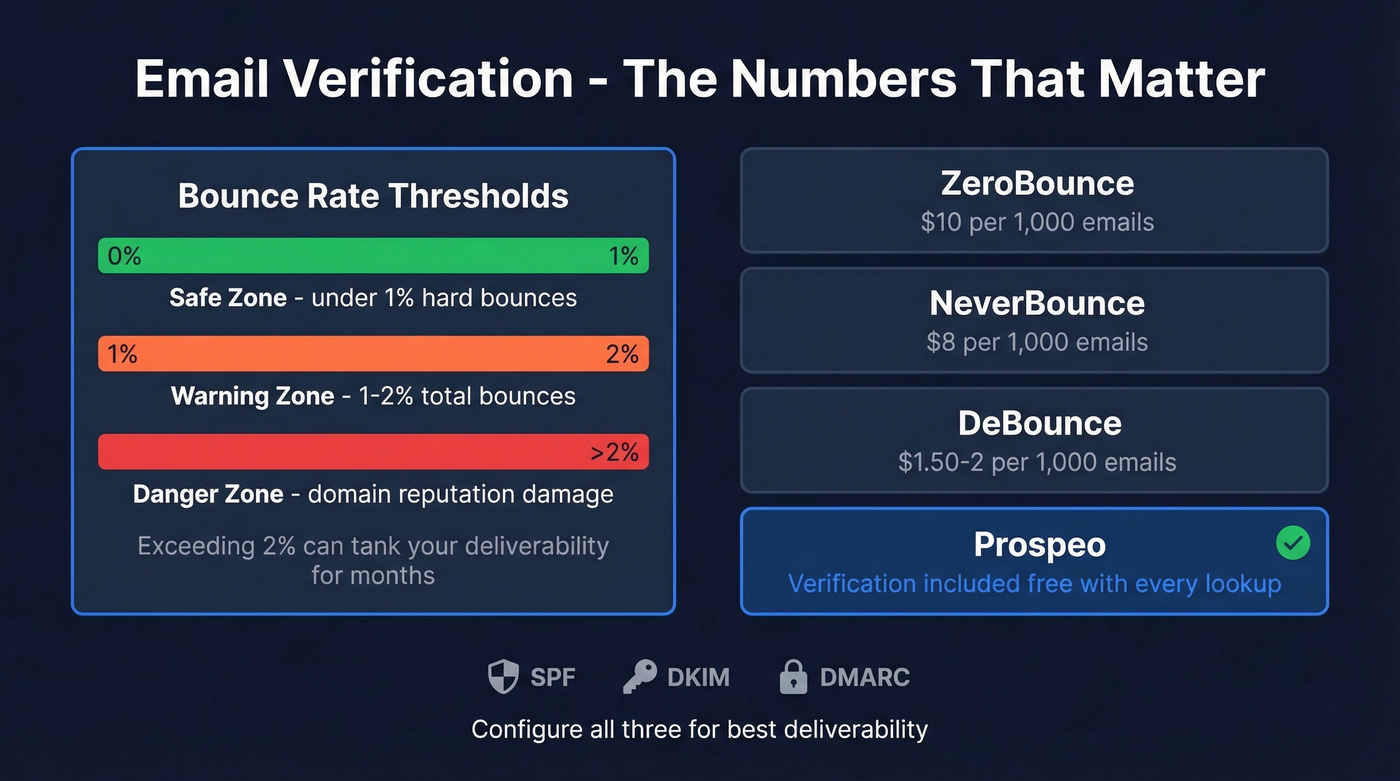
Even the best email finder will occasionally return an address that bounces. The industry benchmark is to keep total bounces below 2%, with hard bounces under 1%. Exceed that and your domain reputation takes a hit that can tank deliverability for months. (More detail in our email bounce rate benchmarks.)
One wrinkle most guides skip: catch-all domains. These servers accept mail to any address, so verification tools can't definitively confirm whether a specific mailbox exists. We've seen teams burn through sender reputation because they assumed "accepted by server" meant "real inbox." It doesn't.
Standalone verification costs vary. ZeroBounce runs about $10 per 1,000 emails, NeverBounce charges $8 per 1,000, and DeBounce sits at $1.50-2 per 1,000. Prospeo eliminates this step - its 5-step verification runs automatically on every email found, including catch-all handling and spam-trap removal.
Beyond verification, make sure your sending domain has SPF, DKIM, and DMARC records configured. These materially improve deliverability and help mailbox providers trust your mail. If you want a deeper checklist, see our email deliverability guide and how to improve sender reputation.
Google operators and format guessing work for one-off lookups. But if you're prospecting at scale, you need 300M+ verified profiles refreshed every 7 days - not stale data that bounces at 35%. At $0.01 per email, Prospeo pays for itself on your first campaign.
Find any professional email in seconds, not hours.
FAQ
Can you find someone's email if it's a personal Gmail or Yahoo?
Rarely. Email finder tools focus on professional domains - that's where the databases are built. Personal addresses are almost never publicly listed. OSINT techniques can surface them if the person has posted the address publicly, but success rates are much lower than B2B lookups.
What's the most accurate email finder in 2026?
Prospeo delivers 98% email accuracy with built-in 5-step verification, the highest independently measurable rate among major tools. Vendor-run benchmarks are notoriously unreliable since each vendor designs tests to favor their own product - pick a tool with built-in verification so you aren't paying for emails that bounce.
How many free email searches can I get?
Prospeo offers 75 free emails plus 100 Chrome extension credits per month. Hunter provides 50 searches, Apollo gives 75 credits, and GetProspect includes 50 valid emails. That's enough to test any tool before committing to a paid plan.
Is it legal to find someone's email address for cold outreach?
Yes in most B2B contexts. US CAN-SPAM allows cold email without prior consent - include a physical address and working opt-out. The EU permits it under GDPR's legitimate interest provision (Article 6(1)(f)). Canada's CASL is stricter and requires implied or express consent. See the legal section above for full details.