

How to Write a "Just a Heads Up" Email That Actually Gets Read
It's 4:47 PM on a Thursday. The client meeting just got moved to Monday, the budget numbers changed, and three people on your team don't know yet. You need to fire off a quick heads-up email - except "quick" emails are where most workplace miscommunication starts.
With 392.5 billion daily emails expected in 2026 and the average worker receiving 117 a day, your heads-up has about four seconds to land before it gets buried. Poor workplace communication costs $10K-$55K per employee per year, and unclear notification emails are a common culprit. Let's make those seconds count.
The Cheat Sheet
If you're in a rush:
- Aim for 70-100 words. That sweet spot forces clarity.
- State the heads-up in sentence one. Don't bury it under greetings and context.
- Match your tone to your audience. "Heads up" works great with peers. For clients or executives, swap the phrasing.
In our experience, the emails that get ignored aren't the ones with the wrong phrase - they're the ones that bury the point three sentences deep.
What Is a Heads-Up Email?
A heads-up email is an advance notification sent as a courtesy. You're giving someone time to prepare before something changes. No action required, no long explanation needed. Whether you want to flag a schedule shift or a policy change, the goal is the same: let people prepare.
You'd send one when:
- A meeting time or location changes
- A deadline shifts earlier or later
- A new policy or process kicks in
- You're rescheduling a call or presentation
- You've spotted news or information that affects someone's work
With 88% of the workweek spent communicating and sales communication happening across channels, these short emails are the connective tissue of every team. The trick is keeping them tight.
5 Heads-Up Email Templates
Copy, paste, customize. Each template runs ~60 words or less in the body.
Template 1: Internal Team Update
Subject: Heads up: New reporting format starts Monday
Hi team, quick heads-up - we're switching to the new reporting template starting Monday. I've attached the updated format. If you have questions, ping me before Friday so we can sort them out. Thanks!
One change, one action, one deadline. The reader knows exactly what happened and what to do about it in under ten seconds.
Template 2: Deadline Change
Subject: Heads up: Q2 proposal deadline moved to June 5
Here's what most people send versus what actually works:
❌ "Hi! Hope you're doing well. I wanted to touch base about something that came up in yesterday's meeting regarding the Q2 proposal timeline. After some discussion with the client, it looks like we might need to adjust the deadline..."
✅ "Hi [Name], just a heads-up that the Q2 proposal deadline has been pushed to June 5 (was June 12). The client requested an earlier review cycle. Let me know if this creates any conflicts on your end."
The good version is 40 words. The bad version still hasn't gotten to the point.
Template 3: Meeting Reschedule
Subject: Friday standup moved to 2 PM
Hey [Name], heads up - Friday's standup is moving from 10 AM to 2 PM. Same agenda, same Zoom link. If the new time doesn't work, let me know and I'll send notes after.
This answers every question the reader would have: what changed, what stayed the same, and what to do if there's a conflict.
Template 4: Client or External Notice
Subject: Quick update on the implementation timeline
Hi [Name], I wanted to flag a small change to our timeline. The data migration phase will now start on March 10 instead of March 3. This doesn't affect your go-live date. Happy to jump on a call if you'd like to discuss.
Notice the shift: no "heads up" in the subject line or body. For external contacts, "I wanted to flag" or "quick update" reads more polished. Save the casual phrasing for your team.
Template 5: Outreach Follow-Up
Subject: [Name], quick note on your renewal
Hi [Name], just a heads-up that your current plan renews on April 15. I wanted to make sure you had time to review the updated pricing before it auto-renews. Here's the summary - happy to walk through it if helpful.
Skip this template if you're cold-emailing someone who's never heard of you. "Just a heads up" from a stranger reads as presumptuous. Jump straight into the value instead. If you need more options, borrow from these sales follow-up templates.
Subject Lines That Get Opened
64% of people decide to open or skip an email based on the subject line alone. For heads-up emails, that means front-loading the actual news - not hiding it behind filler.
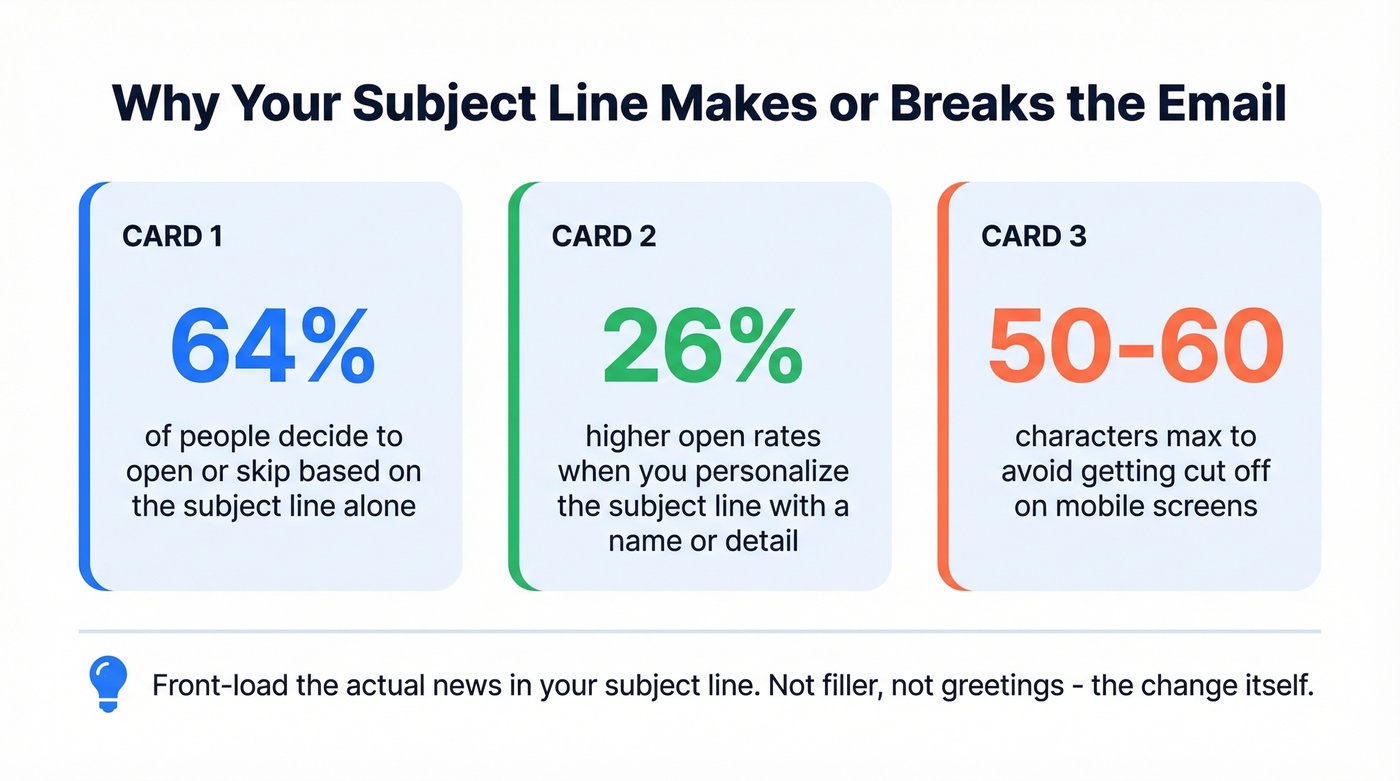
Keep subject lines under 50-60 characters for mobile. Personalization lifts open rates by roughly 26%, so drop in a name or specific detail when you can. For more swipeable ideas, see our email subject line examples.
| Subject Line Example | Chars | When to Use |
|---|---|---|
| Heads up: Friday meeting moved to 3 PM | 39 | Internal reschedule |
| [Name], quick update on Q2 timeline | 37 | Direct report or peer |
| FYI: New expense policy starts Monday | 38 | Team-wide announcement |
| Quick note on the March deliverables | 37 | Client or external |
| [Name], your renewal is coming up | 34 | Outreach follow-up |
| Budget update before Thursday's call | 37 | Upward to leadership |

A great heads-up email only works if it reaches the right inbox. Prospeo's 98% email accuracy and 7-day data refresh mean your follow-ups, reschedules, and client updates actually land - not bounce.
Stop crafting perfect emails that go to dead inboxes.
Who You're Emailing Changes Everything
The phrase "just a heads up" is perfectly professional - until it isn't. Who you're sending it to determines whether it lands as helpful or careless.
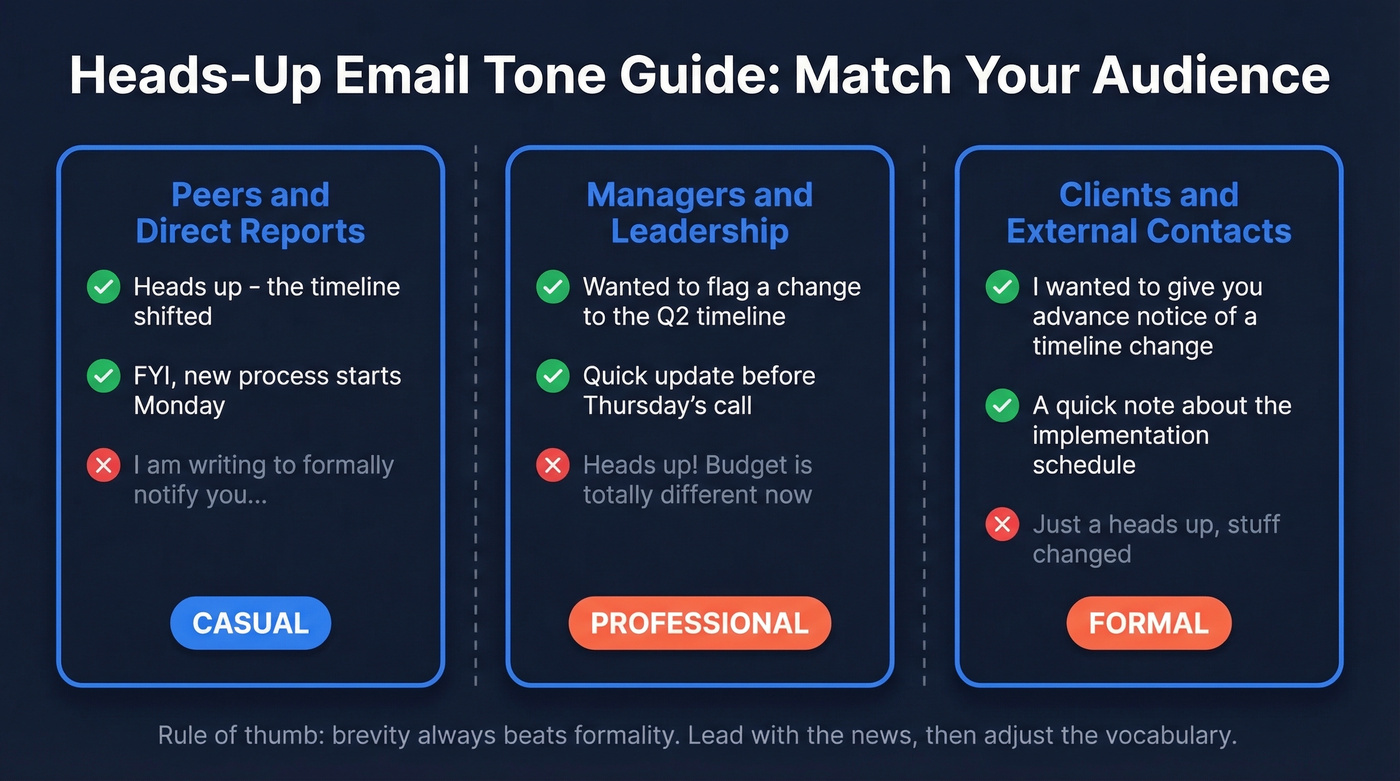
Here's the thing: most people agonize over the wrong detail. They worry about whether "heads up" sounds too casual while writing three paragraphs of preamble before the actual news. Tone matters, but brevity matters more. A slightly casual email that gets to the point in sentence one will always outperform a perfectly formal email that buries the lead - even if the formal one uses all the right vocabulary.
That said, 53% of workers feel anxious about written messages being misinterpreted. A quick tone check before hitting send eliminates most of that risk:
| Audience | Tone | Example Opening | Avoid |
|---|---|---|---|
| Peers / direct reports | Casual | "Heads up - the timeline shifted" | Overly formal language |
| Manager / leadership | Professional | "Wanted to flag a change to..." | "Just a heads up" as opener |
| Clients / external | Formal | "I wanted to give you advance notice of..." | Slang, "FYI," "heads up" |
One of the most upvoted workplace email tips on Reddit's r/LifeProTips nails this: "Always lead with your thesis. Then justify it. Never put your justifications before your premise." That rule applies doubly when you're emailing up the chain.
15+ Professional Alternatives
If you only remember one alternative, make it "I wanted to flag something for you" - it works in almost every context. The rest of this table is for when you need to dial the formality up or down depending on the recipient.
| Phrase | Tone | Best For |
|---|---|---|
| I wanted to flag something for you | Neutral | Universal default |
| Quick update on [topic] | Neutral | Peers, managers |
| Just so you're aware | Casual | Close colleagues |
| For your awareness | Formal | Leadership, clients |
| I wanted to give you advance notice of... | Formal | External, legal |
| FYI | Casual | Peers only |
| Wanted to loop you in on... | Neutral | Cross-functional teams |
| Before [event], I wanted to mention... | Neutral | Pre-meeting context |
| A quick note about... | Neutral | Clients, managers |
| I wanted to bring this to your attention | Formal | Escalations |
| Thought you should know | Casual | Peers, direct reports |
| Flagging this for your review | Formal | Leadership, approvals |
| Small change to be aware of | Neutral | Process updates |
| Wanted to make sure this was on your radar | Neutral | Managers, stakeholders |
| I'm writing to give you advance notice of... | Very formal | Legal, compliance, board |
| Quick flag before tomorrow's call | Casual | Pre-meeting nudge |
When "Heads Up" Backfires
Stop agonizing over whether "heads up" is professional enough. The real mistakes are structural.
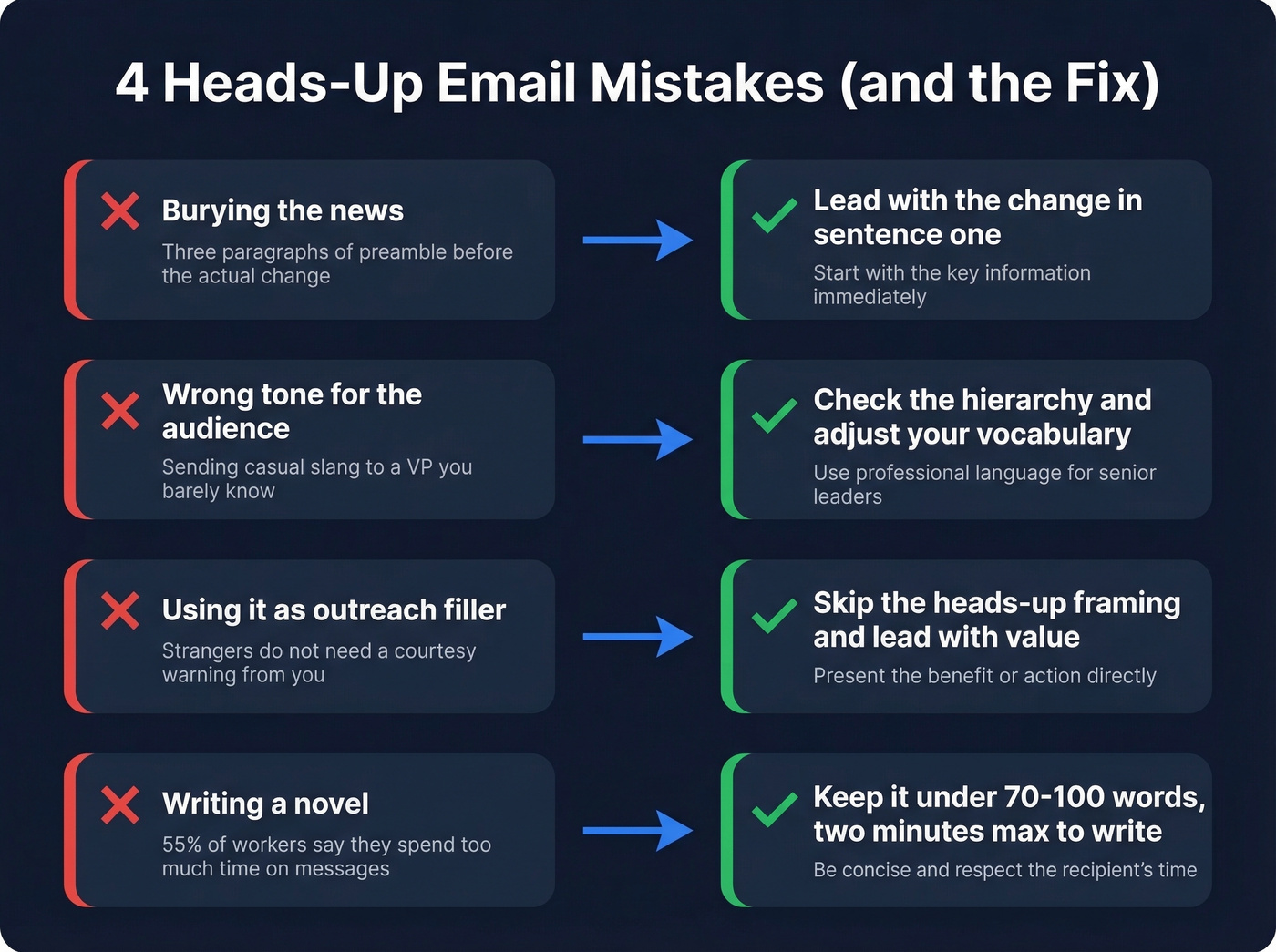
1. Burying the actual news. Lead with your thesis:
❌ "Hi, hope you're doing well! I wanted to touch base about something that came up in yesterday's meeting regarding the timeline for the Q2 deliverables..."
✅ "Heads up: the Q2 deadline moved to June 5. The client requested an earlier review cycle - here's what that means for your workstream."
The first version makes the reader do archaeology. The second respects their time.
2. Wrong register for the audience. Sending "just a heads up!" to a VP you've met twice reads as careless. Check the hierarchy table above and adjust accordingly.
3. Using it as a crutch in outreach. In sales emails, "I wanted to give you a heads up" is generic filler. It signals low effort. The recipient doesn't know you - they don't need a courtesy warning, they need a reason to care. If you're building a sequence, use a tighter B2B cold email sequence structure instead.
Even a well-written outreach follow-up bounces if the email address is wrong. We use Prospeo to verify addresses in real time before sending - it catches bad data that would otherwise tank your sender reputation. That matters because initial cold emails convert at just 1-5%, and the first follow-up jumps to 15-20%, but only if it actually reaches the inbox.
4. Writing a novel. 55% of workers say they spend too much time crafting and deciphering messages. A heads-up email shouldn't be one of them. If it takes more than two minutes to write, you're overcomplicating it. A lightweight email copywriting checklist helps you cut the fluff fast.
You just nailed the tone, subject line, and brevity. Now make sure you're emailing the right person. Prospeo gives you verified emails for 300M+ professionals - at $0.01 per contact, no contracts.
Find anyone's verified email in one click with 40,000+ Chrome extension users.
How to Reply to a Heads-Up Email
Most heads-up emails don't need a long response. Match the brevity of the original.
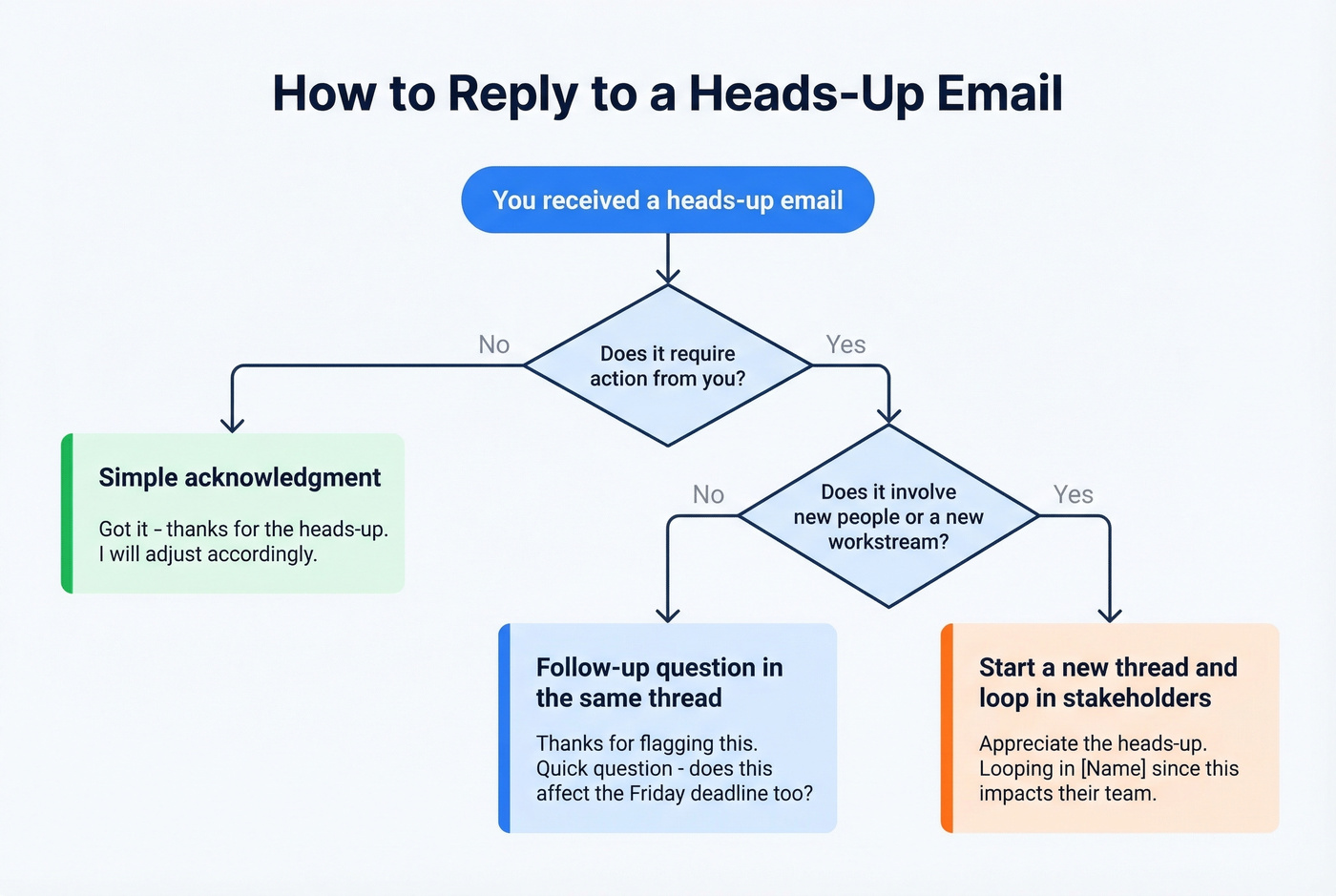
Simple acknowledgment:
"Got it - thanks for the heads-up. I'll adjust accordingly."
Follow-up question:
"Thanks for flagging this. Quick question: does this affect the Friday deadline too?"
Escalation:
"Appreciate the heads-up. I'm going to loop in [Name] since this impacts their team as well."
One decision to make: reply in the same thread or start a new email? If the heads-up is a quick FYI, reply in-thread. If it triggers a new workstream or involves different stakeholders, start a fresh thread with a clear subject line. We've seen too many important decisions get buried in reply chains that started as a simple "FYI." If you're unsure on timing, follow this guide on when you should follow up on an email.
FAQ
Is "heads up" one word or two?
Two words as a noun ("a heads-up") and hyphenated as an adjective ("a heads-up email"). Never one word. The 's' isn't possessive - it comes from the original command "heads up!" meaning everyone should look up and pay attention. You'll see it without the hyphen in casual messages, and that's fine internally.
Can I use "heads up" in a subject line?
Yes, and it works well for internal emails. Keep the full subject under 50-60 characters. "Heads up: [specific thing]" is direct and scannable. For cold outreach or client emails, swap in "Quick update" or "FYI" instead.
When should I send an email instead of a Slack message?
Use email when the information needs a paper trail, involves external contacts, or affects deadlines more than a day out. Slack works for same-day, low-stakes updates. If someone needs to reference the notification later - during a meeting or an audit - email creates a searchable record that chat messages don't.
How do I make sure my outreach emails actually get delivered?
Verify addresses before you send. Prospeo checks emails in real time with 98% accuracy and offers a free tier of 75 emails per month. Verifying prevents bounces that damage your sender reputation, which is especially important for follow-up sequences where each touchpoint builds on the last.