

"Just Checking In" Emails Don't Work - Here's What to Send Instead
You've sent the proposal, waited three days, and now you're staring at a blank compose window trying to will a follow-up into existence. Your fingers type the classic "just checking in" email and you pause. You know it's weak. You know it won't work.
The problem isn't the phrase itself - it's the mindset behind it: sending a follow-up that adds absolutely nothing new.
The Short Version
"Just checking in" fails because it delivers zero value and signals laziness. Replace it with a follow-up that references something specific, delivers a new insight, and asks for a micro-commitment.
Time your follow-ups on a graduated schedule (Day 2, 4, 7, 14), send Tuesday through Thursday at 9-11 AM, and keep subject lines to 2-4 words. Personalize when you can.
Why This Follow-Up Fails
Most guides on this topic hand you replacement phrases - "circling back," "touching base," "looping in." That's putting a new label on the same empty box. The real fix is structural: what your follow-up contains, not what it's called.
Etiquette expert Jenny Dreizen nails it: "just checking in" is a "vague non-statement" that's really just saying "pushing this to the top of your inbox." It doesn't move anything forward, and it reads as passive-aggressive. One experienced practitioner on r/business put it bluntly: the phrase signals "I have nothing valuable to add to your life."
That's the opposite of what a follow-up should do.
And yet most people give up too early to even learn this lesson. 48% of salespeople quit after a single attempt, even though 55% of replies come from follow-up emails. The issue isn't following up - it's following up with nothing to say.
Follow-Up Data That Matters
Let's put some numbers on this. The Instantly Cold Email Benchmark Report analyzed billions of cold email interactions and found the average reply rate sits at 3.43%. Top quartile campaigns hit 5.5%+, and elite performers clear 10.7%+. That gap isn't luck - it's what happens after the first send.
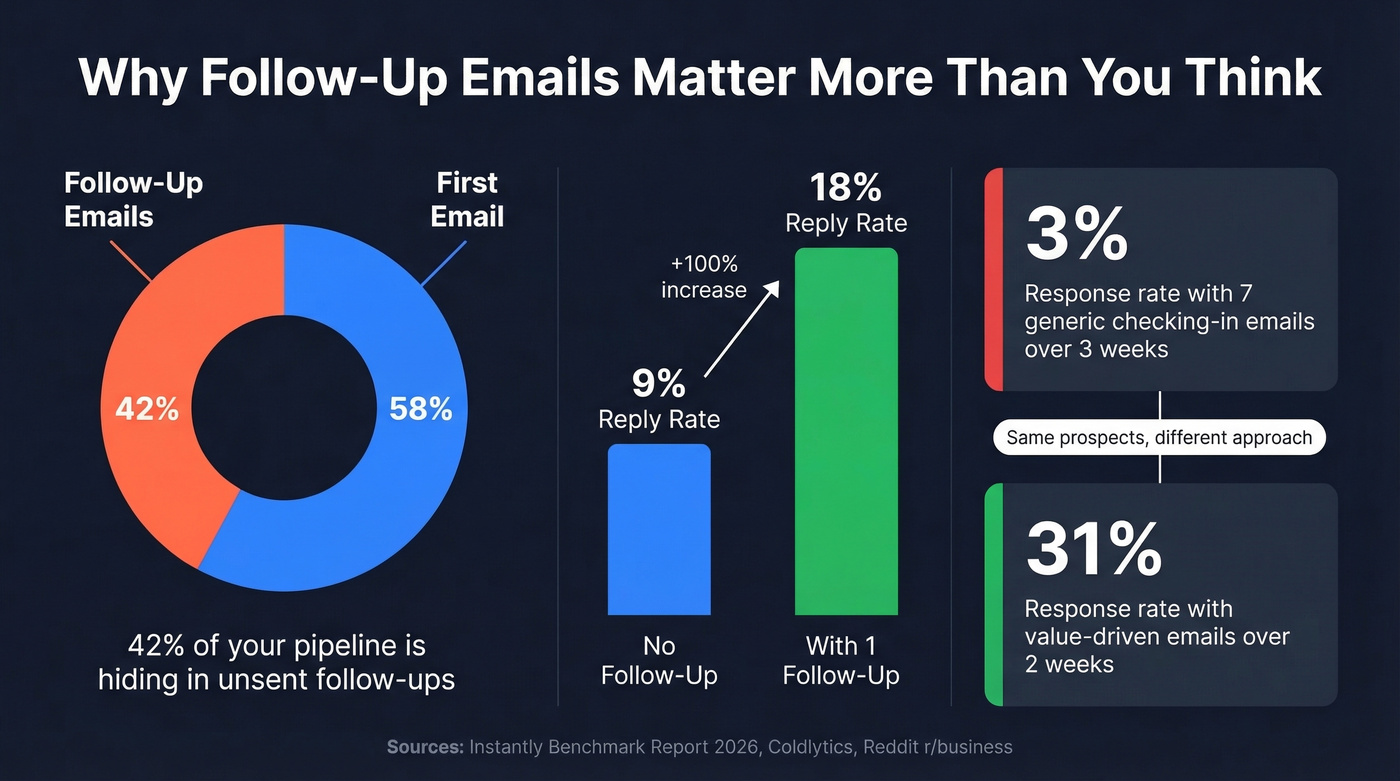
Here's the split: 58% of all replies come from the first email, but follow-ups contribute the remaining 42%. That's nearly half your pipeline hiding in emails you haven't sent yet. Woodpecker data summarized by Coldlytics shows reply rates can jump from 9% to 18% with just one follow-up.
The sweet spot is 4-7 total touchpoints. Beyond that, returns drop off sharply unless each touch adds genuinely new value. One Reddit practitioner shared a telling transformation: switching from 7 generic "just checking" emails over 3 weeks (3% response rate) to a handful of value-driven emails over 2 weeks produced a 31% response rate. Same prospects. Completely different results.
Here's the thing: if your average deal size is under $5k, you probably don't need a 7-touch sequence. Three genuinely useful follow-ups will outperform seven lazy ones every single time.
8 Alternatives That Actually Get Replies
Every follow-up needs to earn its place in someone's inbox. Here are eight alternatives organized by scenario - use any of them as a template and customize the details to your prospect's situation.
If you want more plug-and-play options, start with these sales follow-up templates and adapt them to your deal context.
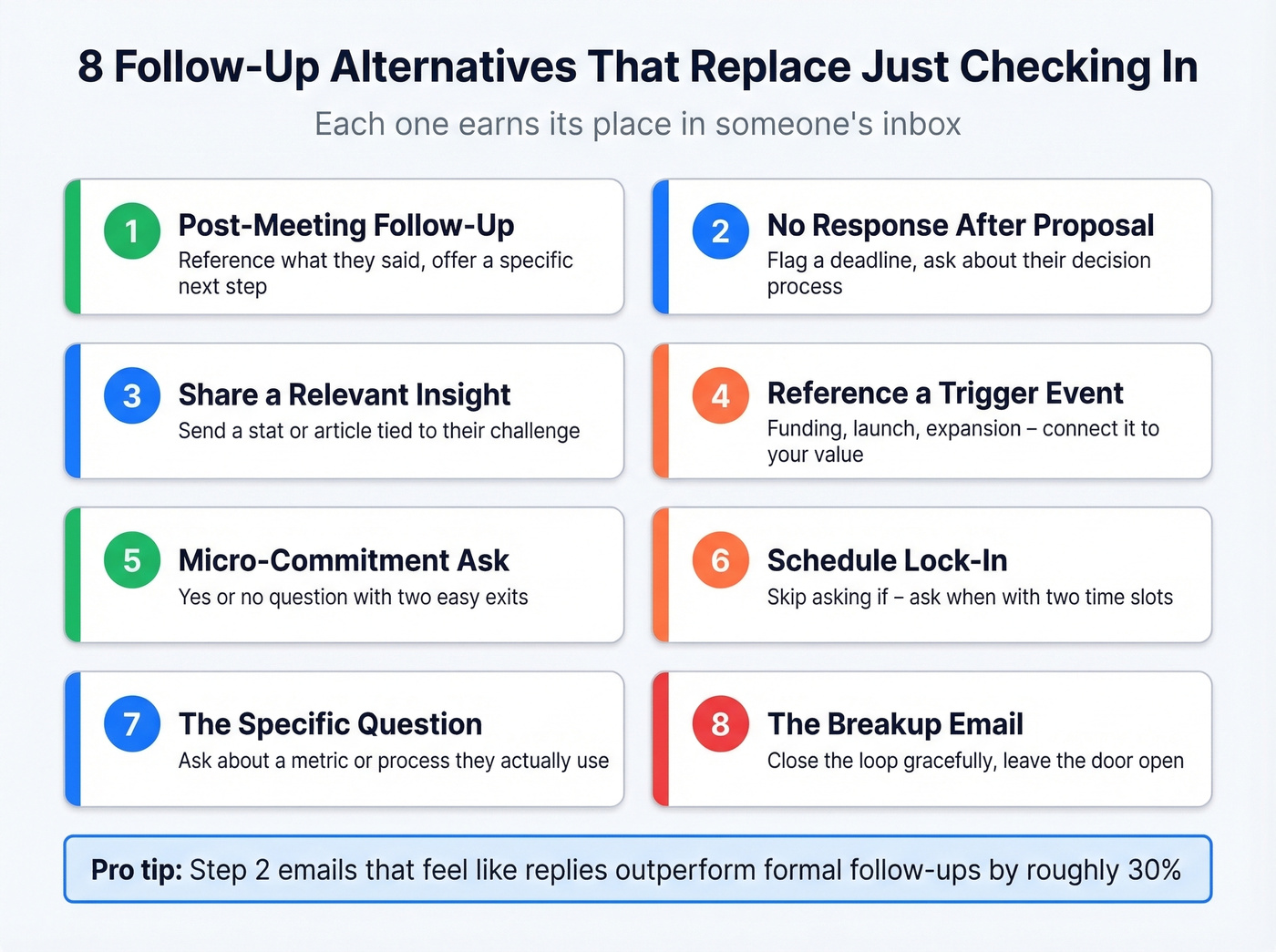
One insight from the Instantly benchmark data worth internalizing first: Step 2 emails that feel like replies - short, plain text, sent in the same thread - outperform formal follow-ups by roughly 30%. Keep that in mind as you read these.
1. Post-Meeting Follow-Up
Subject: Next step on [specific topic]
"Hi [Name], thanks for the conversation on [day]. You mentioned [specific challenge they raised] - I pulled together a quick breakdown of how we've handled that for [similar company]. Worth 10 minutes Thursday to walk through it?"
2. No Response After a Proposal
Subject: Question about the timeline
"Hi [Name], I wanted to flag one thing on the proposal - the pricing in Section 3 is locked through [date]. If the timeline's shifted on your end, totally fine. What does your decision process look like from here?"
3. Sharing a Relevant Insight
Subject: [Industry] trend you'll want to see
"Hi [Name], [publication] just published data showing [specific stat relevant to their industry]. It connects directly to what we discussed about [their challenge]. Thought you'd find it useful - here's the link."
4. Referencing a Trigger Event
Subject: Congrats on [event]
"Hi [Name], saw that [company] just [raised funding / launched product / expanded to new market]. That usually means [specific implication]. Happy to share how [similar company] navigated that if it's helpful."
5. The Micro-Commitment Ask
Most people write: "Just checking in to see if you had any thoughts on our last conversation." Dead end. Here's the fix:
Subject: Quick question
"Hi [Name], I know timing wasn't right last month. One question: are you still planning to [address specific challenge] this quarter? If so, I've got a case study that's directly relevant. If not, no worries - I'll check back in Q3."
This works because it gives them two easy exits, and both keep the door open.
6. The Schedule Lock-In
This one comes straight from r/sales and we've seen it work consistently: instead of asking if they want to meet, assume the meeting and ask when.
Subject: [Their company name] + next week
"Hi [Name], I'm trying to finalize my schedule for next week - would Tuesday at 2 PM or Thursday at 10 AM work better for a quick 15 minutes on [specific topic]?"
7. The Specific Question
Subject: [Their company name] + [topic]
"Hi [Name], I've been thinking about the [specific metric] you mentioned. Are you currently tracking that through [tool/process they likely use]? Asking because we found a gap there that's worth a 5-minute conversation."
8. The Breakup Email
Subject: Should I close your file?
"Hi [Name], I've reached out a few times and haven't heard back - totally understand if the timing's off. I'll assume this isn't a priority right now and close out my notes. If anything changes, just reply to this thread and we'll pick up where we left off."
The common thread across all eight: each one gives the recipient a reason to care that didn't exist in the previous email. Skip the ones that don't match your scenario and double down on the ones that do.

Even the best follow-up template is worthless if it bounces. Prospeo's 98% email accuracy and 7-day data refresh mean your carefully crafted alternatives to 'just checking in' actually land in the right inbox - not a dead address.
Stop perfecting copy for emails that bounce. Start with verified data.
Subject Lines That Get Opened
Your follow-up copy doesn't matter if the email never gets opened. A Belkins study of 5.5 million emails found that personalized subject lines hit a 46% open rate versus 35% without - a 31% lift.
If you need more ideas beyond the examples below, use these email subject line examples to build a swipe file you can personalize fast.
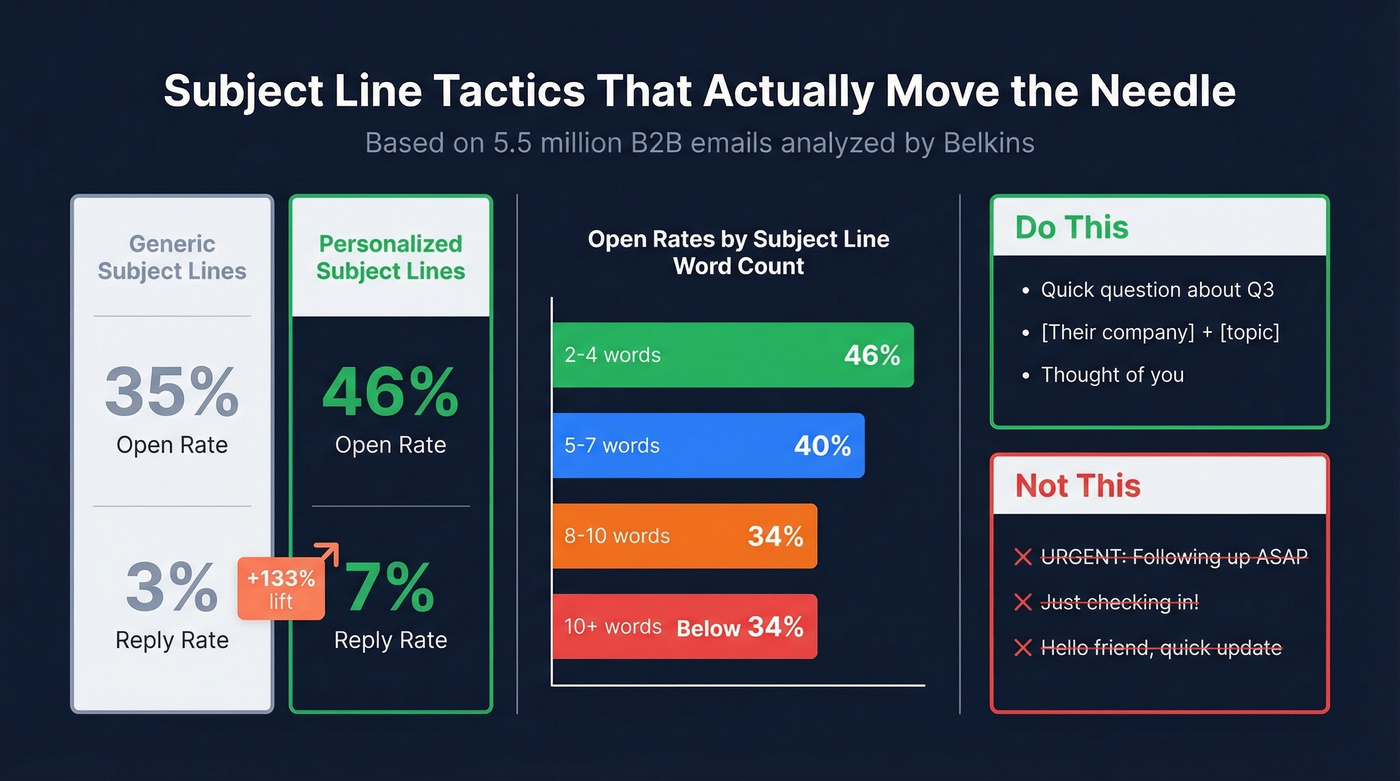
Reply rates jumped even more dramatically: personalized subject lines pulled 7% reply rates versus 3% without, a 133% increase. Question-based subject lines averaged 46% opens. Length-wise, 2-4 words performed best at 46%, with performance dropping steadily beyond 7 words. By 10 words, you're down to 34%.
What to avoid: hype words like "ASAP," urgency language, and generic greetings like "Hello, friend" all pushed open rates below 36%. Your subject line should read like something a colleague would write, not a marketing blast.
Do this: "Quick question about Q3" / "[Their company] + [topic]" / "Thought of you"
Not this: "URGENT: Following up ASAP" / "Just checking in!" / "Hello friend, quick update"
When to Send Follow-Ups
Timing is the most underrated variable in follow-up performance. The data consistently points to Tuesday through Thursday, 9-11 AM in the recipient's time zone. Avoid Friday afternoons and weekends for B2B outreach.
For a deeper breakdown (by day, hour, and sequence step), see our guide on the best time to send cold emails.
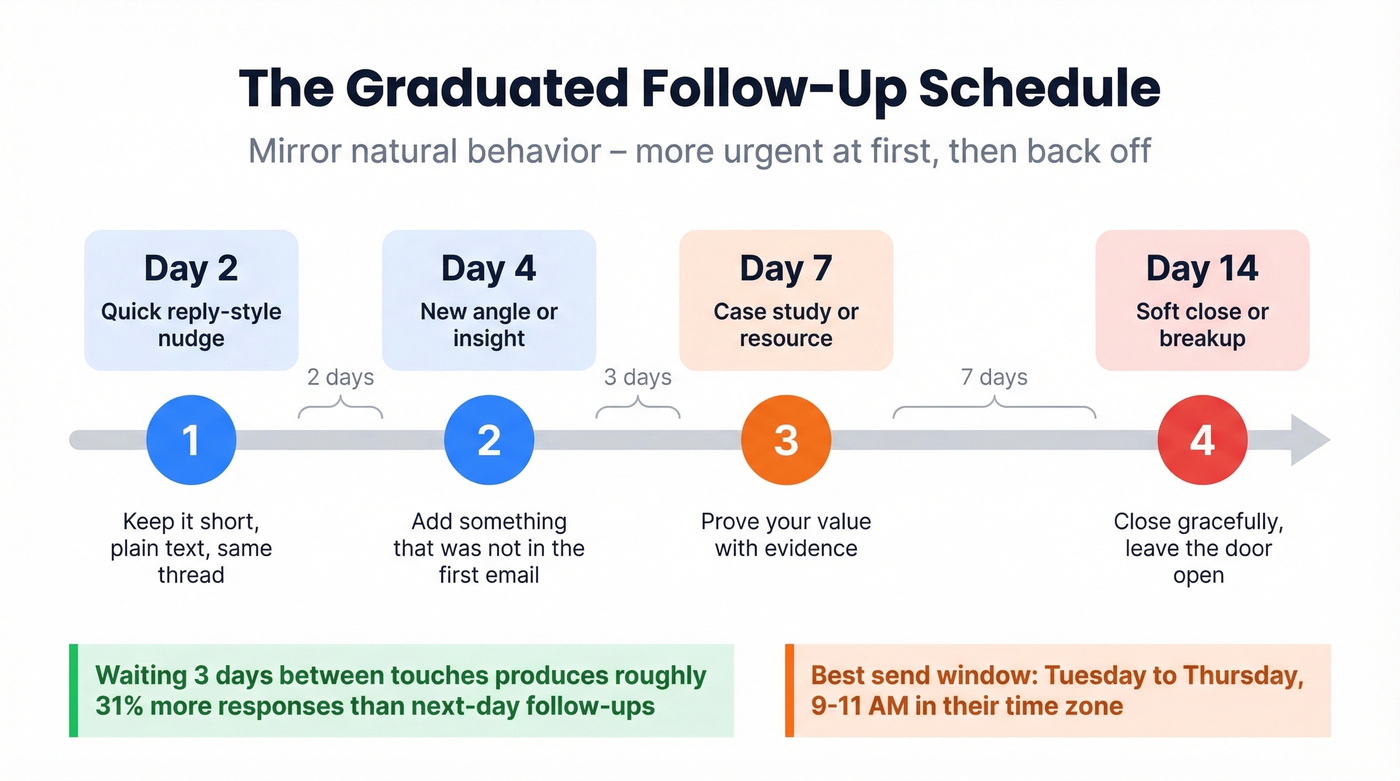
More important than the day is the spacing pattern. Static intervals - every 2 days, every 3 days - look automated and can hurt deliverability. Use graduated spacing instead:
| Follow-Up | Days After Previous | Purpose |
|---|---|---|
| #1 | Day 2 | Quick, reply-style nudge |
| #2 | Day 4 | New angle or insight |
| #3 | Day 7 | Case study or resource |
| #4 | Day 14 | Soft close or breakup |
This mirrors natural follow-up behavior - more urgently at first, then backing off. Directional data suggests waiting 3 days produces roughly a 31% increase in responses compared to next-day follow-ups.
If you're still unsure about cadence, this guide on when should you follow up on an email can help you pick intervals by scenario.
Mistakes That Kill Reply Rates
We've watched teams burn through perfectly good prospect lists with these five errors. Every one is fixable.
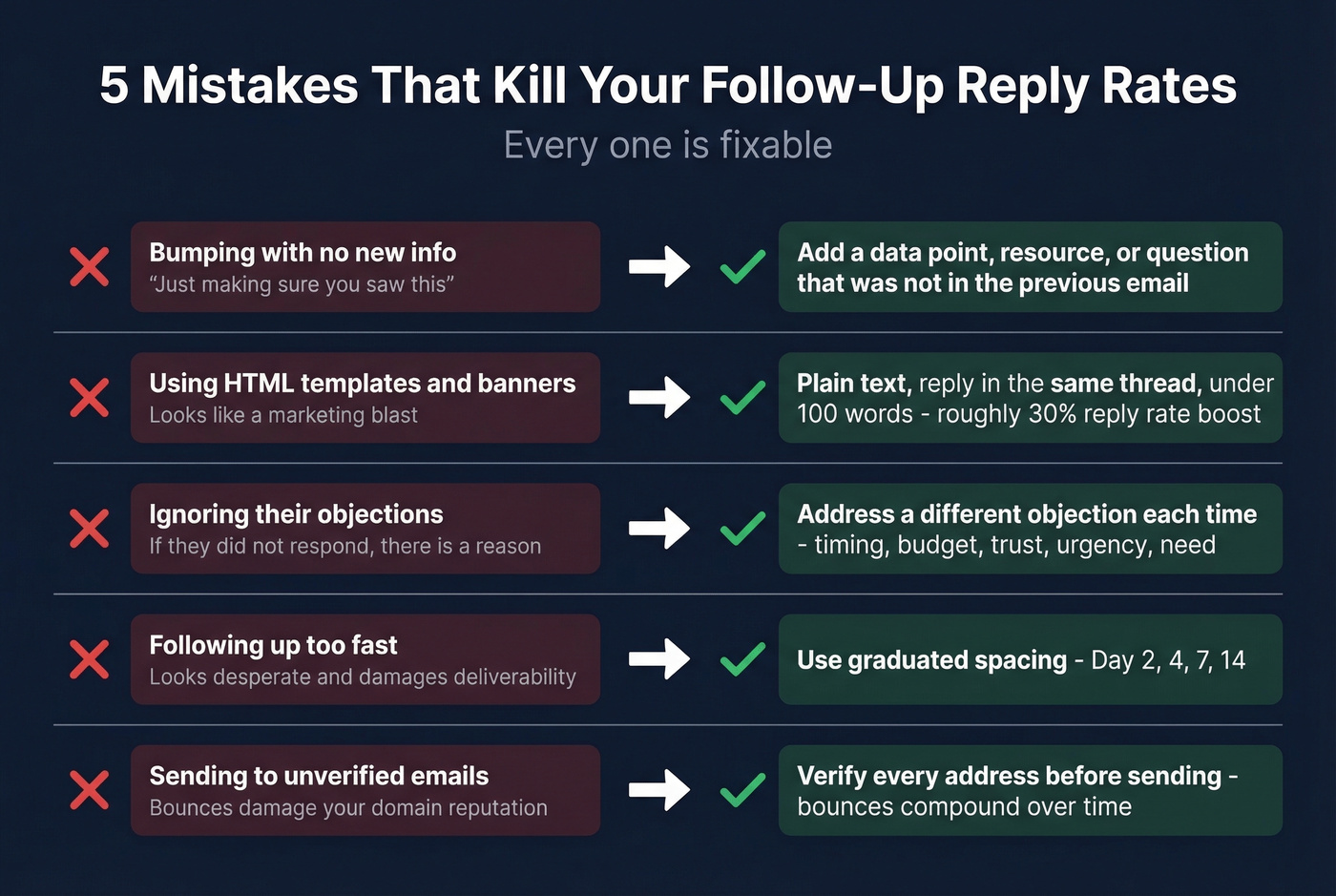
Bumping with no new info. "Just making sure you saw this" is a non-email. Add a specific data point, resource, or question that wasn't in the previous message. If you need a "just checking in" email example of what not to do, that sentence is it.
Making follow-ups look like marketing emails. HTML templates, banners, and formatted signatures scream "mass email." Plain text, reply to the original thread, keep it under 100 words. In our experience, reply rates jump around 30% just by switching from formatted templates to reply-style plain text.
If you're running sequences at scale, the right follow up email software can help you keep messages simple without looking automated.
Ignoring objections. If they didn't respond, there's a reason. Address a different potential objection in each follow-up - timing, budget, trust, urgency, need. (A structured set of discovery questions makes this much easier.)
Wrong frequency. Too fast looks desperate. Too slow and they forget you. Stick to the graduated spacing framework above.
Verify Before You Send
You can nail the copy, timing, and subject line, but none of it matters if the email bounces. Bounced emails don't just waste a touchpoint - they damage your domain reputation, which tanks deliverability for every subsequent email you send. It's a compounding problem that most follow-up advice completely ignores.
If you want the benchmarks and fixes behind this, start with our email bounce rate guide and then work through the email deliverability guide to address root causes.
Prospeo's 5-step verification process catches spam traps, honeypots, and catch-all domains before they torch your sender score. The free tier covers 75 emails per month, and you only pay for valid addresses.
Trigger-based follow-ups like funding rounds and new hires need fresh data. Prospeo refreshes 300M+ profiles every 7 days - so your 'congrats on the raise' email hits the right person at the right company, not last quarter's org chart.
Send timely follow-ups with data that's never more than a week old.
FAQ
How many follow-ups should I send?
Four to seven total touchpoints is the sweet spot, based on analysis of billions of cold emails. Beyond seven, returns diminish sharply unless each email adds genuinely new value. The biggest lift comes between touchpoints two and four.
What's the best day to send a follow-up?
Tuesday through Thursday, 9-11 AM in the recipient's time zone. Wednesday tends to edge out the other days slightly. Avoid Friday afternoons and weekends for B2B - open rates drop as people clear inboxes before the weekend.
How do I follow up without sounding pushy?
Add something new every time - a relevant insight, a specific question, or a resource they haven't seen. If your follow-up doesn't give the recipient a reason to care, it's a push, not a follow-up.
Is a casual check-in ever appropriate?
With close colleagues or existing clients where you have genuine rapport, a casual check-in is fine - the relationship context provides the value. For prospects or leads who haven't opted into your communication, every touchpoint needs to deliver something new. A vague "checking in" wastes your credibility.
Can I use a template from the internet?
You can use any template as a starting point, but never send it verbatim. The templates above work because they're designed to be customized with specific details about your prospect's situation, industry, and pain points. A generic copy-paste lands you right back in the "nothing valuable to add" category.