

Keap Pipeline: The Complete Guide to Setup, Automation & Plan Limits
$299 a month for a CRM, and you cap out at 250 active deals on the Pro plan. That's the Keap pipeline reality - strong automation underneath, but plan limits that bite fast. Here's everything Keap scatters across a dozen help pages: setup, automations, pricing, reporting, and what real users actually think.
What Is the Keap Pipeline?
Keap's pipeline is a visual, stage-based deal tracker built into its CRM. You drag deals between columns - Discovery Call, Proposal Sent, Closed Won - and trigger automations at each transition. If you've used the legacy Infusionsoft sales pipeline, the core concept is the same, but the modern interface is cleaner and the automation triggers are more flexible.
Don't confuse pipeline with funnel. A pipeline tracks actions and stages, meaning what reps do day to day. A funnel tracks conversion rates through those stages, showing how many prospects survive each step. Keap handles both, but the pipeline is where daily sales work happens. The feature exists in Keap Pro, Max, Ultimate, and Max Classic.
Pricing & Plan Limits
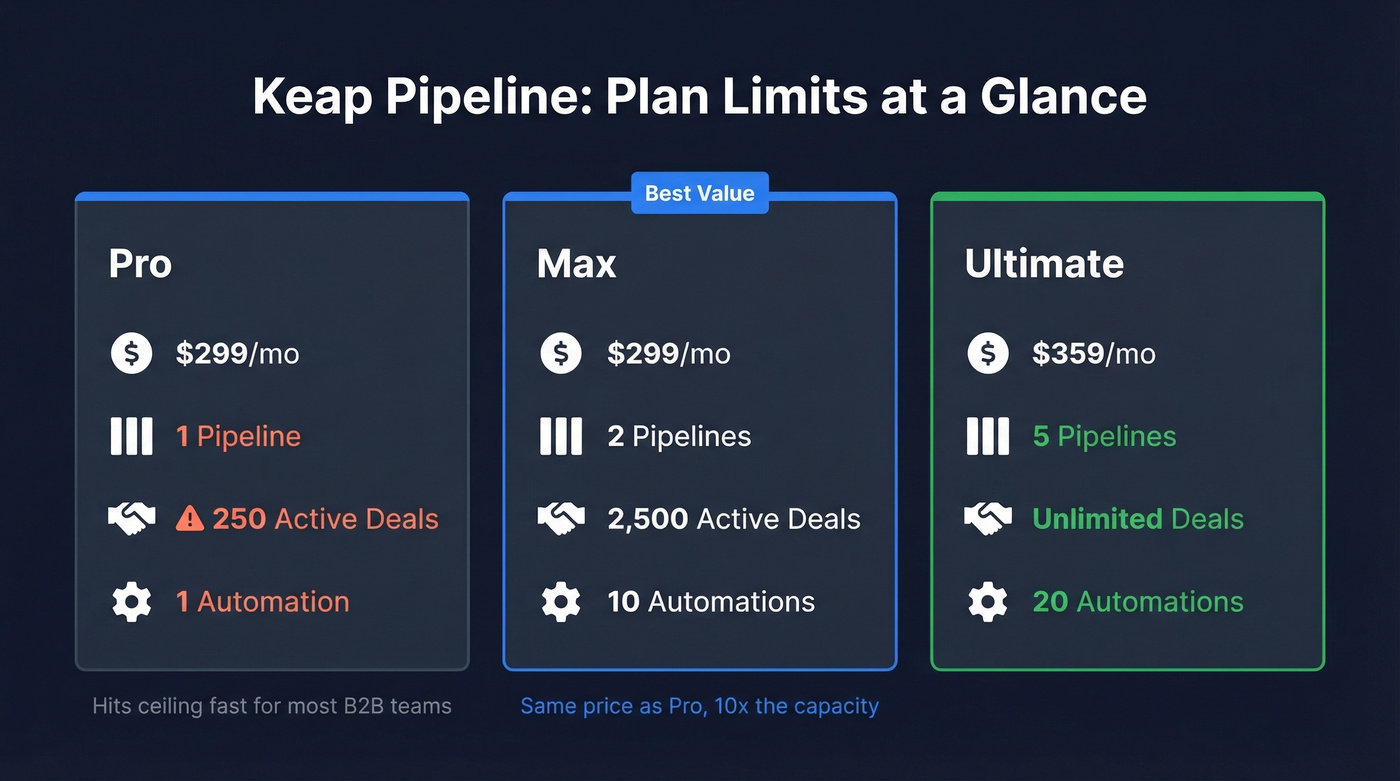
Keap's pricing gets tricky fast. Pro and Max both run $299/mo, but the pipeline limits are wildly different.
| Pro | Max | Ultimate | |
|---|---|---|---|
| Price | $299/mo | $299/mo | $359/mo |
| Pipelines | 1 | 2 | 5 |
| Active deals | 250 | 2,500 | Unlimited |
| Automations | 1 | 10 | 20 |
Pro's 250-deal cap catches people off guard. Even a modest B2B pipeline with a 60-day sales cycle will hit that ceiling within months. Max gives you 10x the deals and 10x the automations at the same price - it's the obvious choice for anyone past the startup phase.
Budget for onboarding too: expect $1,000-$5,000+ depending on migration complexity. And if you need custom reporting, Graphly runs $30/mo on top.
How to Set Up Your Pipeline
If you've already mapped your sales process, setup takes about 15 minutes:
- Create stages: Go to Sales > Pipeline then Add a Stage, name it, and save. Use action-based names like "Discovery Call Scheduled" and "Proposal Sent."
- Add a second pipeline (Max/Ultimate): My Day > Pipelines, click the ellipses, then Manage pipelines and Add new pipeline.
- Set deal ordering: In Pipeline settings, choose whether new deals land at the top or bottom of each stage.
- Add a Stalled/On Hold stage. Deals delayed by missing info shouldn't clog active stages. Give them a parking lot.
- Assign probability-to-close per stage for revenue forecasting. Discovery at 10%, Proposal Sent at 40%, Negotiation at 70%.

Deal cards let you edit details, add notes, send emails, and manage associated contacts and team members. Keap also logs stage moves in a deal activity feed with timestamps, which is useful for auditing rep activity. The iOS app (4.5 stars, 1,700 reviews) handles pipeline access well; the Android version (3.1 stars, 224 reviews) is rougher.
Recommended Pipeline Stages
Keap suggests a 7-stage framework, but we'd trim to 5-6 stages. Every stage you add is a decision point for reps, and too many create friction.
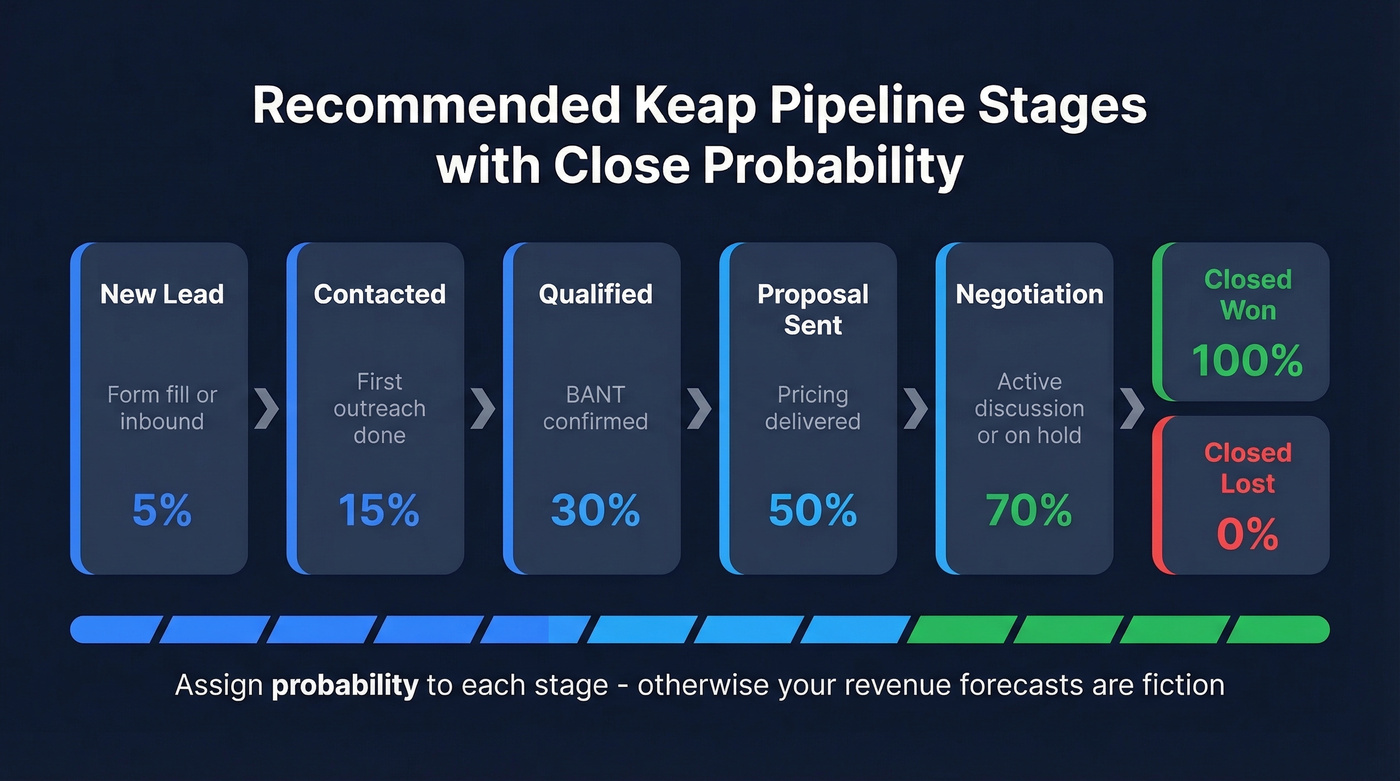
- New Lead - opportunity created from form fill or inbound
- Contacted - first outreach completed
- Qualified - budget, authority, need, and timeline confirmed
- Proposal Sent - pricing delivered
- Negotiation/Stalled - active discussion or on hold
- Closed Won / Closed Lost - final outcomes
Assign close probability to each stage. Most marketers are blind to 80% of their funnel - stage-by-stage probability tracking fixes that by giving you a realistic pipeline value instead of a fantasy number. Skip this step and your revenue forecasts are fiction.

Keap's stage-based probability tracking only works when your contacts are real. With 98% email accuracy and a 7-day data refresh cycle, Prospeo ensures every deal in your pipeline has a verified email behind it - so your automated follow-ups actually land.
Stop building automations on top of bounced emails.
Pipeline Automation
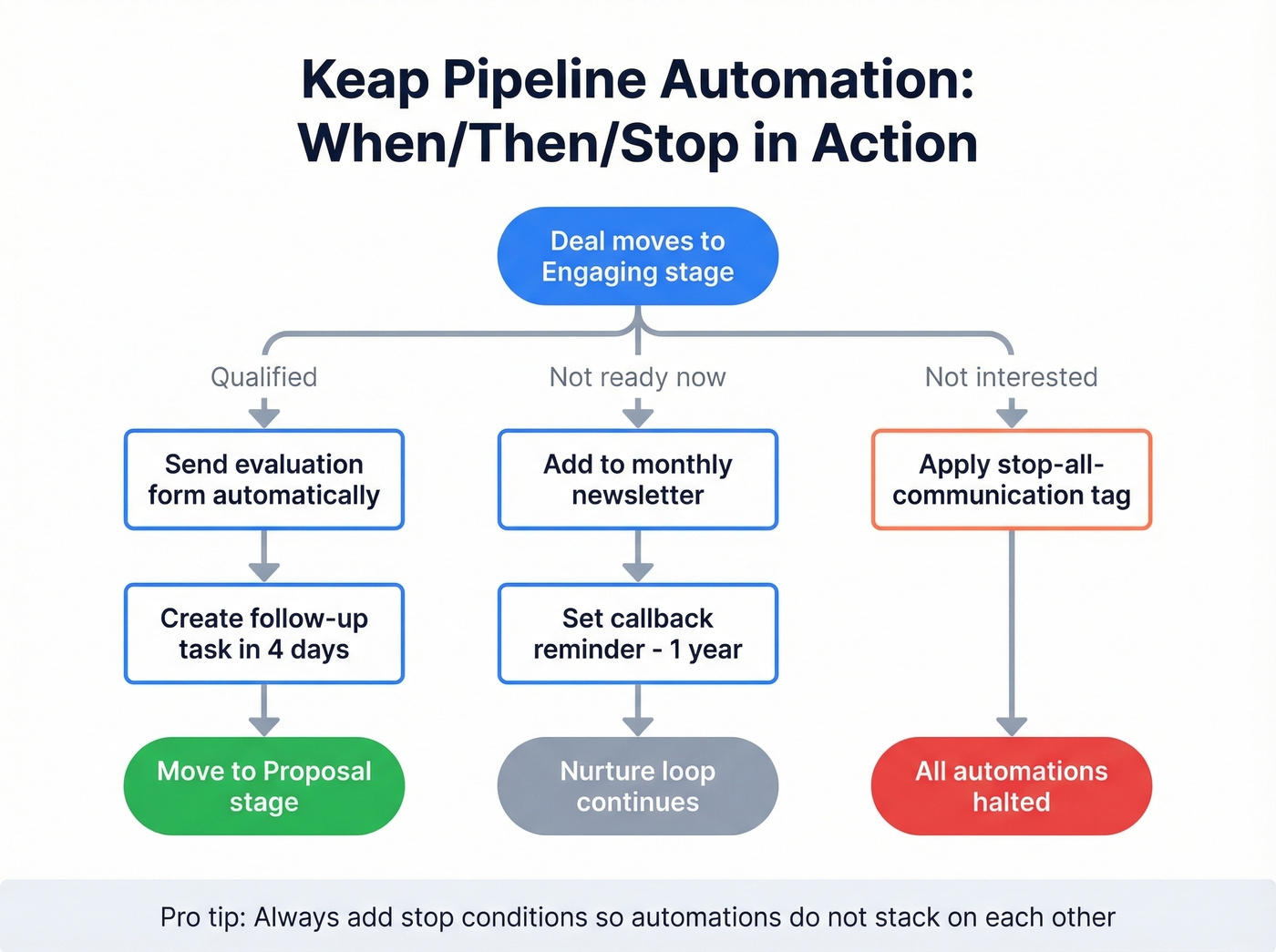
This is where Keap earns its price tag. The automation engine uses a When/Then/Stop model: a trigger fires, an action executes, and stop conditions prevent over-communication.
Here's a real example. A company called Sum of All Numbers built a sequence where new opportunities get assigned to reps via round-robin, then the assigned rep gets a reminder task to call. If the prospect doesn't respond, a 3-week nurture kicks in - 3 emails plus 2 call reminders, all automated. That kind of hands-off follow-up is genuinely hard to replicate in simpler CRMs.
When a deal moves to the Engaging stage, three paths open. Qualified automatically sends an evaluation form. Not ready now adds the contact to a monthly newsletter with a callback reminder in one year. Not interested applies a tag that stops all communication immediately.
Moving a deal into Proposal stage automatically creates a follow-up task in 4 days. A good cadence benchmark: 3-5 follow-up emails over 2-3 weeks, spaced several days apart. If you need copy you can plug in fast, use these follow-up emails. Manage tags carefully so automations don't stack on top of each other - we've seen teams accidentally trigger three sequences at once because they forgot to add stop conditions.
Reporting & Analytics
Keap's pipeline analytics cover four core reports: deal conversions by stage, average deal duration, average time in stage, and deal revenue forecasting.
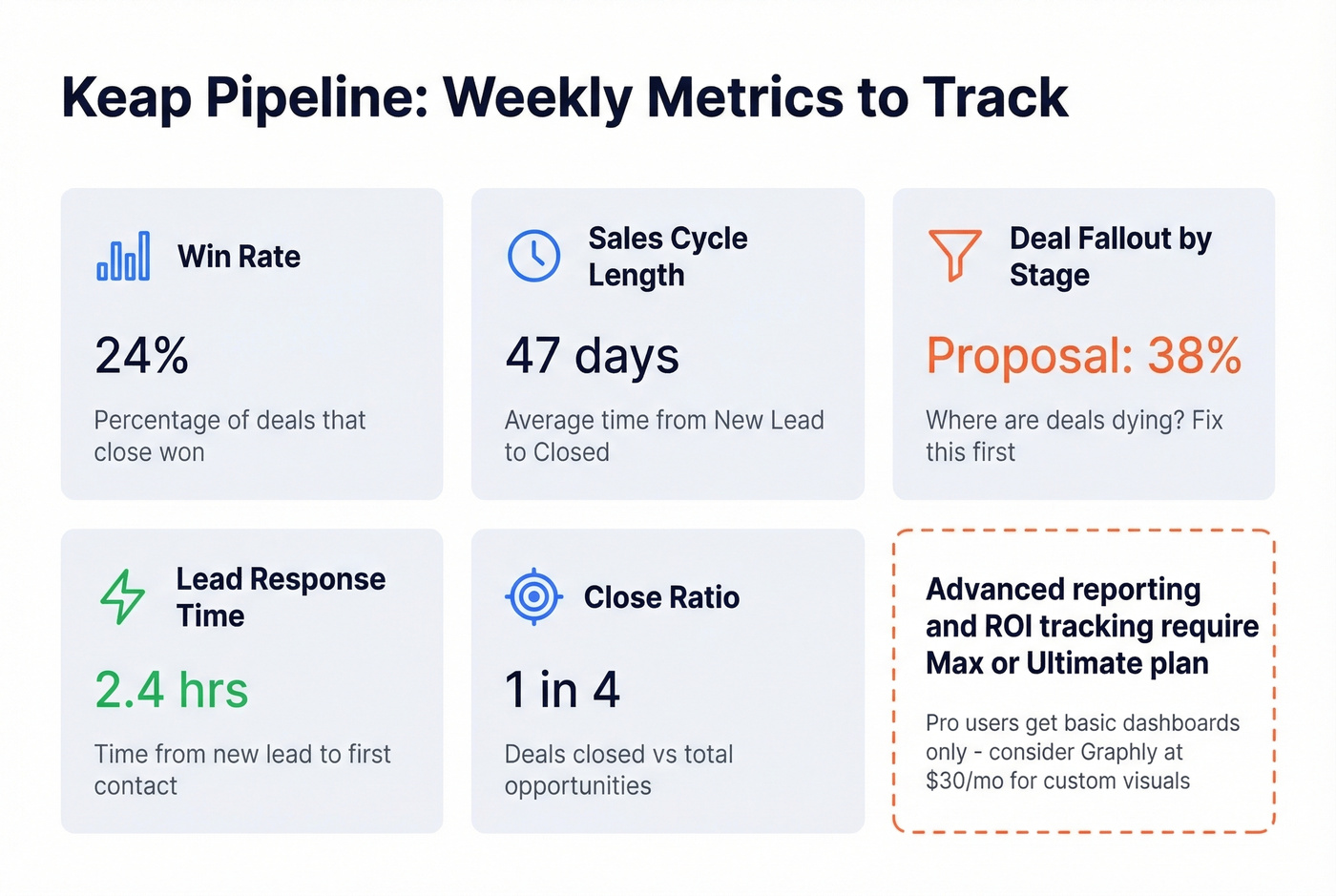
Track weekly: win rate, sales cycle length, deal fallout by phase, lead response time, and close ratio. If deals pile up in your Proposal stage, either your pricing is off or reps aren't following up fast enough. That's the kind of signal a pipeline report should surface immediately.
Advanced reporting and ROI tracking are gated to Max and Ultimate. Pro users get basic dashboards. For custom visualizations like pipeline velocity charts and rep performance comparisons, Graphly fills the gap. Keap's own reporting docs cover what's included at each tier. If you want a broader view of tooling, compare sales forecasting solutions and pipeline health metrics.
What Users Actually Say
Let's be honest: Keap's pipeline gets mixed reviews, and the criticism is consistent. One Reddit user in r/CRMSoftware called it "lacking in terms of pipeline management" while praising the contact setup and tags. Another on r/sales was blunter: "We currently use Keap, and it sucks."
Keap's Trustpilot rating sits at 2.4. The pattern: contact management and tagging are strong, but the pipeline UX feels like an afterthought compared to tools built pipeline-first. If pipeline visualization is your top priority, Pipedrive is the benchmark Keap users keep referencing. If automation and contact workflows matter more, Keap's engine is genuinely strong.
Here's the thing: most small businesses buying Keap at $299/mo would get better pipeline management from Pipedrive and spend the savings on better data and outreach tools. You're paying for Keap's automation engine, not its deal board - make sure you actually use it. If you aren't building multi-step automations with branching logic, you're overpaying.
Bad Data Kills Pipeline Automation
You can build the most sophisticated automations in Keap, and they'll fail silently if your contact data is wrong. That automated follow-up after Proposal Sent does nothing when the email bounces. We've watched teams spend weeks perfecting their automation sequences only to discover a 15% bounce rate was torpedoing the whole thing.
Verify contacts before they enter your CRM. Prospeo checks emails with 98% accuracy on a 7-day refresh cycle, so your automations actually reach people. Its enrichment returns 50+ data points per contact at a 92% API match rate, meaning the deal records flowing into your Keap pipeline are complete from day one. If you're troubleshooting deliverability, start with email bounce rate benchmarks and an email deliverability guide.

Spending $299/mo on Keap but watching deals stall because reps can't reach prospects? Prospeo delivers 125M+ verified mobile numbers with a 30% pickup rate and emails at $0.01 each - so your pipeline stays moving from Contacted to Closed Won.
Fill your Keap pipeline with contacts that actually convert.
FAQ
Can I use the Keap pipeline for non-sales workflows?
Yes. Keap pipelines work for onboarding, fulfillment, and any stage-based process. Keap Academy offers a free 25-lesson course on building operational pipelines, including a podcast production workflow example.
What's the biggest limitation of Keap Pro's pipeline?
One pipeline, 250 active deals, one automation. Most growing businesses hit this ceiling within months. Upgrade to Max for 2 pipelines and 2,500 deals at the same $299/mo - 10x the capacity for zero extra cost.
How does the modern pipeline compare to the old Infusionsoft version?
The core drag-and-drop stage management carries over, but the modern Keap pipeline adds tighter When/Then/Stop automation triggers and a cleaner card-based UI. Expect a smoother experience with the same underlying logic - just fewer manual workarounds.
How do I make sure pipeline contacts have accurate emails?
Verify contact data before importing into Keap. Tools like Prospeo return 50+ data points per contact with a 92% API match rate, so automated follow-ups reach people instead of bouncing. The free tier gives you 75 verified emails per month to start.