

Keap vs Pipedrive: Real Cost, Features, and Verdict
You're a 3-person team evaluating CRMs. Both headline numbers are misleading. Keap's first-year cost lands around $4,556-$5,556 once you factor in the third seat and mandatory implementation. Pipedrive's $14/seat/mo gets you the Lite plan with zero automation. Let's figure out which one actually fits.
30-Second Verdict
Pick Pipedrive if you need a clean pipeline, fast onboarding, and a budget under $200/mo. It's cheaper, easier to adopt, and better-rated on both Capterra and G2.
Pick Keap if you need CRM + marketing automation + invoicing/payments in one platform and you're willing to invest $300+/mo plus a steep learning curve.
Skip both if your real problem is bad contact data. Neither CRM verifies emails or finds direct dials - and no pipeline view fixes bounces caused by garbage records.
At-a-Glance Comparison
| Keap | Pipedrive | Winner | |
|---|---|---|---|
| Capterra Rating | 4.1/5 (1,297 reviews) | 4.5/5 (3,042 reviews) | Pipedrive |
| Ease of Use | 3.6/5 | 4.5/5 | Pipedrive |
| Value for Money | 3.8/5 | 4.4/5 | Pipedrive |
| Lowest Plan (Annual) | $299/mo (2 users) | $14/seat/mo | Pipedrive |
| Contacts Included | 1,500 | Unlimited | Pipedrive |
| Built-in Email Marketing | Yes | Add-on (from $13.33/company/mo) | Keap |
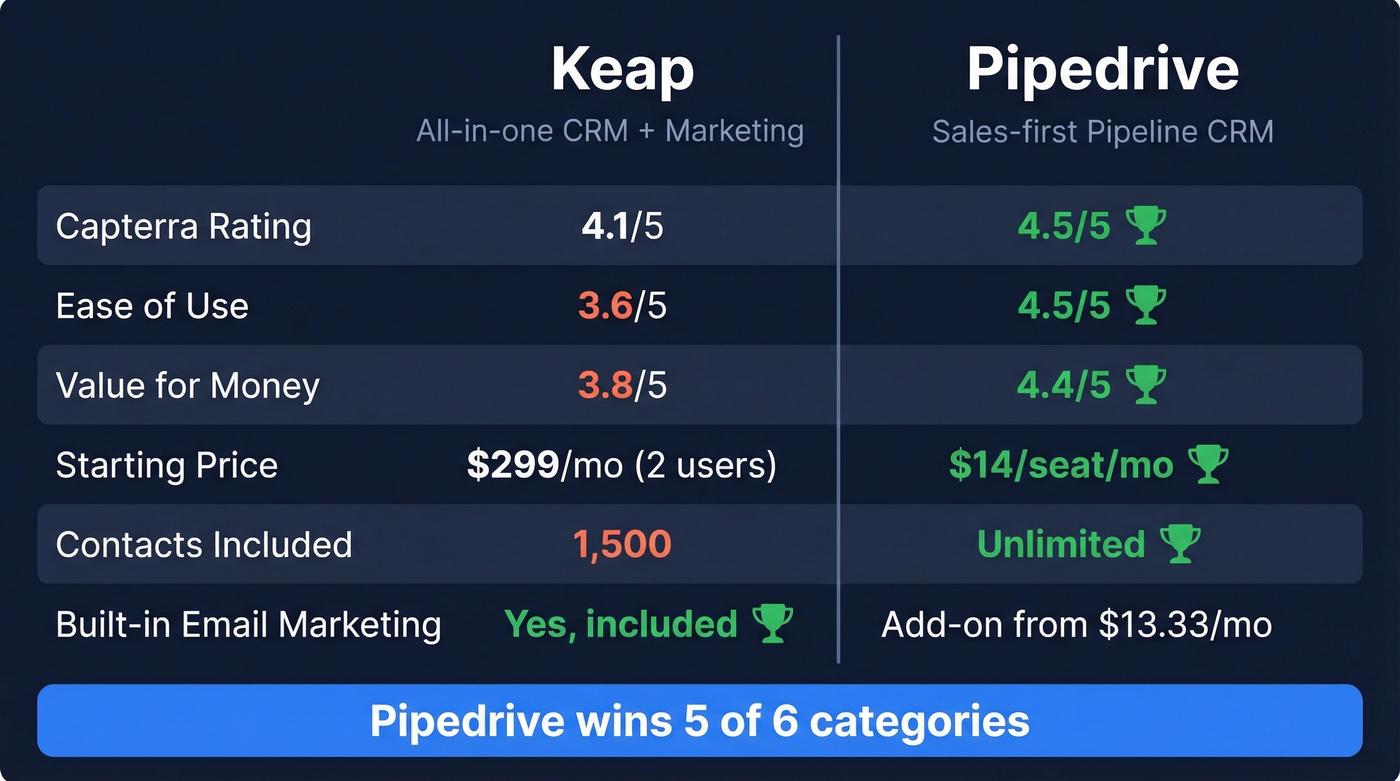
Pipedrive wins the key sub-scores on Capterra's head-to-head: ease of use, value for money, and customer service. The only category where Keap leads is feature breadth - and you pay dearly for it.
What You'll Actually Pay
Keap's $299/mo starting price includes two users. The Pro plan covers 1,500 contacts, and each additional user costs $39/mo. Implementation services are required - expect $500-$1,500 depending on complexity. Once you outgrow 1,500 contacts, you're paying step-ups at each tier.
If you're still deciding what counts as a CRM vs. an all-in-one platform, skim a few examples of a CRM to sanity-check the category.
Pipedrive runs four tiers: Lite ($14), Growth ($39), Premium ($59), and Ultimate ($79), all per seat billed annually. Add-ons like Campaigns (from $13.33/mo) and LeadBooster (from $32.50/mo) are per-company, not per-seat. Pipedrive also offers a 14-day free trial with no credit card required, so you can test before committing. Keap requires paid implementation just to get started.
Here's what a 3-person team actually pays in year one:
| Keap | Pipedrive (Growth) | |
|---|---|---|
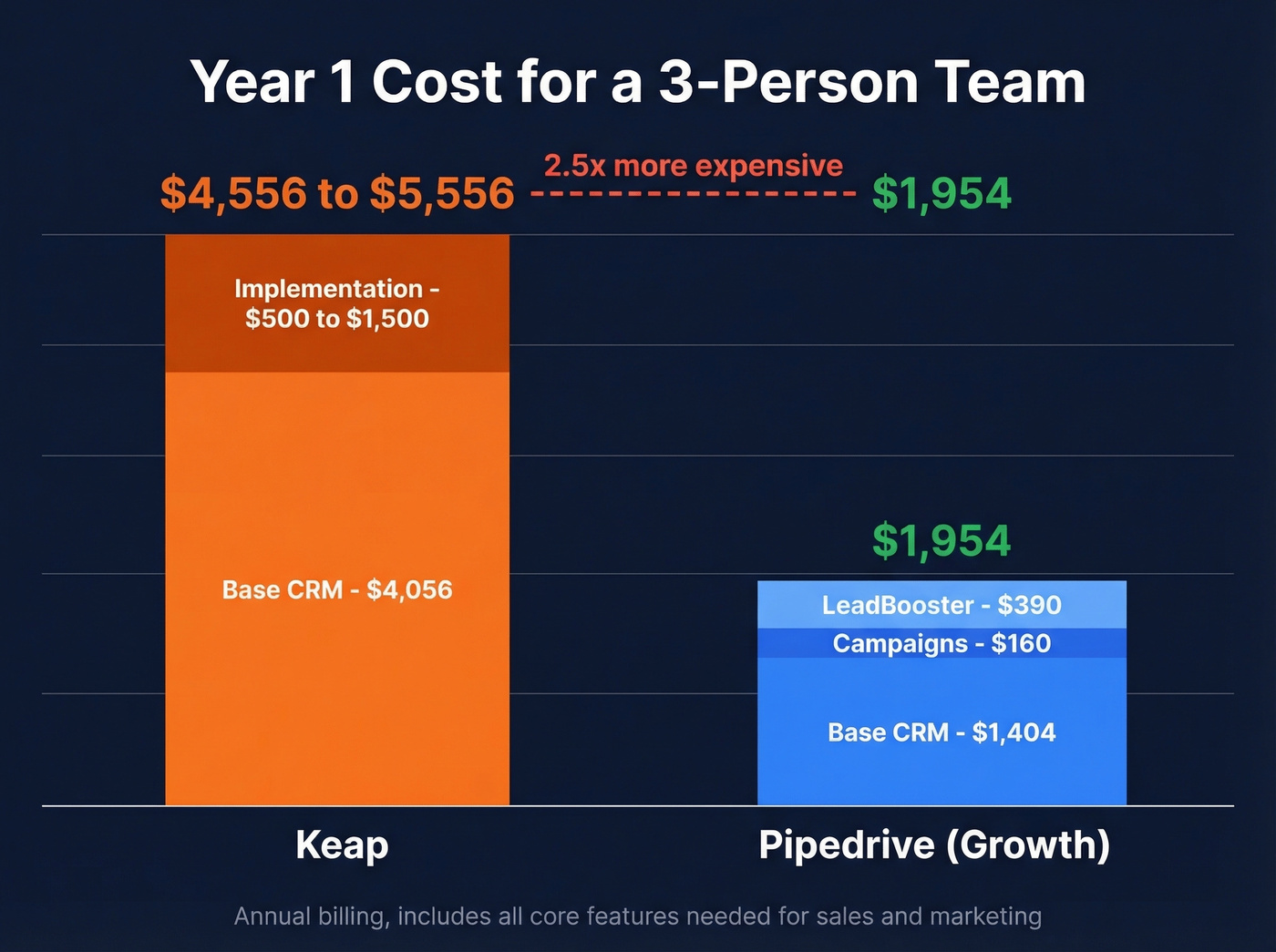
| Base CRM | $4,056/yr ($299 + $39 x 12) | $1,404/yr ($39 x 3 x 12) |
| Implementation | ~$500-$1,500 | $0 |
| Email Marketing | Included | +$159.96/yr (Campaigns) |
| Lead Capture | Included | +$390/yr (LeadBooster) |
| Year 1 Total | ~$4,556-$5,556 | ~$1,954 |
Keap costs roughly 2.5x more. That premium only makes sense if you're actively replacing multiple standalone tools - email platform, payment processor, landing page builder - with Keap's built-in versions.
Here's the thing: most 3-person teams don't need an all-in-one CRM. They need a CRM that's easy to use and $3,000/year left over for the tools that actually move the needle.
If your real bottleneck is list quality, start with data enrichment before you blame the CRM.

That $3,000 you save picking Pipedrive over Keap? Invest it where it actually moves pipeline. Prospeo gives you 98% verified emails and 125M+ direct dials at ~$0.01/lead - so every contact in your CRM is real.
Stop debating CRMs. Fix the data going into them.
How Features Stack Up
Pipeline and Deal Management
Pipedrive's visual pipeline is what users rave about most. Across 2,953 G2 reviews, ease of use and intuitive design come up constantly - drag-and-drop deals, customizable stages, activity-based selling. Keap has pipeline tools, but it's primarily built around automation and all-in-one operations. If pipeline visibility is your primary need, this isn't close.
If you're trying to diagnose why deals stall even with a clean pipeline view, these sales pipeline challenges are usually the real culprits.
Automation
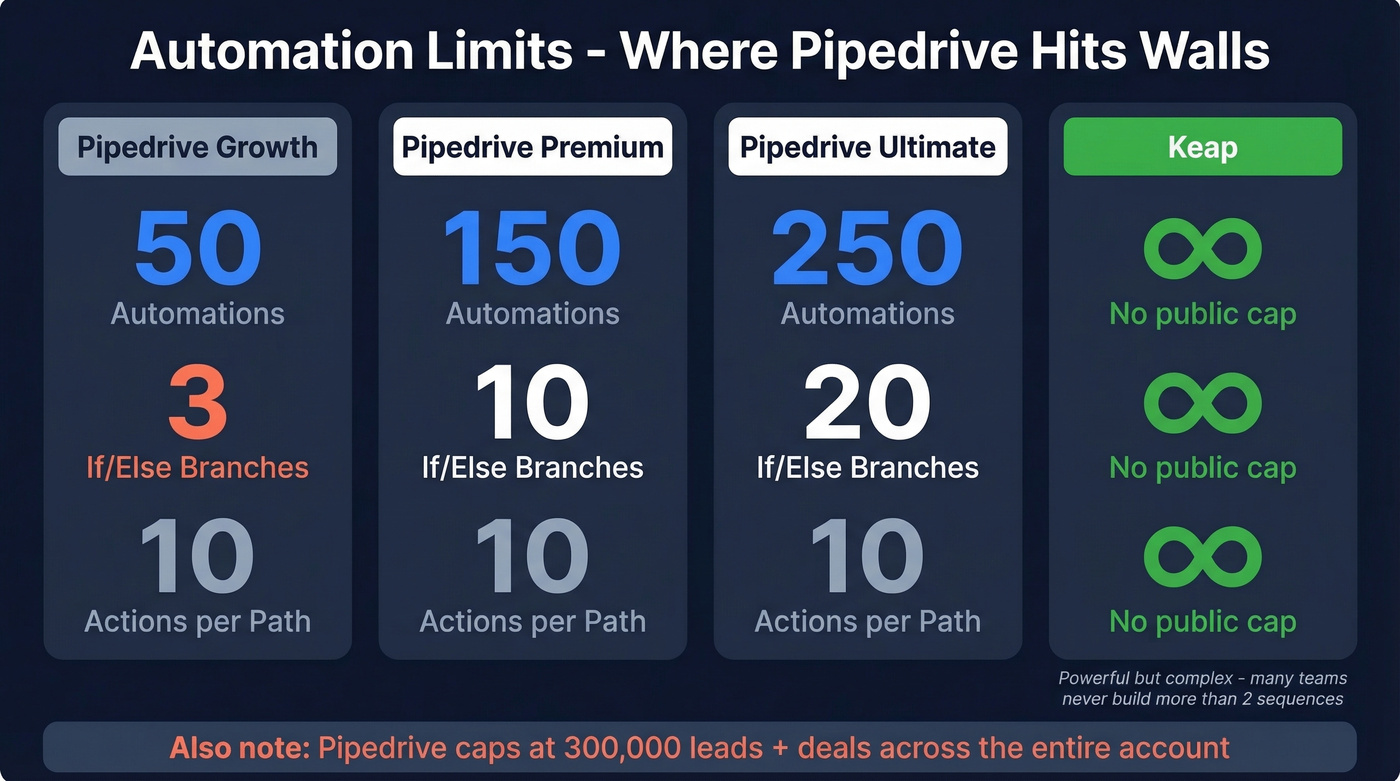
Pipedrive's automation looks good on paper until you hit the caps. Growth plans get 50 automations with 3 if/else conditions each, maxing out at 10 actions, 10 delay steps, and 90 days per path. The "wait for condition" step caps at 7 days. The Lite plan? No automation at all. There's also a hard cap of 300,000 leads + deals across the account.
If you're building sequences, it helps to have a simple system for sequence management so you don't end up with spaghetti automation.
| Pipedrive Growth | Pipedrive Premium | Pipedrive Ultimate | Keap | |
|---|---|---|---|---|
| Automations | 50 | 150 | 250 | Not publicly capped |
| If/Else Branches | 3 | 10 | 20 | Not publicly capped |
| Actions per Path | 10 | 10 | 10 | Not publicly capped |
Keap is built for complex, multi-step automation across sales and marketing. But it comes with a learning curve, and G2 reviews frequently call out complexity, cost, and occasional automation bugs. We've seen teams buy Keap for the automation power and then never build more than two sequences because the builder is that unintuitive.
Email Marketing and Payments
Keap includes email marketing natively - broadcasts, sequences, newsletters, and an AI content assistant. It also handles invoicing and payment collection directly inside the CRM, which is a genuine differentiator for service businesses that want to close deals and collect payment in one workflow.
Pipedrive requires the Campaigns add-on (from $13.33/company/mo billed annually). It covers the basics but lacks A/B testing and has limited templates. The Mailchimp integration is one-way: contacts export out, but engagement data doesn't flow back. For anything beyond simple newsletters, you'll want a dedicated email tool like Mailchimp or ActiveCampaign.
If email performance is part of your decision, keep an eye on email deliverability and not just open rates.
Reporting and Integrations
One of the most common complaints on G2 about Pipedrive: limited advanced reporting. The built-in dashboards cover pipeline metrics well but fall short on custom analytics. That said, Pipedrive's marketplace offers 500+ integrations, making it easy to plug gaps with best-of-breed tools.
Keap lists far fewer direct integrations (29 apps plus Zapier connections), but ships with deeper built-in features to compensate. Want a best-of-breed stack? Pipedrive. Want single-vendor simplicity? Keap.
If you're planning to connect outbound tools into either CRM, use a repeatable checklist like this guide on how to connect outreach tool to CRM.
What Users Actually Say
Pipedrive users (4.3/5 on G2, 2,953 reviews) consistently praise the intuitive UI and visual pipeline. Negative sentiment clusters around limited advanced reporting. On Capterra, the sentiment split is striking: 2,843 positive reviews vs. 61 negative - a roughly 2% negative rate.
Keap users (4.1/5 on Capterra, 1,297 reviews) praise automation depth and the all-in-one approach. Criticism centers on the learning curve, price, and occasional bugs. Capterra shows 1,030 positive vs. 121 negative - about a 9% negative rate, several times Pipedrive's. The consensus on r/smallbusiness and r/CRM threads tends to echo this: Keap is powerful but frustrating, Pipedrive is simple but sometimes too simple.
Who Should Pick Which
Pipedrive is the right call for sales-first teams that need fast onboarding, a clean pipeline view, and a budget under $200/mo. Add Campaigns and LeadBooster for basic marketing, but don't expect enterprise-grade email automation.
If you're trying to increase top-of-funnel volume on a budget, these free lead generation tools can help fill the pipe without adding another paid platform.
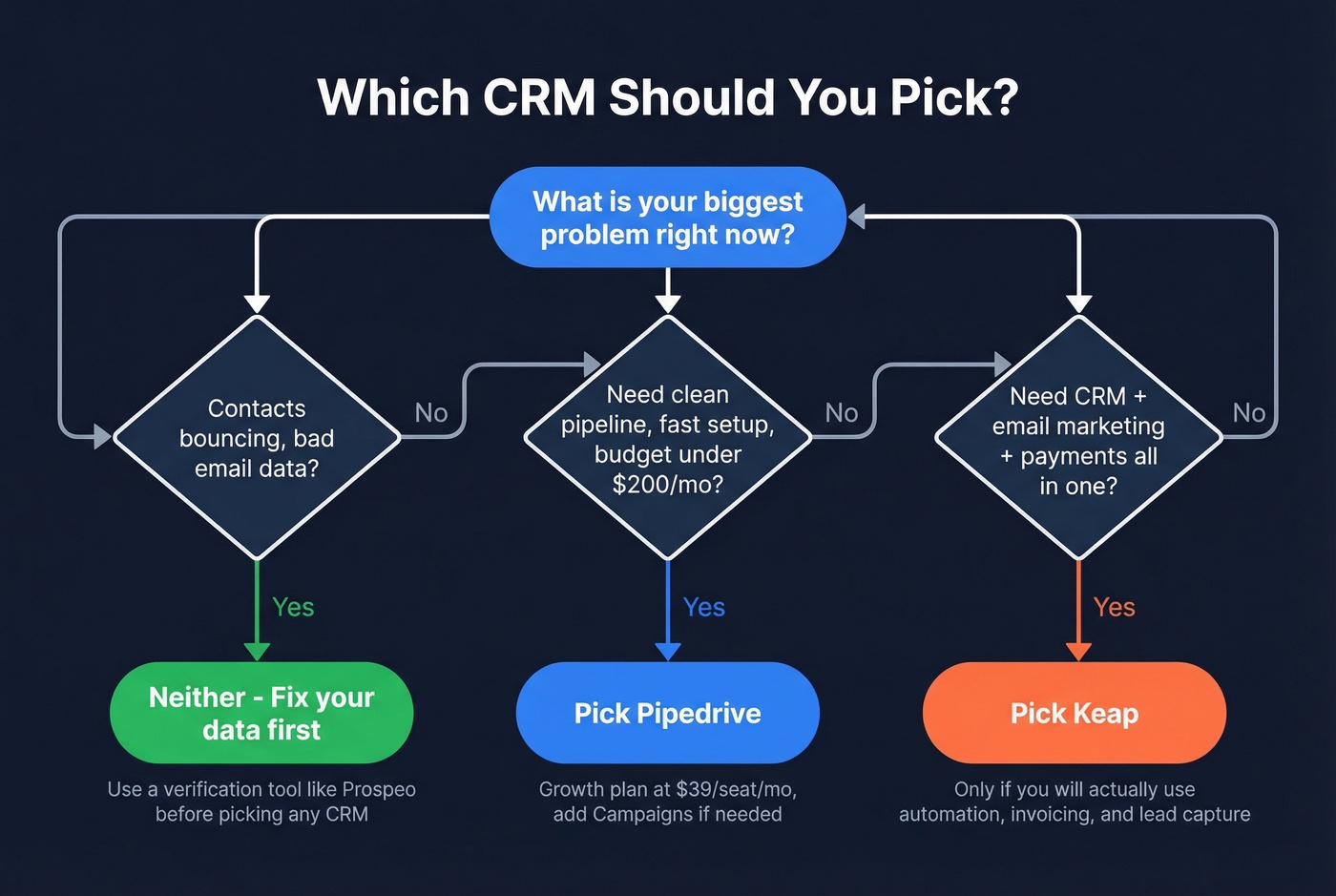
Keap makes sense for marketing-heavy small businesses replacing both their CRM and their email marketing platform - but only if you'll actually use the automation, payments, and lead capture features enough to justify the ~2.5x price premium. If you're buying Keap just for the CRM, you're lighting money on fire.

Neither is the answer if your pipeline problems are actually data quality problems. We've watched teams agonize over CRM selection for months, only to realize their sequences were bouncing because the contact data was rotten. No CRM fixes that - you need a data enrichment layer upstream. Prospeo fills that gap with 98% email accuracy across 300M+ profiles and a 7-day refresh cycle, feeding clean contacts into whichever CRM you choose via Zapier, Make, or native integrations.
If bounces are already hurting you, start by benchmarking your email bounce rate and fixing the inputs.
Neither Keap nor Pipedrive verifies your contact data. Teams fill shiny new pipelines with stale emails, then wonder why sequences bounce at 35%. Prospeo refreshes 300M+ profiles every 7 days and kills bounces before they hit your domain.
No CRM fixes a pipeline built on bad data. Prospeo does.
FAQ
Is Keap worth $299/month?
Only if you'll actively use the marketing automation, email sequences, and payment processing. If you just need a CRM and pipeline tool, you're overpaying by 5-10x compared to Pipedrive's Growth plan at $39/seat/mo.
Does Pipedrive include email marketing?
Not by default. The Campaigns add-on starts at $13.33/company per month billed annually and covers basic broadcasts, but it lacks A/B testing and advanced templates - it won't replace a dedicated email tool.
How do I keep contact data clean in either CRM?
Run contacts through a verification layer before importing. Prospeo's enrichment returns 50+ data points per contact at a 92% match rate and integrates with both Keap and Pipedrive via Zapier and Make, so you get fewer bounces from day one regardless of which platform you choose.