


Laserfocus Review 2026: Pricing, Pros, Cons, and the Truth About Its Reviews
There aren't many detailed Laserfocus reviews out there, and there are no major review-platform ratings to lean on. Most "reviews" are really just software directory listings with conflicting data. We tested the free tier and dug through every source we could find to put together the review that should already exist.
The 30-second verdict: Laserfocus Pro at $30/seat/month is solid value for solo reps who want a faster Salesforce experience. The free Basic plan is genuinely usable. But the total absence of G2, Capterra, or TrustRadius ratings means the free tier is your main due diligence tool - try it yourself before committing. If you need collaboration or AI features, Scratchpad's the safer pick. And if your real problem isn't a slow UI but bad data inside Salesforce, that's a different fix entirely.
What Laserfocus Actually Does
Laserfocus is a Salesforce productivity overlay - not a CRM replacement. It sits on top of your existing instance and gives you inline editing, pipeline views, task management, and spreadsheet-like views with cross-object fields in a single interface. Think of it as a modern skin for Salesforce's notoriously clunky UI.
The tool's directory copy claims you can "update and filter" Salesforce data in under 100 milliseconds. A maker comment on Product Hunt notes that Salesforce data gets pulled to your local machine and isn't stored on Laserfocus's servers. Founded in 2019, it's one of the newer, smaller tools in this niche - which matters, as we'll get to.
Pricing Breakdown for 2026
| Feature | Basic ($0) | Pro ($30/seat/mo) | Team (Custom) |
|---|---|---|---|
| Custom stacks | 2 | Unlimited | Unlimited |
| Imported views | 2 | Unlimited | Unlimited |
| Bulk edits | 3 | Unlimited | Unlimited |
| Custom field groups | 3 | Unlimited | Unlimited |
| Calendar + email sync | ✓ | ✓ | ✓ |
| Native phone | ✗ | ✗ | ✓ |
| Salesloft/Outreach | ✗ | ✗ | ✓ |
| Dedicated CSM | ✗ | ✗ | ✓ |
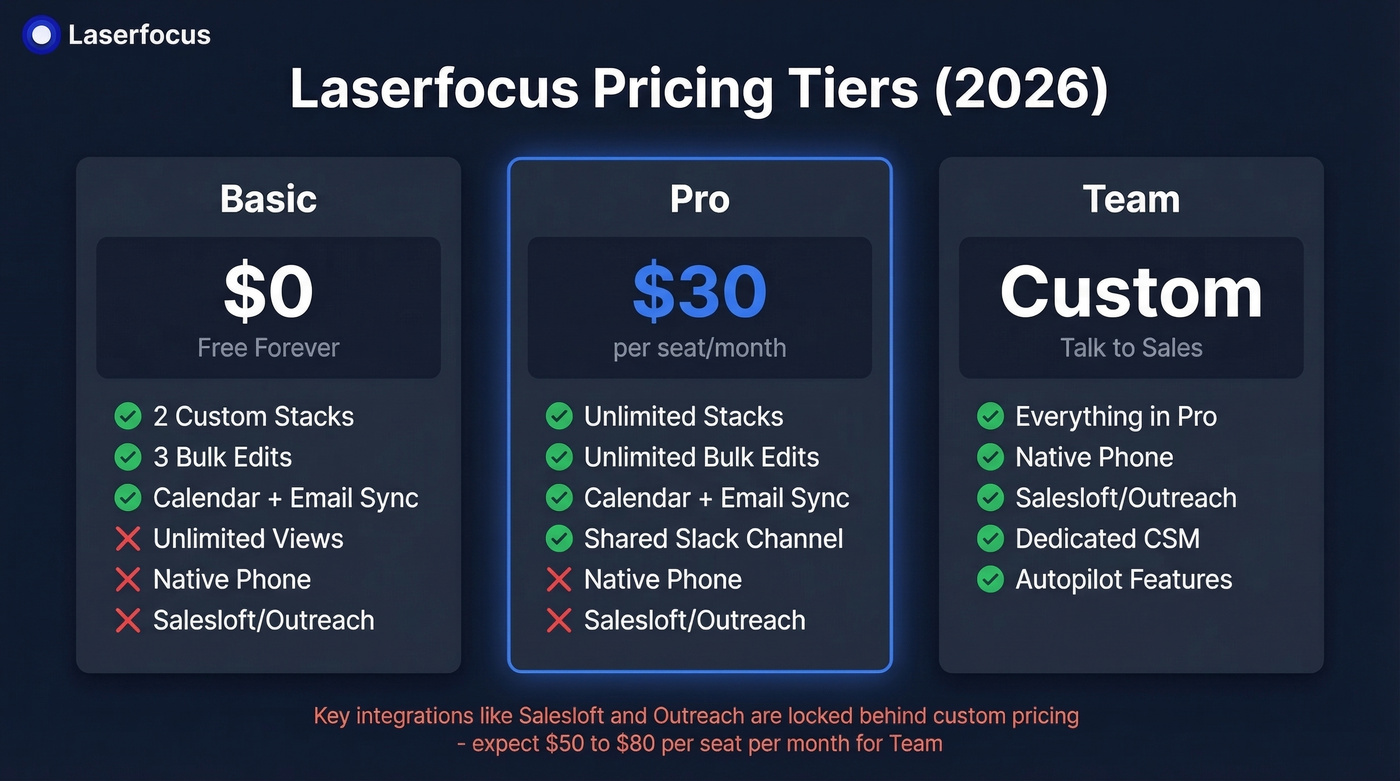
The Basic tier is legitimately usable - enough to evaluate whether the interface clicks for you before spending a dime. Pro at $30/seat/month unlocks unlimited limits and adds a shared Slack channel plus video call support. Native phone, Salesloft/Outreach integration, and Team "autopilot" features are all gated behind Team's custom pricing.
Here's the thing: gating Salesloft and Outreach integrations behind custom pricing is a red flag for small teams. You can't even test that workflow without talking to sales. Based on comparable tools in this category, expect Team pricing somewhere in the $50-$80/seat/month range.
The ROI math still works at Pro, though. If Laserfocus saves an AE even 3 hours per week on data entry, that's roughly $900/month in recovered selling time at a $75/hour loaded cost. Paying $30 for that is a no-brainer - if the time savings are real for your workflow.
If you're evaluating this category more broadly, it helps to compare it against other AI CRM data entry automation options and the wider revenue operations tools stack.
Real Pros and Cons
Pros:
- Genuinely usable free plan. No credit card, no time limit, no crippled trial.
- Clean, fast interface. In our testing, inline editing felt noticeably faster than native Salesforce. Product Hunt commenters compare the natural-language task rescheduling to Superhuman.
- $30/seat is competitive. Below Scratchpad's $49 Team tier and at the midpoint for overlay tools ($20-$60/user/month).
- Designed not to store Salesforce data. If your security team is sensitive to vendor-side data-at-rest risk, this architecture is a real plus.
Cons:
- No review-platform trust signals. We couldn't find ratings on G2, Capterra, or TrustRadius, and Slashdot shows "No User Reviews." You're buying based on a marketing site and hands-on testing alone.
- No collaboration features to speak of. Shared workflows, deal rooms, multi-rep coordination - none of it. (If that's your priority, start with a shortlist of deal management software.)
- Team pricing is opaque. Custom pricing for the only tier with integrations? Small teams hate this, and rightfully so.
- Viability questions are real. Dooly shut down in 2025, and smaller tools in this category can disappear fast.

A faster Salesforce UI won't help if half your contacts have bounced emails and dead phone numbers. Prospeo's CRM enrichment fills gaps with 143M+ verified emails at 98% accuracy and 125M+ verified mobiles - all refreshed every 7 days, not every 6 weeks. Native Salesforce integration means no workflow changes.
Stop polishing a pipeline built on stale data. Enrich it for $0.01/lead.
What Users Actually Say
Let's be honest: the user review situation here is thin. We couldn't find ratings on G2, Capterra, or TrustRadius. Slashdot's directory listing shows zero ratings. Reddit had nothing relevant - every result was people using "laser focus" as a generic phrase.
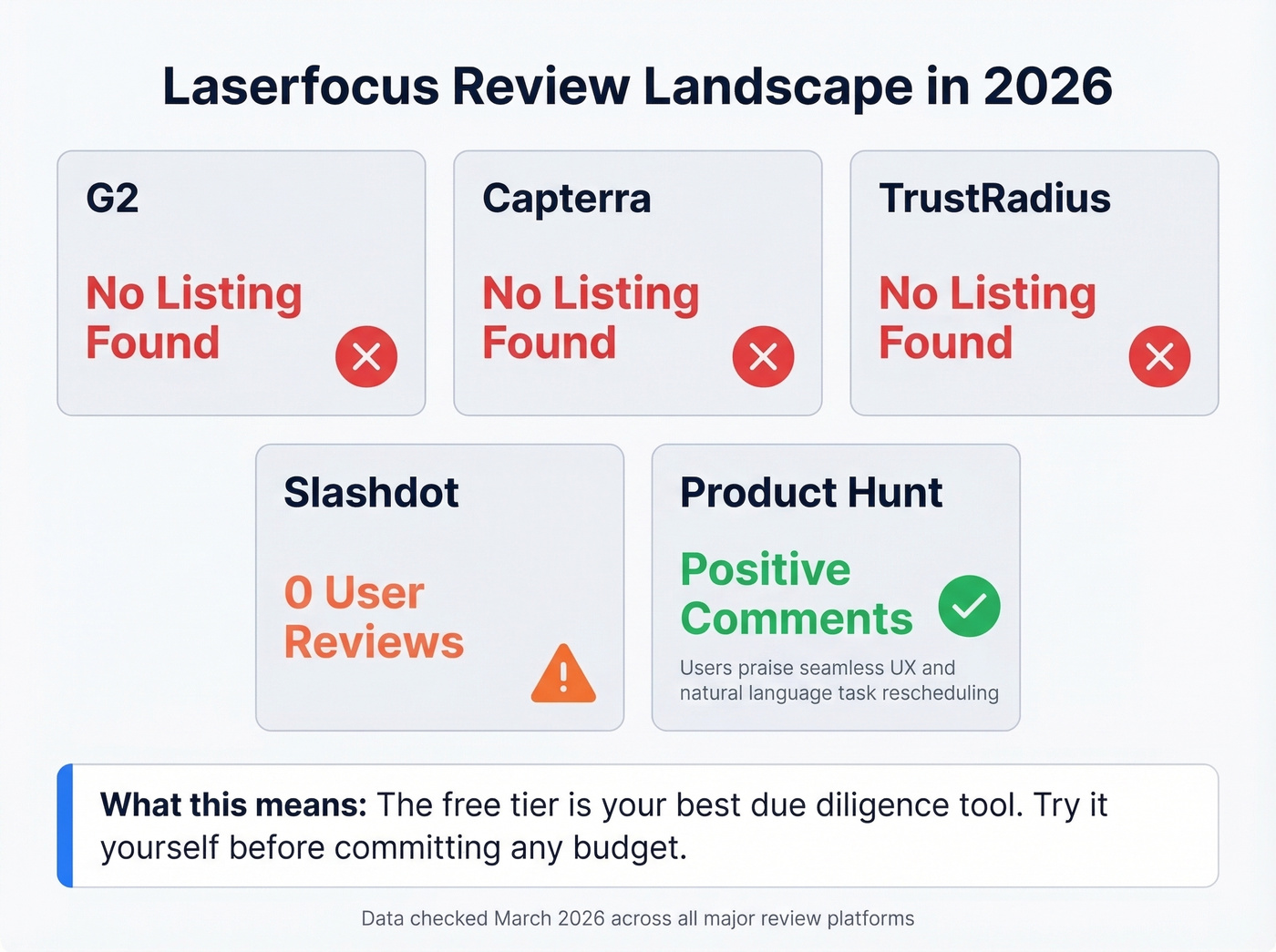
The only real user sentiment comes from the Product Hunt launch discussion. Comments praise the "seamless UX," highlight rescheduling tasks with natural language, and contrast it favorably with Salesforce's clutter. These aren't verified purchasers, but they're the closest thing to genuine feedback that exists publicly.
A Salesforce overlay with basically no public reviews in 2026 is either a hidden gem or a tool that hasn't found product-market fit. The free tier exists specifically so you don't have to guess which one it is. Use it.
If you're building a more complete evaluation process, pair hands-on testing with a lightweight sales team assessment so you know what you're actually trying to fix.
Laserfocus vs Scratchpad
With Dooly shut down, the comparison most teams end up making is Laserfocus vs Scratchpad.
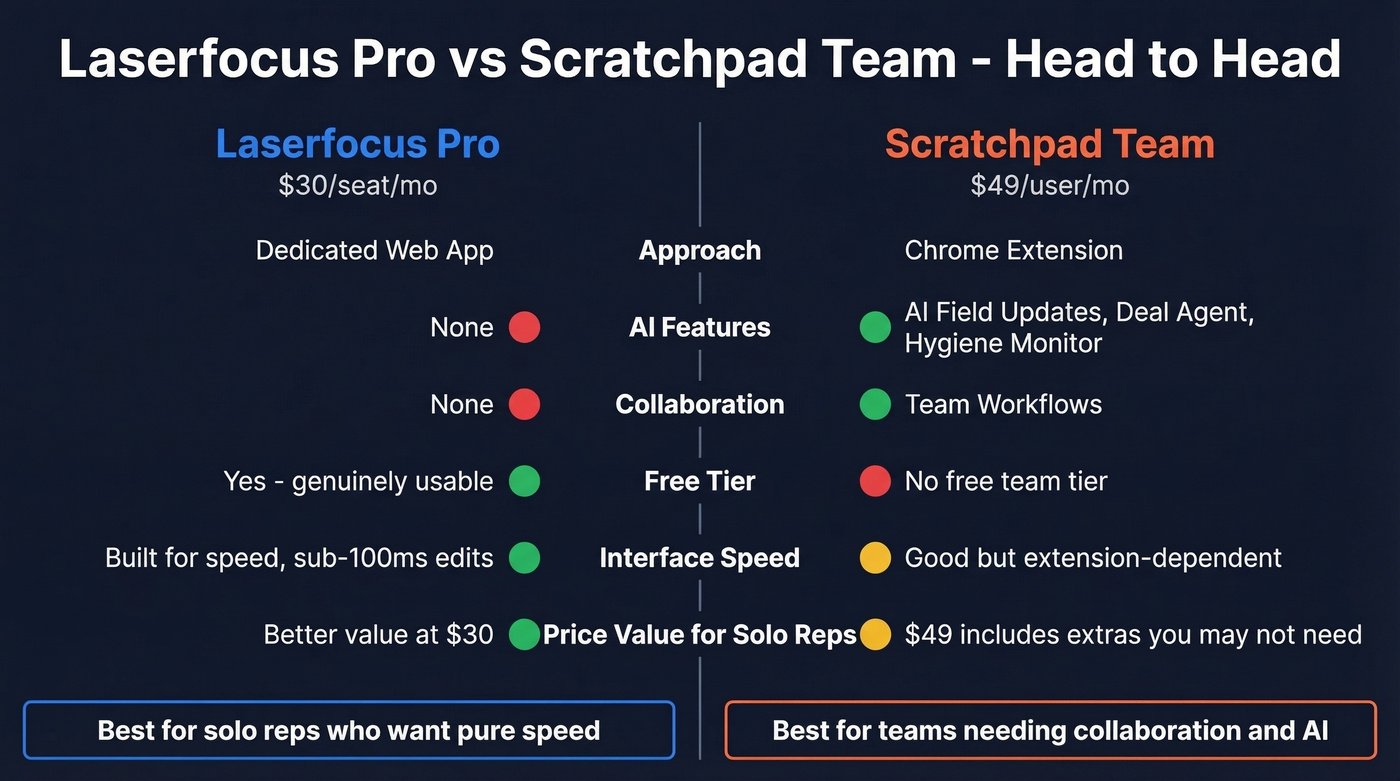
| Laserfocus Pro | Scratchpad Solo | Scratchpad Team | |
|---|---|---|---|
| Price | $30/seat/mo | $19/user/mo | $49/user/mo |
| Approach | Dedicated web app | Chrome extension | Chrome extension |
| AI features | None | 100 AI credits/mo | AI field updates + deal/account agent + hygiene monitor |
| Collaboration | None | Limited | Team workflows |
| Free tier | Yes (usable) | Yes (3 views) | No |
Scratchpad wins on collaboration and AI - deal/account agent, hygiene monitor, and AI-powered field updates give it a clear edge for teams. Laserfocus wins on pure interface speed and a more generous free tier. For solo reps who want a faster Salesforce without the extras, Laserfocus is the better value at $30 vs. $49. For teams building shared workflows, Scratchpad is the obvious choice.
If you're trying to standardize how reps work opportunities, it’s also worth tightening your pipeline review cadence so the UI speed actually translates into cleaner forecasts.
What Laserfocus Doesn't Solve
Laserfocus speeds up how you work in Salesforce. It can't fix what's already inside it.
We've seen this pattern dozens of times: a team buys an overlay tool, reps love the faster UI, and then pipeline still stalls because half the contacts have bounced emails and disconnected numbers. The problem isn't interface speed - it's upstream data quality. Prospeo handles that side with 143M+ verified emails at 98% accuracy and 125M+ verified mobile numbers, all refreshed every 7 days, with native Salesforce integration. At roughly $0.01 per lead, it's a fraction of what most enrichment vendors charge.
If you're diagnosing why outbound is underperforming, start with sales prospecting benchmarks and then audit your list quality with an email existence checker.

Laserfocus Pro costs $30/seat/month to speed up data entry. Prospeo costs roughly $0.01/lead to make sure that data is actually accurate. Teams using Prospeo see bounce rates drop below 4% and connect rates jump to 20-25% - because every email and phone number is verified before it hits your CRM.
The best overlay tool can't fix a contact list full of dead ends.
Who Should (and Shouldn't) Buy
Buy Laserfocus if you're a solo rep living in Salesforce daily, you want faster data entry without replacing your CRM, and you're comfortable evaluating a tool without third-party review depth.
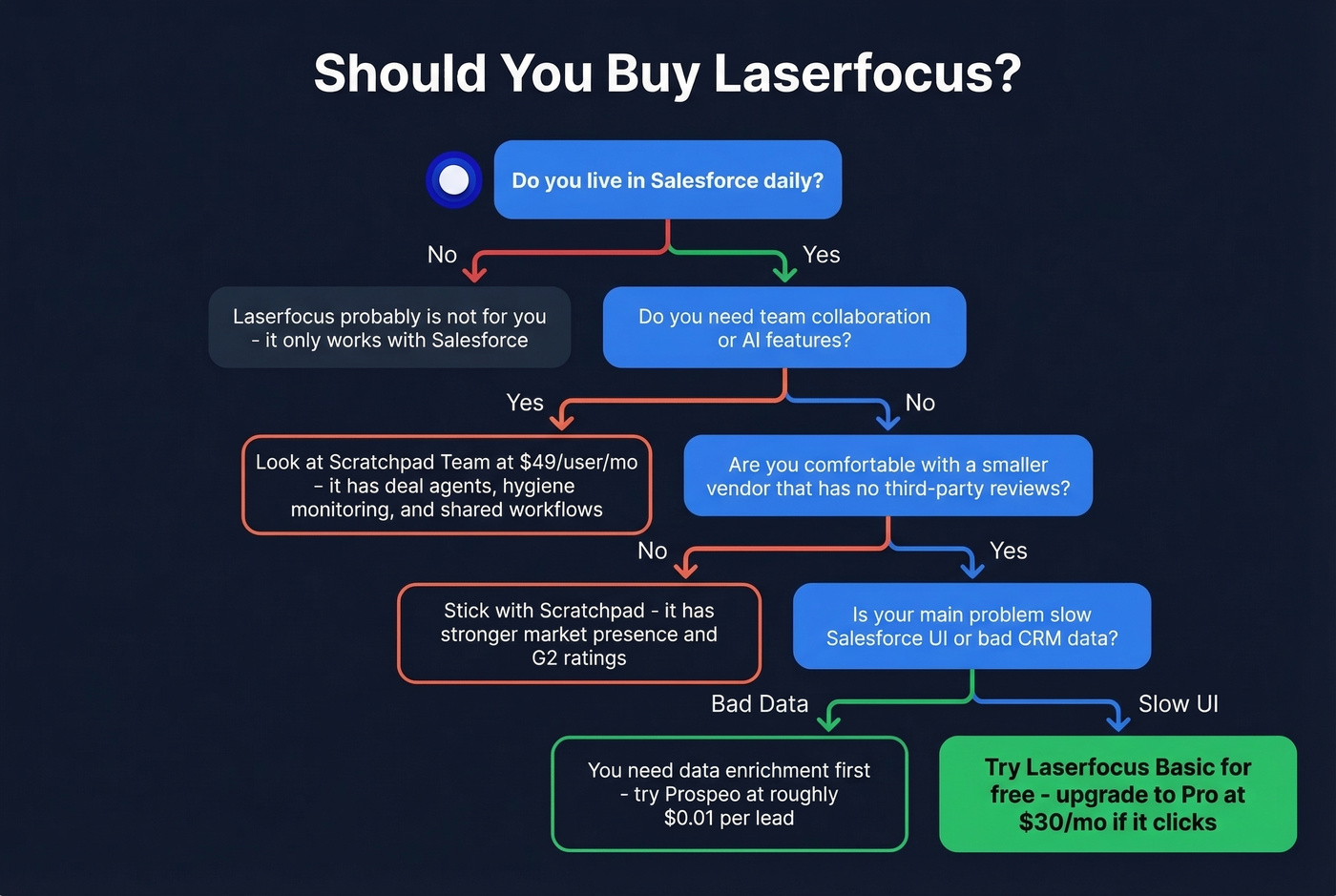
Skip Laserfocus if you need team collaboration, AI-powered features, or Salesloft/Outreach integration without custom pricing. Also skip it if you're risk-averse about betting on a smaller vendor in a space where Dooly just disappeared overnight.
If you're rebuilding your workflow post-overlay, align it with sales enablement best practices so reps don’t just move faster - they move consistently.
FAQ
Does Laserfocus have a free plan?
Yes - Basic is free forever with no credit card required. You get 2 custom stacks, 3 bulk edits, and calendar plus email sync. It's genuinely usable for evaluating whether the tool fits your workflow before committing to Pro at $30/seat/month.
Is Laserfocus safe for my Salesforce data?
According to a maker comment on Product Hunt, Laserfocus pulls Salesforce data to your local machine and doesn't store it server-side. That said, run it through your security team's standard review like any other Salesforce-connected tool before rolling it out.
What happened to Dooly?
Dooly shut down June 30, 2025, and confirmed no CRM data would be maintained past July 30, 2025. Scratchpad and Laserfocus are the two Salesforce overlay tools worth evaluating as replacements in 2026.
Can Laserfocus fix bad data in Salesforce?
No - it only improves how you interact with existing records. If your CRM is full of bounced emails and stale phone numbers, you need a data enrichment tool. Prospeo's CRM enrichment returns 50+ data points per contact at a 92% match rate, with a 7-day refresh cycle that keeps records current.
How does Laserfocus compare to Scratchpad on price?
Laserfocus Pro costs $30/seat/month versus Scratchpad's $19 Solo and $49 Team tiers. Laserfocus is cheaper than Scratchpad Team but lacks AI features and collaboration tools. Solo reps get better value from Laserfocus; teams should lean toward Scratchpad.