

Lead Assignment Rules: Route Leads Across Salesforce, HubSpot & Dynamics 365
A RevOps lead we know spent three months building the "perfect" routing logic - 450+ lead assignment rules, weekly updates, a dozen products - and still called it a "house of cards." The problem wasn't the rules. It was that nobody told him when to stop using native tools and when to switch approaches.
That's what this guide fixes.
What You Need (Quick Version)
If you're on Salesforce with fewer than 50 rule entries and a stable team, native assignment rules work fine - set them up in 20 minutes. If you need round robin or your rules keep multiplying, use Flow to make the logic dynamic and use assignment rules only where they still make sense. And before you route anything, verify your lead data. Routing a bad email to your best rep is waste, not speed.
Why Routing Speed Decides Revenue
The data on speed-to-lead is brutal. Leads contacted within five minutes are 21x more likely to qualify than those contacted after 30 minutes. Respond in the first minute, and you're looking at a 391% increase in conversions versus waiting even a few minutes longer.
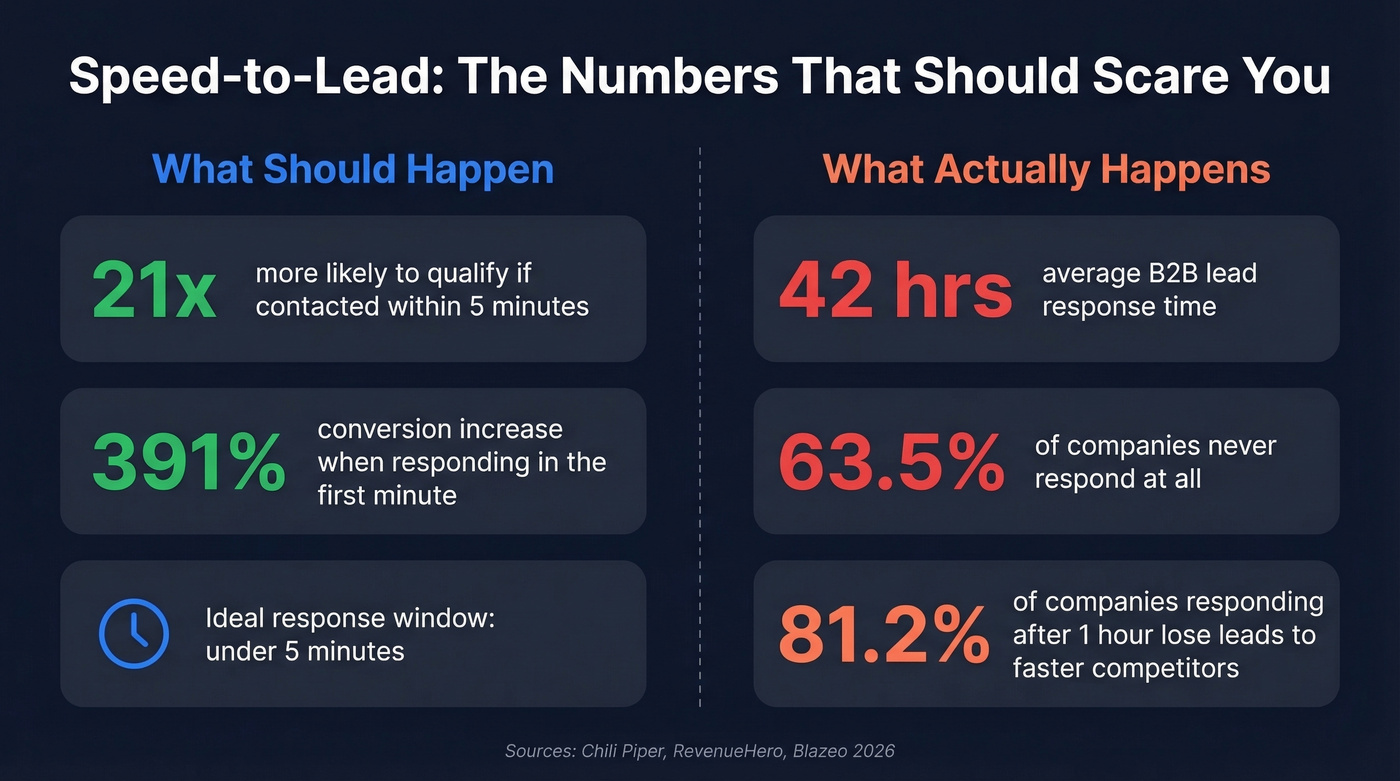
Now look at what actually happens. The average B2B response time is 42 hours. A RevenueHero study of 1,000 companies found that 63.5% never responded at all - and those that did averaged over 29 hours. A 2026 Blazeo survey puts it bluntly: 81.2% of companies responding after one hour report losing leads to faster competitors.
That gap between "five minutes" and "42 hours" is where pipeline goes to die. Lead routing is the mechanism that closes it.
What Are Lead Assignment Rules?
Lead assignment rules are automated if/then logic that routes incoming records to the right person or queue the moment they enter your CRM. Every major platform supports some version of this, though the implementation varies wildly. The goal is simple: connect a prospect to a sales rep as quickly and accurately as possible.
The core concepts stay consistent across platforms:
- Criteria - the conditions a record must match (industry, geography, lead score, source)
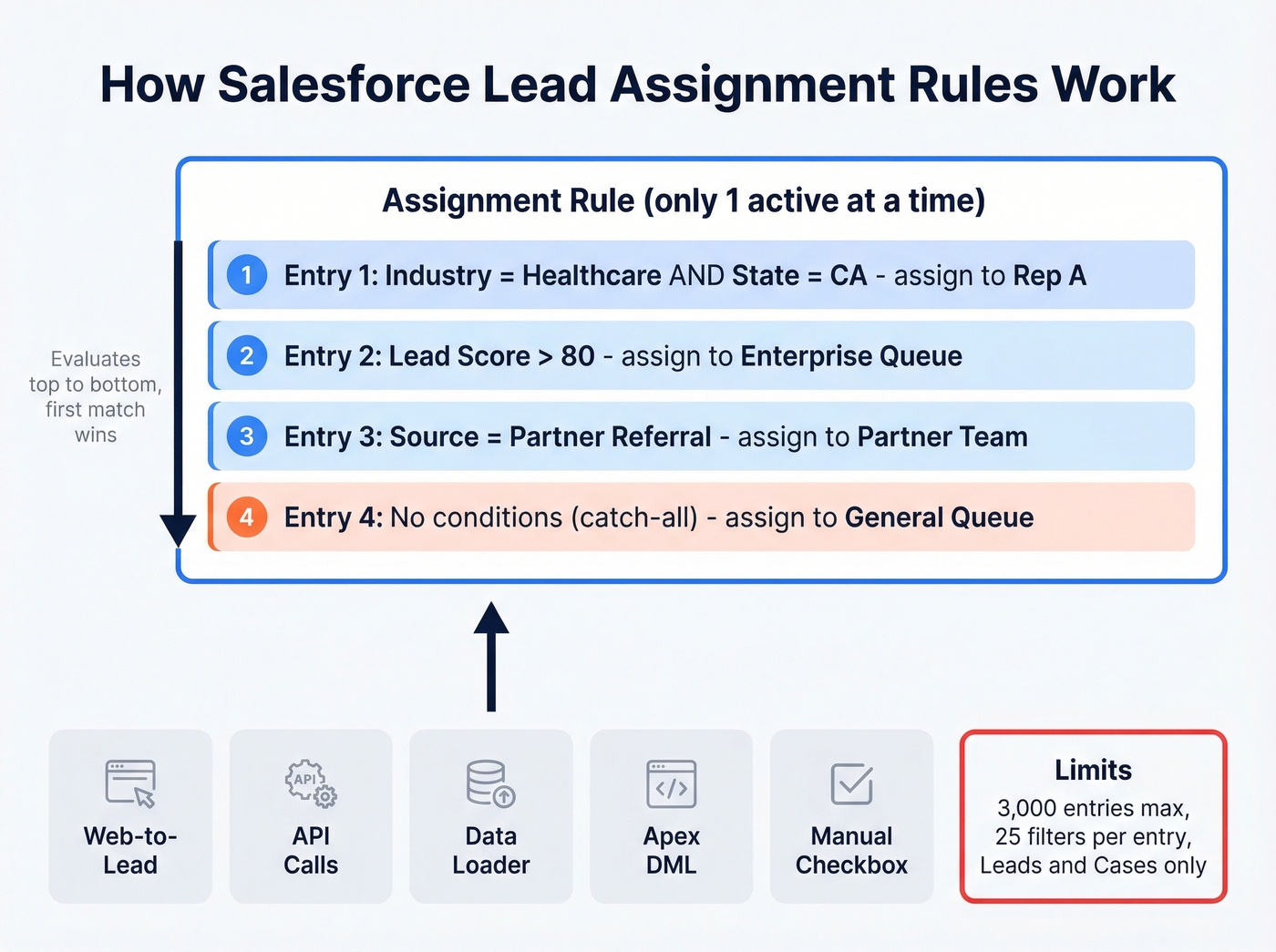
- First-match-wins ordering - rules evaluate top to bottom; the first match assigns the record
- Assignees - individual users or queues, which are groups of users sharing a pool
One terminology note that trips people up in Salesforce: an "assignment rule" is the container. "Rule entries" are the individual if/then criteria inside it. You get one active rule, but it can hold thousands of entries.
Salesforce Setup: Rules, Entries & Limits
Salesforce is where most teams first encounter routing rules, and it's where the most complexity lives.
Step-by-Step Configuration
In Setup, search for Lead Assignment Rules, create a new rule, activate it, then start adding rule entries. Each entry needs three things: a sort order (priority), filter criteria (the conditions), and an assignee (user or queue).
The sort order matters. Salesforce evaluates entries top to bottom and stops at the first match. Put your most specific criteria first and your broadest last. A common mistake is ordering entries by creation date rather than by specificity - this leads to leads landing in the wrong bucket.
To trigger assignment rules on new records, check the "Use active assignment rule" checkbox on Web-to-Lead forms, or set the AssignmentRuleHeader in API calls. For Data Loader imports, there's a settings checkbox. For Apex-based inserts/updates, you'll set the assignment rule header or DML options so the active rule runs.
System Limits & Triggering Contexts
Salesforce imposes hard limits you need to know upfront:
- 3,000 rule entries maximum per assignment rule
- 25 filter conditions per entry
- One active rule at a time - you can create multiple rules, but only one can be live
- Assignment rules apply to Leads and Cases only, not Contacts, Accounts, or custom objects
Assignment rules fire in these contexts: Web-to-Lead, Web-to-Case, Data Loader imports, API creates/updates, Apex-driven DML (when invoked), and manual checkbox selection. They run after Apex triggers and before workflow rules in Salesforce's order of execution.
Always create a catch-all entry. Make it the last entry in your rule with no conditions, assigning to a general queue or your default owner. Without it, leads that don't match any criteria end up with the default owner behavior for that creation method - which is how you get the "where did that lead go?" Slack message at 4pm on a Friday.
HubSpot Routing via Workflows
HubSpot lead routing is built inside Workflows, which is actually more flexible once you get the hang of it. The three common patterns: basic round robin, weighted or custom round robin, and rules-based routing by territory or industry.
Start by creating a workflow with an enrollment trigger - form submission, lifecycle stage change, lead score crossing a threshold, or a property value changing. Before you route, add a branching step to check data quality. Does the record have a valid email? Is the company name populated? This prevents garbage records from clogging rep queues.
For the actual assignment, use HubSpot's "Rotate record to owner" action. This distributes leads evenly across a team in round-robin fashion. You can also use if/then branches to route by territory, industry, or deal size before hitting the rotation step.
One caveat: workflow-based routing requires HubSpot tiers that include Workflows, typically Professional or Enterprise. On Starter, you're doing this manually or with a third-party tool.

You just read that 63.5% of companies never respond to leads - and the ones that do take 29+ hours. But even a sub-5-minute response is wasted if the email bounces. Prospeo delivers 98% email accuracy with a 7-day refresh cycle, so every lead your assignment rules route actually reaches a real inbox.
Stop routing dead data to your best reps.
Dynamics 365 Assignment Rules
Dynamics 365 takes a different approach through its Sales Accelerator module. Navigate to Sales Hub, then Sales Accelerator, then Assignment Rules to create and activate rules. The biggest difference from Salesforce: round robin and load balancing are built in natively. No formula hacks required.
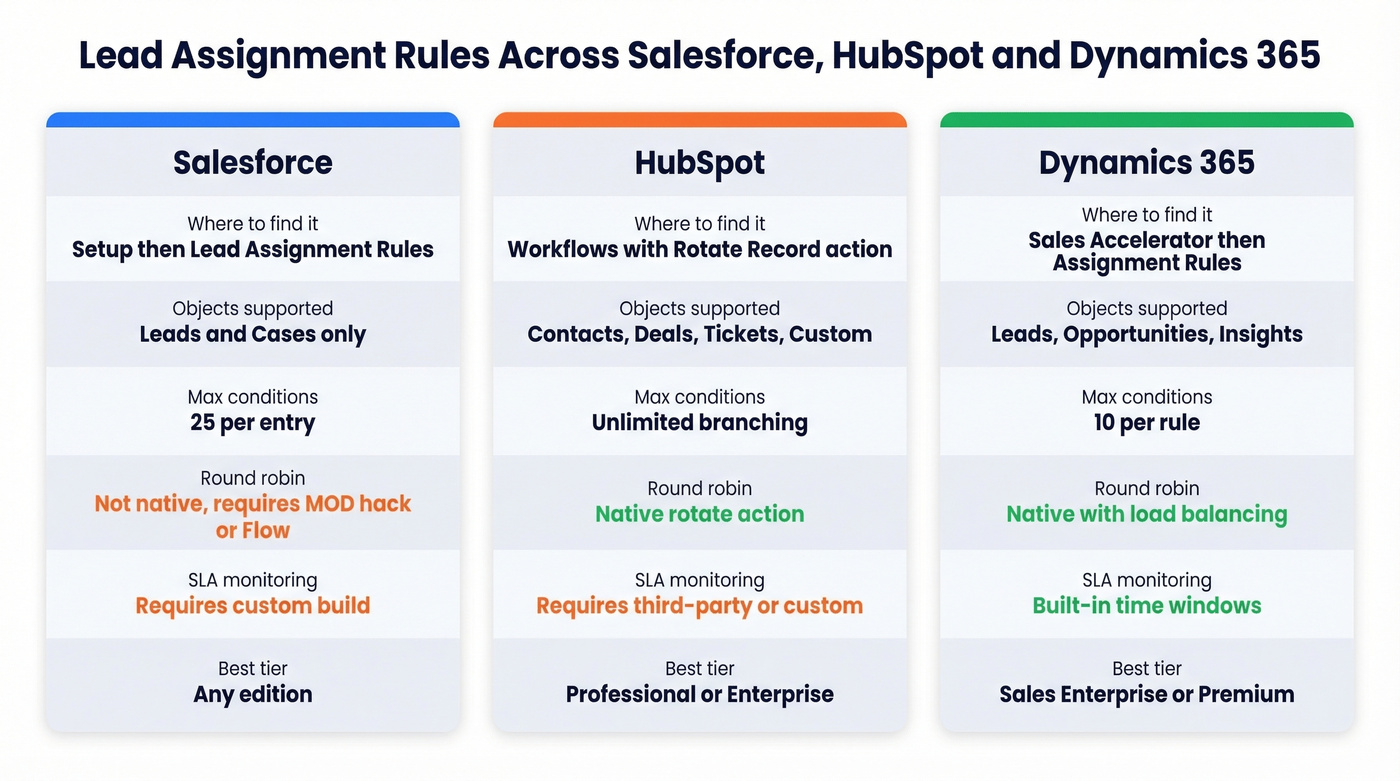
Assignment rules in Dynamics can route leads, opportunities, and seller insights - broader object support than Salesforce's lead-and-case limitation. Rules evaluate in listed order with first-match-wins logic. You're limited to 10 conditions per rule, which is tighter than Salesforce's 25 filters per entry but sufficient for most routing scenarios.
The standout feature is SLA-like time windows. You can configure rules with "Consider record type created in the last X hours"; if no seller is available within that window, the record gets marked overdue with a status reason explaining why. It's a built-in safety net that Salesforce requires custom automation to replicate.
Round Robin in Salesforce
Salesforce doesn't ship round robin out of the box. You have two paths: a simple formula approach for stable teams, and a Flow-based approach for teams that change frequently.
Auto Number + MOD() Formula
Create an Auto Number field on the Lead object, like Lead_Number__c. Then create a formula number field:
MOD(VALUE(Lead_Number__c), 3) + 1
Replace 3 with the number of reps. This produces values 1, 2, 3, 1, 2, 3... in sequence. Then create assignment rule entries mapping each value to a specific rep.
It's elegant and costs nothing. The drawback: when someone joins or leaves the team, you need to update the MOD divisor, adjust every assignment rule entry, and hope nothing breaks in between. For a team of five that rarely changes, this is fine. For a team of twenty with quarterly turnover, it's a maintenance headache.
Custom Settings + Flow-Based Round Robin
The Salesforce Admins blog outlines a more flexible approach using Custom Settings as an org-wide counter. Instead of relying on Auto Number, you store a counter value in a Custom Setting and increment it via Flow.
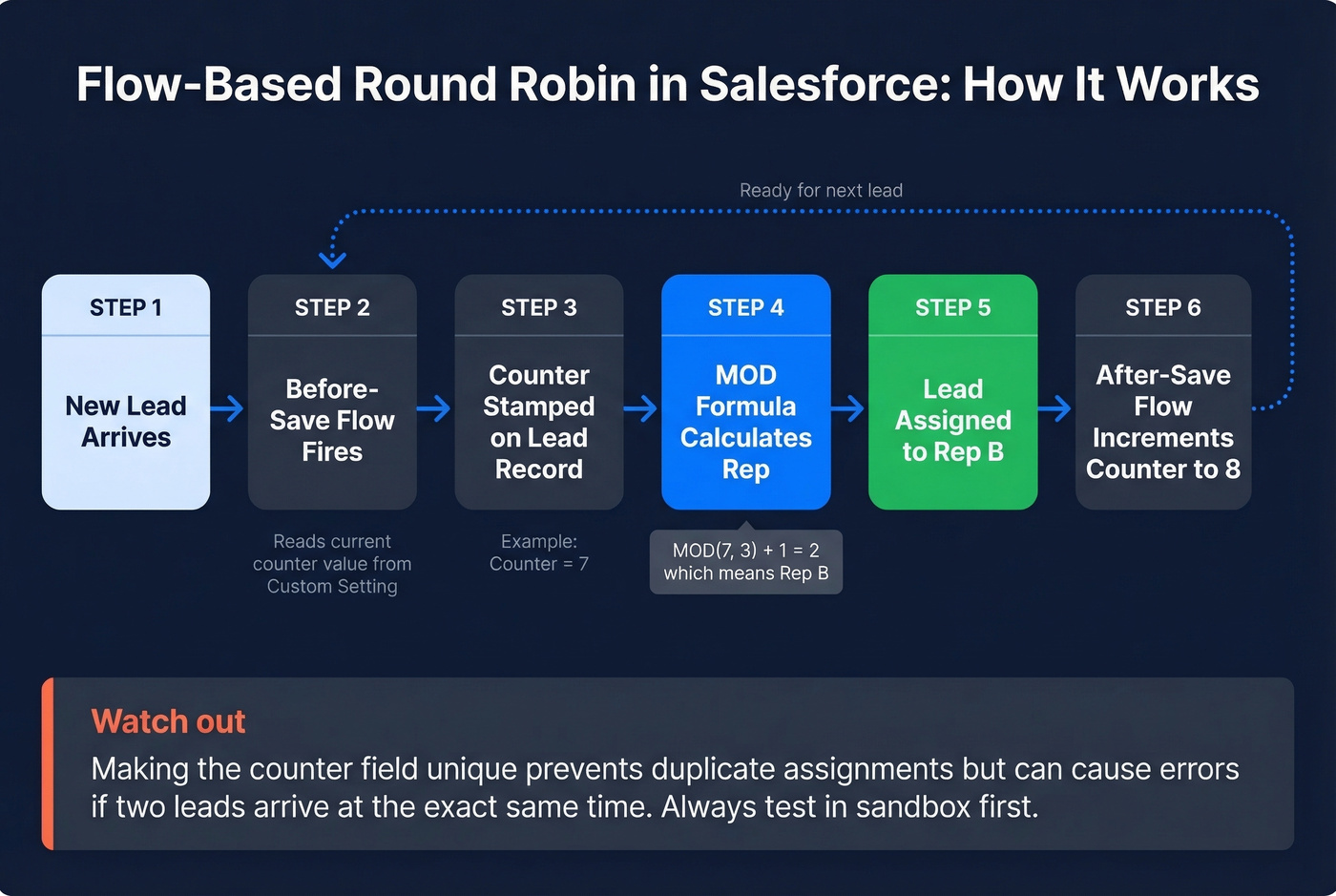
A before-save flow reads the current counter from the Custom Setting and stamps it on the lead record, so assignment rules can evaluate it before the record commits. An after-save flow increments the counter, keeping the sequence in sync for the next lead. The formula field still uses MOD logic, but the counter is decoupled from Auto Number - you can reset it, skip values, or adjust for availability without touching the formula.
One tradeoff worth testing: making the counter field unique prevents duplicate assignments but can cause automation errors if two leads arrive simultaneously. Test thoroughly in sandbox.
Assignment Rules vs. Flow in 2026
Salesforce has been retiring Workflow Rules and Process Builder, pushing everyone toward Flow. That context matters here.
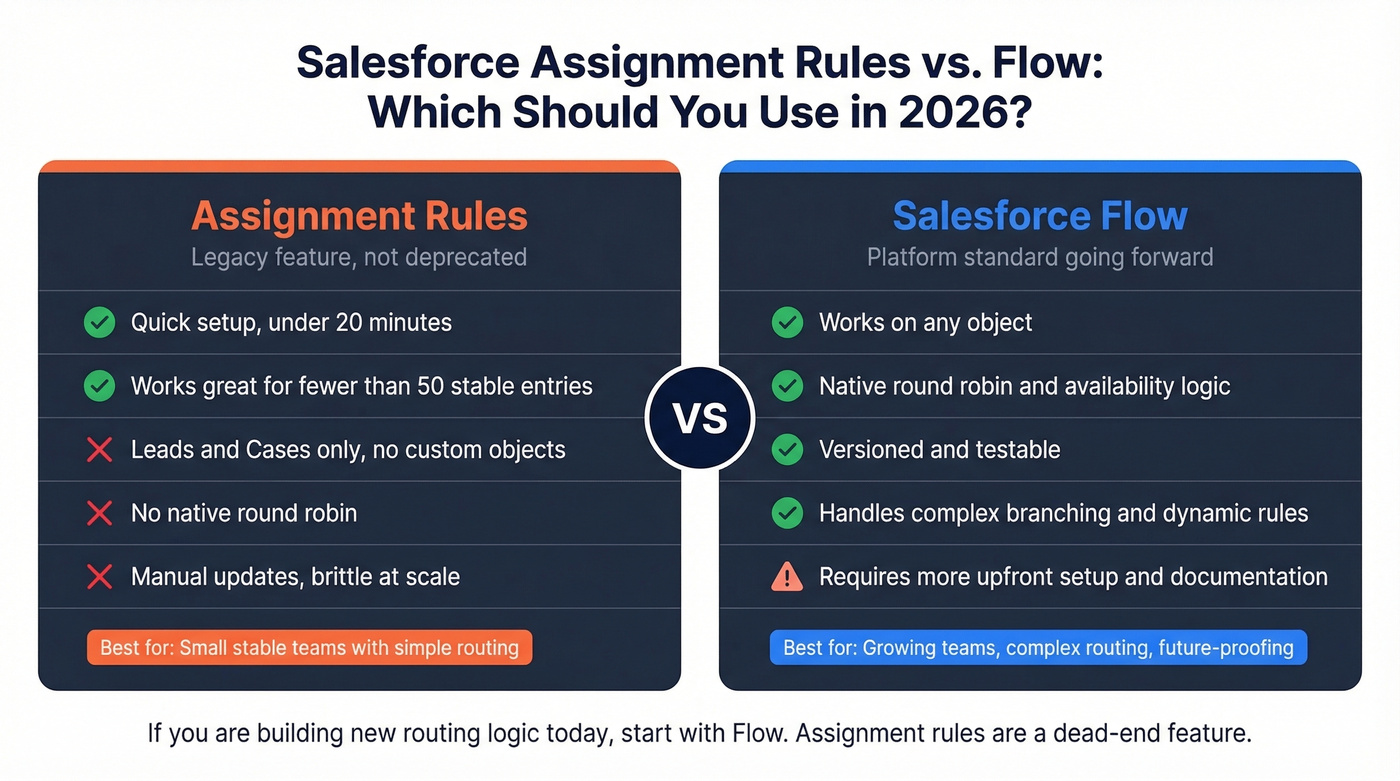
Use native assignment rules if you have fewer than 50 stable entries, your team doesn't change often, and your routing logic is straightforward criteria matching. Use Flow if you need round robin, availability-based logic, routing across multiple objects, or your rules change frequently.
Let's be honest: if you're building new routing logic today, start with Flow. Assignment rules aren't deprecated, but they're a dead-end feature - Salesforce isn't investing in them. The Reddit admin with 450+ rules updated weekly is the cautionary tale. That's a house of cards maintained by people who aren't even Salesforce admins, and it breaks constantly. If you go the Flow route, build in fallback paths and validation checkpoints - undocumented Flows become spaghetti logic just as fast as overgrown assignment rules.
| Criteria | Assignment Rules | Flow |
|---|---|---|
| Complexity ceiling | Low-medium | High |
| Round robin | Hack (MOD formula) | Native logic |
| Object support | Leads & Cases only | Any object |
| Maintenance burden | Manual, brittle | Versioned, testable |
| Future-proofing | Legacy feature | Platform standard |
When to Move Beyond Native Rules
Before you build a single rule entry, sit down with marketing and sales to map every lead source, the fields each source populates, and the routing scenario for each. The hardest part of lead routing isn't CRM configuration - it's this cross-team alignment. Skip it, and you'll rebuild your rules within six months.
Consider a third-party routing tool when your team exceeds 20 reps, you're managing 100+ rule entries, you need lead-to-account matching, availability-based assignment, or territory management overlap logic. Beyond round robin, mature teams often implement weighted distribution, skill-based routing, or claim-based "shark tank" models - all of which require third-party tools or custom Apex. Thoughtful resource allocation for leads becomes critical at this stage because uneven distribution burns out top reps while leaving others underutilized. And with over 40% of high-intent inquiries arriving evenings and weekends, automated routing isn't optional for teams selling across time zones.
Here's our hot take: the routing tool industry exists because CRMs ship incomplete features. Before you pay $25K+/year, ask whether Flows plus clean data solve 80% of your problem for free. We've seen teams buy LeanData when a well-structured Flow would've handled everything they needed. On Reddit, admins frequently cite $6-8K/month as the perceived cost barrier for third-party routing tools - make sure you've exhausted native options first.
| Tool | Best For | Starting Price |
|---|---|---|
| LeanData | Enterprise Salesforce orgs | ~$25K-$40K+/yr |
| Chili Piper | Speed-to-meeting inbound | $22.50/user/mo |
| LeadAngel | Budget-friendly routing | ~$99/mo |
| Warmly | Signal-based routing | ~$10,000/yr |
| Salesforce Flow | Staying native | Free (all editions) |
Fix Your Data Before You Route
Here's the contrarian opinion nobody in the routing tool space wants to hear: if your average deal size is under $10K, you probably don't need a $40K routing platform - but you absolutely need clean data. 25% of CRM managers say less than half their data is accurate and complete. Routing bad data faster just creates pipeline garbage faster.

We've watched teams obsess over routing logic while ignoring the fact that 30% of their lead emails bounce. That's the real bottleneck. Tools like Prospeo handle this upstream - 98% email accuracy and an 83% enrichment match rate mean records arrive in your CRM verified and enriched with 50+ data points before they ever hit a routing rule. The native Salesforce and HubSpot integrations make it automatic, refreshed on a 7-day cycle.
If you want to compare vendors, start with a shortlist of data enrichment services and validate your list hygiene against email bounce rate benchmarks.
Round-robin logic, territory routing, catch-all queues - none of it matters if your CRM is full of stale contacts. Prospeo's enrichment API returns 50+ data points per record at a 92% match rate, giving your assignment rules the clean fields they need to route accurately. At $0.01 per email, enriching your entire pipeline costs less than one misrouted lead.
Enrich before you route. Every rule works better with verified data.
Best Practices Checklist
- Always create a catch-all entry as your final rule entry with no conditions, assigning to a shared queue so no lead goes unrouted.
- Use formula fields for complex criteria instead of stacking dozens of rule entries - one formula can replace ten entries.
- Test in sandbox first. Assignment rule changes take effect immediately in production, and there's no undo button.
- Document every rule entry's purpose. The admin who built them will leave, and the next person needs to understand why entry #47 exists.
- Monitor with field history tracking on the Owner field to catch routing errors before reps do.
- Review rules quarterly. Teams change, territories shift, products launch - stale rules create stale pipelines.
If you're building a broader system around routing, it helps to map your lead generation workflow and track the right lead generation metrics so you can prove routing changes actually improved outcomes.
FAQ
Can you have multiple active lead assignment rules in Salesforce?
No. Salesforce allows only one active lead assignment rule at a time. Use multiple rule entries within that single rule to handle different routing scenarios, ordered by priority. If you need fundamentally different logic for different lead sources, use branching criteria within your entries rather than trying to maintain separate rules.
Does Salesforce support round-robin lead assignment natively?
Not as a built-in feature. You can implement round robin using an Auto Number field plus a MOD() formula plus assignment rule entries, or build a more dynamic version with Custom Settings and record-triggered Flows. Both approaches work - expect 30-60 minutes of setup and testing.
What happens when no rule entry matches a lead?
The lead falls back to the default owner behavior for that creation method (the default lead owner or the creating user), and it often won't reach the right rep without manual cleanup. A catch-all entry - the last entry with no conditions, assigning to a general queue - is non-negotiable.
How do I keep routing data accurate without manual cleanup?
Use an enrichment tool with native CRM integration to verify emails and fill missing fields before records enter your routing logic. Prospeo's Salesforce and HubSpot integrations auto-enrich leads with 50+ data points at 98% email accuracy, which eliminates the "garbage in, garbage out" problem that breaks even well-designed assignment rules.