

Lead Capture Integration: How to Stop Losing Leads Between Form Fill and CRM
Your marketing team just ran a webinar. 400 registrants. 180 attended. Two weeks later, sales has followed up with 12 of them. The other 168? Sitting in a CSV somewhere, aging by the hour.
That's not a lead gen problem - it's a lead capture integration problem.
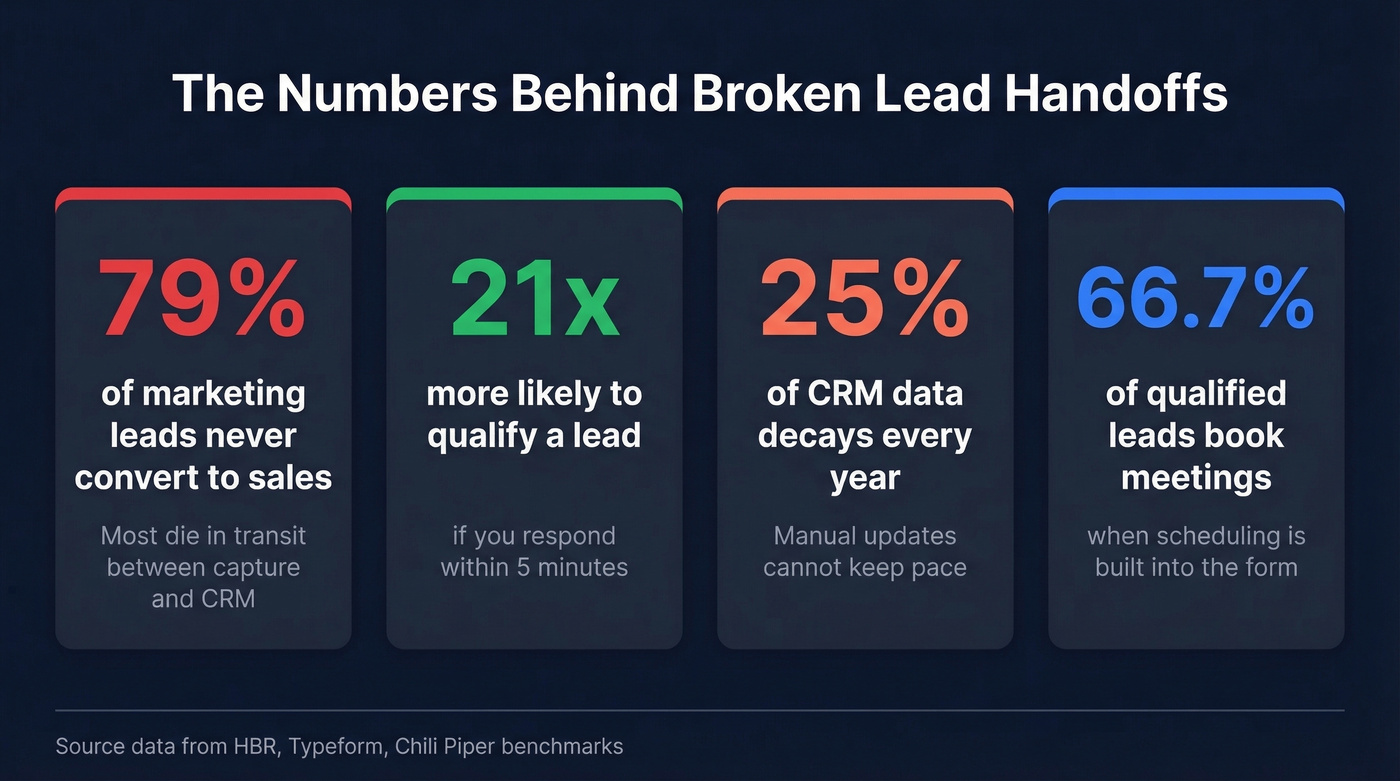
79% of marketing leads never convert into sales, and it's not because the leads are bad. The handoff between capture and action is broken. Contact a lead within 5 minutes and you're 21x more likely to qualify them. The lead capture software market has grown to a projected $16.2B by 2034 at a 9.1% CAGR, and the reason is straightforward: companies are finally realizing the form isn't the problem. What happens after someone hits submit is.
Here's the math that should keep you up at night. If you close 5% of SQLs at $10K ACV and need $500K this quarter, you need 1,000 qualified leads - and 79% of them will die in transit without proper integration.
The Short Version
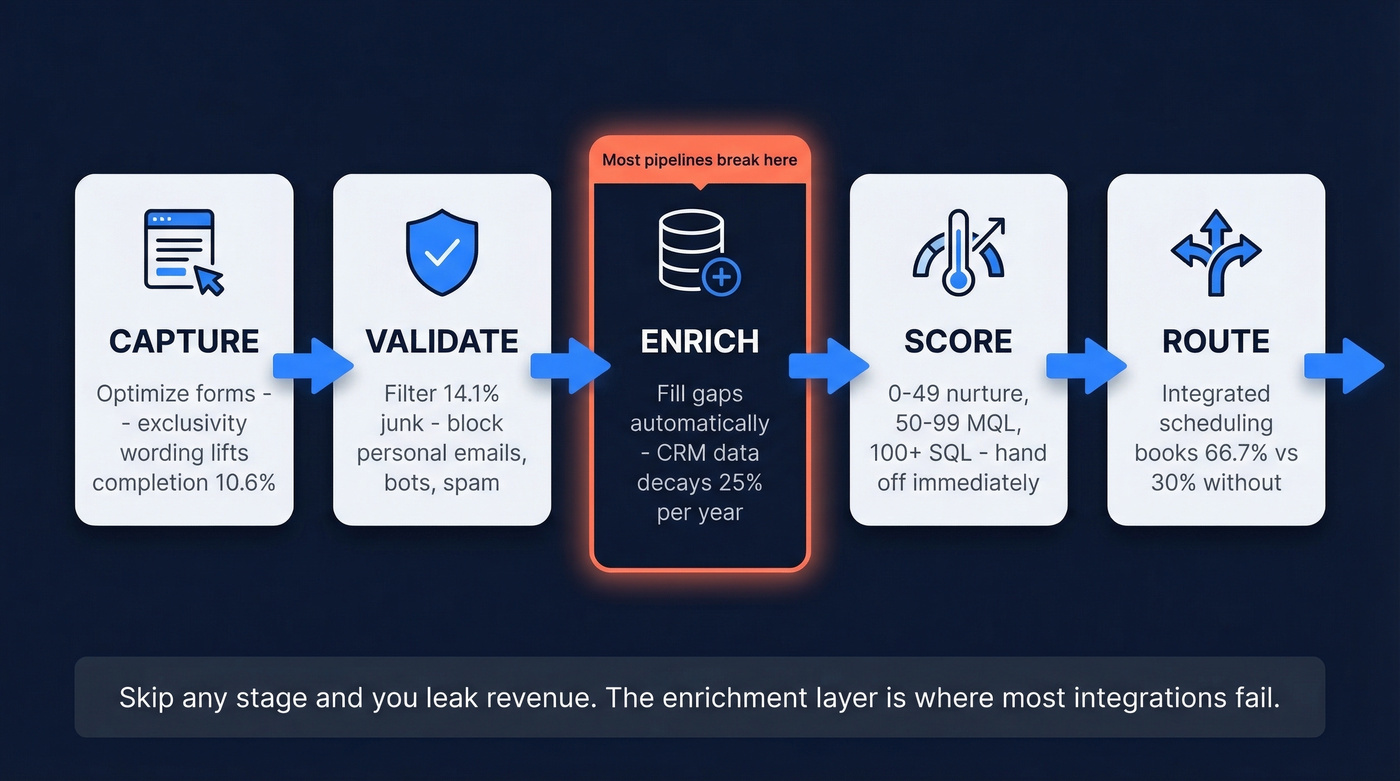
Most integrations fail because companies treat it as form-to-CRM and stop there. The real pipeline has five stages: capture, validate, enrich, score, route. Skip any one and you're leaking revenue. Enrich every lead automatically and respond within 5 minutes. Everything else is optimization on top of those two fundamentals.
What Lead Capture Integration Actually Means
Lead capture integration connects every touchpoint where someone raises their hand - forms, chatbots, landing pages, badge scans at events - to the systems that act on that signal: your CRM, enrichment tools, scoring engine, and routing logic.
Without it, you get manual CSV imports, stale data sitting in inboxes, and reps calling leads who've already gone cold. The goal isn't just getting data into Salesforce. It's getting enriched, scored, routed data to the right rep before the lead forgets they filled out your form.
Integration Methods Compared
There are three ways to connect your capture layer to your CRM. Each involves real tradeoffs.
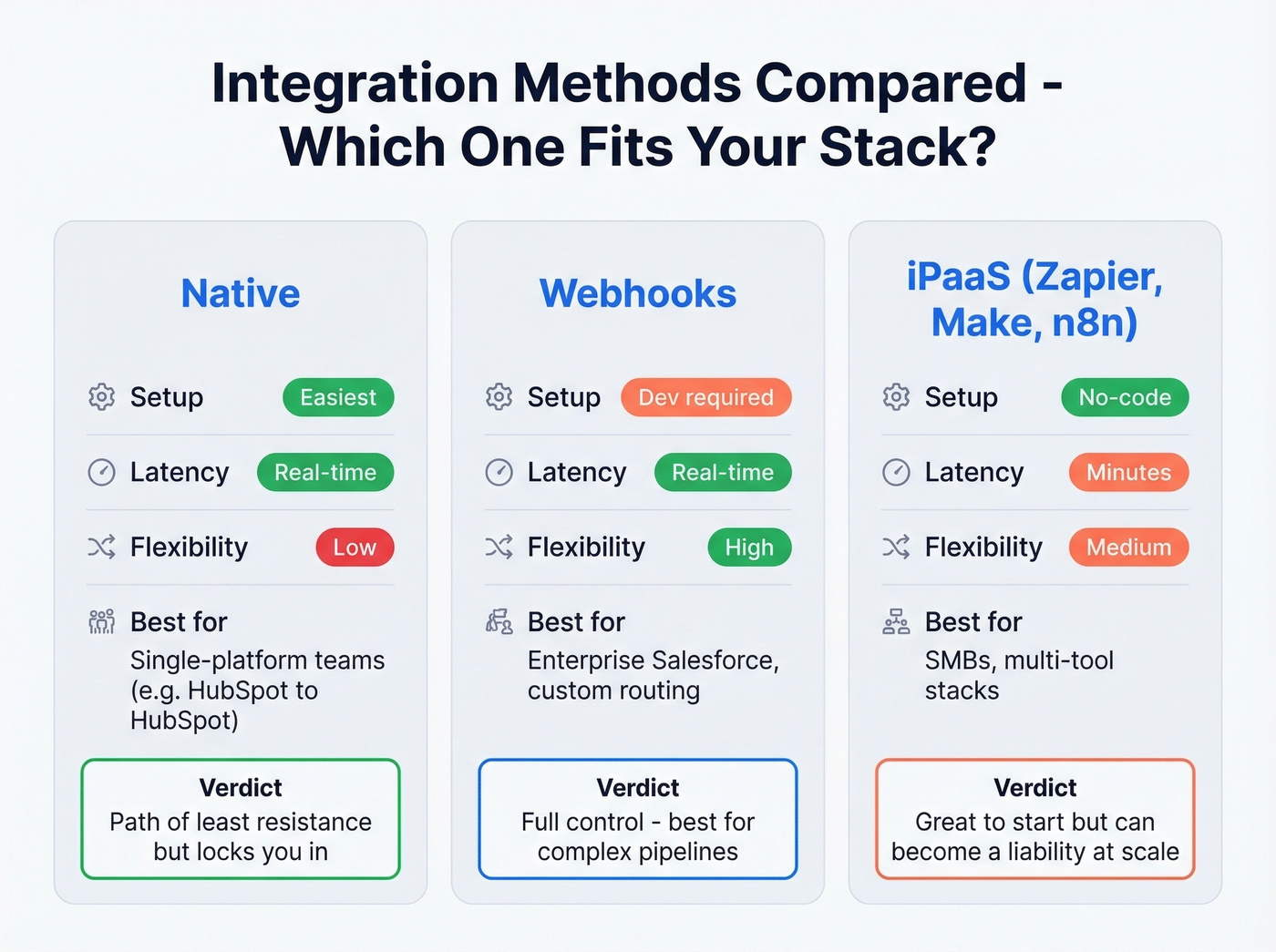
| Method | Setup | Latency | Flexibility | Best For |
|---|---|---|---|---|
| Native | Easiest | Real-time | Low | Single-platform teams |
| Webhooks | Dev required | Real-time | High | Custom/enterprise |
| iPaaS (Zapier, Make, n8n) | No-code | Minutes | Medium | SMBs, multi-tool stacks |
Native integrations - like HubSpot Forms feeding HubSpot CRM - are the path of least resistance. Zero config, real-time sync, no middleware to maintain. The tradeoff is lock-in.
Webhooks give you real-time, event-driven data pushes with full control over the payload. They require a developer, but for enterprise Salesforce environments, they're the right call. Navattic replaced a 99-step Zapier workaround with a webhook-based enrichment and routing pipeline and cut lead response time from hours to seconds.
iPaaS tools sit in the middle - fast to set up, great for connecting tools that don't talk natively. But there's a trust issue. A Salesforce admin on r/salesforce put it bluntly: Zapier "looks a little too simple" and "cheap" when you're responsible for data integrity across departments. We've seen this play out repeatedly - Zapier works well for early-stage teams, but for enterprise CRM environments with complex routing, it becomes a liability.
For more ways to connect your outbound stack, see our guide on connect Outreach tool to CRM.

The enrichment layer is where most lead capture integrations break. Prospeo returns 50+ verified data points per contact at 98% email accuracy - plugging directly into Salesforce and HubSpot so every form fill hits your CRM enriched, scored, and ready to route. At ~$0.01 per email, fixing your leakiest pipeline stage costs less than losing one more lead.
Stop losing 79% of your leads to broken handoffs.
The Five-Stage Pipeline
1. Capture - Optimize the Form
Typeform analyzed 10,000 user-generated forms (including a primary dataset of 1,576 lead capture forms) and found that exclusivity wording - "Apply for access" vs. "Sign up" - is associated with a 10.6% increase in completion rate. Hidden fields for UTM parameters correlated with a 4.8% increase. Putting a question on the welcome screen? A 5% decrease in completion rate. Less friction, more context, better data in.
If you want a broader view of what’s working right now, track lead generation trends alongside your form experiments.
2. Validate - Filter the Junk
14.1% of form submissions are unqualified - spam, personal emails, competitor domains, bots. That stat comes from an analysis of nearly 4 million submissions. Block personal email domains at the form level. Require work addresses. Use CAPTCHA for bot filtering.
This isn't gatekeeping. It's hygiene. If you’re standardizing the process, map validation into your broader lead generation workflow.
3. Enrich - Fill the Gaps
CRM data decays by roughly 25% per year. If your enrichment strategy is "reps update records manually," a quarter of your database is already wrong.
Let's be honest: this is where most pipelines fall apart. We've tested dozens of form-to-CRM setups, and the enrichment layer is consistently the weakest link. Bad data cascades downstream - it corrupts scoring, misroutes leads, and wastes rep time. Automated enrichment tools like Prospeo return 50+ verified data points per contact with 98% email accuracy, running on a 7-day refresh cycle so records don't rot between quarterly cleanups. Every new lead enters the CRM with complete firmographic and technographic data before a rep touches it.
If you’re comparing vendors, start with our roundup of data enrichment services or the deeper guide to lead enrichment.

4. Score - Separate Hot from Cold
Not every lead deserves a phone call:
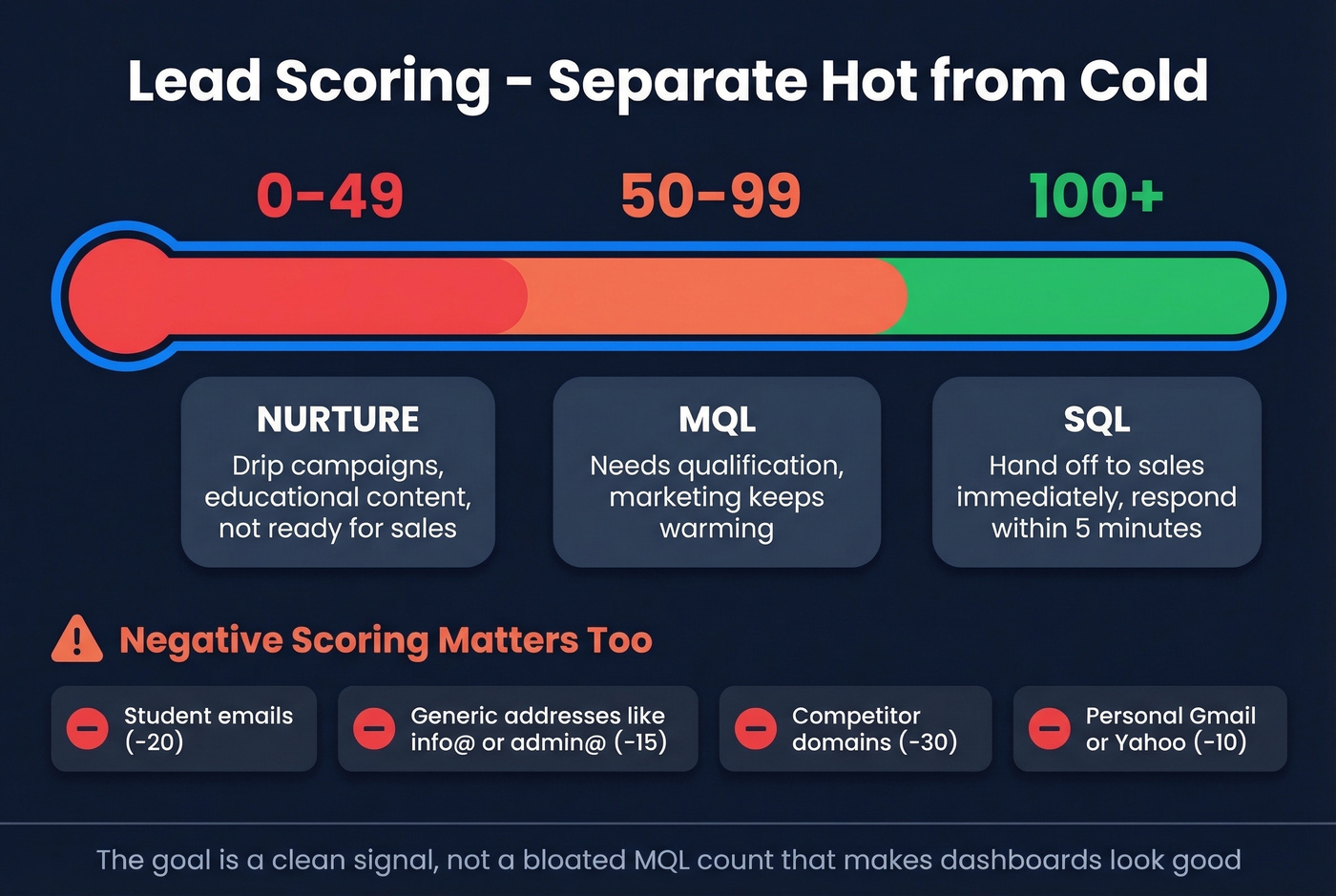
- 0-49: Nurture via drip campaigns
- 50-99: MQL, needs qualification
- 100+: SQL, hand off immediately
Negative scoring matters just as much. Student emails, generic addresses like info@ and admin@, and competitor domains should subtract points. The goal is a clean signal, not a bloated MQL count that makes your dashboard look good while pipeline stays flat. For a full framework, see our lead scoring guide.
5. Route - Get Leads to Reps Fast
When scheduling is integrated directly into the form, 66.7% of qualified submissions book a meeting versus roughly 30% with a "we'll get back to you" flow. That gap is enormous. Route by territory, deal size, or intent signal. The routing logic should mirror your GTM strategy - no manual assignment, no leads sitting in a queue.
One Reddit user in r/sales nailed it: without immediate response, you lose "the majority of opportunities." If your reps need a faster playbook once leads hit their queue, use these sales follow-up templates.
Compliance Essentials
Integration without compliance is a lawsuit waiting to happen.
GDPR requires you to capture consent with a timestamp, source URL, and policy version. Store these as CRM fields, not buried in a form tool's backend. TCPA requires prior expressed written consent before phone outreach - "they filled out a form" isn't enough. And every consent record should be queryable in seconds, not locked behind a support ticket to your form vendor.
Lead Capture and Tracking Tools
| Pipeline Stage | Tool | Starting Price |
|---|---|---|
| Capture | Typeform | Free (10 responses/mo); $25/mo |
| Capture | Jotform | Free; $34/mo paid |
| Capture + CRM | HubSpot | Free CRM; Starter from $15/mo/user |
| CRM | Salesforce | $25/user/mo Starter |
| Enrichment | Prospeo | Free (75 emails/mo); ~$0.01/email |
| Routing | Chili Piper | ~$30-150/user/mo |
| Automation | Zapier | Free; ~$20/mo paid |
| Automation | Make | Free; paid tiers available |
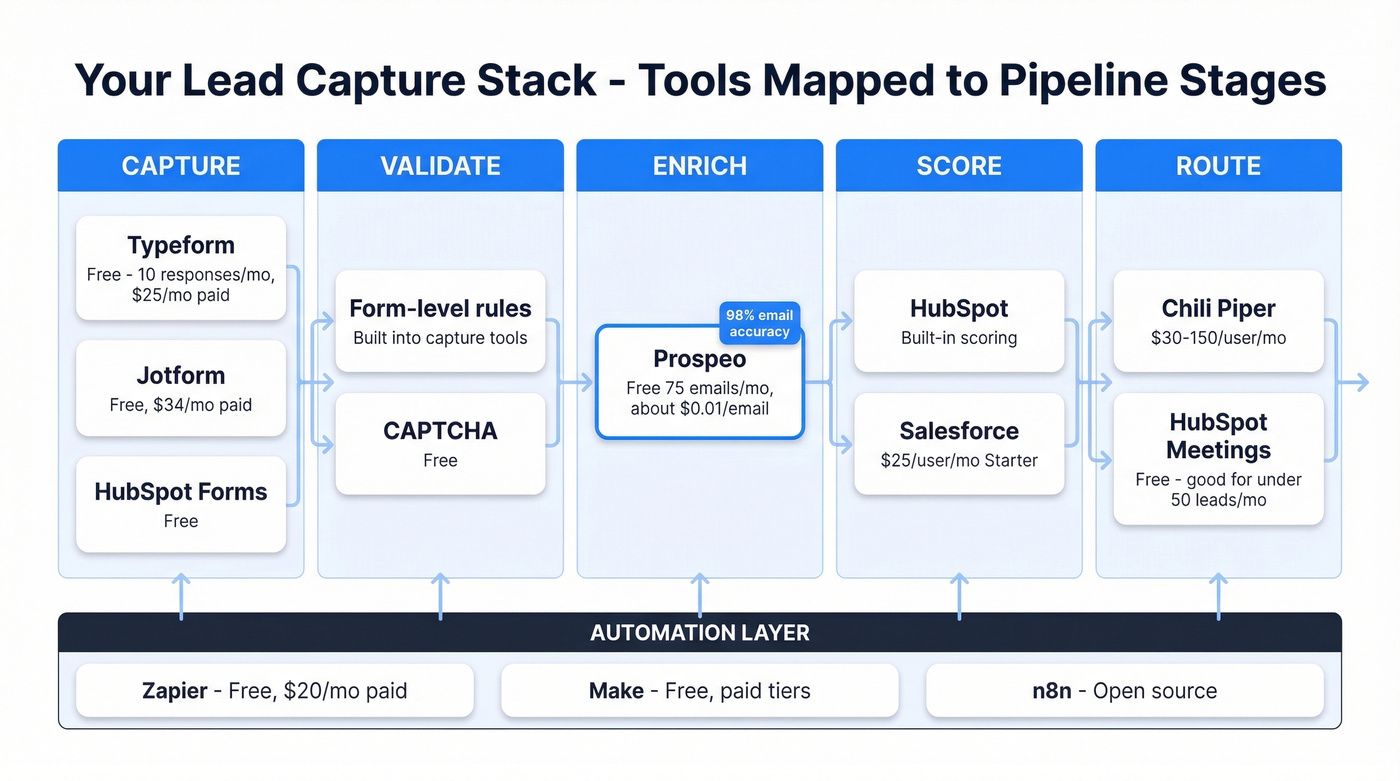
Skip Chili Piper if you're a small team with under 50 inbound leads per month - the ROI won't justify the seat cost. For teams at that scale, HubSpot's built-in meeting scheduler handles the basics.
Prospeo plugs directly into Salesforce, HubSpot, Zapier, Make, and n8n, so the enrichment step slots into whatever stack you're already running. Get enrichment right and everything downstream gets easier. If you’re auditing the rest of your stack, start with our list of SDR tools.
CRM data rots 25% per year. Manual updates can't keep up. Prospeo's 7-day refresh cycle - 6x faster than the industry average - ensures every lead record stays current from capture through close. With a 92% API match rate and native integrations for Salesforce, HubSpot, Zapier, Make, and n8n, your five-stage pipeline runs without gaps.
Plug the enrichment gap before another quarter of leads dies in transit.
FAQ
What's the Fastest Way to Set Up a Lead Capture Integration?
Native integrations are fastest - HubSpot Forms to HubSpot CRM syncs in real time with zero setup. For cross-platform connections, Zapier or Make handle no-code links in minutes. Webhook-based setups take longer but offer full payload control for complex routing.
How Do You Block Bad Leads at the Form Level?
Require work email addresses, block personal domains (Gmail, Yahoo), and add CAPTCHA. About 14% of submissions are junk - form-level validation catches most of it before your CRM gets polluted. Negative lead scoring handles the rest downstream.
How Often Should You Enrich CRM Data?
Continuously, on a 7-day refresh cycle at minimum. CRM data decays roughly 25% per year, so quarterly cleanups always leave gaps. Automated enrichment on a weekly cycle keeps contact data current without anyone manually updating fields.