

Lead Distribution: Route Leads Faster, Fairer, and Without Leaking Revenue
A roofing company owner posted on Reddit about distributing leads across 15 reps by "rough mental tally." The office staff eyeballs who got what last week, guesses who's due next, and hopes nothing falls through the cracks. Meanwhile, the average B2B sales team takes 42 hours to respond to a new lead. That's not a lead distribution system - it's a leak disguised as a process.
The fix isn't complicated, but it requires intentional design. Here's how routing actually works, which methods fit which teams, and how to stop bleeding revenue at the handoff.
The Quick Version
- Respond in under 5 minutes. You're 21x more likely to qualify a lead than if you wait 30 minutes.
- Match your routing method to your team size and complexity. Round robin is fine for very small teams. Once you're past about 5 reps or you add territories and specialization, rules-based routing becomes critical.
- Verify contact data before it enters the system. Routing a lead with a bounced email is a wasted lead.
What Is Lead Distribution?
Lead distribution is the process of assigning incoming leads to sales reps. A lead comes in, and someone - or something - decides which rep gets it.
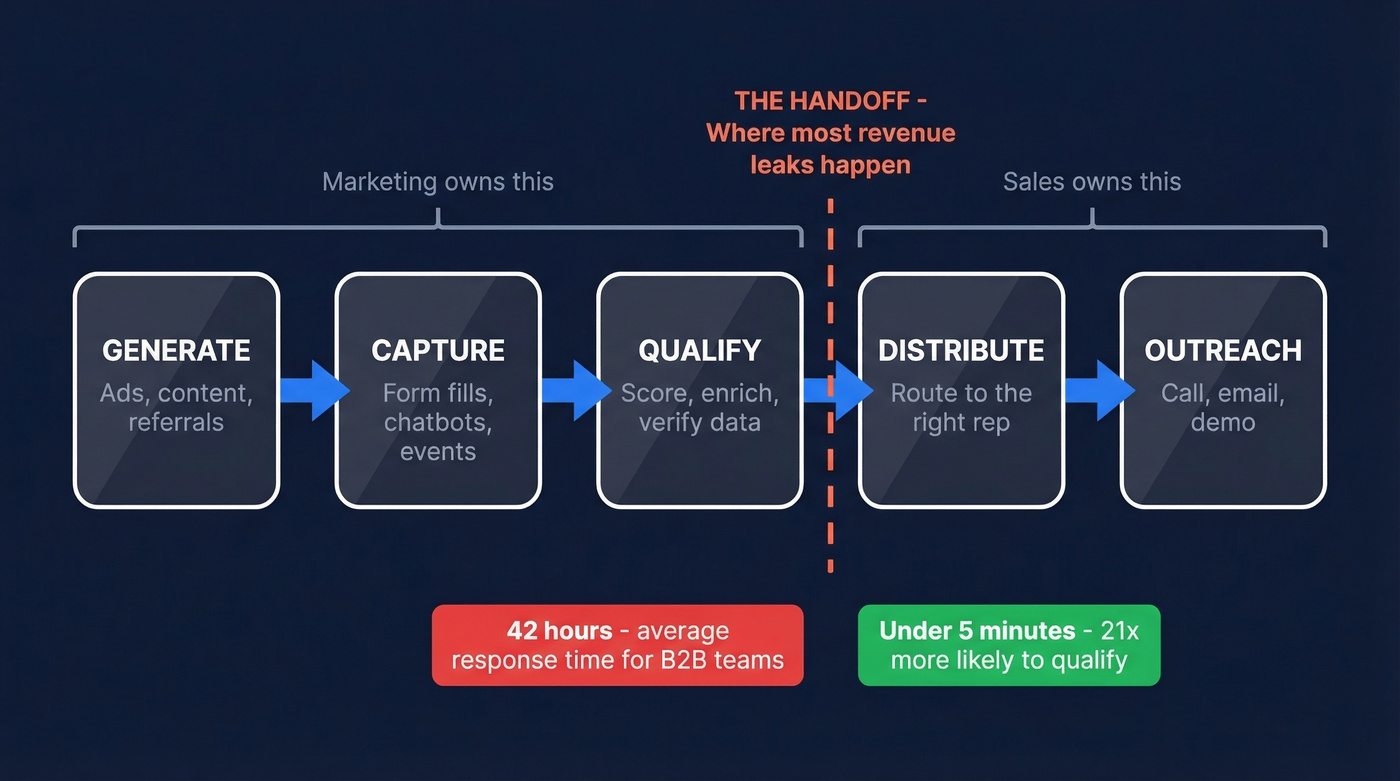
People use "distribution" and "routing" interchangeably, but there's a useful distinction. Distribution is the action of assigning leads. Routing is the logic that decides who gets which lead and why. Think of distribution as the process and routing as the brain behind it.
Where does it sit in the funnel? It's the bridge between capture and outreach: generate, capture, qualify, distribute, outreach. Everything upstream is marketing's job. Everything downstream is the rep's job. The handoff between these stages is where most revenue leaks happen.
If your assignment process is manual, slow, or poorly matched, it doesn't matter how good your lead gen is. Leads rot. Reps waste time. Deals die before they start.
The Numbers That Make the Case
Responding within the first minute drives a 391% increase in conversions compared to waiting even a few minutes longer. Make contact within five minutes and you're 21x more likely to qualify that lead than if you wait half an hour. Delay from 5 to 10 minutes? The probability of contacting an online lead drops by about 4x, per the MIT Lead Response Management research cited by CRMsearch.
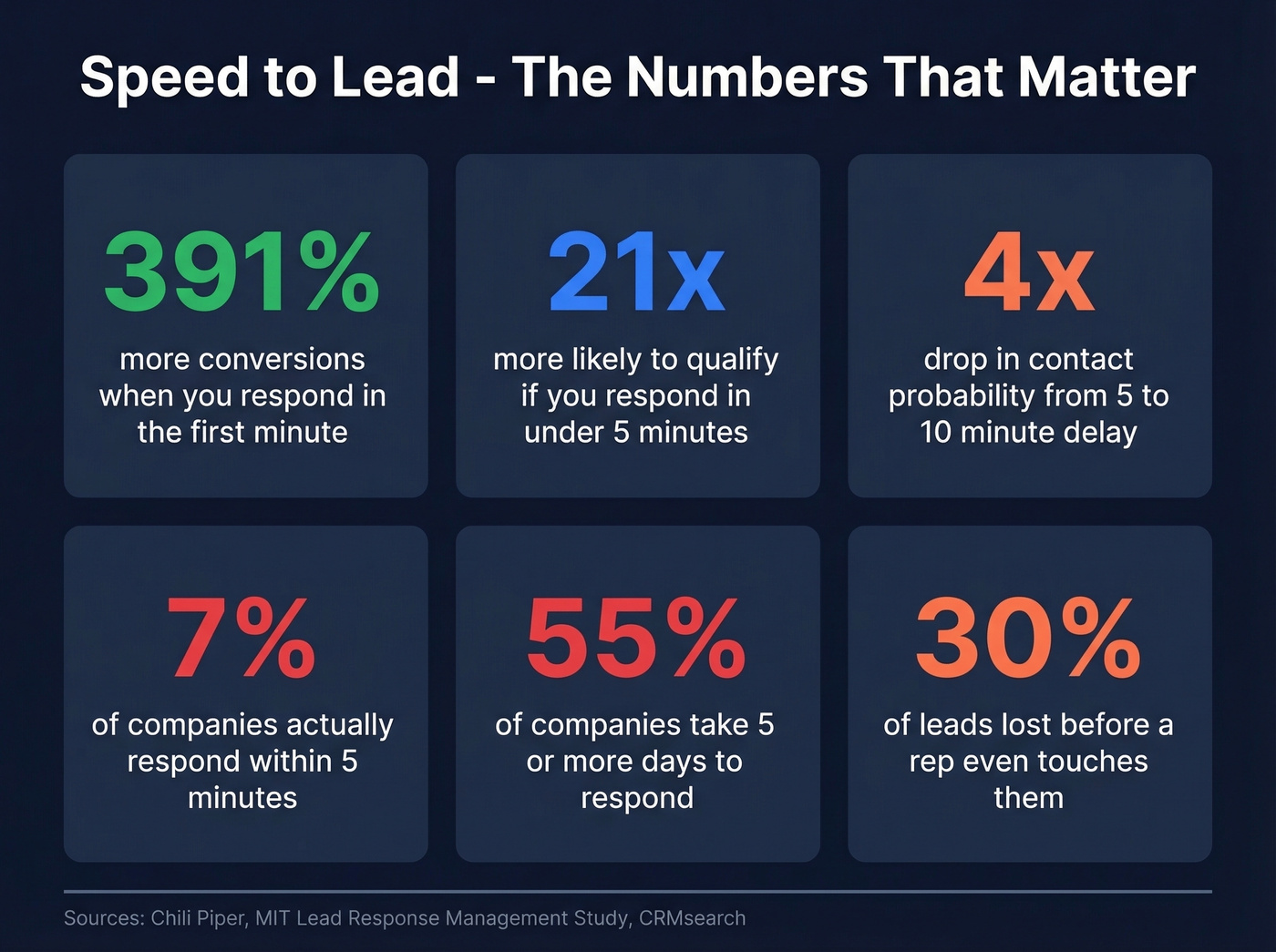
Here's the uncomfortable part: only 7% of companies respond within five minutes. 55% take five days or more. Small companies average 48 minutes; mid-market and enterprise teams take over 90 minutes. That's not a response time - it's a missing persons case.
The downstream effects compound fast. 38% of leads never respond to outreach at all. Slow or manual processes lose roughly 30% of leads before a rep even touches them. CRMsearch calls the marketing-to-sales handoff "the single greatest breakdown point" in lead generation. That framing is exactly right.
Methods Compared
Not every team needs the same approach.
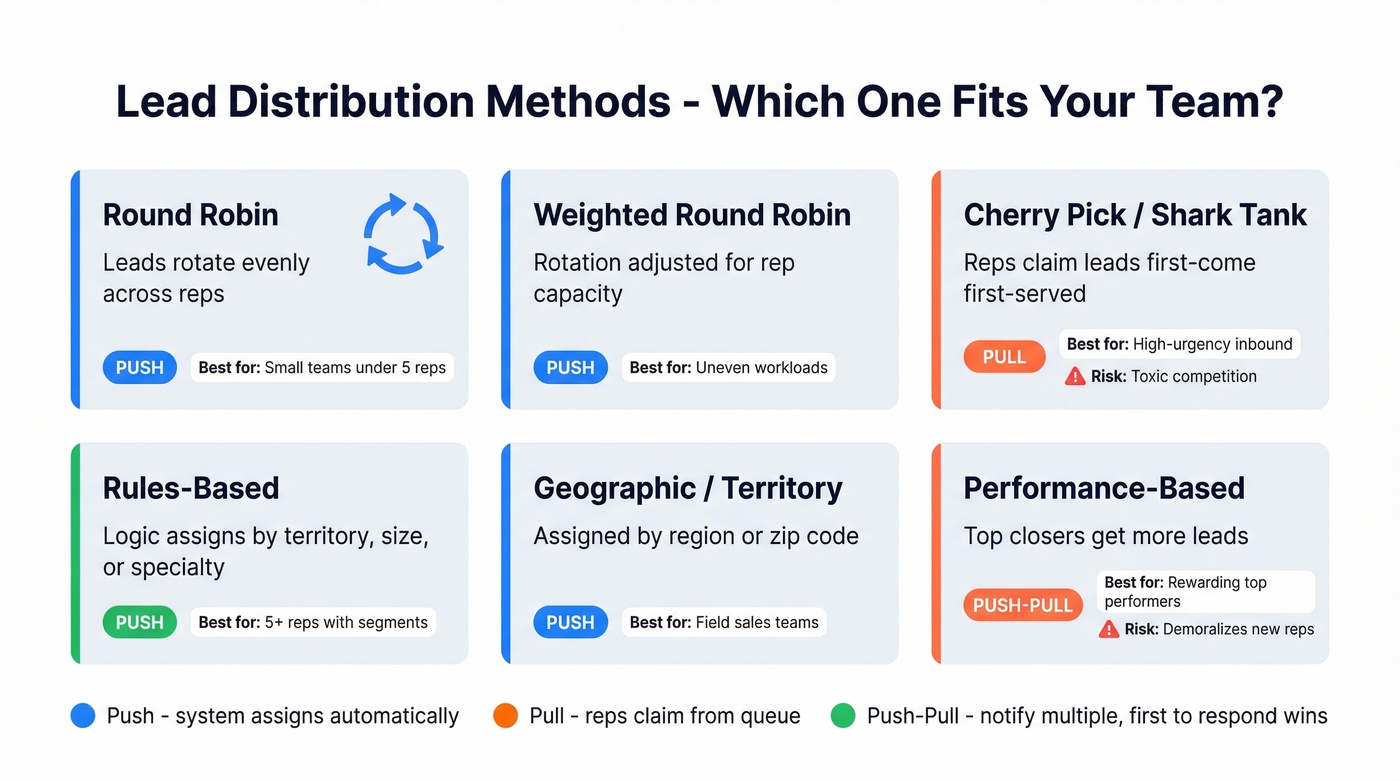
| Method | How It Works | Best For | Watch Out For |
|---|---|---|---|
| Round Robin | Leads rotate evenly | Small teams | Ignores rep strengths |
| Weighted Round Robin | Rotation with volume bias | Uneven rep capacity | Needs regular tuning |
| Cherry-Pick / Shark Tank | Reps claim leads first-come | High-urgency inbound | Toxicity, cherry-picking |
| Rules-Based | Logic assigns by criteria | Teams with territories/specialization | Complex to maintain |
| Geographic / Territory | Assigned by region | Field sales, local markets | Uneven lead volume |
| Performance-Based | Top closers get more leads | Rewarding top performers | Demoralizes new reps |
These fall into three delivery patterns. Push systems assign leads automatically - the rep has no choice. Pull systems let reps claim leads from a queue. Push-pull hybrids notify multiple agents and the first to respond gets the lead.
A quick word on the cherry-pick model. One Reddit user building a first-to-click claiming system explicitly worried it would "create a toxic environment" - even for a team of 1-5 reps. That concern is valid. Cherry-pick systems reward speed over fit, and they create perverse incentives where reps grab the easiest leads and ignore the rest. We've seen this play out in teams where enterprise leads get claimed instantly while mid-market leads sit untouched for days.
Round robin is the default for a reason: it's fair and simple. But it's a starting point, not a strategy.

Routing a lead with a dead email is worse than not routing it at all - it burns rep time and kills trust in the process. Prospeo's 98% email accuracy and 5-step verification ensure every lead entering your distribution system has a valid, deliverable contact. Data refreshed every 7 days, not 6 weeks.
Stop distributing dead leads. Verify contacts before they hit the queue.
Which Model Fits Your Team
Team size is the single biggest variable.
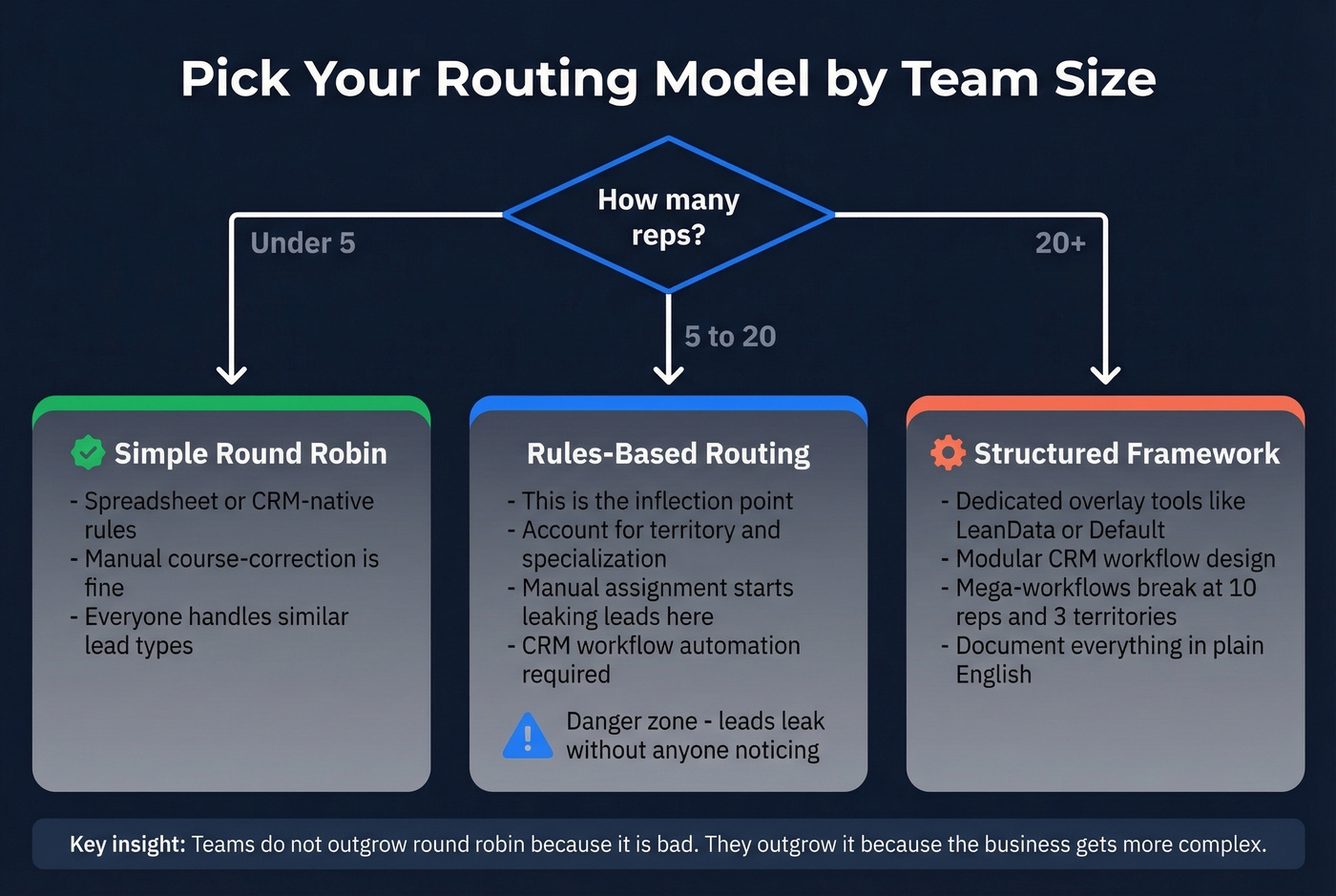
Under about 5 reps: Standard round robin works fine. Everyone handles similar lead types, territories overlap, and you can course-correct manually. A spreadsheet or CRM-native assignment rule is enough.
5-20 reps: This is the inflection point. Once you pass roughly 5 reps, manual assignment starts leaking leads without anyone noticing. Rules-based routing becomes critical - you need logic that accounts for territory, specialization, and capacity.
20+ reps: At this scale, complexity usually forces a more structured framework: either a dedicated overlay tool like LeanData or Default, or a modular CRM automation design that's easy to maintain. In HubSpot specifically, the "mega-workflow" anti-pattern breaks around 10 reps and 3 territories, and it breaks messily.
Most teams don't outgrow round robin because it's bad. They outgrow it because their business gets more complex - new territories, product lines, rep specializations. The method should evolve with the team.
Best Practices That Actually Work
Design an SLA With Teeth
An SLA without enforcement is a suggestion. Define specific timelines: reps have 12 hours to accept or reject a lead, then 3 business days to advance it to SQL status or log meaningful activity. If neither happens, the lead automatically reverts to marketing for re-nurture.
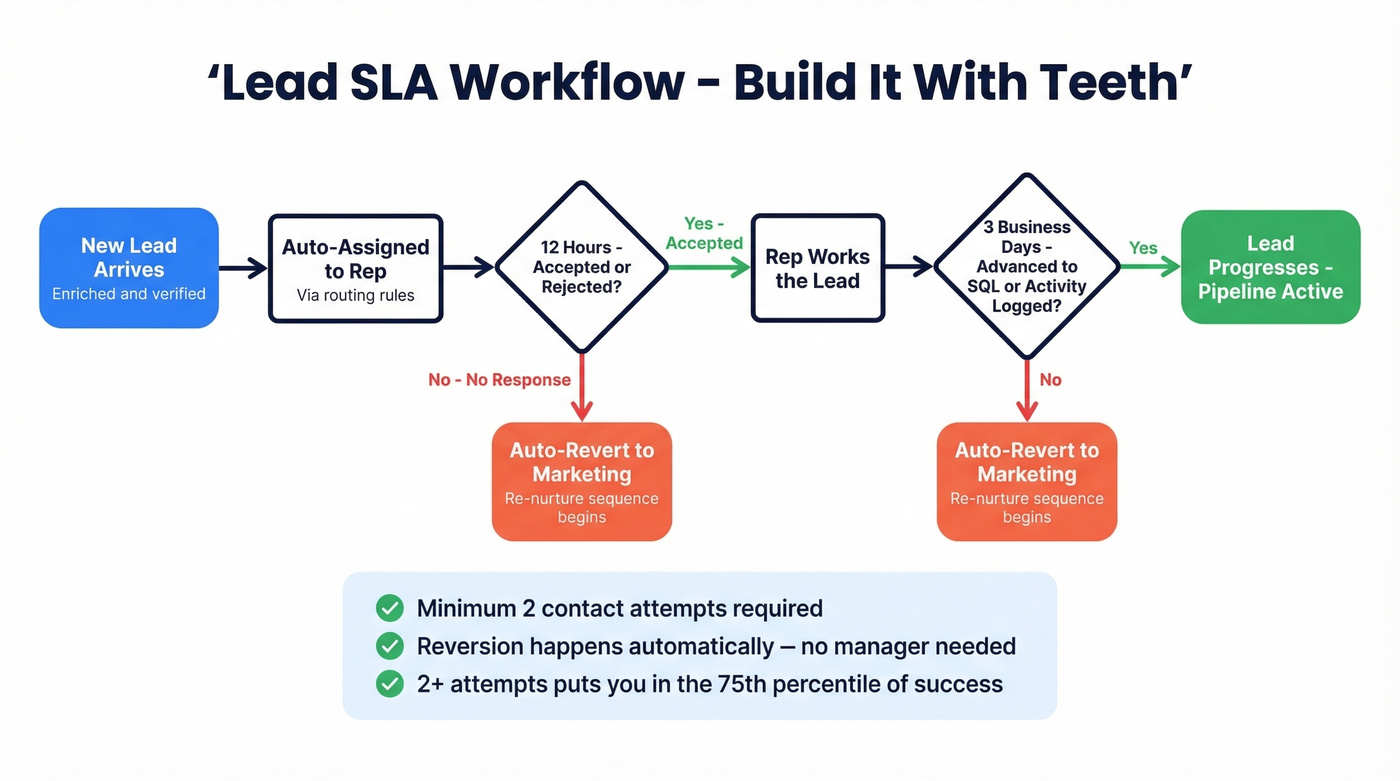
The key word is "automatically." If reversion requires a manager to notice and intervene, it won't happen consistently. Build it into your workflow.
Don't stop at the first touch, either. Most reps make two or fewer contact attempts. Those who make at least two attempts land in the 75th percentile of success - persistence alone puts you ahead of three-quarters of the competition. Your SLA should mandate a minimum number of attempts, not just a response window.
Build a Fallback Path
Every routing system needs a catch-all. If a lead comes in with a missing field - no state, no company size, no industry - and your rules can't match it, where does it go? Without a fallback path like a default queue or owner, those leads get stranded. They sit in limbo until someone runs a report and finds 200 unassigned contacts from last quarter.
Recycle Stalled Leads
Leads that go unworked past the SLA window shouldn't sit in a rep's pipeline. Build a "contact unworked?" check into your workflow. If the lead hasn't been touched within the window, route it back to marketing for re-nurture or reassign it to another rep. Dead leads in a pipeline are worse than no leads - they create false confidence in forecasts.
Verify Data Before You Route
This is the step most teams skip, and it's the one that makes the entire process work.
Routing a lead with a dead email or wrong phone number wastes rep time and kills momentum. Before a lead enters your assignment system, it should be enriched and verified. We run inbound leads through Prospeo's enrichment layer as a pre-routing step - 98% email accuracy, verified direct dials, and 50+ data points per contact including job title, company size, industry, and revenue. The 83% enrichment match rate means the vast majority of leads come back with actionable contact data, and because the refresh cycle is 7 days versus the 6-week industry average, you're not routing leads to phone numbers that went stale last month.

Your routing system is only as good as the data flowing through it.
Speed-to-lead only matters if the contact data is real. Teams using Prospeo's enrichment get 50+ data points per contact at a 92% match rate - giving your routing rules the territory, title, and company signals they need to assign leads correctly the first time.
Enrich every lead with routing-ready data for $0.01 each.
CRM Setup Guide
Salesforce
Salesforce gives you several native options: Assignment Rules, Queues, Flows, and custom Apex. The right choice depends on complexity.
Assignment Rules work for straightforward logic - route leads by state, company size, or lead source. Queues distribute leads to groups, but queues don't enforce prioritization. A hot inbound demo request can sit in the same queue as a whitepaper download. Flows give you decision-tree logic with branching, and they're what most teams should use now that Workflow Rules and Process Builder are being retired.
Critical guardrail: always include a fallback path. A catch-all queue or default owner ensures leads with missing fields don't get stranded. Test in sandbox with edge cases - duplicates, incomplete records, unusual field combinations. And document your flows in plain English so the next admin doesn't have to reverse-engineer your logic.
HubSpot
HubSpot's routing capabilities are solid, but the architecture matters more than the features. The biggest mistake we see is the mega-workflow: one giant workflow handling classification, routing, notifications, and SLA monitoring all at once. It breaks at roughly 10 reps and 3 territories, and debugging it is a nightmare.
Build three modular workflows instead:
Classification workflow - normalizes inbound data, sets routing properties like territory code, lead type, and source category. This is your data hygiene layer.
Assignment workflow - the only workflow that sets Contact Owner. Uses territory branches and HubSpot's "Rotate record to owner" action. Important nuance: rotation is per-action, not global. Each rotate action maintains its own counter, so three rotate actions in one workflow track independently.
SLA enforcement workflow - delays 15 minutes (or whatever your window is), then checks whether the contact has been worked. If not, escalate or reassign.
One technical gotcha: HubSpot property validation rules aren't enforced when values are set via workflows. You need defensive checks in your workflow branches to catch bad data before it causes misroutes.
Lead Distribution Tools in 2026
The tool market breaks into three categories: CRM-native, overlay systems, and scheduling-based routing.
| Tool | Category | Best For | Starting Price |
|---|---|---|---|
| Salesforce (native) | CRM-native | Teams on Sales Cloud | ~$25-165/user/mo |
| HubSpot (native) | CRM-native | SMBs on Sales Hub | ~$90-150/seat/mo+ |
| Chili Piper | Scheduling overlay | Fast inbound booking | From $30/user/mo + platform fee |
| LeadAngel | Overlay | Lead-to-account matching | From $99/company/mo |
| LeanData | Overlay | Complex SF-native routing | ~$2,000-10,000+/mo |
| Default | Overlay | End-to-end RevOps flows | ~$1,000-5,000+/mo |
| RevenueHero | Scheduling overlay | SMB inbound booking | ~$500-3,000+/mo |
CRM-native tools are included with your CRM license and handle simple routing well. Overlay systems like LeanData and Default sit on top of your CRM and add complex logic - lead-to-account matching, territory management, ownership rules. Scheduling-based tools like Chili Piper and RevenueHero optimize the form-to-calendar flow, getting meetings booked instantly.
One category that's easy to confuse with routing tools is enrichment platforms. These aren't routing tools - they're the data layer that makes routing work. Enrichment should happen before distribution, not alongside it.
Let's be honest: most companies don't need a $30K routing platform. If your average deal size is under $15K, you almost certainly don't. What you need is better CRM hygiene, a verification layer, and disciplined workflow design. Start with native tools. Add an overlay when your routing logic outgrows what Salesforce Flows or HubSpot workflows can handle cleanly.
Mistakes That Kill Your Pipeline
Relying on mental tallies past 5 reps. The roofing company scenario isn't unique - it's the norm for growing teams. Leads leak and you don't know how many because nobody's counting.
Defaulting to round robin forever. It ignores rep strengths, territory knowledge, and lead quality. Once you have specialization or territories, you need rules.
Skipping data verification. Routing a lead with a dead email wastes rep time and kills momentum. Multiply that across hundreds of leads per month and you're burning hours on contacts that were never reachable.
No SLA enforcement. Without accept/reject deadlines, leads sit in limbo. The 42-hour average response time isn't because reps are lazy - it's because there's no system forcing urgency.
Building one mega-workflow. We've said it twice already because it's that common. Modularize from the start - classification, assignment, and SLA enforcement should be separate workflows.
That 30% lead loss figure from slow and manual processes? It's not a worst case. For teams without automated routing and verified data, it's closer to the baseline.
FAQ
What's the difference between lead distribution and lead routing?
Lead distribution is the action of assigning leads to sales reps. Lead routing is the logic that decides who gets which lead and why - territory rules, capacity weighting, specialization matching. Most teams need both: smart routing logic feeding an automated assignment process.
When should I switch from manual to automated assignment?
Around 5 reps. Below that threshold, a spreadsheet or basic CRM rule works fine. Above 5, you're leaking leads without realizing it - the "rough mental tally" approach breaks down, and the cost compounds as you scale past 10.
Which method is best for small teams?
Standard round robin for teams under 5 reps handling similar lead types. It's fair, simple, and requires almost no configuration. Once you add territories or product specializations, move to rules-based routing so leads match rep expertise.
How do I verify leads before they enter my routing system?
Run inbound leads through an enrichment layer before assignment. Prospeo's CRM integration returns verified emails at 98% accuracy, direct dials, and 50+ data points per contact at an 83% match rate - so reps connect on the first attempt instead of chasing dead contacts.