Lead Lists: How to Build, Verify, and Maintain One That Doesn't Destroy Your Domain
You exported a lead list of 5,000 contacts from a shiny new database, loaded them into your sequencer, and hit send. Three days later your bounce rate is sitting at 12%, your domain reputation is tanking, and your deliverability is wrecked for the next quarter. We've watched that scenario play out at company after company - teams that confuse "more leads" with "better leads."
A 50,000-contact database loses roughly $550,000 in potential pipeline every year to decay alone, assuming just $50 per lead value. You don't need 10,000 leads. You need 200 verified ones that match your ICP, respond to outreach, and don't torch your sender reputation on the way in.
What Is a Lead List?
A lead list is a filtered, enriched, verified collection of contacts who match your ideal buyer profile and are ready for outreach. Every record should have a reason for being there, tied back to your ICP criteria - industry, title, company size, tech stack, buying signals.
A B2C list might be 50,000 newsletter subscribers. A B2B prospect list is 300 VP-level buyers at mid-market SaaS companies who use Salesforce and recently hired three new SDRs. The difference matters because it determines how you build, verify, and maintain the thing.
Fields That Separate Useful Lists From Dead Spreadsheets
Most lead list templates stop at name, email, company, and title. That's a contact list, not a working sales tool. The fields that actually matter are the workflow columns - the ones that tell you what to do next.
| Field | Why It Matters |
|---|---|
| ICP fit score (1-10) | Prioritize outreach by fit - score based on title match, company size, tech stack overlap |
| Lead source | Track what's working |
| Intent signals | Time your outreach |
| Buying committee role | Know who influences vs. who signs |
| Last contact date | Avoid double-tapping |
| Next action | Keep follow-ups moving |
| Status | Segment by stage |
| Pain points | Personalize messaging |
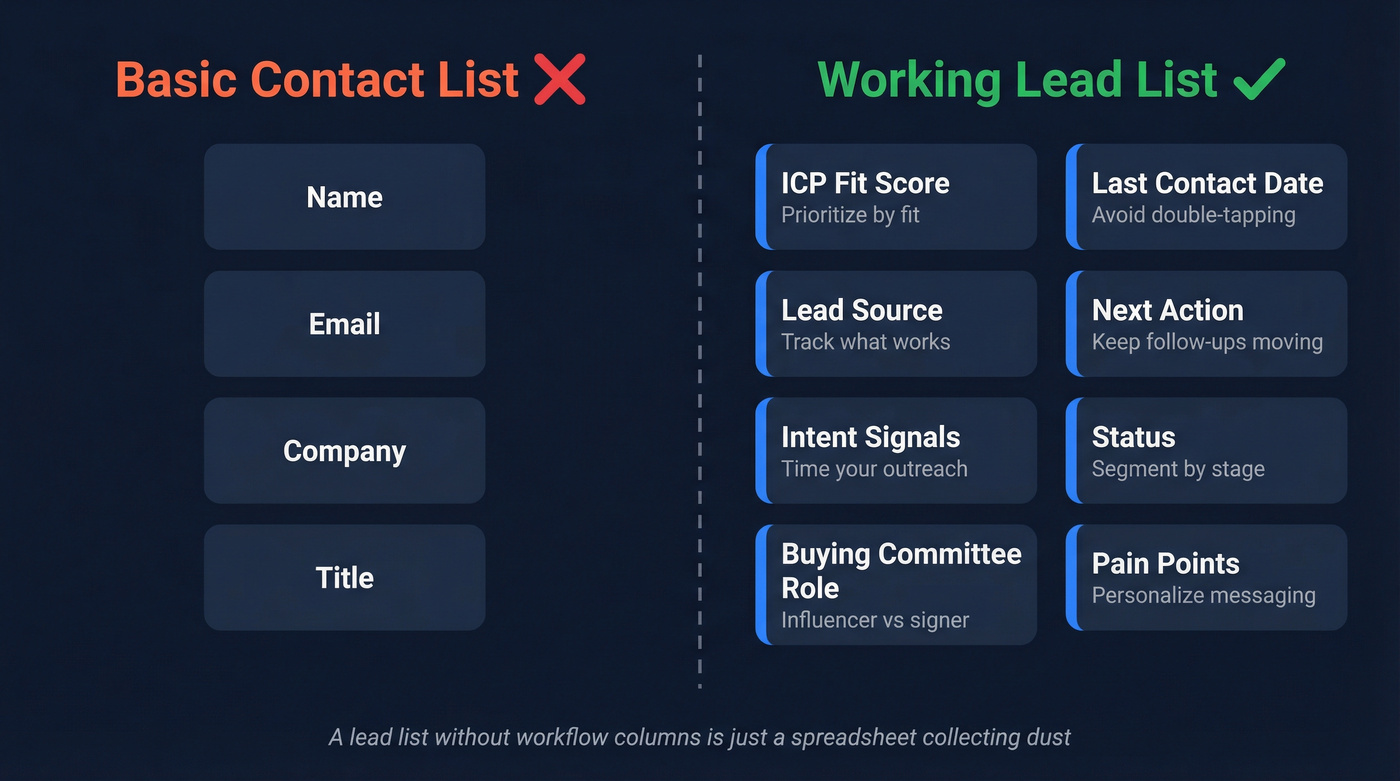
The OnePageCRM lead tracker template is a solid starting point with follow-up reminders, conditional formatting for urgency, and color-coded status labels. Quick tip for Google Sheets users: add an apostrophe before the "+" in phone numbers to prevent formatting errors.
One thing databases won't give you: pain points pulled from industry communities, niche forums, and comment threads. The consensus on r/sales is that the best personalization comes from reading what prospects actually complain about, not from firmographic data. Add those insights to the pain points column.
How to Build a Lead List in 5 Steps
Expect 30-120 minutes to build a targeted list of 100 contacts, depending on your tooling and how tight your ICP is.
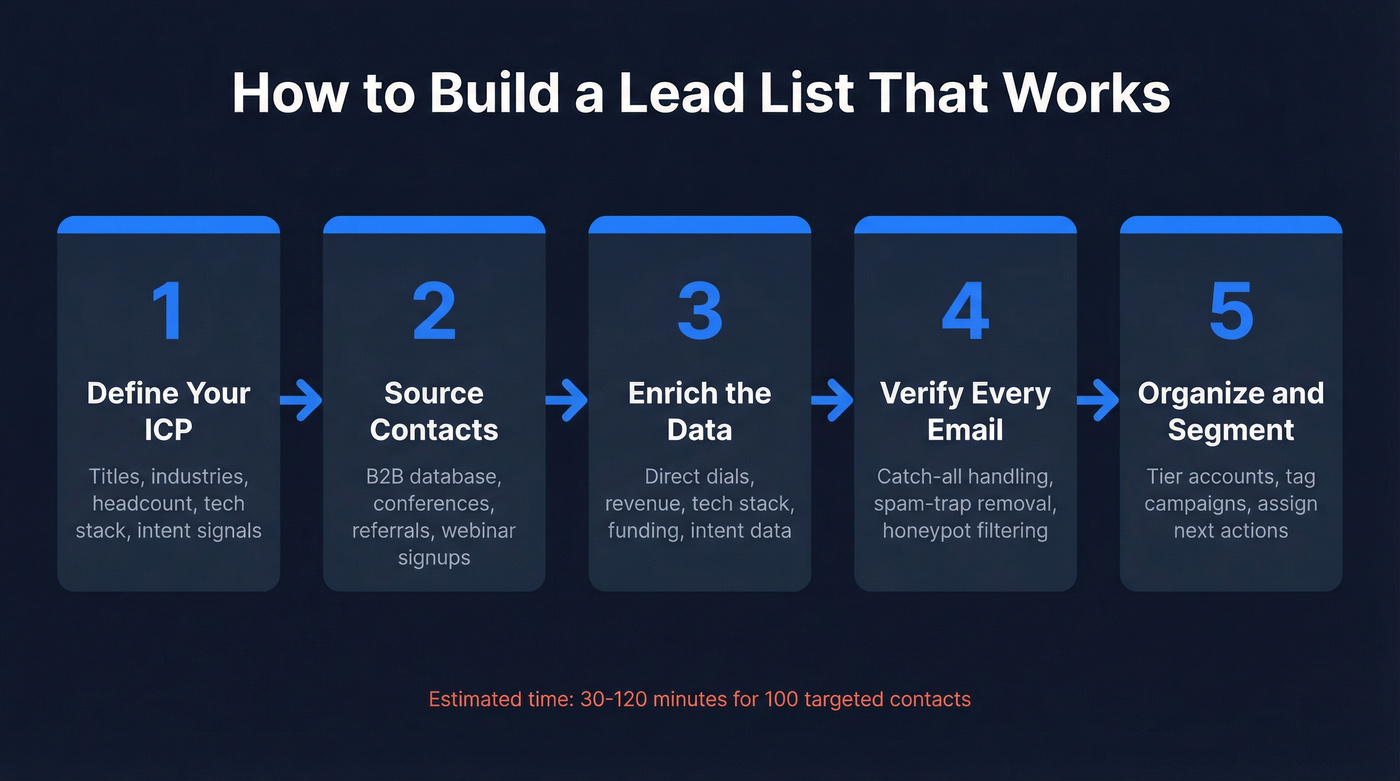
1. Define Your ICP
Start with the profile, not the tool. Nail down job titles, industries, company headcount, tech stack, and buyer intent signals. A list built without a tight ICP definition is just a database export with extra steps - and we've seen teams waste entire quarters learning that lesson the hard way. The more specific your filters, the smaller your list and the higher your reply rate.
2. Source Your Contacts
Use a B2B database like Prospeo. Paste a URL or upload a CSV of target companies, apply 30+ filters, and export verified contacts in minutes.
Here's the workflow in action:
Other sourcing channels worth your time: industry conferences and badge scans, inbound referrals, webinar registrants, and local directories like Chamber of Commerce listings for geo-targeted campaigns.
3. Enrich the Data
Raw contact records are rarely complete. Fill the gaps - direct dials, company revenue, tech stack, funding stage, intent data. Enrichment turns a name and email into a full prospect profile your reps can personalize against. Without it, you're sending generic outreach and wondering why nobody replies. (If you want a deeper workflow, see enrichment best practices.)
4. Verify Every Contact
Verify Every Contact before your first outreach, and reverify before each subsequent campaign. Unverified lists are the single fastest way to destroy your domain reputation. More on this below. If you’re choosing a tool, start with a dedicated email verification workflow.
5. Organize and Segment
Load verified contacts into your CRM or a structured spreadsheet. Tier 1 accounts get personalized sequences, Tier 3 gets automated. Tag by campaign, assign next actions. A list without segmentation is just a flat file collecting dust. (This is also where lead scoring pays off fast.)
Buy or Build?
The buy-vs-build debate isn't binary.
| Dimension | Build Your Own | Buy a List |
|---|---|---|
| Speed | Slower ramp | Immediate access |
| Cost | Time-intensive | CPL pricing |
| Data quality | High (you control it) | Variable |
| Compliance risk | Lower | Higher |
Buying isn't inherently bad - buying cheap is. A $500 list of 50,000 "decision-makers" is almost certainly garbage. A curated list from a reputable provider, verified and scrubbed against your suppression list, can accelerate pipeline. But purchased lists must still be verified, deduplicated, and compliance-checked before a single email goes out. Skip that step and you're importing someone else's data quality problems into your domain.
Here's the thing: if your average deal size is under $10K, you probably don't need to buy lists at all. Build a tight list of 200-500 prospects from a good database, verify everything, and outwork the teams blasting 50,000 contacts with 12% bounce rates. For more on the tradeoffs, see prospecting vs lead generation.

You just read why unverified lists destroy domains. Prospeo's 5-step verification - with catch-all handling, spam-trap removal, and honeypot filtering - delivers 98% email accuracy. 30+ filters for title, intent, tech stack, and headcount growth mean every contact on your list has a reason to be there.
Build a 200-contact list that outperforms someone else's 10,000.
How to Verify Your Lead List
If your bounce rate is above 5%, stop sending and fix your list. That's not a suggestion - it's a deliverability survival rule. (Use an email deliverability checklist to triage fast.)
Hunter's verification research found that 2.3% of a sample list was outdated after just 8 weeks. That compounds fast. Verify all new contacts before first outreach, and reverify before reengaging older contacts. Bounce-rate thresholds to measure against:
- Under 2%: Excellent - your list is clean
- 2-5%: Acceptable for most campaigns
- 5-10%: Risky - reverify before next send
- Over 10%: Stop sending immediately
One risk most teams miss: catch-all domains. These accept-all addresses are 27x more likely to bounce than standard addresses. You need a verification tool that handles catch-all domains specifically, along with spam-trap removal and honeypot filtering - not just a simple syntax check. If you’re auditing issues, start with invalid emails and hard bounce definitions.
Why Your Data Decays
B2B data decays at roughly 22.5% per year - about 2.1% per month, compounding. That means nearly a quarter of your list goes stale before you even finish your annual planning cycle. (More benchmarks: B2B contact data decay.)
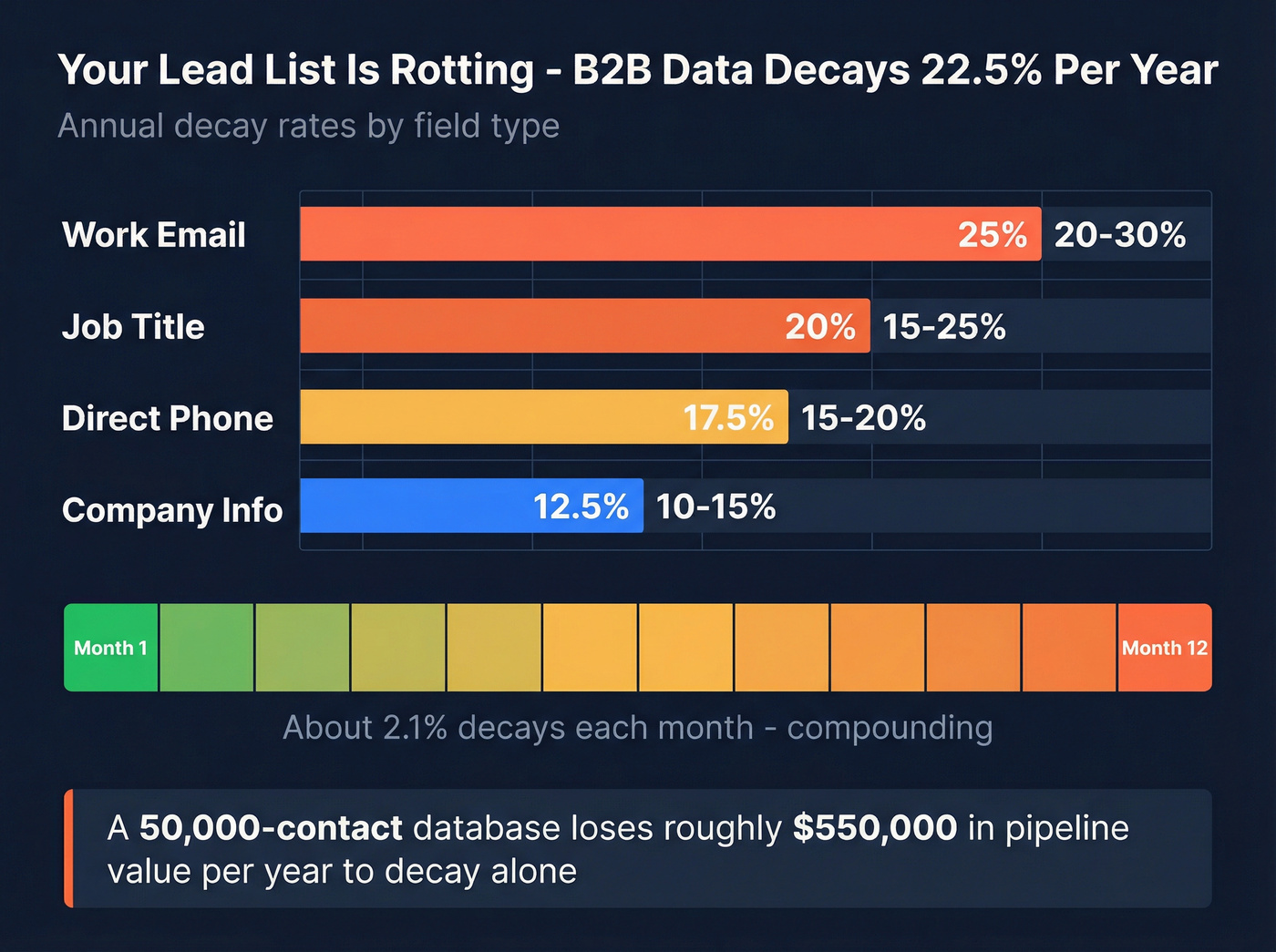
| Field | Annual Decay Rate |
|---|---|
| Work email | 20-30% |
| Job title | 15-25% |
| Direct phone | 15-20% |
| Company info | 10-15% |
The drivers: 15-20% of professionals change jobs annually, 5-10% of companies undergo major changes like M&A, rebrands, or closures, and high-turnover industries like tech startups can see decay rates up to 70%. We've seen teams with "fresh" lists from six months ago discover that a third of their contacts had already moved on.
The fix is a maintenance cadence: verify before each campaign, process bounces daily, deduplicate weekly, full refresh quarterly. If you want a system for keeping records clean, use a CRM hygiene playbook.
Compliance - The Fines Are Real
A lead list without compliance controls is a lawsuit waiting to happen. Between October 2024 and March 2025, 208,083 spam complaints hit Canada's CRTC, and Australia's ACMA collected AU$14M+ in spam-related penalties between 2023 and 2025.
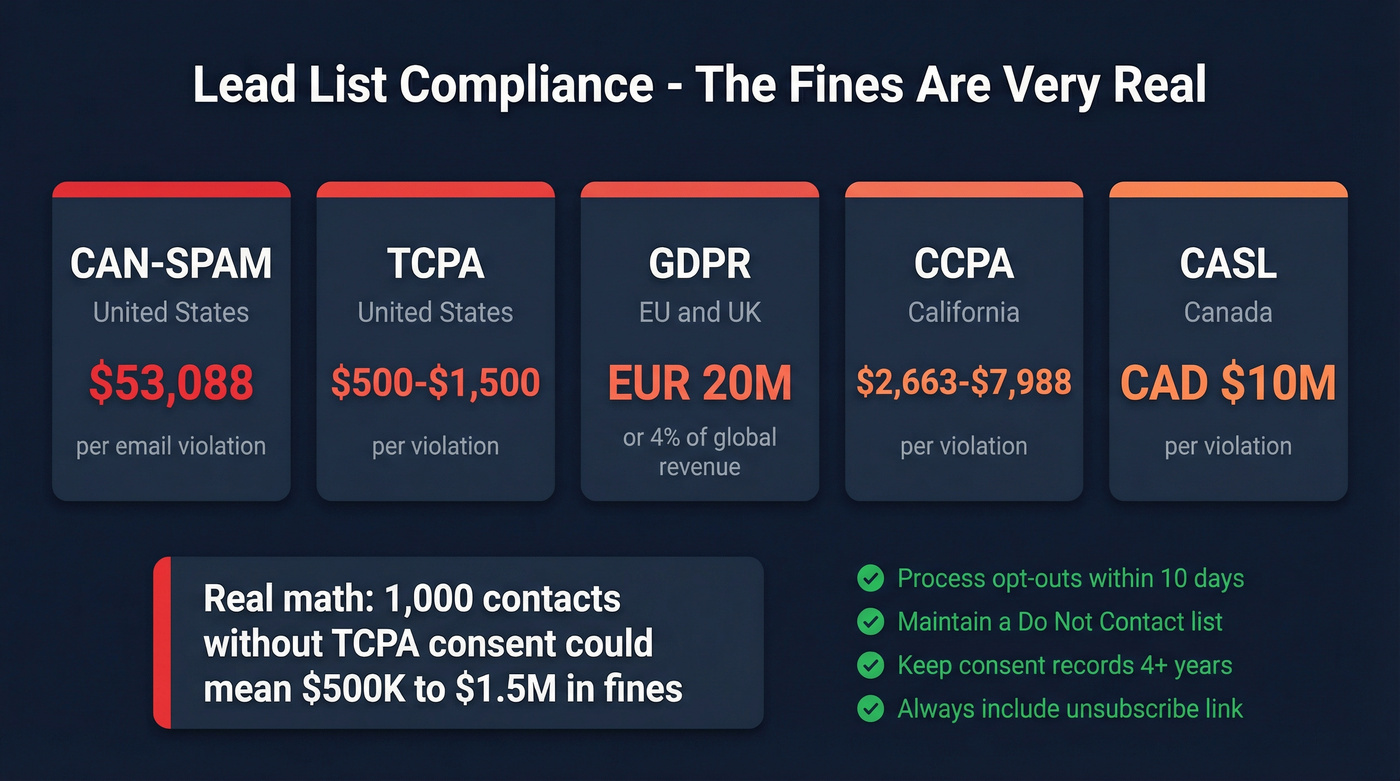
| Regulation | Region | Key Requirement | Penalty Range |
|---|---|---|---|
| CAN-SPAM | U.S. | Opt-out + physical address | Up to $53,088/email |
| TCPA | U.S. | Prior express consent | $500-$1,500/violation |
| GDPR | EU/UK | Legitimate interest or consent | EUR 20M or 4% revenue |
| CCPA | California | Right to opt out of data sale | $2,663-$7,988/violation |
| CASL | Canada | Express or implied consent | Up to CAD $10M/violation |
Let's break that down: 1,000 contacts without proper TCPA consent could trigger $500K-$1.5M in fines. Process opt-outs within 10 business days, maintain a Do Not Contact list, retain consent records for at least four years, and never send without a clear unsubscribe mechanism. (If you sell into Canada, review CASL cold email requirements.)
Types of Lead Lists
Not every prospect list serves the same purpose. The type you build should match the campaign you're running:
ICP-based lists are your bread and butter for cold outbound - built from firmographic and technographic filters, they're the most common starting point for sales teams. Intent-based lists sourced from Bombora or similar signals target accounts actively researching your category, which means your timing is already half-right. Event-based lists pulled from webinar registrants, conference attendees, or content downloads work best for warm follow-up where you already have a touchpoint. And ABM target lists are hand-curated account and contact lists for high-value, multi-threaded campaigns where you're going deep on 50 accounts instead of wide on 5,000.
Choose the type that aligns with your sales motion, then apply the same verification and enrichment steps. If you’re building around signals, start with intent signals and a signal-based outbound approach.
Best Tools for Building a Lead List
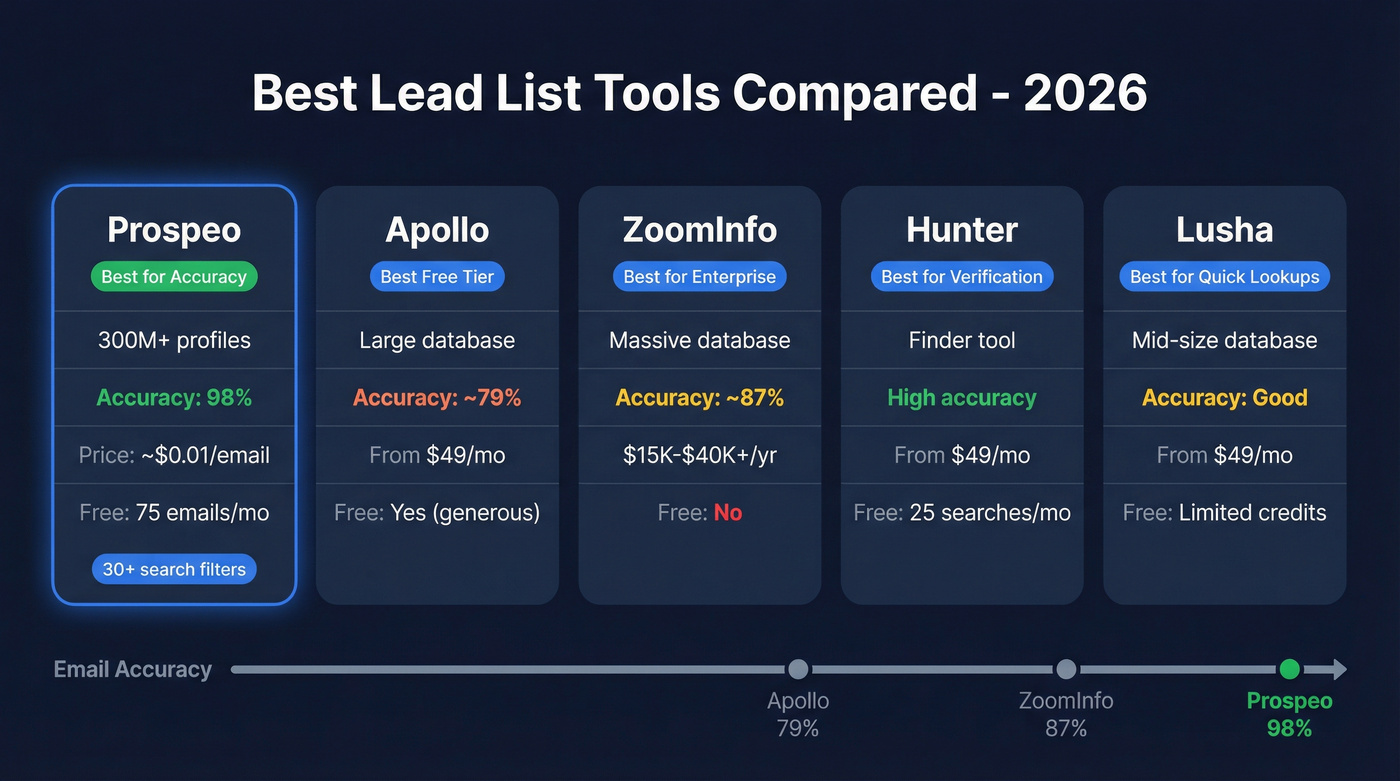
| Tool | Best For | Data Quality | Pricing | Free Tier |
|---|---|---|---|---|
| Prospeo | Accuracy + freshness | 300M+ profiles / 98% accuracy | ~$0.01/email | 75 emails/mo (+100 extension credits) |
| Apollo | Free all-in-one | Large database / ~79% accuracy | From $49/mo | Yes (generous) |
| ZoomInfo | Enterprise teams | Massive database / ~87% accuracy | $15K-$40K+/yr | No |
| Hunter | Email verification | Finder tool / high accuracy | From $49/mo | 25 searches/mo |
| Lusha | Quick lookups | Mid-size database | From $49/mo | Limited credits |
Prospeo
The numbers: 300M+ professional profiles, 143M+ verified emails, 125M+ verified mobile numbers, all refreshed on a 7-day cycle. Email accuracy is 98%, backed by a proprietary 5-step verification process with catch-all handling, spam-trap removal, and honeypot filtering. Search filters go 30+ deep - buyer intent powered by 15,000 Bombora topics, technographics, job changes, headcount growth, funding signals.
The Chrome extension with 40K+ users pulls verified contacts from any website in one click. Pricing runs about $0.01 per email with a free tier of 75 emails per month - no contracts, no sales calls. One customer, Meritt, tripled their pipeline from $100K to $300K per week after switching, with bounce rates dropping from 35% to under 4%.
In our experience, the 7-day refresh cycle is the single biggest differentiator for teams running ongoing outbound campaigns, compared to the 6-week industry average that most providers operate on. (If you’re comparing stacks, see our sales prospecting platforms roundup.)
Apollo
Apollo is the obvious starting point if you're bootstrapping. The free tier gives you access to a large B2B database, built-in email sequencing, and a basic CRM without spending a dollar. Paid plans run ~$49-$99/mo per user. Email accuracy sits around 79%, so expect higher bounce rates than dedicated data platforms. Teams often start here and graduate once deliverability becomes a bottleneck.
Use this if: You need a free all-in-one starting point with sequencing built in.
Skip this if: Email deliverability is your top priority - that 79% accuracy rate will cost you in bounces.
ZoomInfo
ZoomInfo is the enterprise default - massive database, deep intent data, full workflow tools. It's also the platform most mid-market teams realize they're overpaying for. A 10-seat contract with intent data and mobile numbers runs $15,000-$40,000+ per year. That's justified for a 200-person sales org running outbound, ABM, and intent from one platform.
Skip this if: You're under 20 seats or don't need bundled intent and workflow tools. There are better options at a fraction of the cost.
Hunter
An email finder and verifier, not a full database. Free tier gives you 25 searches per month, paid plans start at ~$49/mo. Solid for quick email lookups and one-off verification, but it won't build you a prospect list from scratch.
Lusha
Simple Chrome extension with free credits and paid plans from ~$49/mo per user. Good for quick contact lookups during research, but the database is mid-size and enrichment depth doesn't match dedicated platforms.
Data decays 22.5% per year, but Prospeo refreshes all 300M+ profiles every 7 days - not the 6-week industry average. That means the lead list you build today stays accurate next month. At $0.01 per email, clean data costs less than one bounced campaign.
Stop reverifying lists your provider should have kept fresh.
FAQ
How many leads should be on a lead list?
A targeted list of 100-500 verified contacts matching your ICP will outperform 10,000 unverified names every time. Start small, measure reply rates, and scale what works. Most teams see the best ROI between 200 and 500 prospects per campaign.
How often should you update your list?
Verify before every campaign. B2B data decays ~2.1% per month, so run a full refresh quarterly at minimum. Tools with a 7-day data refresh cycle handle much of this automatically, compared to the 6-week industry average.
Is it legal to buy a lead list?
Yes, in most jurisdictions - but you're responsible for compliance regardless of where the data came from. Verify every contact, honor opt-outs within 10 business days, and maintain consent records for at least four years under GDPR and TCPA requirements.
What's the difference between a lead list and a contact list?
A contact list is names and emails. A lead list is filtered by ICP criteria, enriched with context like intent signals and tech stack, verified for accuracy, and organized for outreach. It's a working sales asset, not a flat spreadsheet.
What free tools can build a lead list?
Apollo offers the most generous free tier for an all-in-one platform, though email accuracy is ~79%. Prospeo's free plan includes 75 verified emails plus 100 Chrome extension credits monthly at 98% accuracy - a better fit for teams where deliverability matters more than volume. Hunter gives 25 free searches per month for one-off lookups.