

Lead Management: Frameworks, Benchmarks, and the System Most Teams Are Missing
500 webinar leads land in your CRM on a Tuesday. By Friday, 80 have been followed up, 30 bounced, and the rest sit in a queue nobody owns. That's not a lead generation problem - it's a lead management problem. And it's costing you pipeline every single week.
Here's the uncomfortable truth most CRM vendor guides won't tell you: every one of them conveniently concludes you need a bigger, more expensive platform. Meanwhile, 76% of CRM users say less than half their data is accurate or complete. You don't need a bigger funnel. You need a cleaner one.
The Short Version
Lead management is a system of scoring, routing, SLAs, and clean data. If you take nothing else from this article: build a scoring model with explicit thresholds, set response-time SLAs by lead priority, and verify your contact data before optimizing anything else.
What Is Lead Management?
Most vendor guides conflate three different things. Let's separate them.
Lead management is the operational system that captures, qualifies, scores, routes, and nurtures leads from first touch through to a sales conversation or disqualification. It's not lead generation - that's how you attract leads. It's not your CRM - that's the database where leads live. It's the process layer you build on top of both.
Lead generation fills the top of the sales funnel. Your CRM stores the records. The process layer is the set of rules, workflows, and SLAs that determine what happens to each lead and when. Without it, you've got a database full of names and no system to turn them into revenue.
The recurring pain point on r/SalesOperations and r/smallbusiness is always the same: "leads fall through the cracks." That's not a CRM feature gap. It's a process gap - missing routing rules, no scoring thresholds, no SLAs, no accountability. And more often than not, the root cause is bad data making every downstream workflow unreliable.
Why It Matters More Than You Think
The average B2B buying cycle runs 10.1 months, and the winning vendor is on the buyer's Day One shortlist 95% of the time. Forrester's research backs this up: 41% of buyers already have a preferred vendor before formal evaluation even begins. First contact doesn't happen until 61% of the journey is already complete - by the time a lead fills out your form, they've already done their homework and they probably already have a favorite.
Your sales lead management system isn't just about efficiency. It's about being in the right place at the right time with the right response. Miss the window, and you're not even in the conversation.
CRM platforms return an average of $8.71 for every $1 invested, and 91% of companies with 11+ employees use one. But here's the stat that should keep you up at night: 76% of CRM users say less than half their data is accurate or complete. You've got the system. You've got the adoption. The data inside it is the weak link, and that's where most processes quietly break down. Fix the data, and the funnel fixes itself.
The 7 Stages of the Process
Every system - whether you're running it in HubSpot, Salesforce, or a spreadsheet - follows the same lifecycle.
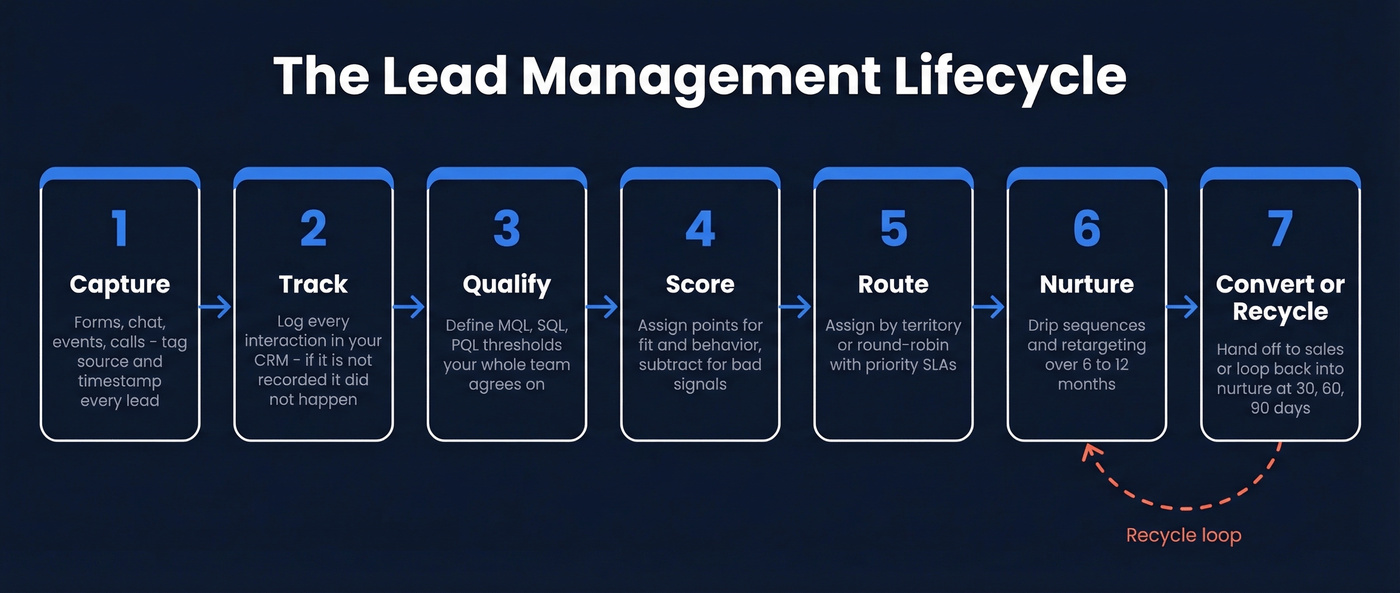
Capture
Capture is where leads enter your system: form fills, chatbot conversations, event registrations, purchased lists, inbound calls. For teams running telemarketing workflows, inbound and outbound call data needs the same rigor as digital channels. The operational detail most teams miss is that every capture point needs a source tag and a timestamp. Without those two fields, you can't measure channel performance or enforce response-time SLAs later. A lead that enters your CRM without a source is already half-broken.
Track
Tracking means logging every interaction - page views, email opens, content downloads, sales calls, meeting notes. Your CRM has to be the single source of truth. The common failure? Reps logging activity in Slack, email, or their heads instead of the CRM. If it's not in the system, it didn't happen. Build required fields and activity minimums into your workflow.
Lead Qualification: MQL vs SQL vs PQL
This is where you separate signal from noise. Three definitions your team needs to agree on:
- MQL (Marketing Qualified Lead): Meets a minimum engagement and fit threshold. Marketing says "this one's worth a conversation."
- SQL (Sales Qualified Lead): Sales has validated budget, authority, need, or timeline. The lead is a real opportunity.
- PQL (Product Qualified Lead): For product-led growth companies - a user who's hit activation milestones in your free tier or trial.
The biggest source of marketing-sales friction we've seen is vague MQL definitions. "They downloaded a whitepaper" isn't qualification criteria - it's a behavior. Qualification needs explicit scoring thresholds, which brings us to the next stage.
Score
Lead scoring assigns numerical values to demographic fit (title, company size, industry) and behavioral signals (pricing page visits, demo requests, email engagement). Behavioral scoring alone boosts conversion rates by up to 40%. We'll walk through a worked scoring model in the next section.
One critical caveat: scoring is useless on stale data. If your contact records haven't been verified in weeks, you're scoring against last month's reality. A 7-day data refresh cycle keeps your scoring inputs current rather than aspirational.
Route
Routing is where speed-to-lead becomes a real competitive advantage. Following up within the first hour increases conversion to 53% vs 17% after 24 hours. The HBR research on online sales leads made the case over a decade ago: the window is short, and minutes matter. This is especially true for internet-sourced leads, where prospects are actively comparing vendors and expect near-instant engagement.
Routing rules should assign leads based on territory, deal size, or round-robin - with explicit SLAs by priority tier.
Nurture
Not every lead is ready to buy. Nurture sequences keep you in the conversation over weeks or months through drip emails, retargeting, educational content, and event invitations. Match nurture cadence to buying cycle length - for B2B, plan around 6-12 months and 8-15 meaningful touches for long-cycle deals. One email and a "just checking in" follow-up isn't nurturing. It's hoping.
Convert and Recycle
Conversion is the handoff from lead to opportunity. But the stage most teams forget is recycling. Leads that go dark, lose budget, or aren't ready yet should flow back into nurture - not into a graveyard. Build a "recycle" status in your CRM and set re-engagement triggers at 30, 60, and 90 days.
How to Build a Lead Scoring Model
Most teams know they should score leads, but they never build the actual model. Here's a starting point you can copy straight into your CRM:
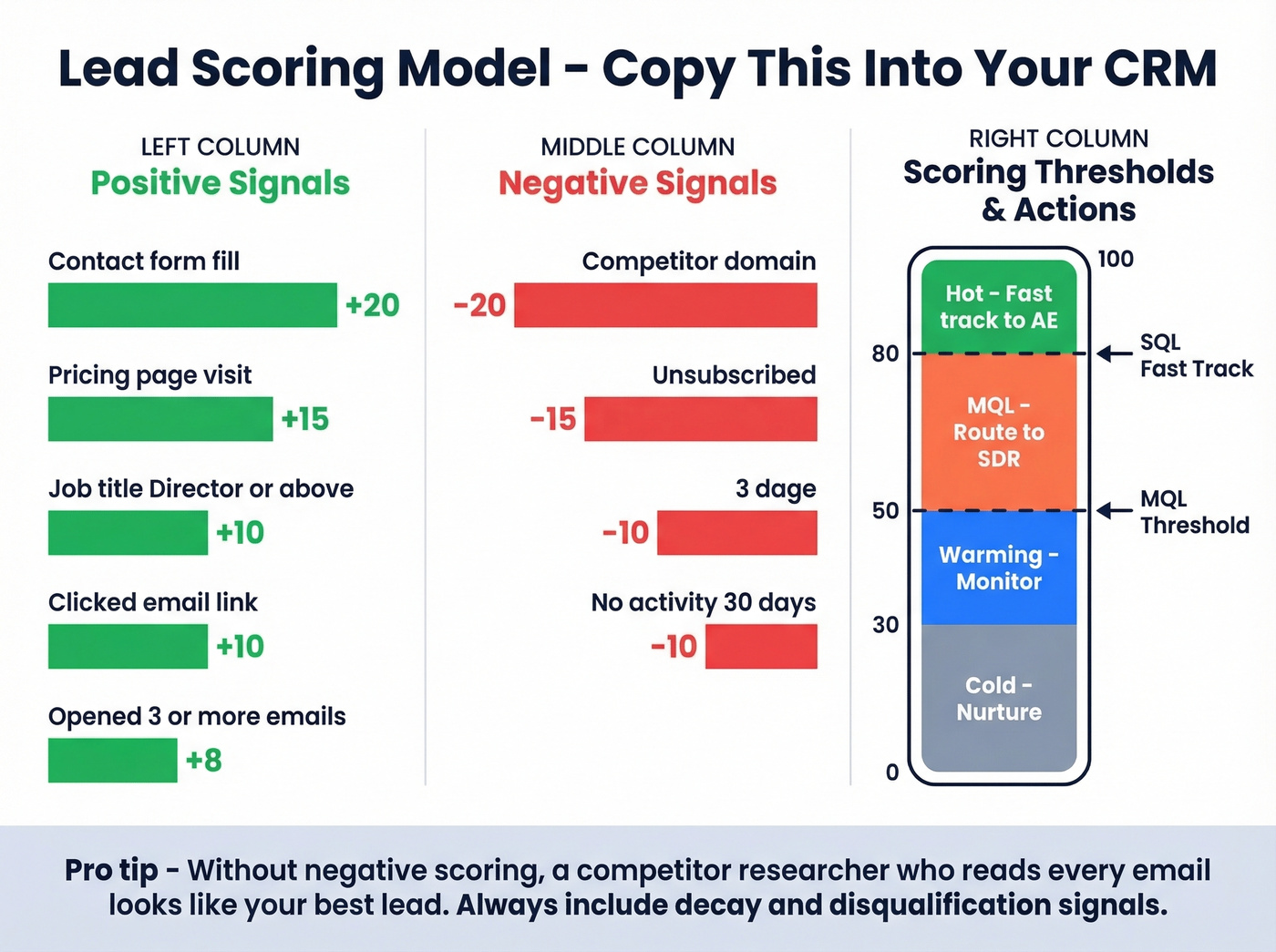
| Signal | Type | Points |
|---|---|---|
| Job title: Director+ | Demographic | +10 |
| Company size >100 | Demographic | +5 |
| Pricing page visit | Behavioral | +15 |
| Contact form fill | Behavioral | +20 |
| Opened 3+ emails | Behavioral | +8 |
| Clicked email link | Behavioral | +10 |
| Unsubscribed | Negative | -15 |
| Competitor domain | Negative | -20 |
| No activity 30 days | Decay | -10 |
Threshold example: Score > 50 = MQL. Score > 80 = fast-track to sales.
Negative scoring is what separates a real model from a vanity one. Without it, a competitor researcher who opens every email and visits your pricing page looks like your hottest lead. Unsubscribes, competitor domains, and inactivity decay keep your scores honest.
For more sophisticated teams, try a Pardot-style dual model: scoring measures engagement while grading measures fit on an A-F scale. A lead can be highly engaged but a terrible fit - and your model should catch that.

76% of CRM users say their data is incomplete. Your scoring model, routing SLAs, and nurture sequences all break when contact records are stale. Prospeo refreshes 300M+ profiles every 7 days with 98% email accuracy - so every lead that enters your system is actually reachable.
Stop managing leads you can't even contact.
Lead Routing SLAs
Routing without SLAs is just assignment. Here's the framework that drives accountability:
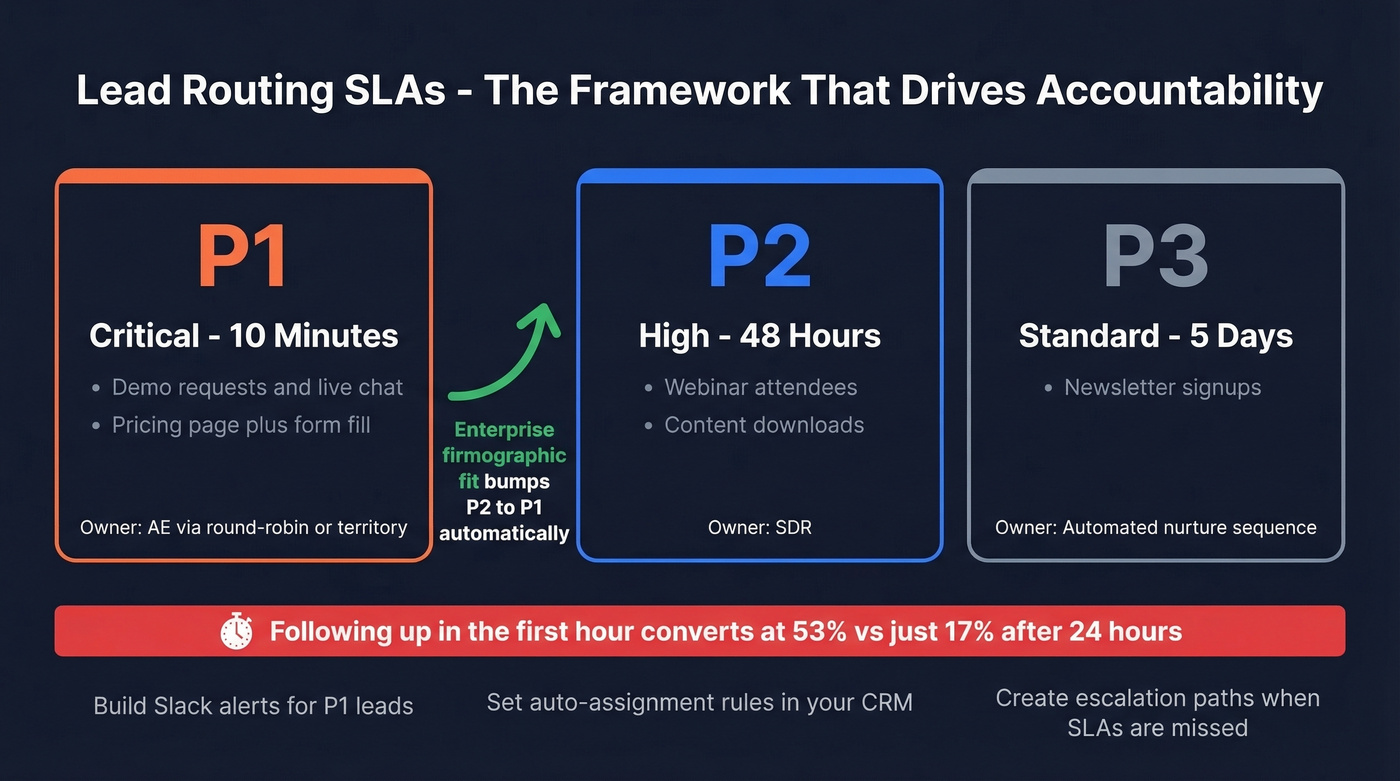
| Priority | Lead Type | Response SLA | Owner |
|---|---|---|---|
| P1 | Demo request, chat | 10 minutes | AE (round-robin) |
| P1 | Pricing page + form | 10 minutes | AE (territory) |
| P2 | Webinar attendee | 48 hours | SDR |
| P2 | Content download | 48 hours | SDR |
| P3 | Newsletter signup | 5 days | Nurture sequence |
The Clearbit routing model uses firmographic fit scores as a multiplier on intent signals - so a P2 lead from an enterprise account gets bumped to P1 automatically. That's the kind of nuance that turns a routing table into a competitive advantage.
If your P1 response time is measured in hours instead of minutes, you're losing deals to competitors who respond faster. Build Slack alerts, auto-assignment rules, and escalation paths to hit these windows.
Benchmarks by Industry
You can't improve what you don't measure. Here are stage-to-stage conversion benchmarks worth pinning to your dashboard:
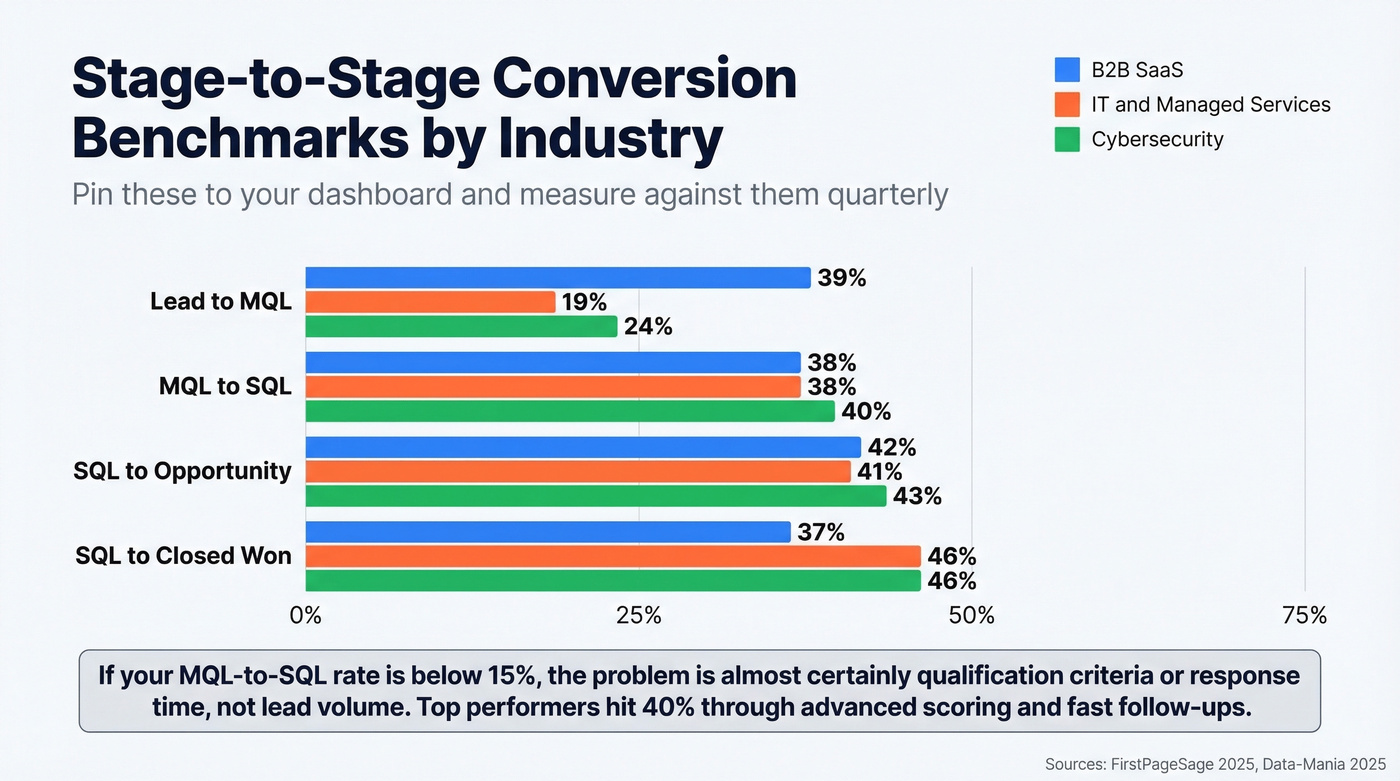
| Industry | Lead-to-MQL | MQL-to-SQL | SQL-to-Opp | SQL-to-Closed |
|---|---|---|---|---|
| B2B SaaS | 39% | 38% | 42% | 37% |
| IT & Managed Services | 19% | 38% | 41% | 46% |
| Cybersecurity | 24% | 40% | 43% | 46% |
Across sectors, MQL-to-SQL averages range 12-21%, with top performers hitting ~40% through advanced scoring and fast follow-ups. If your MQL-to-SQL rate is below 15%, the problem is almost certainly in your qualification criteria or response time - not your lead volume.
These are post-visitor-to-lead benchmarks. The visitor-to-lead conversion happens upstream and is notably lower. Don't compare your full-funnel numbers against these stage-to-stage rates.
B2B vs B2C: Different Parameters
The process is the same. The parameters are wildly different. B2B lead management typically involves longer cycles, more stakeholders, and higher deal values, which means your scoring and nurture systems need to be proportionally more sophisticated.
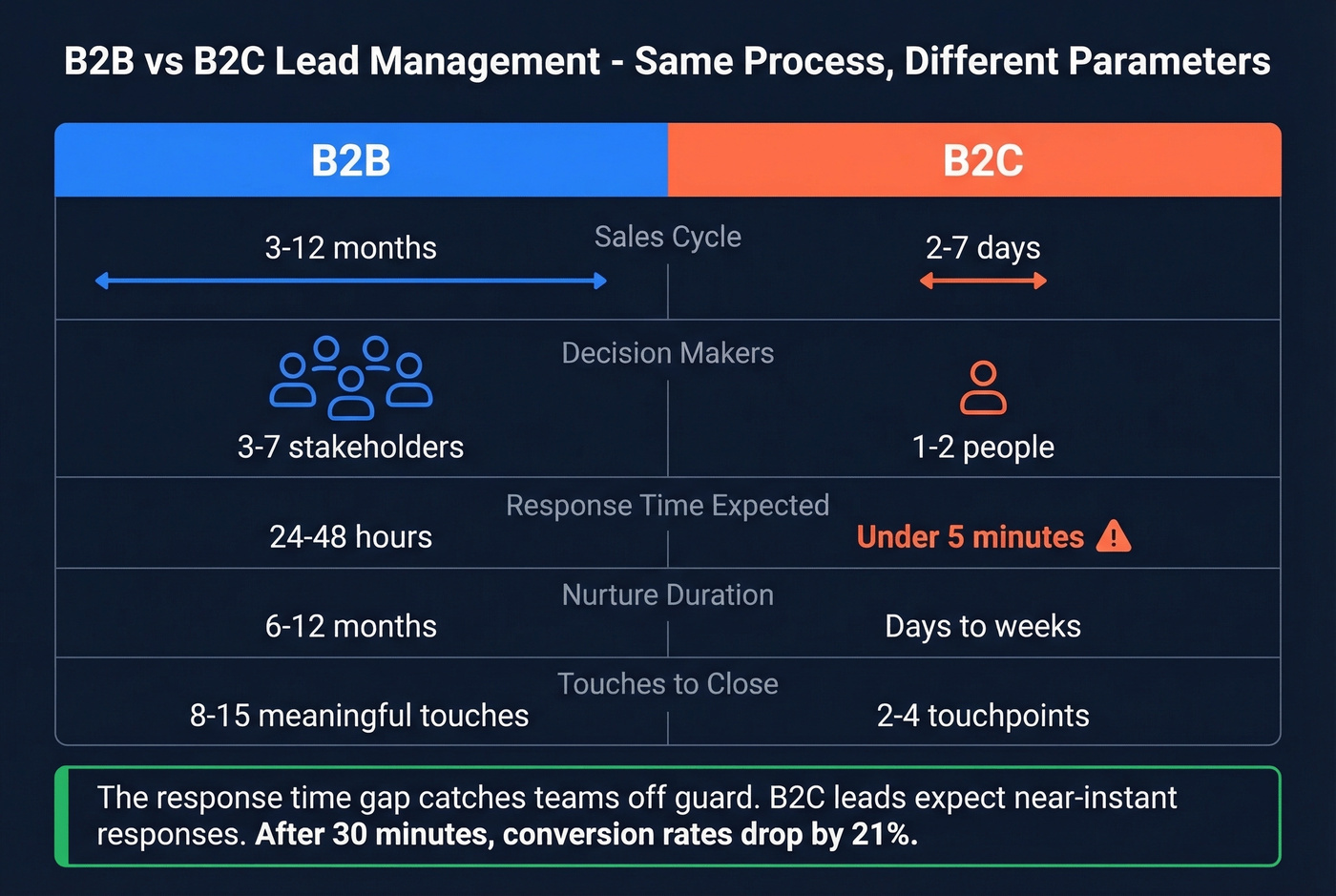
| Dimension | B2B | B2C |
|---|---|---|
| Sales cycle | 3-12 months | 2-7 days |
| Decision-makers | 3-7 stakeholders | 1-2 people |
| Acceptable response | 24-48 hours | Under 5 minutes |
| Nurture duration | 6-12 months | Days to weeks |
| Touches to close | 8-15 meaningful | 2-4 touchpoints |
The response-time gap catches teams off guard. B2C leads expect near-instant responses - after 30 minutes, conversion rates drop by 21%. B2B buyers are more patient, but "patient" still means 24-48 hours, not next week. If you're running a hybrid model selling to both SMBs and enterprises, you need separate routing SLAs for each segment.
5 Mistakes That Kill Your Pipeline
1. No routing rules. Leads sit in a shared queue. Nobody owns them. They age out. Fix: auto-assign by territory or round-robin with SLA timers and escalation alerts.
2. Scoring without thresholds. You've built a scoring model, but there's no defined cutoff for MQL or SQL. Reps cherry-pick based on vibes. Fix: set explicit thresholds and enforce them in your CRM workflow.
3. Relying on stale data. That 76% CRM inaccuracy stat isn't abstract - it means your reps are calling wrong numbers and emailing dead addresses. The industry average data refresh cadence is about 6 weeks, which means a lot of teams are working with last month's reality. This is the single most common reason lead management systems fail, and it's the one most teams ignore because they assume their CRM data is fine.
4. No marketing-sales SLA. Marketing says they're sending qualified leads. Sales says the leads are garbage. Without a written SLA defining MQL criteria, response times, and feedback loops, this argument never ends. Document it. Review it quarterly.
5. Over-automating without human touch. Automation handles the 80% - routing, nurture drips, task creation. But the 20% that matters most needs a human. The P1 follow-up, the discovery call, the personalized note - prospects know when they're talking to a sequence. Don't let your automation become a wall between your team and your buyers.
Here's our honest take: if your average deal size is under $15K, you probably don't need a $50K data platform or a $150K/year CRM implementation. A free CRM tier, a credit-based enrichment tool, and a $29/month marketing automation platform will outperform an enterprise stack that nobody on your team actually uses.
Building Your Stack
You don't need one platform that does everything. You need three to four tools that do their jobs well and talk to each other.
| Category | What It Does | Examples | Typical Pricing |
|---|---|---|---|
| CRM | System of record | HubSpot, Salesforce | Free-$300/user/mo |
| Data Enrichment | Verified contacts | Prospeo | Free; ~$0.01/email |
| Marketing Automation | Nurture sequences | ActiveCampaign | From ~$29/mo |
| Connectors | Workflow glue | Zapier, Make | From ~$20/mo |

HubSpot has a usable free tier. Salesforce plans commonly start around $25/user/month and can run $300+/user/month with advanced editions and add-ons - it's the right choice if you need deep customization, but the implementation cost is real. monday CRM is worth a look for smaller teams who want something visual and lightweight.
Your CRM is only as good as the data inside it. Prospeo sits in the enrichment layer with 98% email accuracy and 125M+ verified mobile numbers on a 7-day refresh cycle. Native integrations with Salesforce, HubSpot, Zapier, and Make mean enriched data flows directly into your CRM without manual imports. The free tier gives you 75 verified emails per month - enough to test the workflow before committing.
If you want to go deeper on the enrichment layer, compare data enrichment options and how they impact email bounce rates.
For marketing automation, ActiveCampaign from ~$29/month handles nurture sequences, behavioral triggers, and basic scoring for most mid-market teams. Zapier or Make connects everything. Start with these three layers and add complexity only when you've outgrown them. Skip the enterprise stack until your team is actually bottlenecked by the tools, not the process.
If you're tightening follow-up execution, keep a set of sales follow-up templates and a simple sequence management standard so leads don't stall.
Speed-to-lead means nothing if the email bounces. Teams using Prospeo cut bounce rates from 35% to under 4% and tripled pipeline - because every routed lead has a verified email and direct dial behind it.
Verified data at $0.01 per email. No contracts, no sales calls.
FAQ
What is lead management?
Lead management is the operational system that captures, qualifies, scores, routes, and nurtures leads from first touch through to a sales conversation or disqualification. It's the process layer built on top of your CRM - the rules, workflows, and SLAs that determine what happens to each lead and when.
How does it differ from pipeline management?
Lead management covers pre-opportunity stages: capture, qualification, scoring, and routing. Pipeline management begins when a qualified lead becomes a formal sales opportunity with an estimated close date and deal value.
What's a good MQL-to-SQL conversion rate?
Industry averages range 12-21%, with top-performing B2B SaaS teams hitting ~38% through advanced scoring and sub-hour response times. If you're below 15%, audit your qualification criteria and speed-to-lead before increasing volume.
How does data quality affect lead scoring?
Bad data is the silent killer of scoring models. If 76% of CRM records are inaccurate, your scores reflect outdated job titles, dead emails, and wrong phone numbers. A 7-day refresh cycle on your enrichment data keeps scores grounded in reality, not last quarter's snapshot.
Do small teams need dedicated lead management software?
Not necessarily. A free CRM tier, a credit-based enrichment tool at ~$0.01/email, and a $29/month automation platform handle scoring, routing, and nurture for most teams under 20 reps. Add specialized software only when you've outgrown the basics.