

Lead-to-Account Matching: What Works, What Breaks, and What It Costs
Your SDR just cold-emailed the CEO of your biggest customer. The lead came in through a webinar, sat in Salesforce as an unmatched record, and got picked up by an automated sequence. Nobody knew the account already existed three clicks away.
That's the problem lead-to-account matching solves - and most teams don't realize they have it until it embarrasses them.
What It Actually Is
Lead-to-account matching links an inbound or outbound lead to an existing account in your CRM. Salesforce doesn't do this automatically. A new lead sits as an orphan record with no connection to the account it belongs to, even if that account has a $200k opportunity in Stage 3.
The consequences are predictable: duplicate outreach, reps stepping on each other, ABM campaigns that can't attribute pipeline correctly, and speed-to-lead metrics that look great on paper but route leads to the wrong person. Matching maps leads to accounts using email domain, company name, geography, and fuzzy logic so the right rep gets the right lead.
What You Need (Quick Version)
- Under 50 target accounts: Salesforce Flow + enriched data is enough. Don't buy a dedicated tool.
- 50-500 accounts: Chili Piper Distro or Default deliver solid matching at a fraction of LeanData's typical contract cost.
- Enterprise with complex hierarchies: Budget $25k+ for LeanData; Demandbase typically runs $30k-$100k+/yr.
Your match rate depends on data quality upstream. Enrich leads before they hit the matching engine - garbage company names and Gmail addresses give matchers nothing to work with. (If you’re building this end-to-end, pair matching with automated lead enrichment.)
How Fuzzy Matching Works
Matching leads to accounts is entity resolution applied to CRM data:
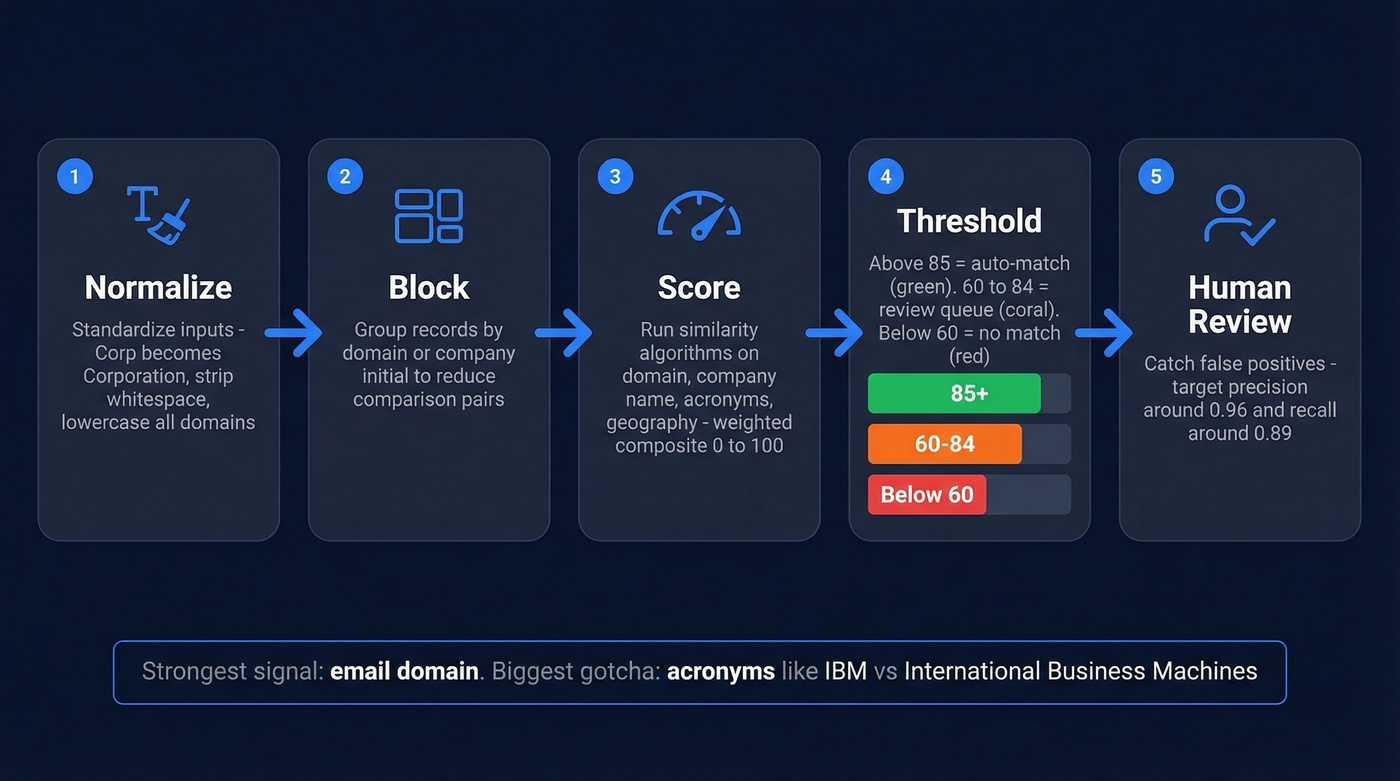
- Normalization - Standardize inputs: "Corp." becomes "Corporation," strip whitespace, lowercase domains.
- Blocking - Group records into candidate pairs by domain or company initial to avoid comparing every lead against every account.
- Scoring - Run similarity algorithms across email domain, company name variations, acronyms, and geography. Each field gets a weighted score; the composite determines match confidence on a 0-100 scale.
- Thresholding - Scores above 85 auto-match. Between 60-85, review queue. Below 60, no match. You'll tune these to your data.
- Human review - Catch false positives. A well-tuned system targets precision around 0.96 and recall around 0.89, but that takes iteration.
The strongest signal is email domain. Acronyms are the most common gotcha - "IBM" needs to match "International Business Machines," and "JPM" needs to find "JPMorgan Chase." In our experience, teams that invest an hour mapping their top 50 acronyms and subsidiaries before configuring thresholds cut false negatives by 30-40%.
Why It Matters for Revenue
The benefits compound across every revenue function:
- Faster speed-to-lead - Matched leads route to the account owner instantly instead of sitting in a queue while ops manually assigns them.
- Accurate ABM attribution - When every lead ties to an account, marketing can measure which campaigns actually influence pipeline at the account level (especially if you’re running ABM lead scoring).
- Fewer duplicate records - Matching catches existing accounts before reps create new ones, keeping your CRM clean.
- Better rep experience - SDRs see full account context before making a call, which means fewer embarrassing cold emails to existing customers.
- Higher conversion rates - Teams with proper matching consistently report 15-25% improvements in lead-to-opportunity conversion because leads reach the rep who already has context on the account.

Lead-to-account matching fails when leads arrive with Gmail addresses and blank company fields. Prospeo's CRM enrichment fills in 50+ data points per record at an 83% match rate - company name, domain, job title, location - refreshed every 7 days. At ~$0.01 per email, it costs less than one misrouted lead.
Fix your data upstream and watch your match rates climb.
What Breaks in Practice
Here's the thing: this is a solved problem being sold as a hard problem. The matching logic is straightforward. What's actually hard is the data going in and the edge cases nobody planned for.
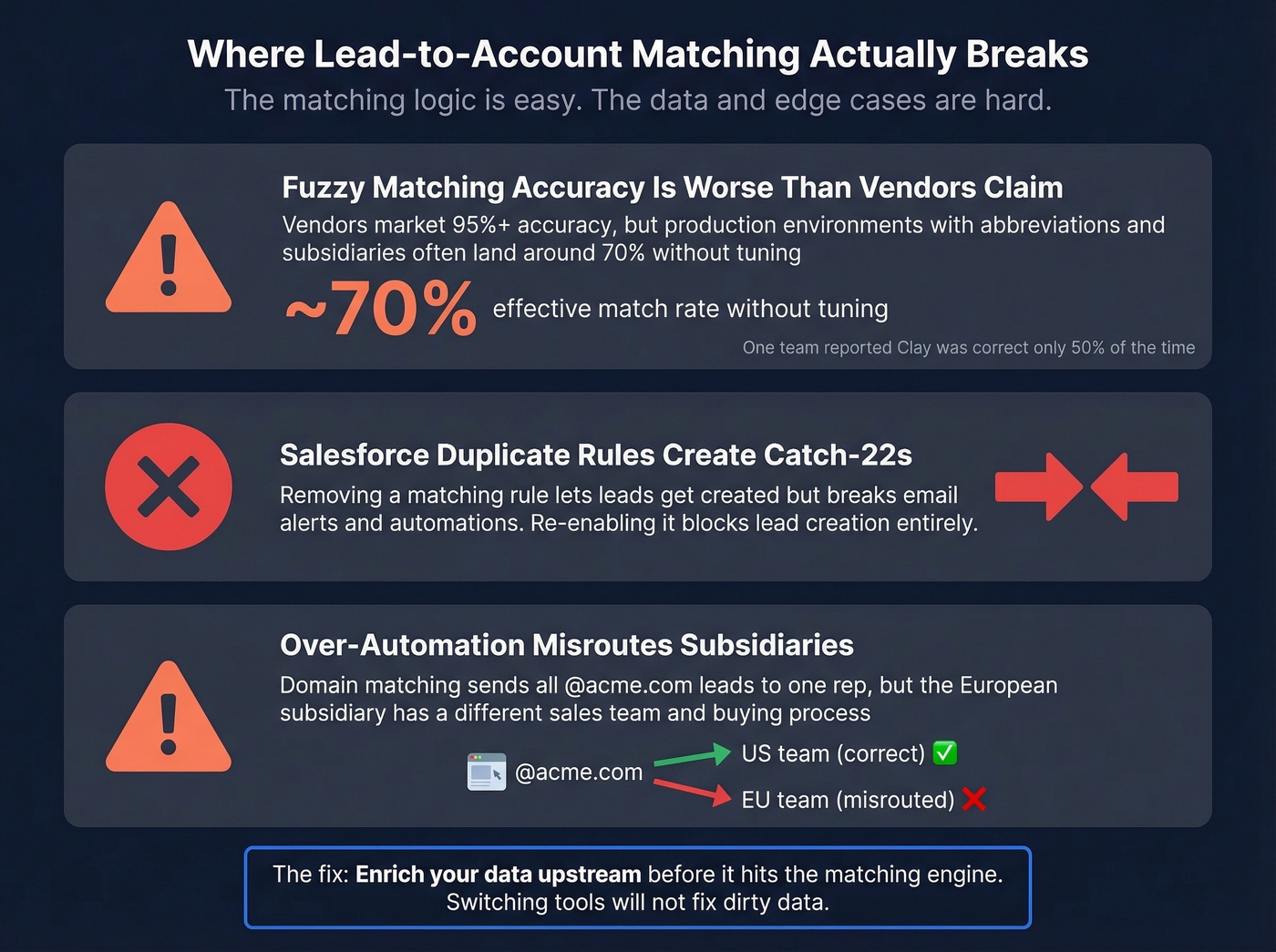
Fuzzy matching accuracy is worse than vendors admit. One practitioner reported Clay's Salesforce integration was correct about 50% of the time, requiring custom SOQL workarounds. Many vendors market 95%+ accuracy, but in production with abbreviations and subsidiaries, teams often end up around ~70% effective matching without tuning.
Salesforce duplicate rules create cascading failures. We've seen teams discover that removing an account matching rule lets leads get created - but email alerts stop and downstream automations break. Re-enabling the rule blocks lead creation entirely. It's a catch-22 that burns hours of admin time.
Over-automation misroutes subsidiaries. A domain match that sends all @acme.com leads to one rep sounds clean until Acme's European subsidiary has a different sales team and buying process (this is where territory-based lead routing usually needs to be explicit).
The consensus on r/salesforce and r/salesops is that LeanData alternatives are worth exploring, with price increases as the usual trigger. That frustration is justified - but switching tools won't fix dirty data.
Tools Compared (2026)
LeanData is the default choice for enterprise teams, partly because it's genuinely powerful and partly because "just buy LeanData" has become reflexive advice in RevOps circles. But LeanData's pricing starts in the mid-five figures annually, which is hard to justify for a mid-market team running 50-200 target accounts.
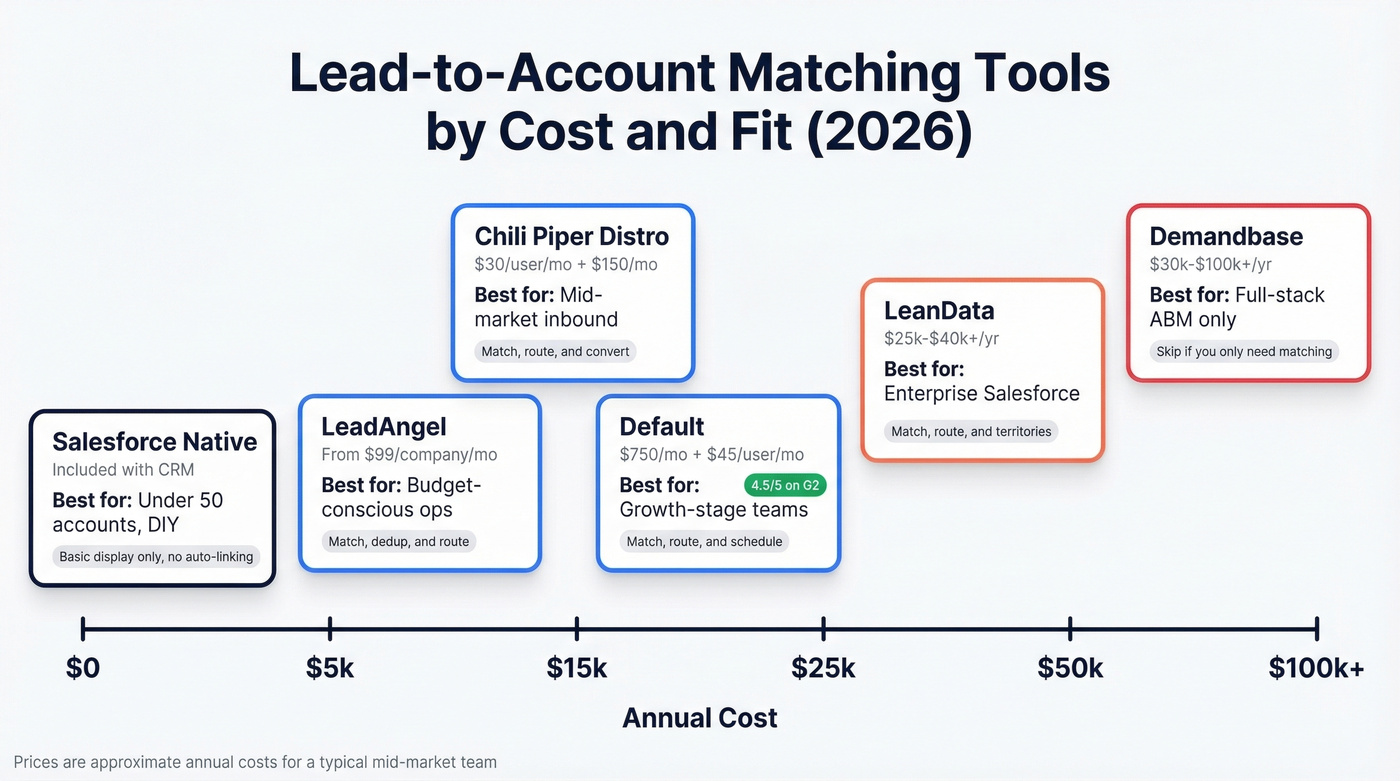
Chili Piper Distro and Default cover matching plus routing for far less. Default carries a 4.5/5 on G2 with 63 reviews, and users report implementation in about a month.
| Tool | What It Does | Starting Price | Best For |
|---|---|---|---|
| LeanData | Match + route + territories | ~$25k-$40k+/yr | Enterprise Salesforce |
| Chili Piper Distro | Match + route + convert | $30/user/mo + $150/mo | Mid-market inbound |
| Default | Match + route + schedule | $750/mo + $45/user/mo | Growth-stage teams |
| LeadAngel | Match + dedup + route | From $99/company/mo | Budget-conscious ops |
| Demandbase | Match within ABM platform | ~$30k-$100k+/yr | Full-stack ABM |
| Salesforce (native) | Basic matched leads display | Included with CRM | <50 accounts, DIY |
Skip Demandbase if you don't need a full ABM platform - you're paying for a lot of functionality you won't touch just to get matching.
Fix Your Data First
We've seen teams spend $40k on LeanData and still get poor match rates because half their inbound leads arrive with personal email addresses and no company name. The matching engine has nothing to work with.
The fix is enrichment before matching. Prospeo's CRM enrichment returns 50+ data points per record at an 83% match rate - company name, domain, job title, department, location - all on a 7-day refresh cycle. At roughly $0.01 per email, it's the cheapest insurance policy for your matching accuracy. Snyk's team of 50 AEs saw bounce rates drop from 35-40% to under 5% after switching to verified data, which directly improved match quality downstream.

Let's be honest: if you're evaluating a $25k+ matching tool and haven't solved your data quality problem, you're optimizing the wrong thing. Enrich first, match second. (If you need a broader stack view, start with B2B data infrastructure.)
Snyk's 50 AEs cut bounce rates from 35-40% to under 5% with Prospeo's verified data - and that clean data fed directly into better lead-to-account matching downstream. 98% email accuracy and 7-day refresh cycles mean your matching engine always has something real to work with.
Stop paying $40k for matching tools that choke on bad data.
Implementation Checklist
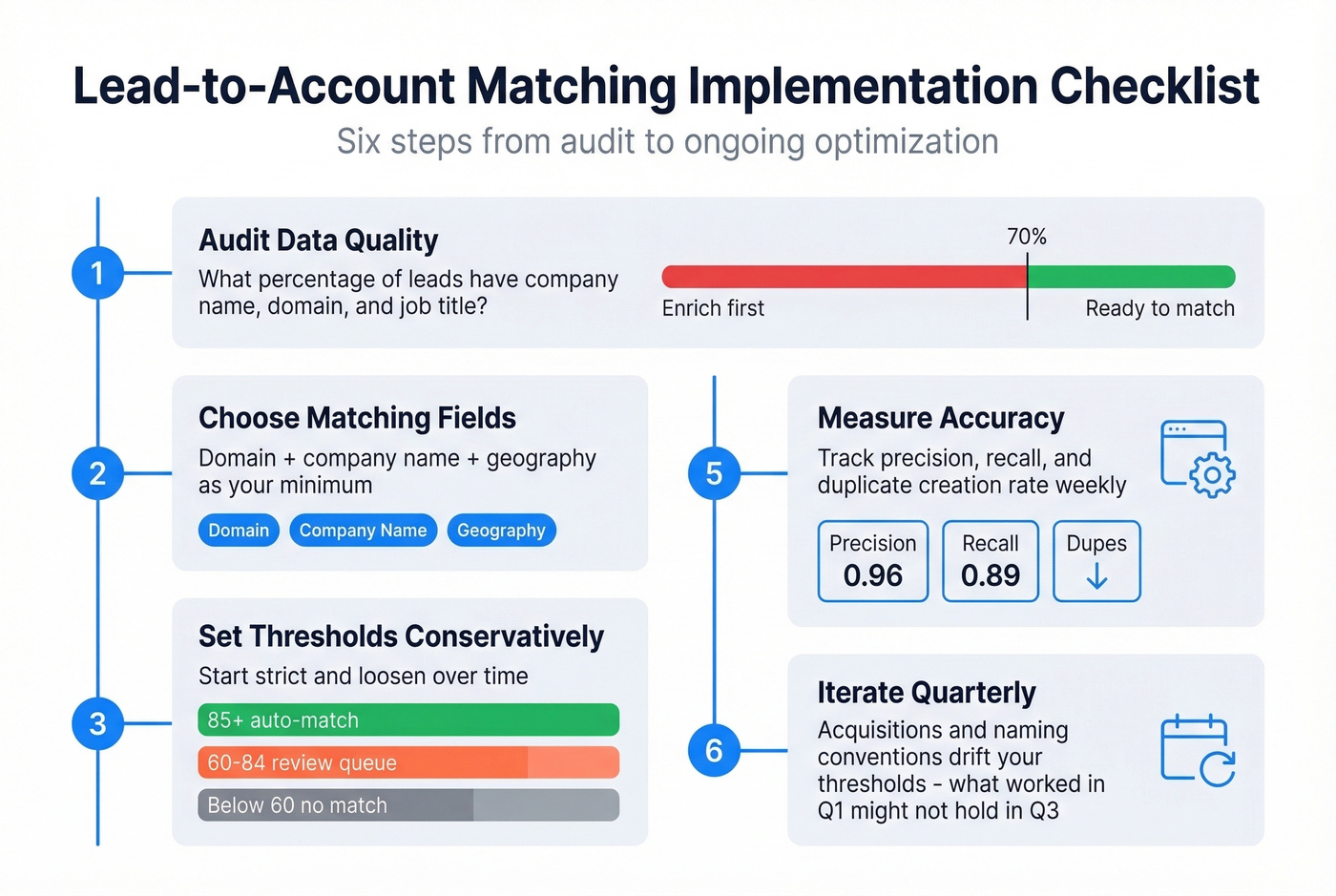
- Audit data quality - What percentage of leads have a company name, domain, and job title? Below 70%? Enrich first (use a simple lead analytics dashboard to track it).
- Choose matching fields - Domain + company name + geography minimum.
- Set thresholds conservatively - 85+ auto-match, 60-84 review queue.
- Test in sandbox - Matching that works on 100 records can misfire at 10,000. We learned this one the hard way.
- Measure accuracy - Track precision, recall, and duplicate creation rate weekly.
- Iterate quarterly - Acquisitions and naming conventions drift your thresholds over time, and what worked in Q1 won't necessarily hold in Q3.
FAQ
What's the difference between lead-to-account matching and lead routing?
Matching identifies which account a lead belongs to. Routing assigns that matched lead to the right rep based on territory or ownership rules. Matching always happens first. Most tools like LeanData and Chili Piper handle both in a single workflow, but they're distinct steps - and if matching is broken, routing can't save you.
Can Salesforce match leads to accounts natively?
Salesforce's Matched Leads component displays potential matches but doesn't auto-link records or trigger assignment. Actual association requires Flow, Apex, or a third-party tool. Duplicate rules help surface matches but can block lead creation as a side effect - a well-documented pain point in the Salesforce admin community.
How do I improve my match rate?
Enrich leads before matching. Leads with verified company domains and job titles match at 2-3x the rate of raw form fills. Prospeo's enrichment returns 50+ data points per record at an 83% match rate, turning incomplete submissions into records your matching engine can actually resolve.
Are there affordable LeanData alternatives for mid-market teams?
Default ($750/mo + $45/user/mo) and Chili Piper Distro ($30/user/mo + $150/mo) both handle lead-to-account matching and routing for a fraction of LeanData's $25k+ annual contracts. For teams that need matching but not the full enterprise routing engine, either one gets the job done. Pair with upstream enrichment to maximize accuracy without the enterprise price tag.