

LeadForce Alternatives: Budget CRMs That Actually Have an Ecosystem
LeadForce CRM gets confused with LeadForce the lead generation agency constantly - even G2 mixes them up, returning agencies like KlientBoost and INFUSE on its alternatives page. The CRM itself, made by SANeForce, costs $3.99-$7.99/user and has a 2.5/5 rating on G2 from exactly one review. No Reddit threads. No obvious public community footprint. Zero reviews on Software Advice.
If you're here, you already know the product feels thin. Here are the CRMs people actually use.
Our Picks (TL;DR)
- Freshsales - Closest feature match at $9/user. Built-in phone, email, chat, and Freddy AI.
- Zoho CRM - Free for 3 users, $14/user to scale. Deep ecosystem at this price point.
- Pipedrive - Best pipeline UX in the budget CRM category, bar none.
Why Teams Switch from LeadForce CRM
There isn't a wave of public complaints about LeadForce because there's barely a public user base to complain. The reasons to look elsewhere are structural.
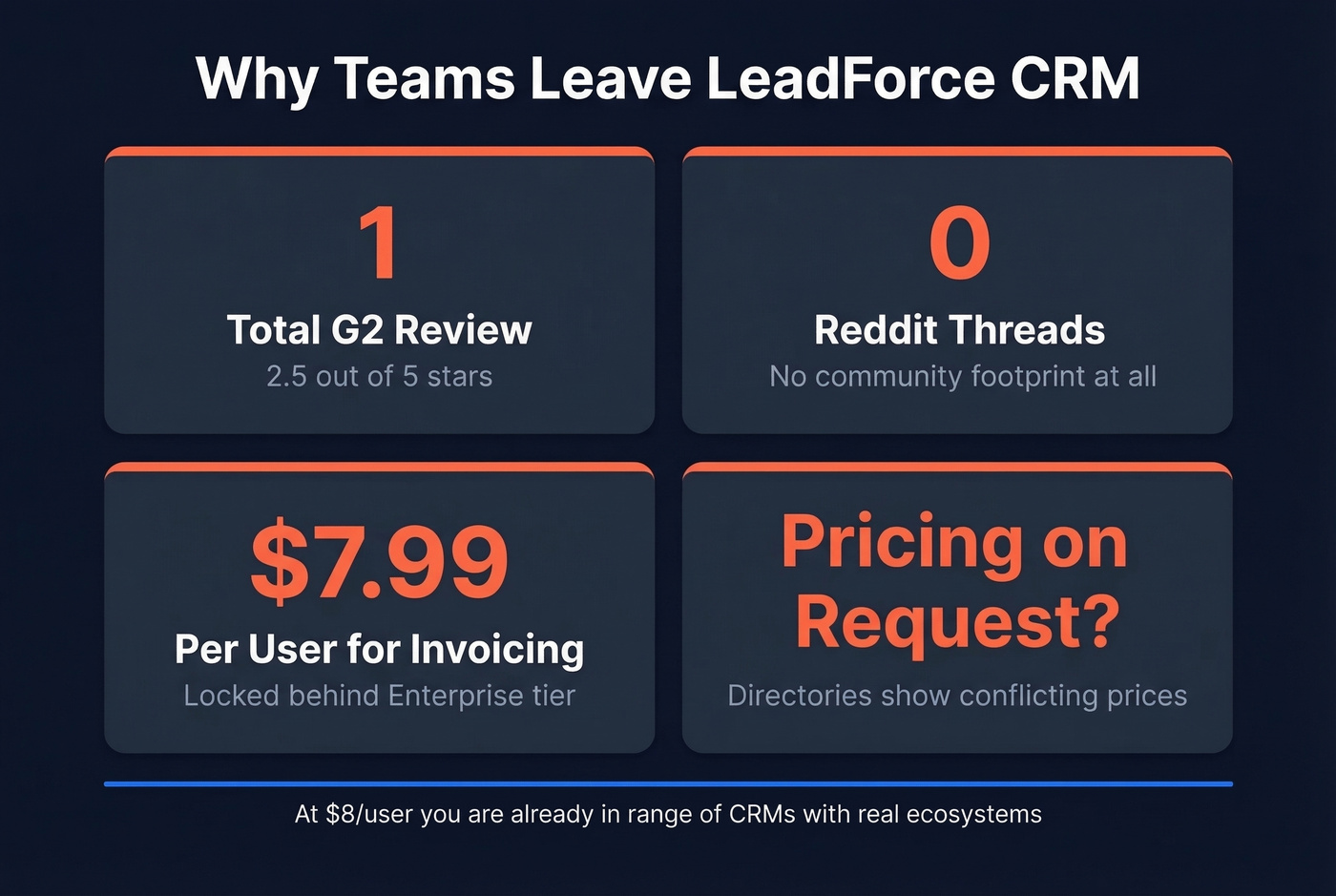
One review, zero community. If you hit a problem, you're on your own. No Quora threads, no Reddit discussions, no Stack Overflow answers - just silence. Pricing inconsistency doesn't help either: SoftwareSuggest lists $4/$6/$8 per user tiers while Software Advice says "pricing on request." That mismatch across directories isn't confidence-inspiring.
Then there's feature gating. Proposals, estimates, and invoicing are locked behind the $7.99-$8/user Enterprise tier - and at that price, you're in range of CRMs with real ecosystems, real communities, and real documentation. Integrations aren't clearly documented in the public directories people usually rely on, which makes it hard to know what actually connects before you commit.

Switching from LeadForce means rebuilding your contact database. Don't carry bad data into a better CRM. Prospeo verifies emails at 98% accuracy with a 7-day refresh cycle - so your new Freshsales, Zoho, or Pipedrive instance starts clean from day one.
Verify 5,000 contacts for $50 before your CRM migration.
Pricing Comparison
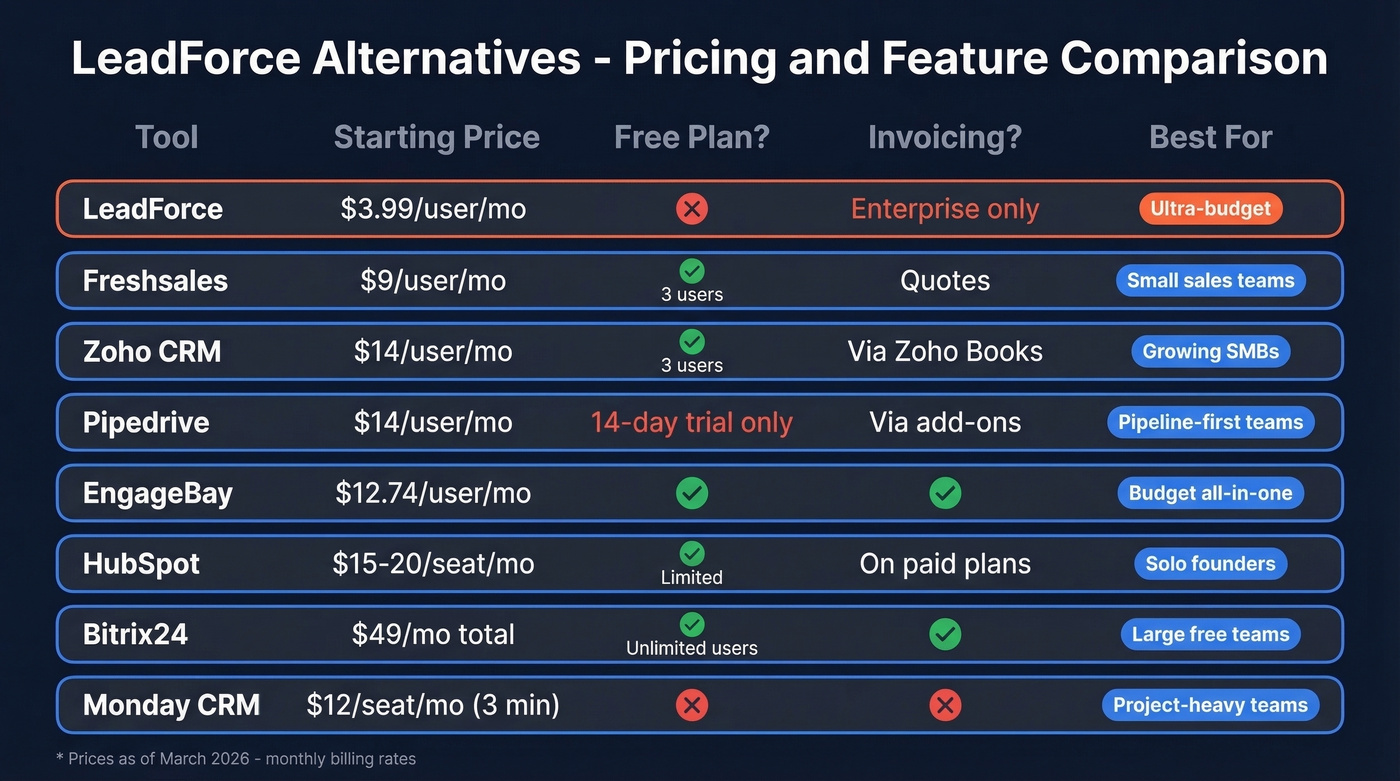
| Tool | Starting Price | Free Plan? | Invoicing? | Best For |
|---|---|---|---|---|
| LeadForce | $3.99/user/mo | Trial only | Enterprise tier only | Ultra-budget |
| Freshsales | $9/user/mo | Yes (3 users) | Quotes | Small sales teams |
| Zoho CRM | $14/user/mo | Yes (3 users) | Via Zoho Books | Growing SMBs |
| Pipedrive | $14/user/mo | 14-day trial | Via add-ons | Pipeline-first teams |
| EngageBay | ~$12.74/user/mo | Yes | Yes | Budget all-in-one |
| HubSpot | $15-$20/seat/mo | Yes (limited) | On paid plans | Solo founders |
| Bitrix24 | $49/mo total | Yes (unlimited) | Yes | Large free teams |
| Monday CRM | $12/seat/mo (3 min) | No | No | Project-heavy teams |
Best LeadForce Alternatives in 2026
1. Freshsales
Freshsales is the most natural upgrade from LeadForce. At $9/user on the Growth plan, you're paying roughly double the Essential tier but getting a completely different class of product - built-in phone, email, and chat mean you aren't stitching together third-party tools. Freddy AI adds pipeline insights on top.

The free plan supports 3 users with basic contact and deal management, enough to test before committing. Quoting features cover the "send a quote fast" gap that LeadForce locks behind Enterprise. We've recommended Freshsales to small teams more than any other budget CRM this year, and the feedback has been consistently positive. If you want the shortest path from LeadForce to something that works, this is it.
2. Zoho CRM
Best for: Teams that'll outgrow a simple CRM within a year.
Zoho's real advantage isn't any single feature - it's the platform surrounding the CRM. Need invoicing? Zoho Books plugs in natively. Marketing automation? Zoho Campaigns. Help desk? Zoho Desk. You're buying into a suite that covers most SMB software needs without leaving the Zoho universe, and that ecosystem depth is something LeadForce simply can't match at any tier.

The UI isn't as polished as Pipedrive or Freshsales, and the learning curve is steeper - let's be honest, Zoho's settings pages can feel like navigating a government website. But the free tier covers 3 users, and Standard at $14/user/mo is the typical starting point for teams that need automation and Zia AI.
3. Prospeo
Your CRM is only as good as the data inside it. Switching CRMs is the perfect moment to clean up your contacts.
Prospeo isn't a CRM replacement - it's the data quality layer that makes whichever CRM you choose actually convert. The platform covers 300M+ professional profiles with 98% email accuracy and a 7-day data refresh cycle, while most data providers refresh every six weeks. That gap matters when you're importing thousands of contacts into a fresh CRM instance and don't want to start with a bounce rate north of 30%.

Before you import a single contact into your new CRM, run them through Prospeo's email verification. At $0.01 per lead, verifying 5,000 contacts costs $50. The free tier covers 75 emails per month. Native integrations with Salesforce, HubSpot, Smartlead, and Instantly mean verified data flows directly into your pipeline - no CSV gymnastics required.
If you're also evaluating data enrichment to fill missing fields during the move, do it before you import.
4. Pipedrive
Use this if pipeline visualization is your top priority. Pipedrive's drag-and-drop deal board is the cleanest in the budget CRM category - nothing else at $14/user feels this intuitive for reps who think visually. Smart Docs handles basic quoting, and the integration marketplace covers invoicing gaps through third-party add-ons.
Skip this if you need a free plan. Pipedrive only offers a 14-day trial, and at $14/user you're paying nearly double LeadForce's Enterprise tier for a tool that's deliberately pipeline-focused over all-in-one. For teams that want everything under one roof, Zoho or EngageBay are better fits.
If you're comparing pipeline-first CRMs, it helps to look at a few examples of a CRM side by side.
5. EngageBay
The budget all-in-one option. Starting at around $12.74/user, EngageBay bundles CRM, marketing automation, and a help desk into a single platform. Worth a look if you want marketing emails and deal tracking without juggling multiple subscriptions. The free plan is generous enough to test properly, though the UI feels a generation behind Freshsales.
6. HubSpot CRM
Great for solo founders who want a free CRM with a recognizable name. The free plan includes contact management, one deal pipeline, and 2,000 marketing email sends per month.
Here's the thing: the moment you need automation, prepare for sticker shock. The free plan caps you at 10 custom properties, no workflows, and no lead scoring. Starter runs $15-$20/seat. Professional plans require annual commitment plus a $1,500 onboarding fee. We've seen teams start on HubSpot free and end up paying more than Zoho or Freshsales within six months because they didn't map out their growth path first. If you're budget-conscious enough to be evaluating LeadForce, HubSpot's paid tiers probably aren't where you want to land.
If you're weighing these two specifically, see our Bitrix24 vs HubSpot breakdown.
7. Bitrix24
Free plan with unlimited users - that's the pitch, and it's real. Paid plans start at $49/mo per organization (not per user), and invoicing is included out of the box. If you've got a large team on a razor-thin budget, Bitrix24 is the only real option on this list.
The tradeoff is the interface, which feels dated compared to everything else here. Navigation is cluttered, and onboarding new reps takes longer than it should. But for a 15-person team paying $0/mo? Hard to argue with the math.
Monday CRM
Built for project-heavy teams who want CRM functionality layered onto Monday.com's work management platform. At $12/seat with a 3-seat minimum, the floor is $36/mo, and there's no free CRM plan. Skip this unless your team already lives in Monday.com for project management.
If your team is doing a lot of outbound alongside the CRM switch, consider tightening your sales prospecting techniques so the new pipeline fills faster.
Every CRM on this list integrates with Prospeo - Salesforce, HubSpot, Smartlead, Instantly, and more. Import 300M+ verified contacts directly into your pipeline. No CSV exports, no bounced emails, no wasted budget on dead leads.
Start with 75 free verified emails. No credit card, no sales call.
How to Choose the Right Alternative
I'll be direct: the CRM switch itself matters less than the data you bring into it. Importing stale contacts into a shiny new tool just means you'll distrust it within a week.
If you're seeing bounces after the move, start with email bounce rate benchmarks and fixes before you blame the CRM.
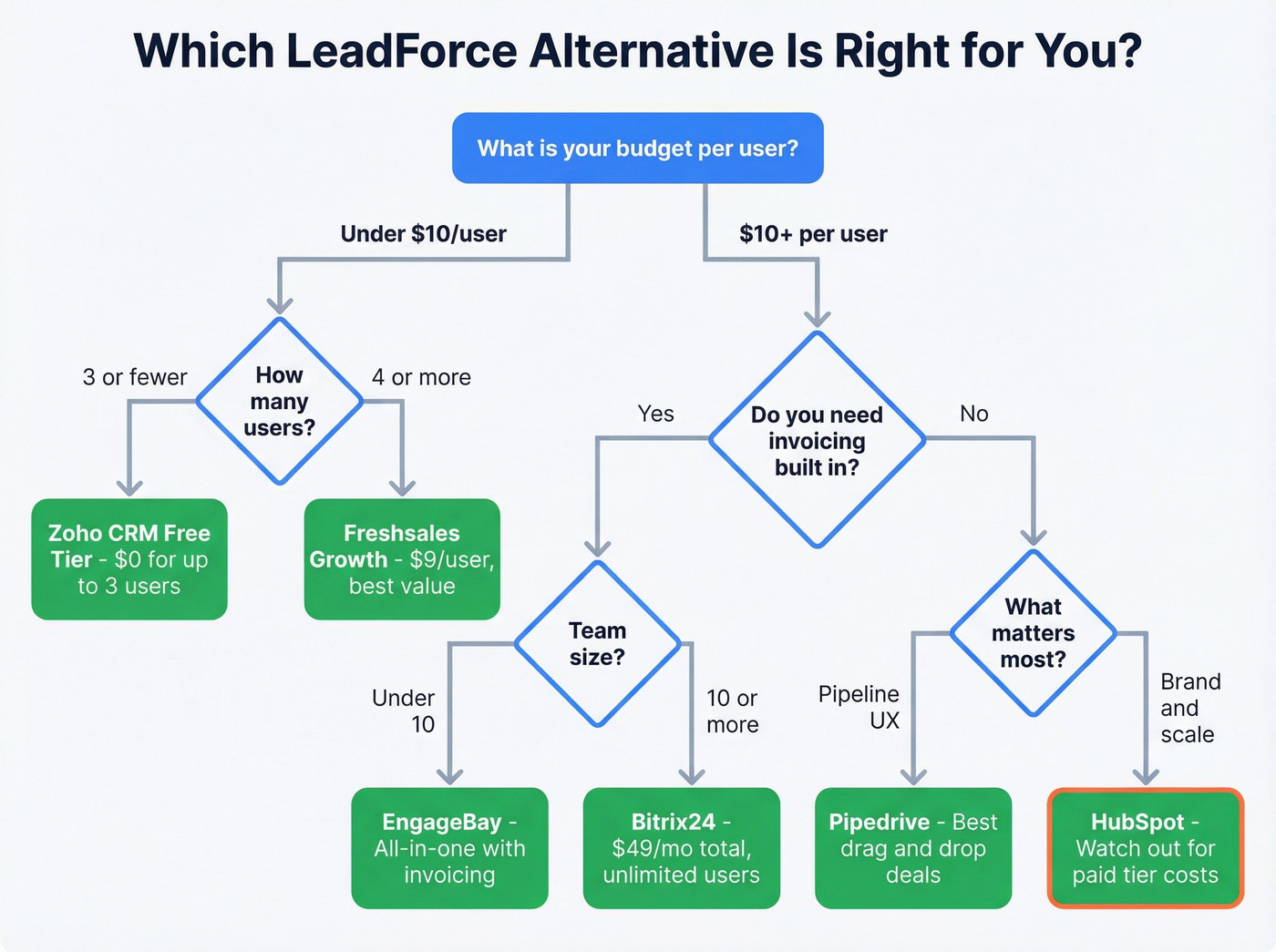
For teams on a budget under $10/user, Freshsales at $9/user is the sweet spot. Zoho's free tier works if you've got 3 or fewer users. When you need invoicing inside the CRM, your shortlist narrows to Zoho (via Zoho Books), EngageBay, or Bitrix24. Got a large team with zero budget? Bitrix24's unlimited free plan is the only game in town.
And honestly? If your deals average under $10k, you probably don't need anything fancier than Freshsales. The teams that agonize over CRM features for months would've been better off picking one and spending that time on outreach instead - especially if they already have sales follow-up templates ready to deploy.
FAQ
What does LeadForce CRM cost?
LeadForce CRM runs three tiers: Essential at $3.99/user/month, Advanced at $4.99, and Enterprise at $7.99. Proposals, estimates, and invoicing require the Enterprise plan. A free trial is available, but there's no permanent free tier.
Is there a free alternative to LeadForce?
Freshsales and Zoho CRM both offer free plans for up to 3 users. Bitrix24's free plan supports unlimited users but has feature limits. HubSpot's free CRM works for solo founders but lacks automation.
How do I avoid bad data during a CRM migration?
Run your contact list through an email verification tool before migrating. Cleaning 5,000 contacts at $0.01 per lead costs $50 - and clean data on day one saves months of pipeline confusion. It's the single highest-ROI step in any CRM switch, and it's the step most teams skip because it feels like busywork. It isn't.