

Why Your Legitimate Emails Keep Going to Spam - and How to Stop It
Your bank confirmation sits in spam, right next to a Nigerian prince offering $4.2 million. That's email filtering in 2026. If you've noticed legitimate emails going to spam more often, you're not imagining it. Roughly 1 in 6 emails globally never reach the inbox - an 84% average placement rate, which means millions of real messages vanish every single day.
Whether you're missing important emails or watching your deliverability tank as a sender, here's what's actually going wrong and how to fix it.
Quick Fixes at a Glance
If you're receiving legit emails in spam: Mark as "Not Spam," add the sender to contacts, and create a filter. If it keeps happening, it's likely a provider-side classification issue - Gmail had a widely discussed incident in 2025, and Microsoft 365 admins saw waves of false positives that same year.
If you're sending emails that land in spam: Check authentication (SPF/DKIM/DMARC), check blocklists, and verify your email list. New domains with zero reputation are the most common hidden cause we see.
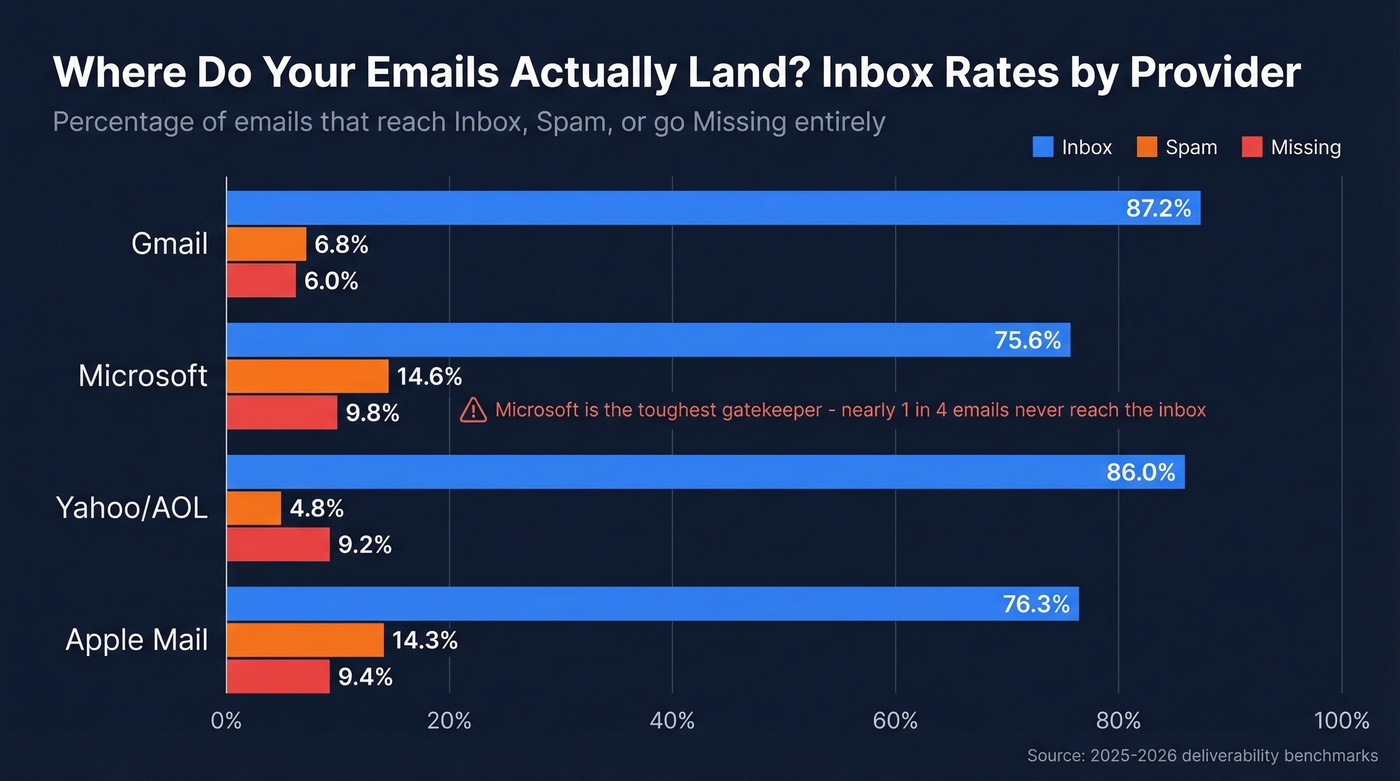
How tough is your recipient's provider? That matters more than you'd think:
| Provider | Inbox Rate | Spam Rate | Missing |
|---|---|---|---|
| Gmail | 87.2% | 6.8% | 6.0% |
| Microsoft | 75.6% | 14.6% | 9.8% |
| Yahoo/AOL | 86.0% | 4.8% | 9.2% |
| Apple Mail | 76.3% | 14.3% | 9.4% |
Microsoft is the toughest gatekeeper by a wide margin. If your emails land fine in Gmail but vanish in Outlook, that table tells you everything.
When Provider Filters Are the Problem
Stop blaming yourself - sometimes the provider's filters are just broken.
In 2025, Gmail experienced a classification glitch where transactional emails were flagged as suspicious despite SPF and DKIM passing cleanly. Users reported promotions landing in Primary, real spam flooding inboxes, and legitimate mail routed to Junk - all at the same time. Google acknowledged the disruption on their Apps Status Dashboard.
Microsoft wasn't any better. Sysadmins on r/sysadmin reported that legitimate client emails started hitting spam in Microsoft 365 even though headers showed SPF, DKIM, and DMARC all passing. No tenant changes, no configuration drift - just Microsoft's backend behaving differently one day.
Gmail users also reported PayPal, GoDaddy, and eBay all landing in spam after years of clean delivery. Here's the thing: if your deliverability changed overnight and you didn't change anything, the problem is genuinely upstream.

Provider filters misfire, but dirty lists make it worse. Prospeo's 5-step verification removes spam traps, honeypots, and invalid addresses before you hit send - delivering 98% email accuracy and bounce rates under 4%.
Stop feeding spam folders. Send only to verified addresses.
Fixes for Recipients
Gmail
Mark the message "Not Spam," then add the sender to your contacts. For a permanent fix, create a filter: Settings -> Filters -> Create New Filter, set the "From" field to the sender's address, and check "Never send to Spam." Fair warning - marking "not spam" doesn't always retrain Gmail's classifier permanently, which is why the filter matters.
Outlook and Outlook.com
In Outlook desktop or Microsoft 365, right-click the message and select "Not Junk," then add the sender to your Safe Senders list. If you're seeing too many false positives, adjust the Junk Email filter protection level under Home -> Junk -> Junk E-Mail Options, dropping it from High to Low.
Outlook.com has a frustrating quirk: inbox rules and Blocked Senders only apply to messages that arrive in your Inbox. If a message goes directly to Junk, your rules never touch it. You have to mark the message as "Not Junk" first - which adds the sender to Safe Senders - then create any additional rules you need. It's a maddening workflow, but it's the only one that works.
How Senders Can Stop Landing in Spam
Fix Your Authentication
SPF tells receiving servers which IPs can send on your domain's behalf. For Google Workspace: v=spf1 include:_spf.google.com ~all. For Microsoft 365: v=spf1 include:spf.protection.outlook.com ~all.
Two critical mistakes to avoid: never publish multiple SPF records for the same domain (merge them into one), and respect the 10 DNS lookup limit - exceeding it causes a PermError that silently breaks authentication. We've seen teams spend weeks debugging deliverability issues that traced back to a single extra include: statement.
DKIM signs your messages cryptographically. Use 2048-bit RSA keys and rotate them every 6-12 months. In Google Workspace, generate the key under Admin Console -> Gmail -> Authenticate Email. In Microsoft 365, enable DKIM and add two CNAME records (selector1/selector2) pointing to your tenant.
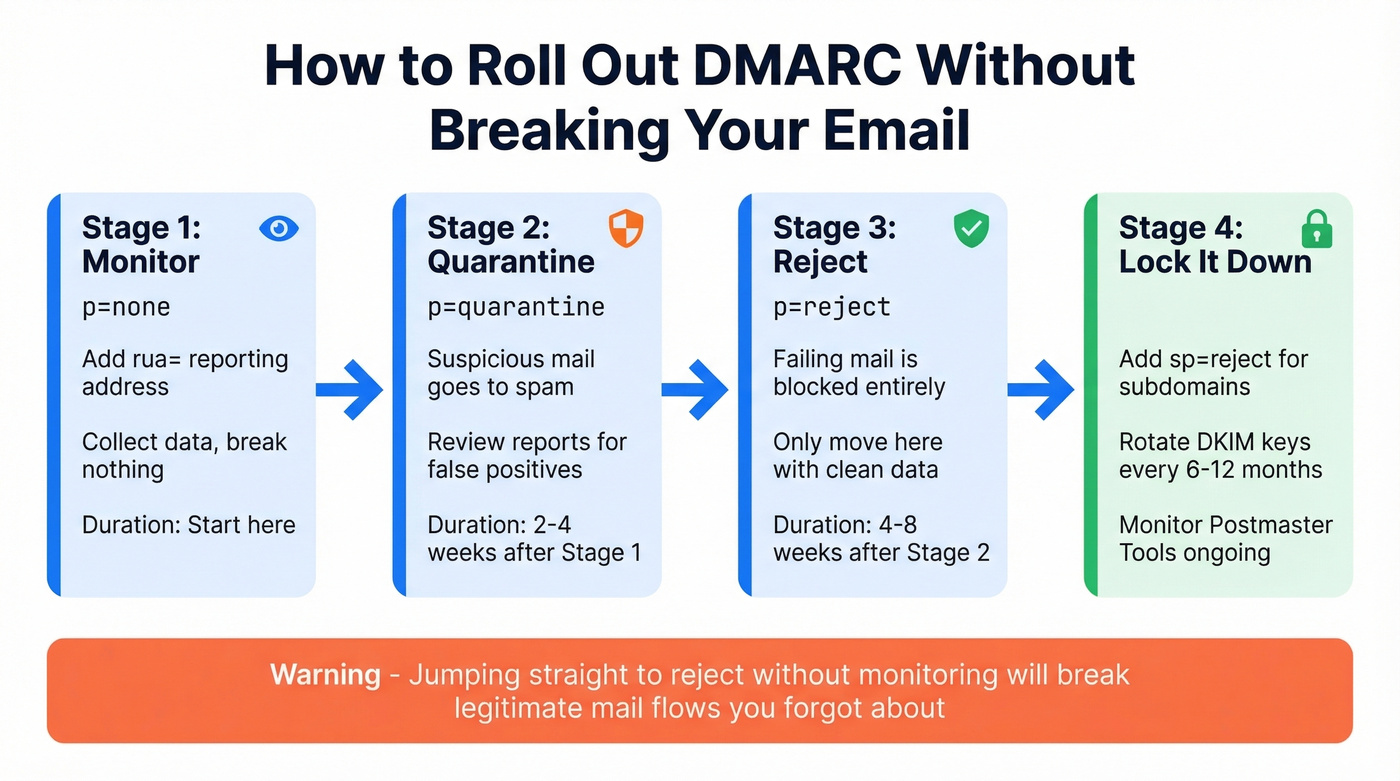
DMARC ties SPF and DKIM together with a policy. Roll it out in stages:
- Start with
p=noneand includerua=mailto:your@address.comfor reporting. - After 2-4 weeks of clean data, move to
p=quarantine. - After another 4-8 weeks, move to
p=reject. - Include
sp=rejectto extend the policy to subdomains.
Jumping straight to reject without monitoring will break legitimate mail flows you forgot about. Since February 2024, Google and Yahoo enforce strict requirements for senders of 5,000+ emails per day: full authentication alignment, one-click unsubscribe headers, and a spam complaint rate under 0.10%. (If you want the technical nuance, see DMARC alignment.)
Check Your Domain Reputation
New domains - especially those younger than 14 days - get hammered by Spamhaus DBL because they have no reputation. Zero reputation isn't good reputation. A small business owner on r/smallbusiness reported the exact same issue: perfect SPF/DKIM/DMARC on a brand-new domain, every test email landing in spam.
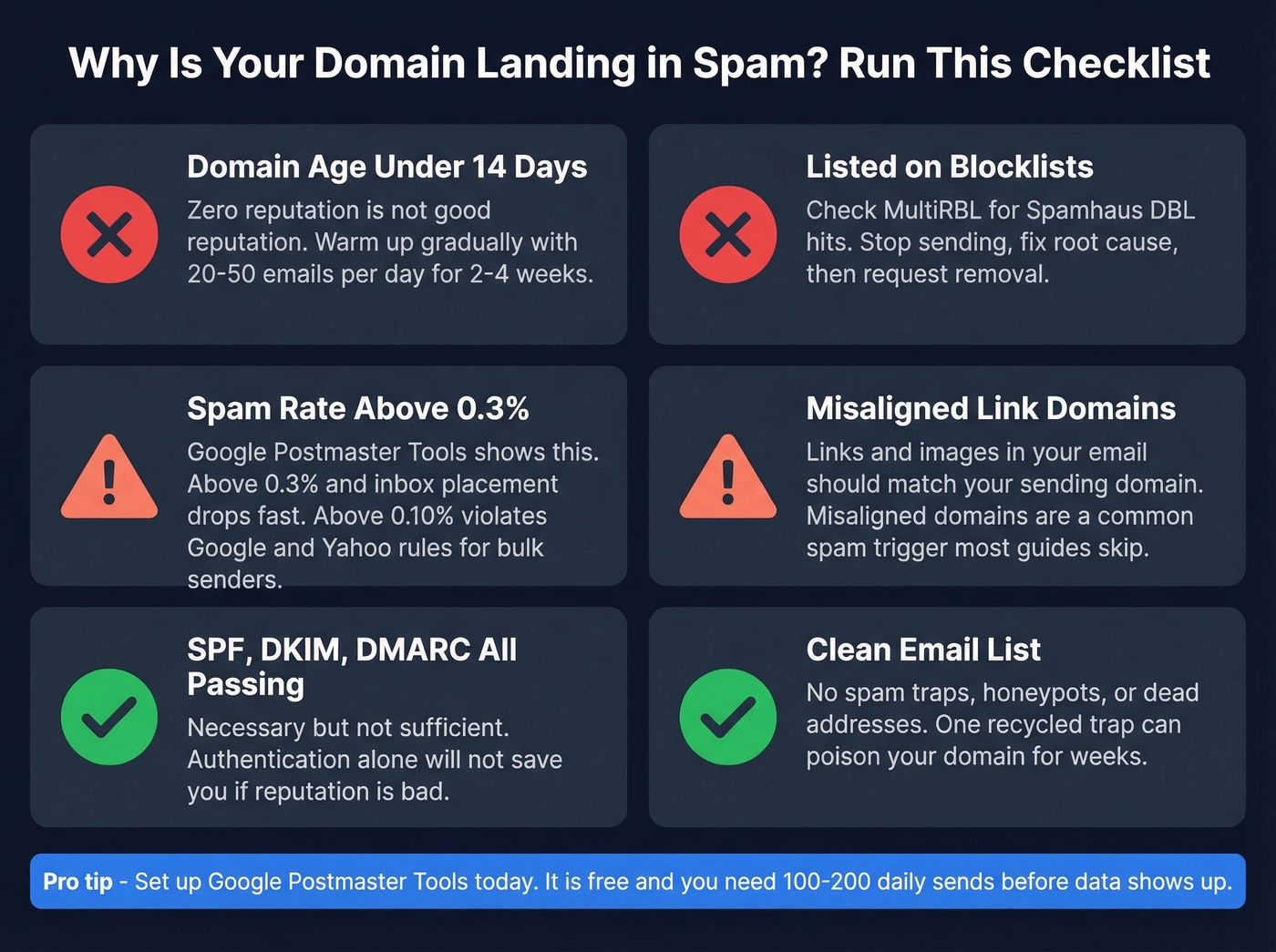
Set up Google Postmaster Tools immediately. It's free. Add your sending domain, verify with a TXT record, and monitor the spam rate dashboard. You'll need to send at least 100-200 emails daily before data populates. Aim to stay under 0.3% spam rate - once you're above that, inbox placement drops fast.
For blocklist checks, use MultiRBL - it queries dozens of blocklists simultaneously. Some entries are informational only and don't mean your mail is actually being blocked. If you're listed on Spamhaus DBL, stop sending, fix the root cause, and submit a removal request through their lookup form. (If you need a step-by-step, use our Spamhaus Blacklist Removal guide.)
One more thing most guides skip: make sure domains in your links and images match your sending domain. Misaligned domains are a common spam trigger that's easy to overlook. This is especially common when you use a separate tracking domain.
Clean Your Email List
Spam traps, honeypots, and dead addresses tank sender reputation faster than bad subject lines or aggressive copy ever will. One recycled spam trap on your list can poison your domain's reputation for weeks. (More remediation steps: spam trap removal.)
Let's be honest - if you're doing outbound at any scale, list hygiene isn't optional. Prospeo's 5-step verification catches spam traps, honeypots, catch-all domains, and invalid addresses before they hit your sending infrastructure. Snyk cut bounce rates from 35-40% to under 5% after switching, which directly improved their inbox placement across both Gmail and Microsoft.

Bad data is the fastest way to destroy domain reputation. Prospeo refreshes every record on a 7-day cycle and catches catch-all domains, honeypots, and recycled traps - so your emails reach real inboxes, not junk folders.
One spam trap can poison your domain for weeks. Eliminate them at $0.01 per email.
The "Spammy Subject Line" Myth
Most deliverability guides lead with "avoid spammy words." That advice is 10 years out of date.
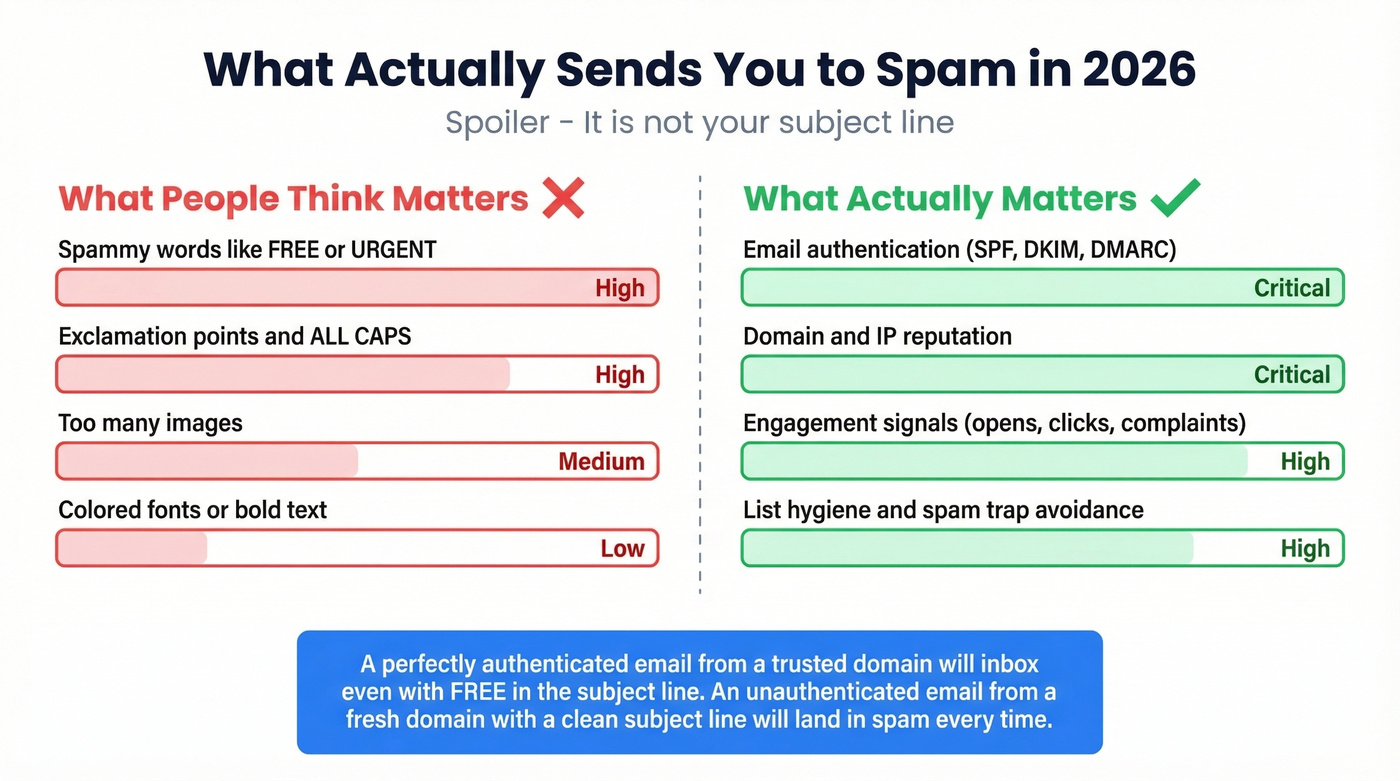
Modern spam filters weight authentication, domain reputation, and engagement signals far more heavily than trigger words. A perfectly authenticated email from a domain with strong reputation will inbox even with "FREE" in the subject line. An unauthenticated email from a fresh domain with a pristine, corporate subject line will land in spam every time.
Focus your energy on the infrastructure, not on whether you used an exclamation point. If you still want copy ideas, use these email subject line examples as a starting point.
Look - if your average deal size is modest and you're sending fewer than 1,000 emails a month, you don't need expensive deliverability monitoring tools. Google Postmaster Tools, a clean list, and proper authentication will get you 95% of the way there. Skip the $200/month monitoring platforms unless you're sending at real volume. If you are sending at volume, monitor email velocity and keep an eye on your email bounce rate.
FAQ
Why do emails from PayPal or eBay land in spam?
Even major senders experience false positives during provider-side classification changes. Gmail and Microsoft both had documented waves of misrouted mail in 2025 where fully authenticated messages were flagged. Mark the message as "Not Spam" and add the sender to contacts - this usually resolves it within a few delivery cycles.
I set up SPF, DKIM, and DMARC but emails still go to spam. Why?
Authentication is necessary but not sufficient. If your domain is newer than 14 days, your list contains spam traps, or your complaint rate exceeds 0.3%, filters will still flag you. Check Google Postmaster Tools for reputation data and run your domain through MultiRBL for blocklist hits.
How do I verify my email list to improve deliverability?
Use a verification tool that checks for spam traps, honeypots, and catch-all domains - not just syntax validation. Prospeo removes bad addresses at 98% accuracy and is free to start with 75 emails per month plus 100 Chrome extension credits.