Email Address Verification: How It Works and Which Tools Deliver in 2026
Every tool in the email verification space markets "99% accuracy." A benchmark of 15 tools across 3,000 real business emails found the top scorer hit 70%. That gap between marketing and reality is where your bounce rate lives.
Here's the short version. Email address verification means two different things depending on who you are. Developers building a signup flow need a token-based double opt-in link - random token, short expiry, done. Teams cleaning lists or verifying before outreach need a dedicated tool. We've tested the major players, and the differences in real-world accuracy are bigger than any of them want to admit.
What Is a Verification Link?
A verification link is the confirmation URL sent during a double opt-in signup flow:
- A user submits their email in a form.
- Your system sends a confirmation email containing a unique link.
- The user clicks that link to prove they own the address.
- Only then does the address get added to your list.
Double opt-in isn't legally required under GDPR, but it creates proof of consent that's hard to argue with in a dispute. On the performance side, double opt-in subscribers are 30-40% more likely to open your welcome emails compared to single opt-in. That's a massive engagement lift for what amounts to one extra step.
For developers, the standard pattern is a signed, random token (typically 64-128 characters) with a time-based expiry anywhere from 1 to 24 hours depending on your risk tolerance. In Flask, you'll often see URLSafeTimedSerializer handling this. Handle SignatureExpired and BadSignature errors separately so users get useful feedback when a link dies - "Your link expired, here's a new one" beats a generic 400 error every time. If you want the deliverability side of the story too, see our guide to verification email.
How Verification Tools Work
Verification tools solve a different problem entirely. Instead of confirming someone clicked a link, they check whether an email address can receive mail without sending anything.
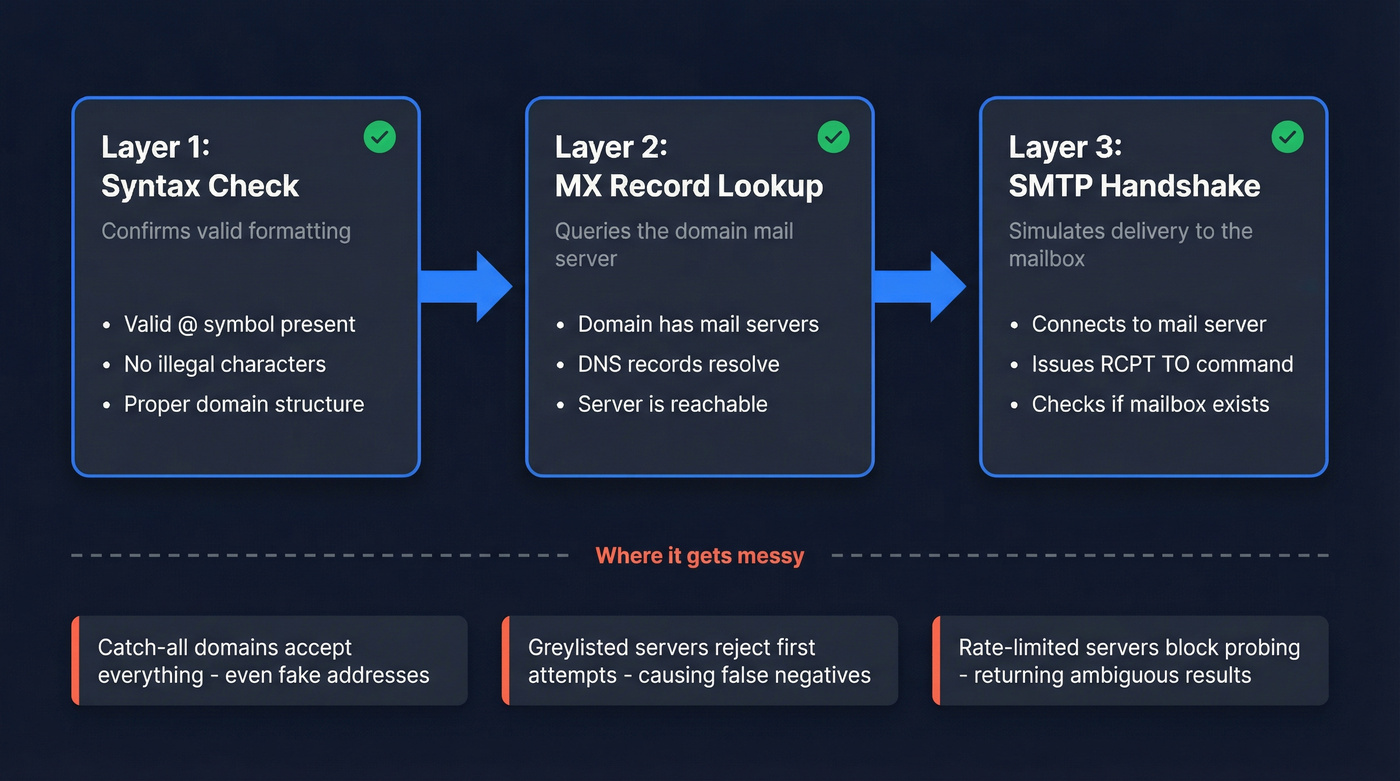
The process runs three layers deep. First, a syntax check confirms valid formatting - no missing @, no illegal characters. Then an MX record lookup queries the domain's mail server to confirm it can receive email. Finally, an SMTP handshake simulates delivery by connecting to the mail server and issuing RCPT TO commands to test whether the specific mailbox exists.
Now here's where it gets messy. Many servers block or rate-limit SMTP probing, returning ambiguous results. Catch-all domains accept mail for any address - even fake ones - so verification tools can't distinguish real from nonexistent. Greylisted servers temporarily reject connections, creating false negatives. The best tools run 20+ checks beyond the basic three, including spam-trap detection and honeypot filtering. For a deeper dive, compare approaches in our AI email verification breakdown.
A quick terminology note, since these terms get conflated constantly: cleaning removes invalids and duplicates from a list, validation checks formatting rules, and verification confirms an address can actually receive mail. Most people need all three, but they're distinct steps. If you're evaluating vendors, our roundup of email checker tools is a good starting point.

Most verification tools check against stale databases. Prospeo's 5-step verification runs against 143M+ emails refreshed every 7 days - with catch-all handling, spam-trap removal, and honeypot filtering built in. That's why Snyk's 50-person sales team dropped bounce rates from 35% to under 5%.
Stop verifying emails that were wrong to begin with. Start at $0.01 per email.
Why Verifying Addresses Matters
Email lists decay roughly 22-25% per year. People change jobs, domains shut down, inboxes get deactivated. Skip verification for a year and a quarter of your list goes stale. (If you want the benchmarks and what to do about them, see B2B contact data decay.)
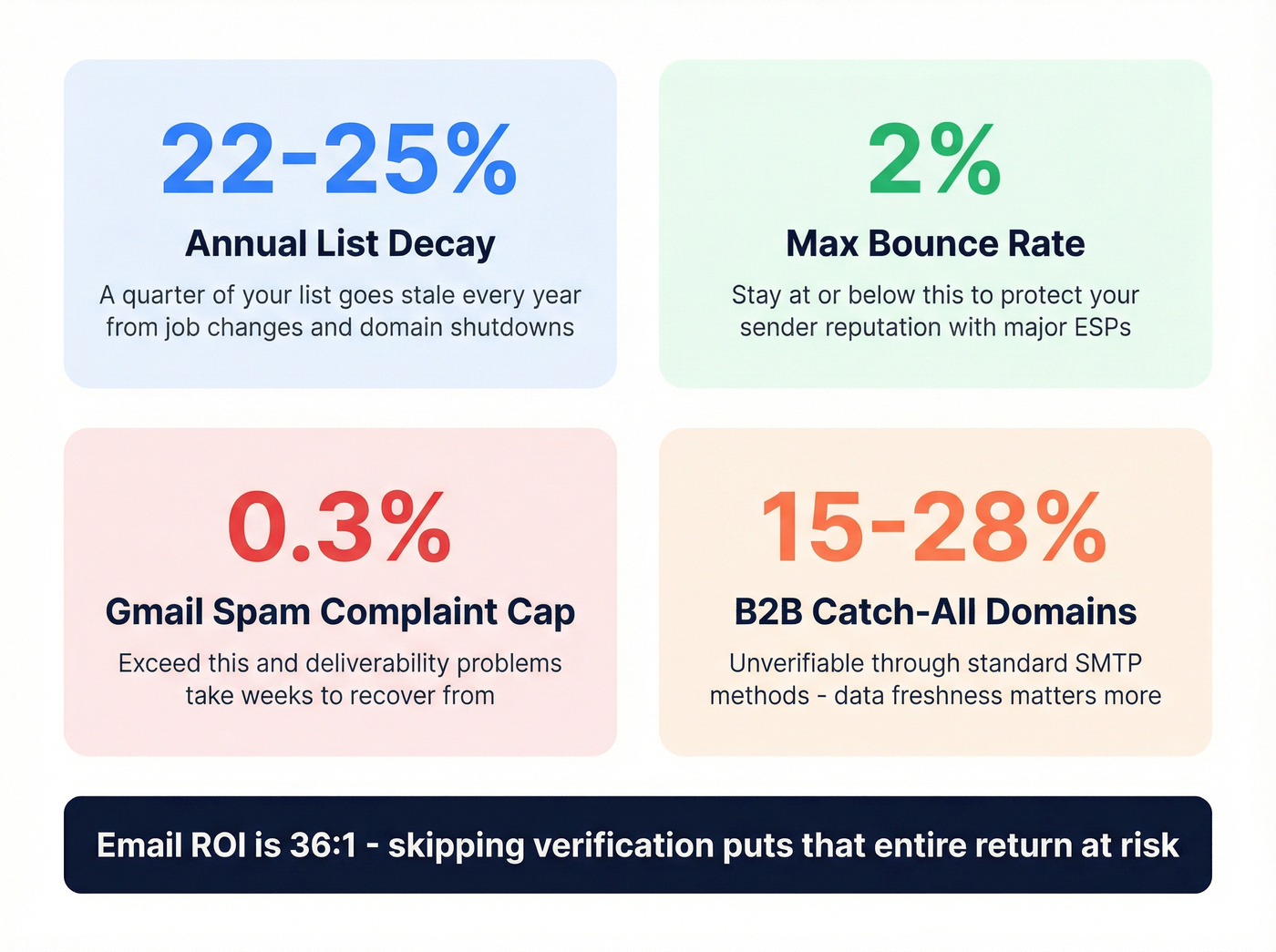
Keep bounces at or below 2% to protect your sender reputation. Gmail's bulk sender requirements cap spam complaints at under 0.3%. Blow past either number and you're looking at deliverability problems that take weeks to recover from. Given that email ROI runs near 36:1 per Litmus research, the cost of skipping verification is enormous. To reduce risk further, follow an email deliverability checklist before scaling volume.
Let's be honest about something most tools won't tell you: 15-28% of B2B domains are catch-all configured. Even after running checks, a meaningful chunk of your list is unverifiable through standard SMTP methods. This is why data freshness matters more than any single accuracy metric. Stale data is the root cause of most post-verification bounces.
If your outbound bounce rate is above 5%, your data provider is the problem - not your verification tool. Verification can't fix emails that were wrong to begin with. If you're troubleshooting, start with the basics in our hard bounce guide.
Best Email Verification Tools in 2026
Most tools here market 99% accuracy. In catch-all-heavy B2B lists, the gap between marketed and real-world performance is wider than any of them want to admit. We've run our own comparisons, and here's where things actually stand. For more options, see our list of email ID validators.
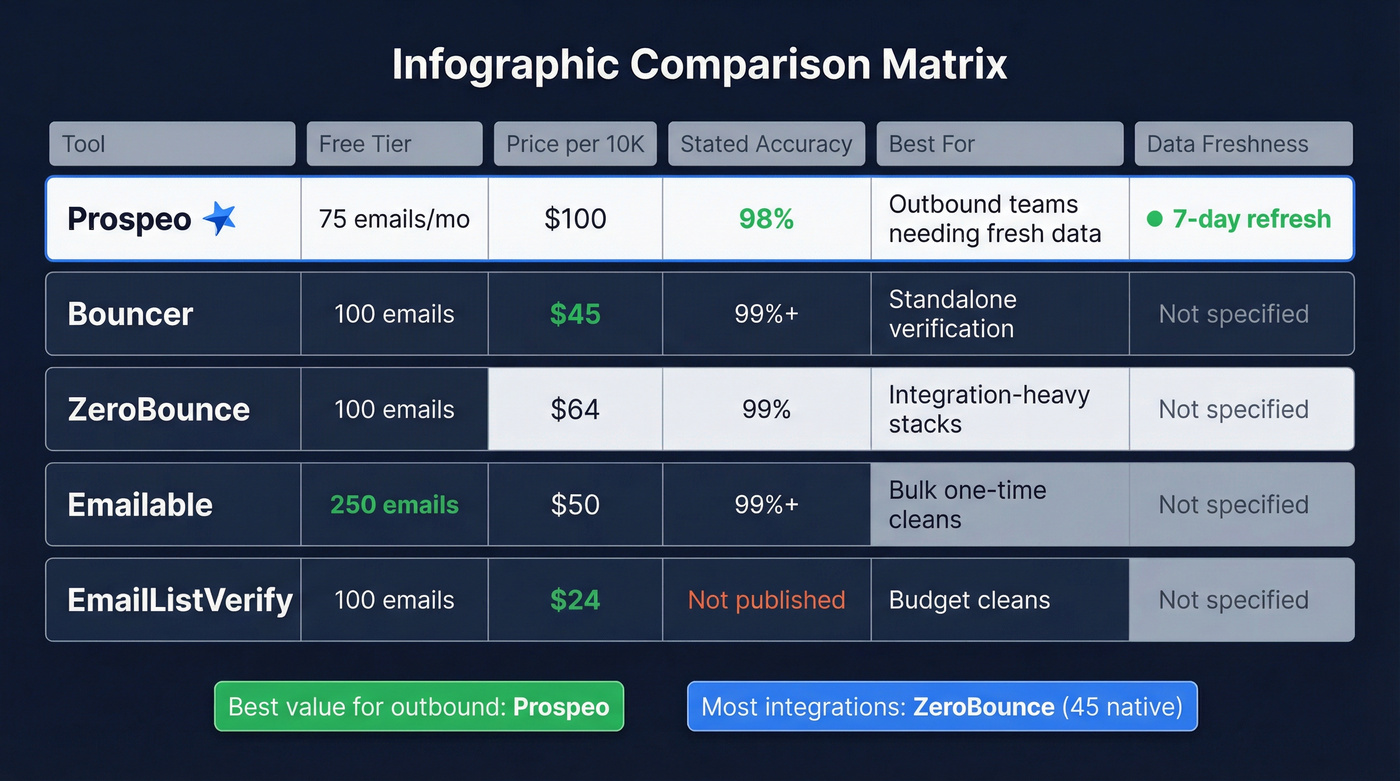
| Tool | Free Tier | Price / 10K | Stated Accuracy | Best For |
|---|---|---|---|---|
| Prospeo | 75 emails/mo | ~$100 | 98% | Outbound teams needing fresh data |
| Bouncer | 100 emails | $45 | 99%+ | Standalone verification |
| ZeroBounce | 100 emails | $64 | 99% | Integration-heavy stacks |
| Emailable | 250 emails | $50 | 99%+ | Bulk one-time cleans |
| EmailListVerify | 100 emails | $24 | Not published | Budget cleans |
Prospeo
Use this if you're running outbound at scale and can't afford bounces tanking your domain reputation. Prospeo's 5-step verification includes catch-all handling, spam-trap removal, and honeypot filtering - running against 143M+ verified emails that refresh every 7 days. That weekly refresh is the real differentiator, because most tools verify against data that's weeks or months old, and stale data is what actually causes post-verification bounces. If you're building a full stack around this, start with our email verification for outreach playbook.

The results speak for themselves. Snyk's 50-person AE team went from 35-40% bounce rates to under 5%, generating 200+ new opportunities per month. At roughly $0.01 per email with a free tier of 75 emails per month, the pricing undercuts most competitors while delivering higher accuracy. The proprietary infrastructure doesn't rely on third-party email providers, which means verification results aren't recycled from the same underlying databases everyone else uses.
Bouncer
Bouncer is the specialist's pick. It does one thing and does it well. Pay-as-you-go pricing starts at ~$0.008 per email with 100 free verifications to test. Processing speed hits 180K emails per hour, and it carries a 4.9 on Capterra across 233 reviews - unusually high for this category. The tradeoff: only 16 integrations, so complex stacks will need middleware like Zapier or Make. Skip this if your workflow depends on native CRM connections.
ZeroBounce
ZeroBounce wins on ecosystem. With 45 native integrations - the most in this comparison - it slots into nearly any marketing or sales stack without middleware. Pricing runs $64 per 10K, mid-range for the category. For teams whose primary concern is plugging verification directly into their ESP or CRM without building custom connections, ZeroBounce is the easiest path.
Emailable
Raw speed is Emailable's game: 2M emails per hour for bulk processing. At $50 per 10K with 250 free verifications - the largest free allotment here - it's solid for teams running large one-time cleans where throughput matters more than ongoing freshness.
EmailListVerify
The budget pick at $24 per 10K, nearly half the price of the next cheapest option. If you're cleaning a massive list and accuracy requirements aren't mission-critical, it gets the job done. Don't expect the same catch-all handling or spam-trap detection you'd get from pricier tools, though.
You just read that 15-28% of B2B domains are catch-all configured and most tools can't handle them. Prospeo's proprietary infrastructure doesn't recycle third-party data - it runs 5-step verification including catch-all domain handling, keeping bounce rates under 4% for teams sending at scale.
Get 75 free verified emails this month and see the accuracy difference yourself.
Best Practices for Clean Lists
Verify at point of capture. Real-time email address verification prevents bad data from ever entering your CRM, and cleaning after the fact is always more expensive. In our experience, teams that verify on input spend roughly 60% less time on list hygiene downstream. If you're operationalizing this, use a CRM hygiene process so bad records don’t creep back in.
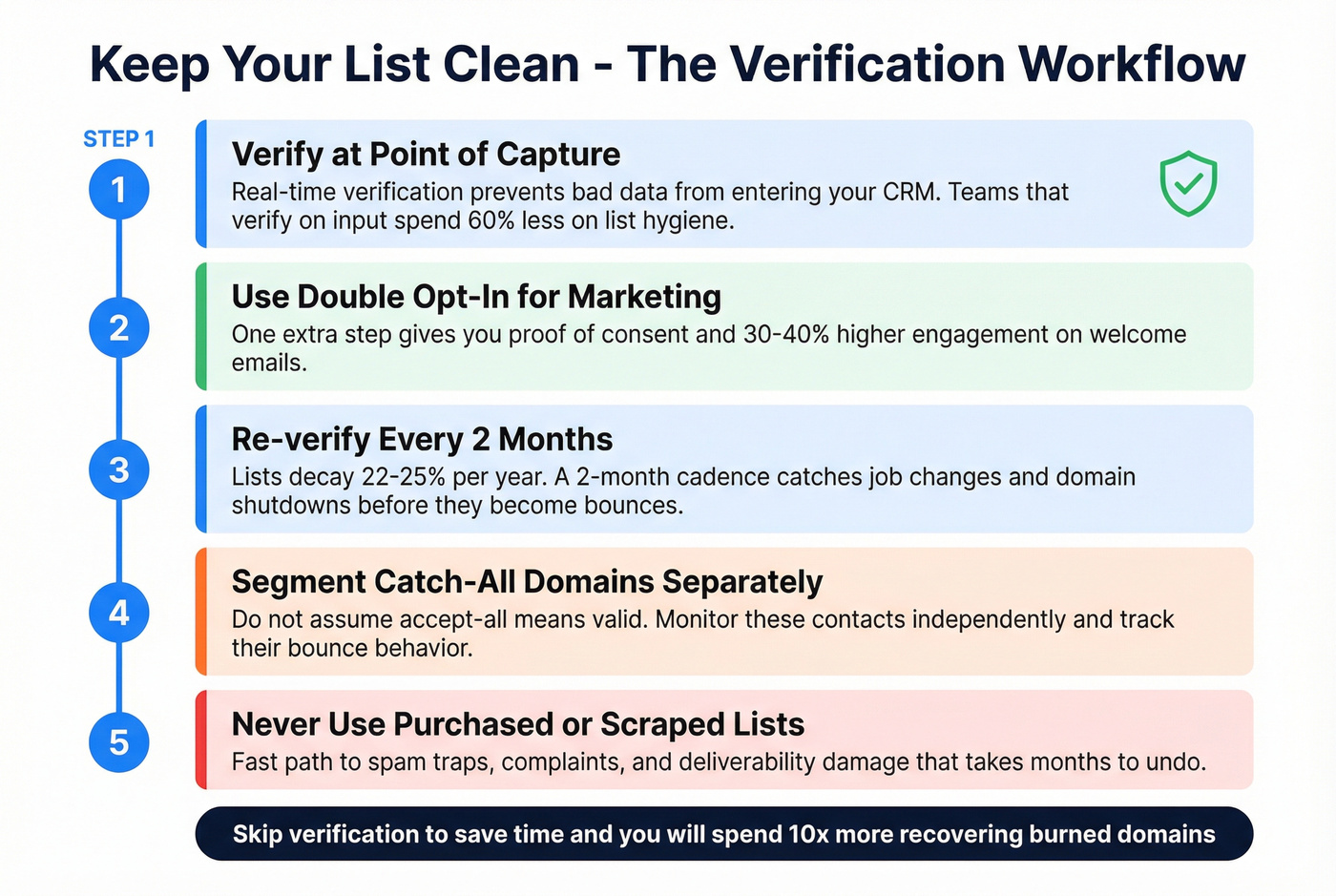
Re-verify every 2 months. With 22-25% annual decay, that cadence catches job changes and domain shutdowns before they become bounces. Handle catch-all domains separately - don't assume "accept-all" means valid. Segment these contacts and monitor their bounce behavior independently.
Never use purchased or scraped lists. They're a fast path to spam traps, complaints, and deliverability damage that can take months to undo. And use double opt-in for marketing signups. It costs some conversion volume upfront but pays back in engagement and deliverability. The consensus on r/coldoutreach is pretty clear: teams that skip verification to "save time" end up spending 10x more time recovering burned domains. If you're scaling sends, follow cold email volume best practices.
FAQ
What's the difference between a verification link and a verification tool?
A verification link is the confirmation URL sent during double opt-in - the user clicks it to prove inbox ownership. A verification tool checks deliverability without sending anything, using syntax, MX, and SMTP checks. One requires user action; the other runs silently against your list.
Why do verified emails still bounce?
Catch-all domains (15-28% of B2B domains) accept all mail, so tools can't confirm individual mailboxes. Lists also decay 22-25% annually. If your tool verified against stale data, bounces follow. A 7-day refresh cycle minimizes this by keeping records current.
How often should I re-verify my email list?
Every 2 months minimum. Lists lose 22-25% of valid addresses annually from job changes and domain shutdowns. Real-time verification at capture prevents new bad data, but existing records need regular re-checks.
Is double opt-in required by GDPR?
No, but it provides clear proof of consent. Double opt-in subscribers show 30-40% higher engagement, making it worth the minor friction for any marketing list.