

List of CRM Tools: 20 Platforms Compared for 2026
Every "best CRM" list has the same problem: it's written by a CRM vendor that ranks itself first. Pipedrive's list puts Pipedrive at #1. Kommo's list puts Kommo at #1. Monday's guide somehow concludes that Monday CRM is the answer.
We're not a CRM company, so we don't have that conflict. What follows is an opinionated, priced-out list of CRM tools - 20 of them - sorted by what actually matters for your team, not by who's paying the most affiliate commissions. Every tool includes real pricing, honest tradeoffs, and a clear verdict on who should and shouldn't use it.
Here's the thing most lists won't tell you: companies in the $1-$10M revenue range make up 53.9% of CRM buyers but account for 0.5% of total CRM spending. The market is built for enterprise, not for you. This guide is.
Our Picks at a Glance
If you're short on time:
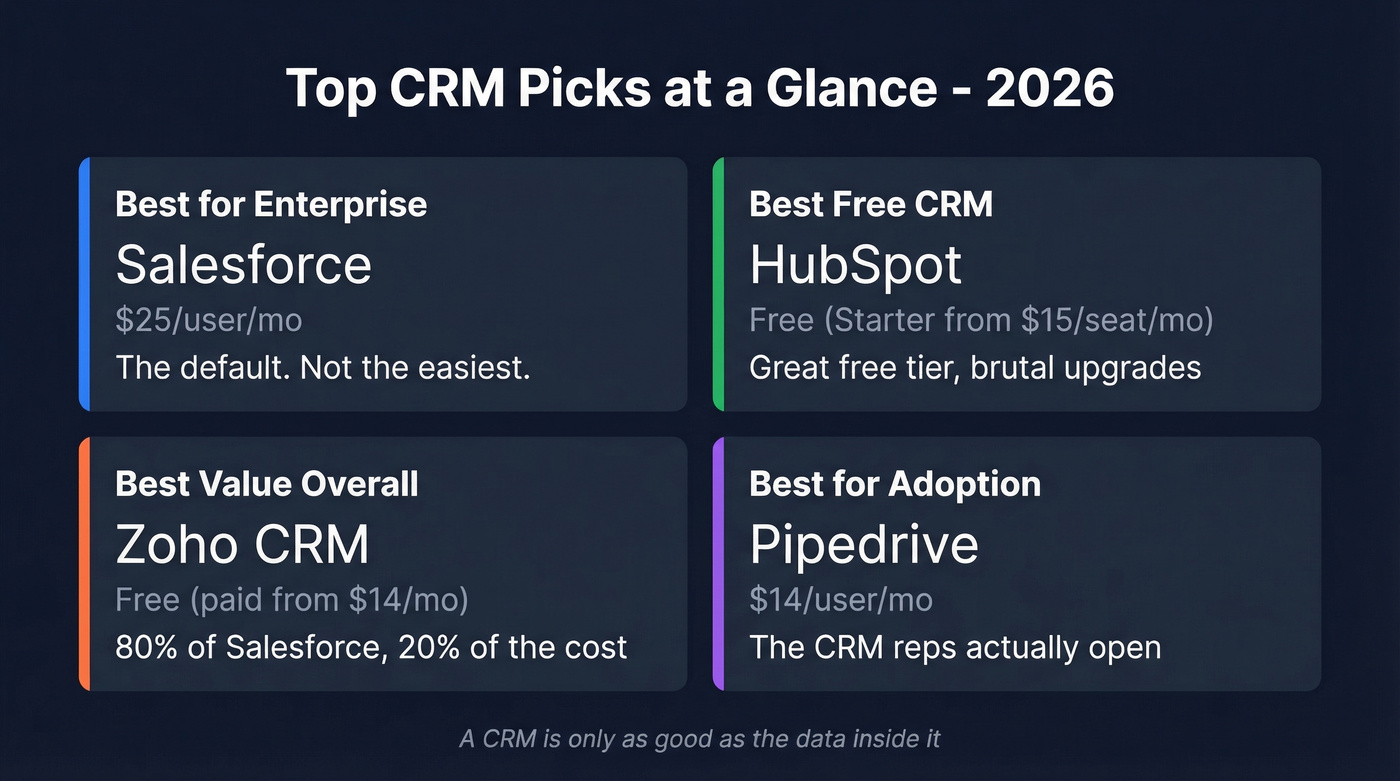
| Use Case | Our Pick | Starting Price | One-Line Verdict |
|---|---|---|---|
| Best for enterprise | Salesforce | $25/user/mo | The default. Not the easiest. |
| Best free CRM | HubSpot | Free (Starter from $15/seat/mo) | Great free tier, brutal upgrades |
| Best value overall | Zoho CRM | Free (paid from $14/mo) | 80% of Salesforce, 20% of the cost |
| Best for adoption | Pipedrive | $14/user/mo | The CRM reps actually open |
Every CRM on this list shares the same weakness: the data inside it. A CRM with bounced emails and disconnected numbers is a glorified spreadsheet, regardless of what you paid for it. Fix the data layer first - then worry about features. If you’re evaluating the “CRM vs. spreadsheet” line, start with contact management basics before you overbuy.
The CRM Market in 2026
The CRM market is projected to hit $53B in global spend over the next twelve months. That's not evenly distributed - 73.8% of that spending comes from companies with 1,000+ employees, and 37% comes from the United States alone.
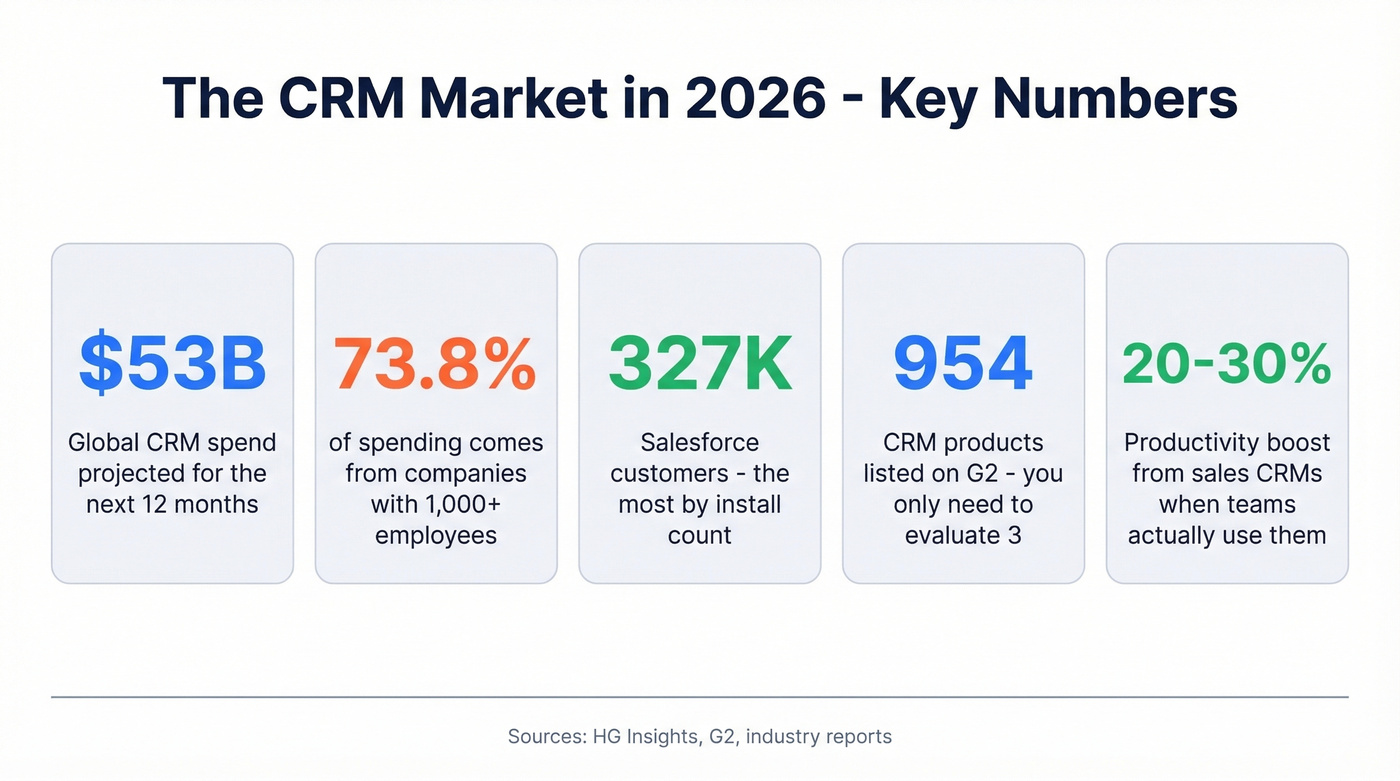
Three vendors dominate by install count: Salesforce (327K customers), Zoho (186K), and HubSpot (180K). These are the most popular CRM platforms by sheer adoption, but install count doesn't tell you much about fit. Salesforce's customer base skews enterprise. Zoho's skews SMB. HubSpot sits in the middle, pulling marketing-heavy teams who grow into sales features.
The payoff for getting this right is real. Sales CRMs can increase team productivity 20-30% and improve forecast accuracy up to 42%. But those gains assume your team actually uses the tool - and that the data inside it is accurate. Most teams get neither right. If forecasting is a priority, compare sales forecasting tools alongside CRMs.
G2 lists 954 products in its CRM category. You don't need to evaluate 954 tools. You need to evaluate maybe three, seriously, with real data.
Types of CRM Software
Before picking a tool, it helps to know what category you're actually shopping in. Most modern CRMs blur these lines, but the distinctions still matter for understanding what you're paying for.
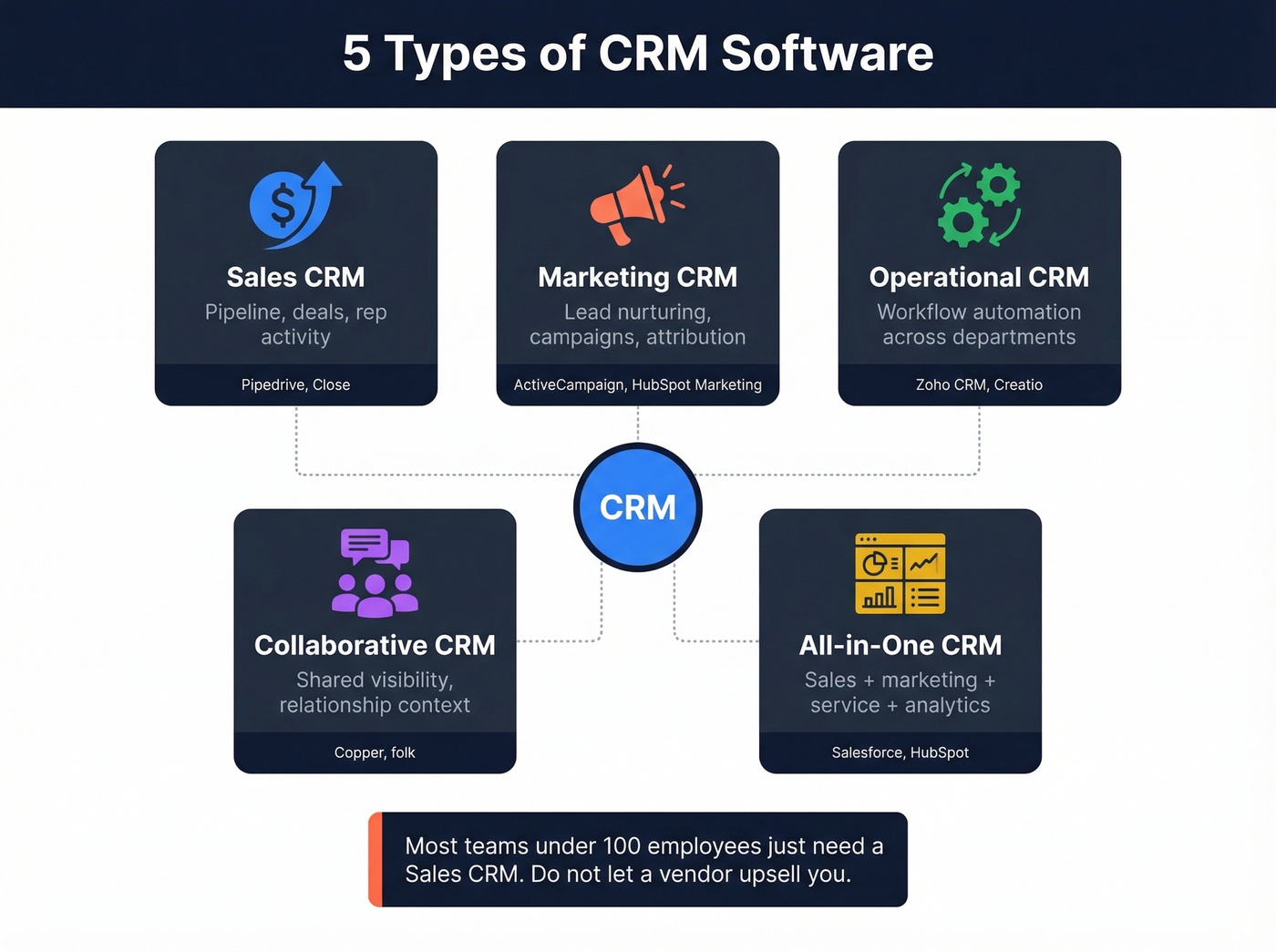
Sales CRM - Built around pipeline management, deal tracking, and rep activity. Pipedrive and Close live here. If your primary goal is closing deals faster, this is your category. If you’re building the motion around outbound, pair this with proven sales prospecting techniques.
Marketing CRM - Focused on lead nurturing, email campaigns, and attribution. ActiveCampaign and HubSpot's marketing hub are the clearest examples. These tools care more about the top of funnel than the bottom.
Operational CRM - Automates workflows across sales, marketing, and service. Think Zoho CRM or Creatio. The goal is efficiency across departments, not depth in one.
Collaborative CRM - Designed for teams that need shared visibility into customer interactions across departments. Copper and folk lean this direction - relationship context over pipeline mechanics.
All-in-One CRM - Tries to do everything: sales, marketing, service, analytics. Salesforce and HubSpot both play here, though you'll pay for the breadth. The tradeoff is complexity - all-in-one platforms take longer to implement and require more admin overhead.
Let's be honest: most teams under 100 employees need a sales CRM. Don't let a vendor upsell you into an all-in-one platform when you just need pipeline visibility and contact management. If your average deal size is under $25K, you almost certainly don't need Salesforce-level infrastructure.
How Much Does a CRM Cost?
CRM pricing is one of the most opaque corners of B2B software. Here's what teams actually pay in 2026:
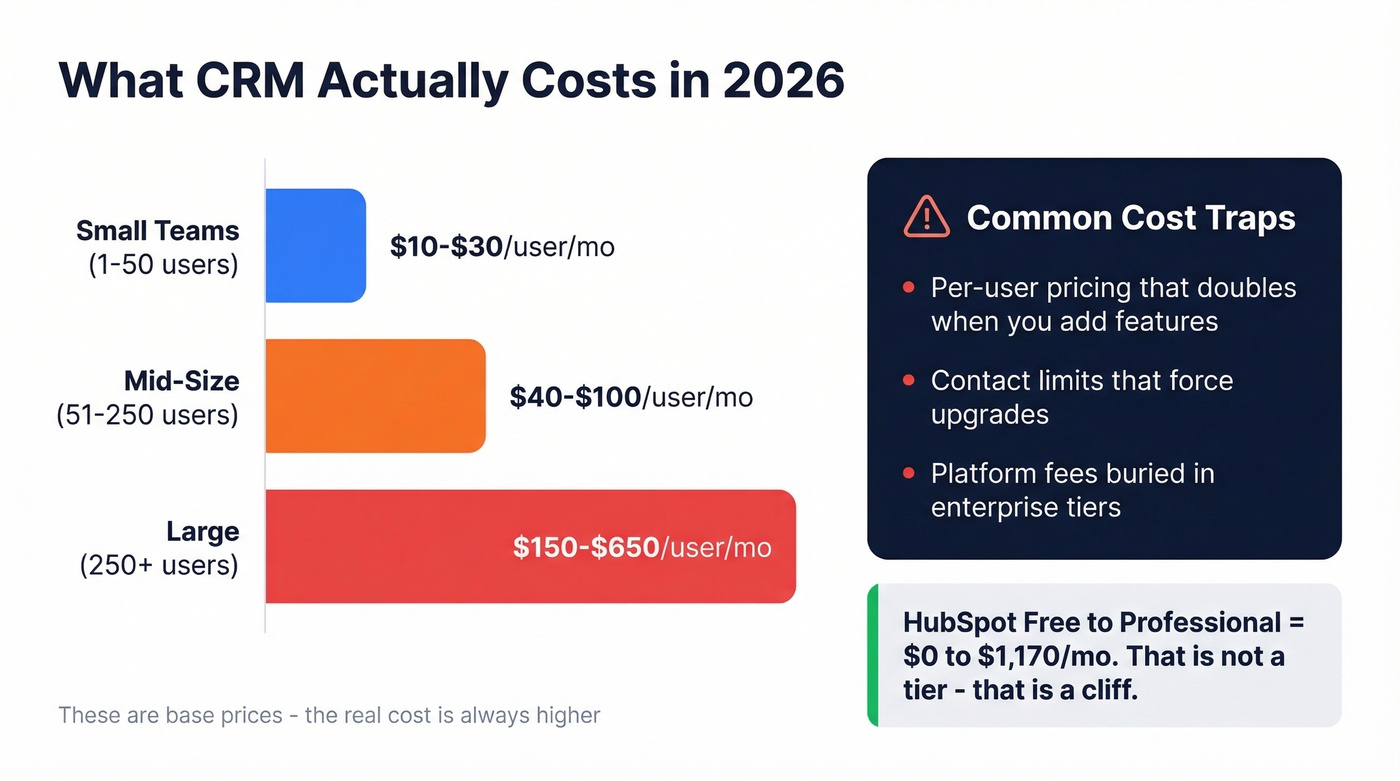
| Company Size | Typical Range |
|---|---|
| Small teams (1-50) | $10-$30/user/mo |
| Mid-size (51-250) | $40-$100/user/mo |
| Large (250+) | $150-$650/user/mo |
Those ranges look manageable until you hit the feature gates. HubSpot's free plan is genuinely generous - unlimited users, up to 1M stored contacts. But the jump from Free to Professional is $0 to $1,170/month. That's not a pricing tier; that's a cliff.
Salesforce's Starter Suite is $25/user/month. And that's before add-ons, implementation costs, and the admin salary you'll need to keep it running.
If a vendor won't tell you what it costs without a sales call, they're optimizing for their margin, not your budget. Every tool on our list below includes real pricing. We've estimated where vendors hide behind "contact us" pages, because a rough range is infinitely more useful than no number at all.
The most common cost traps: per-user pricing that doubles when you add features, contact limits that force upgrades, and "platform fees" buried in enterprise tiers. The sticker price is never the real price. If you’re trying to model pipeline impact, use sales pipeline benchmarks to sanity-check assumptions.

Every CRM on this list has the same Achilles' heel: garbage data. Bounced emails, disconnected numbers, and stale records turn any platform into a glorified spreadsheet. Prospeo enriches your CRM with 98% verified emails, 125M+ direct dials, and 50+ data points per contact - refreshed every 7 days, not every 6 weeks.
Fix your CRM data before you spend another dollar on features.
20 Best CRM Tools for 2026
Salesforce - Best for Enterprise
Salesforce is the default enterprise CRM. It has 327K customers, and Sales Cloud carries a 4.4/5 rating with 25,479 reviews on G2. If you're a 500-person sales org with a dedicated admin team, Salesforce is probably the right call.

The problem is that Salesforce has become the answer to every CRM question, even when it shouldn't be. For teams under 200 employees, it's overkill. Setup is complex enough to require a dedicated admin - and that's a $70-120K salary before you've paid for a single license. We've watched teams spend three months on configuration before a single rep logged a call.
Pricing: Starter Suite at $25/user/month. Most mid-market teams land in the $80-165 range once they need forecasting and workflow automation. A 10-seat Enterprise contract runs roughly $19,800/year before add-ons. And once you're in, migration is painful - Salesforce's data model makes it hard to move to another platform without significant rework. If you want the full cost breakdown, see our Salesforce pricing guide.
Use this if you have 200+ reps and a RevOps team to manage it. Skip this if you don't have a dedicated Salesforce admin - you'll waste the first six months on configuration instead of selling.
HubSpot - Best Free CRM to Start
HubSpot's free CRM is the best on-ramp in the market. Unlimited users, up to 1M stored contacts, basic pipeline management, email tracking, and meeting scheduling - all at $0. For a startup or small team just getting organized, it's the obvious starting point.
The catch is what happens when you outgrow it. HubSpot's Starter plan is $15/seat/month - reasonable. But Professional jumps to $0 to $1,170/month, and Enterprise hits $4,300/month. That's a pricing curve designed to lock you in while you're small and extract maximum value once you're dependent.
We've seen teams build their entire workflow on HubSpot Free, then face a $14,040/year bill when they need one Professional feature like custom reporting or sequences. Plan your exit strategy before you need it - or at least budget for the jump.
The marketing hub integration is genuinely excellent, though. If your team runs inbound campaigns, HubSpot's CRM-to-marketing connection is tighter than anything Salesforce offers without third-party tools. It's one of the most popular platforms for marketing-led teams for exactly this reason.
Use this if you're starting from zero and want to move fast. Skip this if you're already at 50+ users and need advanced automation - the Professional pricing will sting.
Zoho CRM - Best Value Overall
Zoho does 80% of what Salesforce does at 20% of the price. That's not an exaggeration - it's the math. Zoho's Enterprise tier is $40/user/month. Salesforce Enterprise is commonly priced far higher. For a 10-person team, that's $4,800/year vs. $19,800/year.
The free tier supports up to 3 users with basic contact and deal management. Paid plans start at $14/user/month (Standard) and scale through Professional ($23), Enterprise ($40), and Ultimate ($52). Zia, Zoho's AI assistant, is available across plans and is genuinely underrated - it's not as polished as Salesforce's Einstein, but it's included at price points where Salesforce charges extra.
The tradeoff is ecosystem. Zoho works best if you're already in the Zoho suite (Books, Desk, Projects). If you're a Google Workspace or Microsoft shop, integrations exist but aren't as tight. The UI is functional rather than beautiful - it won't win design awards, but it won't slow your team down either.
Use this if you want enterprise-grade features without enterprise pricing. Skip this if you need deep third-party integrations outside the Zoho ecosystem.
Pipedrive - Best for Adoption
The best CRM is the one your team actually uses. That's Pipedrive's entire thesis, and it works. The visual pipeline interface is intuitive enough that reps start using it without training - and that matters more than any feature list.
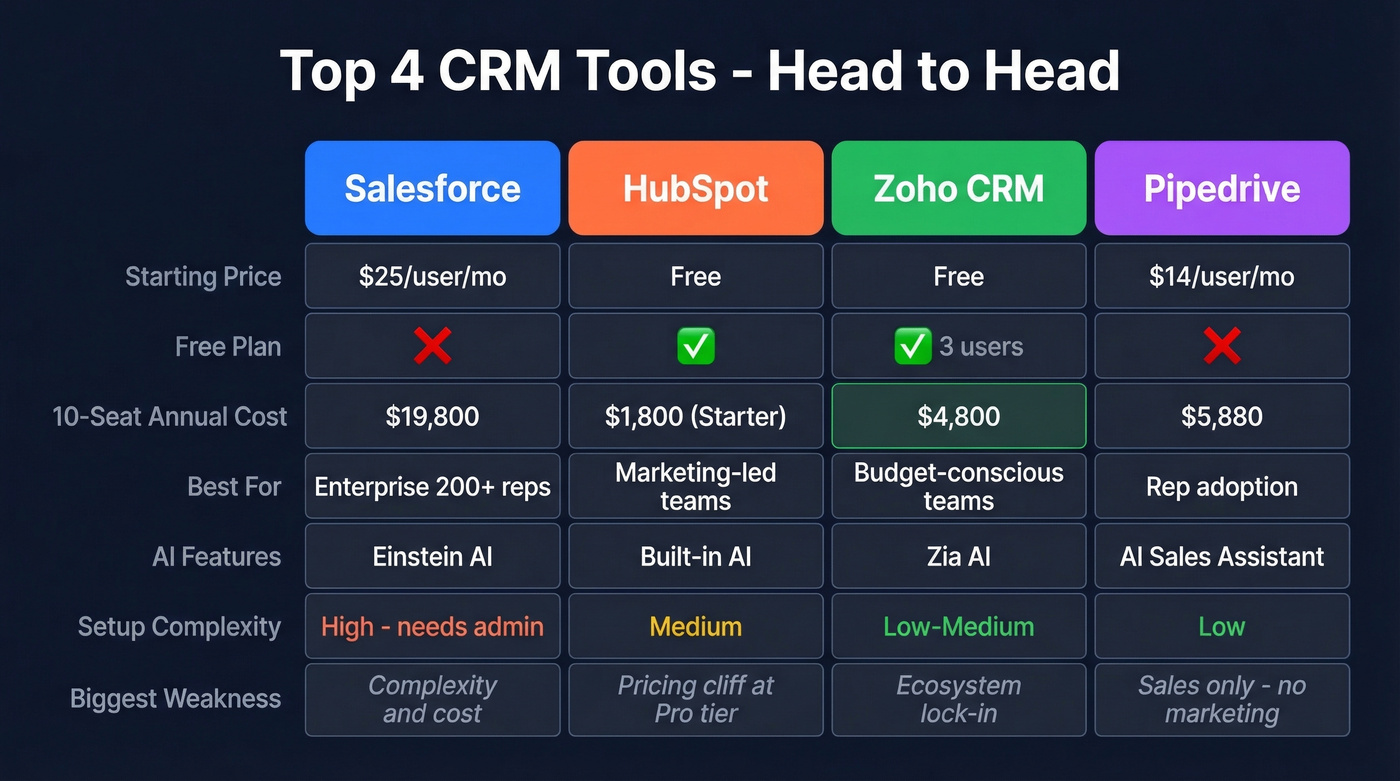
Pricing runs Essential at $14/user/month, Advanced at $29, Professional at $49, Power at $64, and Enterprise at $99. Most teams land on Advanced or Professional. The Essential-to-Advanced jump adds email automation and workflow builders, which is where Pipedrive goes from contact tracker to actual sales tool. If you’re comparing Pipedrive to other lightweight CRMs, see Copper vs Pipedrive.
Pipedrive's AI Sales Assistant flags deals at risk and suggests next actions. It's not as sophisticated as Salesforce Einstein, but it's practical - it surfaces the three things you should do today, not a dashboard of 50 metrics.
The limitation is scope. Pipedrive is a sales CRM, period. No marketing hub, no service desk, no content management. If you need all-in-one, look elsewhere. If you need your reps to actually log their activities and move deals through stages, Pipedrive wins.
| Tool | Best For | Starting Price | Free Plan | AI Features |
|---|---|---|---|---|
| Salesforce | Enterprise | $25/user/mo | No (trial) | Einstein AI |
| HubSpot | Versatility | Free | Yes | AI features |
| Zoho CRM | Value | Free | Yes | Zia AI |
| Pipedrive | Ease of use | $14/user/mo | No (trial) | AI Sales Assistant |
Monday CRM
Monday CRM makes sense if your team already lives in Monday.com for project management. The visual board interface translates naturally to deal tracking, and the crossover between project delivery and sales pipeline is genuinely useful for services companies.
Free for 2 users. Paid plans run $9/seat/month (Basic), $12 (Standard), and $19 (Pro), with a 3-seat minimum on paid tiers. CRM features are thinner than dedicated sales tools - don't expect Pipedrive-level pipeline management. But for teams that need lightweight deal tracking alongside project boards, it eliminates one more tool from the stack. Skip it if you need advanced sales automation or reporting.
Freshsales
The best budget AI CRM on the market right now. Freshsales packs AI into plans starting at $9/seat/month (Growth), which includes lead scoring, deal insights, and basic forecasting. Pro ($39) and Enterprise ($59) add territory management and custom modules. If you want to go deeper on scoring, use this alongside a dedicated lead scoring framework.
For teams that want AI-assisted selling without paying Salesforce prices, Freshsales hits a sweet spot. The interface is clean, onboarding is fast, and Freshworks' broader suite integrates tightly. In our experience, it's the strongest option under $15/user/month for teams that care about AI features.
Zendesk Sell
If your company runs Zendesk for support, Zendesk Sell is the path of least resistance for adding sales. The shared customer view between support tickets and sales deals is the real differentiator. Pricing: Team at $19/agent/month, Growth at $55, Professional at $115, Enterprise at $169+. Skip it if you don't use Zendesk for support - there's no standalone reason to choose Sell over Pipedrive or Zoho.
Close - The Inside Sales Weapon
Most CRM systems make you bolt on a dialer. Close builds one in. For inside sales teams making 50+ calls per day, that distinction saves thousands in separate tool costs and eliminates the tab-switching that kills call velocity.
Close includes a built-in power dialer, SMS, and email sequencing starting around $49/user/month. That sounds high until you factor in the Aircall or RingCentral subscription you'd otherwise need. The tradeoff: Close is narrow. No marketing, no service, no project management. It's a sales execution tool, full stop. But if your team's primary motion is outbound calling, Close is the best tool on this list for that specific job. If you’re building the full calling motion, start with a cold calling system.
ActiveCampaign
Best when marketing automation is the primary need and CRM is secondary. ActiveCampaign's email automation, segmentation, and campaign tools are best-in-class for SMBs. The CRM layer is functional but basic. Pricing: Lite at $29/month, Plus at $49, Professional at $149, Enterprise at $259. The Plus tier adds CRM and lead scoring - more cost-effective than buying HubSpot Marketing Hub plus a separate CRM.
Copper
The Google Workspace CRM. Copper lives inside Gmail and Google Calendar, which means less context-switching for teams already in the Google ecosystem. If you're not on Google Workspace, Copper offers no advantage. Even within Google, CRM features are lighter than Zoho or Pipedrive at comparable price points.
Attio
The modern UI darling. Attio looks and feels like a CRM designed in 2026, not 2010. The interface is fast, the data model is flexible, and the whole experience feels like someone actually thought about the user. Free tier available, paid plans from ~$29/user/month. Best for startups and small teams that value design and speed over feature depth. Not ready for enterprise complexity, but for a 10-person team that wants something beautiful and functional, it's worth a trial.
Creatio
No-code workflow automation is Creatio's differentiator. If your sales process involves complex, multi-step workflows that change frequently, Creatio lets you build and modify them without developer resources. Growth at $25/user/month, Enterprise at $55, Unlimited at $85. The learning curve is steeper than Pipedrive but shallower than Salesforce. Best for mid-market companies with unique sales processes that don't fit out-of-the-box templates.
SugarCRM
Mid-market customization without Salesforce pricing. SugarCRM offers deep configurability for teams that need tailored workflows, custom modules, and on-premise deployment options. Essentials at $19/user/month, Standard at $59, Advanced at $85, Premier at $135. The on-premise option is increasingly rare and genuinely valuable for companies with strict data residency requirements.
Keap
Small business automation at a premium price point. Keap starts at $299/month with no free plan, which prices out most startups. But for established small businesses doing $500K+ in revenue that need CRM, email marketing, payments, and appointment scheduling in one tool, the all-in-one approach eliminates tool sprawl. Skip it if you're early-stage - $299/month is hard to justify when Zoho and HubSpot Free exist.
folk
Lightweight relationship CRM for teams that manage partnerships, investors, or community relationships rather than traditional sales pipelines. From ~$20/user/month. Clean interface, good for non-sales use cases like investor relations, partnerships, and community management. Skip if you need pipeline reporting or sales automation.
Streak
Gmail-native CRM with a usable free tier. Best for solo operators and freelancers who want pipeline management without leaving their inbox. Paid plans from ~$15/user/month. Skip if you have more than 5-10 users or need anything beyond basic deal tracking.
Nutshell
Simple sales CRM that doesn't try to be more than it is. From ~$16/user/month. Good reporting for the price, straightforward pipeline management - a solid Pipedrive alternative for teams that want fewer bells and whistles. Skip if you need marketing automation or deep customization.
Insightly
CRM plus project management in one platform. From ~$29/user/month. Useful for professional services firms that need to track deals and then manage delivery in the same tool. The CRM features alone don't justify the price - the project layer is what makes it worth considering.
Microsoft Dynamics 365
Enterprise CRM for companies already deep in the Microsoft ecosystem. From $65/user/month. If you run Outlook, Teams, SharePoint, and Power BI, Dynamics 365 plugs directly into your existing stack. If you don't, there's no compelling reason to choose it over Salesforce - and Salesforce has a larger partner ecosystem for implementation support.
AI in CRM - Real vs. Fluff
Every CRM vendor now markets "AI-powered" features. About 90% of it is a text editor with a chatbot skin.
Real AI in a CRM delivers next-best-action suggestions based on deal history, at-risk deal flags that surface before a rep notices, pipeline forecasting that accounts for seasonality and rep behavior, and automatic interaction logging that eliminates manual data entry. Salesforce Einstein, HubSpot, and Zoho Zia all offer some version of these - though depth varies by pricing tier.
Fluff AI is an email rewriter, a chatbot that summarizes meeting notes, or a "smart" template suggestion. These features save minutes, not hours. They're nice to have, not reasons to choose a platform.
Here's a practical test: Does the AI explain why it's recommending something? Can you test it with real data during a trial? Does it integrate into pipeline and forecasting workflows, or is it a standalone chatbot? If the answer to any of these is no, it's marketing, not AI. And what most vendors won't tell you is that AI is only as good as the data it's trained on - an AI model analyzing a CRM full of bounced emails and outdated job titles produces garbage insights.
Why Your CRM Data Is Broken
Your sales team just told you 40% of the phone numbers in your CRM are dead. Half the email addresses bounce. Job titles are six months out of date.
Sound familiar?

This is the data decay problem, and it hits every CRM regardless of how much you paid for it. People change jobs, companies get acquired, phone numbers rotate. The average B2B database decays 2-3% per month. Within a year, a quarter of your CRM contacts are stale. If you’re evaluating vendors, compare options in our data enrichment services roundup.
The math is simple. A $500/month CRM with verified, current data outperforms a $5,000/month CRM with garbage contacts. No amount of AI, automation, or workflow sophistication compensates for calling the wrong person at the wrong number.
5 Mistakes That Lead to CRM Regret
1. Choosing by brand instead of workflow fit. Salesforce is the most recognized CRM on the planet. It's also the wrong choice for most teams under 200 employees. The consensus on r/CRM is clear: CRMs fail because they don't match how your team actually works, not because they lack features. Start with your workflow, then find the tool that fits it.
2. Ignoring total cost of ownership. That $25/user/month Salesforce Starter plan looks affordable until you need higher-tier features, a dedicated admin, and three integrations. Model what you'll pay in 6 months, not just today.
3. Not piloting with real data. A CRM demo with sample data tells you nothing. Import your actual contacts, run your actual sales process, and see if the tool holds up. Most CRM tools on this list offer a free tier or trial. Use them.
4. Skipping the adoption question. The most feature-rich CRM in the world is worthless if your reps won't use it. Before you buy, ask: will my team actually open this every day? If the answer is "only if we force them," pick something simpler.
5. Neglecting data quality. A $14/month CRM with verified contacts beats a $500/month CRM with garbage data. Every time. Enrichment tools like Prospeo keep your records current at ~$0.01 per email - a fraction of what you're wasting on bounced sequences and disconnected calls. If email quality is a recurring issue, fix it at the source with an email deliverability guide.
You just picked a CRM. Now fill it with data reps actually trust. Prospeo's native integrations with Salesforce and HubSpot push verified contacts directly into your pipeline - 92% match rate, $0.01 per email, no contracts. Teams using Prospeo book 26% more meetings than ZoomInfo users.
A CRM without accurate data is a to-do list with a monthly fee.
How to Choose the Right CRM
With 20 platforms on this list, narrowing the field starts with getting clear on four things.
First, match the tool's complexity to your team's patience. Under 20 users? Go with Pipedrive or Zoho. Between 20 and 200? HubSpot or Zoho Enterprise. Over 200? Salesforce or Dynamics 365.
Second, use the pricing benchmarks above and don't let a sales rep convince you that $165/user/month is "an investment" when your team has 15 people. Third, list every tool your team uses daily - if the CRM doesn't integrate natively with your email platform, sequencer, and data tools, you'll spend months building workarounds. If you’re wiring up your stack, follow a connect outreach tool to CRM checklist.
Finally, bring two or three reps into the trial. Import real contacts, run a real sequence, close a real deal in the tool. Fourteen days is enough to know if it fits. If your reps hate it after a week, no amount of admin configuration will fix that.
FAQ
What are the most popular CRM tools for small businesses?
HubSpot (free tier), Zoho CRM (free for 3 users), Pipedrive ($14/user/month), and Freshsales ($9/seat/month) are the most widely adopted among small teams. Each balances affordability with enough pipeline management to support a growing sales operation without overwhelming a lean team.
What's the best free CRM in 2026?
HubSpot offers the most generous free plan - unlimited users, up to 1M stored contacts, and basic pipeline management. Zoho CRM's free tier supports up to 3 users with contact and deal tracking. Monday CRM is free for 2 users with basic board-style deal views.
How much should a small team budget for CRM software?
Most small teams pay $10-30/user/month for capable CRM software. Budget $14-29/user/month for platforms like Zoho, Pipedrive, or Freshsales. Avoid enterprise tiers until you actually need features like territory management or custom forecasting models.
How do I keep my CRM data accurate?
Use a data enrichment tool that refreshes contact records automatically - weekly cycles beat manual quarterly cleanups. Prospeo's 7-day refresh cadence and 83% enrichment match rate keep emails, phone numbers, and job titles current with native Salesforce and HubSpot integrations.
What's the biggest reason CRM implementations fail?
Low adoption. Teams buy a CRM and nobody uses it because it's too complex or doesn't match actual workflows. Pick the tool your reps will open every day - not the one with the longest feature list. Pipedrive and Zoho consistently win on usability for teams under 100 people.