

Mail Merge Follow-Ups That Get Replies
You send 200 personalized emails through a mail merge. Maybe a dozen people reply. The other 188? Silence. Native Gmail and Outlook mail merge can send that first batch, but they've got zero built-in follow-up capability. You're left staring at a spreadsheet, manually checking who replied - exactly the pain point that fills Reddit threads with people asking for a mail merge follow-up plugin that automatically sends when someone doesn't respond.
The fix is straightforward, but how many follow-ups you send, how fast, and what you say matters more than most people think.
What 16.5M Emails Reveal About Follow-Up Cadence
Belkins analyzed 16.5 million cold emails across 93 business domains in 2024. The highest reply rate - 8.4% - came from a single email with no follow-up at all. Open rates hit 45.37% on that first touch.
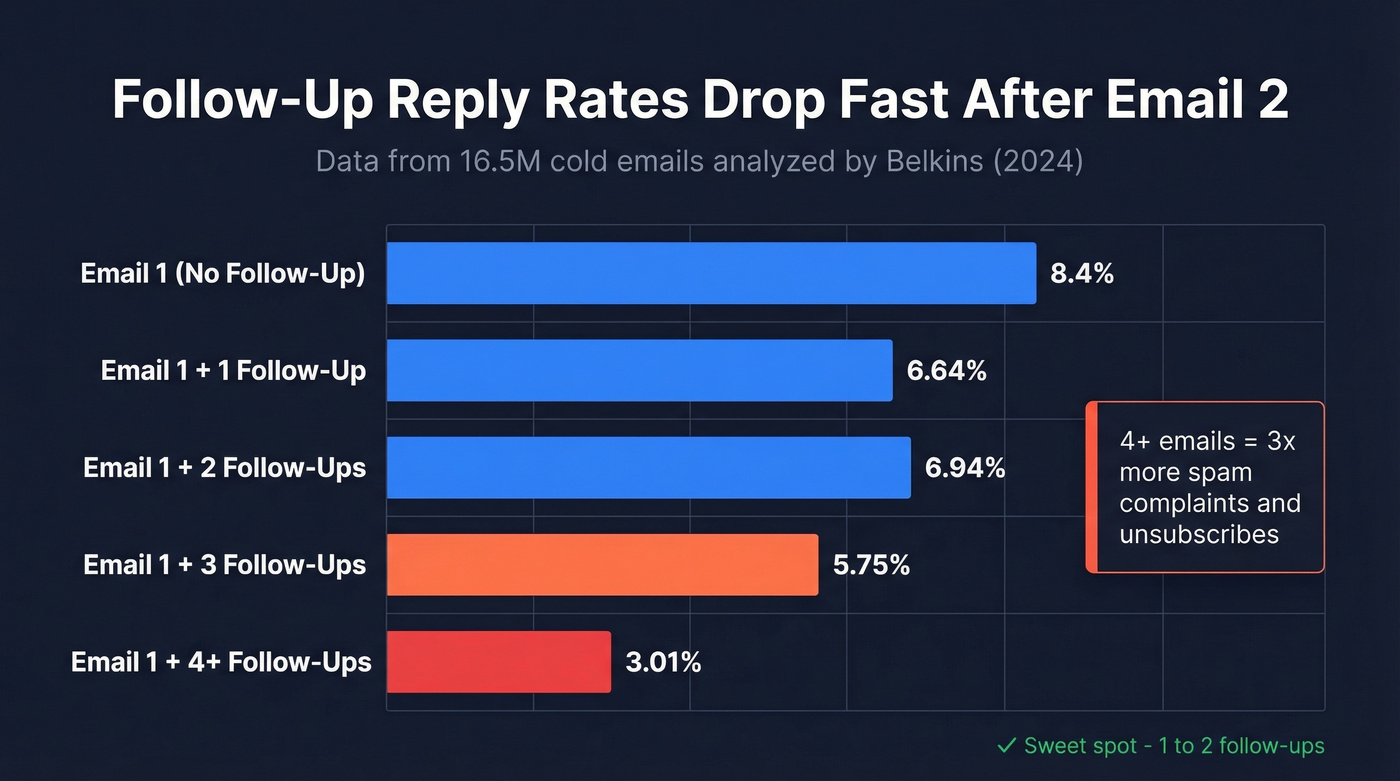
Each additional follow-up erodes performance. Four or more emails in a sequence more than triples unsubscribe and spam complaint rates. That's not a gradual decline. It's a cliff.
The founder segment tells the story: response rates hold steady through the second follow-up (6.64% to 6.66% to 6.94%), then collapse to 5.75% on the third and 3.01% on the fourth. Enterprise prospects punish persistence even harder.
The sweet spot is one to two follow-ups. Three if you have a genuinely compelling reason. Anything beyond that and you're trading replies for spam complaints - a deal that never works in your favor.
One more thing from the same dataset: a LinkedIn message paired with a profile visit hit an 11.87% reply rate, higher than any email-only follow-up sequence. If your cadence tops out at two emails, adding a LinkedIn touch as a third step beats sending a third email every time.
Structuring Sequences That Work
Send your first follow-up 3-5 days after the initial email. For C-suite and senior executives, stretch to 7 days (see When Should You Follow Up on an Email?). Next morning screams desperation; two weeks means they've forgotten you entirely.
"Just checking in" and "wanted to make sure you saw this" are dead phrases - they add zero value and train recipients to ignore you. Frame each follow-up around a specific objection: they don't think they need it, the price feels wrong, there's no urgency, or they don't trust you yet. Address one objection per email.
Personalized follow-ups pull roughly 18% response rates versus 9% for generic ones. Here's the counterintuitive part, though: over-personalization actually increases spam reports when it feels obviously automated. We've found that two or three merge fields per email hits the sweet spot between personal and creepy (more examples in our sales follow-up templates).
Segment by Behavior
Not every non-responder is the same. Break your list into three tiers:
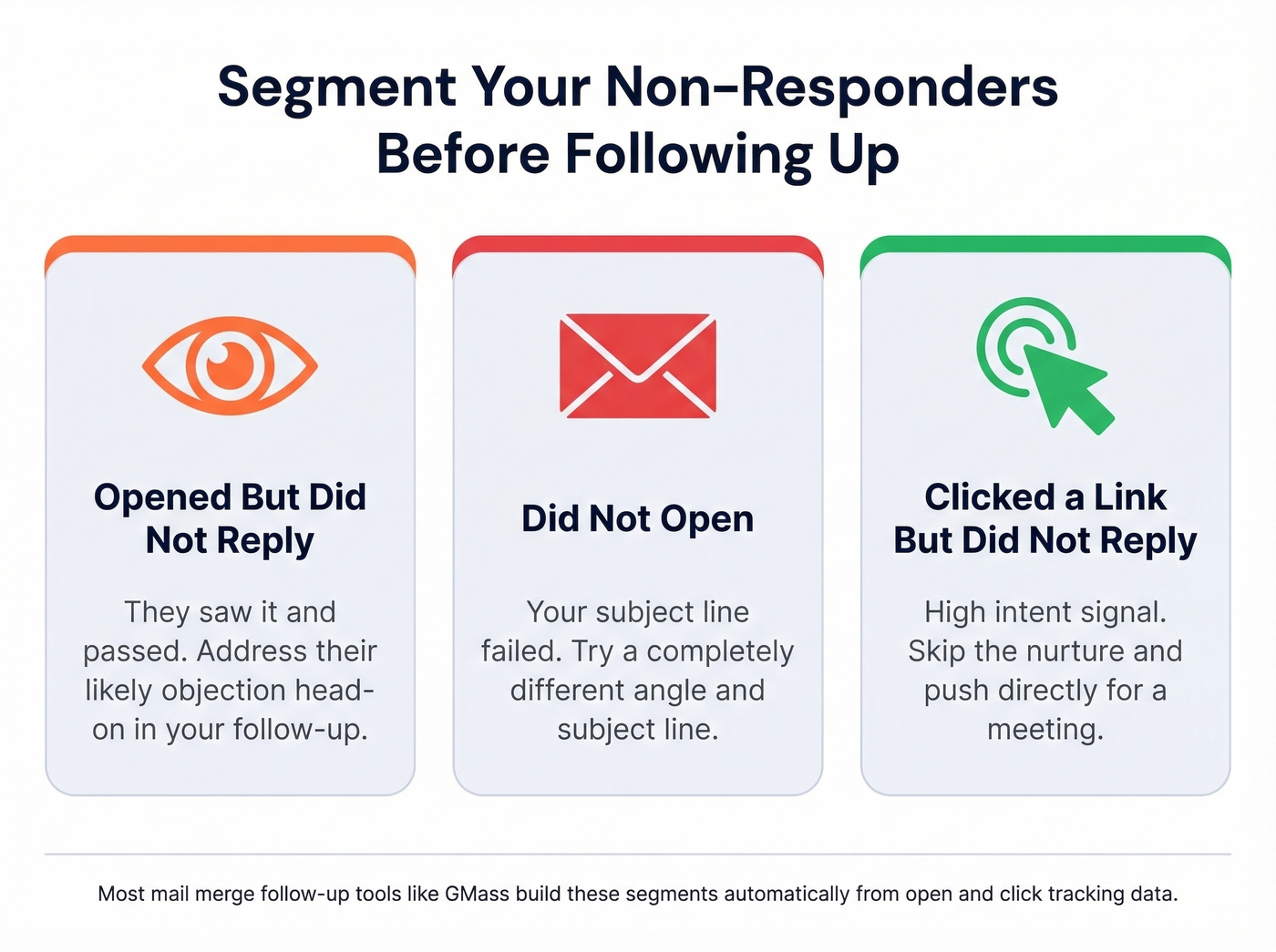
- Opened but didn't reply - They saw it and passed. Handle the most likely objection head-on.
- Didn't open - Your subject line failed. Try a completely different angle (use these email subject lines).
- Clicked a link but didn't reply - High intent. Push directly for a meeting.
Many tools that support automated follow-ups build these segments automatically. GMass, for example, also supports triggered follow-ups - emails that fire the moment someone opens or clicks, while your message is still top of mind.
A Template That Works
Skip the "circling back" language (alternatives here: How to Say Just Checking In Professionally):
Subject: Re: [original subject]
Hi {{FirstName}},
One more thought - [specific insight or case study result that addresses their likely objection]. Figured it was worth sharing.
Worth a 15-minute call this week?
Short, adds value, and sends as a reply in the same thread to keep context visible.
If you're capping at two follow-ups, make the last one a breakup email. "Should I close your file?" works because it flips the dynamic - people respond to the threat of losing access more than to another value pitch. We've seen breakup emails pull higher reply rates than the first follow-up in some campaigns.

Your follow-up sequence is only as good as the data behind it. Stale emails mean bounces, bounces mean spam folders, and spam folders mean your entire cadence is dead on arrival. Prospeo verifies emails at 98% accuracy with a 7-day refresh cycle - so every follow-up hits a real inbox.
Stop following up with addresses that don't exist anymore.
Best Tools for Multi-Stage Mail Merge
| Tool | Platform | Auto Follow-Ups | Best For | Starting Price |
|---|---|---|---|---|
| GMass | Gmail | Up to 8 stages | Power users | ~$21/mo (annual) |
| Streak | Gmail | In-thread | CRM + merge | Free (50/day) |
| Woodpecker | Gmail + Outlook | Multi-step | Outlook users | ~$29/user/mo |
| Auto Follow Up | Gmail | Up to 10 stages | Simple & cheap | ~$10-30/mo |
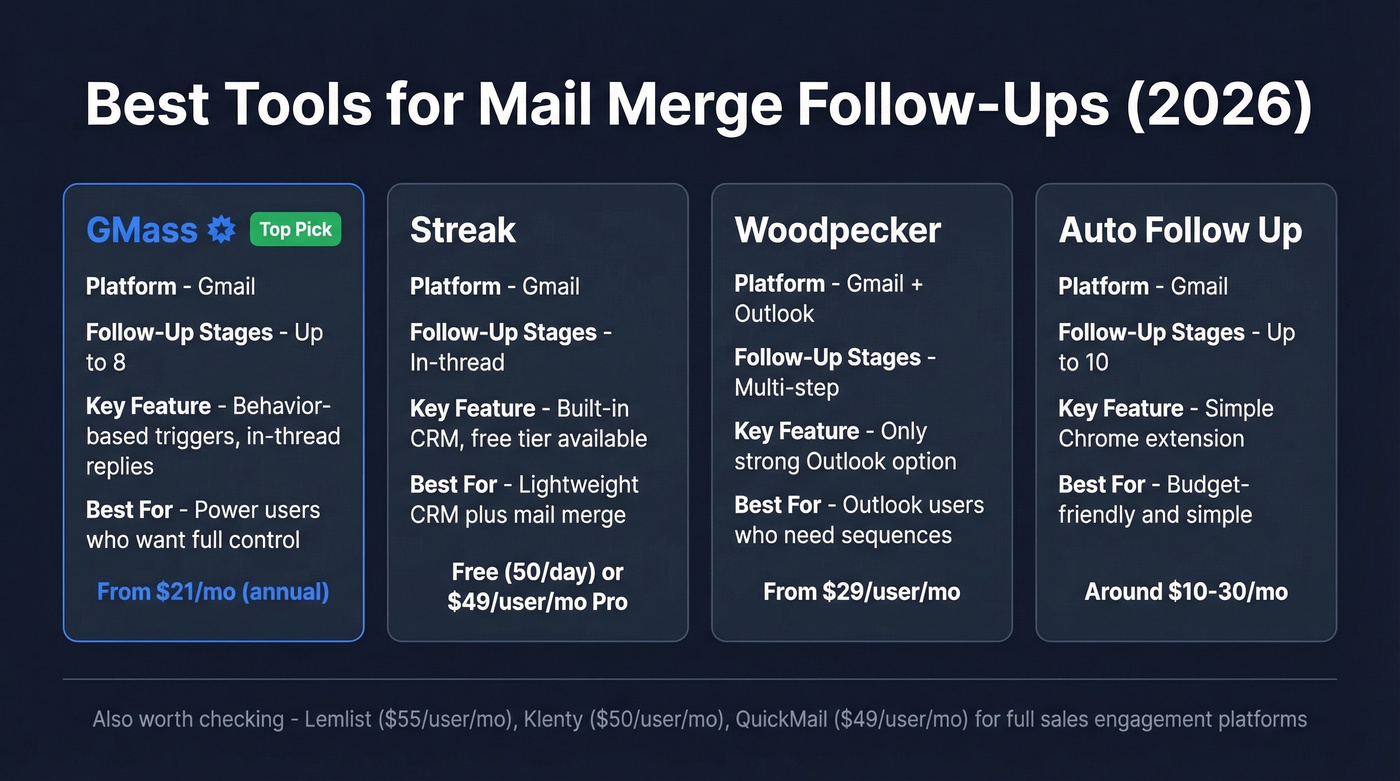
For Gmail users, GMass is our strongest pick. It handles behavior-based follow-ups and sends as replies in the same thread - the two features that matter most for mail merge follow-up automation. Standard plan runs about $21/mo billed annually.
Streak works if you want a lightweight CRM baked into Gmail. The free tier gives you 50 mail merges per day with basic follow-up automation. Paid plans start at $49/user/mo billed annually for Pro.
Outlook's native mail merge through Word has no follow-up automation at all. Woodpecker fills that gap - it connects to both Gmail and Outlook, runs multi-stage sequences with engagement tracking, and starts around $29/user/mo.
Auto Follow Up for Gmail by cloudHQ is the lightweight pick: up to 10 follow-up stages, basic tracking, entirely inside Gmail. Expect a typical Chrome-extension price in the $10-30/mo range.
Other options worth checking: Lemlist ($55/user/mo), Klenty ($50/user/mo), and QuickMail ($49/user/mo). All include multi-step sequences but are heavier and pricier than the four above. Skip these unless you need a full-blown sales engagement platform (see our guide to follow up email software).
Clean Your Data First
Here's the thing everyone gets wrong: they obsess over follow-up copy while their contact list is rotting. In our experience, the real reason automated follow-ups fail is simpler than bad messaging - too many emails bounce because your data is stale. A bounced email doesn't just waste a send. It damages your sender reputation, pushing future emails straight into spam for everyone on your list, not just the bad address (benchmarks: email bounce rate).
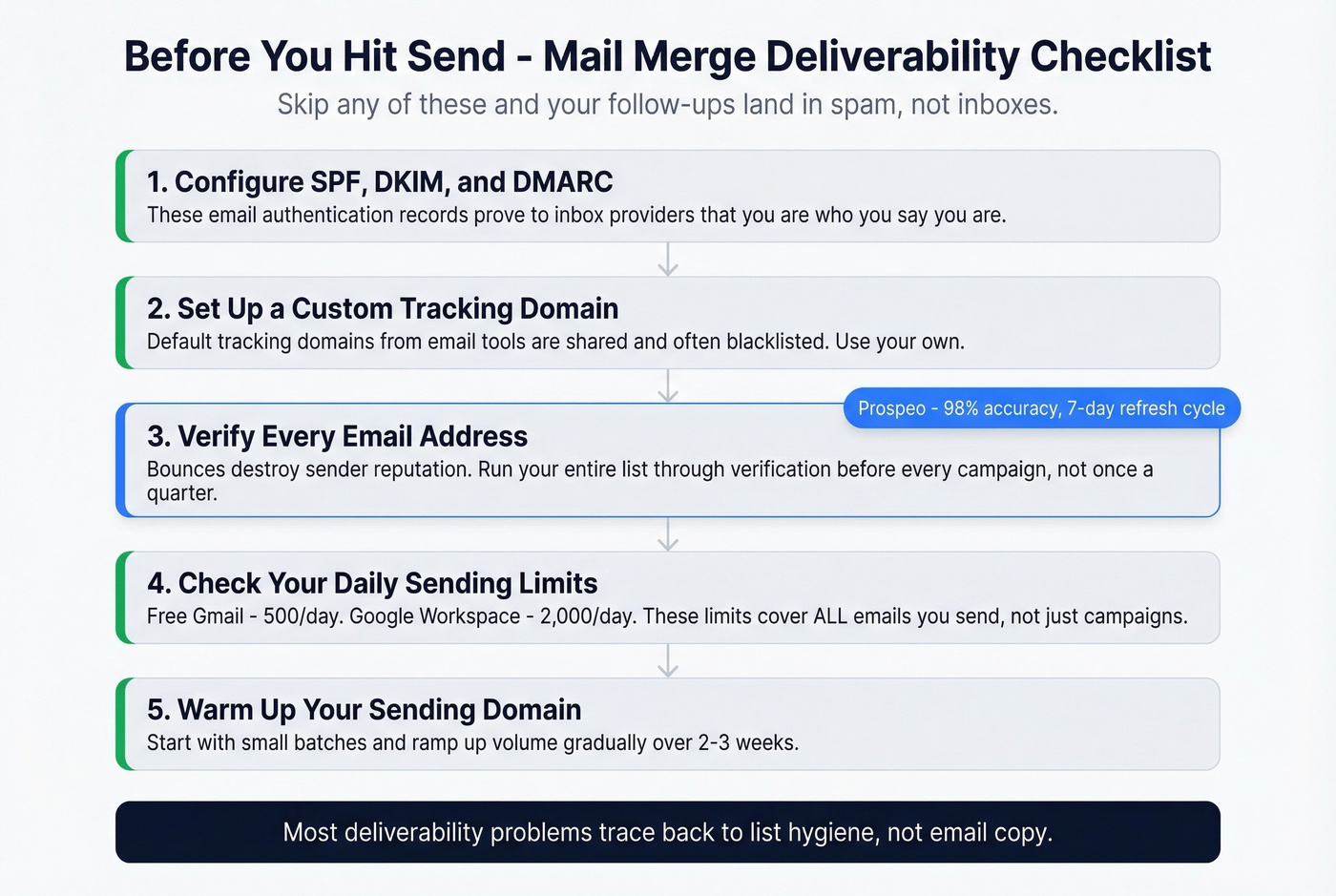
Before you schedule a single follow-up, make sure SPF, DKIM, and DMARC are configured on your sending domain, and use a custom tracking domain so link tracking doesn't trigger spam filters (setup guide: tracking domain). Then clean your list before every campaign - not once a quarter, every time. The consensus on r/coldoutreach is that most deliverability problems trace back to list hygiene, not email copy, and we'd agree.
Gmail caps free accounts at 500 emails/day and Google Workspace at 2,000/day. Those limits cover all emails you send, not just mail merge campaigns. Hit the ceiling and your follow-ups simply don't go out (more on safe sending in Email Velocity).
Run your list through Prospeo before sending. With 98% email accuracy and a 7-day data refresh cycle, you're not following up with addresses that bounced three months ago. The free tier covers 75 verifications per month - enough to clean a targeted list and see the deliverability difference firsthand.

You just learned that personalized follow-ups pull 2x the response rate. But personalization starts with accurate data - verified emails, correct names, fresh job titles. Prospeo returns 50+ data points per contact at $0.01/email, so your merge fields are always current.
Clean data in, replies out. Start with 75 free verifications.
FAQ
How many follow-ups should I send after a mail merge?
Data from 16.5 million emails shows one to two follow-ups is the sweet spot. After that, reply rates drop and spam complaints triple. Cap at two for C-suite and founder-level contacts - three only if you have a genuinely new value angle to share.
Should follow-ups go in the same email thread?
Yes. Sending as a reply keeps context visible and increases re-engagement. GMass and Streak both support in-thread replies natively, which is critical for any multi-stage sequence. Recipients are far more likely to respond when they can scroll down and see the original message without hunting through their inbox.
What are Gmail's daily sending limits?
Free Gmail accounts can send up to 500 emails per day; Google Workspace accounts get up to 2,000. These limits apply to all emails sent that day, not just mail merge campaigns. Plan your sequence stages so total daily volume stays well under the cap.
How do I prevent mail merge follow-ups from landing in spam?
Verify every email address before sending - bounces are the fastest way to tank sender reputation. Clean your list with a verification tool, configure SPF, DKIM, and DMARC on your domain, and set up a custom tracking domain to avoid triggering spam filters. Let's be honest: if you're skipping verification, no amount of copy optimization will save your deliverability.