

Mailcheck vs Tomba: One Verifies, One Finds - Here's What That Means for You
These two tools get lumped together constantly, and it's frustrating because they barely overlap. Mailcheck is a pure email verification tool - you feed it a list, it tells you which addresses are valid. Tomba is an email finder that also verifies. Picking the wrong one wastes both money and time, and we've seen teams burn weeks figuring that out the hard way.
Let's clear it up.
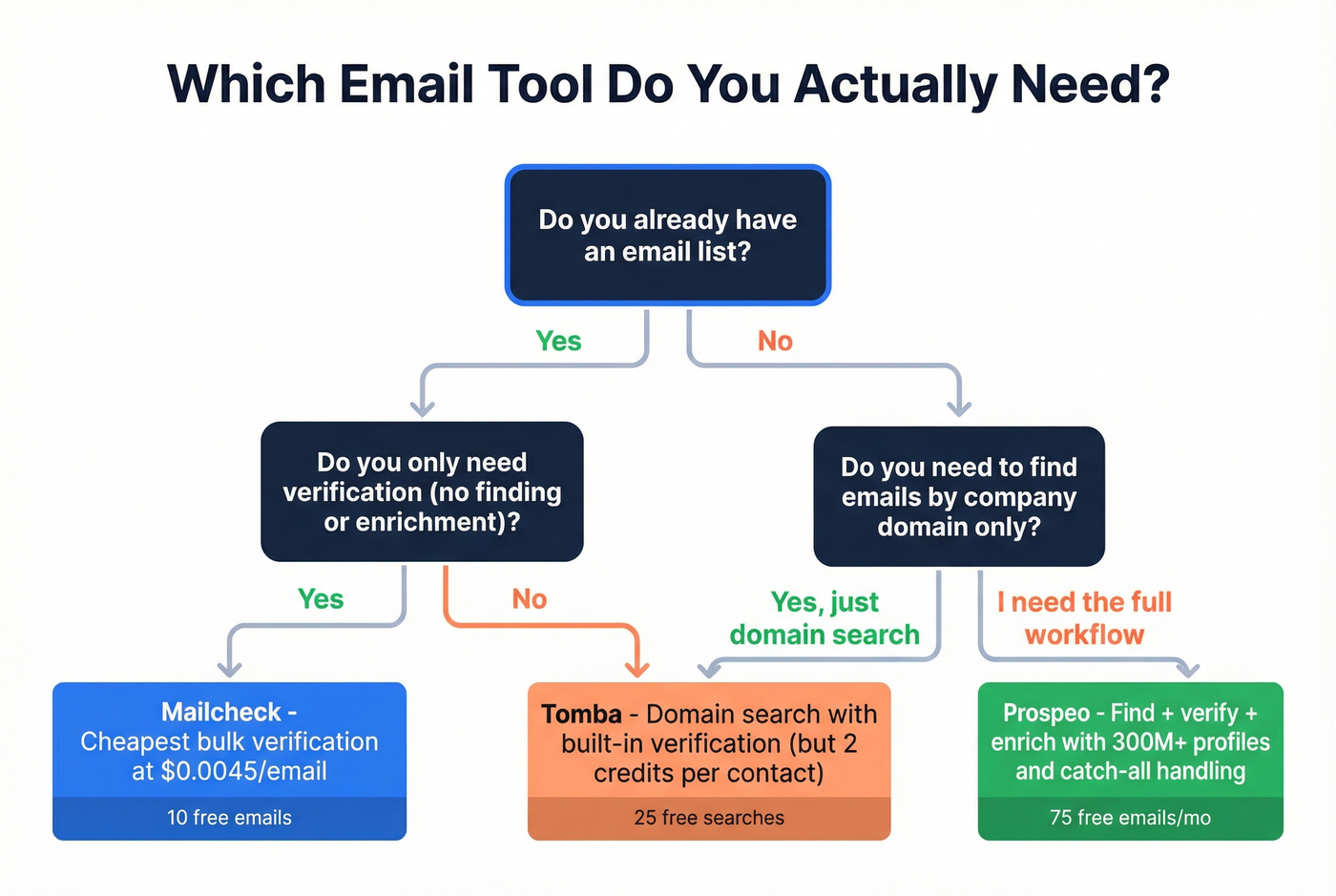
30-Second Verdict
Pick Mailcheck if you already have email lists and need fast, cheap bulk verification. On the Enterprise plan, included credits work out to $0.0045 per verification, and overages drop to $0.003 per email. That's hard to beat on pure cost-per-check.
Pick Tomba if you need to discover business emails by company domain and verify them in one workflow.
Quick Comparison
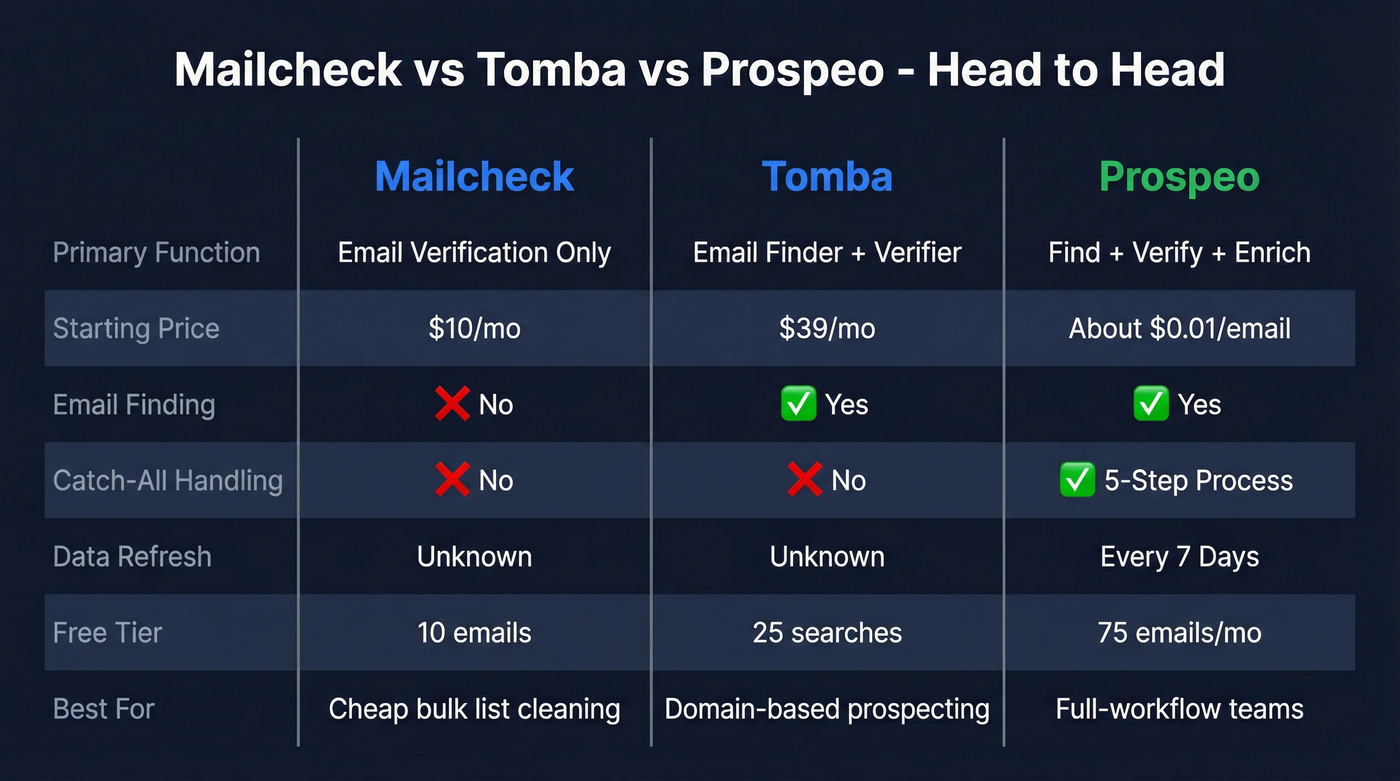
| Mailcheck | Tomba | Prospeo | |
|---|---|---|---|
| Primary function | Email verification | Email finder + verifier | Find + verify + enrich |
| Starting paid tier | $10/mo | $39/mo | ~$0.01/email (credit-based) |
| Free tier | 10 emails (no card) / 100 (billing verified) | 25 searches + 50 verifications | 75 emails/mo |
| Verification method | Trust-rate scoring + public-source validation | Format + MX + SMTP | 5-step with catch-all handling |
| Email finding | No | Yes | Yes |
| Key integrations | Zapier, Mailchimp, WordPress plugin | Chrome extension, Sheets, API | HubSpot, Salesforce, Clay, Zapier |
| G2 rating | 5.0/5 (5 reviews) | 4.7/5 (25 reviews) | - |
| Best for | Cheap bulk list cleaning | Domain-based prospecting | Full-workflow teams |
Mailcheck: Strengths and Gaps
Use this if you've got existing lists that need cleaning before a campaign. Mailcheck's approach is unusual - instead of relying only on SMTP-style checks, it validates emails through social networks and other public sources to build a "trust rate" score. Their guidance is simple: 0-49% means risky or likely invalid, 50-100% means valid.
Speed is genuinely impressive. They claim 15 minutes to check 1,000,000 email addresses, and in our testing the speed held up. The API documentation is solid, and integrations with Zapier, Mailchimp, and WordPress plugin cover the basics. Mailcheck reports bounce rates as low as 2.47% for cold emails, though we'd take that with a grain of salt given the limited independent validation available. If you're trying to reduce risk further, it helps to understand email bounce rate benchmarks and what actually causes spikes.
Skip this if you need email finding or you're processing truly massive enterprise-scale lists. The G2 profile shows a perfect 5.0 - but from only 5 reviews. AppSumo reviews paint a fuller picture: 4.7/5 from 17 reviews, with one user reporting the product stopped working entirely. At this review volume, you're betting on a smaller vendor. Neither tool has much of a community footprint - most verification discussions on r/sales and r/Emailmarketing tend to center on ZeroBounce, NeverBounce, and Bouncer. If you're comparing more verification-first options, see our roundup of Bouncer alternatives.

Mailcheck verifies but can't find. Tomba finds but charges double credits. Prospeo finds, verifies with 5-step catch-all handling, and enriches - one platform, one credit system, 98% email accuracy.
Replace two tools and two invoices with one that actually works.
Tomba: Strengths and Gaps
Use this if you're prospecting by company domain and want to find professional emails associated with it, then verify them in the same tool. Domain search is the core strength: enter a domain, get back associated business emails with verification status. The Chrome extension and Google Sheets add-on make list-building quick and low-friction, which is why it's popular with solo SDRs and small agencies doing targeted outreach. If you're building a broader outbound stack, this fits into the wider category of SDR tools.
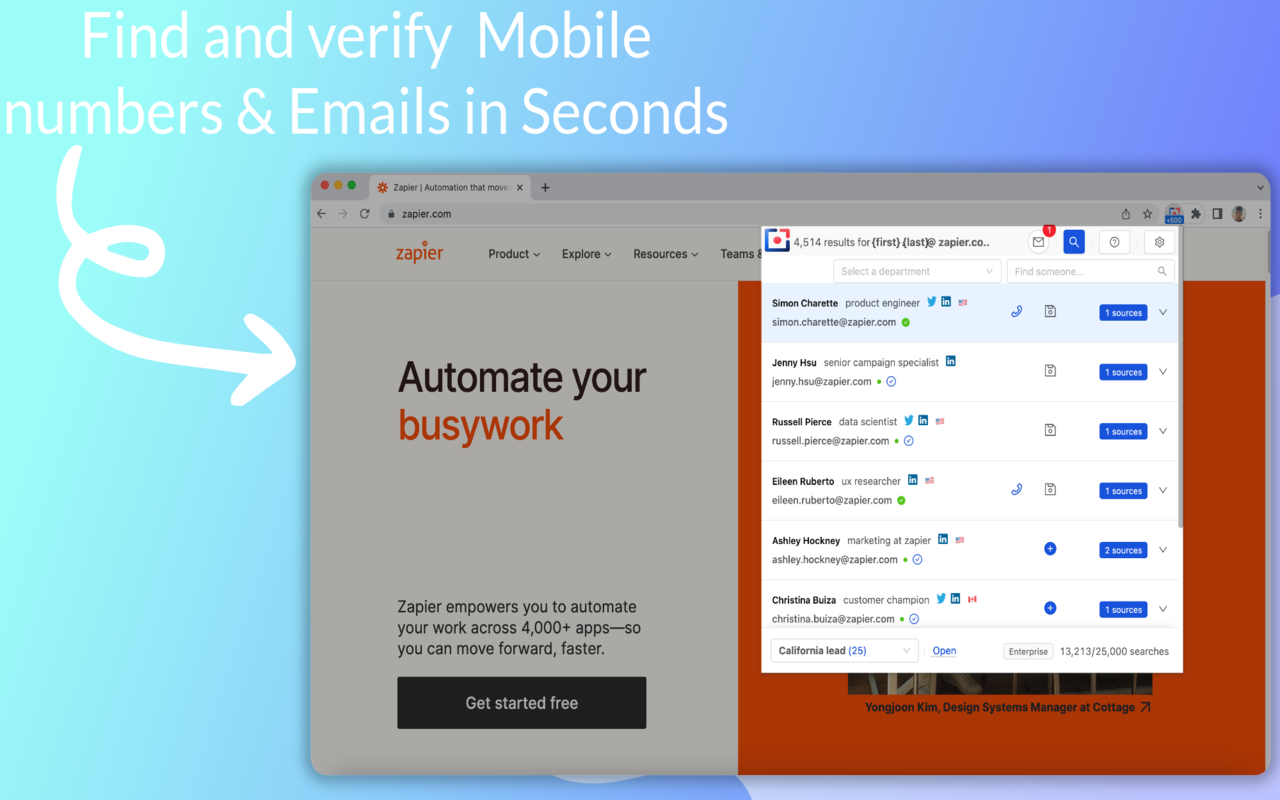
Here's the thing about Tomba's pricing, though. Its request system charges separately for finding and verifying - two credits per contact if you do both. That adds up fast. And there are real functional gaps: Tomba doesn't find Gmail addresses even when they're present on a website, and it can't scrape emails from web pages. If scraping is a must-have, compare options in our guide to free email scrapers and web scraping lead generation. User feedback also calls out UI/UX inconsistencies, particularly in the Leads section where the interface feels disconnected from the rest of the product.
Pricing Breakdown
Mailcheck:
| Plan | Price | Included Emails |
|---|---|---|
| Free | $0 | 10 (no card) / 100 (billing verified) |
| Pro | $10/mo | 1,000 |
| Agency | $30/mo | 5,000 |
| Enterprise | $90/mo | 20,000 |
Tomba:
| Plan | Price | Searches | Verifications |
|---|---|---|---|
| Free | $0/mo | 25 | 50 |
| Starter | $39/mo | 500 | 1,000 |
| Growth | $89/mo | 2,500 | 5,000 |
| Pro | $189/mo | 10,000 | 20,000 |
| Enterprise | $389/mo | 25,000 | 60,000 |
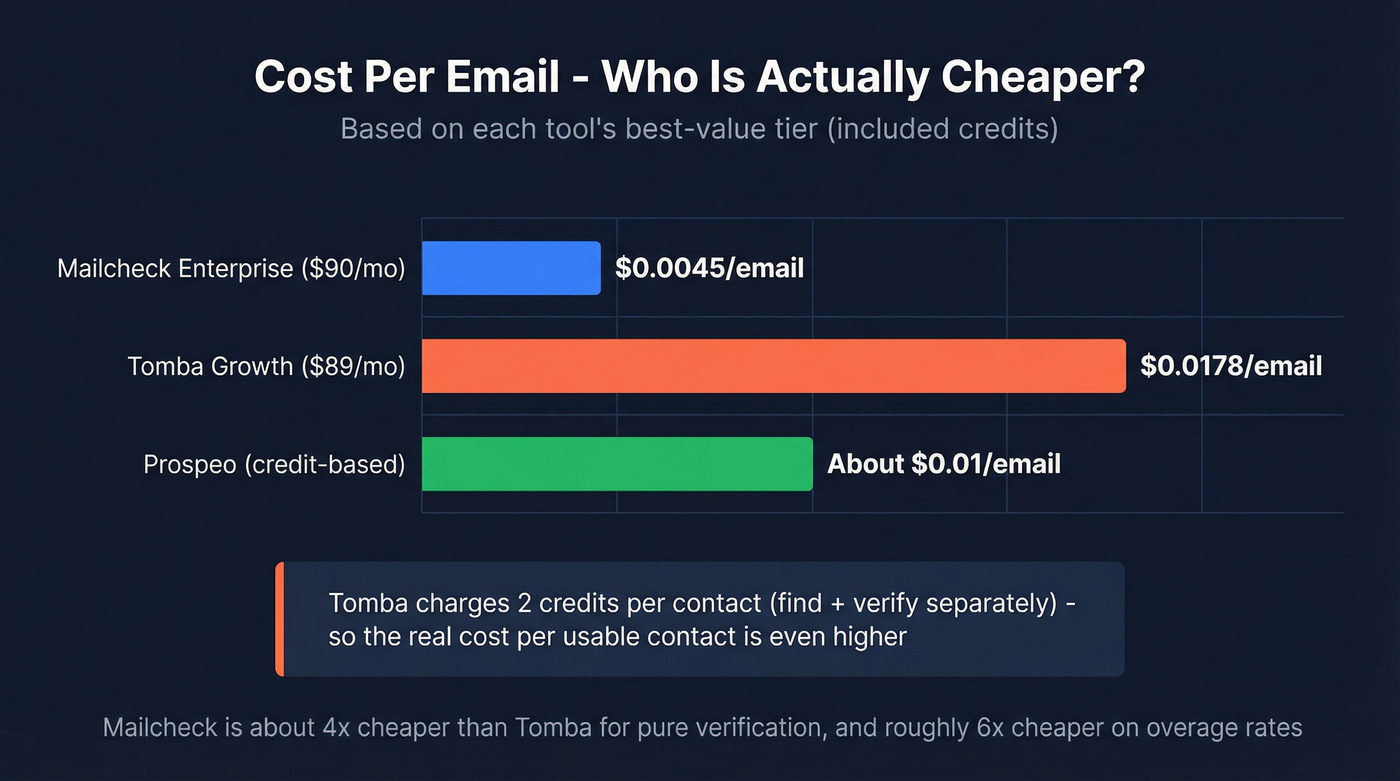
The math is straightforward. Mailcheck Enterprise works out to $0.0045 per included verification and $0.003 per overage email. Tomba Growth costs $0.0178 per verification credit - and that excludes the search credits you burned finding those emails in the first place. For pure verification, Mailcheck is about 4x cheaper on included credits and roughly 6x cheaper on overage. If you're doing this at scale, it’s worth mapping the process into a repeatable lead generation workflow.
The Accuracy Reality Check
Every email tool markets "99% accuracy." Don't believe it.
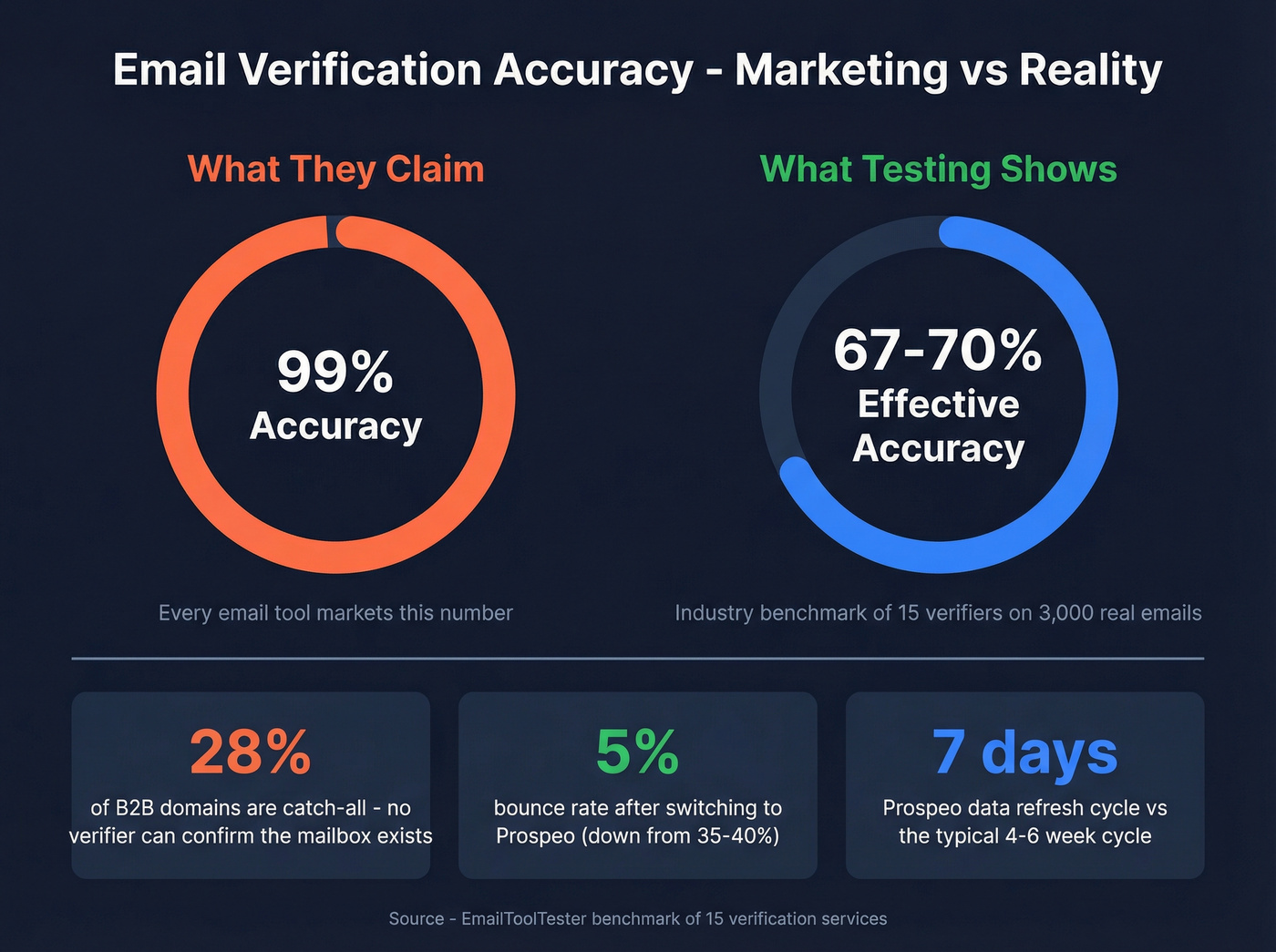
One industry benchmark testing 15 verifiers on 3,000 real emails found top performers hit 67-70% effective accuracy. A separate 10K-email B2B test found 28% of domains were catch-all - meaning the server accepts everything, and no verifier can confirm the specific mailbox exists. That gap between marketing claims and real-world performance is where your bounce rate lives, and it's why we've seen teams get burned even after "verifying" their entire list.
If your outbound volume is under 5,000 emails/month, the difference between verifiers barely matters. What matters is whether you're finding the right people in the first place - and that's where a combined find-verify-enrich platform saves you from stitching three tools together with duct tape and Zapier. For more on list-building approaches, see sales prospecting techniques and how data enrichment services fit into the stack.
When to Skip Both
If you're tired of pairing a finder with a verifier and reconciling credits across two dashboards, there's a simpler path. We've run lists through all three tools, and the difference comes down to workflow speed: Prospeo's 300M+ professional profiles with 98% email accuracy, 125M+ verified mobiles, and data that refreshes every 7 days - not the 4-6 week cycle most competitors run - means you're working with fresher data from the start. The 5-step verification process includes catch-all handling, spam-trap removal, and honeypot filtering, which is why teams like Snyk cut bounce rates from 35-40% to under 5% after switching. Stack Optimize built to $1M ARR while maintaining client deliverability above 94% and bounce rates under 3% across all accounts. If you want the deeper mechanics behind list hygiene, read our guide to spam trap removal and the full email deliverability guide.
The free tier gives you 75 emails/month to test it.

Catch-all domains fool most verifiers - that's 28% of B2B domains. Prospeo's 5-step verification includes catch-all handling, spam-trap removal, and honeypot filtering on data refreshed every 7 days, not 6 weeks.
Get accuracy that holds up past the marketing claims.
FAQ
Is Mailcheck the same as Tomba?
No. Mailcheck validates lists you already have using trust-rate scoring. Tomba discovers emails by company domain and verifies them. They solve different problems - verification-only vs. prospecting - so choosing between them depends on whether you already have a list or need to build one.
Can Tomba verify bulk email lists?
Yes, but its request system charges separately for finding and verifying - two credits per contact if you do both. For pure bulk cleaning, Mailcheck is roughly 4x cheaper per email on its Enterprise plan.
What's a good alternative if I need finding and verification together?
Prospeo combines finding, verification, and enrichment in a single platform with 98% email accuracy, 125M+ verified mobiles, and a free tier of 75 emails/month. It's the strongest option for teams that don't want to stitch multiple tools together.
Does Tomba find personal email addresses?
No. Tomba focuses on professional and business emails and explicitly excludes personal addresses like Gmail. If your prospects use personal domains, you'll need a different tool with a broader database.