

Mailing Blacklist: How to Check, Get Delisted, and Never Get Listed Again
A small business owner on Reddit sent 500 emails to existing clients - people who'd bought from them before - and woke up listed on UCEProtect L2 and L3. Their hosting provider was useless. They ended up sending from a personal Gmail account while scrambling to figure out what went wrong.
That's how fast a mailing blacklist can wreck your outbound. With 392.5 billion emails projected daily in 2026 and 45.6% of email traffic classified as spam, mailbox providers are aggressive about filtering. The good news: many major-list listings clear in 12-48 hours once the root cause is fixed - if you know which list matters and what triggered it.
What You Need (Quick Version)
- Read your bounce message. It names the blacklist and the reason. Faster than any checker tool.
- If it's Spamhaus or Barracuda, act immediately. These are the most impactful lists for deliverability to Gmail, Outlook, and Yahoo. A listing can cut inbox placement by up to 90% within hours.
- If it's a niche list you've never heard of, you can probably ignore it. UCEProtect L2/L3, Fabelsources, and similar obscure lists have minimal real-world impact.
- Fix the root cause before requesting delisting. Bad data, missing authentication, or a compromised server will get you relisted within days.
- Verify your email list before every campaign. Bounces and spam trap hits are the two fastest paths to a listing.
What Is a Mailing Blacklist?
A mailing blacklist - technically called a DNSBL (DNS-based Blackhole List) or RBL (Real-time Blackhole List) - is a database of IP addresses or domains flagged for sending spam or suspicious email. When you hit "send," the receiving mail server queries these lists in real time. If your sending IP or domain appears on one, your email gets rejected or routed to spam before the recipient ever sees it.
There are three types. IP-based lists flag the server's IP address. Domain-based lists like Spamhaus DBL flag the sender's domain. URL-based lists flag links inside the email body. Some blocklists are public and queryable by anyone; others are private, maintained internally by mailbox providers like Gmail and Outlook, and you'll never see your name on them. The public ones are what you can check and fix. The private ones respond to the same signals - bounces, complaints, spam traps - so fixing the public problem usually fixes the private one too.
Which Blacklists Actually Matter
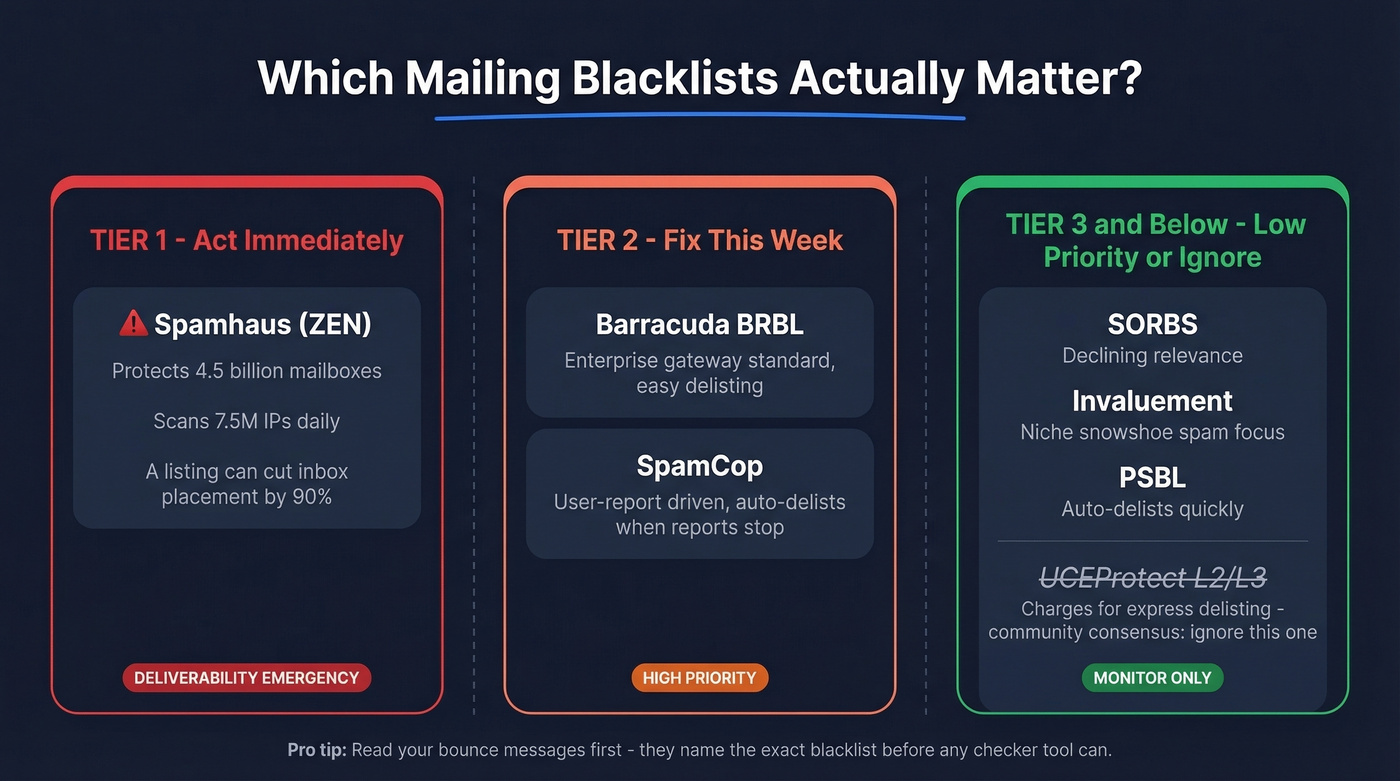
Not all blocklist operators carry equal weight. The Reddit consensus matches what we've seen in practice: brand-new domains show up on obscure lists almost immediately, and most of those listings mean nothing.
| Tier | Blacklist | Impact | Used By | Notes |
|---|---|---|---|---|
| Tier 1 | Spamhaus (ZEN) | Critical | Major mailbox providers and filters | 7.5M IPs/day, 4.5B mailboxes |
| Tier 2 | Barracuda BRBL | High | Enterprise gateways | Popular with mid-market |
| Tier 2 | SpamCop | Moderate | ISPs, spam filters | User-report driven |
| Tier 3 | SORBS | Low-moderate | Some ISPs | Declining relevance |
| Tier 3 | Invaluement | Low-moderate | Niche filters | Snowshoe spam focus |
| Tier 3 | PSBL | Low | Limited adoption | Auto-delists quickly |
| Ignore | UCEProtect L2/L3 | Minimal | Almost nobody | Charges for "express delisting" |
Spamhaus is the one that matters most. They analyze 7.5 million IPs every 24 hours and protect 4.5 billion mailboxes. Their ZEN list aggregates multiple sub-lists (SBL, XBL, PBL, CSS, DBL). A Spamhaus listing is a deliverability emergency. We've seen teams lose 80%+ of their inbox placement within hours.
Barracuda BRBL is the enterprise gatekeeper - widely used by companies running Barracuda security appliances. SpamCop matters but auto-delists quickly once reports stop, so it's more of a warning signal than a crisis.
For the technically curious, here's how a DNSBL query works: your receiving server reverses your sending IP (say, 192.0.2.1 becomes 1.2.0.192.zen.spamhaus.org) and runs a DNS lookup. A response code like 127.0.0.2 means confirmed spam source. No response means you're clean. It happens in milliseconds, on every single email.
UCEProtect's L2 and L3 listings cover entire IP ranges and even ASNs, meaning your neighbor's behavior can get you listed. They offer "express delisting" for a fee. The email community broadly considers this a shakedown. Ignore them.

Bounce rates above 5% trigger blacklist listings. Prospeo's 5-step email verification and 7-day data refresh cycle keep your lists clean - delivering 98% email accuracy versus the 79-87% from competitors whose stale data lands you on Spamhaus.
Stop sending to dead addresses. Start with data that's verified this week.
How to Check If You're Blacklisted
Here's the thing: stop obsessing over blacklist checker tools. Start reading your bounce messages. A bounce-back like 550 5.7.1 blocked by zen.spamhaus.org tells you exactly which list flagged you and why. No checker tool gives you faster or more actionable information.
That said, proactive monitoring has its place. For ongoing reputation tracking, Google Postmaster Tools (free) and Microsoft SNDS (free) show you how Gmail and Outlook view your sending domain. These catch reputation slides before they become full-blown crises.

For periodic multi-list scans, three tools cover the bases. MxToolbox is the deepest - it checks over 100 email blocklists, and the free tier handles one-off lookups fine. In our experience, it's the best all-around option. Mailmeteor monitors 100+ top DNS blacklists, requires no sign-up, and is completely free. DNSChecker works as a lightweight alternative for single checks.
The diagnostic hierarchy is simple: read your bounces first, check Postmaster Tools and SNDS weekly, and run a multi-RBL scan monthly or whenever open rates drop suddenly.
Why You Got Blacklisted
Thresholds That Trigger Listings
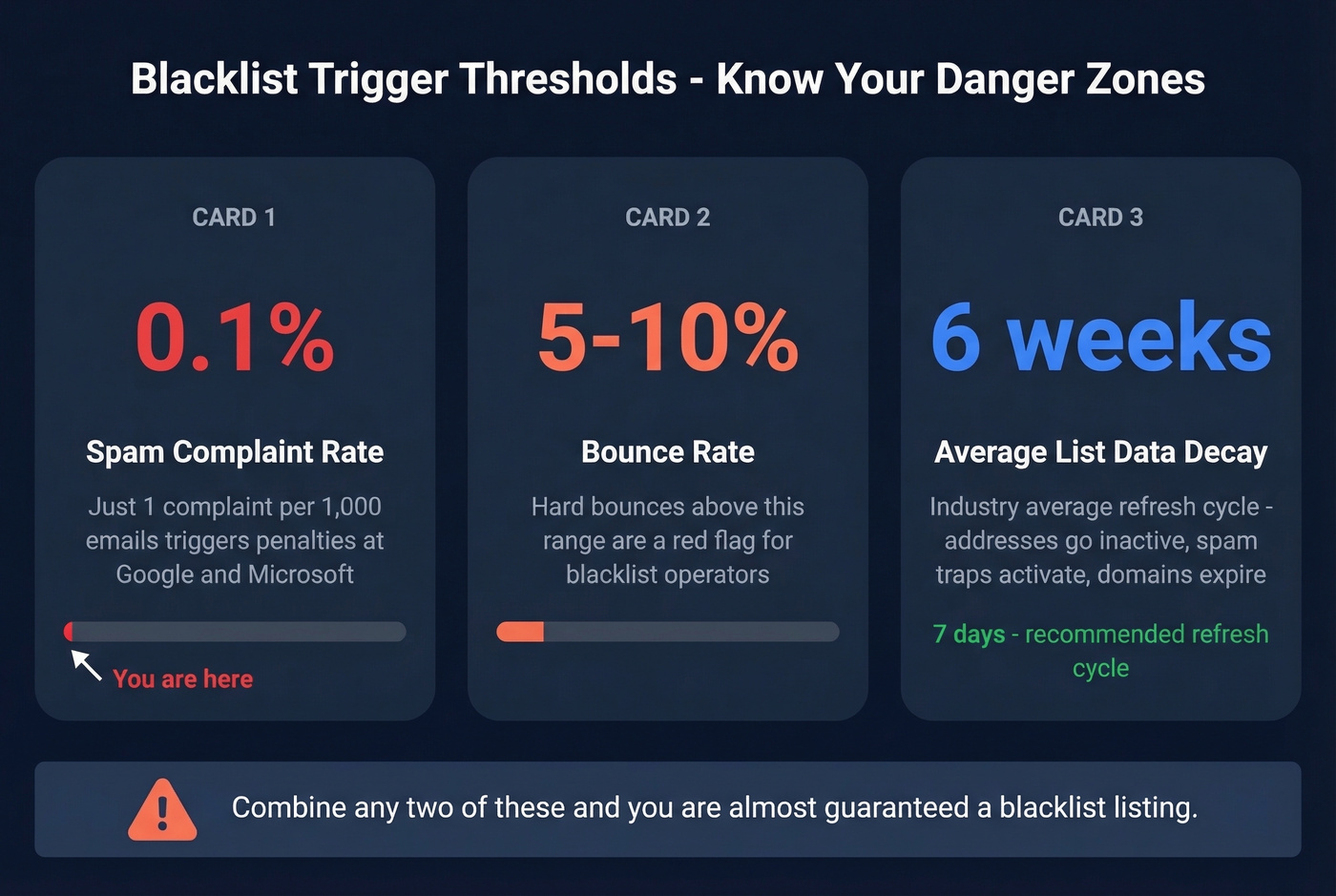
These thresholds are lower than most people expect. A spam complaint rate of 0.1% - one complaint per thousand emails - triggers automated reputation penalties at Google and Microsoft. A bounce rate above 5-10% is a red flag for blacklist operators. "Good enough" list hygiene isn't good enough.
Common Causes
Purchased or rented email lists are the fastest path to a blocklist. They're loaded with spam traps - pristine traps created specifically to catch spammers, and recycled traps where ISPs repurpose abandoned addresses. Spam trap hits are one of the most common triggers for listings.
Other common causes: compromised accounts sending spam without your knowledge, shared IP neighbors with poor sending practices, volume spikes without proper warm-up, and missing SPF/DKIM/DMARC authentication. Any of these alone can do it. Combine two or three and you're almost guaranteed a listing.
The stale data problem is underrated. A list that was "verified" six weeks ago has already decayed - addresses go inactive, domains expire, and recycled spam traps activate. Verification frequency matters more than one-time accuracy. Prospeo runs a 7-day data refresh cycle versus the industry average of six weeks, which is the kind of gap that separates clean delivery from a blocklist event.
When It's Not a Classic Blacklist
Here's a scenario from r/sysadmin that trips people up. After a WordPress compromise, a company's emails were blocked - but only when their website URL appeared in the email signature. Remove the link, emails delivered fine. Blacklist scanners showed nothing.
The issue wasn't an IP-based DNSBL at all. It was URL reputation - the compromised website had been flagged by safe browsing databases and recipient-side security gateways. If removing a URL from your emails fixes delivery, you're dealing with URL or domain reputation, not a traditional IP blocklist. Different problem, different fix.
How to Get Delisted
Before You Request Removal
Stop sending immediately. Continuing to send while listed worsens the listing and delays removal. Then work through this checklist:
- Secure your server - scan for malware, close open relays, restrict SMTP access, and review mail logs to identify the specific trigger
- Protect web forms with CAPTCHA and rate limiting
- Clean your list - remove all hard bounces, purchased lists, and subscribers inactive for 90+ days
- Configure SPF, DKIM, and DMARC as described in the prevention section below
Spamhaus doesn't accept payment for faster removal. Anyone offering to "expedite" a Spamhaus delisting for a fee is scamming you.
Delisting Workflows by Provider
| Blacklist | Who Submits | Process | Timeline | Difficulty (1-5) |
|---|---|---|---|---|
| Spamhaus SBL | ISP/network owner | Prove issue resolved | 24-72h | 4 |
| Spamhaus XBL/CBL | Auto | Corrects after fix | Hours-24h | 2 |
| Spamhaus PBL | Self (static IP) | Lookup tool removal | 24-48h | 2 |
| Spamhaus DBL | Domain owner | Domain-associated email | 24-72h | 3 |
| Barracuda BRBL | Anyone | Online form + verify email | 12-24h | 1 |
| SpamCop | Auto | Delists when reports stop | 24-48h | 1 |
| SORBS | Varies | Lookup, sublist, request | Hours-days | 3 |
| UCEProtect L1 | Auto | Free after 7 days | 7 days | 1 (just wait) |
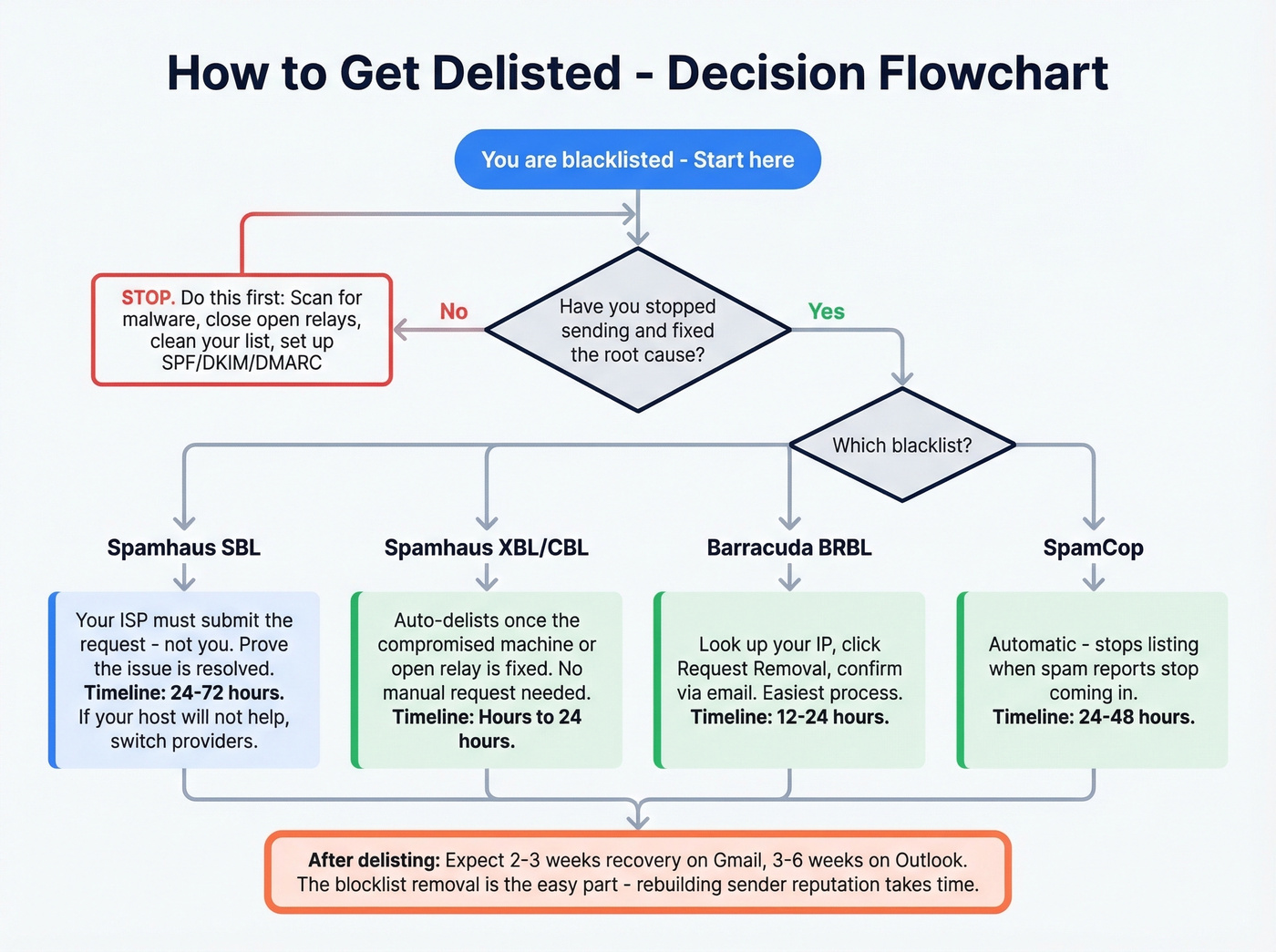
The critical detail most guides miss: for Spamhaus SBL, you can't submit the removal request yourself. Your ISP or network operator has to do it. If you're on shared hosting and your provider won't help - a common complaint on Reddit - that's your signal to switch providers or move to a dedicated IP.
Spamhaus XBL and CBL listings auto-delist once the underlying issue (usually a compromised machine or open relay) is fixed. No manual request needed.
Barracuda is the most straightforward: look up your IP, click "Request Removal," confirm via the verification email, and you're typically clear within 12-24 hours.
Even after delisting, expect recovery to take 2-3 weeks on Gmail and 3-6 weeks on Outlook. The blocklist removal is the easy part. Rebuilding sender reputation is what takes time.
How to Prevent Blacklist Listings
Set Up SPF, DKIM, and DMARC
These three authentication protocols are table stakes. Without them, you're sending email that any spam filter can reasonably distrust.
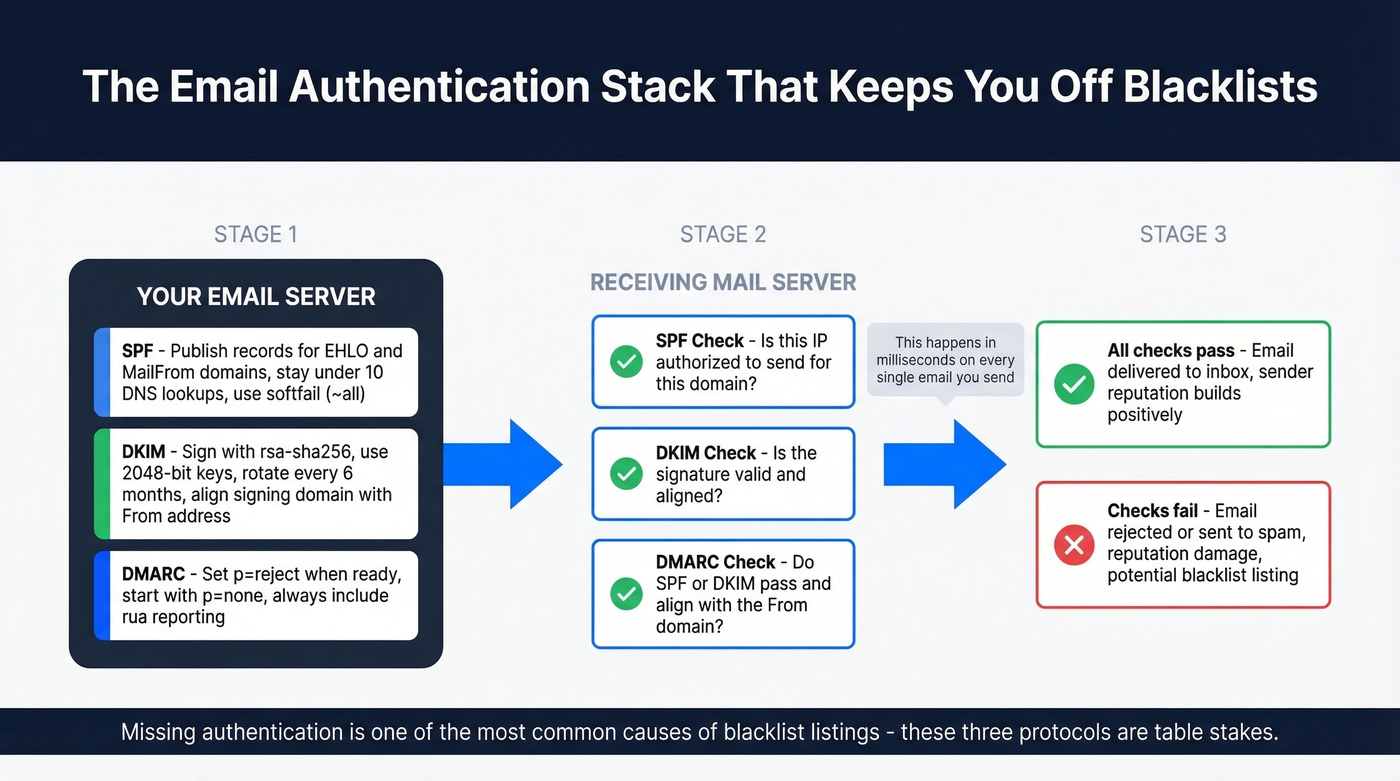
SPF: Publish records for both your EHLO and MailFrom domains. Don't exceed the 10 DNS lookup limit - flatten includes if needed. Use ~all (softfail) rather than -all. This is debated; some admins prefer -all for stricter enforcement. But softfail gives DKIM and DMARC a chance to be evaluated first. (If you need examples, see our SPF record guide.)
DKIM: Sign outbound mail with rsa-sha256 using 2048-bit keys. Rotate keys every six months. Align the signing domain with your From address. If you're troubleshooting, use this checklist to verify DKIM is working.
DMARC: Set p=reject where possible. If you're just starting, p=none works temporarily, but move to enforcement once your sources are aligned. Always include rua reporting so you can see who's sending as your domain. (More on DMARC alignment if you're seeing failures.)
Clean Your List Before Every Send
Double opt-in is the gold standard for marketing lists. For outbound, where opt-in isn't an option, verification before every send is non-negotiable. Remove subscribers inactive for 90+ days. And never send to a purchased list (here’s the compliance breakdown on buying email lists).
Prospeo's 5-step verification process handles the exact issues that trigger blacklist listings: catch-all domain verification, spam-trap removal, and honeypot filtering. At 98% email accuracy, you're eliminating the bounces and trap hits that cause listings in the first place. Stack Optimize built their agency to $1M ARR on Prospeo's data, maintaining 94%+ deliverability with under 3% bounce rates and zero domain flags across all clients.
If you want a deeper breakdown of bounce codes and what they mean, use our email bounce rate guide. And if you’re actively cleaning a list after a bad send, start with spam trap removal.
Warm Up New Domains and IPs
Never go from zero to full volume. A proper warm-up takes four weeks minimum.
| Week | Daily Volume | Inbox Target | Max Bounce | Max Complaint |
|---|---|---|---|---|
| 1 | 10-20 | 70-80% | <5% | 0% |
| 2 | 20-40 | 80-85% | <4% | <0.03% |
| 3 | 40-60 | 88-92% | <3% | <0.05% |
| 4 | 60-80 | 93-96% | <2% | <0.08% |
The goal is "High" reputation in Google Postmaster Tools by end of week four. If your bounce rate exceeds 3% at any point during warm-up, stop sending and investigate. Domain maturity can take 2-4 weeks at minimum and up to 12 weeks to be fully established. (For a more precise framework, see our guide to improve sender reputation.)
Safe Sending Limits
Your email provider's technical limit and your safe cold email limit are very different numbers.
| Provider | Technical Max | Safe Cold Limit | Notes |
|---|---|---|---|
| Google Workspace | 2,000/day | 100-150/day | Most common for SMBs |
| Microsoft 365 | 10,000/day | 100-150/day | Higher ceiling, same risk |
| GoDaddy | 250/day | 50-75/day | Very restrictive |
| Free Gmail | 500/day | Don't use | Not for cold email |
For scaling beyond 150 emails per day, use a multi-domain strategy. Spread volume across dedicated sending domains and keep your primary corporate domain clean. Real talk: if you're sending more than 100 cold emails a day from a single domain, you're playing with fire regardless of your provider. Most teams that come to us with blacklist problems are running too much volume through too few domains. (If you want the math behind this, see our email velocity guide.)
Monitor Continuously
Check Google Postmaster Tools and Microsoft SNDS weekly. Run a full multi-RBL scan monthly or whenever you notice a sudden drop in open rates. Catching a reputation slide early is the difference between a quick fix and a full delisting process. For a full monitoring stack, see our roundup of email reputation tools.
Lists verified six weeks ago are already decaying into spam traps and bounces. Prospeo refreshes all 300M+ profiles every 7 days - not the 6-week industry average - so you never send to recycled traps or abandoned inboxes.
Every blacklisting starts with bad data. Fix the source at $0.01 per email.
FAQ
How long does it take to get off a mailing blacklist?
SpamCop auto-delists in 24-48 hours once reports stop. Barracuda processes removal requests in 12-24 hours. Spamhaus SBL typically takes 24-72 hours after your ISP submits a valid request and proves the issue is resolved. UCEProtect L1 auto-resolves after 7 days with no action needed.
Can a shared IP get me blacklisted?
Yes. On shared hosting, another sender's compromised account or spam activity can get the entire IP blacklisted - and you along with it. If your host can't resolve the issue quickly, switch to a dedicated IP or move to a reputable email service provider with proper IP isolation.
Does being blacklisted mean I'm a spammer?
Not necessarily. Shared IPs, high bounce rates from stale data, compromised accounts, and missing authentication records all trigger listings. Blacklist operators don't distinguish intent from behavior - they see the signals and list accordingly. Fix the signals, and the listing goes away.
How often should I check for blacklist listings?
Monitor Google Postmaster Tools and Microsoft SNDS weekly - these are your early warning systems. Run a full multi-RBL scan monthly, or immediately whenever you notice a sudden drop in open rates or a spike in bounces. Most problems surface in bounce messages first.