

Map Lead Scraper Review: Pricing, Pros, Cons, and Alternatives (2026)
$9.9 a month for unlimited batch exports from Google Maps sounds almost too cheap. It is cheap - but cheap comes with trade-offs you should know about before you install anything.
This review breaks down Map Lead Scraper's pricing, real-world pros and cons, and how it stacks up against alternatives that might actually fit your workflow better.
What Is Map Lead Scraper?
Map Lead Scraper is a Chrome extension that pulls business data - names, phone numbers, emails, addresses, ratings, social links - straight from Google Maps and exports it to CSV, Excel, or JSON. It's built for local lead generation. With 86% of users relying on Google Maps to find local businesses, the use case is obvious.
The tool targets marketers and small sales teams who want quick, cheap lists without learning a full scraping platform.
30-Second Verdict
Map Lead Scraper is one of the cheapest Google Maps scrapers you'll find at $9.9/mo on an annual plan. It's good for quick, small-batch local scraping when budget matters more than scale. The key drawback: it's not on the Chrome Web Store, which means manual installation and no auto-updates. And the free tier is too restrictive to properly evaluate the tool before you pay.
How It Works
The workflow takes about two minutes to learn:
- Enter your target keyword(s) and location - you can paste coordinates directly from Google Maps.
- Set the maximum number of places per keyword (up to 1,000).
- Hit "run" and wait. The vendor's demo claims around 7 minutes 37 seconds for 1,000+ emails.
- Export results to CSV, Excel, or JSON.
Output fields include business name, website, phone number, address, rating, review count, and social links. Email extraction pulls from businesses' official websites, not Maps itself. Pro plans also support scraping from Bing Maps, Yelp, and TripAdvisor, though Google Maps is the primary use case.

Pricing Breakdown
| Plan | Price | Leads/Month | Batch Size | Email Extraction |
|---|---|---|---|---|
| Free | $0 | 1,000 | 15 records | No |
| Pro (Yearly) | $9.9/mo (~$118.80/yr) | 100,000 | Unlimited | Yes |
| Pro (Monthly) | $19.9/mo | 100,000 | Unlimited | Yes |
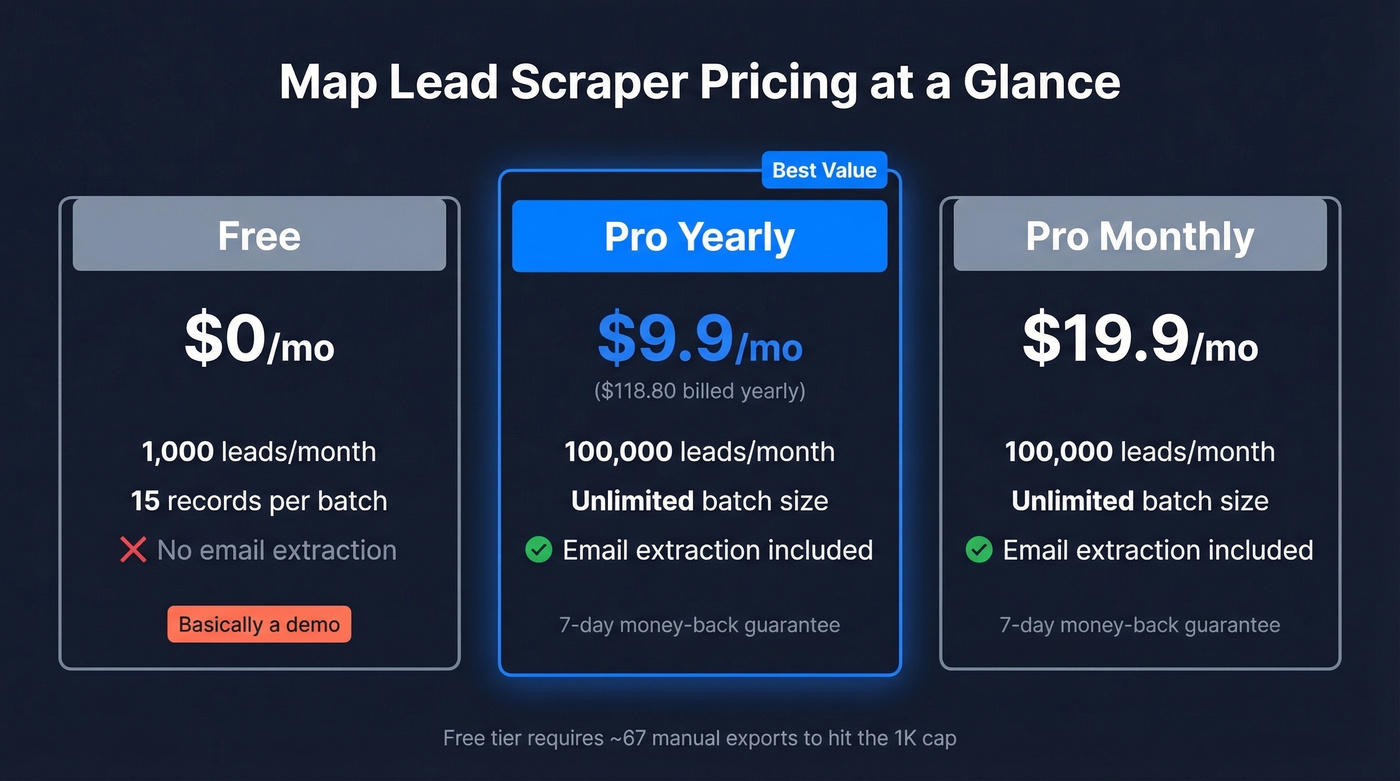
Both Pro plans include a 7-day money-back guarantee.
Here's the thing about the free tier: at 15 records per batch, you'd need to click export roughly 67 times to use your full 1,000-lead monthly allowance - and you don't even get email extraction. It's a demo, not a usable plan.

Map Lead Scraper gives you raw data. Raw data destroys deliverability. Prospeo's 5-step email verification catches catch-all domains, spam traps, and dead addresses - turning scraped lists into sendable ones at 98% accuracy. Start free with 75 verified emails, no credit card required.
Stop bouncing scraped emails. Verify them at $0.01 each.
Pros and Cons
Pros:
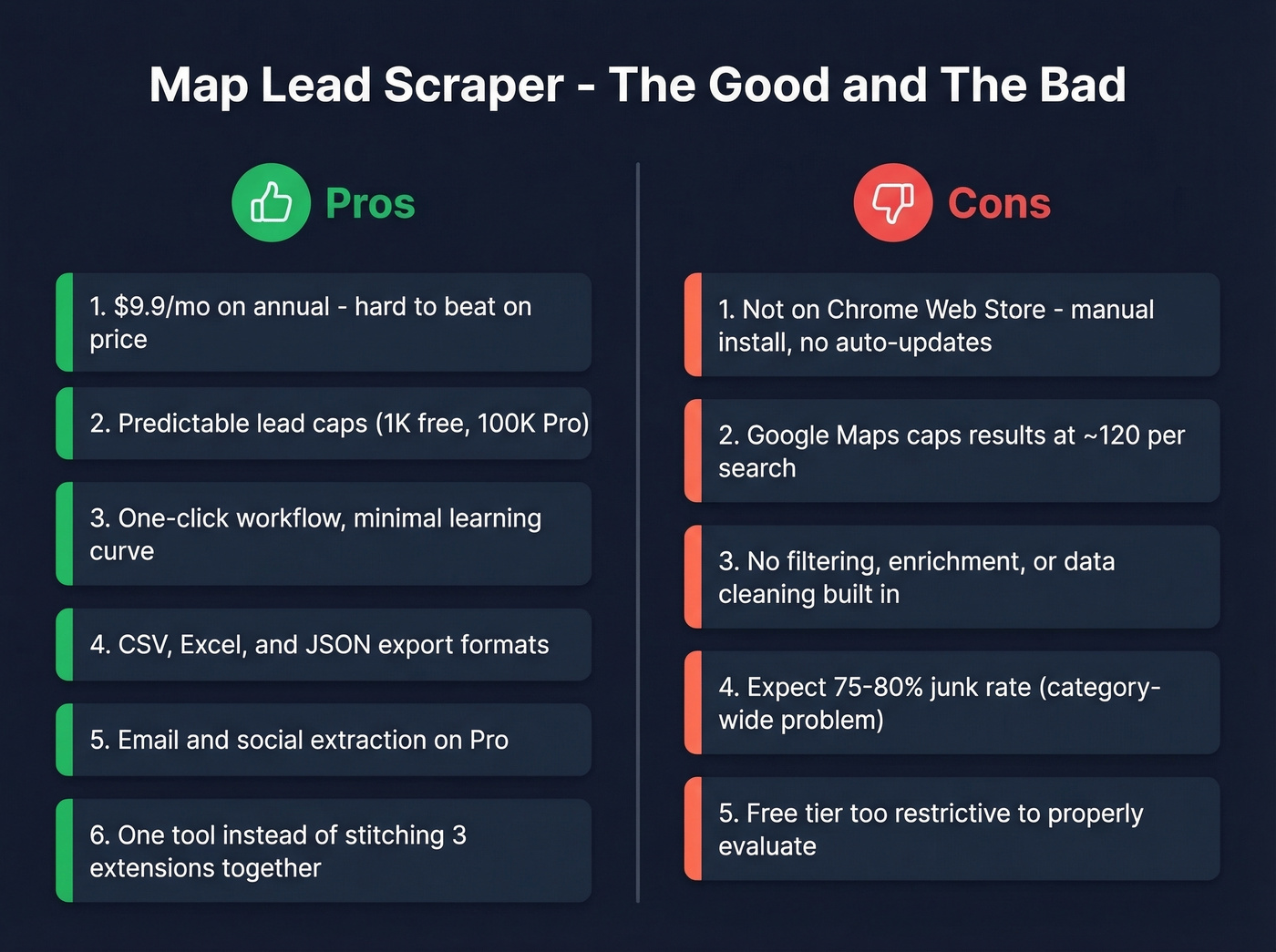
- Genuinely cheap - $9.9/mo on annual is hard to beat in this category
- Lead-export caps are predictable (1K free / 100K Pro)
- One-click workflow with minimal setup
- Exports to CSV, Excel, or JSON
- Email and social profile extraction included on Pro
- Consolidates scraping and email extraction into one tool, which matters - practitioners on Reddit frequently complain about stitching three different Chrome extensions together just to get a usable contact list
Cons:
- Not on the Chrome Web Store. We tested the manual installation process and it took about five minutes but felt dated - no Google-verified publisher badge, no auto-updates
- Google Maps caps results at ~120 businesses per search, so building large lists requires dozens of queries across sub-categories and locations
- No built-in filtering, enrichment, or data cleaning - you get raw output and sort it yourself (see data enrichment options if you need cleaner lists)
- Expect a high junk rate. One Reddit user running Google Maps scrapes reported 75-80% irrelevant results even with solid keywords. That's not unique to this tool - it's a category-wide problem
- Free tier is too restrictive to evaluate the tool before committing
Price Comparison
| Tool | Price | Model | Free Tier |
|---|---|---|---|
| Map Lead Scraper | $9.9-$19.9/mo | Monthly lead-export cap (100K/mo) | 1K leads, 15/batch |
| Maps Scraper AI | $19.9/mo | Per-lead | 1K leads, 15/export |
| Outscraper | ~$3/1K records | Pay-as-you-go | 500/mo |
| Apify | $4/1K places | Pay-per-use | $5 credits/mo |
| PhantomBuster | From EUR69/mo | Execution-time | 30 min/mo |
| Octoparse | From $119/mo | Subscription | Free plan available |
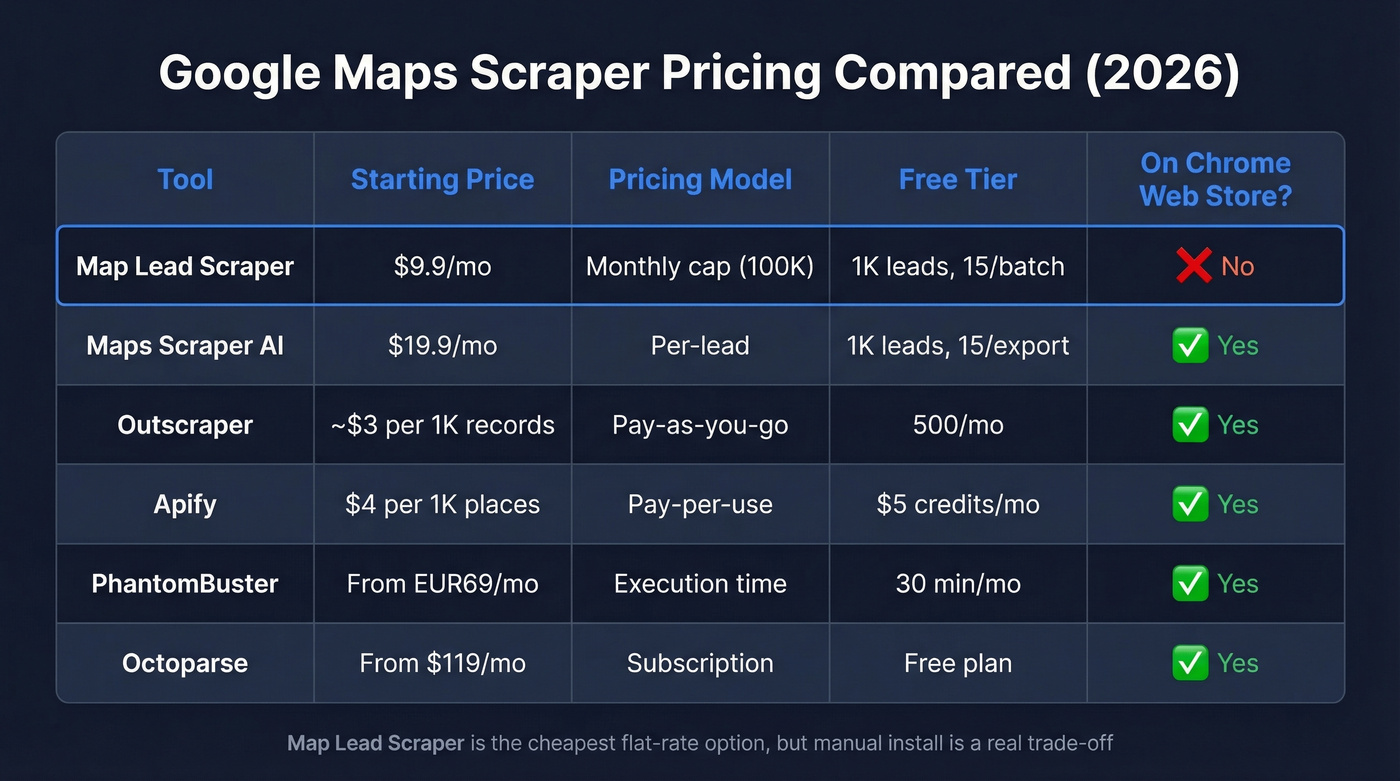
Maps Scraper AI mirrors Map Lead Scraper's pricing almost exactly but has one meaningful advantage: it's actually on the Chrome Web Store. For context, G Maps Extractor's free version caps at just 10 leads per search, making Map Lead Scraper's free tier look generous by comparison.
Outscraper and Apify scale better for high-volume work. If you're pulling tens of thousands of records, pay-per-use pricing beats a flat monthly cap. PhantomBuster's execution-time model is a poor fit here because you pay for runtime regardless of how many usable leads you end up with, and filtering typically happens after export.
Let's be honest about the bigger picture: according to the F5 Labs 2026 Bot Report, 10.2% of all global web traffic now comes from scrapers and bots. Google Maps scraping tools are a tiny slice of that, but the volume explains why Google keeps tightening its anti-scraping measures. If your average deal size is under $5K and you're scraping local businesses, a $9.9/mo Chrome extension is fine. If you're building a real outbound pipeline, you need verified contact data - not raw scrapes. (If you're building a repeatable system, start with a lead generation workflow and track lead generation metrics.)

Verify Before You Send
We've seen raw scraped data from Google Maps bounce at 30-50% when sent without verification. Outdated websites, catch-all domains, dead email addresses - it's all baked into the data. That's not a Map Lead Scraper problem. It's a scraping problem. (If you're diagnosing issues, use an email bounce rate checklist and an email deliverability guide before scaling volume.)
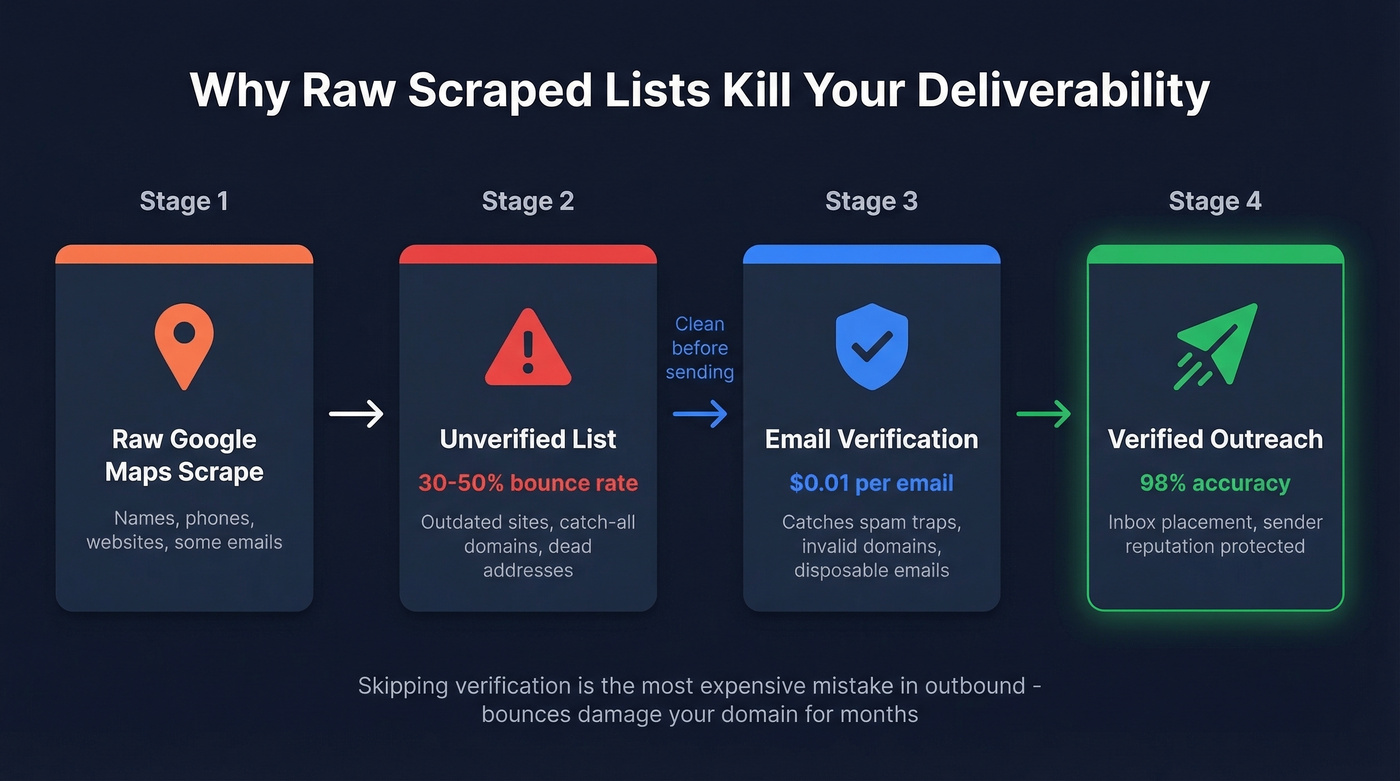
If your deal size justifies real outbound, skip the scraping-and-cleaning dance entirely. Prospeo's database has 143M+ verified emails with 30+ filters - buyer intent, technographics, headcount growth - refreshed every 7 days. No junk rate. No stitching three Chrome extensions together.
Trade raw Google Maps scrapes for verified B2B contacts.
Who Should Use It?
Use Map Lead Scraper if you need small-batch local lead scraping on a tight budget, you're comfortable with manual Chrome extension installation, and you don't mind cleaning raw data yourself. For quick local market scans under 100K leads/month, it's hard to argue with $9.9/mo. If you're doing outreach right after export, pair it with sales prospecting techniques and a few proven sales follow-up templates.
FAQ
Is Map Lead Scraper free?
Technically yes, but the free tier caps you at 1,000 leads/month with 15-record batches and no email extraction. It's a demo, not a working plan. Pro starts at $9.9/mo on an annual commitment.
Is it safe to install outside the Chrome Web Store?
Manual sideloading works but means no Google-verified publisher badge and no automatic updates. You'll need to re-download updates manually. Standard sideloading risk applies - only install from the official vendor site.
How many leads can I scrape per search?
Google Maps caps results at roughly 120 businesses per query. Build larger lists by running multiple searches across different locations or sub-categories. Reaching the 100K Pro cap requires systematic keyword rotation.
What's a good way to verify scraped emails before outreach?
Export your CSV from any Maps scraper, then run it through a verification tool like Prospeo. At 98% accuracy and $0.01 per email, it's far cheaper than the deliverability damage from sending to a 30-50% bounce-rate list.