

Marketing Email Automation: Strategy, Workflows, and Tools for 2026
Marketing email automation generates up to 30x more revenue per recipient than one-off campaigns. Automated flows account for 31% of email orders while representing just 1.8% of total sends. Yet most advice spends 2,000 words explaining what a trigger is and skips the parts that actually move revenue - data quality, deliverability infrastructure, and workflow economics.
Let's fix that.
What You Need (Quick Version)
Three things matter more than your tool choice:
- Build these workflows first: welcome series, abandoned cart, post-purchase. The top 10% of welcome flows generate $21.18 per recipient. Abandoned cart tops out at $28.89.
- Verify your contact list before you automate anything. Bad data destroys sender reputation and wastes every dollar you spend on sequences.
- Tool pick depends on your model: Brevo for budget, ActiveCampaign for depth, Omnisend for ecommerce.
Across all workflow types, the top 10% of automated flows generate $16.96 revenue per recipient versus $1.94 for the average. That's not a marginal improvement - it's a fundamentally different economics model. If you're among the 21% of marketers who haven't started automating, you're leaving the highest-ROI channel in marketing on the table.
How Automated Emails Work
Automated emails fire based on behavior instead of manual blasts to your entire list. Every automation follows the same anatomy: Trigger -> Condition -> Action.
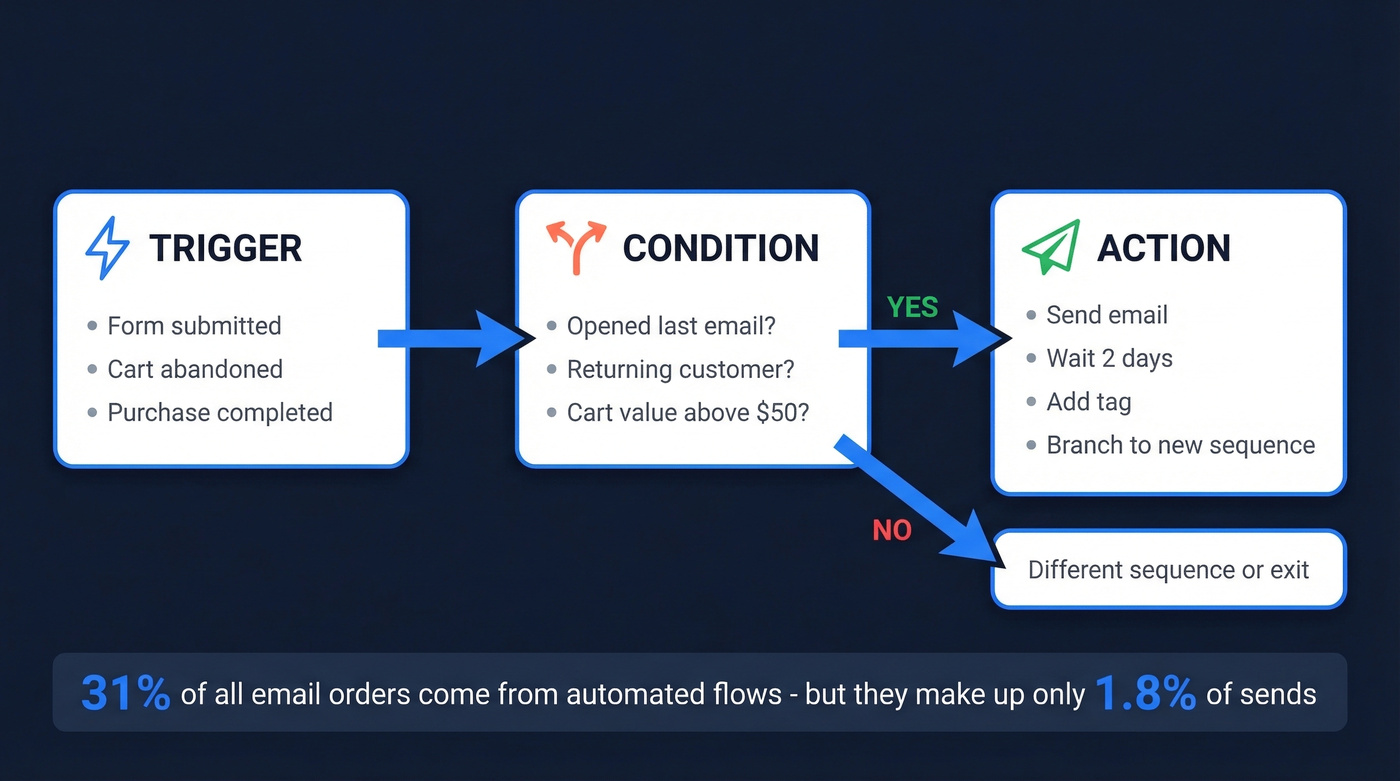
A trigger fires when something happens - a form submission, an abandoned cart, a purchase. A condition checks context: did they open the last email? Are they a returning customer? Is their cart above $50? The action follows: send an email, wait two days, add a tag, branch into a different sequence.
Those flows produce 31% of all email-driven orders while making up only 1.8% of sends. You build the workflow once, and it generates revenue every time someone hits the trigger. Campaigns are one-and-done. Automations compound. And with 64% of marketers now using automation and AI together, the bar for what "good" looks like keeps rising.
Why Automation Drives More Revenue
The gap between average performers and the top 10% is enormous. Here's what the latest Klaviyo benchmarks across 167,000+ customers show for revenue per recipient:
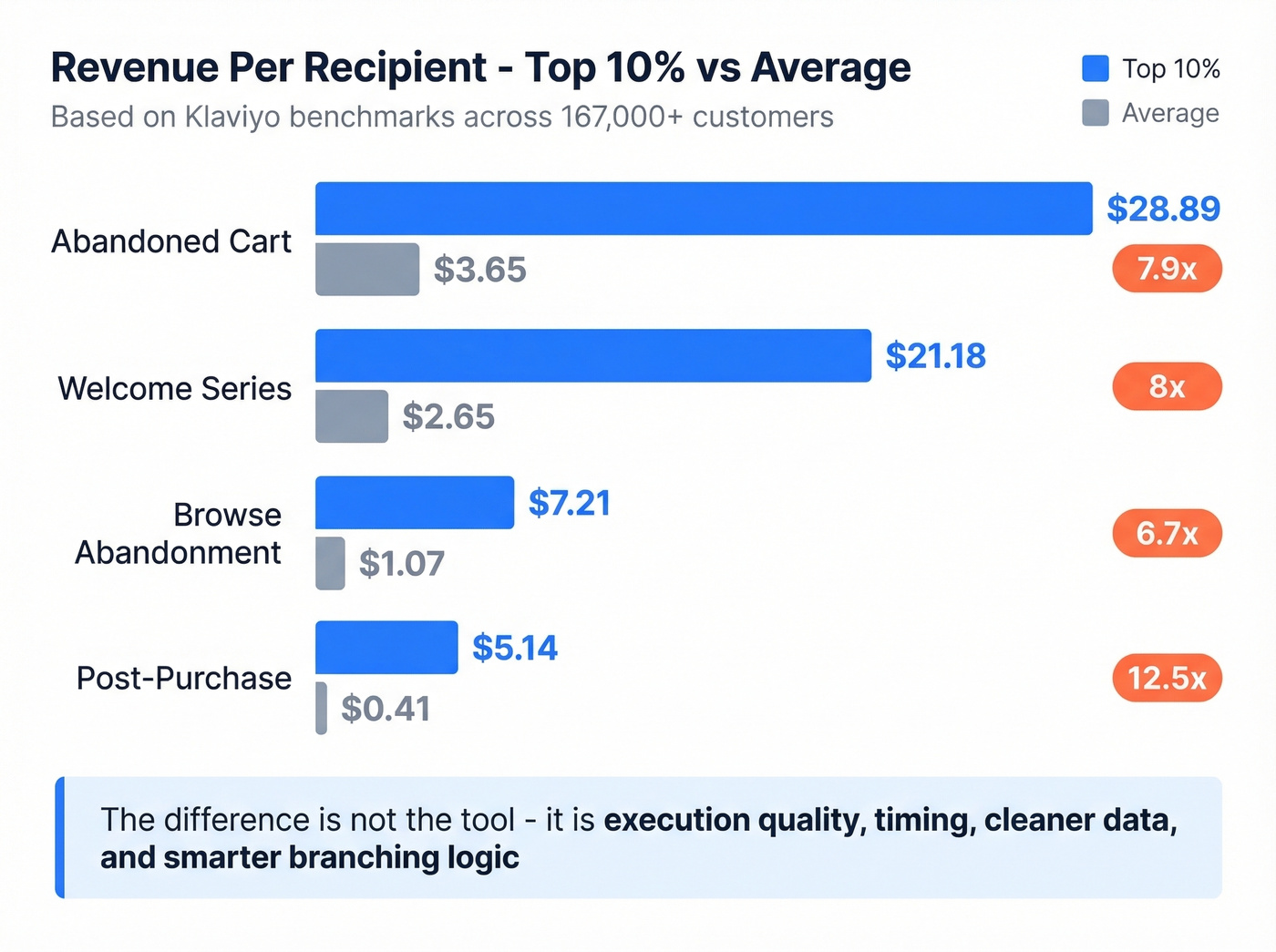
| Workflow | Top 10% | Average |
|---|---|---|
| Abandoned cart | $28.89 | $3.65 |
| Welcome series | $21.18 | $2.65 |
| Browse abandonment | $7.21 | $1.07 |
| Post-purchase | $5.14 | $0.41 |
The top 10% aren't using secret tools. They're running tighter sequences with better timing, cleaner data, and smarter branching logic. The average abandoned cart flow makes $3.65 per recipient. The best ones make nearly 8x that - and the difference comes down to execution quality, not just having a tool in place.
Across all email marketing, ROI runs $36-$42 per $1 spent. No other digital channel comes close. But that ROI assumes your emails actually reach the inbox, which brings us to the workflows and infrastructure that make it possible.
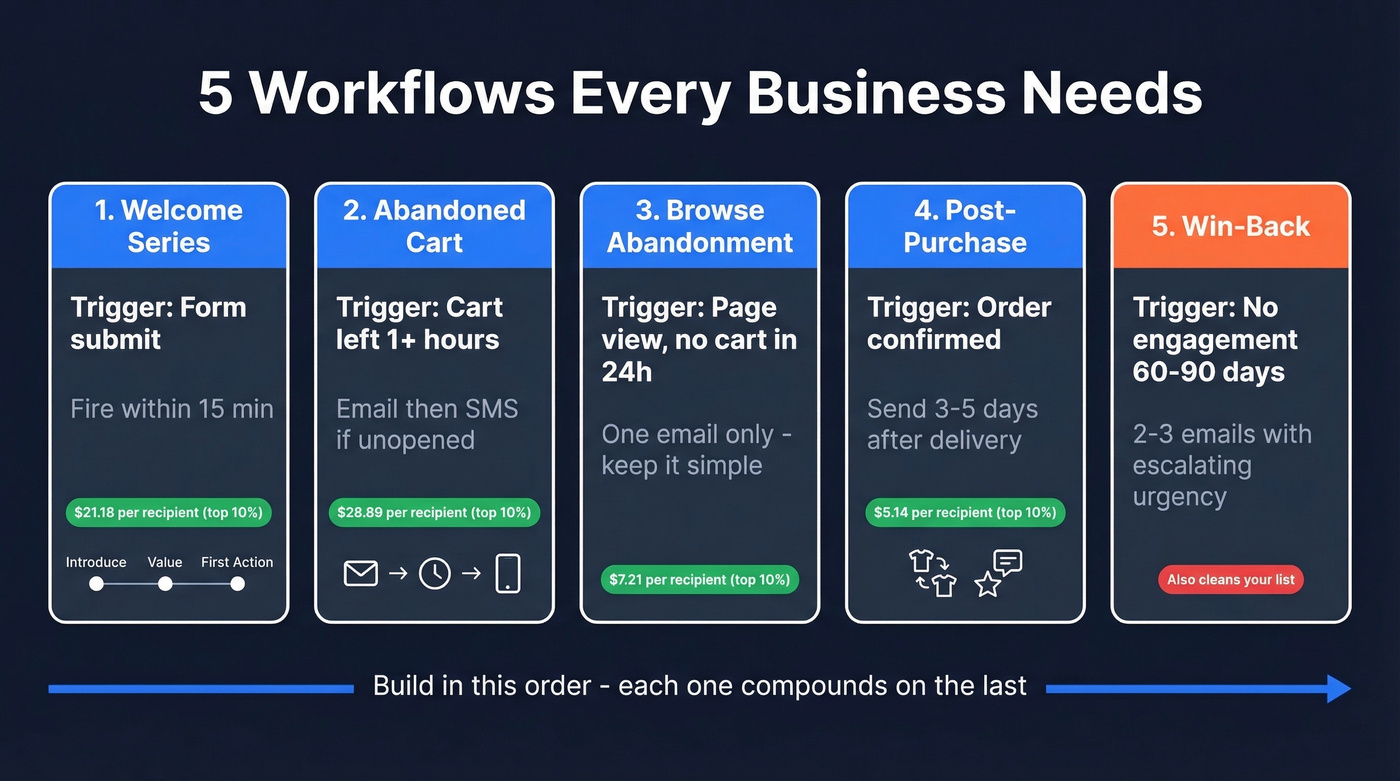
Five Workflows Every Business Needs
Welcome Series
Trigger: form submit or account creation. Fire within 15 minutes - engagement peaks in that window. Run a 3-step sequence: introduce the brand, showcase value, push toward first action. Remix ran a welcome drip that produced a 104% jump in first purchases. Build this one first. Every new subscriber hits it.
Abandoned Cart Recovery
Trigger: cart abandoned for 1+ hours. Send the first email, wait 6-12 hours, then fire an SMS if unopened. Slazenger ran this cross-channel approach and hit 49x ROI in 8 weeks. Restraint is the key - one email, one delay, one SMS if needed. Don't carpet-bomb people into unsubscribing.
Browse Abandonment
Trigger: product page viewed, no add-to-cart within 24 hours. A simple "Still looking?" email with the viewed product works. The top 10% pull $7.21 per recipient from this flow. Keep it to one email; two feels pushy for someone who just browsed.
Post-Purchase Follow-Up
Trigger: order confirmed. Time it 3-5 days after delivery, not after purchase - you want the product in their hands. Cross-sell related items or request a review. Most brands skip this entirely, which is why the average is a dismal $0.41 per recipient. That's practically free money sitting on the floor.
Win-Back / Re-Engagement
Trigger: no open or click in 60-90 days. Run a 2-3 email sequence with escalating urgency. The final email should ask directly: "Should we remove you from our list?" This doubles as list hygiene - removing non-engagers improves deliverability for everyone who remains.
The Step Most Guides Skip: Data Quality
Here's the thing: automation amplifies whatever you feed it. Clean data means compounding revenue. Bad data means compounding damage.
About 17% of emails never reach the inbox. A bounce rate above 3% actively damages your sender reputation, which means every subsequent email - automated or not - is more likely to land in spam. One bad list import can tank deliverability for months.
Most automation guides walk you through building a welcome series but never mention that 12% of your list might be invalid addresses, spam traps, or honeypots. You wouldn't pour gasoline into a diesel engine and wonder why it stalled. Don't pour unverified contacts into your automation platform.
We've seen teams build beautiful 8-step workflows, spend weeks on copy and design, then watch their open rates crater because they never verified a single email address. Run your list through a verification tool before building a single workflow. Prospeo's email verification uses a 5-step process - catch-all handling, spam-trap removal, honeypot filtering - delivering 98% accuracy with a 7-day data refresh cycle. There's a free tier to test before committing, and bulk CSV verification returns results in minutes.


Bad data turns your best automation workflows into deliverability disasters. Prospeo's 5-step email verification catches spam traps, honeypots, and catch-all domains - delivering 98% accuracy on a 7-day refresh cycle. Bulk CSV verification returns results in minutes, starting at $0.01 per email.
Clean your list before you automate a single email.
Deliverability Checklist
Clean data gets you to the starting line. Authentication gets you into the inbox. If you need a deeper walkthrough, use this email deliverability guide alongside the checklist below.
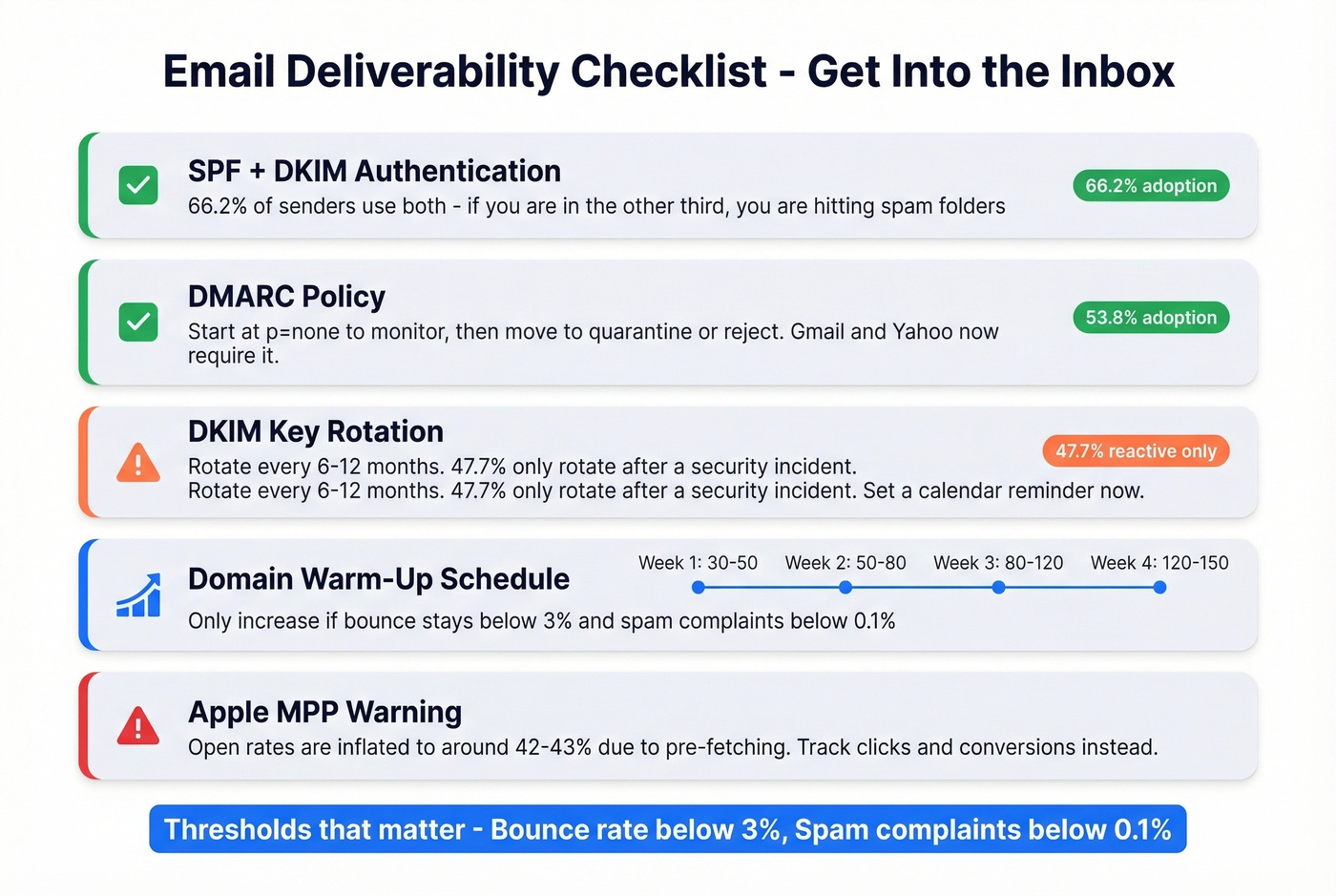
SPF + DKIM - 66.2% of senders use both. If you're in the other third, you're hitting spam folders. Set these up before you send a single automated email. (If you want examples, see these SPF record examples.)
DMARC - Adoption jumped from 42.6% to 53.8% in one year. Gmail and Yahoo now require it for bulk senders. Start at p=none to monitor, then move to quarantine or reject once alignment is clean. If you're troubleshooting policy issues, DMARC alignment is the concept to get right.
DKIM key rotation - Best practice is every 6-12 months. Yet 47.7% of senders only rotate after a security incident. Set a calendar reminder. If you’re unsure your setup is correct, verify DKIM is working before scaling volume.
Warm-up ramp for new domains:
| Week | Daily volume |
|---|---|
| Week 1 | 30-50 |
| Week 2 | 50-80 |
| Week 3 | 80-120 |
| Week 4 | 120-150 |
Only increase if bounce stays below 3% and spam complaints stay below 0.1%. If either threshold breaks, pause and investigate. (More on thresholds and failure modes in this email bounce rate breakdown.)
Apple MPP caveat - Open rates are inflated to ~42-43% thanks to Mail Privacy Protection pre-fetching. Don't use opens as your primary metric. Track clicks and conversions instead.
When to Automate (and When Not To)
Not every email needs a workflow behind it. Automate when the trigger is repeatable and the audience segment is well-defined - welcome series, cart recovery, post-purchase, and win-back flows all qualify.
Skip automation for one-off announcements, time-sensitive promotions, or messages that need a personal, hand-written touch. For teams sending to fewer than 100 contacts with a unique ask, a manual send is faster and more effective. Automation shines at scale; at low volume, it's overhead.
Mistakes That Kill Performance
Bot voice. Use a real person's name in the From field. Enable replies. Template-heavy emails with no personality get ignored - or worse, flagged. If you want to tighten the writing, borrow patterns from emails that get responses.
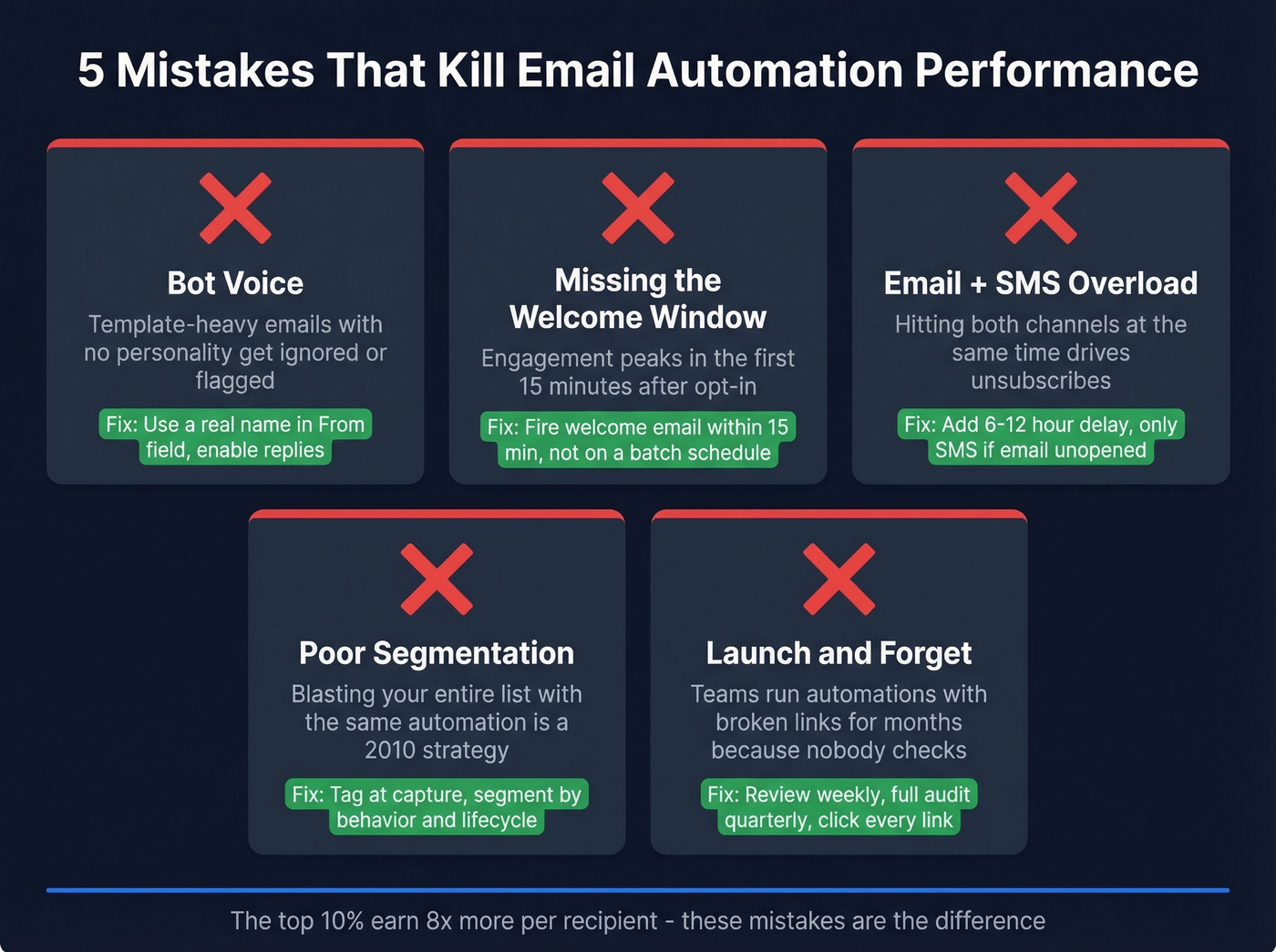
Skipping the welcome window. Subscriber engagement peaks in the first 15 minutes after opt-in. If your welcome email fires on a scheduled batch 6 hours later, you've missed the moment.
Email + SMS overload. Add a 6-12 hour delay before SMS. Only send the text if the email goes unopened. Hitting both channels simultaneously drives unsubscribes.
Poor segmentation. Tag at the point of capture. Segment by behavior, purchase history, and lifecycle stage. Blasting your entire list with the same automation is a 2010 strategy that Reddit's r/EmailWhisperers rightfully calls out constantly. If you want a more rigorous approach, use intent based segmentation to define who gets what.
Launch and forget. Review active campaigns weekly. Audit all workflows quarterly. Click every link, read every email. We've seen teams running automations with broken links for months because nobody checked.
Compliance Quick Reference
- CAN-SPAM - Opt-out based. Clear unsubscribe link, valid physical address, accurate From/subject lines. Fines up to $51,744 per email.
- GDPR - Requires affirmative consent. Right to erasure. Fines up to EUR20M or 4% of global revenue.
- CCPA/CPRA - Applies at $25M+ revenue, 100K+ consumer data, or 50%+ data-derived revenue. $7,500 per intentional violation, uncapped.
Every automated email needs an unsubscribe link, a physical mailing address in the footer, and accessible consent records. If you're sending into the EU, consent isn't optional.
Best Marketing Email Automation Tools in 2026
Look, most teams overthink tool selection. If your average deal size is modest and your list is under 5,000, Brevo or MailerLite will do everything you need. The expensive platforms only pay for themselves when you have the list size and workflow complexity to justify them.
For cross-app orchestration - connecting your email tool to CRM, ad platforms, or Slack - Zapier or Make handle that layer. They aren't email platforms, but they extend whatever tool you pick. If you’re building multi-step journeys across channels, these sales funnel automation tools can help you map the stack.
| Tool | Entry Price | Free Plan | SMS Built-In? | Best For |
|---|---|---|---|---|
| Brevo | $9/mo | 9K emails/mo | Yes | Budget SMBs |
| ActiveCampaign | $19/mo (1K) | 14-day trial | Add-on | Advanced workflows |
| Omnisend | $16/mo (500) | 250 contacts | Yes | Ecommerce |
| MailerLite | $15/mo (1K) | 500 subscribers | No | Beginners |
| Klaviyo | $20/mo (500) | 250 contacts | Yes | Ecommerce + analytics |
| HubSpot | $20/mo/seat | Free CRM only | Add-on | CRM-first teams |
| GetResponse | $19/mo (1K) | 30-day trial | Add-on | Webinar + email |
| Mailchimp | $13/mo | 500 contacts | No | Simple newsletters |
| Drip | $39/mo (2.5K) | 14-day trial | No | Shopify stores |
At 10,000 contacts, expect $50-250/mo for most SMB tools. Ecommerce-focused platforms like Klaviyo and Omnisend tend to run higher.
Brevo - Best Value
The most underrated tool on this list. Brevo's free plan includes 9,000 emails/month (300/day) with automations, and paid plans start at $9/mo.
Email and SMS live in the same platform, so you can run cross-channel cart recovery without stitching together two tools. The editor and templates are basic compared to ActiveCampaign or Klaviyo, but for most SMBs, "basic but functional" at this price is the right tradeoff. Reddit's r/MarketingAutomation often recommends it as the budget-friendly all-rounder.

ActiveCampaign - Best Automation Depth
Use this if you need complex branching logic, behavioral targeting, and a built-in CRM that actually works. ActiveCampaign's workflow builder is the most powerful in the SMB tier - conditional splits, lead scoring, site tracking, and deep segmentation all come standard. If you’re formalizing scoring rules, this lead scoring guide pairs well with ActiveCampaign-style setups.
Skip this if you want something you can set up in an afternoon. The learning curve is real, and pricing ramps hard: 5,000 contacts on the Plus plan runs $145/mo. For teams that need depth over simplicity, though, nothing in this price range competes.
Omnisend - Best for Ecommerce
If you're selling products online and Klaviyo's pricing makes you wince, Omnisend is the answer. Pre-built ecommerce workflows - cart recovery, browse abandonment, post-purchase - come ready to activate. SMS is included, not bolted on. The free plan gives you 250 contacts with ecommerce automations, and at $16/mo for 500 contacts, it's meaningfully cheaper than Klaviyo at the entry tier. The tradeoff: it's purpose-built for ecommerce, so SaaS and services businesses should look elsewhere.
Klaviyo
The obvious choice for ecommerce brands with budget to match. Predictive analytics, deep Shopify/WooCommerce integrations, and AI-powered product recommendations set it apart. But it's a bad choice for everything else. Pricing escalates fast as your list grows, and the email editor feels dated compared to newer competitors.
MailerLite
Clean UI, low price, zero bloat. $15/mo with a free plan for lists under 500. It won't win awards for automation sophistication, but for beginners who need simple welcome sequences and basic segmentation, it's the "just works" option.
HubSpot Marketing Hub
Strong CRM integration - if you're already on HubSpot's CRM, data flows directly between tools. But Marketing Hub Starter limits simple email workflows to 10 actions, which is crippling for anything beyond a basic welcome series. Real automation power requires Professional at $890/mo. I've seen teams sign up for Starter thinking they're getting automation, only to hit the wall within a week.
Mailchimp, GetResponse, and Drip
Mailchimp has an easy editor, but the free plan is very limited for automations - most teams end up paying $13/mo minimum for real flows. GetResponse bundles webinars and landing pages but limits Starter to one custom workflow at $19/mo. Drip is purpose-built for Shopify with strong integrations but no free plan and a $39/mo entry point. All three serve narrow use cases; the tools above cover most teams better.
The top 10% of automated flows earn 8x more per recipient - and it starts with verified contact data. Prospeo gives you 143M+ verified emails with spam-trap removal and honeypot filtering built in, so every trigger fires to a real inbox. Free tier included, no contracts.
Stop feeding bad data into workflows that should be printing money.
FAQ
What's the difference between email automation and email marketing?
Email marketing covers newsletters, promotions, and campaigns sent to a list. Automation is the subset where emails trigger based on subscriber behavior - like a cart abandonment or signup - instead of being sent manually. Every automated email is email marketing, but not every marketing email is automated.
How much does marketing email automation cost?
Most platforms offer free or sub-$20/mo entry plans for lists under 1,000 contacts. At 10,000 contacts, expect $50-250/mo depending on the platform and feature tier. Brevo's free plan at 9,000 emails/month is the most generous starting point.
Which automation workflow should I build first?
Start with a welcome series - it fires on every new signup, and the top 10% generate $21.18 per recipient. Abandoned cart is second priority if you sell online. Both target high-intent moments where subscribers are most likely to convert.
How do I keep my list clean for automated flows?
Verify every contact before it enters a workflow. Run 5-step verification that covers catch-all handling, spam-trap removal, and honeypot filtering. Keep bounce rates below 3% and remove non-engagers every 60-90 days to protect sender reputation.