

Why Your Marketing Emails Go to Spam (And How to Fix It)
A Beehiiv newsletter operator on r/Emailmarketing watched their open rates crater from 35% to 18% overnight after July 2024. Authentication was set up. Content hadn't changed. The ESP blamed "content quality." But that kind of sudden drop almost always points to a email deliverability problem - the invisible metrics that decide whether your marketing emails going to spam is a temporary blip or a systemic failure.
Here's what most marketers miss: "97% delivered" doesn't mean 97% inbox. It means the receiving server accepted the message. Where it lands after that is a completely different story.
What to Fix First
This isn't an equal-weight checklist. It's a hierarchy.
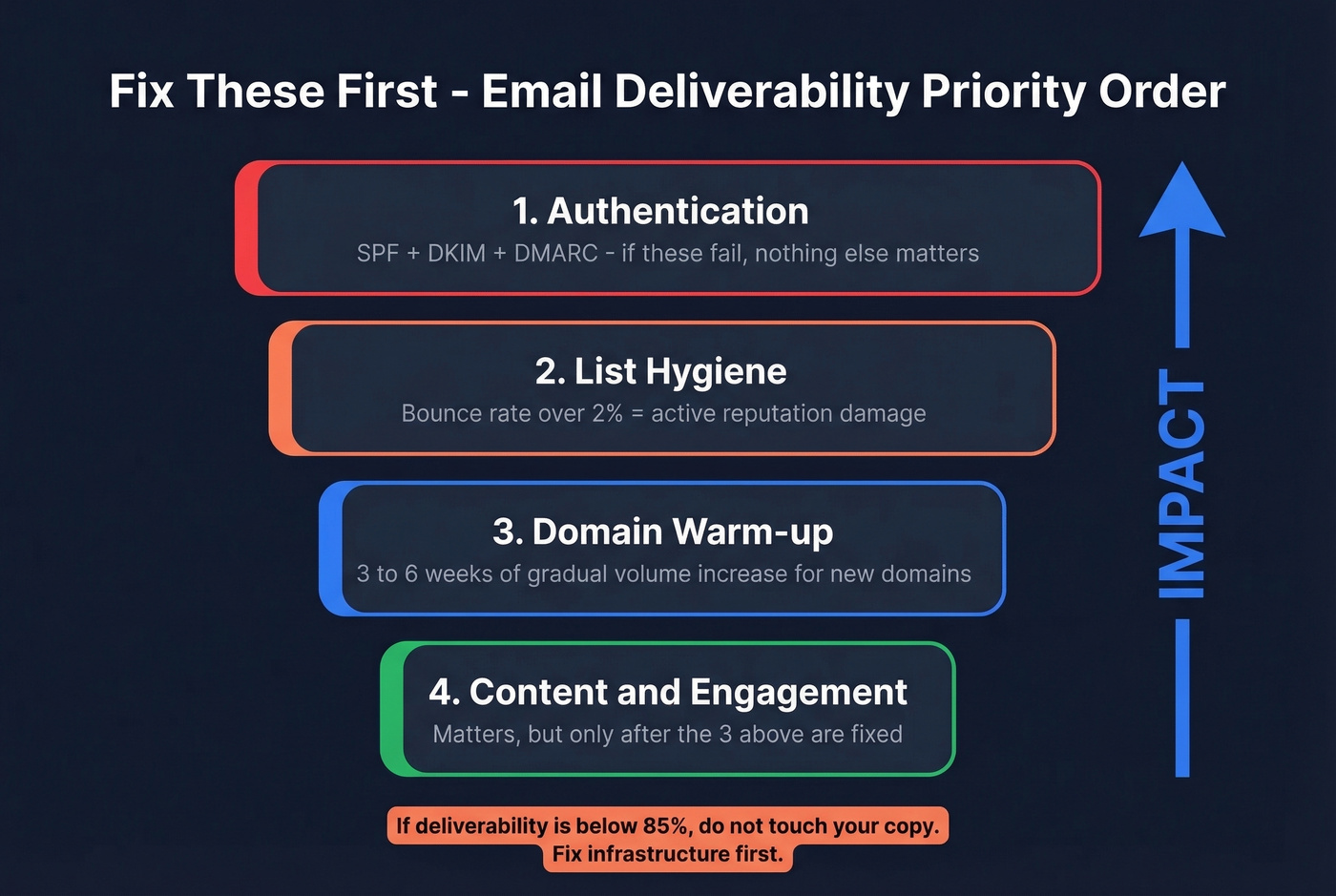
- Authentication - SPF, DKIM, and DMARC. If these are wrong or incomplete, inbox placement falls apart fast, and bulk-sender rules now enforce them.
- List hygiene - once your bounce rate creeps past 2%, you're over the industry-accepted threshold and you start damaging deliverability.
- Domain warm-up - new domains need 3-6 weeks of gradual volume before you send at scale.
- Content and engagement - matters, but it's downstream of the three above. Stop blaming subject lines.
Know Your Numbers
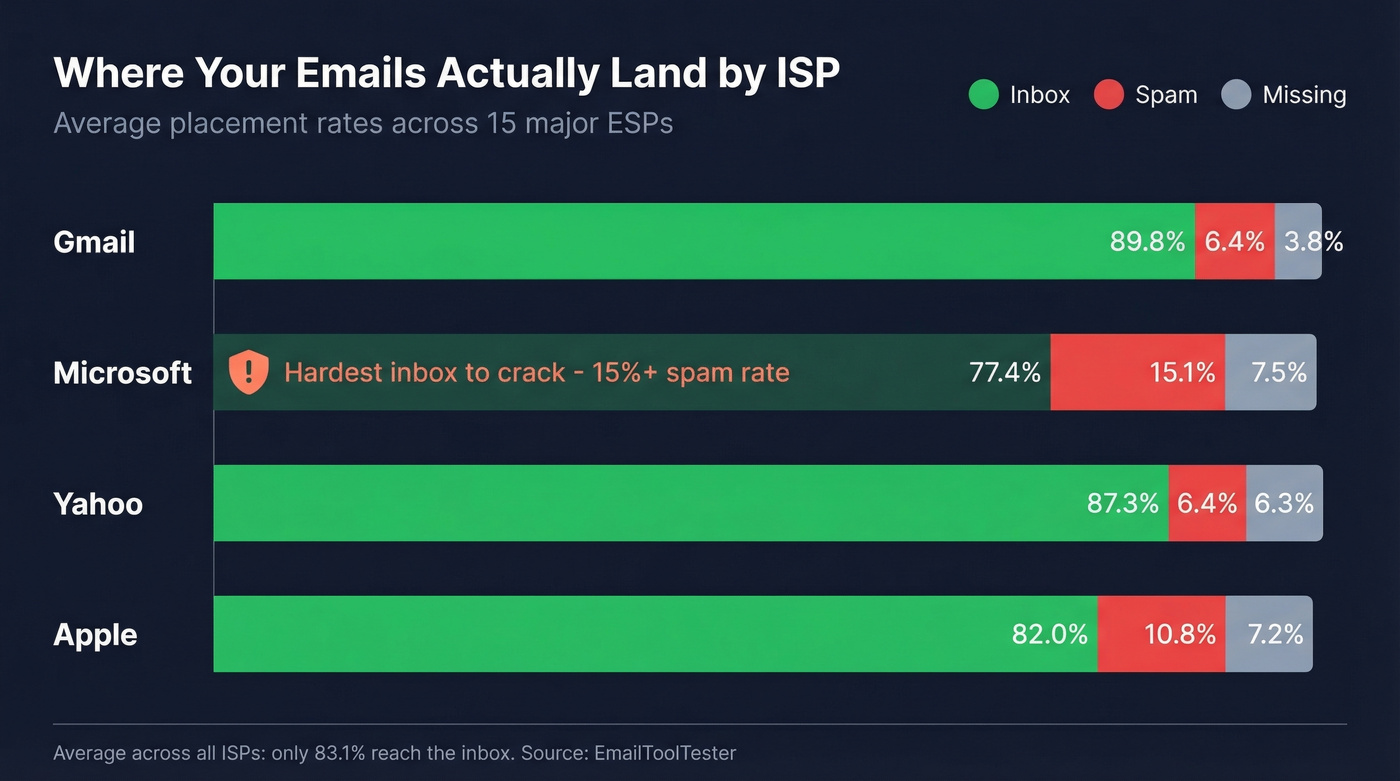
The average deliverability rate across 15 major ESPs is 83.1%. Nearly 17% of emails don't reach the inbox - 10.5% land in spam, 6.4% go missing entirely.
| ISP | Inbox | Spam | Missing |
|---|---|---|---|
| Gmail | 89.8% | 6.4% | 3.8% |
| Microsoft | 77.4% | 15.1% | 7.5% |
| Yahoo | 87.3% | 6.4% | 6.3% |
| Apple | 82.0% | 10.8% | 7.2% |
Microsoft is the hardest inbox to crack - over 15% of emails sent to Outlook land in spam. If your audience skews corporate, your deliverability will naturally run lower than a B2C sender targeting Gmail.
Industry matters too. SaaS and software companies average 87% inbox placement. Non-profits hit 93%. Real estate sits at a brutal 79%. If you're benchmarking, compare against your vertical, not the global average. A "good" inbox rate is above 89%. Below 80% means something's broken.
Why Do Marketing Emails Land in Spam?
Ranked by actual impact:
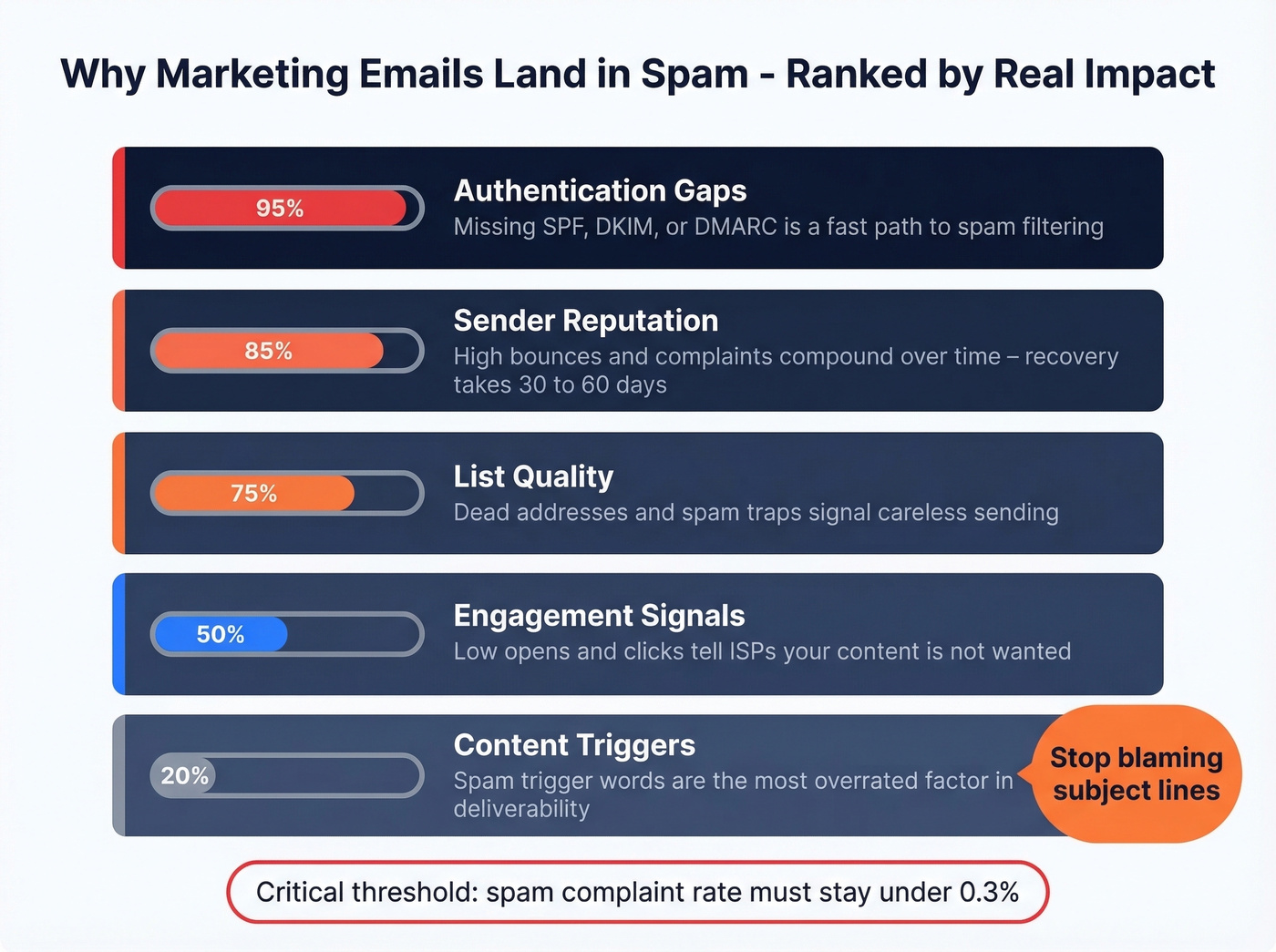
Authentication gaps. Yahoo began enforcing bulk sender requirements in February 2024. For bulk senders, missing SPF + DKIM and a DMARC policy (at least p=none) is a fast path to spam placement and filtering.
Sender reputation. ISPs track your domain's history. High bounce rates, spam complaints, and low engagement compound over time, and recovery takes 30-60 days of clean sending after reputation damage. When your marketing domain's reputation tanks, it can drag transactional emails - password resets, order confirmations - into spam too.
List quality. Dead addresses, spam traps, and role-based emails generate bounces that signal "this sender doesn't maintain their list." This is the single biggest reason bulk emails hit the spam folder instead of the inbox. (If you suspect traps, start with spam trap removal.)
Engagement signals. If recipients don't open, click, or reply, ISPs interpret that as "this content isn't wanted."
Content triggers. Spam trigger words are one of the most overrated factors in deliverability. If your domain reputation and authentication are strong, you can get away with a lot. If your reputation is damaged, even a perfectly written email hits spam.
The spam complaint rate threshold is 0.3% - exceed that consistently and you're in trouble regardless of everything else.
Let's be honest: if your deliverability is below 85%, don't touch your copy. Don't A/B test subject lines. Don't redesign your template. Fix your infrastructure first. We've seen teams spend months optimizing email content when the problem was a misconfigured SPF record the entire time.

Bad data is the #1 reason marketing emails hit spam. Every invalid address on your list pushes you closer to that 2% bounce threshold - and past it, ISPs throttle your sends. Prospeo's 5-step verification catches spam traps, honeypots, and dead addresses before they wreck your sender reputation. Stack Optimize used it to hold 94%+ deliverability with zero domain flags across every client.
Stop guessing which addresses are killing your inbox placement. Verify them.
How to Fix It
Fix Your Authentication
If you're sending at scale, you need SPF, DKIM, and DMARC in place. No exceptions.
SPF tells receiving servers which IPs can send on your behalf. For Google Workspace, the record looks like v=spf1 include:_spf.google.com ~all. Only one SPF record per domain - duplicates cause failures. SPF also has a hard limit of 10 DNS lookups; exceed it and you'll get a PermError that breaks DMARC alignment.
DKIM cryptographically signs your emails. Use 2048-bit keys and publish the TXT record at selector._domainkey.yourdomain.com. (If you want a quick checklist, see how to verify DKIM is working.)
DMARC ties SPF and DKIM together. Start with p=none and enable rua reporting so you can see who's sending as your domain. After 2-4 weeks of clean data, move to p=quarantine, then p=reject. (More detail: DMARC alignment.)
To verify everything's working, send yourself an email in Gmail, click the three dots, and select "Show original." You'll see pass/fail for SPF, DKIM, and DMARC right there.
Clean Your List
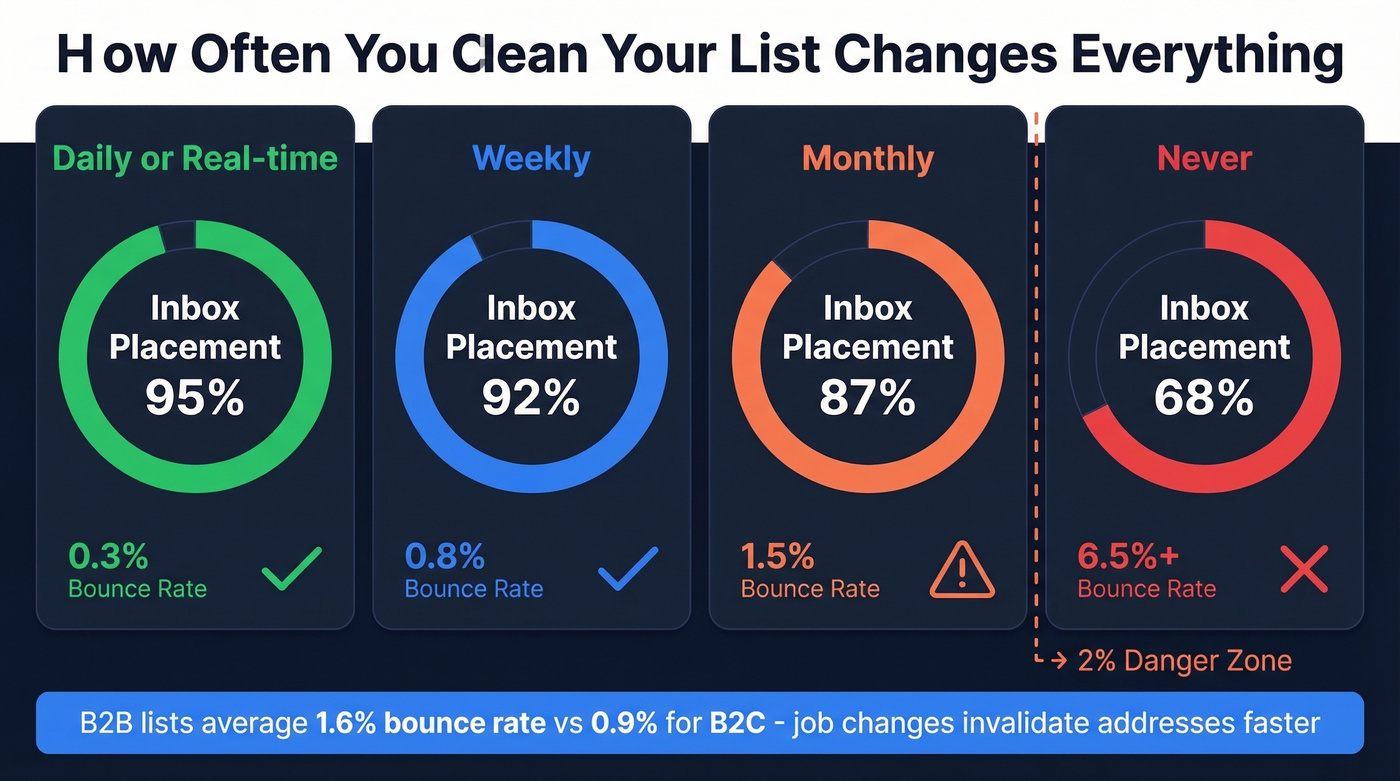
This is where most marketers underinvest. The data is stark:
| Hygiene Frequency | Bounce Rate | Inbox Placement |
|---|---|---|
| Daily/real-time | 0.3% | 95% |
| Weekly | 0.8% | 92% |
| Monthly | 1.5% | 87% |
| Never | 6.5%+ | 68% |
The industry-accepted bounce rate threshold is 2%. Above 5%, ISPs start throttling your sends. B2B lists average a 1.6% bounce rate vs 0.9% for B2C because job changes invalidate addresses faster. (Benchmarks and fixes: email bounce rate.)
Prospeo's email verification runs a 5-step process - including spam-trap removal and honeypot filtering - that catches the addresses ISPs plant to identify careless senders. At 98% email accuracy, it's the most reliable verification we've found. The free tier gives you 75 emails per month to test, and paid plans start at ~$39/mo with no contracts. Stack Optimize built their agency to $1M ARR using Prospeo for client list verification: 94%+ deliverability, under 3% bounce, zero domain flags across all clients.

Warm Up Properly
New domains and IPs need a ramp-up period. Skip this and you'll wreck your reputation before you've built one - the consensus on r/coldemail is that warm-up isn't optional, and we've seen it play out the same way. (Related: email velocity.)
Follow Postmark's 30-day schedule as a baseline. Days 1-2, send 50-100 emails per major provider. Days 3-4, double to 200. Days 5-7, push to 400. After the first week, increase by 20-50% daily. The full warm-up takes 3-6 weeks.
Send to your most engaged subscribers first - their positive engagement signals tell ISPs your domain is legitimate. If metrics dip at any point, cut volume 25-30% until they normalize. Pushing through a dip is how you end up starting over from scratch.
Manage Engagement and Content
Stop memorizing spam word lists. Write like a human, and focus on these structural factors instead. (If you do want to improve copy later, use a framework like email copywriting.)
Send to engaged subscribers first and sunset inactive contacts on a rolling basis - 6 months for high-frequency senders, 12-24 months for lower cadences. Keep your image-to-text ratio around 60% text / 40% images. Every email must include a one-click unsubscribe mechanism per RFC 8058, and you need to honor unsubscribes within 2 days. Not 10 days. Two. That's the standard Yahoo now enforces for bulk senders.
B2B lists decay fast - job changes invalidate addresses every week, and your bounce rate creeps up silently. Prospeo refreshes data every 7 days (industry average: 6 weeks) and delivers 98% email accuracy, so the contacts you're sending to actually exist. At ~$0.01 per email, it costs less than a single spam complaint costs your domain reputation.
Clean lists don't land in spam. Start with 75 free verifications, no contract required.
How to Test If You're in Spam
Three tools worth knowing.
Mail-Tester is free and gives you a quick score on a single email covering authentication, content, and blacklists - it's the fastest sanity check available. GlockApps at $59/mo runs seed-list tests across ~100 mailboxes and shows Gmail Primary vs Promotions splits; a free tier offers 2 tests and 10,000 DMARC checks/month. Postmark's Spam Check is free and analyzes your email against SpamAssassin rules before you send. (More options: email spam checker.)
One caveat: seed-test mailboxes don't generate real engagement signals. They can under-report your actual inbox placement because ISPs factor in opens and clicks that test addresses never produce. Use these tools to identify issues, not as gospel.
Keeping Emails Out of Spam Long-Term
Fixing a spam problem is reactive. The better play is preventing it. Once you've addressed authentication, list hygiene, and warm-up, maintain these habits:
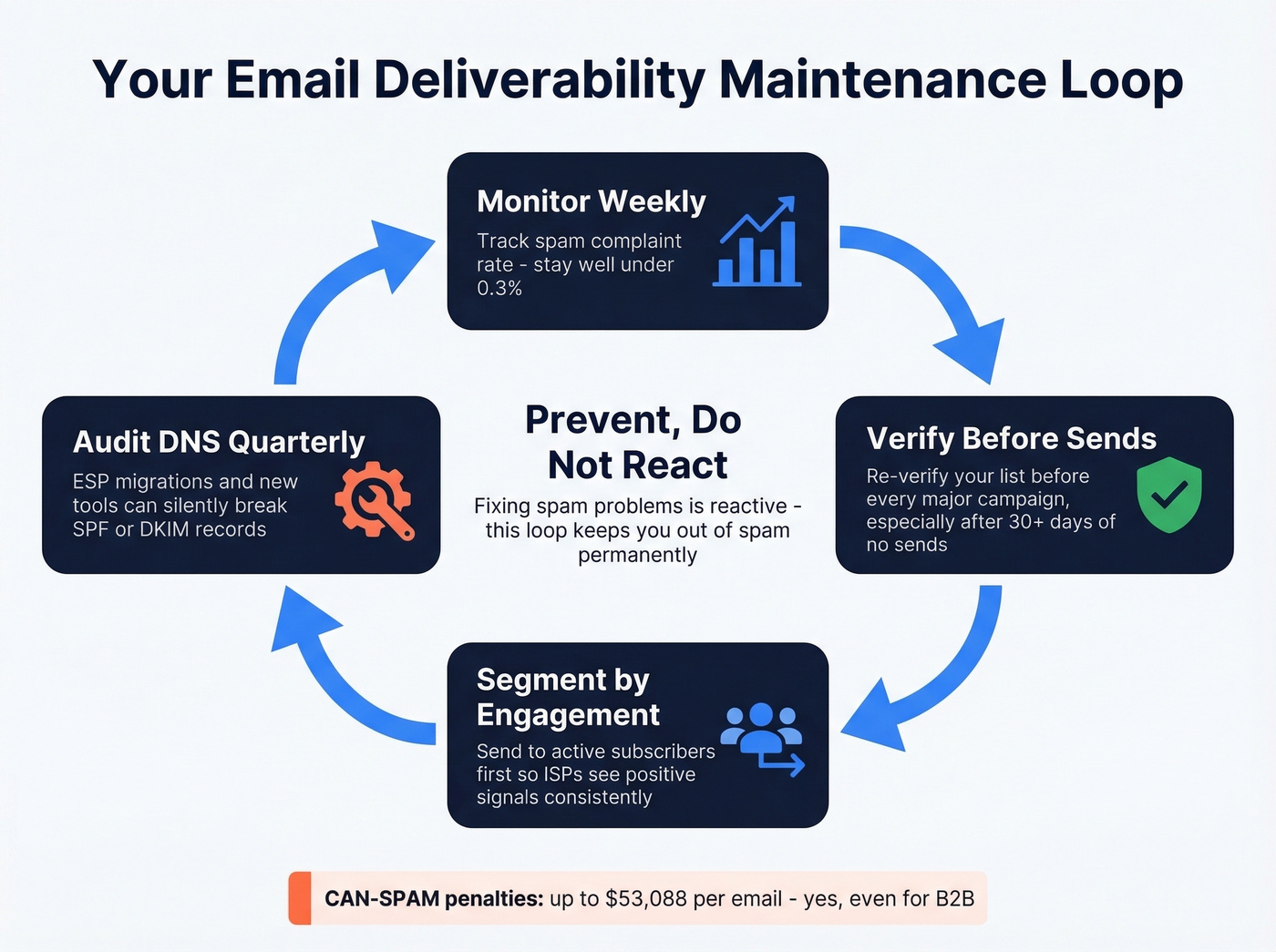
- Monitor your spam complaint rate weekly - stay well under 0.3%.
- Re-verify your list before every major campaign, especially if you haven't sent in 30+ days.
- Segment by engagement so ISPs consistently see positive signals from your sends.
- Audit your DNS records quarterly - ESP migrations and new tools can silently break SPF or DKIM. (If you're troubleshooting reputation, use email reputation tools.)
Compliance Quick Check
CAN-SPAM penalties run up to $53,088 per email - and yes, this applies to B2B. Include a valid physical postal address in every commercial email. Provide a clear opt-out mechanism that works for at least 30 days after sending. Honor opt-outs within 10 business days. You're legally responsible even if you outsource email marketing to an agency.
Don't assume your ESP handles compliance for you.
FAQ
Why did my emails suddenly start going to spam?
Yahoo and Google began enforcing bulk sender requirements in February 2024. If your authentication was incomplete or your spam complaint rate exceeded 0.3%, emails started hitting spam even if nothing else changed. Check SPF, DKIM, and DMARC first - that's the most common culprit.
Does "delivered" mean my email reached the inbox?
No. "Delivered" means the receiving server accepted the message - it could still route to spam or promotions. Confirm actual inbox placement with seed tests from tools like GlockApps or Mail-Tester, which show where your email lands across providers.
How does email verification prevent spam placement?
Invalid addresses cause bounces, which damage sender reputation, which pushes future emails to spam. Verifying your list before each send keeps bounce rates under 2%. Prospeo's 5-step verification at 98% accuracy catches spam traps and honeypots that other tools miss - the free tier covers 75 emails/month.
Why do bulk emails end up in the spam folder?
High volumes without proper authentication, a warmed-up domain, and a clean list trigger ISP risk flags. Bulk emails land in spam most often because of accumulated reputation damage from bounces and complaints - not because of the volume itself. Fix infrastructure before scaling sends.