


Maximizer CRM: Pricing, Reviews, and Honest Pros & Cons
If you're staring at a renewal quote around $89/user/month for a CRM your reps describe as "fine," you're not alone. We've spent time digging through hundreds of user reviews, pricing pages, and community threads to give you a straight answer on whether Maximizer is worth the spend.
Here's the short version: Maximizer is rated 4.0/5 on G2 from 670+ reviews, costs $65-$89/user/month, and is built for Canadian financial advisors who care about PIPEDA-aligned data residency and tight Microsoft Outlook workflows. If that's you, it's a strong pick. If it's not, you're probably overpaying for features you'll never touch.
Maximizer CRM Pricing in 2026
All prices on Maximizer's pricing page are per-user/per-month with annual billing. Monthly billing runs roughly 10-20% higher, though the exact uplift isn't disclosed publicly.
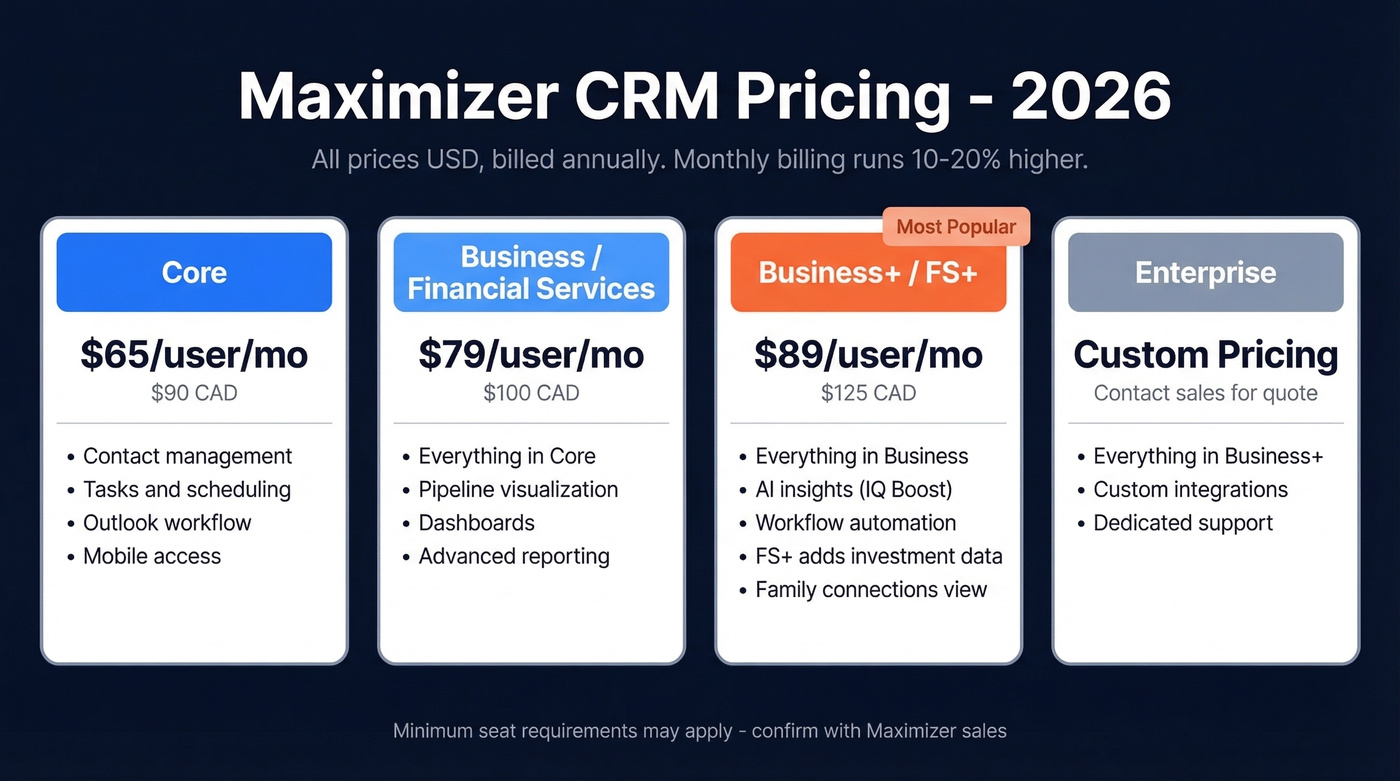
Some third-party sources list minimum seat requirements - commonly 3 users on entry editions and 5 on higher tiers - but Maximizer doesn't confirm this on their official page. Confirm with sales before you sign.
| Tier | USD/user/mo | CAD/user/mo | Key Additions |
|---|---|---|---|
| Core | $65 | $90 | Contact mgmt, tasks, Outlook workflow, mobile |
| Business / Financial Services | $79 | $100 | Pipeline/funnel visualization, dashboards, reporting |
| Business+ / Financial Services+ | $89 | $125 | AI insights, workflow automation; FS+ adds investment & insurance data + family connections |
| Enterprise | Custom | Custom | Contact sales |
The "For Sales" and "For Financial Services" plans share the same price points, but Financial Services+ includes advisor-specific features like investment and insurance data views and family connections visualization.
Maximizer also offers on-premise deployment, priced on request. In our experience, fully loaded on-prem CRM costs - software, hosting, and maintenance combined - often land above $100/user/month in practice.
At $65/user/month for the base tier, Maximizer is priced like a premium CRM. That's more than HubSpot's $20/user/month Starter and roughly 4-5x Zoho's $14/user/month entry point. You're paying for compliance-oriented tooling and Canadian data residency. If you don't need those, the math is hard to justify.
Implementation timelines vary. Between "quick" setups mentioned in reviews and partner-led rollouts, expect anywhere from under 2 weeks to about 6 weeks depending on migration complexity. Partners like Avrion offer guided onboarding packages designed to get teams live within that window.
What 670+ User Reviews Actually Say
Maximizer holds a 4.0/5 on G2 across 670 reviews and a 4.1/5 on Capterra from 366 reviews. On G2, the rating distribution is 42% five-star and 44% four-star - a classic "solid but not exceptional" profile.
G2's review summary repeatedly highlights ease of use and Outlook integration as positives. The consistent negative: reporting is described as "stiff and cumbersome."
Software Advice reviewers get more specific about day-to-day friction. Mass email formatting that looks fine in draft but breaks after sending is a recurring complaint. Household contact management gets called "time-consuming and inconvenient" - a real problem for advisory teams managing relationships by household.
Pros and Cons
What Maximizer Does Well
Ease of use is the most-cited positive across G2 themes with 51 mentions, followed by lead management and task management at 38 each. Once teams are trained, daily workflows are straightforward.
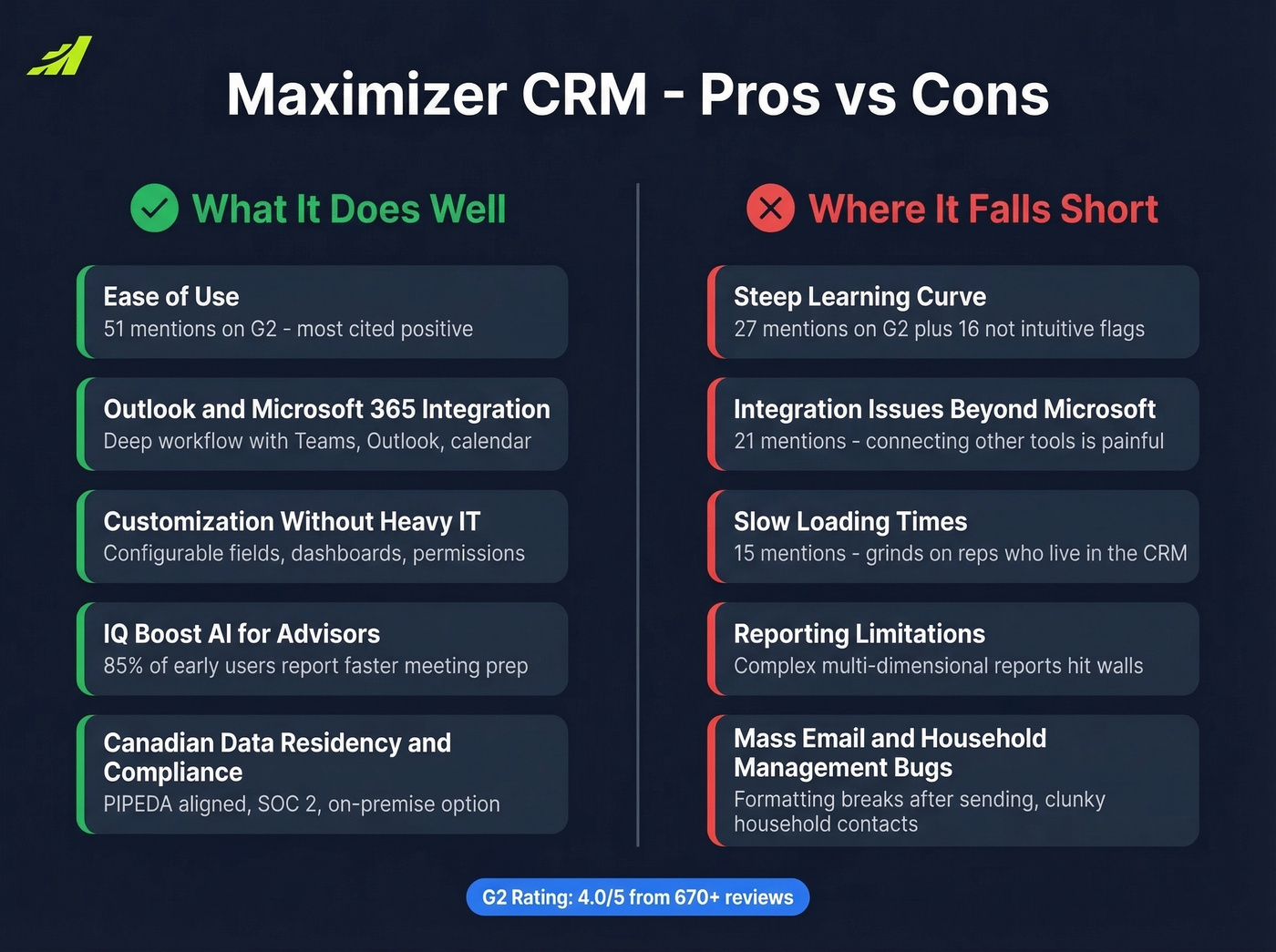
Outlook and Microsoft ecosystem workflows are a genuine strength. Outlook integration is a consistent theme in reviews, and G2 lists broader Microsoft 365 integrations including Teams as part of the ecosystem. For firms already deep in the Microsoft stack, this matters more than most feature comparisons suggest. If Outlook is central to your outbound motion, it’s also worth reviewing Outlook deliverability basics so your emails don’t end up in junk.
Customization without heavy IT is another win. Maximizer supports configurable fields, workflows, dashboards, and permissions. Access controls and security-oriented configuration show up as meaningful positives for teams with stricter governance needs.
IQ Boost AI is Maximizer's AI layer aimed at advisor workflows. 85% of early users reported faster meeting prep, and the feature set includes surfacing KYC reviews and compliance details when opening a client record.
Canadian data residency and compliance positioning round out the strengths. Maximizer emphasizes data stored in Canada, PIPEDA alignment, and SOC 2-compliant security practices - key for firms looking to reduce exposure to foreign jurisdiction risk, including U.S. CLOUD Act concerns. If you’re building a policy around this, our guide to ethical data collection is a useful companion.
Where It Falls Short
Let's be honest: for a CRM at this price point, some of these gaps are frustrating.
Learning curve is the top complaint on G2 with 27 mentions, plus 16 "not intuitive" flags. That's a lot of friction for a tool that lists ease of use as a selling point - especially if you’re already fighting CRM user adoption issues.
Integration issues show up 21 times. While Outlook and Microsoft workflows are strong, connecting other tools can be painful.
Slow loading gets 15 mentions - the kind of thing that grinds on reps who live in the CRM all day.
Reporting limitations surface across platforms, especially for complex, multi-dimensional reporting. If your leadership team wants custom dashboards with drill-down capability, you'll hit walls. (If forecasting is the real goal, start with forecast management fundamentals before blaming the CRM.)
Mass email formatting issues at $65+/user/month? That shouldn't happen. Household contact management feeling clunky is worse - it's a core use case for the financial-advisor audience Maximizer targets.

A $65/user/month CRM is only as good as the data inside it. Prospeo enriches your Maximizer, HubSpot, or Zoho CRM with 98% accurate emails and 125M+ verified mobiles - returning 50+ data points per contact at a 92% match rate.
Stop overpaying for a CRM and underpaying for the data that drives it.
Who Should Buy (And Who Shouldn't)
Use Maximizer if you're a Canadian financial advisory firm that needs Canadian data residency, on-premise deployment options, and strong Outlook/Microsoft workflows. TEC analysts describe Maximizer as "popularly used by brokers and financial investment advisors," and the product packaging clearly leans into that niche.
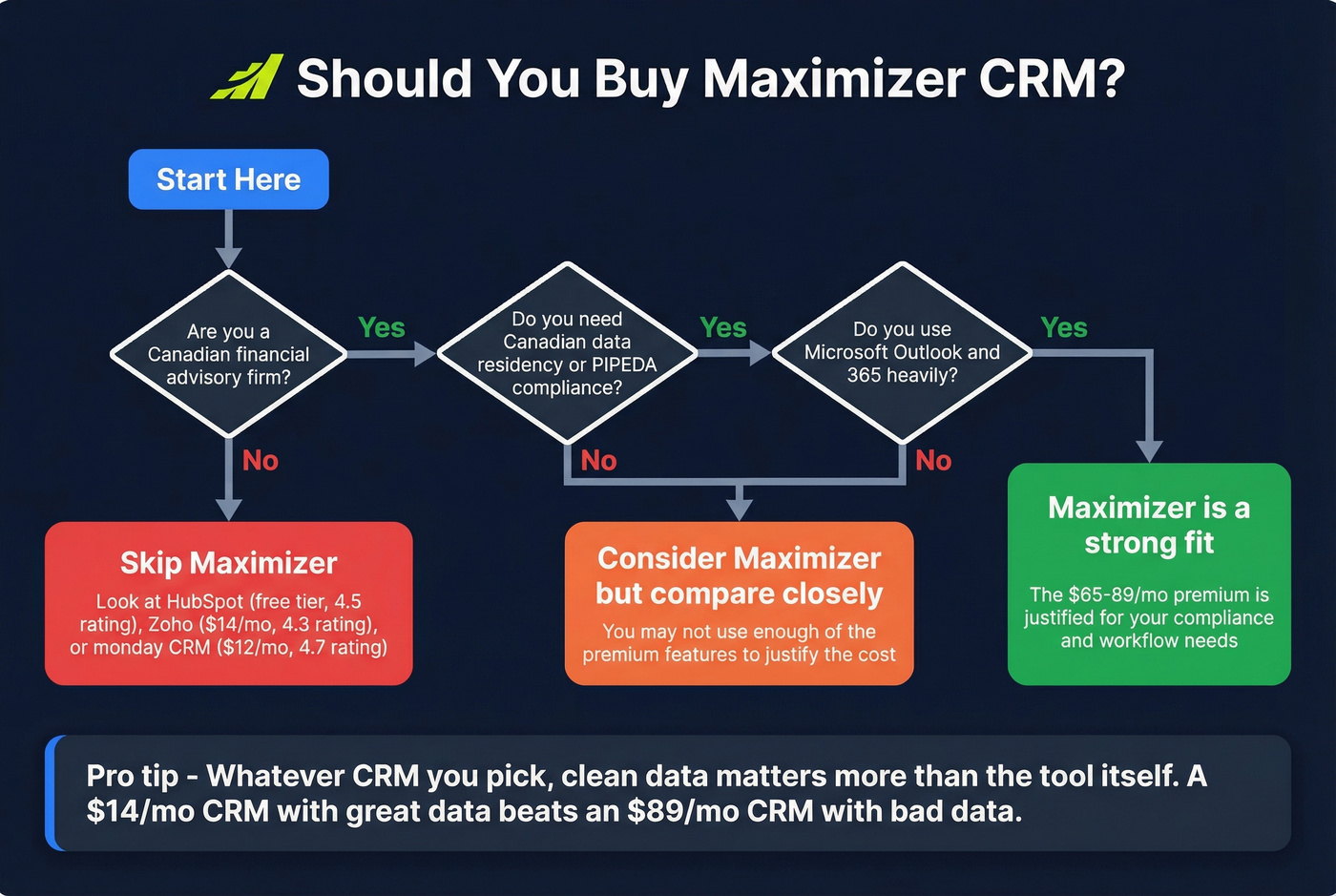
Skip Maximizer if you're a general sales team, need a modern UI, need a 1-2 seat setup, or require advanced reporting. We've evaluated dozens of CRMs at this price point, and Maximizer's value proposition is strongest inside its target niche. Unless you specifically need Canadian data residency and financial services compliance tooling, there's little reason to pay $65+/user/month for a 4.0-rated CRM when better-rated alternatives cost a fraction of the price.
Here's a take worth considering: Maximizer is the best compliance-first CRM for Canadian advisors. But "compliance-first" is doing a lot of heavy lifting in that sentence. For most sales teams, compliance isn't the bottleneck. Bad data is. Fix the data problem first, and a $14/month Zoho seat can outperform an $89/month Maximizer seat in many day-to-day outbound workflows - especially if you’re running a modern cold outbound motion.
How Maximizer Compares on Price
| CRM | Starting Price | G2/Capterra Rating | Best For |
|---|---|---|---|
| Maximizer | $65/user/mo | 4.0-4.1 | Canadian financial advisors |
| HubSpot CRM | Free / $20/user/mo | 4.5 | Modern UI, free tier |
| Zoho CRM | $14/user/mo | 4.3 | Budget-friendly SMBs |
| Salesforce | $25/user/mo | 4.4 | Enterprise scale |
| monday CRM | $12/seat/mo | 4.7 | Visual, collaborative teams |
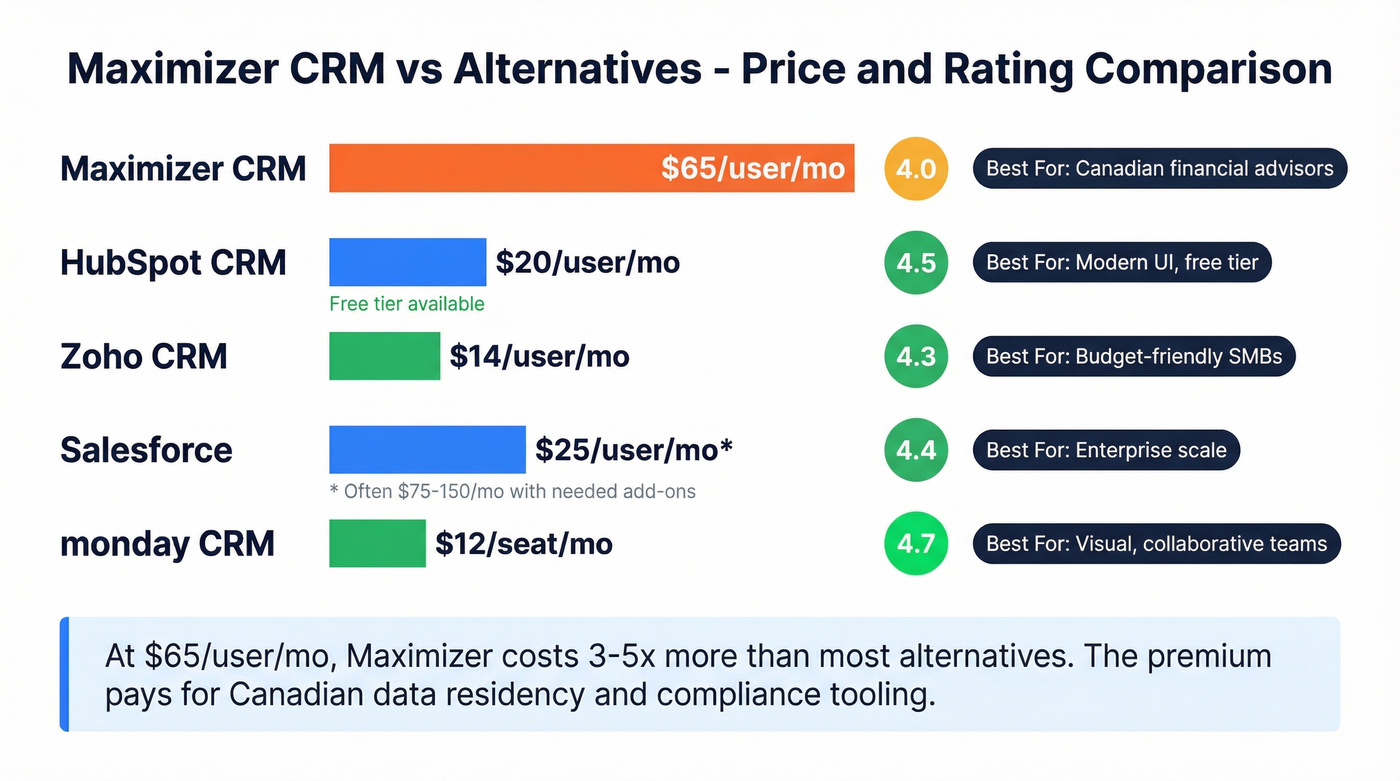
A word of caution on "starting from" prices: Salesforce at $25/month often becomes $75-$150/month once you add the features you actually need. But even accounting for that, Maximizer's $65 floor is steep relative to its broader-market UX and reporting feedback.
Whatever CRM you pick, pipeline quality depends on the data feeding it. Garbage contacts in any CRM produce garbage results - so it’s worth investing in database hygiene and a reliable email address verification workflow.
The Bottom Line
Maximizer CRM earns its place for one specific buyer: Canadian financial advisors who need compliance-oriented infrastructure, strong Microsoft/Outlook workflows, and the option to keep data on-premise. When you weigh the pricing, reviews, and real-world pros and cons together, the verdict is clear - it's a niche tool that excels in its niche. For everyone else, HubSpot, Zoho, or Salesforce will usually deliver more value per dollar.
Whatever CRM you choose, your pipeline depends on data quality upstream. Prospeo enriches CRM records with 98%-accurate emails and verified mobile numbers on a 7-day refresh cycle, integrates natively with Salesforce and HubSpot, and starts free with no contracts - so your CRM actually has clean data to work with. If you’re comparing enrichment vendors, see our breakdown of lead data enrichment tools.
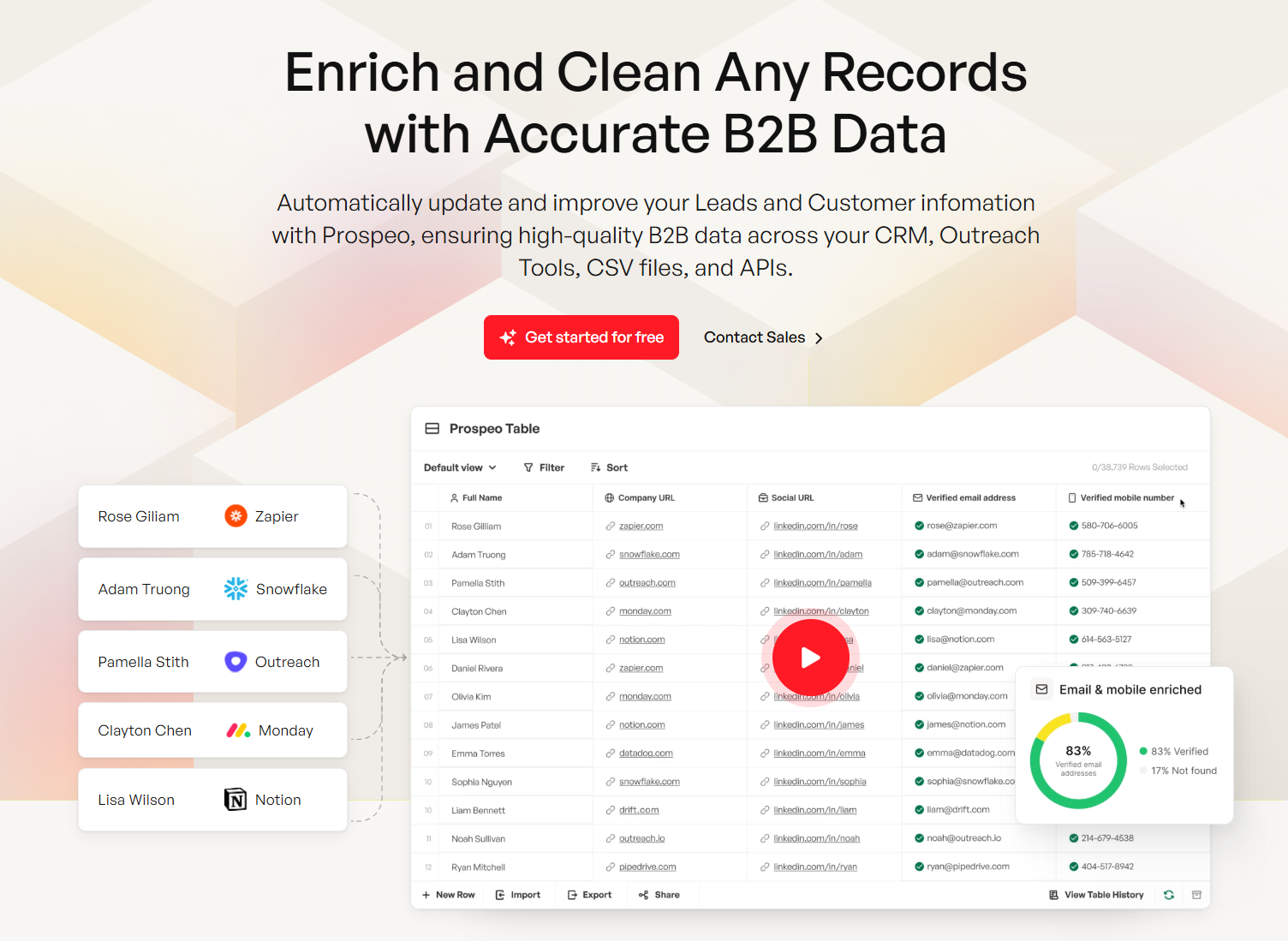
Bad data is the real bottleneck - not your CRM choice. Prospeo's 7-day data refresh cycle means your pipeline never runs on stale contacts, whether you use Maximizer, Zoho, or HubSpot. Native integrations with Salesforce and HubSpot make enrichment automatic.
A $14/mo CRM with Prospeo data outperforms an $89/mo CRM with bad data.
FAQ
Does Maximizer CRM offer a free trial?
Yes, Maximizer offers a free trial on its cloud plans. You'll need to provide contact information to activate it - no credit card requirement is published on the pricing page. Trial length is typically 30 days.
Is Maximizer billed monthly or annually?
All published prices ($65-$89/user/month) assume annual billing. Monthly billing runs roughly 10-20% higher, but the exact uplift isn't disclosed publicly. Always confirm total contract cost with sales before signing.
What's the minimum number of users?
Some third-party sources list minimums of 3 users for entry editions and 5 for higher editions. Maximizer's official pricing page doesn't confirm seat minimums - verify directly with their sales team before committing.
What are the best Maximizer CRM alternatives?
HubSpot CRM is the strongest general alternative with a free starting tier and a 4.5 G2 rating. Zoho CRM offers the best value at $14/user/month. For teams that need accurate contact data regardless of which CRM they pick, Prospeo provides 98%-accurate email enrichment with a free tier of 75 credits/month - useful for keeping any CRM's pipeline clean without added cost.