

Meeting Reschedule Email Templates + the Logistics Nobody Tells You
Professionals spend 11.3 hours per week in meetings, and 42% of patients would switch providers after being rescheduled just twice. That gap between "no problem" and "find a new vendor" comes down to one thing: a well-structured reschedule email and the discipline to actually update the calendar invite.
You don't need a dozen templates. You need one good structure, a few variations, and the calendar mechanics every other guide skips.
Subject Lines That Get Opened
47% of recipients decide whether to open based on the subject line alone. Keep yours under 50 characters - 33 if you want full visibility on mobile. A strong subject line sets expectations before the recipient even clicks.
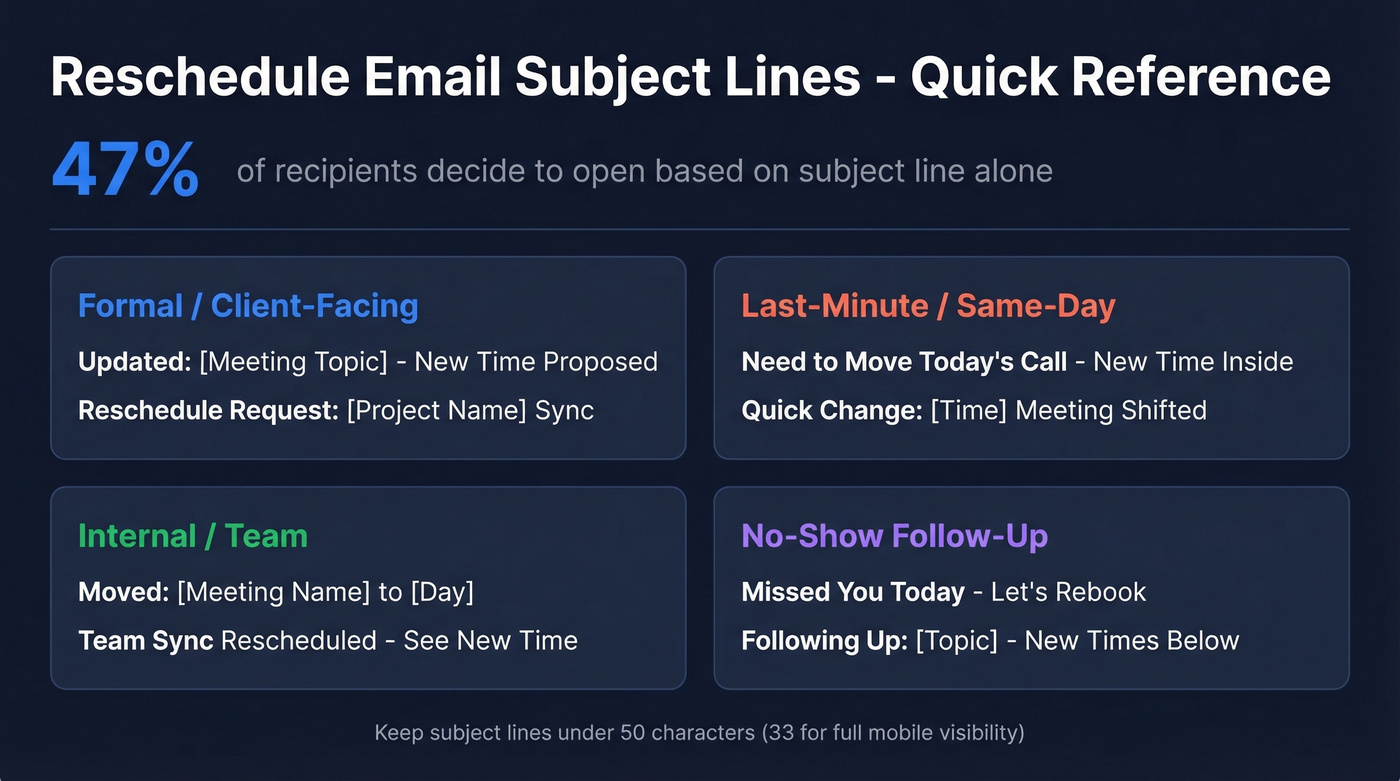
Formal / client-facing:
- Updated: [Meeting Topic] - New Time Proposed
- Reschedule Request: [Project Name] Sync
Last-minute:
- Need to Move Today's Call - New Time Inside
- Quick Change: [Time] Meeting Shifted
Internal / team:
- Moved: [Meeting Name] to [Day]
- Team Sync Rescheduled - See New Time
No-show follow-up:
- Missed You Today - Let's Rebook
- Following Up: [Topic] - New Times Below
For more ideas, pull from these subject line patterns and adapt them to your tone.
Templates for Every Scenario
Formal / Professional
Subject: Reschedule Request: [Meeting Topic]
Hi [Name],
I need to reschedule our [Day] meeting due to a conflict. I apologize for the inconvenience.
Would any of these work instead?
- [Day], [Date] at 10:00 AM ET / 3:00 PM GMT
- [Day], [Date] at 2:00 PM ET / 7:00 PM GMT
I've updated the calendar invite to reflect [preferred time]. Let me know if another slot is better.
Client or Prospect
Subject: Updated: [Meeting Topic] - New Time Proposed
Hi [Name],
I need to move our [Day] call - apologies for the shift. I want to make sure we have your team's full attention on this.
Here are a few options:
- [Day], [Date] at 11:00 AM ET / 4:00 PM GMT
- [Day], [Date] at 1:00 PM ET / 6:00 PM GMT
Or pick a time that works best: [scheduling link]
I'll send an updated calendar invite as soon as we confirm.
If you're rescheduling because a prospect went dark, verify you still have their current email first. We've seen reschedule emails bounce simply because someone changed jobs and nobody updated the CRM. A quick verification with a tool like Prospeo saves you from sending a perfectly crafted email into the void. If you’re troubleshooting bounces, this guide on email bounce rate helps you diagnose what’s actually happening.

Last-Minute / Same-Day
Subject: Need to Move Today's Call - New Time Inside
Hi [Name],
Something urgent came up and I can't make our [time] call today. I'm sorry for the short notice.
Can we do [new time] today, or [time] tomorrow? I'll update the invite once you confirm.
Same-day reschedules cost social capital. Use them sparingly - especially if you’re already running a tight sequence management cadence.
Internal / Team
Subject: Moved: [Meeting Name] to [Day]
Hey team,
Moving our [Day] sync to [New Day] at [Time] [Time Zone]. Calendar invite is already updated - check your inbox.
If the new time doesn't work, let me know by EOD.
Recurring Meeting Change
Subject: Change to [Meeting Name] Schedule
Hi team,
I'm shifting our recurring [Meeting Name] from [old time] to [new time] starting [date].
I've updated this instance only on the calendar - the rest of the series stays the same. If you need me to change all future instances, just say the word.
Meeting Postponed (No Firm Date Yet)
Subject: [Meeting Topic] Postponed - New Date TBD
Hi [Name],
Due to [brief reason], we need to postpone our [Day] meeting. I want to make sure we reconvene when everyone can give this the attention it deserves.
I'll follow up by [date] with a new time. In the meantime, I've removed the calendar hold so it doesn't block your schedule.
Use this format when you don't yet have a replacement date. It's more transparent than proposing times you'll probably need to change again.
No-Show Follow-Up
Subject: Missed You Today - Let's Rebook
Hi [Name],
I was on the line for our [time] call today but didn't see you join - no worries, these things happen.
I'd still love to connect. Pick a time that works: [scheduling link]
If you need a stronger nudge, borrow a few lines from these sales follow-up templates.
Confirmation After Rescheduling
Subject: Confirmed: [Meeting Topic] - [New Day/Date]
Hi [Name],
Confirming our rescheduled meeting:
- When: [Day], [Date] at [Time] ET / [Time] GMT
- Where: [Meeting link]
Calendar invite is updated. See you then.

A perfect reschedule email means nothing if it bounces. 23% of B2B contacts change jobs every year, and outdated CRM data turns your polished templates into wasted effort. Prospeo verifies emails with 98% accuracy on a 7-day refresh cycle - so your reschedule actually lands.
Verify your prospect's email before you reschedule into the void.
How to Update the Calendar Invite
Here's the thing: every reschedule guide says "send an updated calendar invite." Almost none explain how. I've watched deals go cold for a week because someone sent a perfectly worded email but never touched the calendar event.
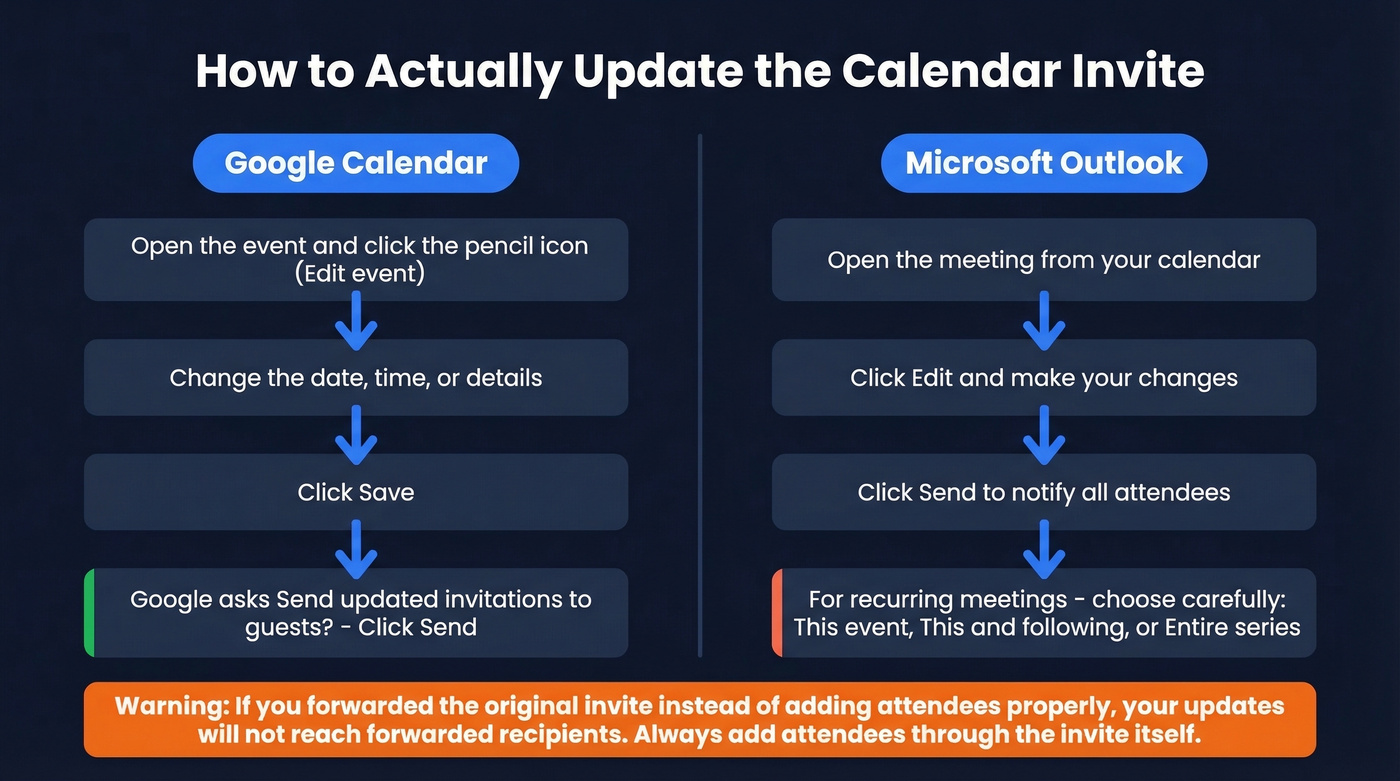
Google Calendar
Open the event and click Edit event (pencil icon). Change the date, time, or details. Click Save. Google asks "Send updated invitations to guests?" - click Send. Guests get an updated email and their calendar reflects the change automatically.
Microsoft Outlook
Open the meeting from your calendar and click Edit. Make your changes, then click Send to notify attendees. For recurring meetings, Outlook gives you three options: edit this event, edit this and all following, or edit the entire series. Pick carefully - editing the series when you only mean to change one instance will confuse everyone on the thread.
The Forwarding Pitfall
If you forwarded the original invite instead of adding attendees properly, your updates won't reach everyone who received the forward. This is a common Outlook issue that bites teams at scale. Always add attendees through the invite itself, not via forward.
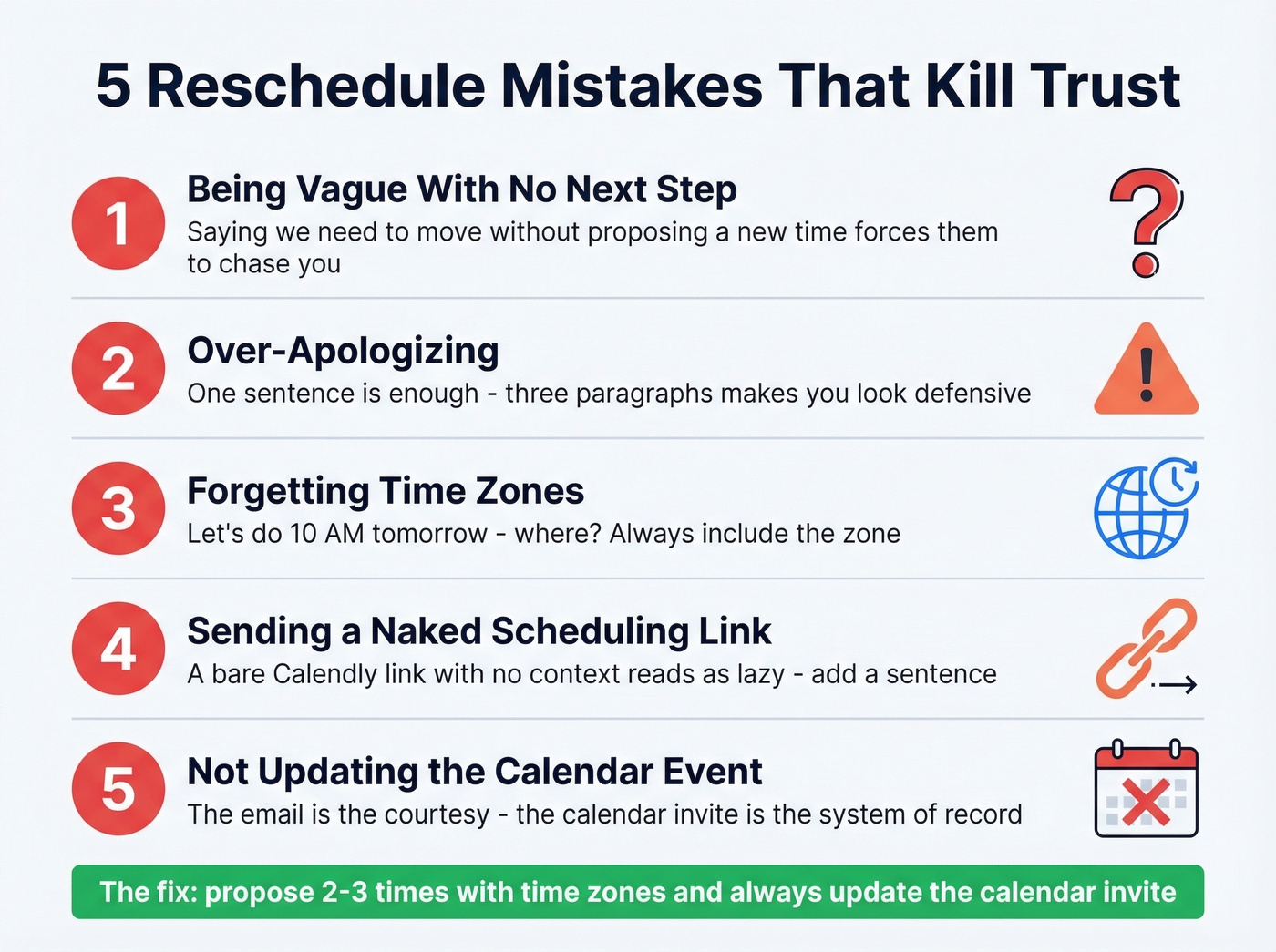
Five Mistakes That Kill Trust
- Being vague with no next step. "We need to move our meeting" with no proposed time forces the other person to do the work. Don't make them chase you.
- Over-apologizing. One sentence is enough. Three paragraphs explaining why makes you look defensive.
- Forgetting time zones. "Let's do 10 AM tomorrow" - where? Always include the zone. Always. If you’re coordinating globally, use a simple time zone checklist so nobody misses the invite.
- Sending a naked scheduling link. Dropping a bare Calendly link without context reads as lazy. Frame it: "Pick a time that works for you: [link]."
- Not updating the calendar event. The email is the courtesy. The calendar invite is the system of record. Skip the invite update and expect confusion.
The consensus on r/sales and r/Outlook echoes the same frustration over and over: vague emails with no proposed alternative time. Don't be that person.
Reschedule Best Practices
Let's break this down into a pre-send checklist you can actually use:
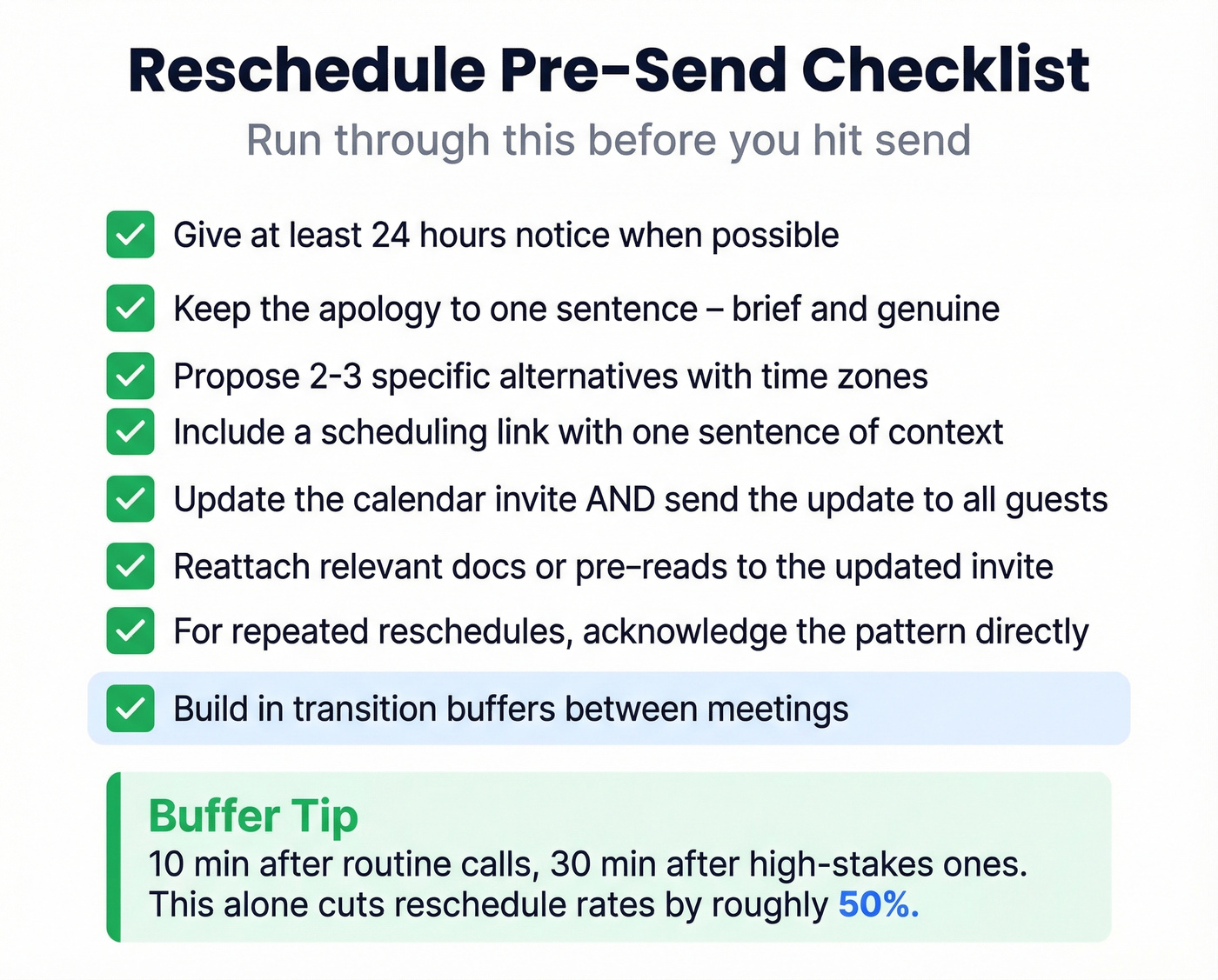
- Give at least 24 hours' notice when possible
- Keep the apology to one sentence - brief and genuine beats elaborate
- Propose 2-3 specific alternatives with time zones included
- Include a scheduling link, but add one sentence of context before it
- Update the calendar invite, not just the email, and send the update to all guests
- Reattach any relevant docs or pre-reads to the updated invite so momentum doesn't stall
- For repeated reschedules, acknowledge the pattern directly and offer extra flexibility on timing
- Build in transition buffers - 10 minutes after routine calls, 30 after high-stakes ones - so you're not rescheduling because you ran over
If you’re doing this at scale, it’s worth tightening your sales communication standards so reschedules don’t feel ad hoc.
We've found that the buffer tip alone cuts our team's reschedule rate by roughly half. Back-to-back scheduling is the silent killer of meeting reliability.
You just spent time crafting the right reschedule email, picking the perfect subject line, and proposing new times. But if your contact changed roles and nobody updated the CRM, none of it matters. Prospeo's enrichment returns 50+ data points per contact at a 92% match rate - keeping your pipeline current so every email you send reaches a real person.
Stop rescheduling meetings with people who left the company six months ago.
A lot of this comes back to list hygiene and data enrichment - because rescheduling is pointless if you’re emailing the wrong person.
FAQ
How far in advance should I reschedule?
Give at least 24 hours' notice whenever possible. Same-day reschedules happen, but they cost social capital - lead with a genuine one-sentence apology and propose the new time in the same message so the other person doesn't have to chase you.
Is it unprofessional to reschedule twice?
It's risky. That 42% stat about patients switching providers after two reschedules applies broadly - clients and prospects feel the same way. If it happens, acknowledge the pattern directly, apologize once, and let the other person pick the replacement slot to restore a sense of control.
What should a meeting reschedule email include?
Three things: a brief apology, 2-3 proposed alternative times with time zones, and confirmation that you'll update the calendar invite. That structure works whether you're writing a formal client email or a quick Slack-style note to your team.
How do I handle rescheduling across time zones?
Always list times in at least two zones - yours and the recipient's. If you're unsure of their zone, include UTC as a universal reference. Tools like World Time Buddy make this trivial, and it shows respect for the other person's schedule.