

Remote Sales Meeting Tips: Templates, Scripts, and Frameworks for 2026
Ten minutes before a call you didn't book, you're scrambling through CRM notes, skimming a prospect's profile, and praying the deck your AE sent last week is still relevant. Sound familiar? A Corporate Visions survey of 500+ B2B salespeople found that 70% don't believe remote presentations can be as effective as in-person. They're wrong - 76% of B2B decision-makers say virtual selling is equally or more effective than face-to-face. The gap isn't the medium. It's preparation.
Only 26% of buyers think sellers actually listen well on virtual calls. Just 16% say sellers make an effective ROI case remotely. Buyers aren't rejecting video - they're rejecting lazy video. The best virtual selling strategies all start in the same place: what you do before you ever open the meeting link.
The Quick Version
- Send a structured agenda before every call. Copy-paste templates are below.
- Keep it under 44 minutes. A study of 945 meetings found video calls under 44 minutes are less exhausting than other formats; beyond that, the advantage disappears.
- Verify your prospect data before the meeting so your follow-up actually reaches the inbox, not a dead address.
The 10-Minute Pre-Call Briefing
The most common complaint on r/techsales? Reps getting pulled into meetings "set up by someone else" with thin context, then scrambling across CRM, email, and professional profiles trying to piece together who they're talking to and why. That scramble is where deals start dying - before the call even begins.
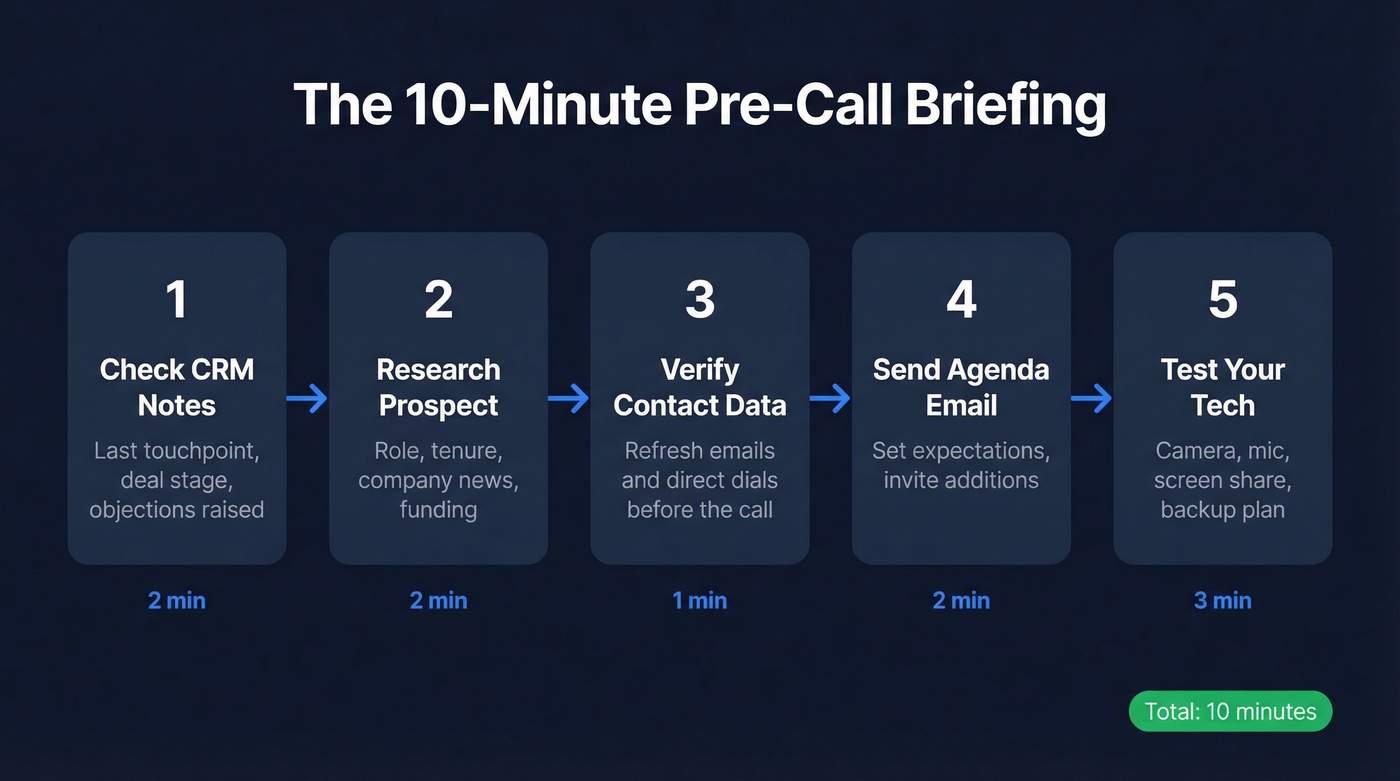
Here's the pre-call workflow we use. It takes 10 minutes and kills the blind-walk-in:
Check CRM notes and recent activity. Last touchpoint, deal stage, any objections raised. If there's a previous call recording, skim the summary.
Research the prospect. Role, tenure, company news, recent funding, headcount changes. Two minutes of context beats twenty minutes of generic discovery questions.
Verify contact data. Contact data decays fast - people change roles, companies update domains, old emails go stale. Prospeo's Chrome extension pulls verified emails and direct dials from any website or CRM in one click, refreshed every 7 days with 98% email accuracy. Run it before the call so you're not chasing bad numbers afterward. (If you’re comparing vendors, start with these data enrichment services.)
Send the agenda and a pre-meeting email. Something simple: "Looking forward to our chat - here's a quick agenda. Let me know if there's anything specific you'd like to add." This sets expectations and signals professionalism.
Test your tech 15 minutes early. Camera, mic, screen share, internet connection. Have a backup plan - a phone number to call if video drops.

For the tech check, confirm these minimum bandwidth requirements:
| Call Type | Quality | Bandwidth Needed |
|---|---|---|
| 1:1 | HQ | 600 kbps |
| 1:1 | 720p | 1.2 Mbps |
| 1:1 | 1080p | 1.8 Mbps |
| Group | HQ | 1.0 Mbps |
| Group | Gallery view/720p | 1.5 Mbps |
| Group | 1080p | 3.0 Mbps |
Agenda Templates You Can Steal
71% of senior managers say meetings are unproductive and inefficient. The fix isn't complicated - it's a structured agenda sent in advance. A solid agenda includes a meeting goal, attendees, timed items, pre-reads if relevant, and action items with owners and deadlines.
Discovery Call (30 Min)
Subject: Agenda for [Date] - [Company] + [Your Company]
- Introductions & meeting goal (5 min)
- Discovery: current challenges and priorities (10-15 min)
- Solution alignment & initial value discussion (10 min)
- Next steps & action items (5 min)
Pre-read: [link to relevant case study or one-pager]
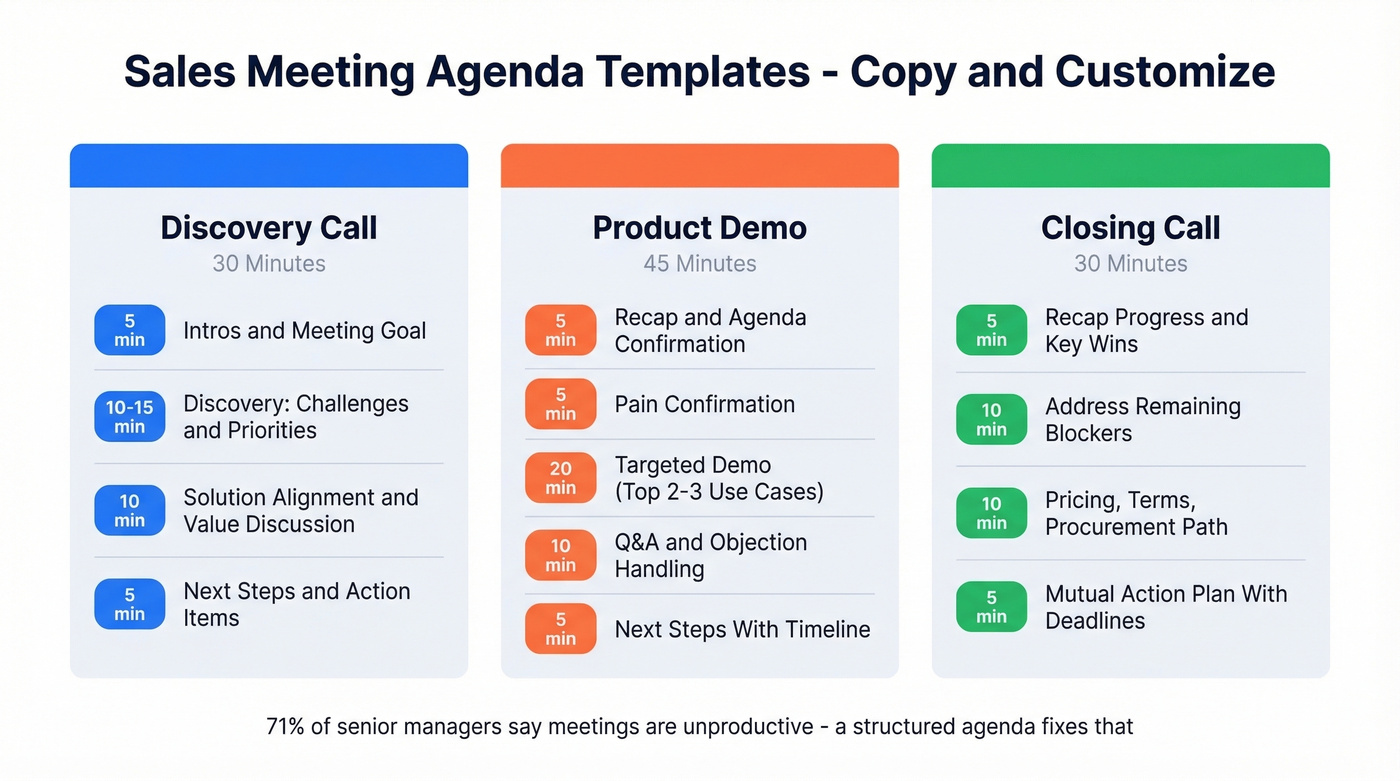
Product Demo (45 Min)
Subject: Demo Agenda - [Date]
- Recap & agenda confirmation (5 min)
- Pain confirmation: what's changed since discovery (5 min)
- Targeted demo - your top 2-3 use cases only (20 min)
- Q&A and objection handling (10 min)
- Next steps with timeline (5 min)
Note: We'll focus the demo on [specific pain points from discovery]. Let me know if priorities have shifted.
Closing / Next-Steps Call (30 Min)
Subject: Next Steps - [Company] + [Your Company]
- Recap progress and key wins so far (5 min)
- Address remaining concerns or blockers (10 min)
- Pricing, terms, and procurement path (10 min)
- Mutual action plan with owners and deadlines (5 min)
Each template includes time blocks for a reason. Without them, discovery bleeds into demo territory and demos turn into aimless feature tours. Closing calls end with "let's circle back next week" instead of a signed contract.

Your pre-call prep is only as good as your data. Prospeo refreshes contact records every 7 days - not every 6 weeks - so the email and phone number you pull before a remote meeting actually works. 98% email accuracy, 125M+ verified mobiles, one-click enrichment from any CRM or profile.
Walk into every virtual call with verified contact data, not stale CRM records.
Running the Call: Facilitation That Closes
Get Cameras On (With a Script)
Closing rates are at least 10% higher when cameras are on. But you can't demand it - you have to earn it:
"I always like to have cameras on for these calls. Part of it is selfish - I need to see your reactions to know if what I'm showing is actually relevant. And you should be able to see me too, so this doesn't feel like a webinar. Would you mind turning yours on?"
That framing - mutual benefit, not a mandate - works. If they decline, don't push it. Move on.
Facilitate, Don't Lecture
The biggest remote meeting killer is the 20-minute monologue. Three rules to prevent it:
Direct questions by name. "Jack, what's your team's biggest bottleneck right now?" is ten times more effective than "Does anyone have thoughts on that?" Open-ended group questions on video calls produce silence, not engagement.
Stop screen sharing when you ask a question. The moment you stop sharing, faces snap back to full size. It shifts the dynamic from presentation to conversation. This is the single most underused facilitation tactic in virtual selling - and in our experience, it's the one that makes the biggest difference. If you must share, keep it tight and come back to faces often.
Never say "does anyone have questions?" Try "What's the one thing I haven't addressed that's on your mind?" instead. It's specific enough to prompt a real answer.
Run Discovery With the Menu of Pain
The Menu of Pain framework from UserGems is the fastest way to run discovery on a video call:
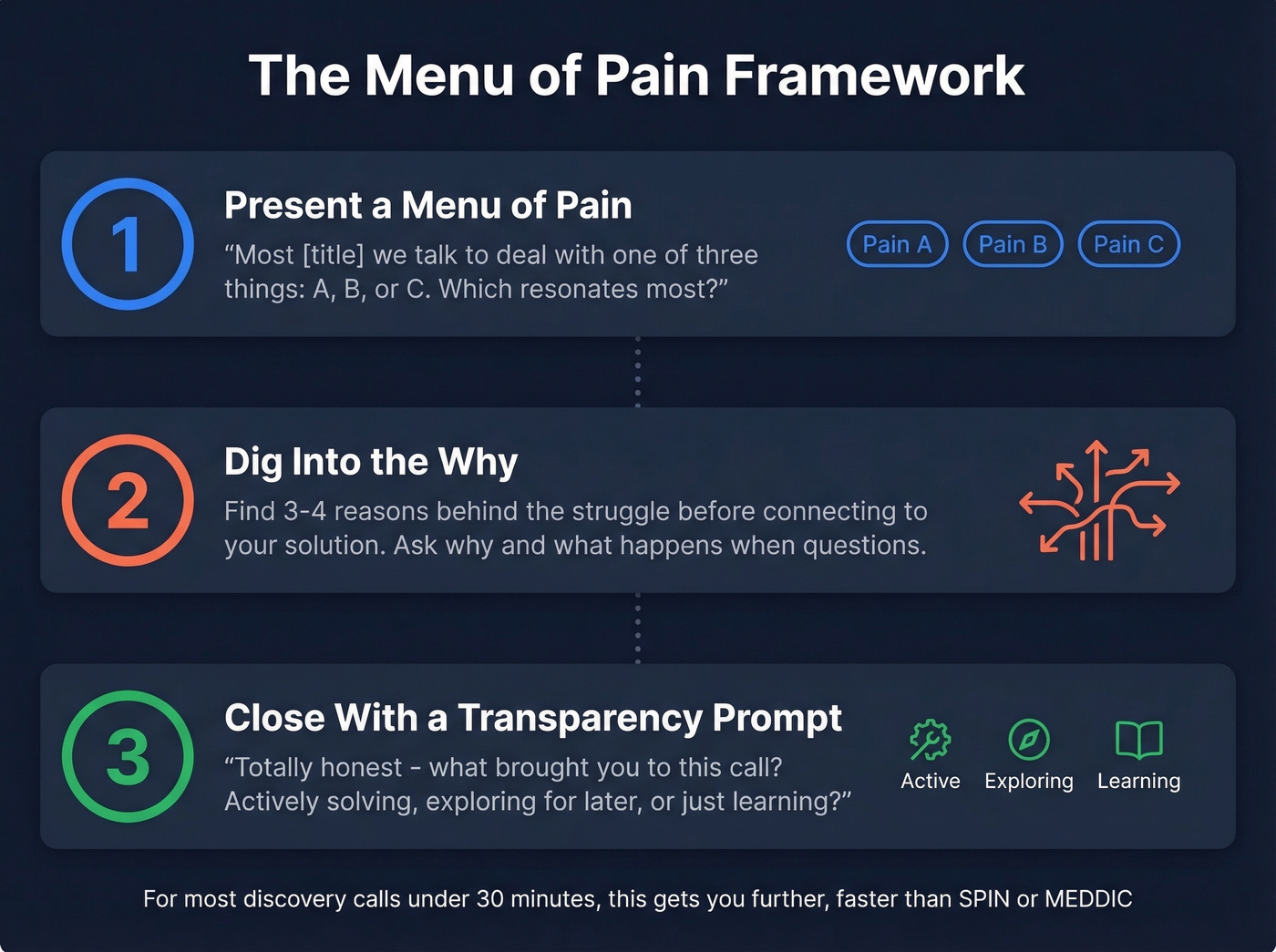
Present a menu of pain. Open with your top three pains you solve for their persona. "Most [title] we talk to are dealing with one of three things: [A], [B], or [C]. Which resonates most?" This speeds up the conversation and builds credibility - you clearly know their world.
Dig into the "why" behind the pain. Don't pitch yet. Find 3-4 reasons behind the struggle before you connect it to your solution. Open-ended "why" and "what happens when" questions do the heavy lifting here. (If you want more prompts, steal a set of discovery questions.)
Close with a transparency prompt. "Totally honest - what brought you to this call? Are you actively solving this now, exploring for later, or just learning?" This qualifies intent without being pushy and sets up a natural next step.
For complex enterprise deals, SPIN Selling and MEDDIC give you more structured question sequences and stakeholder mapping. But for most discovery calls under 30 minutes, the Menu of Pain gets you further, faster.
Why 44 Minutes Is the Limit
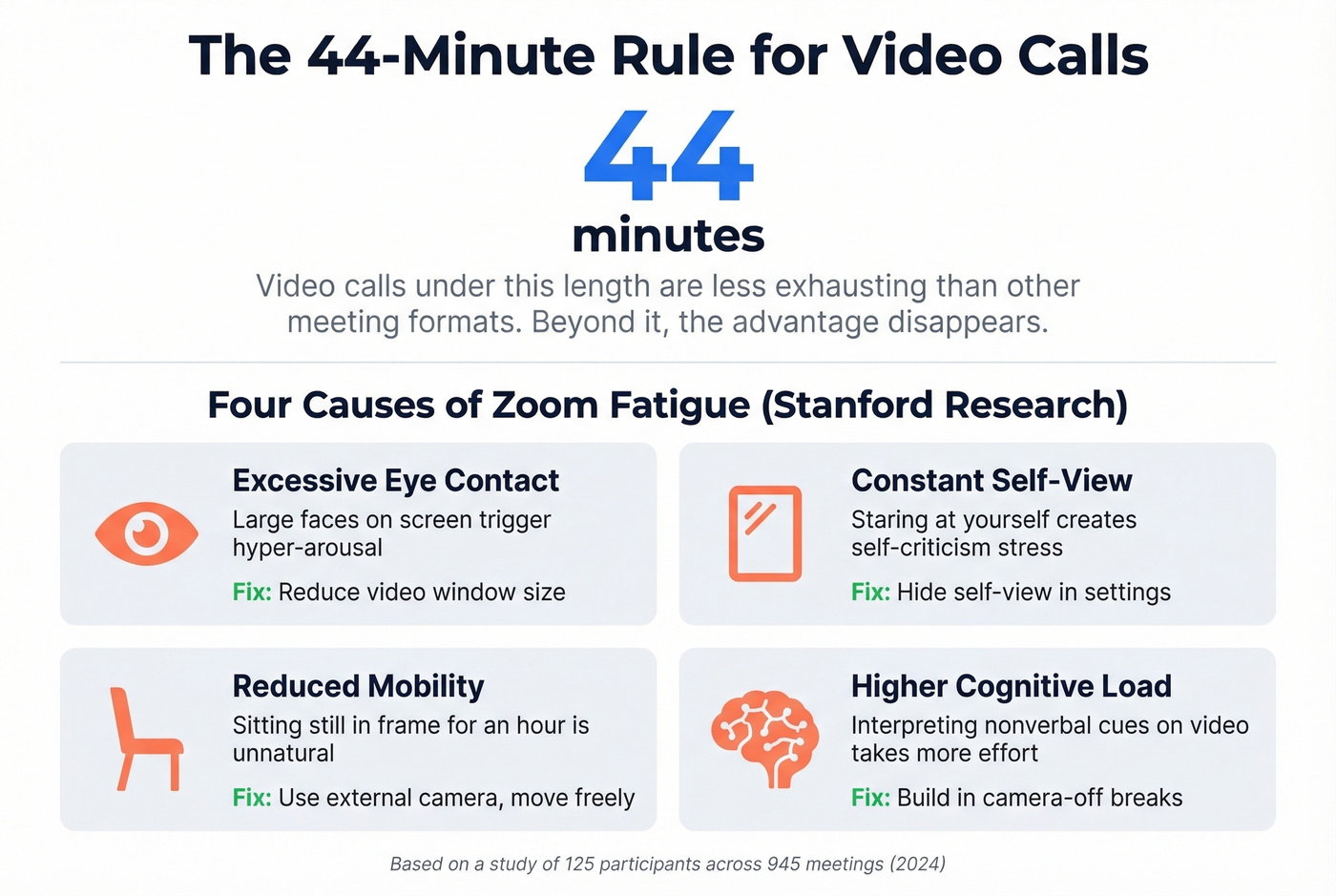
Here's the thing: a 2024 experience-sampling study of 125 participants across 945 meetings found that video meetings under 44 minutes were actually less exhausting than other meeting formats. Beyond that threshold, the advantage disappears.
If your demo takes 60 minutes, your demo is too long. Full stop.
Let's be honest - most sales teams don't have a "Zoom fatigue" problem. They have a "we never learned to run a tight meeting" problem. The 44-minute threshold isn't a ceiling to aim for. It's a warning sign that your content should fit in 30.
Stanford researcher Jeremy Bailenson identified four causes of video-call fatigue that explain why the clock matters so much:
- Excessive close-up eye contact - large faces on screen trigger hyper-arousal. Fix: reduce your video window size. Don't go full-screen.
- Constant self-view - staring at yourself creates self-criticism stress. Fix: hide self-view in your video settings.
- Reduced mobility - sitting still in frame for an hour is unnatural. Fix: use an external camera and keyboard so you can shift and move.
- Higher cognitive load - sending and interpreting nonverbal cues on video takes more mental effort. Fix: build in camera-off breaks for longer sessions.
The call templates above aren't arbitrary - they're timeboxed to keep momentum and avoid dragging into the fatigue zone. Respect the clock and your buyers will respect you.
After the Call: Follow Up Fast
Your meeting went great. The prospect was nodding, asking smart questions, leaning in. Then your follow-up email bounces because the address in your CRM is six months old.
That deal just went cold, and it didn't have to.
Send your recap within 24 hours. Here's the template:
Subject: Recap: [Your Company] + [Their Company] - [Date]
Hi [Name],
Great conversation today. Here's a quick summary:
What we discussed: [2-3 bullet summary of key pain points and priorities]
What we agreed on: [Specific next steps - demo, proposal, intro to another stakeholder]
Next steps with dates:
- [Action item] - [Owner] - [Date]
- [Action item] - [Owner] - [Date]
Let me know if I missed anything. Looking forward to [next step].
Need to loop in the VP who wasn't on the call? Verify their email and direct dial before you reach out - bad data after a good meeting is the most preventable way to lose a deal. If you want more options, keep a few sales follow-up templates ready to go.
You just ran a tight discovery call. Don't let the follow-up bounce. Prospeo's Chrome extension verifies emails and pulls direct dials in real time - 40,000+ sales reps use it to make sure post-meeting outreach actually lands. At $0.01 per email, bad data is no longer an excuse.
Close the gap between a great remote meeting and a follow-up that never arrives.
Virtual Selling Mistakes to Avoid
These are drawn from RAIN Group's research on virtual selling mistakes and what we've seen firsthand. Skip this section if you're already running tight calls - but if you're losing deals you shouldn't be losing, check this list:
- No agenda or plan. Virtual selling has zero tolerance for aimlessness. Wing it and you lose.
- Talking too much. The 70/30 rule (prospect talks 70%) matters even more on video, where monologues feel twice as long.
- Not using video. Video makes it easier to build trust and read cues. If the buyer prefers audio-only, adapt - but always start with cameras on.
- Leaving notifications on. One Slack ping during a pricing discussion and you've lost the room. Do Not Disturb. Always.
- Not reading buyer cues. Crossed arms, looking away, checking their phone - these are visible on video if you're paying attention. Pause and address it directly.
- Letting the buyer run the meeting. You're the guide. If the prospect is steering, you've already lost control of the deal.
- Not using visuals. A wall of text on a shared screen is a nap trigger. Use diagrams, short slides, and whiteboard tools to keep attention. (For a tighter flow, use a product demo checklist.)
FAQ
How long should a virtual sales call be?
Under 44 minutes. Research on 945 meetings found video calls under that threshold are less exhausting than other formats, and the advantage disappears beyond it. Discovery calls: 30 minutes. Demos: 45 max. Closing calls: 30.
Should I require cameras on?
Closing rates are at least 10% higher with cameras on, so yes - request it. Use a polite script explaining mutual benefit rather than mandating it. If they decline, respect it and move on.
What's the best discovery framework for video calls?
The Menu of Pain for speed - present three common pains, let the prospect pick, then dig into the "why." SPIN Selling and MEDDIC work better for complex enterprise deals with six-figure contract values and longer cycles.
What should a sales meeting agenda include?
Meeting goal, attendees, timed agenda items with owners, discussion points, pre-reads if relevant, and action items with deadlines. Send it at least 24 hours in advance so attendees can prep. The Zoom blog's agenda checklist has a solid framework you can adapt.